audio TOYOTA PRIUS PRIME 2022 Owners Manual
[x] Cancel search | Manufacturer: TOYOTA, Model Year: 2022, Model line: PRIUS PRIME, Model: TOYOTA PRIUS PRIME 2022Pages: 808, PDF Size: 14.72 MB
Page 7 of 808
7
1
9 8
7
6 4 3
2
PRIUS PRIME_OM_OM47E74U_(U)
10
5
What to do if... (Troubleshooting) .................... 780
Alphabetical index...................... 784
Index
For vehicles with the navigation system, refer to the “NAVIGATI ON
SYSTEM OWNER’S MANUAL” for information regarding the equip-
ment listed below.
• Navigation system
• Audio system
• Rear view monitor system• Hands-free system (for cellular phone)
For vehicles with the multimedia system, refer to the “MULTIMED IA
OWNER’S MANUAL” for information regarding the equipment listed
below.
• Audio/visual system
• Rear view monitor system• Hands-free system (for cellular phone)
Page 19 of 808
19Pictorial index
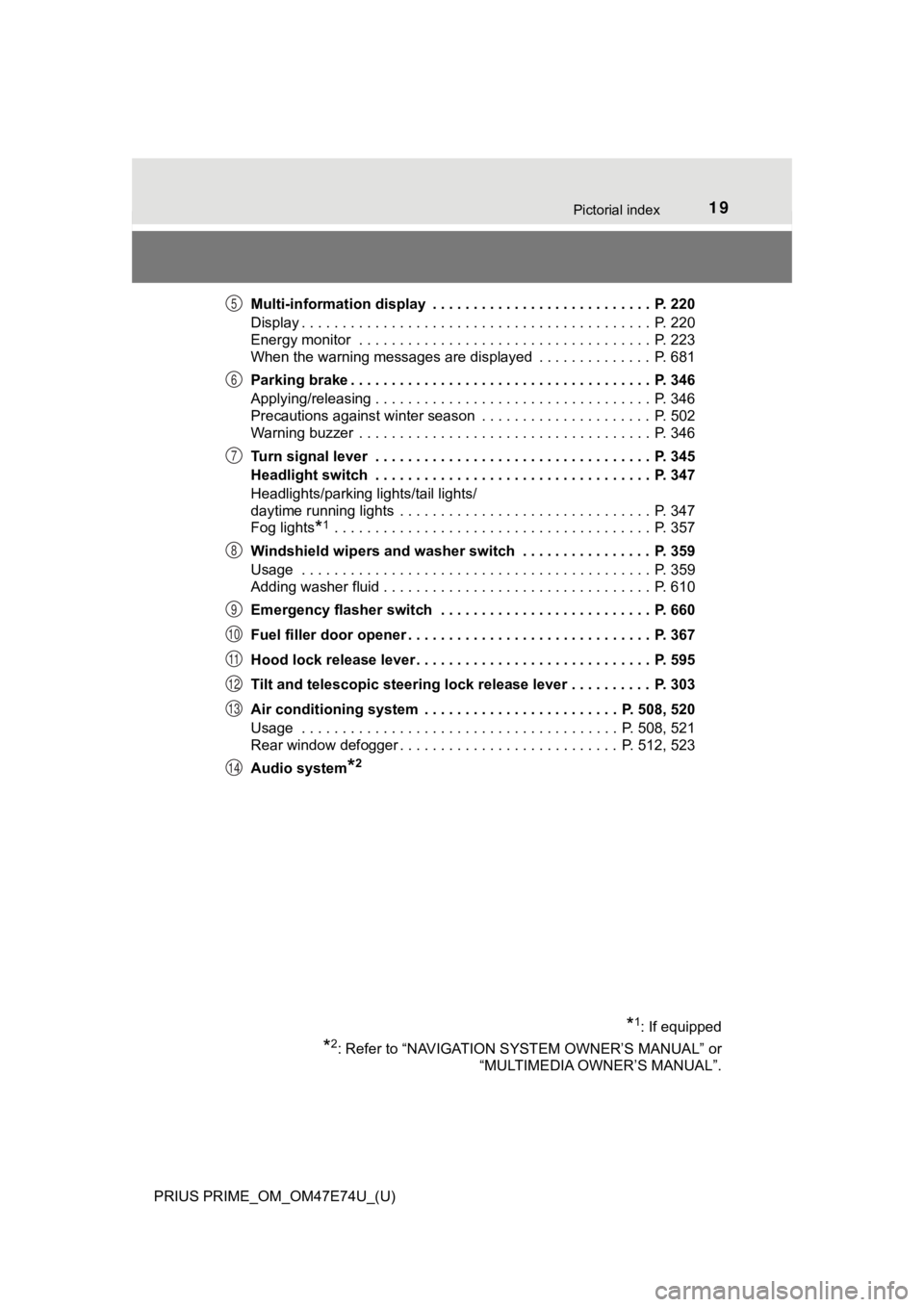
PRIUS PRIME_OM_OM47E74U_(U)Multi-information display . . . . . . . . . . . . . . . . . . . . . . . . . . . P. 220
Display . . . . . . . . . . . . . . . . . . . . . . . . . . . . . . . . . . . . . . . . . . . P. 220
Energy monitor . . . . . . . . . . . . . . . . . . . . . . . . . . . . . . . . . . . . P. 223
When the warning messages are displayed . . . . . . . . . . . . . . P. 681
Parking brake . . . . . . . . . . . . . . . . . . . . . . . . . . . . . . . . . . . . . P. 346
Applying/releasing . . . . . . . . . . . . . . . . . . . . . . . . . . . . . . . . . . P. 346
Precautions against winter season . . . . . . . . . . . . . . . . . . . . . P. 502
Warning buzzer . . . . . . . . . . . . . . . . . . . . . . . .
. . . . . . . . . . . . P. 346
Turn signal lever . . . . . . . . . . . . . . . . . . . . . . . . . . . . . . . . . . P. 345
Headlight switch . . . . . . . . . . . . . . . . . . . . . . . . . . . . . . . . . . P. 347
Headlights/parking lights/tail lights/
daytime running lights . . . . . . . . . . . . . . . . . . . . . . . . . . . . . . . P. 347
Fog lights
*1 . . . . . . . . . . . . . . . . . . . . . . . . . . . . . . . . . . . . . . . P. 357
Windshield wipers and washer switch . . . . . . . . . . . . . . . . P. 359
Usage . . . . . . . . . . . . . . . . . . . . . . . . . . . . . . . . . . . . . . . . . . . P. 359
Adding washer fluid . . . . . . . . . . . . . . . . . . . . . . . . . . . . . . . . . P. 610
Emergency flasher switch . . . . . . . . . . . . . . . . . . . . . . . . . . P. 660
Fuel filler door opener . . . . . . . . . . . . . . . . . . . . . . . . . . . . . . P. 367
Hood lock release lever. . . . . . . . . . . . . . . . . . . . . . . . . . . . . P. 595
Tilt and telescopic steering lock release lever . . . . . . . . . . P. 303
Air conditioning system . . . . . . . . . . . . . . . . . . . . . . . . P. 508, 520
Usage . . . . . . . . . . . . . . . . . . . . . . . . . . . . . . . . . . . . . . . P. 508, 521
Rear window defogger . . . . . . . . . . . . . . . . . . . . . . . . . . . P. 512, 523
Audio system
*2
*1: If equipped
*2: Refer to “NAVIGATION SYSTEM OWNER’S MANUAL” or “MULTIMEDIA OWNER’S MANUAL”.
5
6
7
8
9
10
11
12
13
14
Page 21 of 808
21Pictorial index
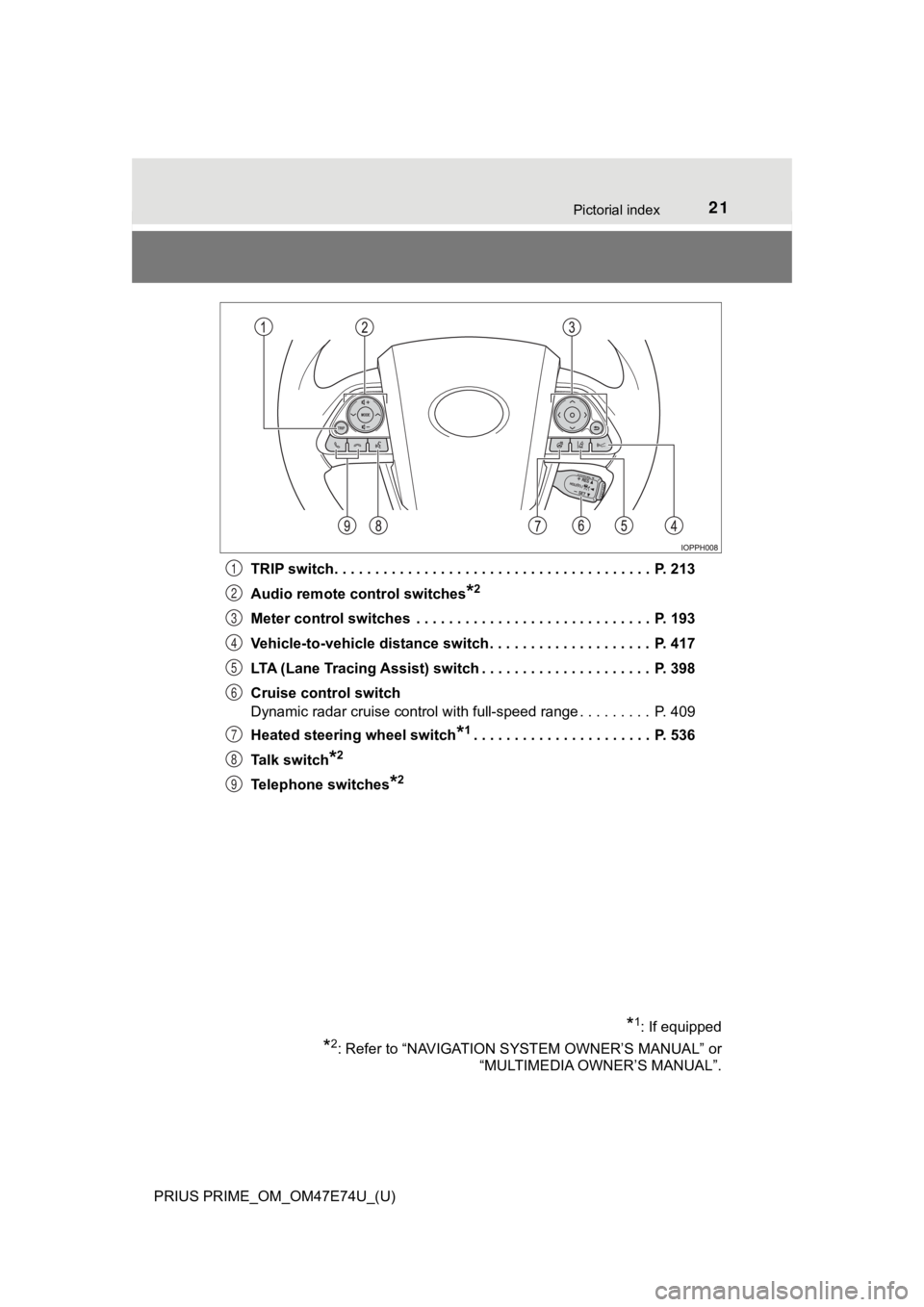
PRIUS PRIME_OM_OM47E74U_(U)TRIP switch. . . . . . . . . . . . . . . . . . . . . . . . . . . . . . . . . . . . . . . P. 213
Audio remote control switches
*2
Meter control switches . . . . . . . . . . . . . . . . . . . . . . . . . . . . . P. 193
Vehicle-to-vehicle distance switch . . . . . . . . . . . . . . . . . . . . P. 417
LTA (Lane Tracing Assist) switch . . . . . . . . . . . . . . . . . . . . . P. 398
Cruise control switch
Dynamic radar cruise control with full-speed range . . . . . . . . . P. 409
Heated steering wheel switch
*1. . . . . . . . . . . . . . . . . . . . . . P. 536
Talk switch
*2
Telephone switches*2
*1: If equipped
*2: Refer to “NAVIGATION SYSTEM OWNER’S MANUAL” or “MULTIMEDIA OWNER’S MANUAL”.
1
2
3
4
5
6
7
8
9
Page 190 of 808
190
PRIUS PRIME_OM_OM47E74U_(U)
2-2. Charging
If “Charging Stopped High Energy Use See Owner’s Manual” is sho wn
Power is being consumed by
electrical components of
vehicle
Check the following items, and then carry
out charging again.
• If the headlights and audio are turned on,
turn them off.
• Turn the power switch off.
If charging cannot be carried out, even after
performing the above, the auxiliary battery
may not be sufficiently charged. Operate
the hybrid system for approximately 15 min-
utes or more to charge the auxiliary battery.
If “Charging System Malfunction See Owner’s Manual” is shown
Malfunction occurred in
charging systemHave the vehicle inspected by your
Toyota dealer.
If “The Traction Battery became low temperature System put priority on
charging to preserve battery condition” is shown (Alaska and Canada
only)
The Hybrid battery (traction
battery) warming control was
operated ( P. 137)
When the hybrid battery (traction battery)
warning control operates, the charging
schedule is not used and charging is per-
formed. This is a control to protect the
hybrid battery (traction battery), and not a
malfunction.
Likely causeCorrection procedure
Page 221 of 808
PRIUS PRIME_OM_OM47E74U_(U)
2213. Instrument cluster
3
Instrument cluster
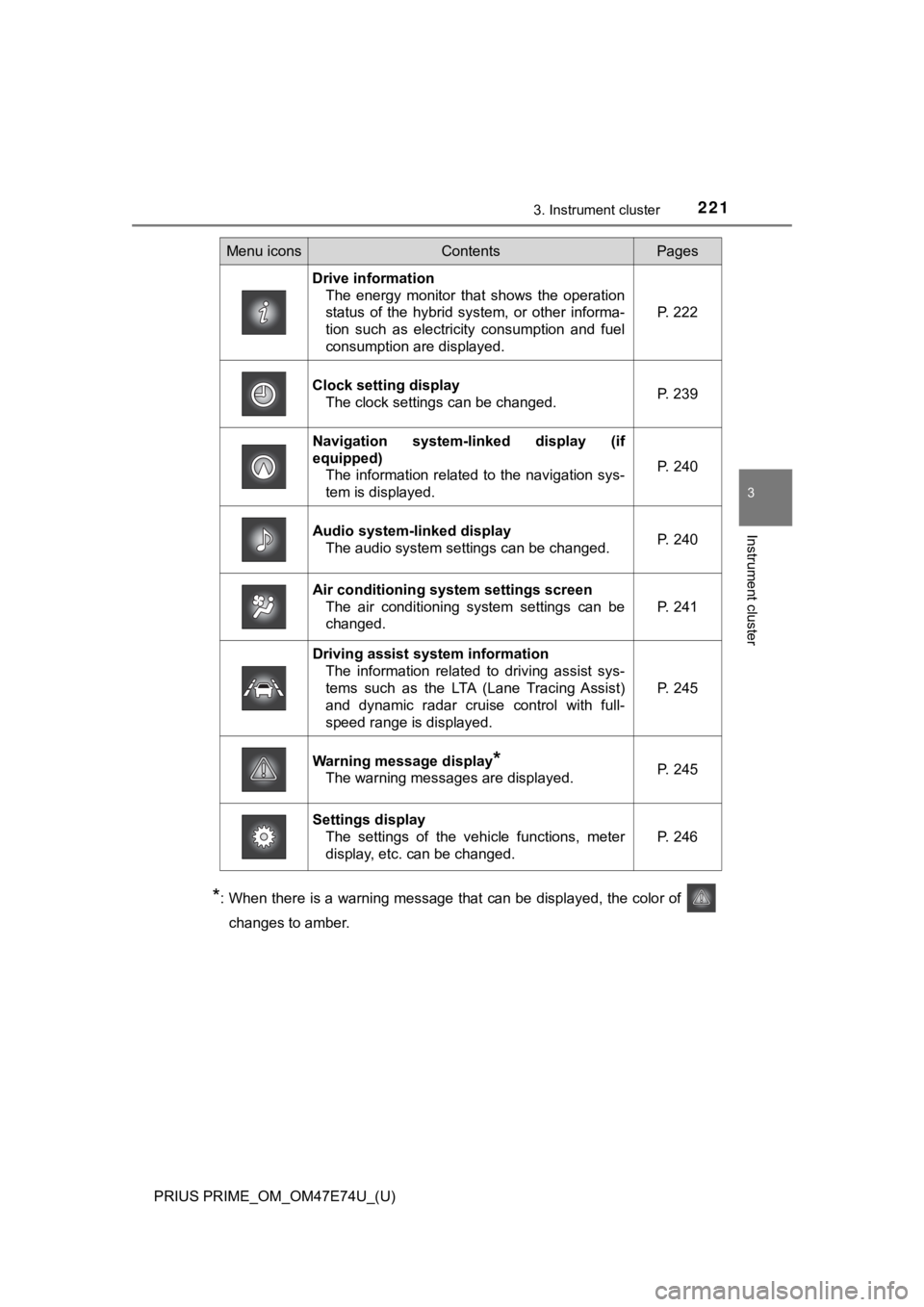
*: When there is a warning message that can be displayed, the color of
changes to amber.
Menu iconsContentsPages
Drive information The energy monitor that shows the operation
status of the hybrid system, or other informa-
tion such as electricity consumption and fuel
consumption are displayed. P. 222
Clock setting display The clock settings can be changed. P. 239
Navigation system-linked display (if
equipped)
The information related to the navigation sys-
tem is displayed.
P. 240
Audio system-linked displayThe audio system settings can be changed.P. 240
Air conditioning system settings screen
The air conditioning system settings can be
changed.
P. 241
Driving assist system informationThe information related to driving assist sys-
tems such as the LTA (Lane Tracing Assist)
and dynamic radar cruise control with full-
speed range is displayed.
P. 245
Warning message display*
The warning messages are displayed.P. 245
Settings display
The settings of the vehicle functions, meter
display, etc. can be changed.
P. 246
Page 240 of 808
240
PRIUS PRIME_OM_OM47E74U_(U)
3. Instrument cluster
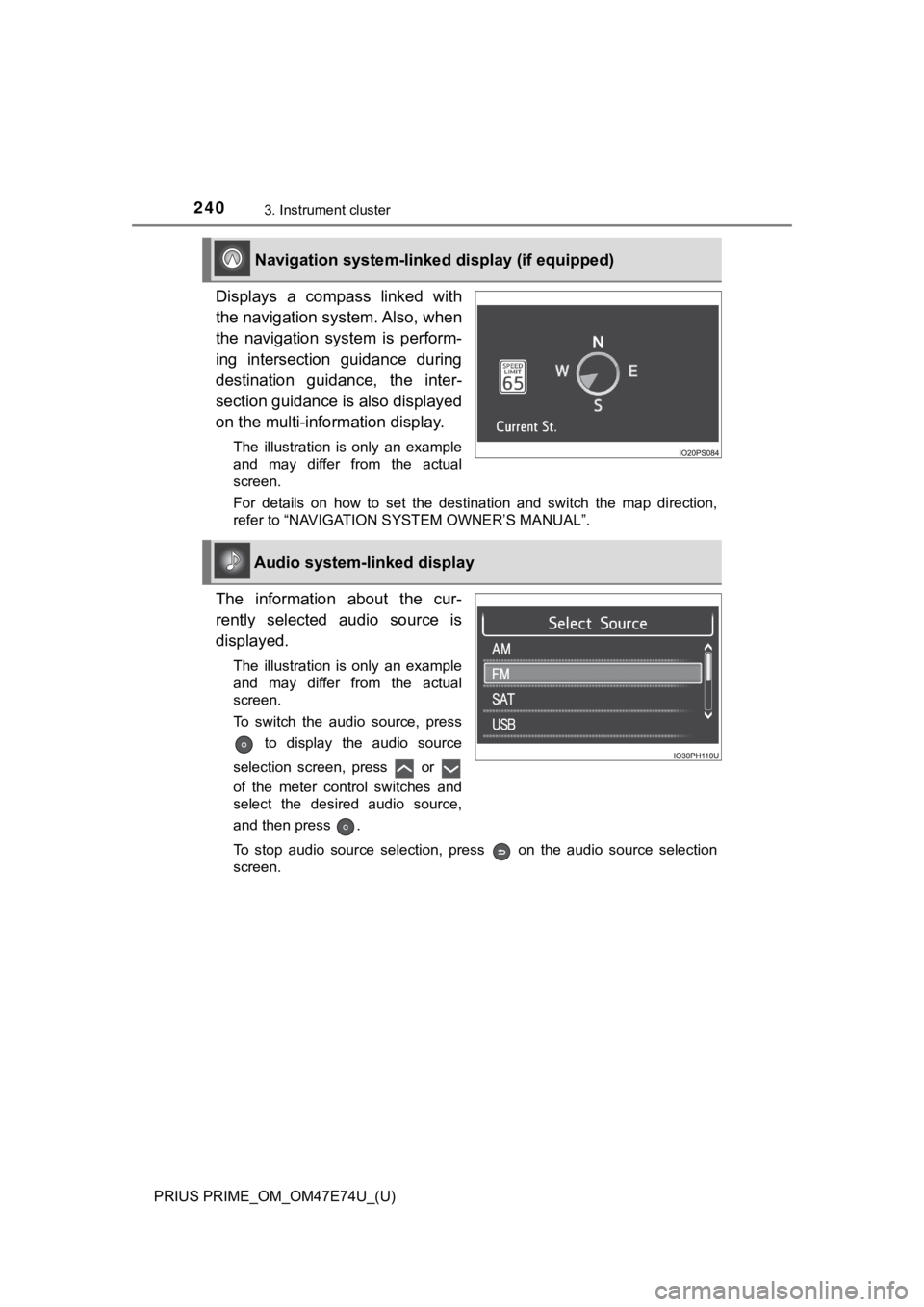
Displays a compass linked with
the navigation system. Also, when
the navigation system is perform-
ing intersection guidance during
destination guidance, the inter-
section guidance is also displayed
on the multi-information display.
The illustration is only an example
and may differ from the actual
screen.
For details on how to set the destination and switch the map di rection,
refer to “NAVIGATION SYSTEM OWNER’S MANUAL”.
The information about the cur-
rently selected audio source is
displayed.
The illustration is only an example
and may differ from the actual
screen.
To switch the audio source, press
to display the audio source
selection screen, press or
of the meter control switches and
select the desired audio source,
and then press .
To stop audio source selection, press on the audio source sele ction
screen.
Navigation system-linked display (if equipped)
Audio system-linked display
Page 278 of 808
278
PRIUS PRIME_OM_OM47E74U_(U)
4-1. Key information
NOTICE
■To prevent key damage
● Do not drop the keys, subject them to strong shocks or bend them.
● Do not expose the keys to high temperatures for long periods of time.
● Do not get the keys wet or wash them in an ultrasonic washer etc.
● Do not attach metallic or magnetic materials to the keys or place the keys
close to such materials.
● Do not disassemble the keys.
● Do not attach a sticker or anything else to the surface of the electronic key.
● Do not place the keys near objects that produce magnetic fields, such as
TVs, audio systems and induction cookers.
● Do not place the keys near medical electrical equipment such as low-fre-
quency therapy equipment or microwave therapy equipment, and do not
receive medical attention with the keys on your person.
■ Carrying the electronic key on your person
Carry the electronic key 3.9 in. (10 cm) or more away from electric appli-
ances that are turned on. Radio waves emitted from electric app liances
within 3.9 in. (10 cm) of the electronic key may interfere with the key, caus-
ing the key to not function properly.
■ In case of a smart key system malfunction or other key-related prob-
lems
Take your vehicle with all the electronic keys provided with your vehicle to
your Toyota dealer.
■ When an electronic key is lost
If the electronic key remains lost, the risk of vehicle theft i ncreases signifi-
cantly. Visit your Toyota dealer immediately with all remaining electronic
keys that were provided with your vehicle.
Page 293 of 808

PRIUS PRIME_OM_OM47E74U_(U)
2934-2. Opening, closing and locking the doors
4
Operation of each component
■Conditions affecting operation
The smart key system, wireless remote control and immobilizer s ystem use
weak radio waves. In the following situations, the communication between
the electronic key and the vehicle may be affected, preventing the smart key
system, wireless remote control and immobilizer system from operating prop-
erly. (Ways of coping: P. 708)
● When the electronic key battery is depleted
● Near a TV tower, electric power plant, gas station, radio stati on, large dis-
play, airport or other facility that generates strong radio wav es or electrical
noise
● When the electronic key is in contact with, or is covered by the following
metallic objects
• Cards to which aluminum foil is attached
• Cigarette boxes that have aluminum foil inside
• Metallic wallets or bags
• Coins
• Hand warmers made of metal
• Media such as CDs and DVDs
● When other wireless key (that emit radio waves) is being used n earby
● When carrying the electronic key together with the following devices that
emit radio waves
• Portable radio, cellular phone, cordless phone or other wirele ss commu-
nication devices
• Another vehicle’s electronic key or a wireless key that emits radio waves
• Personal computers or personal digital assistants (PDAs)
• Digital audio players
• Portable game systems
● If window tint with a metallic content or metallic objects are attached to the
rear window
● When the electronic key is placed near a battery charger or ele ctronic
devices
Page 334 of 808
334
PRIUS PRIME_OM_OM47E74U_(U)
5-2. Driving procedures
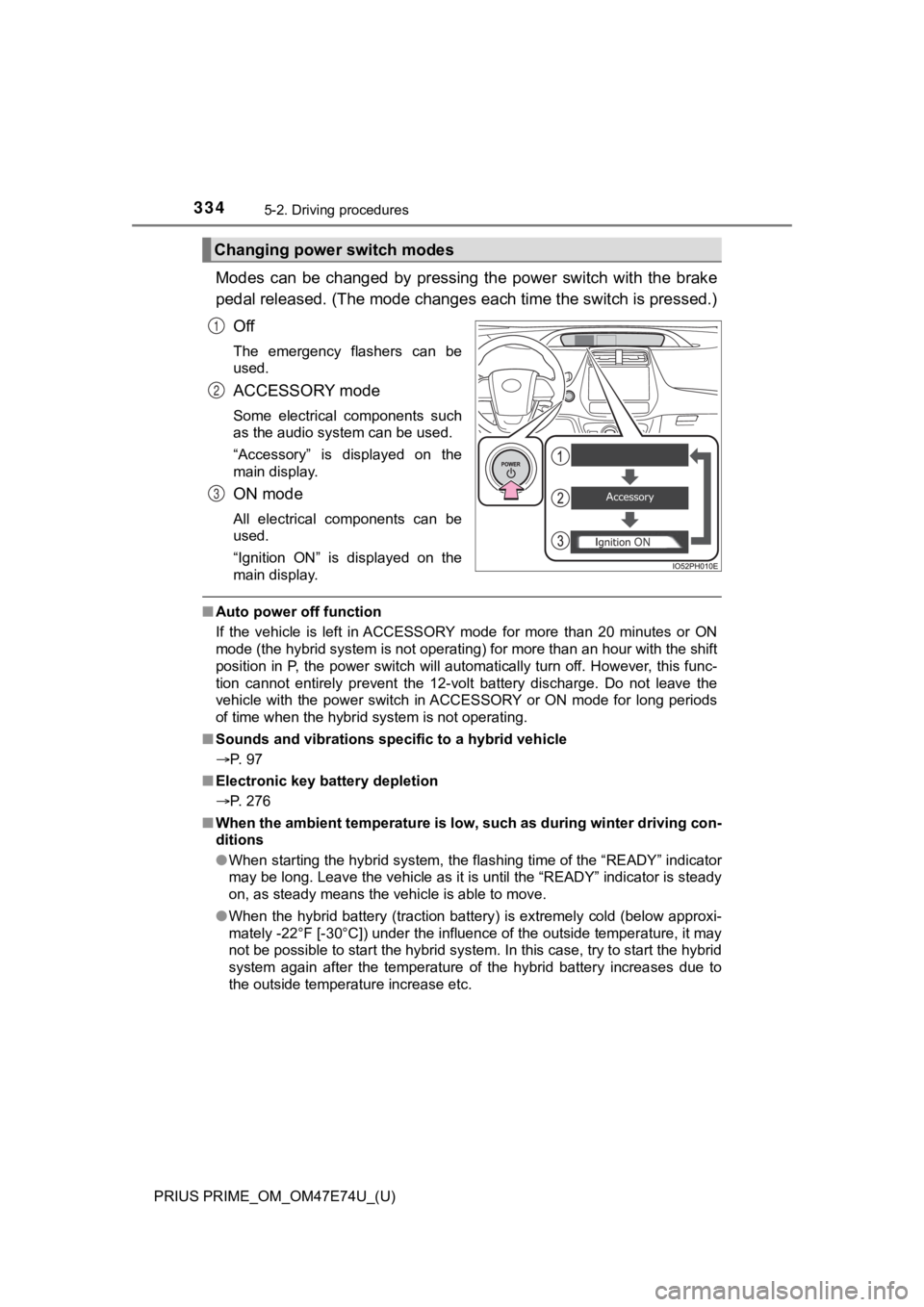
Modes can be changed by pressing the power switch with the brake
pedal released. (The mode changes each time the switch is pressed.)
Off
The emergency flashers can be
used.
ACCESSORY mode
Some electrical components such
as the audio system can be used.
“Accessory” is displayed on the
main display.
ON mode
All electrical components can be
used.
“Ignition ON” is displayed on the
main display.
■ Auto power off function
If the vehicle is left in ACCESSORY mode for more than 20 minut es or ON
mode (the hybrid system is not operating) for more than an hour with the shift
position in P, the power switch will automatically turn off. Ho wever, this func-
tion cannot entirely prevent the 12-volt battery discharge. Do not leave the
vehicle with the power switch in ACCESSORY or ON mode for long periods
of time when the hybrid system is not operating.
■ Sounds and vibrations sp ecific to a hybrid vehicle
P. 97
■ Electronic key battery depletion
P. 276
■ When the ambient temperature is low, such as during winter driv ing con-
ditions
● When starting the hybrid system, the flashing time of the “READY” indicator
may be long. Leave the vehicle as it is until the “READY” indic ator is steady
on, as steady means the vehicle is able to move.
● When the hybrid battery (traction battery) is extremely cold (b elow approxi-
mately -22°F [-30°C]) under the influence of the outside temper ature, it may
not be possible to start the hybrid system. In this case, try t o start the hybrid
system again after the temperature of the hybrid battery increa ses due to
the outside temperature increase etc.
Changing power switch modes
1
2
3
Page 402 of 808

402
PRIUS PRIME_OM_OM47E74U_(U)
5-5. Using the driving support systems
■Temporary cancelation of functions
●When operation conditions are no longer met, a function may be temporarily
canceled. However, when the operation conditions are met again, operation
of the function is automatically restored. ( P. 400)
● If the operation conditions ( P. 401) are no longer met while the lane cen-
tering function is operating, the buzzer may sound to indicate that the func-
tion has been temporarily canceled.
■ Steering assist function/lane centering function
●Depending on the vehicle speed, lane departure situation, road conditions,
etc., the driver may not feel the function is operating or the function may not
operate at all.
● The steering control of the function is overridden by the drive r’s steering
wheel operation.
● Do not attempt to test the operation of the steering assist fun ction.
■ Lane departure alert function
●The warning buzzer may be difficult to hear due to external noi se, audio
playback, etc.
● If the edge of the course
* is not clear or straight, the lane departure alert
function may not operate.
● Do not attempt to test the operation of the lane departure aler t function.
*: Boundary between asphalt and the side of the road, such as gra ss, soil, or
a curb