height TOYOTA PRIUS PRIME 2022 Owners Manual
[x] Cancel search | Manufacturer: TOYOTA, Model Year: 2022, Model line: PRIUS PRIME, Model: TOYOTA PRIUS PRIME 2022Pages: 808, PDF Size: 14.72 MB
Page 31 of 808
311-1. For safe use
PRIUS PRIME_OM_OM47E74U_(U)
1
For safety and security
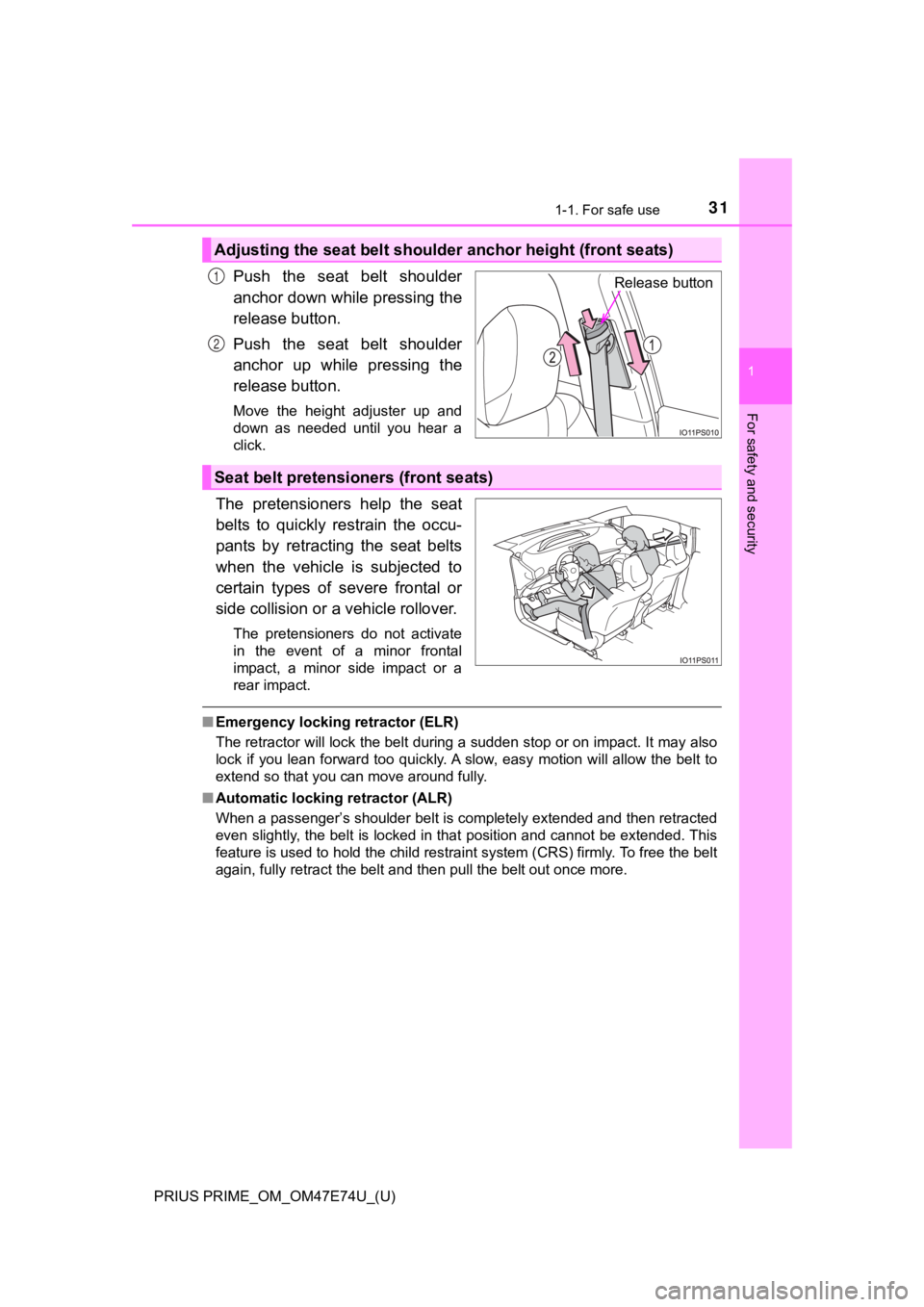
Push the seat belt shoulder
anchor down while pressing the
release button.
Push the seat belt shoulder
anchor up while pressing the
release button.
Move the height adjuster up and
down as needed until you hear a
click.
The pretensioners help the seat
belts to quickly restrain the occu-
pants by retracting the seat belts
when the vehicle is subjected to
certain types of severe frontal or
side collision or a vehicle rollover.
The pretensioners do not activate
in the event of a minor frontal
impact, a minor side impact or a
rear impact.
■Emergency locking retractor (ELR)
The retractor will lock the belt during a sudden stop or on imp act. It may also
lock if you lean forward too quickly. A slow, easy motion will allow the belt to
extend so that you can move around fully.
■ Automatic locking retractor (ALR)
When a passenger’s shoulder belt is completely extended and then retracted
even slightly, the belt is locked in that position and cannot be extended. This
feature is used to hold the child restraint system (CRS) firmly . To free the belt
again, fully retract the belt and then pull the belt out once m ore.
Adjusting the seat belt shoulder anchor height (front seats)
Release button1
2
Seat belt pretensioners (front seats)
Page 248 of 808
248
PRIUS PRIME_OM_OM47E74U_(U)
3. Instrument cluster
*: If equipped
■
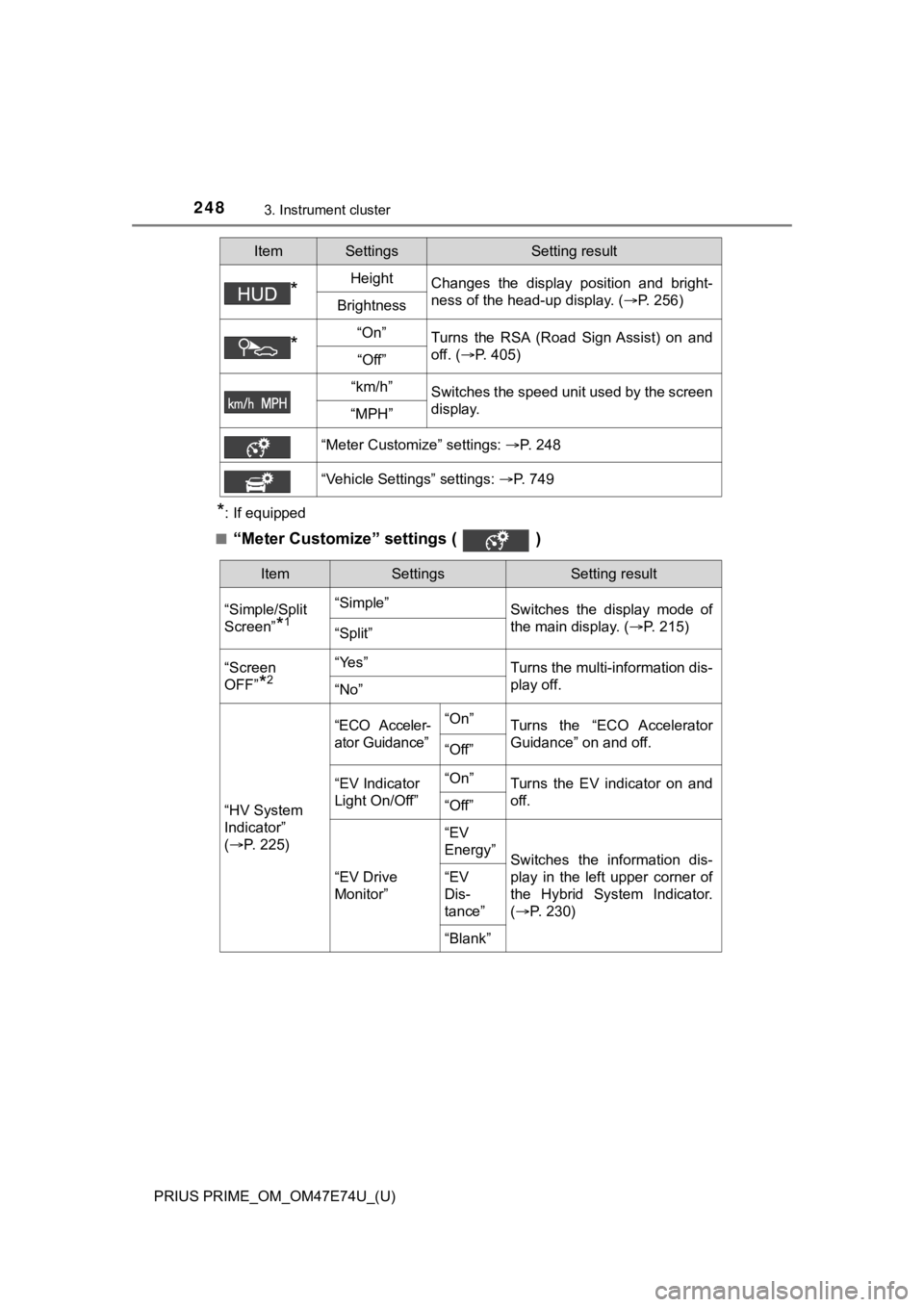
“Meter Customize” settings ( )
*HeightChanges the display position and bright-
ness of the head-up display. ( P. 256)
Brightness
*“On”Turns the RSA (Road Sign Assist) on and
off. (P. 405)
“Off”
“km/h”Switches the speed unit used by the screen
display.
“MPH”
“Meter Customize” settings: P. 248
“Vehicle Settings” settings: P. 749
ItemSettingsSetting result
ItemSettingsSetting result
“Simple/Split
Screen”
*1
“Simple” Switches the display mode of
the main display. (P. 215)
“Split”
“Screen
OFF”
*2
“Yes”Turns the multi-information dis-
play off.
“No”
“HV System
Indicator”
( P. 2 2 5 )
“ECO Acceler-
ator Guidance”“On”Turns the “ECO Accelerator
Guidance” on and off.
“Off”
“EV Indicator
Light On/Off” “On”Turns the EV indicator on and
off.
“Off”
“EV Drive
Monitor”“EV
Energy”
Switches the information dis-
play in the left upper corner of
the Hybrid System Indicator.
(
P. 2 3 0 )
“EV
Dis-
tance”
“Blank”
Page 296 of 808
296
PRIUS PRIME_OM_OM47E74U_(U)
4-3. Adjusting the seats
Front seats
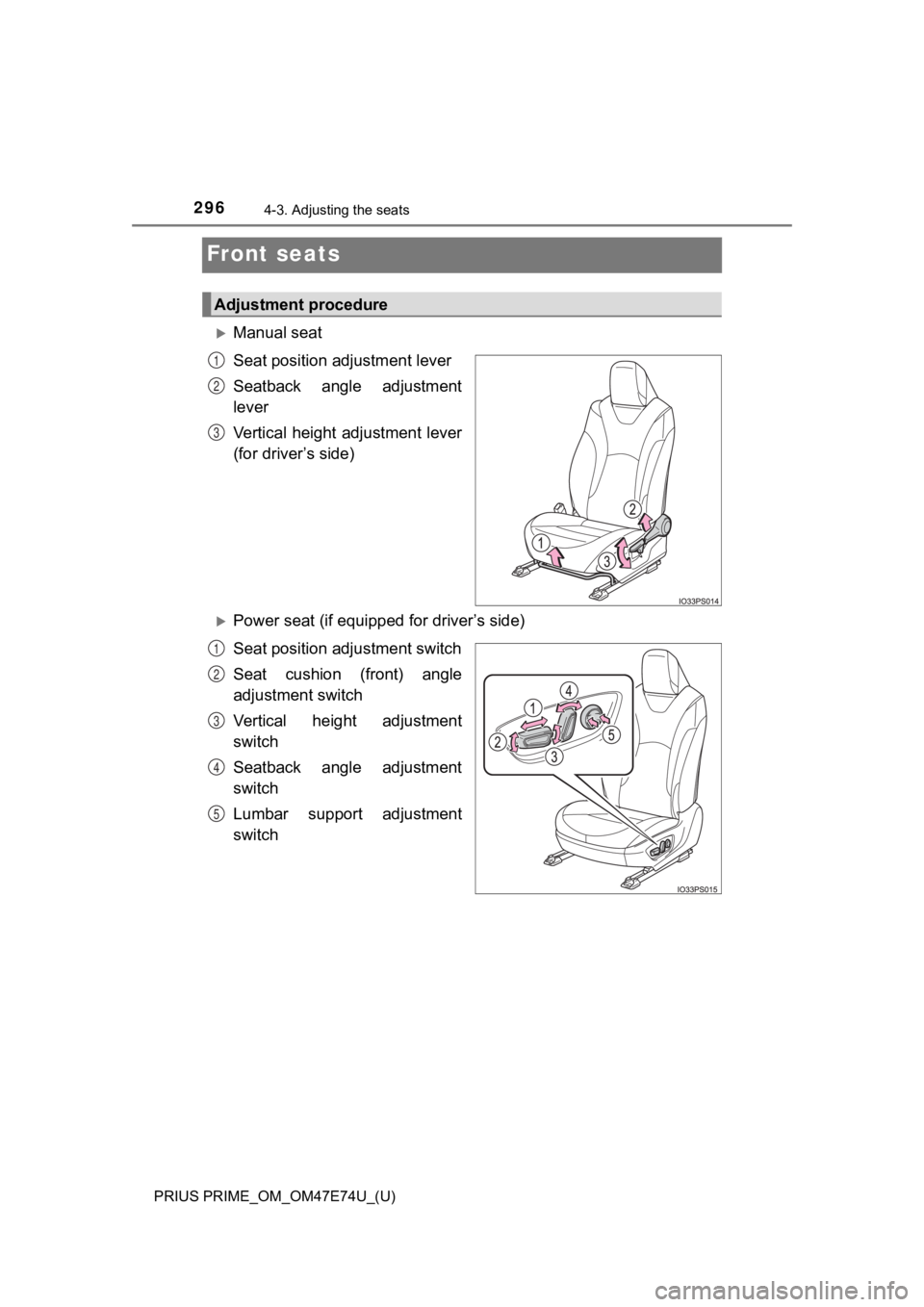
Manual seat
Seat position adjustment lever
Seatback angle adjustment
lever
Vertical height adjustment lever
(for driver’s side)
Power seat (if equipped for driver’s side)
Seat position ad justment switch
Seat cushion (front) angle
adjustment switch
Vertical height adjustment
switch
Seatback angle adjustment
switch
Lumbar support adjustment
switch
Adjustment procedure
1
2
3
1
2
3
4
5
Page 302 of 808
302
PRIUS PRIME_OM_OM47E74U_(U)
4-3. Adjusting the seats
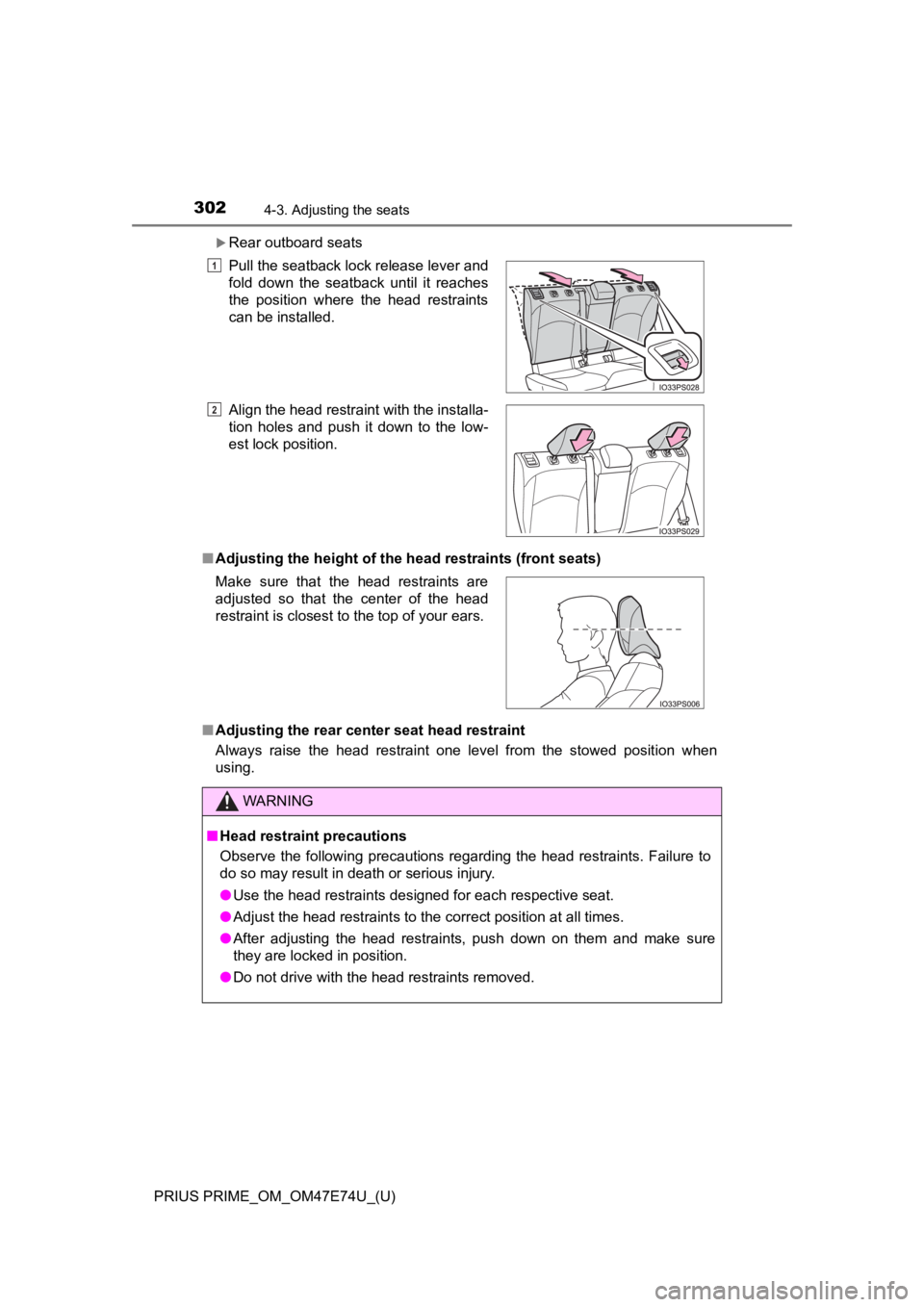
Rear outboard seats
■ Adjusting the height of the head restraints (front seats)
■ Adjusting the rear center seat head restraint
Always raise the head restraint one level from the stowed position when
using.Pull the seatback lock release lever and
fold down the seatback until it reaches
the position where the head restraints
can be installed.
Align the head restraint with the installa-
tion holes and push it down to the low-
est lock position.
Make sure that the head restraints are
adjusted so that the center of the head
restraint is closest to the top of your ears.
WARNING
■ Head restraint precautions
Observe the following precautions regarding the head restraints. Failure to
do so may result in death or serious injury.
● Use the head restraints designed for each respective seat.
● Adjust the head restraints to the correct position at all times.
● After adjusting the head restraints, push down on them and make sure
they are locked in position.
● Do not drive with the head restraints removed.
1
2
Page 305 of 808
3054-4. Adjusting the steering wheel and mirrors
PRIUS PRIME_OM_OM47E74U_(U)
4
Operation of each component
Inside rear view mirror
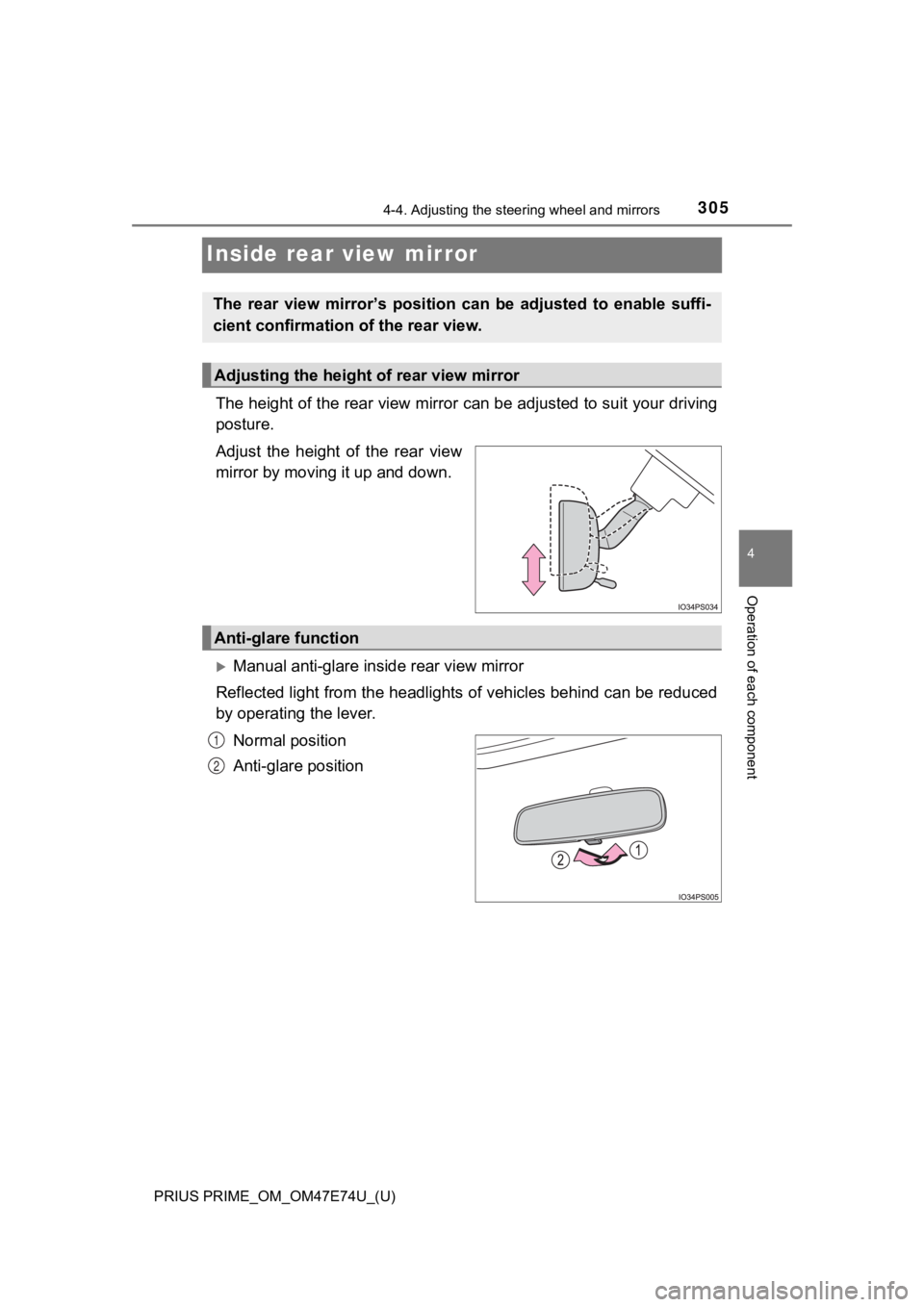
The height of the rear view mirror can be adjusted to suit your driving
posture.
Adjust the height of the rear view
mirror by moving it up and down.
Manual anti-glare inside rear view mirror
Reflected light from the headlights of vehicles behind can be r educed
by operating the lever.
Normal position
Anti-glare position
The rear view mirror’s position ca n be adjusted to enable suffi-
cient confirmation of the rear view.
Adjusting the height of rear view mirror
Anti-glare function
1
2
Page 388 of 808
388
PRIUS PRIME_OM_OM47E74U_(U)
5-5. Using the driving support systems
• If a vehicle ahead is narrow, such as a personal mobility vehi cle
• If a preceding vehicle has a small rear end, such as an unload ed truck
• If a vehicle ahead is carrying a load which protrudes past its rear bumper
• If a vehicle ahead is irregularly shaped, such as a tractor or side car
• If a vehicle ahead is a child sized bicycle, a bicycle that is carrying a large
load, a bicycle ridden by more than one person, or a uniquely shaped
bicycle (bicycle with a child seat, tandem bicycle, etc.)
• If a pedestrian/or the riding height of a bicyclist ahead is s horter than
approximately 3.2 ft. (1 m) or taller than approximately 6.5 ft. (2 m)
• If a pedestrian/bicyclist is wearing oversized clothing (a rai n coat, long
skirt, etc.), making their silhouette obscure
• If a pedestrian is bending forward or squatting or bicyclist i s bending for-
ward
• If a pedestrian/bicyclist is moving fast
• If a pedestrian is pushing a stroller, wheelchair, bicycle or other vehicle
• When driving in inclement weather such as heavy rain, fog, snow or a
sandstorm
• When driving through steam or smoke
• When the surrounding area is dim, such as at dawn or dusk, or while at
night or in a tunnel, making a detectable object appear to be n early the
same color as its surroundings
• When driving in a place where the surrounding brightness changes sud-
denly, such as at the entrance or exit of a tunnel
• After the hybrid system has started the vehicle has not been d riven for a
certain amount of time
• While making a left/right turn and for a few seconds after mak ing a left/
right turn
• While driving on a curve and for a few seconds after driving o n a curve
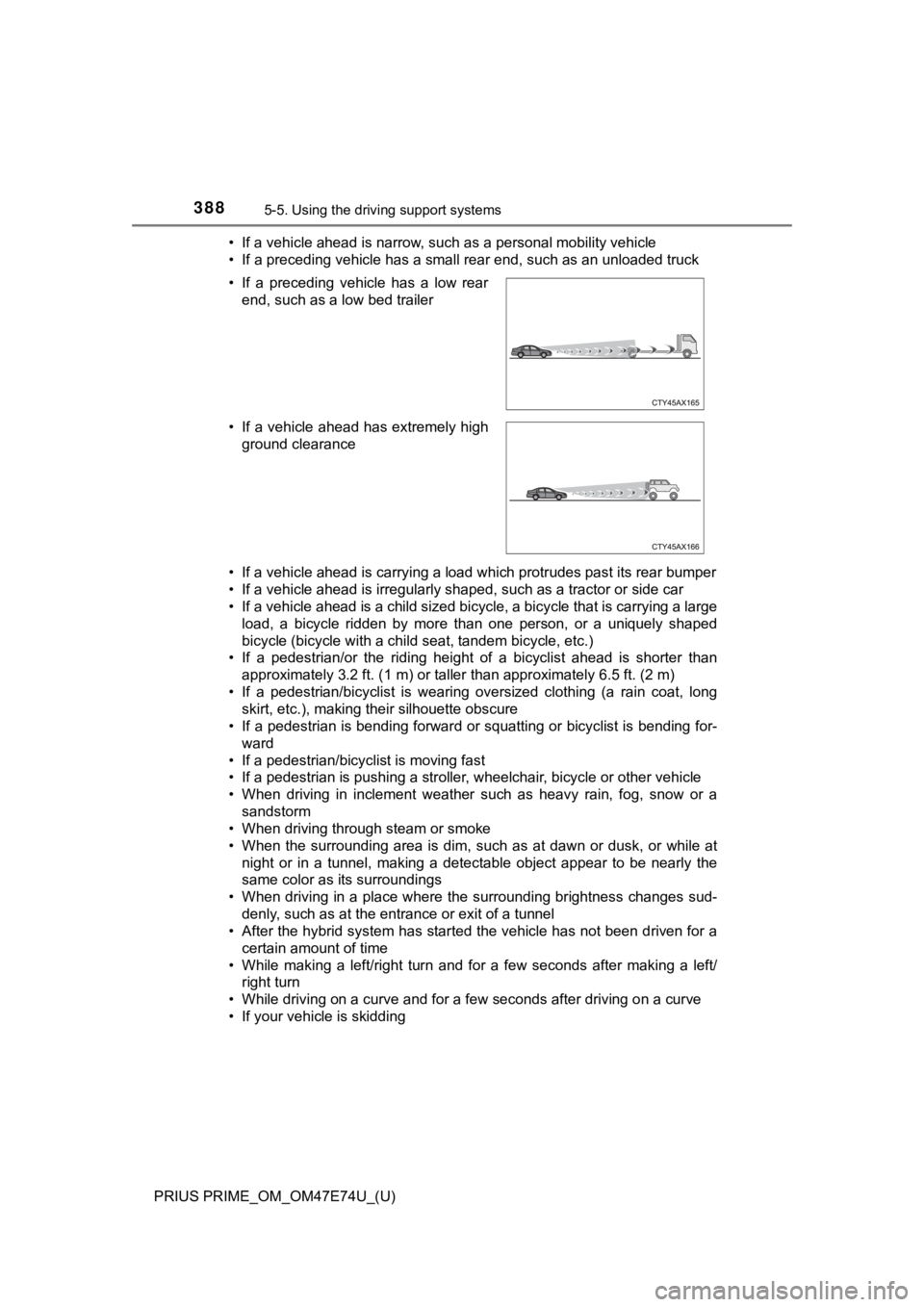
• If your vehicle is skidding • If a preceding vehicle has a low rear end, such as a low bed trailer
• If a vehicle ahead has extremely high ground clearance
Page 434 of 808

434
PRIUS PRIME_OM_OM47E74U_(U)
5-5. Using the driving support systems
■Conditions under which the system may not function correctly
●The Blind Spot Monitor function may not detect vehicles correct ly in the fol-
lowing situations:
• When the sensor is misaligned due to a strong impact to the se nsor or its
surrounding area
• When mud, snow, ice, a sticker, etc. is covering the sensor or surround-
ing area on the rear bumper
• When driving on a road surface that is wet with standing water during bad
weather, such as heavy rain, snow, or fog
• When multiple vehicles are approaching with only a small gap b etween
each vehicle
• When the distance between your vehicle and a following vehicle is short
• When there is a significant difference in speed between your v ehicle and
the vehicle that enters the detection area
• When the difference in speed between your vehicle and another vehicle
is changing
• When a vehicle enters a detection area traveling at about the same
speed as your vehicle
• As your vehicle starts from a stop, a vehicle remains in the d etection area
• When driving up and down consecutive steep inclines, such as hills, dips in the road, etc.
• When driving on roads with sharp bends, consecutive curves, or uneven
surfaces
• When vehicle lanes are wide, or when driving on the edge of a lane, and
the vehicle in an adjacent lane is far away from your vehicle
• When a bicycle carrier or other accessory is installed to the rear of the
vehicle
• When there is a significant difference in height between your vehicle and
the vehicle that enters the detection area
• Immediately after the Blind Spot Monitor function is turned on
● Instances of the Blind Spot Monitor function unnecessarily dete cting a vehi-
cle and/or object may increase in the following situations:
• When the sensor is misaligned due to a strong impact to the se nsor or its
surrounding area
• When the distance between your vehicle and a guardrail, wall, etc. that
enters the detection area is short
• When driving up and down consecutive steep inclines, such as h ills, dips
in the road, etc.
• When vehicle lanes are narrow, or when driving on the edge of a lane,
and a vehicle traveling in a lane other than the adjacent lanes enters the
detection area
• When driving on roads with sharp bends, consecutive curves, or uneven
surfaces
• When the tires are slipping or spinning
• When the distance between your vehicle and a following vehicle is short
• When a bicycle carrier or other accessory is installed to the rear of the vehicle
Page 438 of 808
438
PRIUS PRIME_OM_OM47E74U_(U)
5-5. Using the driving support systems
●When towing a trailer
● When there is a significant difference in height between your vehicle and the
vehicle that enters the detection area
● When a sensor or the area around a sensor is extremely hot or c old
● If the suspension has been modified or tires of a size other th an specified
are installed
● If the front of the vehicle is raised or lowered due to the car ried load
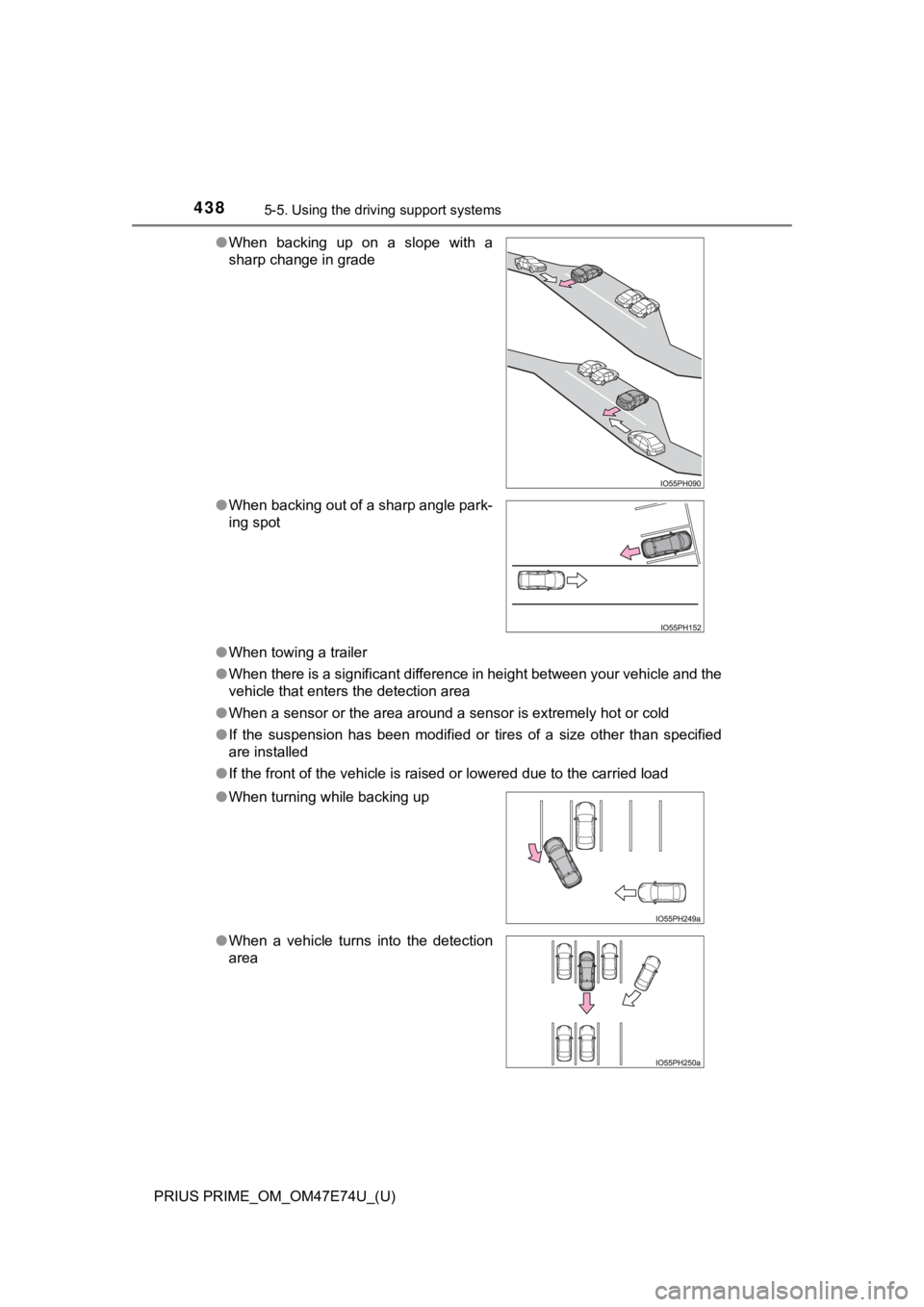
●
When backing up on a slope with a
sharp change in grade
● When backing out of a sharp angle park-
ing spot
● When turning while backing up
● When a vehicle turns into the detection
area
Page 460 of 808

460
PRIUS PRIME_OM_OM47E74U_(U)
5-5. Using the driving support systems
WARNING
■When to disable the Parking Support Brake
In the following situations, disable the Parking Support Brake as the system
may operate even though there is no possibility of a collision.
● When inspecting the vehicle using a chassis roller, chassis dynamo or free
roller
● When loading the vehicle onto a boat, truck or other transport vessel
● If the suspension has been modified or tires of a size other than specified
are installed
● If the front of the vehicle is raised or lowered due to the carried load
● When equipment that may obstruct a sensor is installed, such as a towing
eyelet, bumper protector (an additional trim strip, etc.), bicycle carrier, or
snow plow
● When using automatic car washing devices
● If the vehicle cannot be driven in a stable manner, such as when the vehi-
cle has been in an accident or is malfunctioning
● When the vehicle is driven in a sporty manner or off-road
● When the tires are not properly inflated
● When the tires are very worn
● When tire chains, compact spare tire or an emergency tire puncture repair
kit are used
■ To ensure the system can operate properly
P. 450
■ Handling the suspension
Do not modify the suspension, as changes to the height or incli ne of the
vehicle may prevent the sensors from correctly detecting obstac les, may
cause the system not operate, or may cause the system to operat e unnec-
essarily.
■ If the Parking Support Brake function (static objects) operates unnec-
essarily, such as at a railroad crossing
P. 458
■ Notes when washing the vehicle
P. 451
Page 628 of 808
628
PRIUS PRIME_OM_OM47E74U_(U)
7-3. Do-it-yourself maintenance
WARNING
■Using the tire jack
Observe the following precautions.
Improper use of the tire jack may cause the vehicle to suddenly fall off
the jack, leading to death or serious injury.
●Only use the tire jack that comes with this vehicle for replacing a tire.
Do not use it on other vehicles, and do not use other tire jacks for
replacing tires on this vehicle.
●Do not raise the vehicle w hile someone is inside.
●Do not use the tire jack for any purpose other than replacing t ires or
installing and removing tire chains.
●Do not put any part of your body under the vehicle while it is supported
by the jack.
●Do not start the hybrid system or drive the vehicle while the v ehicle is
supported by the jack.
●When raising the vehicle, do not put an object on or under the jack.
●Do not raise the vehicle to a height greater than that required to
replace the tire.
●Use a jack stand if it is necessary to get under the vehicle.
●When lowering the vehicle, make sure that there is no-one near the
vehicle. If there are people nearby, warn them vocally before l owering.
■When removing the jack from the storage location
The jack may be hot due to heat from the charging equipment dur ing or
after charging. Please use gloves when handling the jack. If it is touched
with bare hands, it may result in burns.
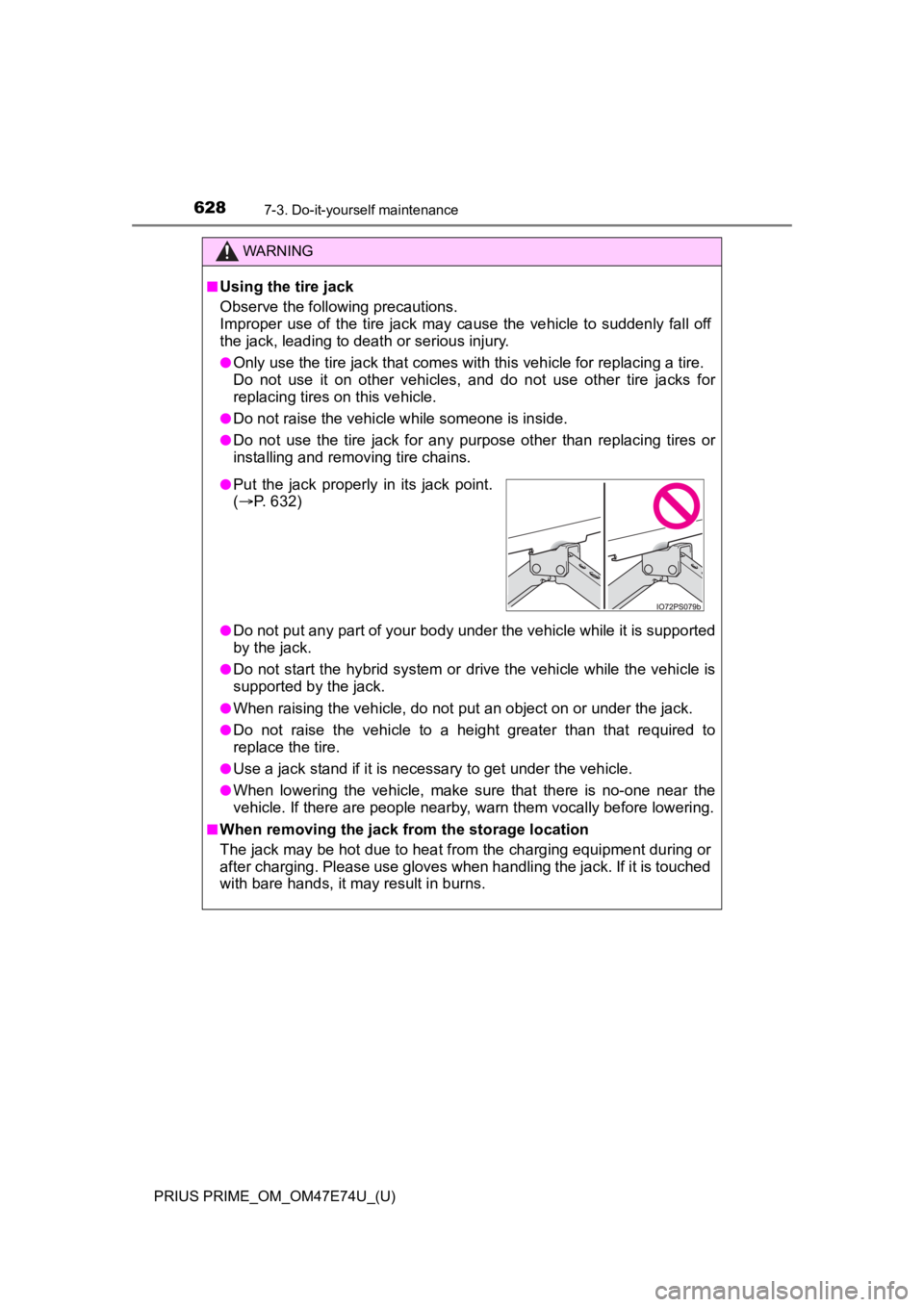
●Put the jack properl y in its jack point.
( P. 632)