lock TOYOTA PRIUS PRIME 2023 Owner's Manual
[x] Cancel search | Manufacturer: TOYOTA, Model Year: 2023, Model line: PRIUS PRIME, Model: TOYOTA PRIUS PRIME 2023Pages: 680, PDF Size: 14.97 MB
Page 97 of 680
972-2. Charging
2
Plug-in hybrid system
AC charging cable
The function, correct oper-
ating procedure, etc. of the
AC charging cable are
explained.
WARNING
■When using the AC charging
cable and CCID (Charging
Circuit Interrupting Device)
Observe the following precau-
tions.
Failure to do so may cause an
unexpected accident, resulting in
death or serious injury.
●Do not attempt to disassemble
or repair the AC charging cable,
charging connector, plug or
CCID (Charging Circuit Inter-
rupting Device).
If a problem arises with the AC
charging cable or the CCID
(Charging Circuit Interrupting
Device), stop charging immedi-
ately and contact your Toyota
dealer.
●Do not subject the AC charging
cable, charging connector, plug
or CCID (Charging Circuit Inter-
rupting Device) to strong force
or impact.
●Do not apply excessive force to
the AC charging cable by force-
fully folding, twisting, pulling or
dragging the AC charging cable.
●Do not damage the AC charging
cable with sharp objects.
●Do not fold the charging con-
nector or plug or insert foreign
objects into them.
●Do not put the charging connec-
tor and plug into water.
●Do not bring the AC charging
cable to a high-temperature
item such as a heating device.
●Do not apply a load to the AC
charging cable and plug-cord
(such as wrapping the AC
charging cable around the CCID
(Charging Circuit Interrupting
Device) and the charging con-
nector).
●Do not use or leave the AC
charging cable in situations
where a load is applied to the
outlet and the plug (such as
when the CCID (Charging Cir-
cuit Interrupting Device) is
hanging in the air without con-
tacting the ground).
NOTICE
■Precautions when handling
AC charging cable
Make sure to observe the follow-
ing precautions. Failure to
observe these precautions may
result in damage to the AC
charging cable and AC charging
inlet.
●Insert the charging connector
straight into the AC charging
inlet.
●After inserting the charging con-
nector, do not apply excessive
force to or twis t the connector.
Also, do not lean on the connec-
tor or hang any objects from it.
●Do not step on or trip over the
AC charging cable.
●Before removing the charging
connector, make sure that it is
unlocked. ( P.102)
●After removing the AC charging
cable, promptly return it to its
proper location.
Page 102 of 680
1022-2. Charging
■Locking the charging con-
nector
The charging connector will be
automatically locked when
inserting it into the AC charging
inlet.
(The setting can be changed:
P.103)
■Unlocking the charging
connector
The AC charging connector will
be unlocked when the doors are
unlocked using the smart key
system or wireless remote con-
trol.
The AC charging connector
locks when connected and
unlocks when the door is
unlocked, so locking/unlocking
the AC charging connector does
not necessarily correspond to
locking/unlocking the door.
WARNING
●The plug is not dirtied by dust
etc.
Remove the plug from the outlet
before inspecting it. If any abnor-
malities are found in the AC
charging cable as a result of the
inspection, immediately stop use
and consult your Toyota dealer.
■Maintaining the AC charging
cable
When the AC charging cable is
dirty, first remove the dirt with a
hard, wringed cloth, and then
wipe the cable with a dry cloth.
However, never wash it with
water. If the AC charging cable is
washed with water, fire or electric
shock may occur during charging,
possibly resulting in death or seri-
ous injury.
■When not using the AC
charging cable for a long time
Remove the plug from the outlet.
Dust could accumulate on the
plug or in the outlet, possibly
causing overheating which could
lead to a fire.
Also, keep the cable in a place
free from moisture.
Locking an d unlock-
ing AC char ging con-
nector
The AC charging connector
will be locked when it is
connected to the AC
charging inlet, preventing
the AC charging cable from
being disconnected while
charging.
Locking and unlocking
the AC charging connec-
tor
Page 103 of 680
1032-2. Charging
2
Plug-in hybrid system
If the door is unlocked and the
AC charging connector is
locked, you can unlock it by
doing the following:
When using the smart key
system, lock the door once
and then unlock it again.
( P.185)
When using the wireless
remote control, press the
unlock button to unlock the
door. ( P.185)
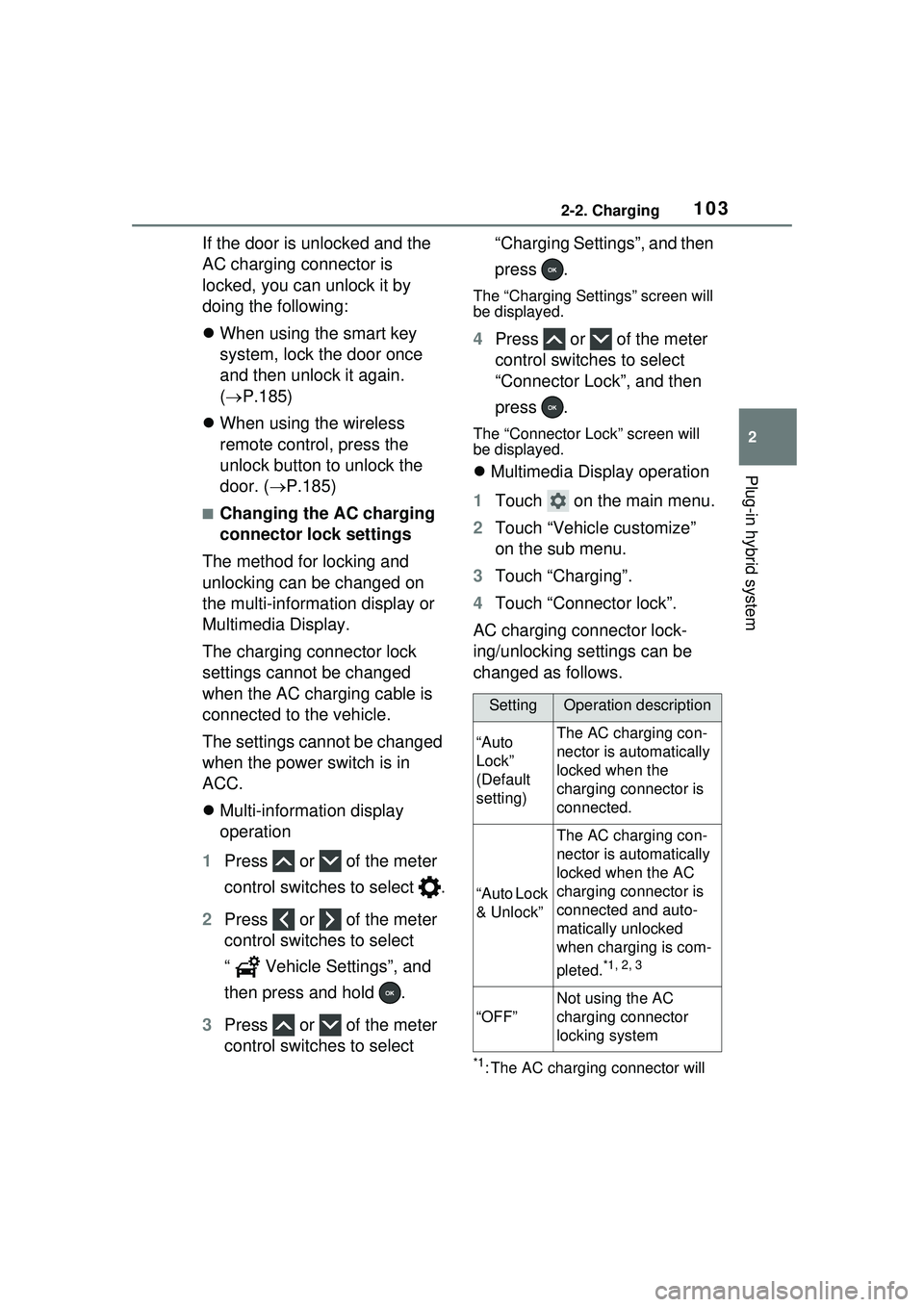
■Changing the AC charging
connector lock settings
The method for locking and
unlocking can be changed on
the multi-information display or
Multimedia Display.
The charging connector lock
settings cannot be changed
when the AC charging cable is
connected to the vehicle.
The settings cannot be changed
when the power switch is in
ACC.
Multi-information display
operation
1 Press or of the meter
control switches to select .
2 Press or of the meter
control switches to select
“ Vehicle Settings”, and
then press and hold .
3 Press or of the meter
control switches to select “Charging Settings”, and then
press .
The “Charging Settings” screen will
be displayed.
4
Press or of the meter
control switches to select
“Connector Lock”, and then
press .
The “Connector Lock” screen will
be displayed.
Multimedia Display operation
1 Touch on the main menu.
2 Touch “Vehicle customize”
on the sub menu.
3 Touch “Charging”.
4 Touch “Connector lock”.
AC charging connector lock-
ing/unlocking settings can be
changed as follows.
*1: The AC charging connector will
SettingOperation description
“Auto
Lock”
(Default
setting)The AC charging con-
nector is automatically
locked when the
charging connector is
connected.
“Auto Lock
& Unlock”
The AC charging con-
nector is automatically
locked when the AC
charging connector is
connected and auto-
matically unlocked
when charging is com-
pleted.
*1, 2, 3
“OFF”
Not using the AC
charging connector
locking system
Page 104 of 680
1042-2. Charging
be unlocked if power supply is
interrupted due to a power out-
age, etc., after the AC charging
connector is automatically
locked.
*2: The AC charging connector can be unlocked by similar opera-
tions to that of “Auto Lock”
(Default setting).
*3: When the end time of the charging schedule “Start-Stop”
or “Start and stop at set times”
setting is reached, the AC
charging connector is unlocked
even if it is not fully charged.
■AC charging connector lock
function
●If the AC charging connector is
locked/unlocked repeatedly, it
may not work temporary due to
protect the system by AC charging
system. In this case, wait for a
while before co nnecting the AC
charging connector to AC
charging inlet again.
●The AC charging connector lock
function does not guarantee that
theft of the AC charging cable will
be prevented, and is not neces-
sarily effective for all mischiefs.
■Security function for unlocking
If the AC charging connector is not
removed within approximately 30
seconds after the vehicle is
unlocked, the security function auto-
matically locks the connector again.
■When the AC charging connec-
tor cannot be inserted into the
AC charging inlet
Check that the connector lock pin is
not lowered.
If the connector lock pin is
extended, the connector lock is
operating. Unlock the doors using
the smart key system or wireless remote control and unlock the AC
charging connector lock and check
that the connector
lock pin is not
lowered.
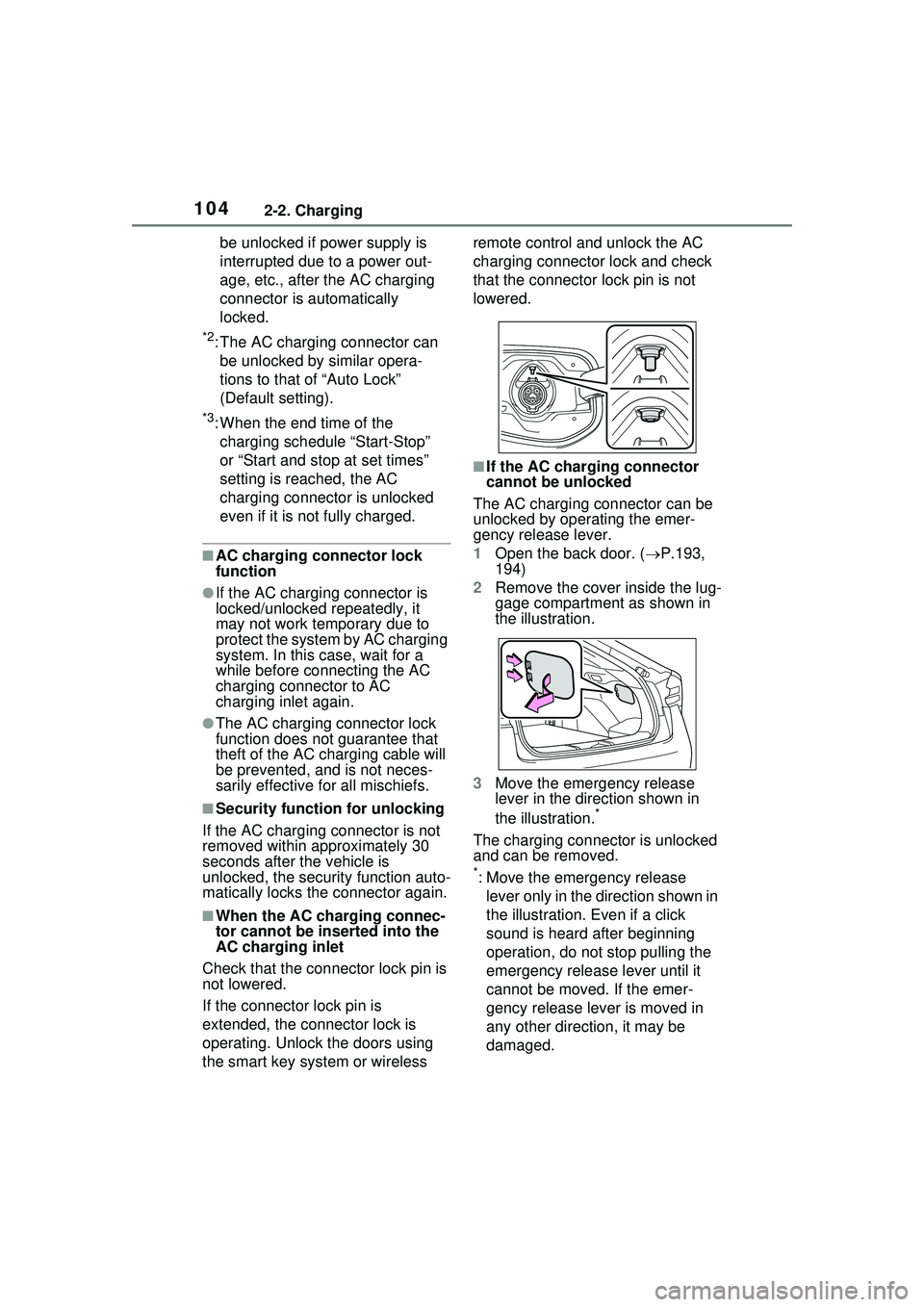
■If the AC charging connector
cannot be unlocked
The AC charging connector can be
unlocked by operating the emer-
gency release lever.
1 Open the back door. ( P.193,
194)
2 Remove the cover inside the lug-
gage compartment as shown in
the illustration.
3 Move the emergency release
lever in the direction shown in
the illustration.
*
The charging connector is unlocked
and can be removed.
*: Move the emergency release
lever only in the direction shown in
the illustration. Even if a click
sound is heard after beginning
operation, do not stop pulling the
emergency release lever until it
cannot be moved. If the emer-
gency release lever is moved in
any other direction, it may be
damaged.
Page 105 of 680
1052-2. Charging
2
Plug-in hybrid system
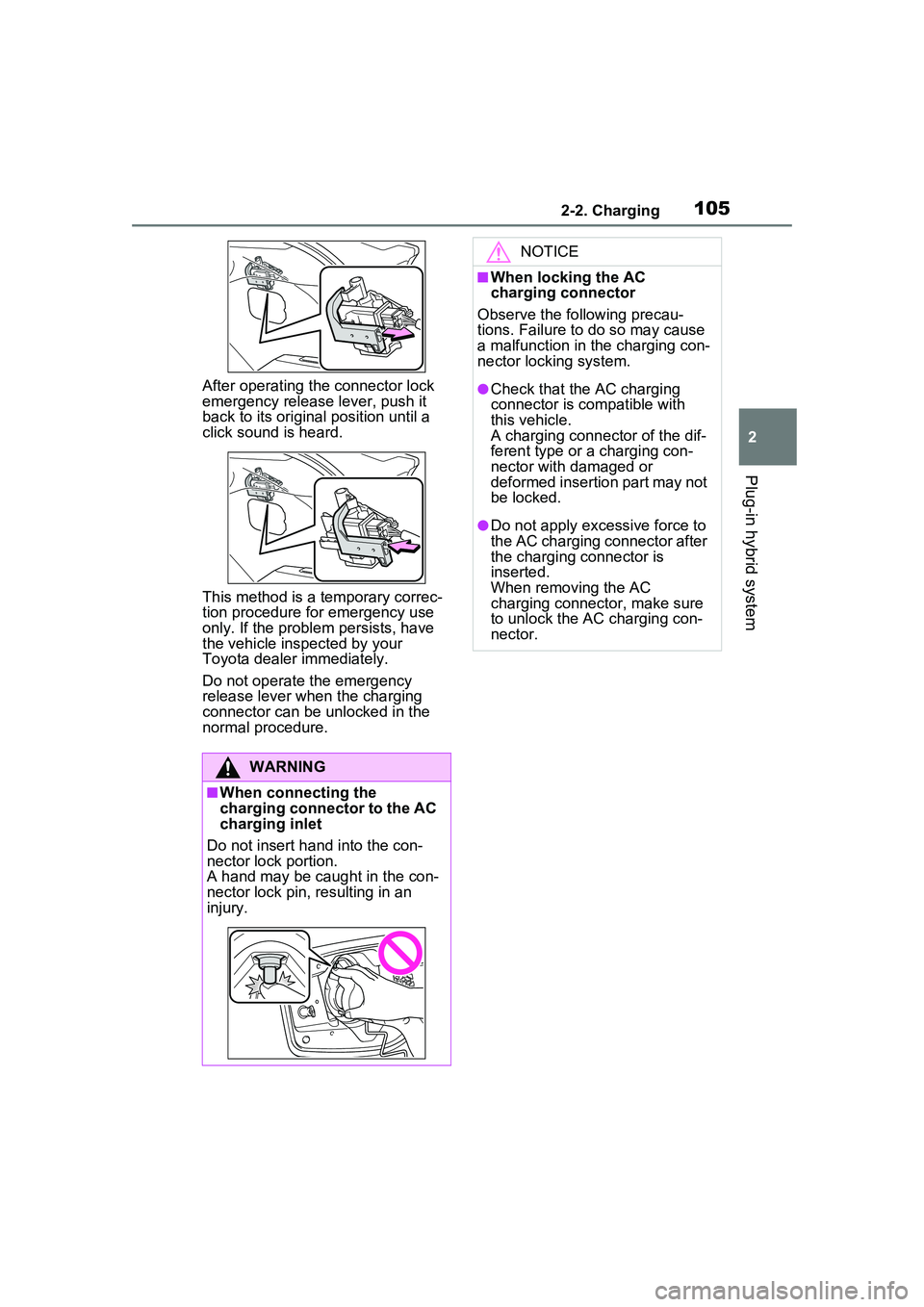
After operating the connector lock
emergency release lever, push it
back to its original position until a
click sound is heard.
This method is a temporary correc-
tion procedure for emergency use
only. If the problem persists, have
the vehicle inspected by your
Toyota dealer immediately.
Do not operate the emergency
release lever when the charging
connector can be unlocked in the
normal procedure.
WARNING
■When connecting the
charging connector to the AC
charging inlet
Do not insert hand into the con-
nector lock portion.
A hand may be caught in the con-
nector lock pin, resulting in an
injury.
NOTICE
■When locking the AC
charging connector
Observe the following precau-
tions. Failure to do so may cause
a malfunction in the charging con-
nector locking system.
●Check that the AC charging
connector is compatible with
this vehicle.
A charging connector of the dif-
ferent type or a charging con-
nector with damaged or
deformed insertion part may not
be locked.
●Do not apply excessive force to
the AC charging connector after
the charging connector is
inserted.
When removing the AC
charging connector, make sure
to unlock the AC charging con-
nector.
Page 107 of 680
1072-2. Charging
2
Plug-in hybrid system
WARNING
■Power sources precautions
Observe the following precau-
tions.
If you do not follow them, fire,
electrical shock or damage may
occur, possibly resulting in death
or serious injury.
●Connect to an AC 120 V outlet
(NEMA 5-15R) with a Ground-
Fault Circuit-Interrupter (GFCI)
and supplied by a circuit
breaker per your local code.
Use of a 15A individual circuit is
strongly recommended.
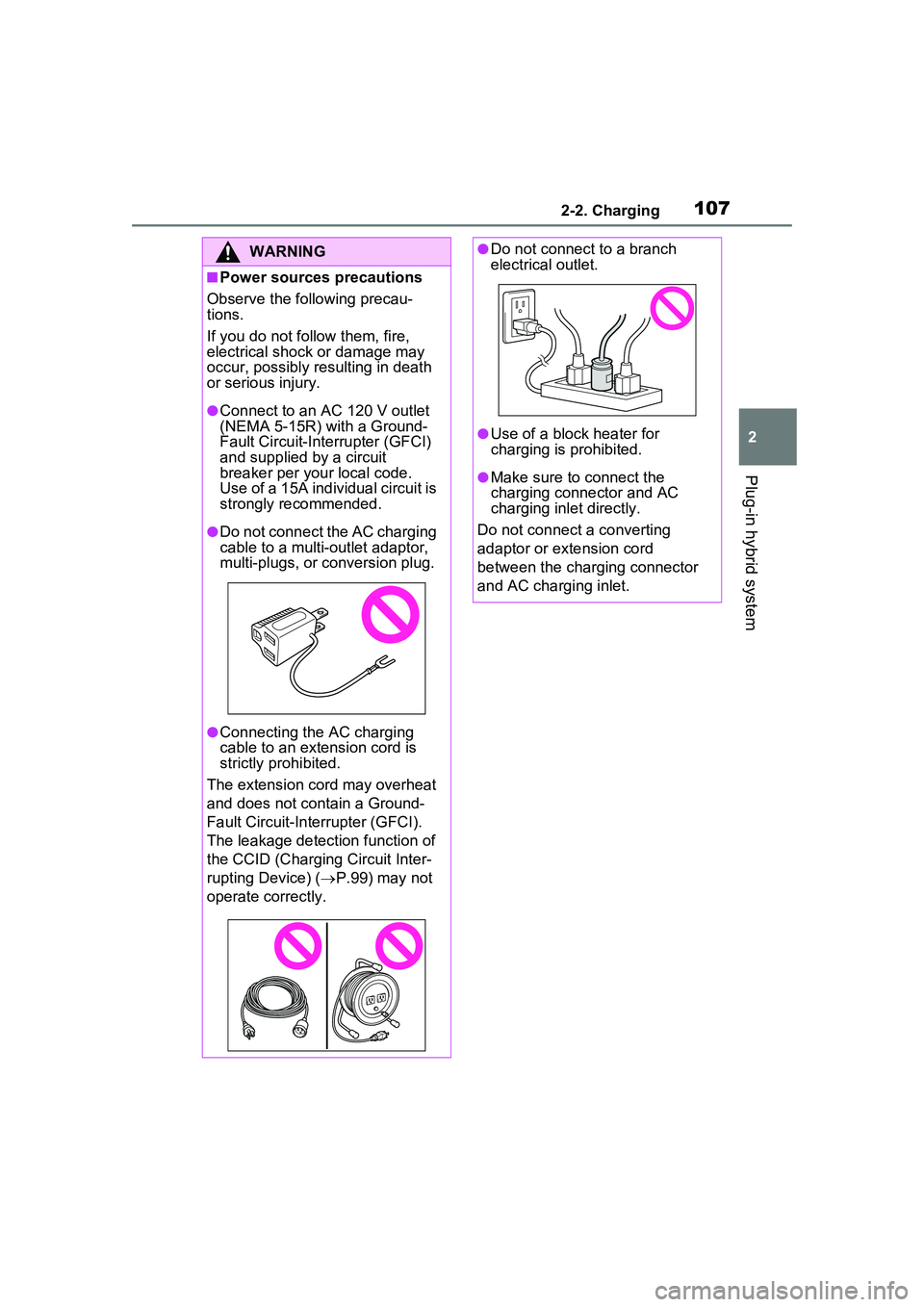
●Do not connect the AC charging
cable to a multi-outlet adaptor,
multi-plugs, or conversion plug.
●Connecting the AC charging
cable to an extension cord is
strictly prohibited.
The extension cord may overheat
and does not contain a Ground-
Fault Circuit-Inte rrupter (GFCI).
The leakage detection function of
the CCID (Charging Circuit Inter-
rupting Device) ( P.99) may not
operate correctly.
●Do not connect to a branch
electrical outlet.
●Use of a block heater for
charging is prohibited.
●Make sure to connect the
charging connector and AC
charging inlet directly.
Do not connect a converting
adaptor or extension cord
between the charging connector
and AC charging inlet.
Page 116 of 680
1162-2. Charging
The parking brake is applied.
( P.263)
Lights such as the head-
lights, emergency flashers
and interior lights etc. are
turned off.
If these light switches are turned
on, then these features will con-
sume electricity, and charging time
will increase.
The power switch is turned to
OFF. ( P.251)
Before charging, make sure that
each part of the AC charging
cable is in good condition.
( P.101)
Inspecting the AC
charging cable
How to charge
This section explains the
procedure for charging the
hybrid battery (traction bat-
tery) with AC charging
cable.
When using an AC charger,
make sure to check the
operation instructions on
the AC charger.
When the charging schedule
is registered, make sure
“Charge Now” is turned on
before charging. ( P.128,
132)
NOTICE
■When using the AC charging
cable and related parts
To prevent damage to the AC
charging cable and related parts,
observe the following precautions.
●When interrupting or canceling
charging, remove the charging
connector before removing the
plug.
●When removing the AC
charging cable, check that the
charging connector is unlocked.
●Do not forcefully pull the
charging connector cap.
●Do not apply a vibration to the
charging connector while
charging.
Charging may be stopped.
●Do not insert anything but the
charging connector into the AC
charging inlet.
Page 118 of 680
1182-2. Charging
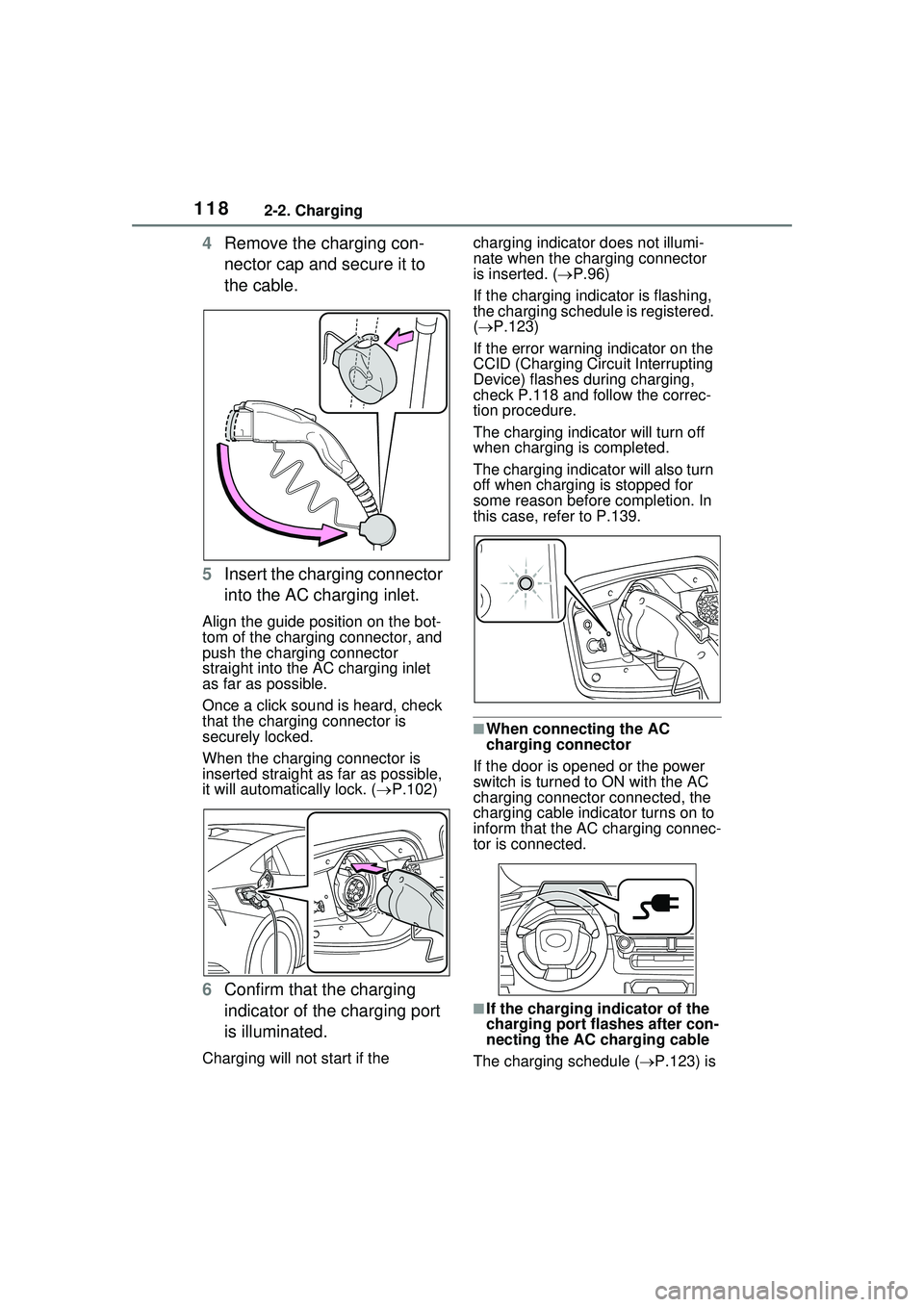
4Remove the charging con-
nector cap and secure it to
the cable.
5 Insert the charging connector
into the AC charging inlet.
Align the guide position on the bot-
tom of the charging connector, and
push the charging connector
straight into the AC charging inlet
as far as possible.
Once a click sound is heard, check
that the charging connector is
securely locked.
When the charging connector is
inserted straight as far as possible,
it will automatically lock. ( P.102)
6 Confirm that the charging
indicator of the charging port
is illuminated.
Charging will not start if the charging indicator does not illumi-
nate when the charging connector
is inserted. (
P.96)
If the charging indicator is flashing,
the charging schedule is registered.
( P.123)
If the error warning indicator on the
CCID (Charging Circu it Interrupting
Device) flashes during charging,
check P.118 and follow the correc-
tion procedure.
The charging indicator will turn off
when charging is completed.
The charging indica tor will also turn
off when charging is stopped for
some reason before completion. In
this case, refer to P.139.
■When connecting the AC
charging connector
If the door is opened or the power
switch is turned to ON with the AC
charging connecto r connected, the
charging cable indicator turns on to
inform that the AC charging connec-
tor is connected.
■If the charging indicator of the
charging port flashes after con-
necting the AC charging cable
The charging schedule ( P.123) is
Page 121 of 680
1212-2. Charging
2
Plug-in hybrid system
1Unlock the doors to unlock
the charging connector.
( P.102)
The charging co nnector will be
unlocked and the AC charging inlet
light will illuminate when the doors
are unlocked.
WARNING
●After connecting the charging
cable, confirm that it is not
wound around anything.
●If the power indicator on the
CCID (Charging Circuit Inter-
rupting Device) does not illumi-
nate after plugging the AC
charging cable into the socket-
outlet, unplug it immediately.
■If the error warning indicator
on the CCID (Charging Circuit
Interrupting Device) illumi-
nates or flashes during
charging
There may be an electrical leak-
age in the power source path, or
there may be a malfunction in the
AC charging cable or CCID
(Charging Circuit Interrupting
Device).
Refer to P.100 and follow the cor-
rection procedure. If the error
warning indicator does not turn off
even after performing the correc-
tion procedure, immediately stop
charging, remove the AC
charging cable and contact your
Toyota dealer. Continuing to
charge the vehicle in that condi-
tion may lead to unforeseen acci-
dents or serious injury.
■Onboard traction battery
charger
The onboard traction battery char-
ger is located under the luggage
compartment. Make sure to
observe the following precautions
regarding the onboard traction
battery charger. Failure to
observe these precautions may
result in death or serious injury
such as burns and electric
shocks.
●The onboard traction battery
charger is hot during charging.
Do not touch the onboard trac-
tion battery charger, as doing so
may result in burns.
●Do not disassemble, repair or
modify the onboard traction bat-
tery charger. When the onboard
traction battery charger needs
to be repaired, consult your
Toyota dealer.
NOTICE
■When charging
Do not insert the plug into the AC
charging inlet.
The AC charging inlet may be
damaged.
■Using private power genera-
tor
Do not use private power genera-
tors as a power source for
charging.
Doing so may make charging
unstable, the voltage may be
insufficient, and the charging
operation may stop.
■Charging station
Due to the environment in which
the power equipment is located,
charging may be unstable due to
noise, the voltage may be insuffi-
cient, and the charging operation
may stop.
After charging
Page 122 of 680
1222-2. Charging
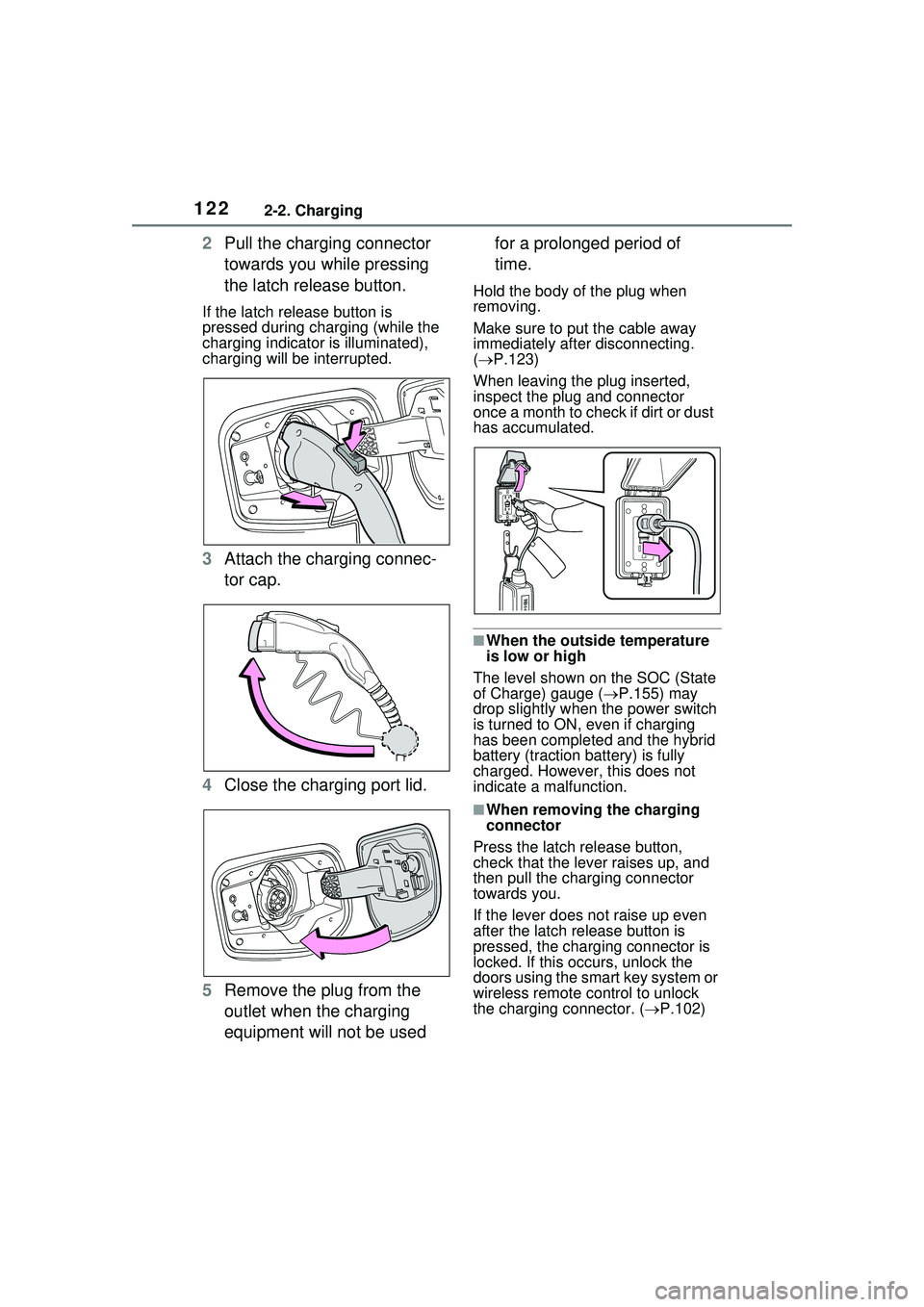
2Pull the charging connector
towards you while pressing
the latch release button.
If the latch release button is
pressed during charging (while the
charging indicator is illuminated),
charging will be interrupted.
3Attach the charging connec-
tor cap.
4 Close the charging port lid.
5 Remove the plug from the
outlet when the charging
equipment will not be used for a prolonged period of
time.
Hold the body of the plug when
removing.
Make sure to put the cable away
immediately after disconnecting.
(
P.123)
When leaving the plug inserted,
inspect the plug and connector
once a month to check if dirt or dust
has accumulated.
■When the outside temperature
is low or high
The level shown on the SOC (State
of Charge) gauge ( P.155) may
drop slightly when the power switch
is turned to ON, even if charging
has been completed and the hybrid
battery (traction battery) is fully
charged. However, this does not
indicate a malfunction.
■When removing the charging
connector
Press the latch release button,
check that the lever raises up, and
then pull the charging connector
towards you.
If the lever does not raise up even
after the latch release button is
pressed, the charging connector is
locked. If this occurs, unlock the
doors using the smart key system or
wireless remote control to unlock
the charging connector. ( P.102)