TRAC TOYOTA PRIUS PRIME 2023 Service Manual
[x] Cancel search | Manufacturer: TOYOTA, Model Year: 2023, Model line: PRIUS PRIME, Model: TOYOTA PRIUS PRIME 2023Pages: 680, PDF Size: 14.97 MB
Page 125 of 680
1252-2. Charging
2
Plug-in hybrid system
time*
*
: For details regarding setting clock, refer to “MULTIMEDIA OWNER’S
MANUAL”.
●The calendar is set to the correct
date ( P.166)
●Check that the power switch is
turned off
●After registering the charging
schedule, connect the AC
charging connector
The charging start time is deter-
mined based on the charging
schedule at the time that the AC
charging connector was connected.
●Connect the AC charging connec-
tor before the start time
When the charging mode is set to
“Start” or “Start at set time”, if you
connect the AC charging connector
after the set start time, the next
charging schedule will be refer-
enced.
When the charging mode is set to
“Start-Stop” or “Start and stop at set
times”, if you connect the AC
charging connector after the start
time, charging will start immediately
and charging will be performed until
the stop time.
●After connecting the AC charging
connector, check that the
charging indicator of the charging
port flashes ( P.96)
●Do not use an outlet that has a
power cut off function (including a
charging schedule function)
Use an outlet that constantly sup-
plies electricity. For outlets where
the power is cut off due to a
charging schedule function, etc.,
charging may not be carried out
according to plan if the power is cut
off during the set time.
■When the AC charging connec-
tor remains connected to the
vehicle
●When the charging mode is set to
“Start” or “Start at set time”, even
if multiple consecutive charging
schedules are registered, the next
charge will not be carried out
according to the charging sched-
ule until the AC charging connec-
tor is removed and reconnected
after charging completes. Also,
when the hybrid battery (traction
battery) is fully charged, charging
according to the charging sched-
ule will not be carried out.
●If the charging stop time is
reached before the hybrid battery
(traction battery) is fully charged
and the charging mode is set to
“Start-Stop” or “Start and stop at
set times”, the nearest charging
schedule after the stop time is
updated as the next charging
schedule, and charging is
repeated until the battery is fully
charged.
■Smartphone-linked operation (if
equipped)
After applying to Toyota Apps, it is
possible to use the smartphone
application to change charging
schedule settings.
For details about Toyota Apps, refer
to http://www.toyota.com/
connectedservices in the United
States and
http://www.toyota.ca/connected
in
Canada.
■When charging schedules are
ignored
When the following operations are
performed while the charging
schedule is on standby, charging
schedule is temporarily canceled
and charging is started.
●When turning “My Room Mode”
on ( P.134)
●When turning “Charge Now” on
( P.128, 132)
Page 126 of 680
1262-2. Charging
●When an operation that temporar-
ily cancel charging using the
charging schedule (P.118)
■“Battery Heater” ( P.108) /
“Battery Cooler” ( P.109)
Depending on the temperature of
the hybrid battery (traction battery),
“Battery Heater” or “Battery Cooler”
may be activated and the charging
indicator may light up while the
charging schedule is waiting for
charging.
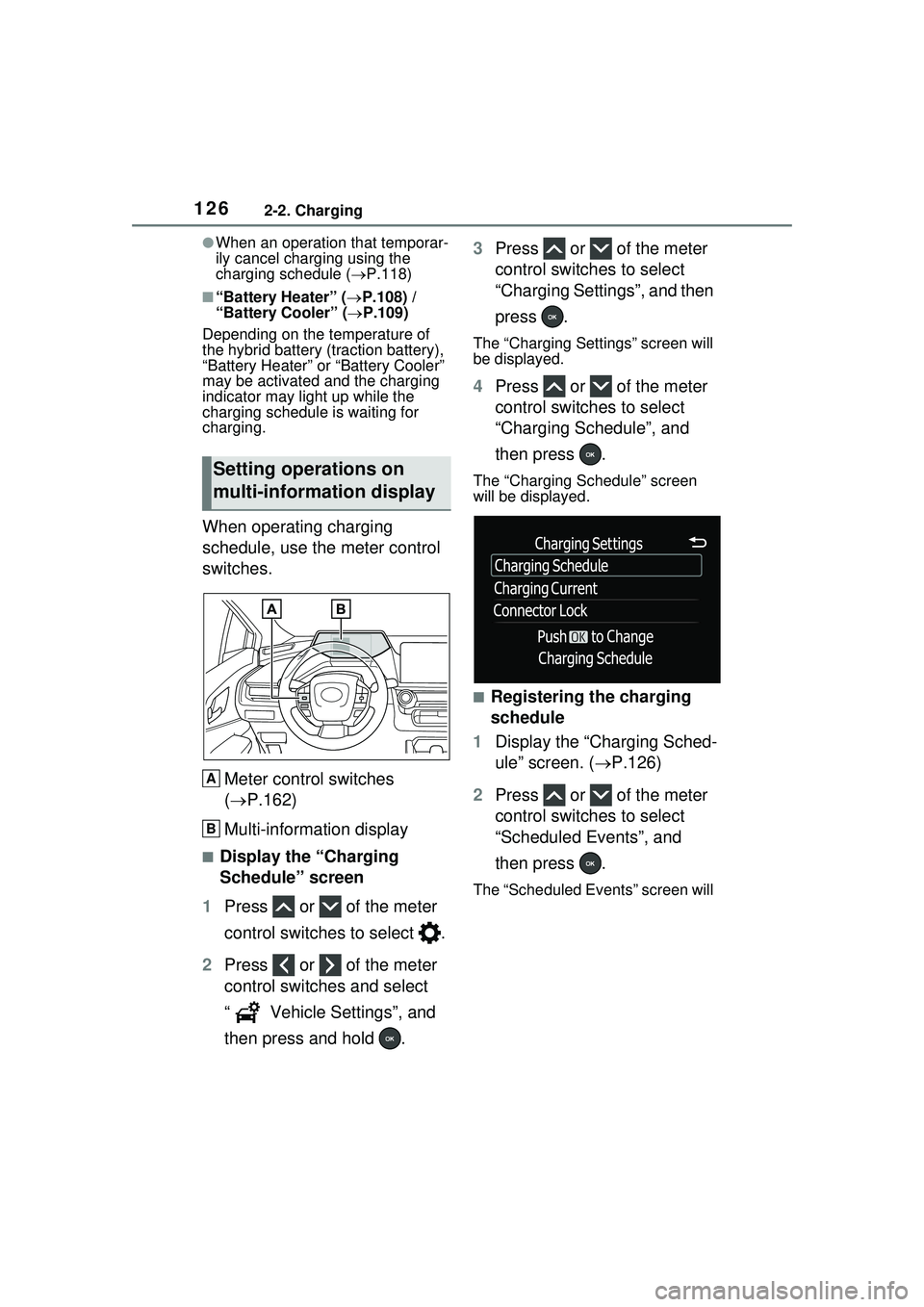
When operating charging
schedule, use the meter control
switches.
Meter control switches
( P.162)
Multi-information display
■Display the “Charging
Schedule” screen
1 Press or of the meter
control switches to select .
2 Press or of the meter
control switches and select
“ Vehicle Settings”, and
then press and hold . 3
Press or of the meter
control switches to select
“Charging Settings”, and then
press .
The “Charging Settings” screen will
be displayed.
4Press or of the meter
control switches to select
“Charging Schedule”, and
then press .
The “Charging Schedule” screen
will be displayed.
■Registering the charging
schedule
1 Display the “Charging Sched-
ule” screen. ( P.126)
2 Press or of the meter
control switches to select
“Scheduled Events”, and
then press .
The “Scheduled Events” screen will
Setting operations on
multi-information display
A
B
Page 134 of 680
1342-2. Charging
1Connect the AC charging
cable to the vehicle and start
charging
2 Turn the power switch on
during charging
The setting screen of “My Room
Mode” is displayed automatically on
the multi-information display.
3Press or of the meter
control switches, select
“Yes”, and then press .
“My Room Mode” starts and sys-
tems such as the air conditioning
system and audio system can be
used inside the vehicle.
When not using “My Room Mode”,
select “No”, and then press .
To stop “My Room Mode”, turn
the power switch off.
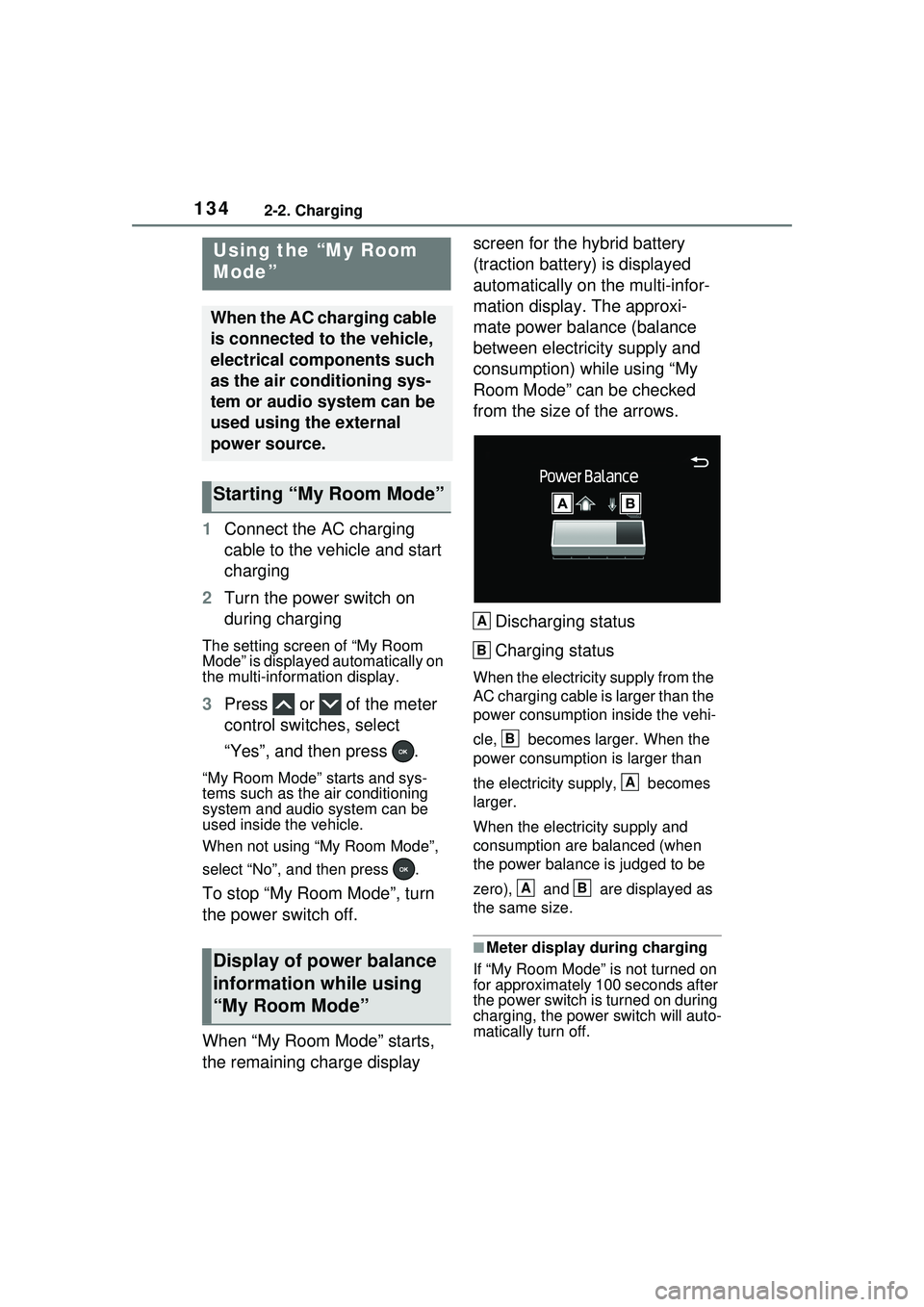
When “My Room Mode” starts,
the remaining charge display screen for the hybrid battery
(traction battery) is displayed
automatically on the multi-infor-
mation display. The approxi-
mate power balance (balance
between electricity supply and
consumption) while using “My
Room Mode” can be checked
from the size of the arrows.
Discharging status
Charging status
When the electricity supply from the
AC charging cable is larger than the
power consumption inside the vehi-
cle, becomes larger. When the
power consumption is larger than
the electricity supply, becomes
larger.
When the electricity supply and
consumption are balanced (when
the power balance is judged to be
zero), and are displayed as
the same size.
■Meter display during charging
If “My Room Mode” is not turned on
for approximately 100 seconds after
the power switch is turned on during
charging, the power switch will auto-
matically turn off.
Using the “My Room
Mode”
When the AC charging cable
is connected to the vehicle,
electrical components such
as the air conditioning sys-
tem or audio system can be
used using the external
power source.
Starting “My Room Mode”
Display of power balance
information while using
“My Room Mode”
A
B
B
A
AB
Page 135 of 680
1352-2. Charging
2
Plug-in hybrid system
■While using “My Room Mode”
Any of the following may occur.
●When the remaining charge of the
hybrid battery (traction battery)
reaches the lower limit, the air
conditioning system automatically
turns off.
In this situation, the air conditioning
system cannot be used until the
remaining charge of the hybrid bat-
tery (traction battery) increases.
Turn the power switch off and use
“My Room Mode” after the remain-
ing charge of the hybrid battery
(traction battery) is restored.
●When the outside temperature is
low, the heater output may be lim-
ited due to the air conditioning
system operation being restricted.
●Warning lights and indicators such
as electric power steering system
warning light (yellow) and mal-
function indicator lamp may turn
on, but this is not a malfunction.
Also, when the headlight switch is
in the AUTO position (if equipped)
and the surrounding area is dark,
the headlights are turned on.
( P.269)
■When a charging schedule is
registered
When “My Room Mode” starts while
the charging schedule is on
standby, charging schedules are
ignored and charging starts.
■When “My Room Mode” is used
while the hybrid battery (trac-
tion battery) is fully charged
When the power switch is turned on
while the hybrid battery (traction
battery) is fully charged and the
charging connector that supplies
power is connected, “Charging Port
Lid is Open” is displayed on the
multi-information di splay. In this
case, press on the meter control switches to display the setting
screen of “My Room Mode”, and
then select “My Room Mode”.
When “My Room Mode” is used
while the hybrid
battery (traction
battery) is fully charged, the electric
power of the hybrid battery (traction
battery) may be consumed. In this
case, charging may be performed
again.
■When a message related to “My
Room Mode” is displayed
When a message is displayed on
the multi-information display while
using or attempti ng to start “My
Room Mode”, take the following cor-
rection procedures.
●“Traction battery is too low for “My
Room Mode””
There is insufficient remaining
charge in the hybrid battery (traction
battery) for starting “My Room
Mode”.
Wait until the charge of the hybrid
battery (traction battery) increases,
then start “My Room Mode”.
●““My Room Mode” has stopped
due to low traction battery”
The remaining charge in the hybrid
battery (traction ba ttery) is insuffi-
cient.
Stop using “My Room Mode” and
charge the hybrid battery (traction
battery).
●““My Room Mode ” will stop when
traction battery is too low Reduce
power usage to continue using
“My Room Mode””
The power consumption inside the
vehicle is greater than the power
being charged to the hybrid battery
(traction battery), and the remaining
charge of the hybrid battery (traction
battery) is low.
*
• “My Room Mode” will end unless
Page 136 of 680
1362-2. Charging
the power consumption inside the
vehicle is improved.
• To continue using “My Room
Mode”, turn off the power of sys-
tems such as the air conditioning
system and audio system to
increase the remaining charge of
the hybrid battery (traction bat-
tery).
*: The power balance status during
“My Room Mode” can be checked
from the remaining charge dis-
play screen for the hybrid battery
(traction battery) displayed on the
multi-informat ion display.
( P.134)
*: If equipped
This system generates solar
power with the solar panel
equipped to the roof of the vehi-
cle (solar roof).
The hybrid battery (traction
battery) is charged while park-
ing.
The electrical consumption of
the hybrid battery (traction
battery) is reduced during
WARNING
■Cautions for using “My Room
Mode”
Make sure to ob serve the follow-
ing precautions.
Failure to do so may result in seri-
ous health problems or even
death.
●Do not leave children, people
who need assistance, or pets
inside the vehicle. The system
may turn off automatically and
the interior temperature may
become high or low, resulting in
heat stroke, dehydration or
hypothermia. Devices such as
the wipers can also be used,
which may lead to mistaken
operation and an accident.
●Check the safety around the
vehicle carefully before use.
Solar charging sys-
tem*
A system that provides
power to the hybrid battery
(traction battery) and auxil-
iary systems by performing
solar charging via the large
solar panel (solar roof)
equipped on the vehicle
roof.
Even when a parking lot does
not have charging equipment
and in the event of a disaster,
it is possible to charge
* the
hybrid battery (traction bat-
tery) without any special oper-
ations as long as sunlight is
available.
*: The charging amount via the solar charging system differs
depending on conditions, such
as season and weather.
Solar charging system
operation
Page 137 of 680
1372-2. Charging
2
Plug-in hybrid system
driving.
The electrical consumption of
the hybrid battery (traction
battery) is suppressed
increasing EV driving dis-
tance by supplementing
power consumption for the
auxiliary systems using solar
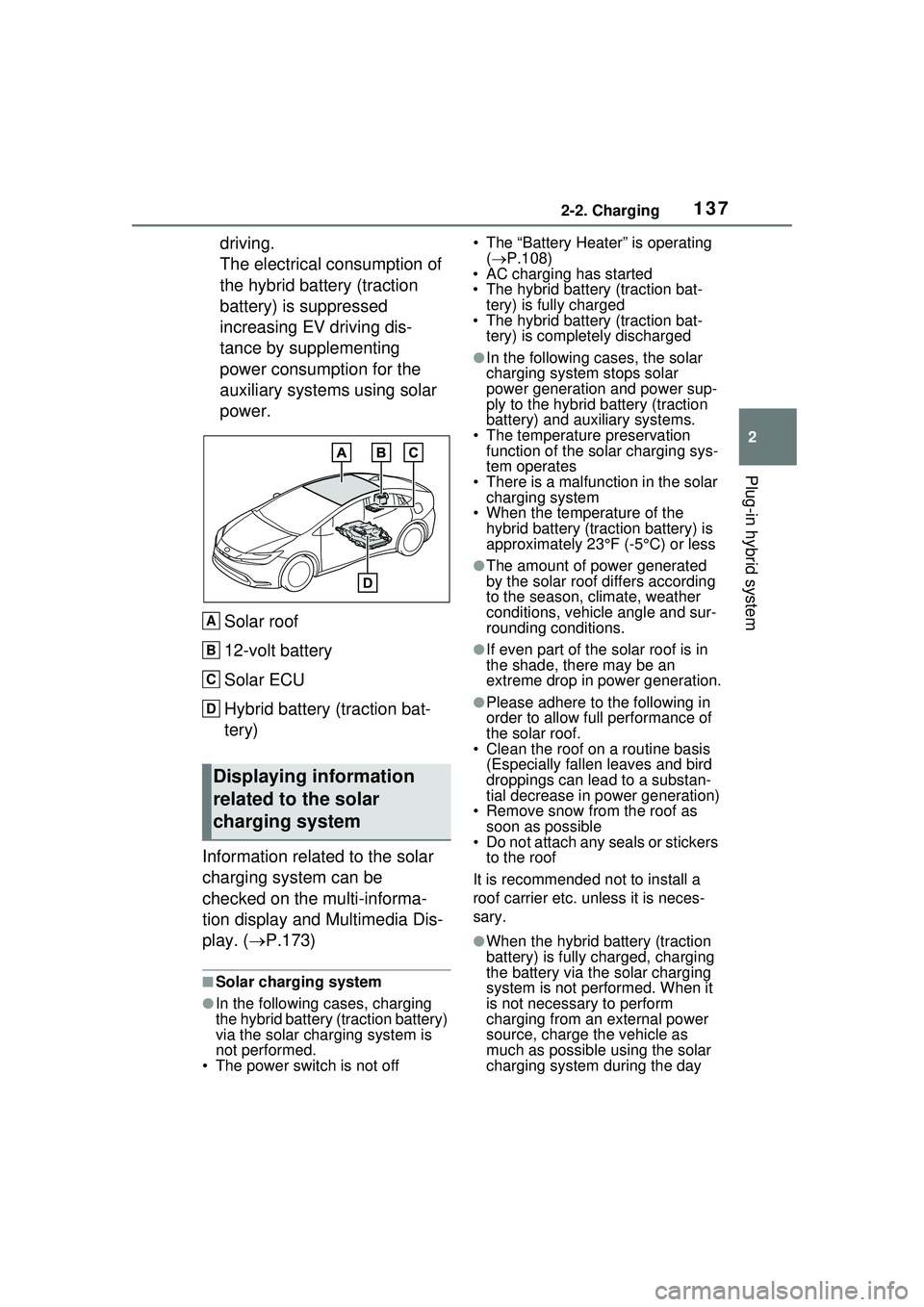
power.Solar roof
12-volt battery
Solar ECU
Hybrid battery (traction bat-
tery)
Information related to the solar
charging system can be
checked on the multi-informa-
tion display and Multimedia Dis-
play. ( P.173)
■Solar charging system
●In the following cases, charging
the hybrid battery (traction battery)
via the solar charging system is
not performed.
• The power switch is not off • The “Battery Heater” is operating
( P.108)
• AC charging has started
• The hybrid battery (traction bat-
tery) is fully charged
• The hybrid battery (traction bat-
tery) is completely discharged
●In the following cases, the solar
charging system stops solar
power generation and power sup-
ply to the hybrid battery (traction
battery) and auxiliary systems.
• The temperature preservation function of the solar charging sys-
tem operates
• There is a malfun ction in the solar
charging system
• When the temperature of the hybrid battery (traction battery) is
approximately 23°F (-5°C) or less
●The amount of power generated
by the solar roof differs according
to the season, climate, weather
conditions, vehicle angle and sur-
rounding conditions.
●If even part of the solar roof is in
the shade, there may be an
extreme drop in power generation.
●Please adhere to the following in
order to allow full performance of
the solar roof.
• Clean the roof on a routine basis
(Especially fallen leaves and bird
droppings can lead to a substan-
tial decrease in power generation)
• Remove snow from the roof as soon as possible
• Do not attach any seals or stickers
to the roof
It is recommended not to install a
roof carrier etc. unless it is neces-
sary.
●When the hybrid battery (traction
battery) is fully charged, charging
the battery via the solar charging
system is not performed. When it
is not necessary to perform
charging from an external power
source, charge the vehicle as
much as possible using the solar
charging system during the day
Displaying information
related to the solar
charging system
A
B
C
D
Page 140 of 680
1402-2. Charging
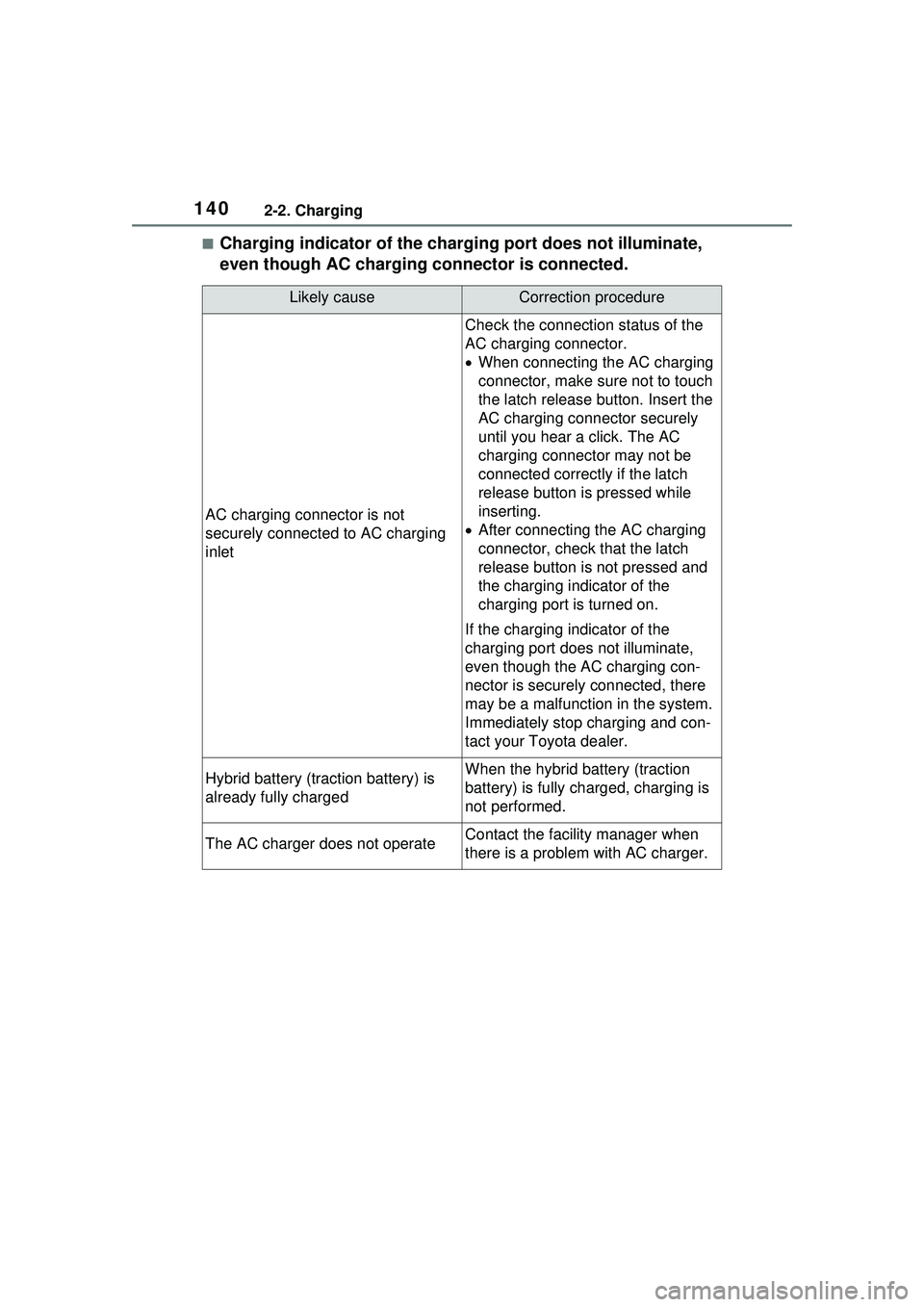
■Charging indicator of the charging port does not illuminate,
even though AC charging connector is connected.
Likely causeCorrection procedure
AC charging connector is not
securely connected to AC charging
inlet
Check the connection status of the
AC charging connector.
When connecting the AC charging
connector, make su re not to touch
the latch release button. Insert the
AC charging connector securely
until you hear a click. The AC
charging connector may not be
connected correctly if the latch
release button is pressed while
inserting.
After connecting the AC charging
connector, check that the latch
release button is not pressed and
the charging indicator of the
charging port is turned on.
If the charging indicator of the
charging port do es not illuminate,
even though the AC charging con-
nector is securely connected, there
may be a malfunction in the system.
Immediately stop charging and con-
tact your Toyota dealer.
Hybrid battery (traction battery) is
already fully chargedWhen the hybrid battery (traction
battery) is fully charged, charging is
not performed.
The AC charger does not operateContact the facility manager when
there is a problem with AC charger.
Page 142 of 680
1422-2. Charging
*: For details regarding setting clock, refer to “MULTIMEDIA OWNER’S
MANUAL”.
■Cannot change charging schedule from smartphone applica-
tion (if equipped)
*
*: In order to use the smartphone application, it is necessary to apply to Toyota Apps. For details about Toyota Apps, refer to
http://www.toyota.com/connectedservices
in the United States and
http://www.toyota.ca/connected
in Canada.
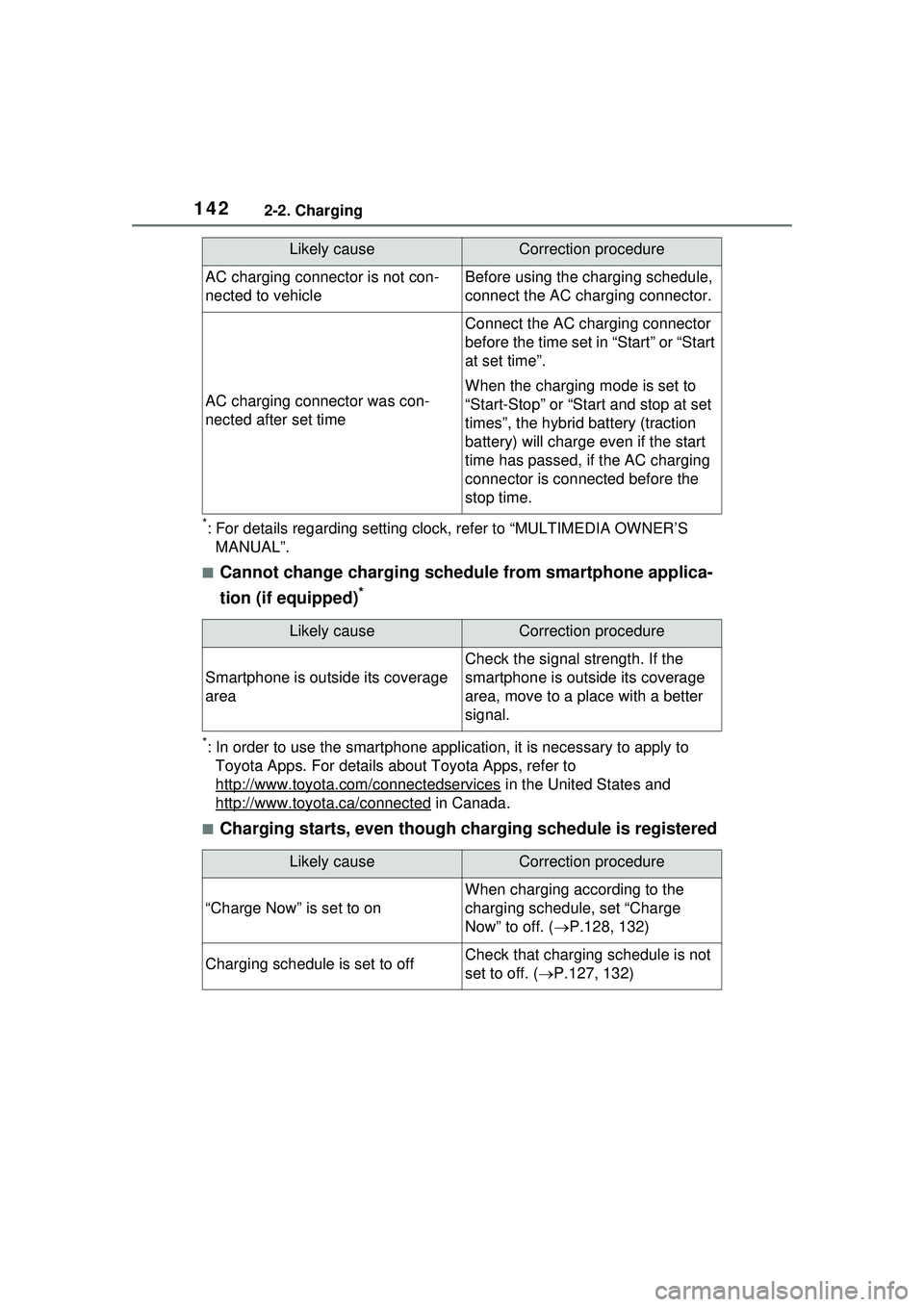
■Charging starts, even though charging schedule is registered
AC charging connector is not con-
nected to vehicleBefore using the charging schedule,
connect the AC charging connector.
AC charging connector was con-
nected after set time
Connect the AC charging connector
before the time set in “Start” or “Start
at set time”.
When the charging mode is set to
“Start-Stop” or “Start and stop at set
times”, the hybrid battery (traction
battery) will charge even if the start
time has passed, if the AC charging
connector is connected before the
stop time.
Likely causeCorrection procedure
Smartphone is outside its coverage
area
Check the signal strength. If the
smartphone is outside its coverage
area, move to a place with a better
signal.
Likely causeCorrection procedure
“Charge Now” is set to on
When charging according to the
charging schedule, set “Charge
Now” to off. ( P.128, 132)
Charging schedule is set to offCheck that charging schedule is not
set to off. ( P.127, 132)
Likely causeCorrection procedure
Page 143 of 680
1432-2. Charging
2
Plug-in hybrid system
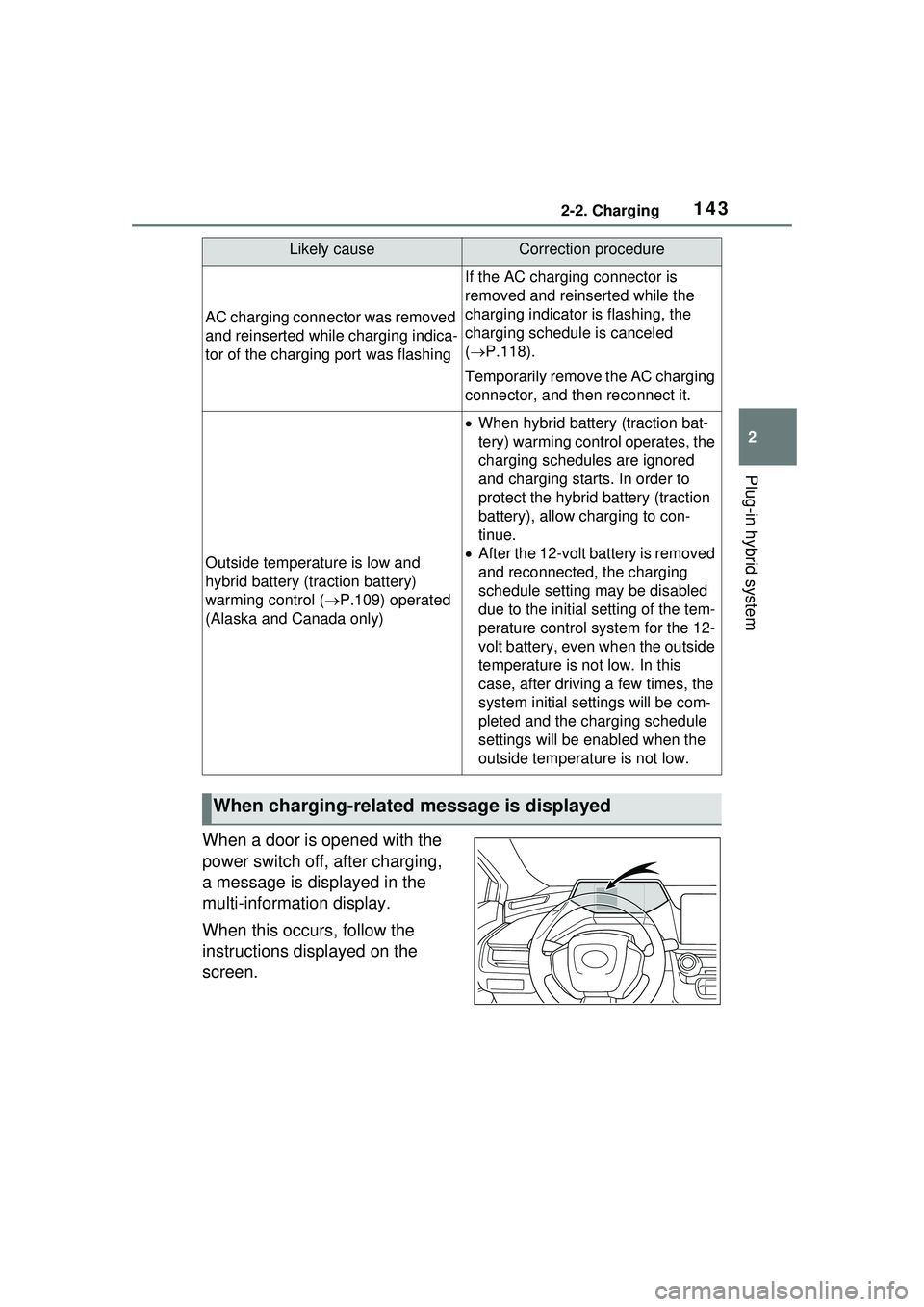
When a door is opened with the
power switch off, after charging,
a message is displayed in the
multi-information display.
When this occurs, follow the
instructions displayed on the
screen.
AC charging connector was removed
and reinserted while charging indica-
tor of the charging port was flashing
If the AC charging connector is
removed and reinserted while the
charging indicator is flashing, the
charging schedule is canceled
( P.118).
Temporarily remove the AC charging
connector, and then reconnect it.
Outside temperature is low and
hybrid battery (traction battery)
warming control ( P.109) operated
(Alaska and Canada only)
When hybrid battery (traction bat-
tery) warming control operates, the
charging schedules are ignored
and charging starts. In order to
protect the hybrid battery (traction
battery), allow charging to con-
tinue.
After the 12-volt battery is removed
and reconnected, the charging
schedule setting may be disabled
due to the initial setting of the tem-
perature control system for the 12-
volt battery, even when the outside
temperature is not low. In this
case, after driving a few times, the
system initial settings will be com-
pleted and the charging schedule
settings will be enabled when the
outside temperature is not low.
When charging-related message is displayed
Likely causeCorrection procedure
Page 144 of 680
1442-2. Charging
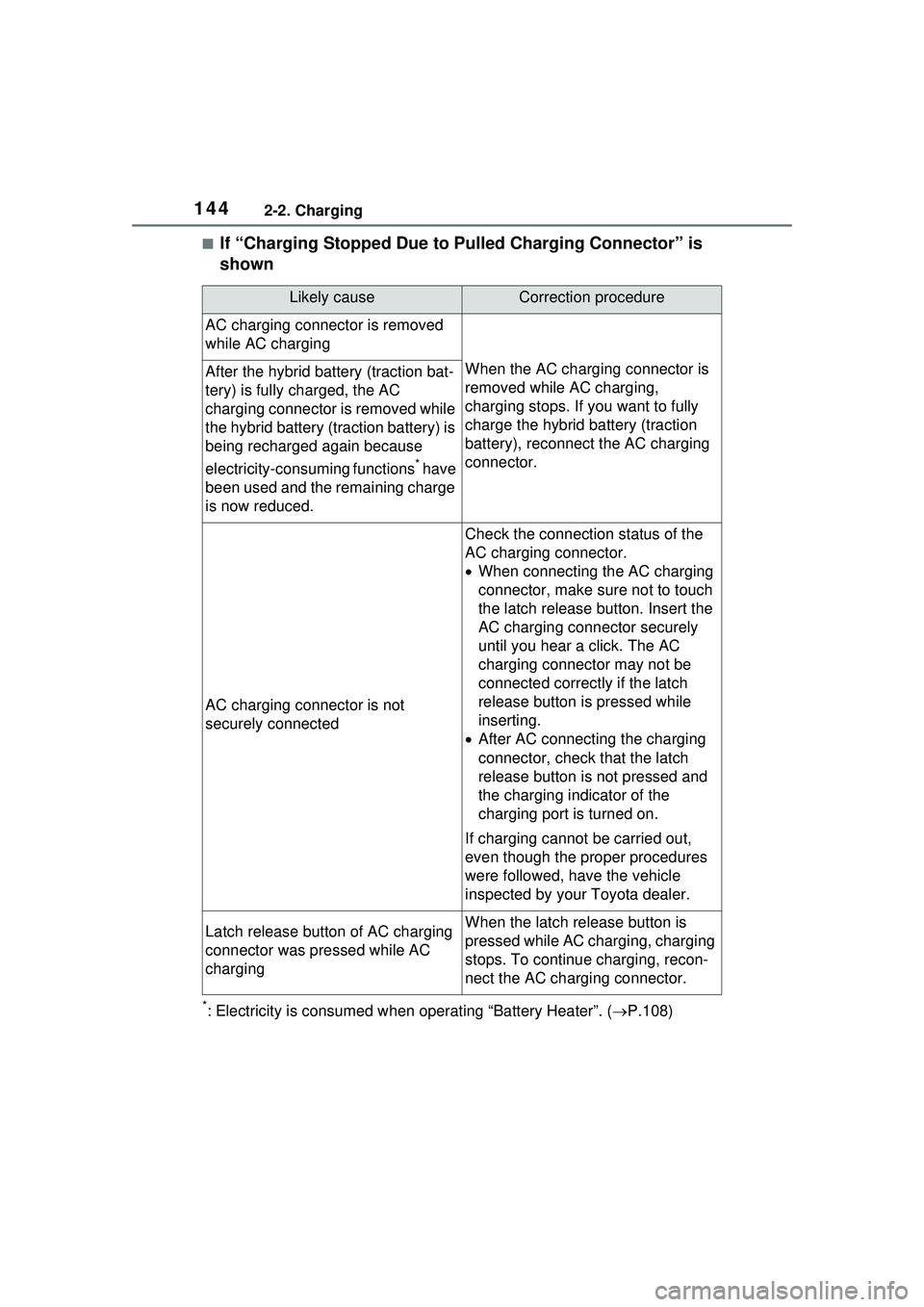
■If “Charging Stopped Due to Pulled Charging Connector” is
shown
*: Electricity is consumed when operating “Battery Heater”. (P.108)
Likely causeCorrection procedure
AC charging connector is removed
while AC charging
When the AC charging connector is
removed while AC charging,
charging stops. If you want to fully
charge the hybrid battery (traction
battery), reconnect the AC charging
connector.After the hybrid battery (traction bat-
tery) is fully charged, the AC
charging connector is removed while
the hybrid battery (traction battery) is
being recharged again because
electricity-consuming functions
* have
been used and the remaining charge
is now reduced.
AC charging connector is not
securely connected
Check the connection status of the
AC charging connector.
When connecting the AC charging
connector, make su re not to touch
the latch release button. Insert the
AC charging connector securely
until you hear a click. The AC
charging connector may not be
connected correctly if the latch
release button is pressed while
inserting.
After AC connecting the charging
connector, check that the latch
release button is not pressed and
the charging indicator of the
charging port is turned on.
If charging cannot be carried out,
even though the proper procedures
were followed, have the vehicle
inspected by your Toyota dealer.
Latch release button of AC charging
connector was pressed while AC
chargingWhen the latch release button is
pressed while AC charging, charging
stops. To continue charging, recon-
nect the AC charging connector.