change time TOYOTA PRIUS V 2012 Accessories, Audio & Navigation (in English)
[x] Cancel search | Manufacturer: TOYOTA, Model Year: 2012, Model line: PRIUS V, Model: TOYOTA PRIUS V 2012Pages: 24, PDF Size: 1.61 MB
Page 2 of 24
1
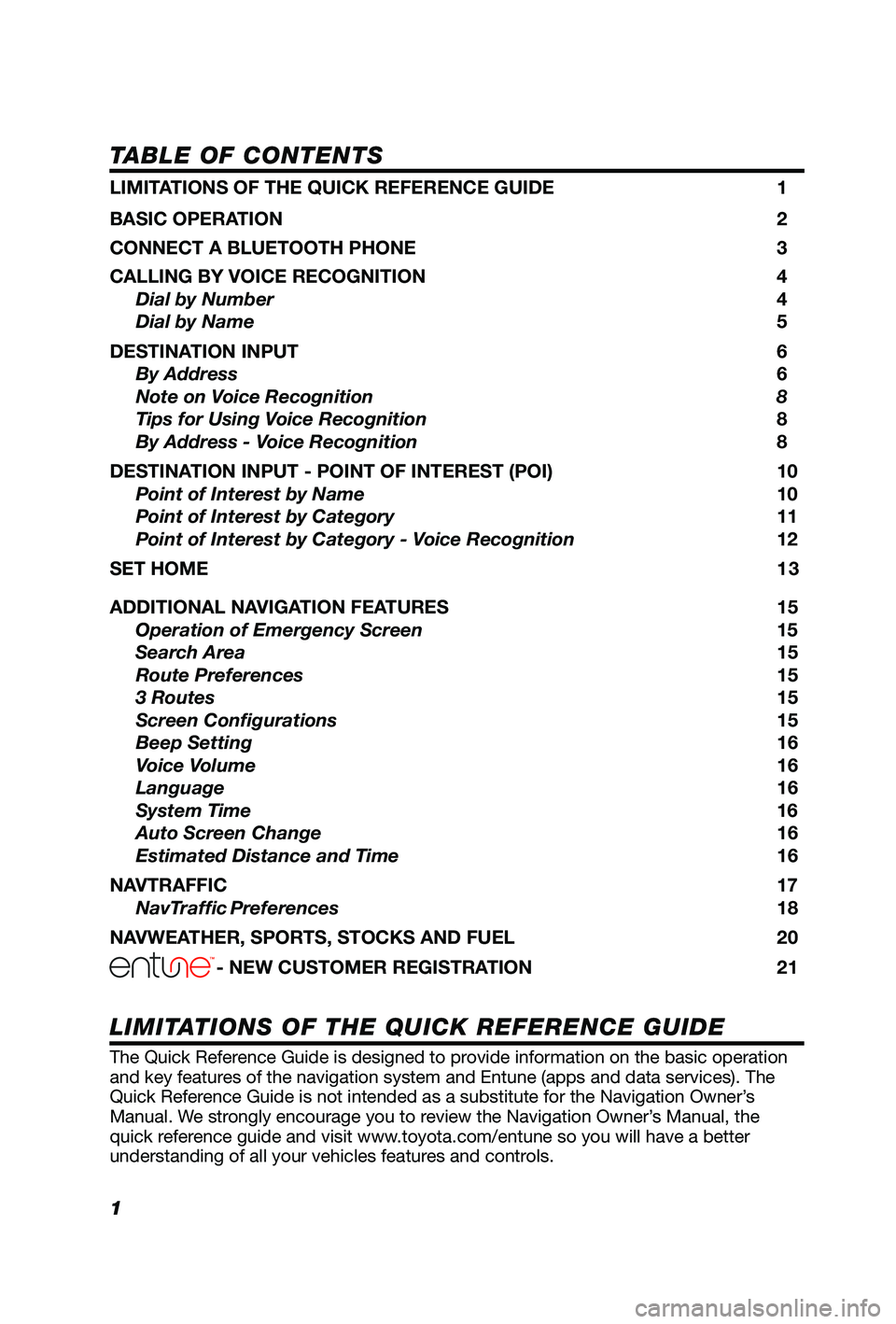
TABLE OF CONTENTS
The Quick Reference Guide is designed to provide information on the basic operation
and key features of the navigation system and Entune (apps and data services). The
Quick Reference Guide is not intended as a substitute for the Navigation Owner’s
Manual. We strongly encourage you to review the Navigation Owner’s Manual, the
quick reference guide and visit www.toyota.com/entune so you will have a better
understanding of all your vehicles features and controls.
LIMITATIONS OF THE QUICK REFERENCE GUIDE
LIMITATIONS OF THE QUICK REFERENCE GUIDE 1
BASIC OPERATION
2
CONNECT A BLUETOOTH PHONE
3
CALLING BY VOICE RECOGNITION
4
Dial by Number
4
Dial by Name
5
DESTINATION INPUT
6
By Address
6
Note on Voice Recognition
8
Tips for Using Voice Recognition 8
By Address - Voice Recognition
8
DESTINATION INPUT - POINT OF INTEREST (POI)
10
Point of Interest by Name
10
Point of Interest by Category
11
Point of Interest by Category - Voice Recognition
12
SET HOME
1 3
ADDITIONAL NAVIGATION FEATURES
15
Operation of Emergency Screen 15
Search Area 15
Route Preferences
15
3 Routes
15
Screen Configurations
15
Beep Setting
16
Voice Volume
16
Language
16
System Time
16
Auto Screen Change
16
Estimated Distance and Time
16
NAVTRAFFIC
17
NavTraffic Preferences 18
NAVWEATHER, SPORTS, STOCKS AND FUEL
20
- NEW CUSTOMER REGISTRATION 21
Page 9 of 24
8
DESTINATION INPUT
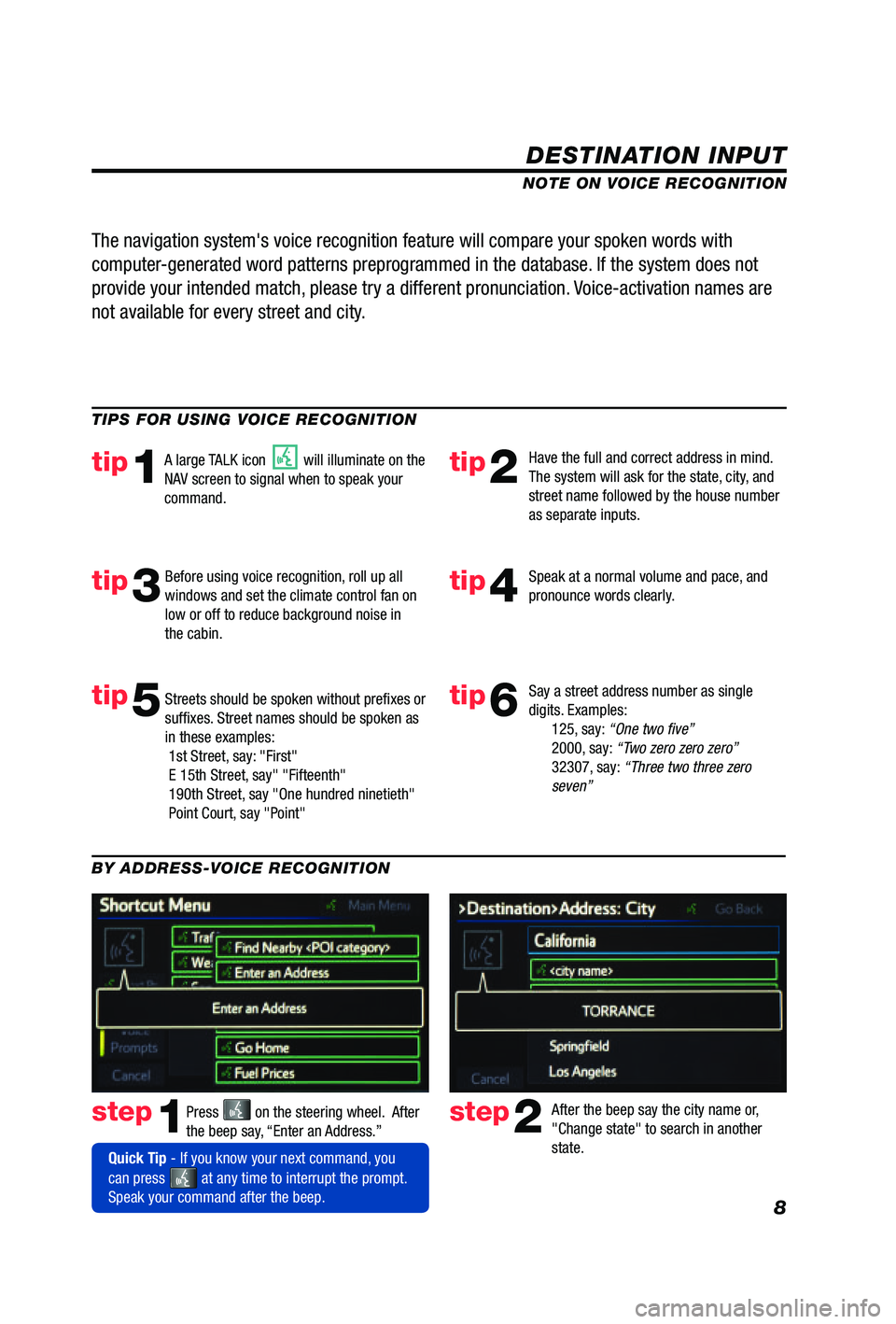
step1step2Press on the steering wheel. After
the beep say, “Enter an Address.” After the beep say the city name or,
"Change state" to search in another
state.
TIPS FOR USING VOICE RECOGNITION
NOTE ON VOICE RECOGNITION
Say a street address number as single
digits. Examples:
125, say: “One two fi ve”
2000, say: “Two zero zero zero”
32307, say: “Three two three zero
seven”
tip1tip2
tip3tip4
tip5
Have the full and correct address in mind.
The system will ask for the state, city, and
street name followed by the house number
as separate inputs.
Before using voice recognition, roll up all
windows and set the climate control fan on
low or off to reduce background noise in
the cabin. Speak at a normal volume and pace, and
pronounce words clearly.
Streets should be spoken without prefi xes or
suffi xes. Street names should be spoken as
in these examples:
1st Street, say: "First"
E 15th Street, say" "Fifteenth"
190th Street, say "One hundred ninetieth"
Point Court, say "Point"
A large TALK icon will illuminate on the
NAV screen to signal when to speak your
command.
The navigation system's voice recognition feature will compare your spoken words with
computer-generated word patterns preprogrammed in the database. If the system does not
provide your intended match, please try a different pronunciation. Voice-activation names are
not available for every street and city.
BY ADDRESS-VOICE RECOGNITION
Quick Tip - If you know your next command, you
can press
at any time to interrupt the prompt.
Speak your command after the beep.
tip6
Page 17 of 24
16
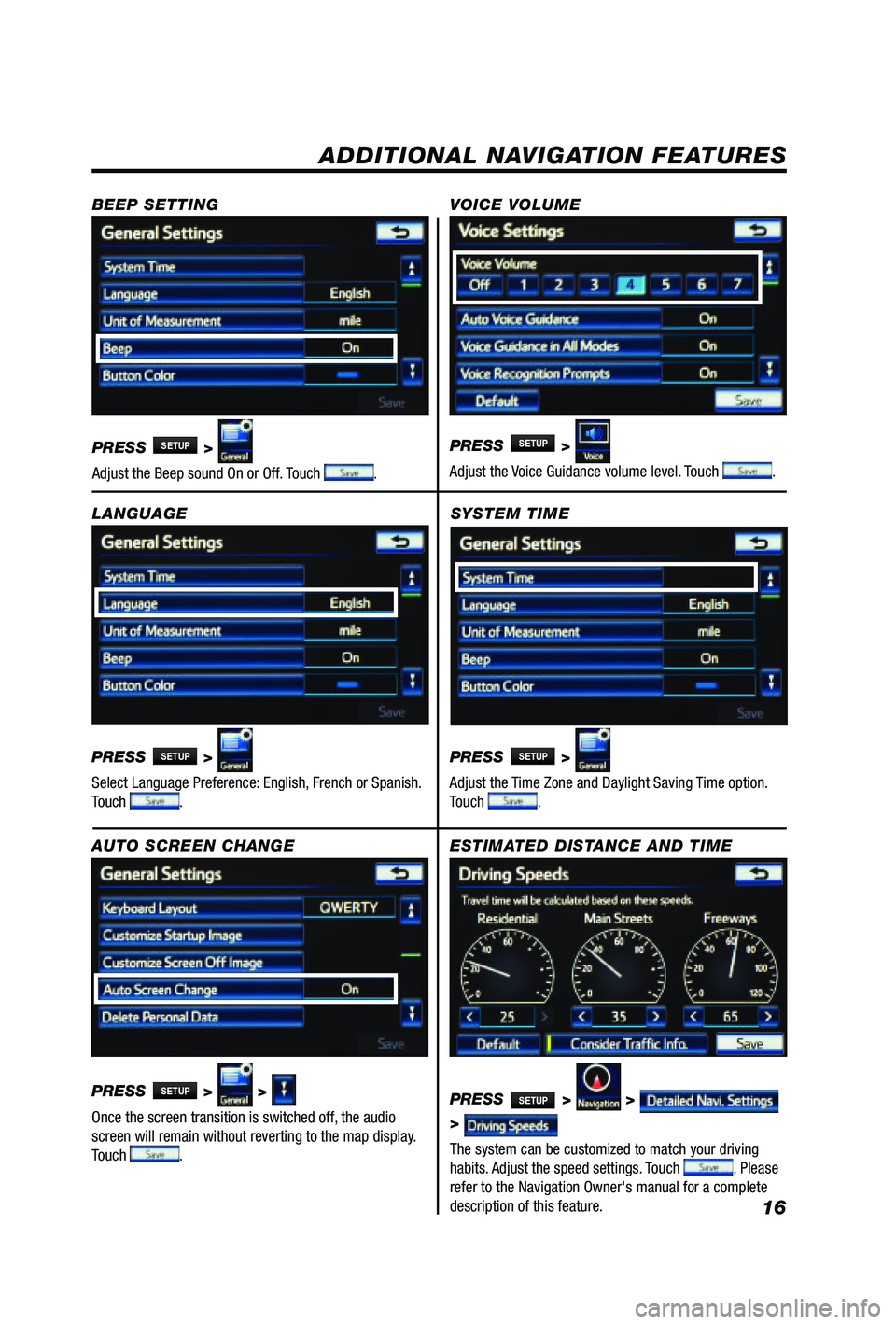
SYSTEM TIME
PRESS
SETUP >
Adjust the Time Zone and Daylight Saving Time option.
Touch
.
ADDITIONAL NAVIGATION FEATURES
LANGUAGE
PRESS
SETUP >
Select Language Preference: English, French or Spanish.
Touch
. PRESS
SETUP >
Adjust the Voice Guidance volume level. Touch
.
BEEP SETTING
VOICE VOLUME
AUTO SCREEN CHANGE
PRESS
SETUP > >
Once the screen transition is switched off, the audio
screen will remain without reverting to the map display.
Touch
.
PRESS
SETUP >
Adjust the Beep sound On or Off. Touch .
ESTIMATED DISTANCE AND TIME
The system can be customized to match your driving
habits. Adjust the speed settings. Touch
. Please
refer to the Navigation Owner's manual for a complete
description of this feature. PRESS
SETUP > >
>
Page 21 of 24
20
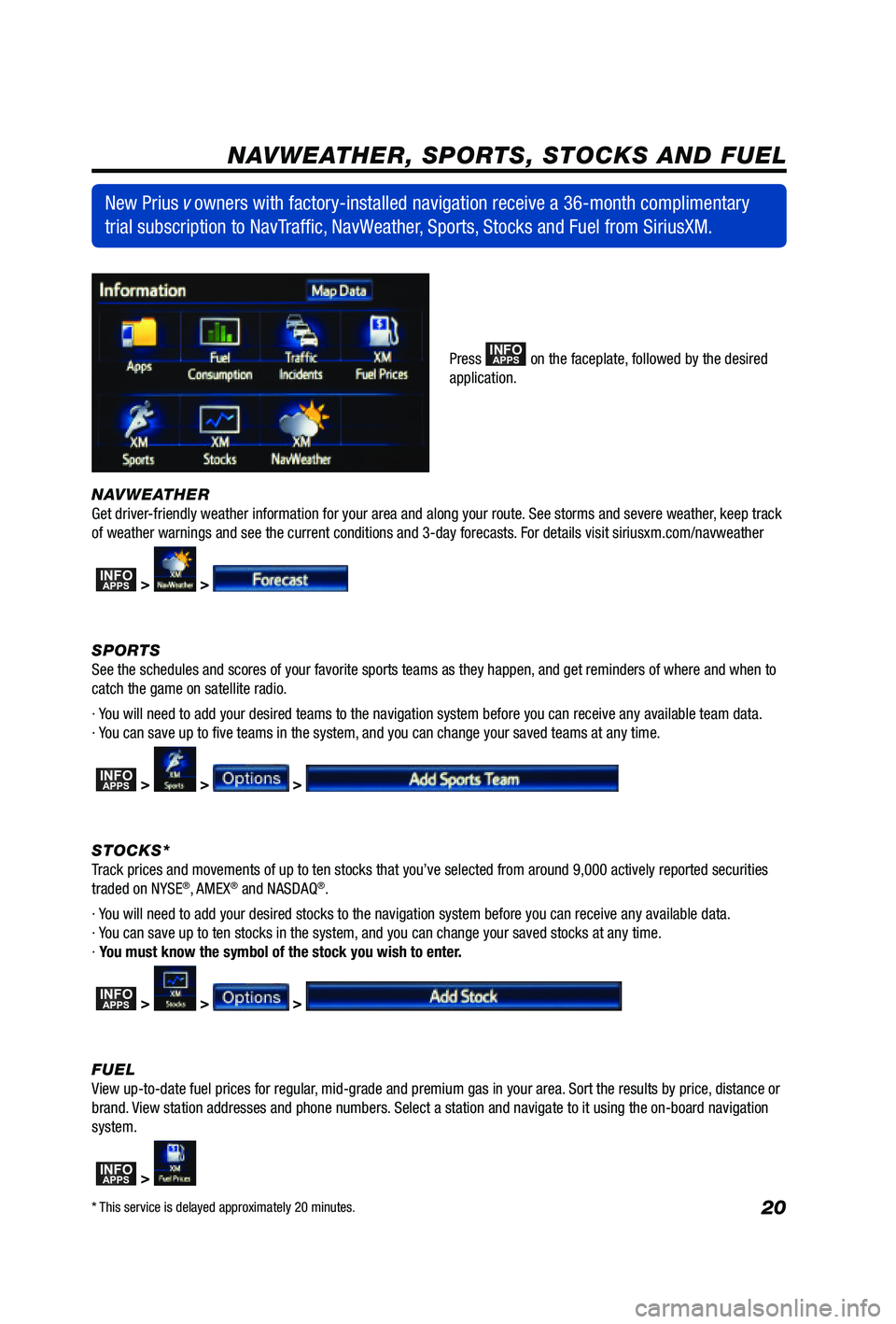
NAVWEATHER
Get driver-friendly weather information for your area and along your route. See storms and severe weather, keep track
of weather warnings and see the current conditions and 3-day forecasts. For details visit siriusxm.com/navweather
INFOAPPS > >
SPORTS
See the schedules and scores of your favorite sports teams as they happen, and get reminders of where and when to
catch the game on satellite radio.
· You will need to add your desired teams to the navigation system before you can receive any available team data.
· You can save up to five teams in the system, and you can change your saved teams at any time.
INFOAPPS > > >
STOCKS*
Track prices and movements of up to ten stocks that you’ve selected from around 9,000 actively reported securities
traded on NYSE
®, AMEX® and NASDAQ®.
· You will need to add your desired stocks to the navigation system before you can receive any available data.
· You can save up to ten stocks in the system, and you can change your saved stocks at any time.
· You must know the symbol of the stock you wish to enter.
INFOAPPS > > >
FUEL
View up-to-date fuel prices for regular, mid-grade and premium gas in your area. Sort the results by price, distance or
brand. View station addresses and phone numbers. Select a station and navigate to it using the on-board navigation
system.
INFOAPPS >
New Prius v owners with factory-installed navigation receive a 36-month complimentary
trial subscription to NavTraffic, NavWeather, Sports, Stocks and Fuel from SiriusXM.
Press INFOAPPS on the faceplate, followed by the desired
application.
NAVWEATHER, SPORTS, STOCKS AND FUEL
* This service is delayed approximately 20 minutes.