key TOYOTA PRIUS V 2012 (in English) Service Manual
[x] Cancel search | Manufacturer: TOYOTA, Model Year: 2012, Model line: PRIUS V, Model: TOYOTA PRIUS V 2012Pages: 564, PDF Size: 10.45 MB
Page 459 of 564
5
When trouble arises
459
5-2. Steps to take in an emergency
PRIUS v_U (OM47674U)
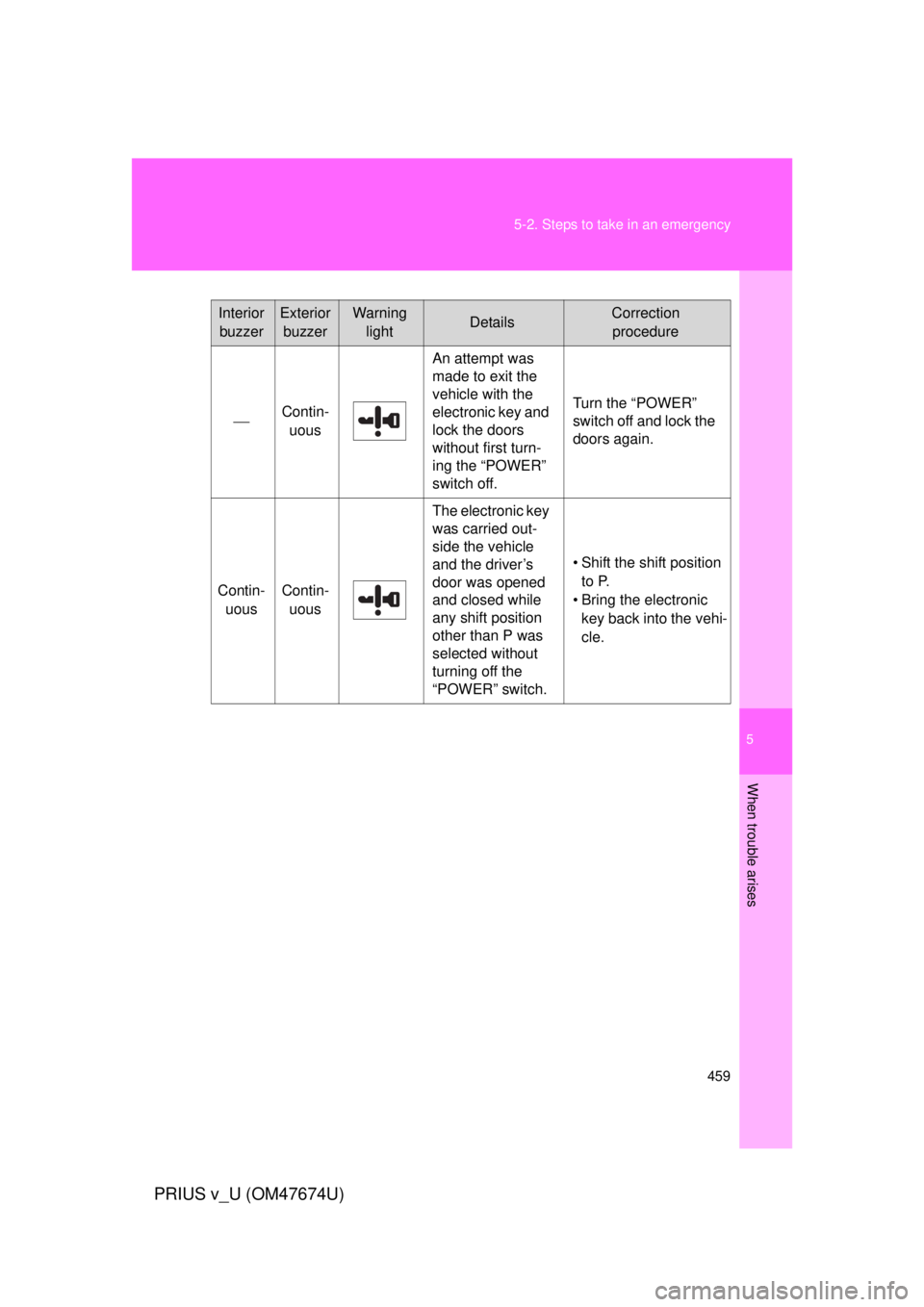
Interior
buzzerExterior buzzerWarning lightDetailsCorrection procedure
Contin- uous
An attempt was
made to exit the
vehicle with the
electronic key and
lock the doors
without first turn-
ing the “POWER”
switch off.
Turn the “POWER”
switch off and lock the
doors again.
Contin- uousContin-uous
The electronic key
was carried out-
side the vehicle
and the driver’s
door was opened
and closed while
any shift position
other than P was
selected without
turning off the
“POWER” switch.
• Shift the shift position to P.
• Bring the electronic key back into the vehi-
cle.
Page 474 of 564
474
5-2. Steps to take in an emergency
PRIUS v_U (OM47674U)
If the hybrid system will not start
Reasons for the hybrid system not starting vary depending on the
situation. Check the following a nd perform the appropriate proce-
dure:
■ The hybrid system will not start even though the correct
starting procedure is being followed ( P. 173)
One of the following may be the cause of the problem:
● The electronic key may not be functioning properly.
*
( P. 477)
● There may not be sufficient fuel in the vehicle’s tank.
Refuel the vehicle.
● There may be a malfunction in the immobilizer system.
*
( P. 1 1 6 )
● There may be a malfunction in the P position control system.
*
( P. 178, 445, 446)
*: It may not be possible to shift the shift position from P to another
position.
■ The interior lights and headlight s are dim, or the horn does
not sound or sounds at a low volume
One of the following may be the cause of the problem:
● The 12-volt battery may be discharged. ( P. 479)
● The 12-volt battery terminal c onnections may be loose or cor-
roded.
Page 476 of 564

476
5-2. Steps to take in an emergency
PRIUS v_U (OM47674U)
If you lose your keys
New genuine keys can be made by your Toyota dealer using the
other key and the key number stamped on your key number plate.
Page 477 of 564
5
When trouble arises
477
5-2. Steps to take in an emergency
PRIUS v_U (OM47674U)
If the electronic key does not operate properly
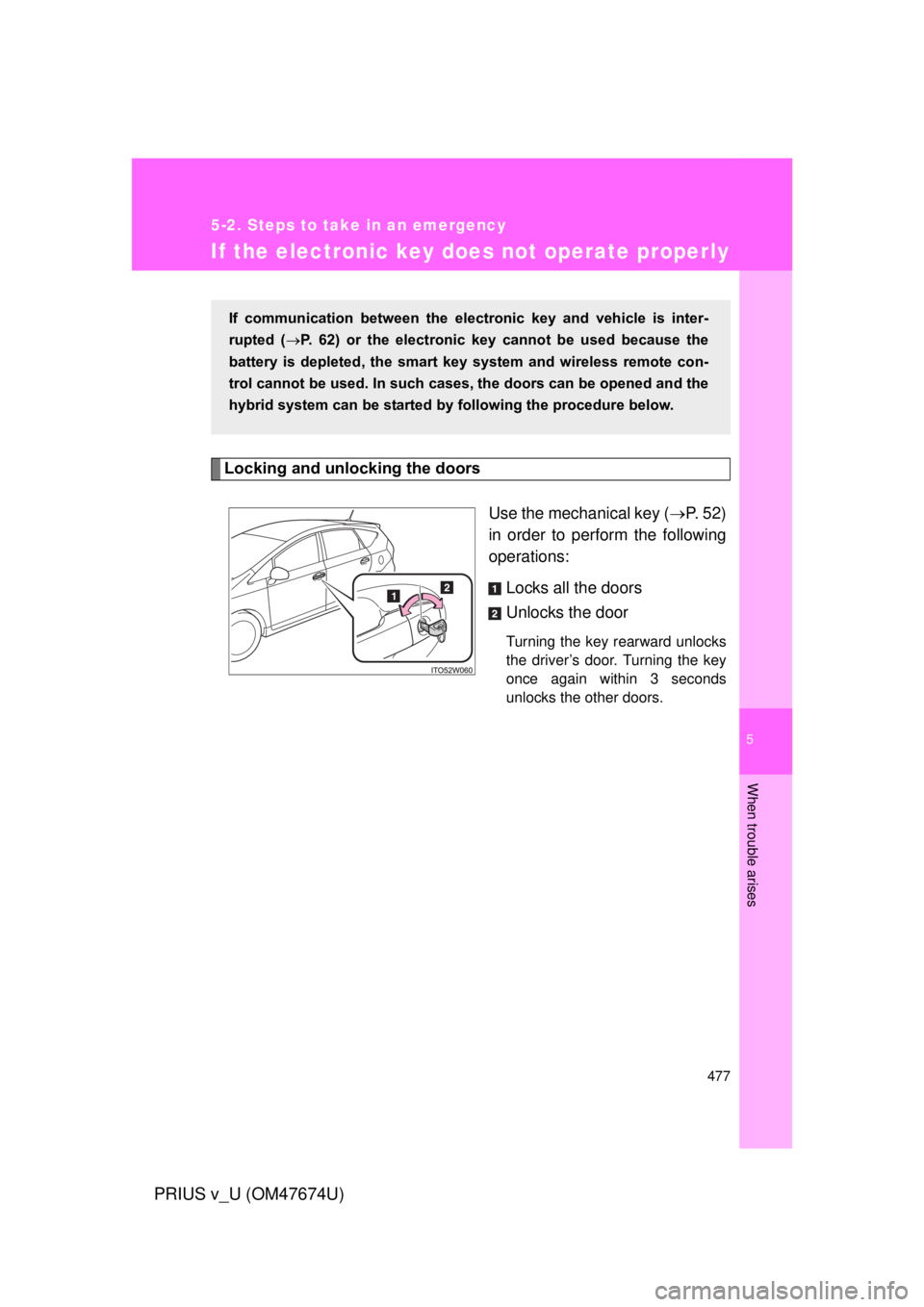
Locking and unlocking the doorsUse the mechanical key (P. 52)
in order to perform the following
operations:
Locks all the doors
Unlocks the door
Turning the key rearward unlocks
the driver’s door. Turning the key
once again within 3 seconds
unlocks the other doors.
If communication between the electronic key and vehicle is inter-
rupted ( P. 62) or the electronic key cannot be used because the
battery is depleted, the smart key system and wireless remote con-
trol cannot be used. In such cases, the doors can be opened and the
hybrid system can be started by following the procedure below.
Page 478 of 564
478 5-2. Steps to take in an emergency
PRIUS v_U (OM47674U)
Changing “POWER” switch modes and starting the hybrid
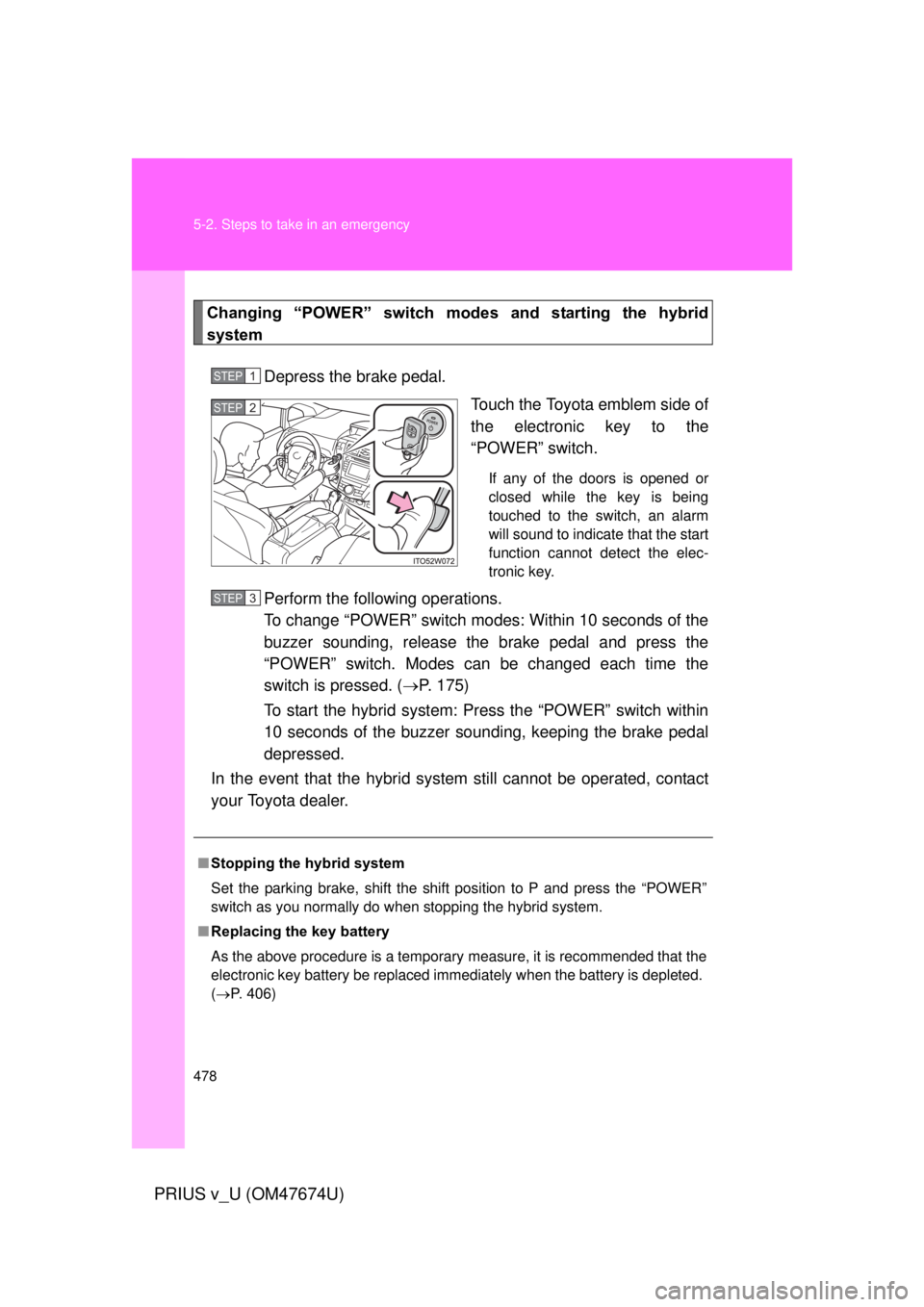
systemDepress the brake pedal. Touch the Toyota emblem side of
the electronic key to the
“POWER” switch.
If any of the doors is opened or
closed while the key is being
touched to the switch, an alarm
will sound to indicate that the start
function cannot detect the elec-
tronic key.
Perform the following operations.
To change “POWER” switch modes: Within 10 seconds of the
buzzer sounding, release the brake pedal and press the
“POWER” switch. Modes can be changed each time the
switch is pressed. ( P. 175)
To start the hybrid system: Press the “POWER” switch within
10 seconds of the buzzer soun ding, keeping the brake pedal
depressed.
In the event that the hybrid system still cannot be operated, contact
your Toyota dealer.
STEP 1
STEP 2
■ Stopping the hybrid system
Set the parking brake, shift the shift position to P and press the “POWER”
switch as you normally do when stopping the hybrid system.
■ Replacing the key battery
As the above procedure is a temporary measure, it is recommended that the
electronic key battery be replaced immediately when the battery is depleted.
(P. 406)
STEP 3
Page 524 of 564

524 6-2. Customization
PRIUS v_U (OM47674U)
ItemFunctionDefault settingCustom- ized
setting
Smart key
system
( P. 55) Smart key
system
ON OFF O O O
Select doors to
unlock Driver’s
door All doors – O O
Wireless
remote
control
( P. 69) Wireless remote
control
ON OFF – – O
Unlocking
operation Driver’s
door
unlocked
in 1-step,
all doors
unlocked
in 2-stepAll doors
unlocked in 1-step OOO
Panic function ON OFF – – O
Buzzer sounds
when pushing with any
door not closed ON OFF – – O
Smart key
system
( P. 55) and
wireless
remote
control
( P. 69) Operation
signals (Emer-
gency flashers)
ON OFF – O O
Operation
signals (Buzz-
ers) Level 7Level 1 to 6
OOO
OFF
Time elapsed
before auto-
matic door lock
function is acti-
vated if door is
not opened after
being unlocked 60 seconds
OFF
–OO
30 seconds
120
seconds
Page 525 of 564
525
6-2. Customization
6
Vehicle specifications
PRIUS v_U (OM47674U)
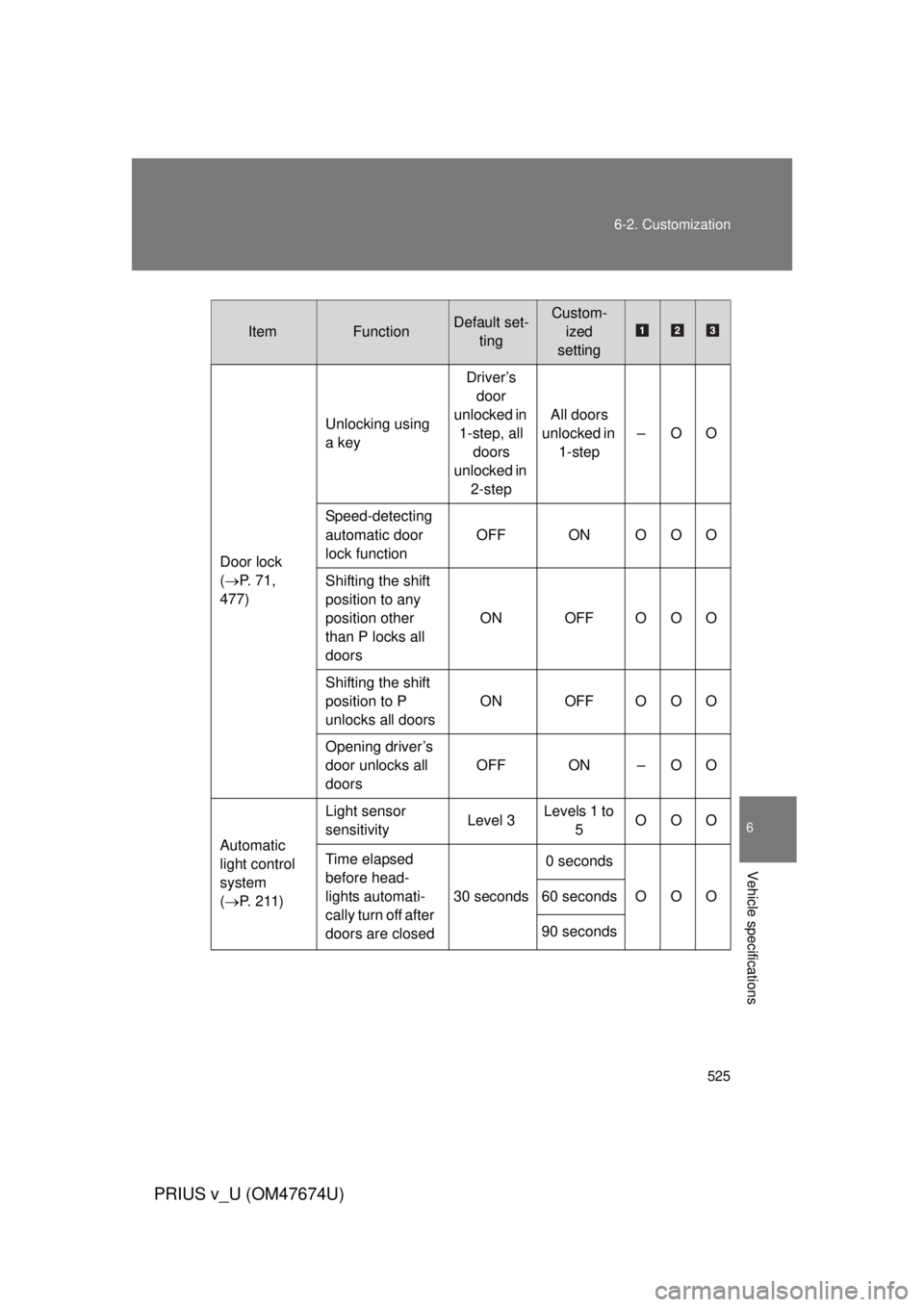
ItemFunctionDefault set-
tingCustom-ized
setting
Door lock
( P. 71,
477) Unlocking using
a key
Driver’s
door
unlocked in 1-step, all doors
unlocked in 2-step All doors
unlocked in 1-step –OO
Speed-detecting
automatic door
lock function OFF ON OOO
Shifting the shift
position to any
position other
than P locks all
doors ON OFF OOO
Shifting the shift
position to P
unlocks all doors ON OFF OOO
Opening driver’s
door unlocks all
doors OFF ON – O O
Automatic
light control
system
( P. 2 1 1 ) Light sensor
sensitivity
Level 3Levels 1 to
5 OOO
Time elapsed
before head-
lights automati-
cally turn off after
doors are closed 30 seconds
0 seconds
OOO
60 seconds
90 seconds
Page 526 of 564

526 6-2. Customization
PRIUS v_U (OM47674U)
*: When the customized settings are changed using the navigation system,these functions will be changed between ON and OFF simultaneously.
ItemFunctionDefault set- tingCustom-ized
setting
Illumination
( P. 299) Time elapsed
before lights turn
off
15 seconds7.5
seconds OOO
30 seconds
Operation when
the doors are
unlocked
*
ON OFF – O O
Operation after
the “POWER”
switch turned
OFF
*
ON OFF – O O
Operation when
you approach
the vehicle with
the electric key
on your person
(When the per-
sonal/interior
light main switch
is door position)
*
ON OFF – O O
Foot lights ON OFF – – O
Foot lights oper-
ation when the
vehicle is run-
ning ON OFF – – O
Page 528 of 564

528 6-2. Customization
PRIUS v_U (OM47674U)
ItemFunctionDefault set-tingCustom-ized
setting
Panoramic
roof shades
door lock-
linked auto-
matic closing
function
( P. 321) Operates when
the “POWER”
switch is turned
off and the doors
are locked from
inside or outside
the vehicle using
the wireless
remote control,
or are locked
from outside the
vehicle using the
smart key sys-
tem or mechani-
cal key
ON OFF – – O
Reverse
warning
buzzer
( P. 188) Operation sig-
nals (Buzzer)
when shifting
into R
Beeps
repeatedly Beeps
once ––O
Seat belt
reminder
( P. 450) Vehicle speed
linked seat belt
reminder buzzer
ON OFF – – O
Page 550 of 564

550
PRIUS v_U (OM47674U)
Alphabetical index
Alphabetical index
A/CAir conditioning filter ..............403
Automatic air conditioning
system ................................278
ABS ...........................................250
Air conditioning filter............... 403
Air conditioning system Air conditioning filter ..............403
Automatic air conditioning
system ................................278
Steering wheel climate remote control switches ......291
Airbags Airbag operating conditions............................ 125
Airbag precautions for your child .................................... 129
Airbag warning light............... 444
Curtain shield airbag operating
conditions............................ 125
Curtain shield airbag
precautions .........................129
Front passenger occupant classification system ...........135
General airbag precautions ...129
Knee airbag ...........................121
Locations of airbags ..............121
Modification and disposal of airbags ................................134
Proper driving posture ...........119
Side airbag operating
conditions............................ 125
Side airbag precautions ........ 129
Side and curtain shield airbags
operating conditions............125
Side and curtain shield airbags
precautions .........................129
SRS airbags .......................... 121
SRS airbag instructions for Canadian owners. ............... 536 Antenna .................................... 352
Anti-lock brake system ........... 250
Armrest ..................................... 319
Audio input
*
Audio remote control
switches
*
Audio system*
Audio/video system*
Automatic air conditioning system Air conditioning filter.............. 403
Air conditioning system ......... 278
Automatic air conditioning system ................................ 278
Steering wheel climate
remote control switches ...... 291
Automatic headlight leveling system .................................... 218
Automatic light control system .................................... 211
AUX port
*
Auxiliary box .................... 310, 327
Back door
Back door ................................ 76
Smart key system .. ................. 55
Wireless remote control .......... 69
Back-up lights Replacing light bulbs ............. 419
Wattage................................. 504
Battery Checking ............................... 382
If the 12-volt battery is
discharged .......................... 479
Preparing and checking
before winter ....................... 271
A
B