key battery TOYOTA PRIUS V 2012 Owners Manual (in English)
[x] Cancel search | Manufacturer: TOYOTA, Model Year: 2012, Model line: PRIUS V, Model: TOYOTA PRIUS V 2012Pages: 564, PDF Size: 10.45 MB
Page 5 of 564

1
2
3
4
5
6
7
5
PRIUS v_U (OM47674U)
4-1. Maintenance and careCleaning and protecting the vehicle exterior............ 346
Cleaning and protecting the vehicle interior............. 350
4-2. Maintenance Maintenance requirements ..................... 353
General maintenance.......... 356
Emission inspection and maintenance (I/M)
programs........................... 360
4-3. Do-it-yourself maintenance Do-it-yourself service precautions ....................... 361
Hood ................................... 364
Positioning a floor jack ........ 367
Engine compartment ........... 370
12-volt battery ..................... 382
Tires .................................... 387
Tire inflation pressure ......... 396
Wheels ................................ 400
Air conditioning filter............ 403
Electronic key battery.......... 406
Checking and replacing fuses ................................. 408
Light bulbs........................... 419 5-1. Essential information
Emergency flashers............ 434
If your vehicle needs to be towed................................ 435
If you think something is wrong ............................... 441
5-2. Steps to take in an emergency If a warning light turns on or a warning buzzer sounds .... 442
If you have a flat tire ........... 460
If the hybrid system will not start .................................. 474
If you lose your keys........... 476
If the electronic key does not operate properly ......... 477
If the 12-volt battery is discharged........................ 479
If your vehicle overheats .... 485
If the vehicle becomes stuck ................................. 489
If your vehicle has to be stopped in an
emergency ....................... 491
4Maintenance and care5When trouble arises
Page 24 of 564

24
PRIUS v_U (OM47674U)
●Safety Connect (U.S. mainland only)
If your Toyota has Safety Connect and if you have subscribed to those ser-
vices, please refer to the Safety Connect Telematics Subscription Service
Agreement for information on data collected and its usage.
CAUTION
■ General precautions while driving
Driving under the influence: Never drive your vehicle when under the influ-
ence of alcohol or drugs that have impaired your ability to operate your vehi-
cle. Alcohol and certain drugs delay reaction time, impair judgment and
reduce coordination, which could lead to an accident that could result in
death or serious injury.
Defensive driving: Always drive defensively. Anticipate mistakes that other
drivers or pedestrians might make and be ready to avoid accidents.
Driver distraction: Always give your full attention to driving. Anything that dis-
tracts the driver, such as adjusting controls, talking on a cellular phone or
reading can result in a collision with resulting death or serious injury to you,
your occupants or others.
■ General precaution regarding children’s safety
Never leave children unattended in the vehicle, and never allow children to
have or use the key.
Children may be able to start the vehicle or shift the vehicle into neutral.
There is also a danger that children may injure themselves by playing with
the windows or other features of the vehicle. In addition, heat build-up or
extremely cold temperatures inside the vehicle can be fatal to children.
■ Disposal of the hybrid battery (traction battery)
If your vehicle is disposed of without the hybrid battery (traction battery) hav-
ing been removed, there is a danger of serious electric shock if high voltage
parts, cables and their connectors are touched. In the event that your vehicle
must be disposed of, the hybrid battery (traction battery) must be disposed
of by your Toyota dealer or a qualified service shop. If the hybrid battery
(traction battery) is not disposed of properly, it may cause electric shock that
can result in death or serious injury.
Page 52 of 564
52
PRIUS v_U (OM47674U)
1-2. Key information
Keys
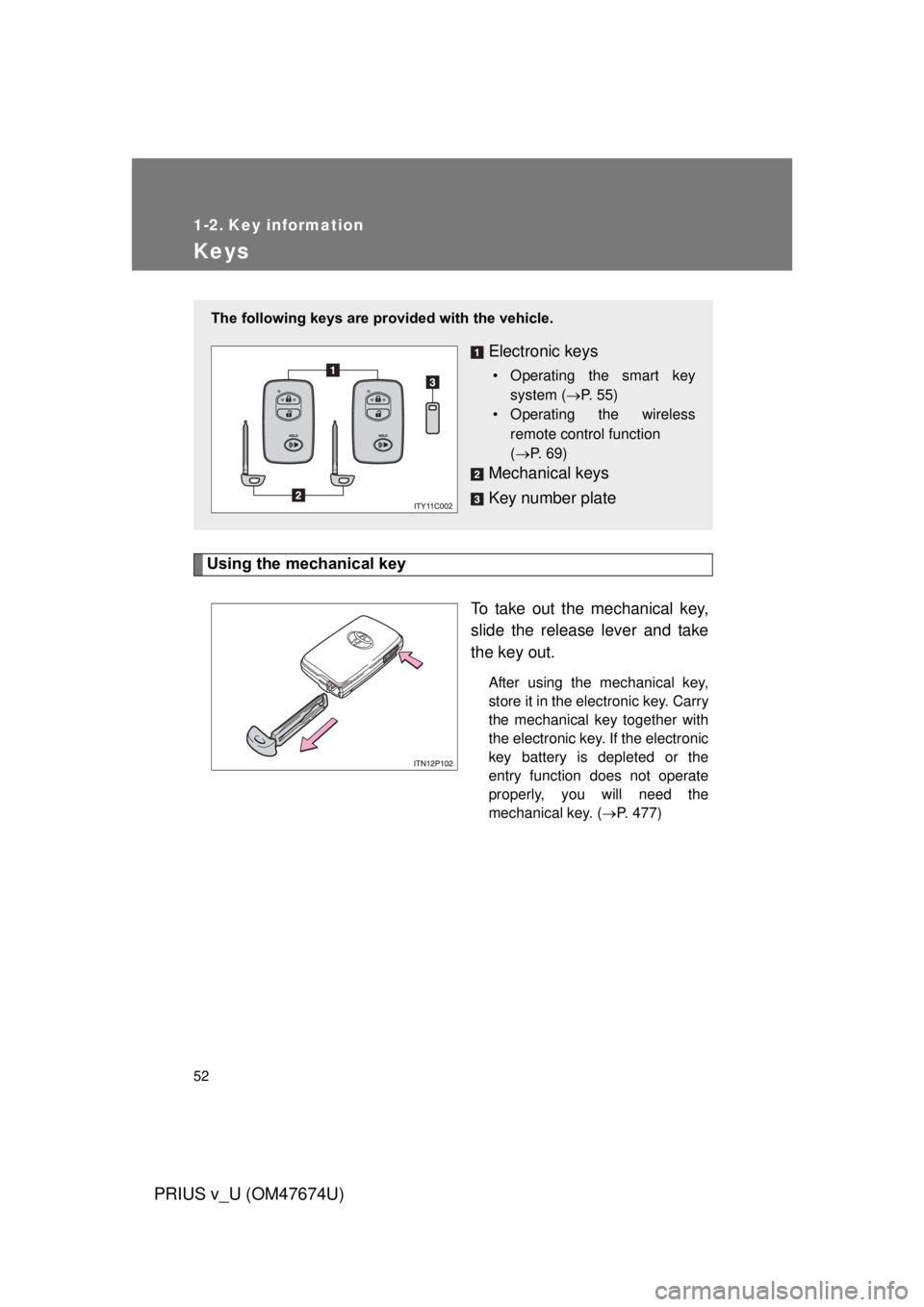
Using the mechanical keyTo take out the mechanical key,
slide the release lever and take
the key out.
After using the mechanical key,
store it in the electronic key. Carry
the mechanical key together with
the electronic key. If the electronic
key battery is depleted or the
entry function does not operate
properly, you will need the
mechanical key. (P. 477)
The following keys are prov ided with the vehicle.
Electronic keys
• Operating the smart key
system ( P. 55)
• Operating the wireless
remote control function
(P. 69)
Mechanical keys
Key number plate
Page 60 of 564

60 1-3. Opening, closing and locking the doors
PRIUS v_U (OM47674U)
■Alarms and warning lights
A combination of exterior and interior alarms as well as warning lights are
used to prevent theft of the vehicle and accidents resulting from erroneous
operation. Take appropriate measures depending on which warning light
comes on. ( P. 457)
The following table describes circumstances and correction procedures
when only alarms are sounded.
AlarmSituationCorrection procedure
Exterior alarm
sounds once for
10 seconds An attempt was made to
lock the doors using the
entry function while the
electronic key was still
inside the passenger com-
partment
Retrieve the elec-
tronic key from the
passenger compart-
ment and lock the
doors again
An attempt was made to
lock either front door by
opening a door and putting
the inside lock button into
the lock position, then
closing the door by pulling
on the outside door handle
with the electronic key still
inside the vehicle
An attempt was made to
lock the vehicle while a
door is open
Close all of the doors
and lock the doors
again
Interior alarm
pings once for 15
seconds The electronic key has a
low battery
Replace the electronic
key battery (
P. 406)
Page 61 of 564

61
1-3. Opening, closing and locking the doors
1
Before driving
PRIUS v_U (OM47674U)
■
Security feature
If a door is not opened within approximately 60 seconds after the vehicle is
unlocked, the security feature automatically locks the vehicle again.
■ Battery-saving function
The battery-saving function will be activated in order to prevent the elec-
tronic key battery and the 12-volt battery from being discharged while the
vehicle is not in operation for a long time.
● In the following situations, the smart key system may take some time to
unlock the doors.
• The electronic key has been left in an area of approximately 6 ft. (2 m)
of the outside of the vehicle for 10 minutes or longer.
• The smart key system has not been used for 5 days or longer.
● If the smart key system has not been used for 14 days or longer, the
doors cannot be unlocked at any doors except the driver’s door. In this
case, take hold of the driver’s door handle, or use the wireless remote
control or the mechanical key, to unlock the doors.
AlarmSituationCorrection procedure
Interior alarm
pings continu-
ously The “POWER” switch was
turned to ACCESSORY
mode while the driver’s
door was open (or the
driver’s door was opened
while the “POWER” switch
was in ACCESSORY
mode)
Close the driver’s
door, or turn the
“POWER” switch off
The driver’s door is open
with the shift position in R Close the driver’s
door, shift the shift
position to P, or turn
the “POWER” switch
off
Page 62 of 564

62 1-3. Opening, closing and locking the doors
PRIUS v_U (OM47674U)
■Conditions affecting operation
The smart key system, wireless remote control and immobilizer system use
weak radio waves. In the following situations, the communication between
the electronic key and the vehicle may be affected, preventing the smart key
system, wireless remote control and immobilizer system from operating
properly. (Ways of coping: P. 477)
● When the electronic key battery is depleted
● Near a TV tower, electric power plant, gas station, radio station, large dis-
play, airport or other facility that generates strong radio waves or electri-
cal noise
● When carrying a portable radio, ce llular phone, cordless phone or other
wireless communication devices
● When the electronic key is in contact with, or is covered by the following
metallic objects
• Cards to which aluminum foil is attached
• Cigarette boxes that have aluminum foil inside
• Metallic wallets or bags
• Coins
• Hand warmers made of metal
• Media such as CDs and DVDs
● When other wireless key (that emit radio waves) is being used nearby
● When carrying the electronic key together with the following devices that
emit radio waves
• Another vehicle’s electronic key or a wireless key that emits radio
waves
• Personal computers or personal digital assistants (PDAs)
• Digital audio players
• Portable game systems
● If window tint with a metallic content or metallic objects are attached to
the rear window
Page 66 of 564

66 1-3. Opening, closing and locking the doors
PRIUS v_U (OM47674U)
■If the smart key system does not operate properly
● Locking and unlocking the doors: Use the mechanical key. ( P. 477)
● Starting the hybrid system: P. 478
■ Electronic key battery depletion
● The standard battery life is 1 to 2 years.
● If the battery becomes low, an alarm will sound in the cabin when the
hybrid system stops. ( P. 60)
● As the electronic key always receives radio waves, the battery will
become depleted even if the electronic key is not used. The following
symptoms indicate that the electronic key battery may be depleted.
Replace the battery when necessary. ( P. 406)
• The smart key system or the wireless remote control does not operate.
• The detection area becomes smaller.
• The LED indicator on the key surface does not turn on.
● To avoid serious deterioration, do not leave the electronic key within 3 ft.
(1 m) of the following electrical appliances that produce a magnetic field:
•TVs
• Personal computers
• Cellular phones, cordless phones and battery chargers
• Recharging cellular phones or cordless phones
• Glass top ranges
• Table lamps
■ When the electronic key battery is fully depleted
P. 406
■ Customization
Settings (e.g. smart key system) can be changed.
(Customizable features P. 523)
Page 70 of 564
70 1-3. Opening, closing and locking the doors
PRIUS v_U (OM47674U)
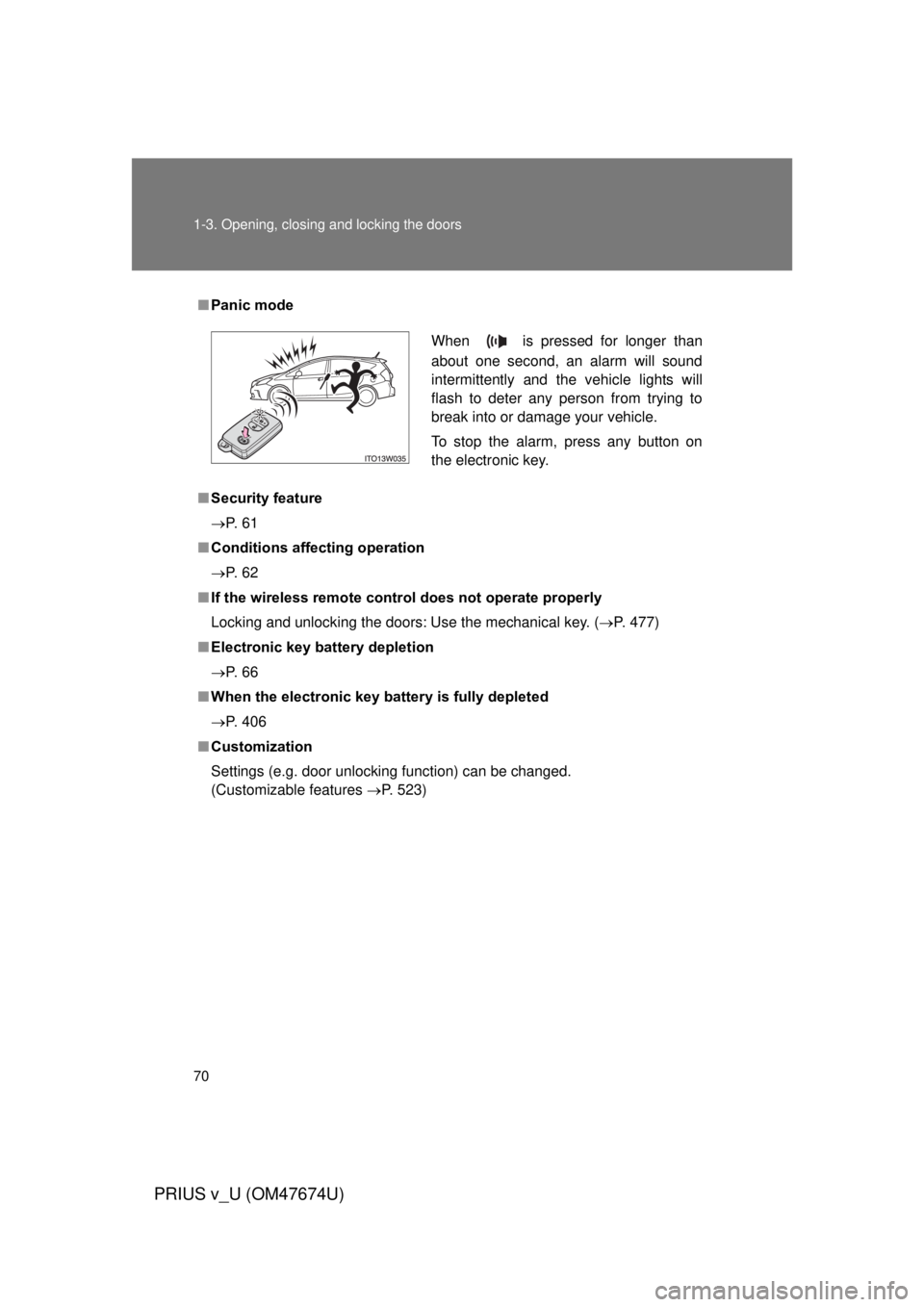
■Panic mode
■ Security feature
P. 6 1
■ Conditions affecting operation
P. 6 2
■ If the wireless remote cont rol does not operate properly
Locking and unlocking the doors: Use the mechanical key. ( P. 477)
■ Electronic key battery depletion
P. 6 6
■ When the electronic key battery is fully depleted
P. 406
■ Customization
Settings (e.g. door unlocking function) can be changed.
(Customizable features P. 523)
When is pressed for longer than
about one second, an alarm will sound
intermittently and the vehicle lights will
flash to deter any person from trying to
break into or damage your vehicle.
To stop the alarm, press any button on
the electronic key.
Page 176 of 564

176 2-1. Driving procedures
PRIUS v_U (OM47674U)
■Auto power off function
If the vehicle is left in ACCESSORY or ON mode (the hybrid system is not
operating) for more than an hour with the shift position in P, the “POWER”
switch will automatically turn off. However, this function cannot entirely pre-
vent the 12-volt battery from discharging. Do not leave the vehicle with the
“POWER” switch in ACCESSORY or ON mode for long periods of time when
the hybrid system is not operating.
■ Sounds and vibrations specific to a hybrid vehicle
P. 3 2
■ Electronic key battery depletion
P. 6 6
■ When the ambient temperature is lo w, such as during winter driving
conditions
The “READY” indicator may flash for a long time when the hybrid system is
starting. Driving will become possible once the “READY” indicator has illumi-
nated. Wait until the “READY” indicator has illuminated.
■ Conditions affecting operation
P. 6 2
■ Notes for the entry function
P. 6 3
■ If the hybrid system does not start
The immobilizer system may not have been deactivated. ( P. 116)
Page 177 of 564

177
2-1. Driving procedures
PRIUS v_U (OM47674U)
2
When driving
■
When the “POWER” switch indicator flashes in amber
The system may be malfunctioning. Have the vehicle inspected by your
Toyota dealer immediately.
■ If the “READY” indicator does not come on
If the “READY” indicator does not come on when you press the “POWER”
switch with the shift position in P and the brake pedal depressed, contact
your Toyota dealer immediately.
■ If the hybrid system is malfunctioning
P. 443
■ If the electronic key battery is depleted
P. 406
■ Operation of the “POWER” switch
● When operating the “POWER” switch, one short, firm press is enough. If
the switch is pressed improperly, the hybrid system may not start or the
“POWER” switch mode may not change. It is not necessary to press and
hold the switch.
● If attempting to restart the hybrid system immediately after turning the
“POWER” switch off, the hybrid system may not start in some cases.
After turning the “POWER” switch off, please wait a few seconds before
restarting the hybrid system.
■ Automatically P position selection function
P. 188