remote start TOYOTA PRIUS V 2012 Owners Manual (in English)
[x] Cancel search | Manufacturer: TOYOTA, Model Year: 2012, Model line: PRIUS V, Model: TOYOTA PRIUS V 2012Pages: 564, PDF Size: 10.45 MB
Page 63 of 564

63
1-3. Opening, closing and locking the doors
1
Before driving
PRIUS v_U (OM47674U)
■
Note for the entry function
● Even when the electronic key is within the effective range (detection
areas), the system may not operate properly in the following cases:
• The electronic key is too close to the window or outside door handle,
near the ground, or in a high place when the doors are locked or
unlocked.
• The electronic key is on the instrument panel, luggage cover, floor, or in the door pockets or glove box when the hybrid system is started or
“POWER” switch modes are changed.
● Do not leave the electronic key on top of the instrument panel or near the
door pockets when exiting the vehicle. Depending on the radio wave
reception conditions, it may be detected by the antenna outside the cabin
and the door will become lockable from the outside, possibly trapping the
electronic key inside the vehicle.
● As long as the electronic key is within the effective range, the doors may
be locked or unlocked by anyone.
● Even if the electronic key is not inside the vehicle, it may be possible to
start the hybrid system if the electronic key is near the window.
● The doors may unlock if a large amount of water splashes on the door
handle, such as in the rain or in a car wash when the electronic key is
within the effective range. (The door will automatically be locked after
approximately 60 seconds if the doors are not opened and closed.)
● If the wireless remote control is used to lock the doors when the elec-
tronic key is near the vehicle, there is a possibility that the door may not
be unlocked by the entry function. (Use the wireless remote control to
unlock the doors.)
Page 66 of 564

66 1-3. Opening, closing and locking the doors
PRIUS v_U (OM47674U)
■If the smart key system does not operate properly
● Locking and unlocking the doors: Use the mechanical key. ( P. 477)
● Starting the hybrid system: P. 478
■ Electronic key battery depletion
● The standard battery life is 1 to 2 years.
● If the battery becomes low, an alarm will sound in the cabin when the
hybrid system stops. ( P. 60)
● As the electronic key always receives radio waves, the battery will
become depleted even if the electronic key is not used. The following
symptoms indicate that the electronic key battery may be depleted.
Replace the battery when necessary. ( P. 406)
• The smart key system or the wireless remote control does not operate.
• The detection area becomes smaller.
• The LED indicator on the key surface does not turn on.
● To avoid serious deterioration, do not leave the electronic key within 3 ft.
(1 m) of the following electrical appliances that produce a magnetic field:
•TVs
• Personal computers
• Cellular phones, cordless phones and battery chargers
• Recharging cellular phones or cordless phones
• Glass top ranges
• Table lamps
■ When the electronic key battery is fully depleted
P. 406
■ Customization
Settings (e.g. smart key system) can be changed.
(Customizable features P. 523)
Page 334 of 564

334 3-5. Other interior features
PRIUS v_U (OM47674U)
■Programming an entry gate (f or U.S.A. owners)/Programming
a devices in the Canadian market
Place the remote control transmitter 1 to 3 in. (25 to 75 mm)
away from the HomeLink
® buttons.
Keep the HomeLink® indicator light in view while programming.
Press and hold the selected HomeLink® button.
Repeatedly press and release (cycle) the remote control
transmitter for 2 seconds each until step 4 is completed.
When the HomeLink
® indicator light starts to flash rapidly,
release the buttons.
Test the HomeLink
® operation by pressing the newly pro-
grammed button. Check to see if the gate/device operates
correctly.
Repeat the steps above to program another device for any of
the remaining HomeLink
® buttons.
■ Programming other devices
To program other devices such as home security systems, home
door locks and lighting, contact your Toyota dealer for assistance.
■ Reprogramming a button
The individual HomeLink
® buttons cannot be erased but can be
reprogrammed. To reprogram a button, follow the “Reprogramming
a HomeLink
® button” instructions.
STEP 1
STEP 2
STEP 3
STEP 4
STEP 5
STEP 6
Page 384 of 564

384 4-3. Do-it-yourself maintenance
PRIUS v_U (OM47674U)
■After recharging/reconnecting the 12-volt battery
● Unlocking the doors using the smart key system may not be possible
immediately after reconnecting the 12-volt battery. If this happens, use
the wireless remote control or the mechanical key to lock/unlock the
doors.
● Start the hybrid system with the “POWER” switch in ACCESSORY mode.
The hybrid system may not start with the “POWER” switch turned off.
However, the hybrid system will operate normally from the second
attempt.
● The “POWER” switch mode is recorded by the vehicle. If the 12-volt bat-
tery is reconnected, the vehicle will return the “POWER” switch mode to
the status it was in before the 12-volt battery was disconnected. Make
sure to turn off the power before disconnect the 12-volt battery. Take
extra care when connecting the 12-volt battery if the “POWER” switch
mode prior to discharge is unknown.
● Restart the hybrid system, depress the brake pedal, and confirm that it is
possible to shift into each shift position.
If the system will not start even after multiple attempts at all methods above,
contact your Toyota dealer.
CAUTION
■ Chemicals in the 12-volt battery
The 12-volt battery contains poisonous and corrosive sulfuric acid and may
produce hydrogen gas which is flammable and explosive. To reduce the risk
of death or serious injury, take the following precautions while working on or
near the 12-volt battery:
● Do not cause sparks by touching the 12-volt battery terminals with tools.
● Do not smoke or light a match near the 12-volt battery.
● Avoid contact with eyes, skin and clothes.
● Never inhale or swallow electrolyte.
● Wear protective safety glasses when working near the 12-volt battery.
● Keep children away from the 12-volt battery.
Page 477 of 564
5
When trouble arises
477
5-2. Steps to take in an emergency
PRIUS v_U (OM47674U)
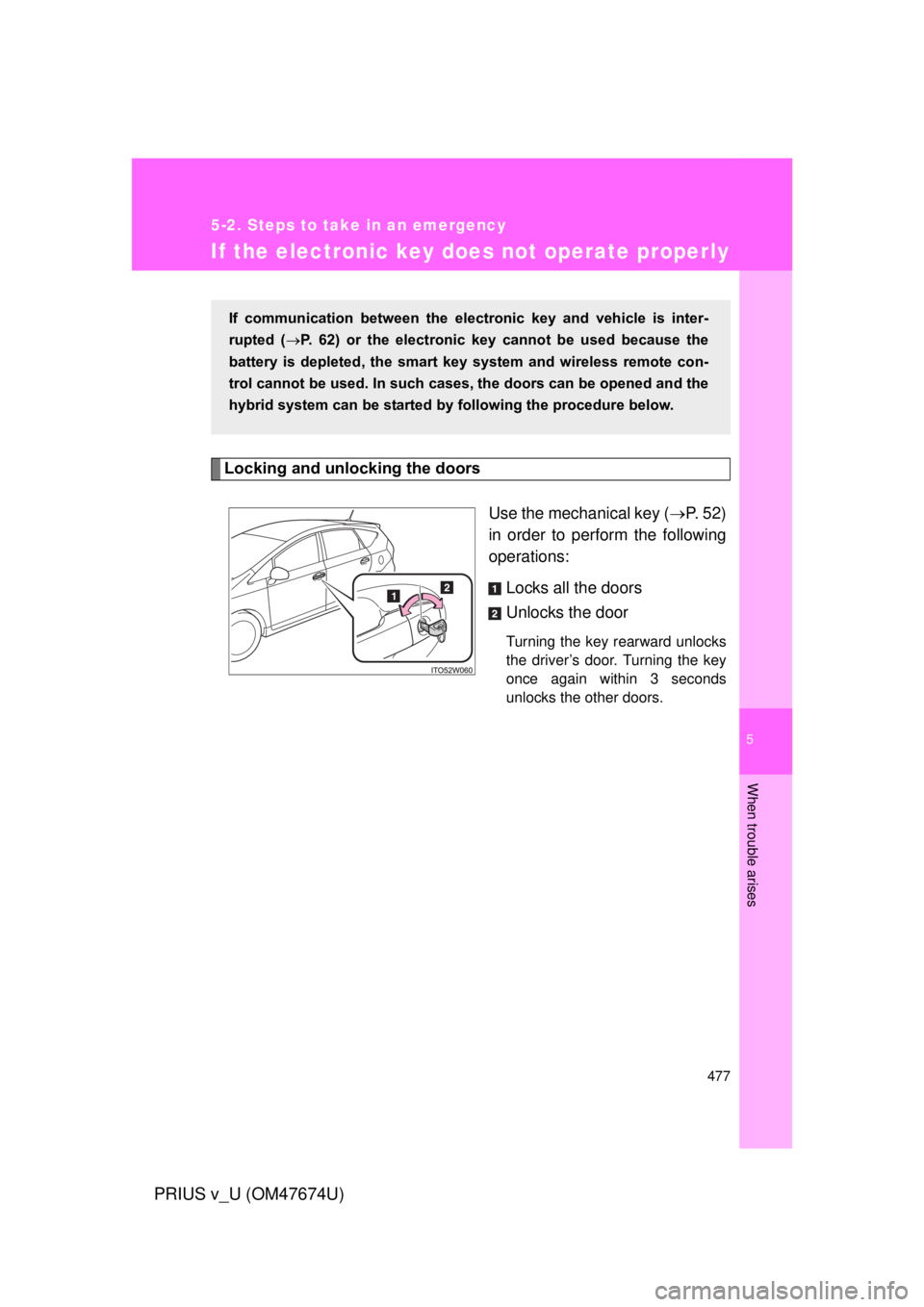
If the electronic key does not operate properly
Locking and unlocking the doorsUse the mechanical key (P. 52)
in order to perform the following
operations:
Locks all the doors
Unlocks the door
Turning the key rearward unlocks
the driver’s door. Turning the key
once again within 3 seconds
unlocks the other doors.
If communication between the electronic key and vehicle is inter-
rupted ( P. 62) or the electronic key cannot be used because the
battery is depleted, the smart key system and wireless remote con-
trol cannot be used. In such cases, the doors can be opened and the
hybrid system can be started by following the procedure below.
Page 552 of 564

552 Alphabetical index
PRIUS v_U (OM47674U)
Daytime running light system .................................... 216
Deck board ............................... 326
Defogger
Rear window .........................293
Side mirrors ...........................293
Dimensions............................... 494
Dinghy towing .......................... 276
Display Dynamic radar cruise control .................................233
Trip information ..................... 199
Do-it-yourself main tenance..... 361
Door lock Back door ................................76
Side doors ............................... 71
Smart key system... ................. 55
Wireless remote control .......... 69
Door pockets ............................ 311
Doors Back door ................................76
Door glasses .........................109
Door lock ..................... 55, 69, 71
Rear door child-protector ........72
Side doors ............................... 71
Driver’s seat belt reminder light ......................................... 449
Driving
Break-in tips .......................... 163
Correct posture ..................... 119
Procedures............................ 162
Winter driving tips.................. 271 Eco drive mode switch ............ 185
Electric power steering ........... 250
Electronic key
If the electronic key does not operate properly ................. 477
Replacing battery .................. 406
Emergency, in case of If a warning buzzer sounds ................................ 442
If a warning light turns on ...... 442
If the electronic key does not operate properly ................. 477
If the hybrid system will not start..................................... 474
If the 12-volt battery is
discharged .......................... 479
If you have a flat tire ............. 460
If you lose your keys ............. 476
If you think something is wrong .................................. 441
If your vehicle becomes stuck ................................... 489
If your vehicle has to be stopped in an
emergency .......................... 491
If your vehicle needs to be towed .................................. 435
If your vehicle overheats ....... 485
Emergency flashers Switch ................................... 434DE
Page 554 of 564

554 Alphabetical index
PRIUS v_U (OM47674U)
Garage door opener.................330
Gauges ......................................195
Glove boxes..............................305
Hands-free system (for cellular phone)
*
Hazard lights Switch.................................... 434
Head restraints Adjustment .............................90
Headlight cleaner ..................... 228
Headlights
Cleaner.................................. 228
Replacing light bulbs ............. 419
Switch.................................... 211
Wattage .................................504
Heaters
Automatic air conditioning system ................................278
Seat heaters .......................... 317
Side mirrors ...........................293
Hill-start assist control ............254
Hood .......................................... 364
Hooks Cargo .................................... 326
Horn...........................................194
Hybrid system Emergency shut off system .....35
Energy monitor/consumption screen..............40
High voltage components........34
Hybrid System Indicator ........ 201
Ignition switch........................173
“POWER” switch ...................173 I/M test ...................................... 360
Identification
Engine ................................... 496
Vehicle .................................. 495
Ignition switch.......................... 173
Illuminated entry system......... 299
Immobilizer system ................. 116
Indicator lights ......................... 206
Initialization Items to initialize ................... 529
Inside rear view mirror ............ 105
Instrument panel light control .................................... 197
Interior lights Interior lights ......................... 299
Switch ................................... 300
Wattage................................. 504
Jack Positioning a floor jack .......... 367
Vehicle-equipped jack ........... 460
Jack handle .............................. 460
Keyless entry ............................. 69
Keys Electronic key.......................... 52
If the electronic key does not
operate properly ................. 477
If you lose your keys ............. 476
Key number............................. 52
Keyless entry .......................... 69
Keys ........................................ 52
Mechanical key ....................... 52
“POWER” switch ................... 173
Wireless remote control key.... 69
Knee airbag .............................. 121
G
H
I
J
K
Page 557 of 564

557
Alphabetical index
PRIUS v_U (OM47674U)
Seats
Adjustment ...................... 81, 85
Adjustment precautions .................... 83, 88
Child seats/child restraint system installation.............. 146
Cleaning ............................... 350
Flattening seatbacks .............. 82
Folding down the seatbacks ... 86
Head restraint ......................... 90
Properly sitting in the seat .... 119
Seat heaters ......................... 317
Service reminder indicators .............................. 206
Shift lever
Transmission ........................ 183
Side airbags ............................. 121
Side marker lights Switch ................................... 211
Side mirrors Adjusting and folding ............ 107
Smart key system
Antenna location..................... 58
Entry functions........................ 55
Starting the hybrid system .... 173
SOS button .............................. 338
Spare tire Inflation pressure .................. 502
Storage location ................... 460
Spark plug................................ 500
Specifications .......................... 494
Speedometer ........................... 195 Steering wheel
Adjustment ............................104
Audio switches
*
Storage feature.........................303
StuckIf your vehicle becomes
stuck ...................................489
Sun visors.................................312
Sunshade Panoramic roof ......................320
Switch Audio remote control switches
*
Cruise control switch .............229
Driving mode selectswitch ..................................185
Eco drive mode switch ..........185
Emergency flasher switch .....434
EV drive mode switch............180
Fog light switch .....................219
Hazard light switch ................434
Headlight cleaner switch .......228
Ignition switch........................173
Light switches........................211
Panoramic roof shades switch ..................................320
Power door lock switch ...........71
“POWER” switch ...................173
Power window switch ............ 109
Pre-collision braking off switch ..................................257
Talk switch
*
Telephone switch*
Tire pressure warning reset switch ..................................389
Window lock switch ...............109
Wipers and washer switch ....221
*: Refer to “Display Audio System Owner’s Manual” or “Navigation System Owner’s Manual”.