tire pressure reset TOYOTA PRIUS V 2012 Owners Manual (in English)
[x] Cancel search | Manufacturer: TOYOTA, Model Year: 2012, Model line: PRIUS V, Model: TOYOTA PRIUS V 2012Pages: 564, PDF Size: 10.45 MB
Page 14 of 564
14
PRIUS v_U (OM47674U)
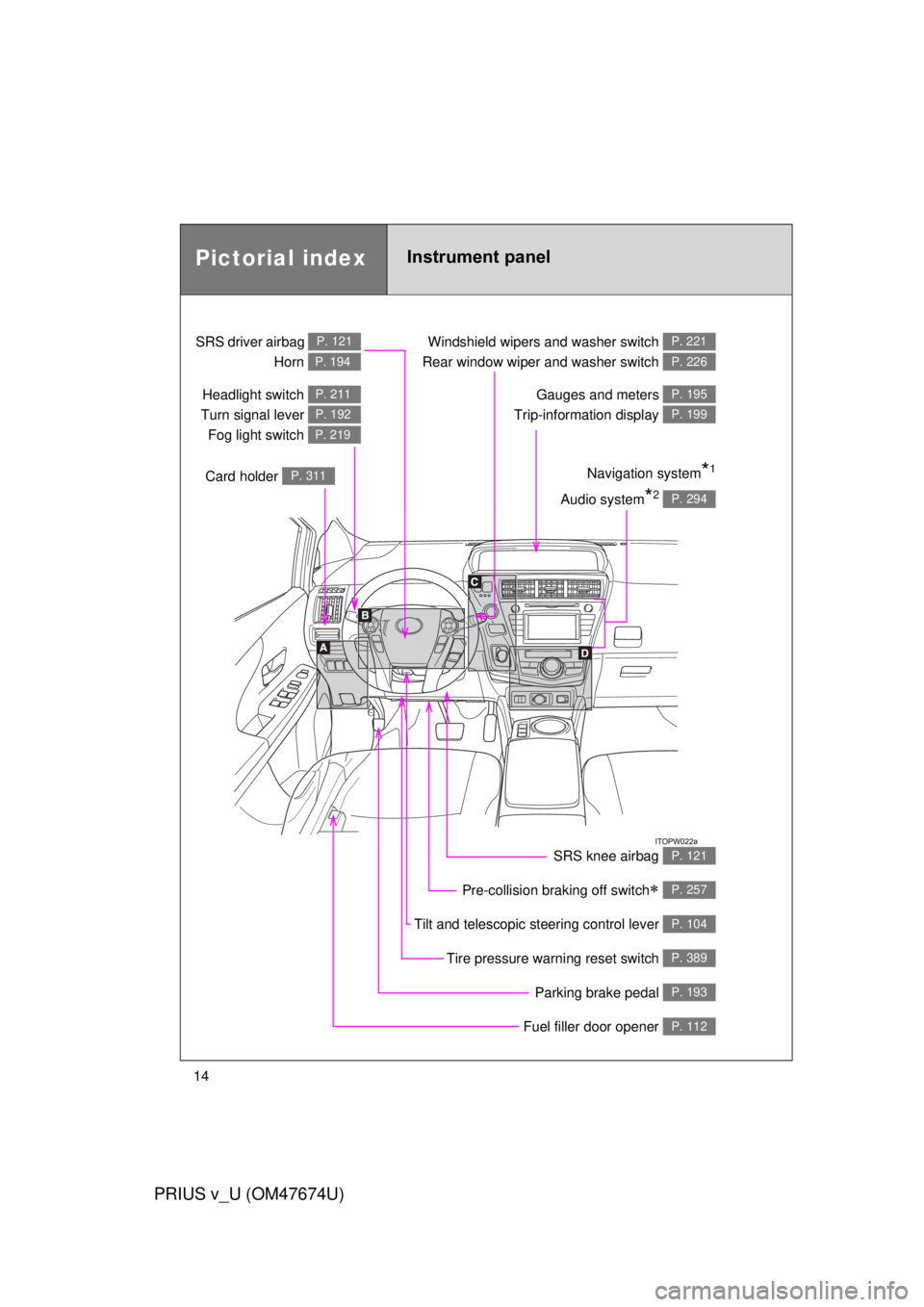
Pictorial indexInstrument panel
Headlight switch
Turn signal lever Fog light switch P. 211
P. 192
P. 219
Pre-collision braking off switch P. 257
Parking brake pedal P. 193
Fuel filler door opener P. 112
Tire pressure warning reset switch P. 389
Windshield wipers and washer switch
Rear window wiper and washer switch P. 221
P. 226
Gauges and meters
Trip-information display P. 195
P. 199
Audio system*2 P. 294
Navigation system*1
SRS driver airbag
Horn P. 121
P. 194
Card holder P. 311
Tilt and telescopic steering control lever P. 104
SRS knee airbag P. 121
Page 390 of 564
390 4-3. Do-it-yourself maintenance
PRIUS v_U (OM47674U)
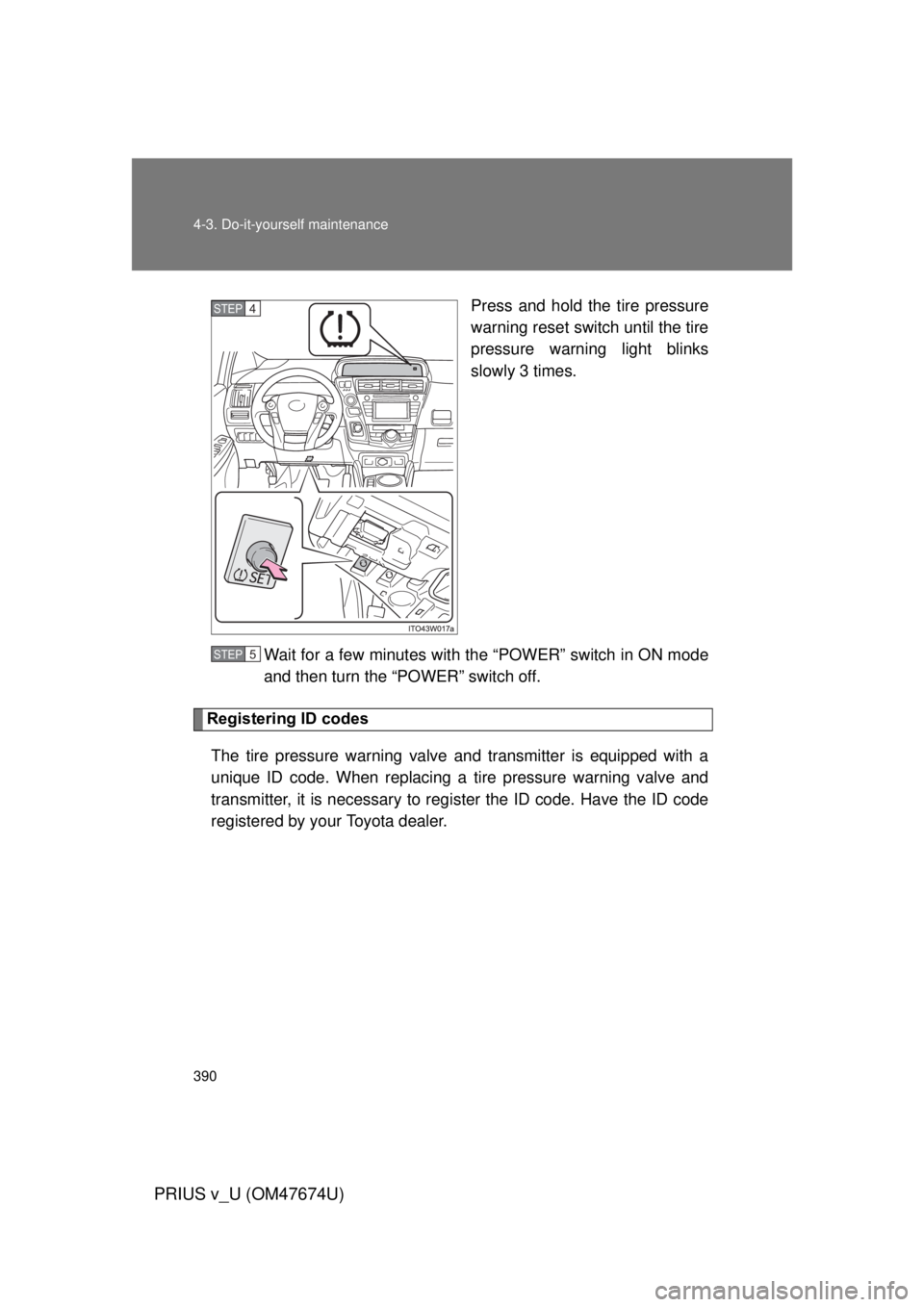
Press and hold the tire pressure
warning reset switch until the tire
pressure warning light blinks
slowly 3 times.
Wait for a few minutes with th e “POWER” switch in ON mode
and then turn the “POWER” switch off.
Registering ID codes
The tire pressure warning valve and transmitter is equipped with a
unique ID code. When replacing a tire pressure warning valve and
transmitter, it is necessary to regi ster the ID code. Have the ID code
registered by your Toyota dealer.
STEP 4
STEP 5
Page 393 of 564

393
4-3. Do-it-yourself maintenance
PRIUS v_U (OM47674U)
4
Maintenance and care
■If you press the tire pressure warning reset switch accidentally
If initialization is performed, adjust t
he tire inflation pressure to the speci-
fied level and initialize the tire pressure warning system again.
■When initialization of the tire pressure warning system has failed
Initialization can be completed in a few minutes. However, in the follow-
ing cases, the settings have not been recorded and the system will not
operate properly. If repeated attempts to record tire inflation pressure
settings are unsuccessful, have the vehicle inspected by your Toyota
dealer.
●When operating the tire pressure warning reset switch, the tire pres-
sure warning light doe s not blink 3 times.
●After carrying out the initialization procedure, the tire pressure warn-
ing light blinks for 1 minute then stays on after driving for 20 minutes.
■Tire pressure warning system certification
For vehicles sold in the U.S.A.
MODEL/FCC IDs:
Transmitter: PAXPMV107J
Receiver: HYQ13BDE
NOTE:
This device complies with part 15 of the FCC Rules. Operation is subject
to the following two conditions: (1) This device may not cause harmful
interference, and (2) this device must accept any interference received,
including interference that may cause undesired operation.
FCC WARNING:
Changes or modifications not expre ssly approved by the party responsi-
ble for compliance could void the user’s authority to operate the equip-
ment.
For vehicles sold in Canada
Operation is subject to the following two conditions; (1) this device may
not cause interference, and (2) this de vice must accept any interference,
including interference that may caus e undesired operation of the device.
Page 394 of 564

394 4-3. Do-it-yourself maintenance
PRIUS v_U (OM47674U)
CAUTION
■When inspecting or replacing tires
Observe the following precautions to prevent accidents.
Failure to do so may cause damage to parts of the drive train as well as
dangerous handling characteristics, which may lead to an accident
resulting in death or serious injury.
●Do not mix tires of different makes, models or tread patterns.
Also, do not mix tires of remarkably different treadwear.
●Do not use tire sizes other than those recommended by Toyota.
●Do not mix differently constructed ti res (radial, bias-belted or bias-ply
tires).
●Do not mix summer, all season and snow tires.
●Do not use tires that have been used on another vehicle.
Do not use tires if you do not know how they were used previously.
■When initializing the tire pressure warning system
Do not operate the tire pressure wa rning reset switch without first adjust-
ing the tire inflation pr essure to the specified level. Otherwise, the tire
pressure warning light may not come on even if the tire inflation pressure
is low, or it may come on when the tire inflation pressure is actually nor-
mal.
Page 469 of 564
5
When trouble arises
469
5-2. Steps to take in an emergency
PRIUS v_U (OM47674U)
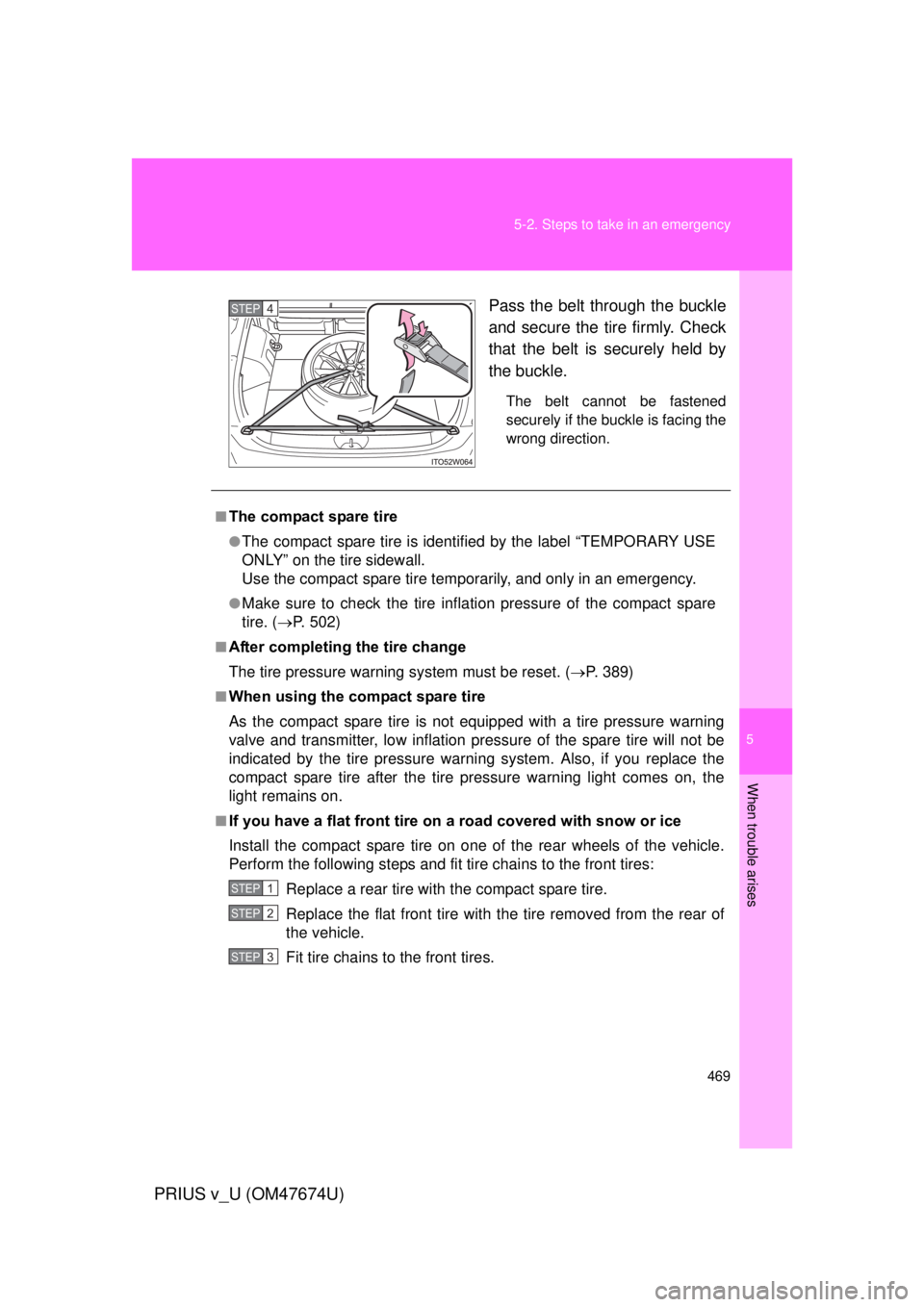
Pass the belt through the buckle
and secure the tire firmly. Check
that the belt is securely held by
the buckle.
The belt cannot be fastened
securely if the buckle is facing the
wrong direction.
STEP 4
■The compact spare tire
●The compact spare tire is identifi
ed by the label “TEMPORARY USE
ONLY” on the tire sidewall.
Use the compact spare tire temporarily, and only in an emergency.
●Make sure to check the tire inflation pressure of the compact spare
tire. ( P. 502)
■After completing the tire change
The tire pressure warning system must be reset. (P. 389)
■When using the compact spare tire
As the compact spare tire is not equipped with a tire pressure warning
valve and transmitter, low inflation pressure of the spare tire will not be
indicated by the tire pressure warning system. Also, if you replace the
compact spare tire after the tire pressure warning light comes on, the
light remains on.
■If you have a flat front tire on a road covered with snow or ice
Install the compact spare tire on one of the rear wheels of the vehicle.
Perform the following steps and fit tire chains to the front tires:
Replace a rear tire with the compact spare tire.
Replace the flat front tire with the tire removed from the rear of
the vehicle.
Fit tire chains to the front tires.
STEP 1
STEP 2
STEP 3
Page 557 of 564

557
Alphabetical index
PRIUS v_U (OM47674U)
Seats
Adjustment ...................... 81, 85
Adjustment precautions .................... 83, 88
Child seats/child restraint system installation.............. 146
Cleaning ............................... 350
Flattening seatbacks .............. 82
Folding down the seatbacks ... 86
Head restraint ......................... 90
Properly sitting in the seat .... 119
Seat heaters ......................... 317
Service reminder indicators .............................. 206
Shift lever
Transmission ........................ 183
Side airbags ............................. 121
Side marker lights Switch ................................... 211
Side mirrors Adjusting and folding ............ 107
Smart key system
Antenna location..................... 58
Entry functions........................ 55
Starting the hybrid system .... 173
SOS button .............................. 338
Spare tire Inflation pressure .................. 502
Storage location ................... 460
Spark plug................................ 500
Specifications .......................... 494
Speedometer ........................... 195 Steering wheel
Adjustment ............................104
Audio switches
*
Storage feature.........................303
StuckIf your vehicle becomes
stuck ...................................489
Sun visors.................................312
Sunshade Panoramic roof ......................320
Switch Audio remote control switches
*
Cruise control switch .............229
Driving mode selectswitch ..................................185
Eco drive mode switch ..........185
Emergency flasher switch .....434
EV drive mode switch............180
Fog light switch .....................219
Hazard light switch ................434
Headlight cleaner switch .......228
Ignition switch........................173
Light switches........................211
Panoramic roof shades switch ..................................320
Power door lock switch ...........71
“POWER” switch ...................173
Power window switch ............ 109
Pre-collision braking off switch ..................................257
Talk switch
*
Telephone switch*
Tire pressure warning reset switch ..................................389
Window lock switch ...............109
Wipers and washer switch ....221
*: Refer to “Display Audio System Owner’s Manual” or “Navigation System Owner’s Manual”.