display TOYOTA PRIUS V 2012 (in English) User Guide
[x] Cancel search | Manufacturer: TOYOTA, Model Year: 2012, Model line: PRIUS V, Model: TOYOTA PRIUS V 2012Pages: 568, PDF Size: 10.53 MB
Page 45 of 568
45
1-1. Hybrid system
1
Before driving
PRIUS v_U (OM47784U)
Navigation system
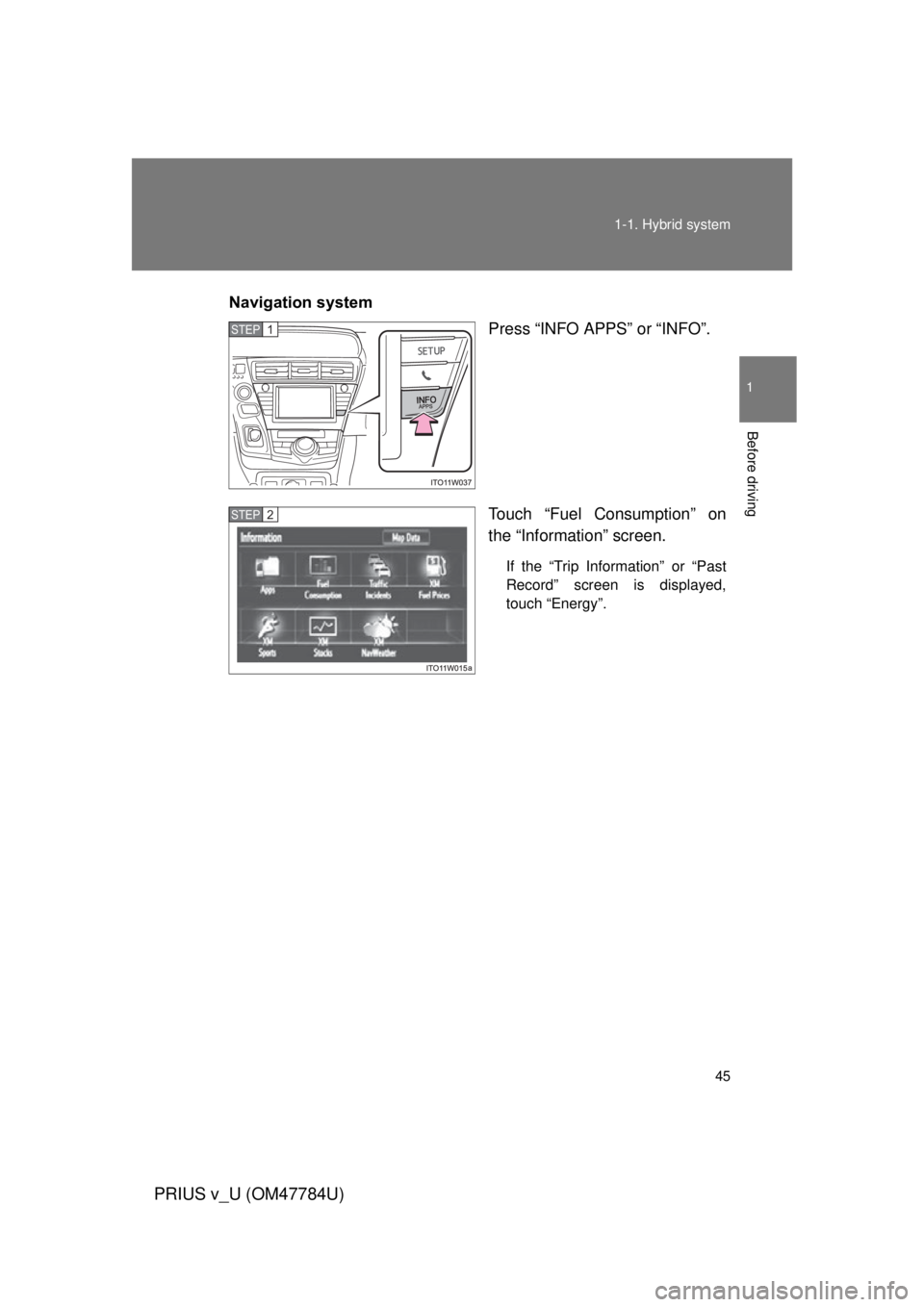
Press “INFO APPS” or “INFO”.
Touch “Fuel Consumption” on
the “Information” screen.
If the “Trip Information” or “Past
Record” screen is displayed,
touch “Energy”.
STEP 1
STEP 2
Page 46 of 568
46 1-1. Hybrid system
PRIUS v_U (OM47784U)
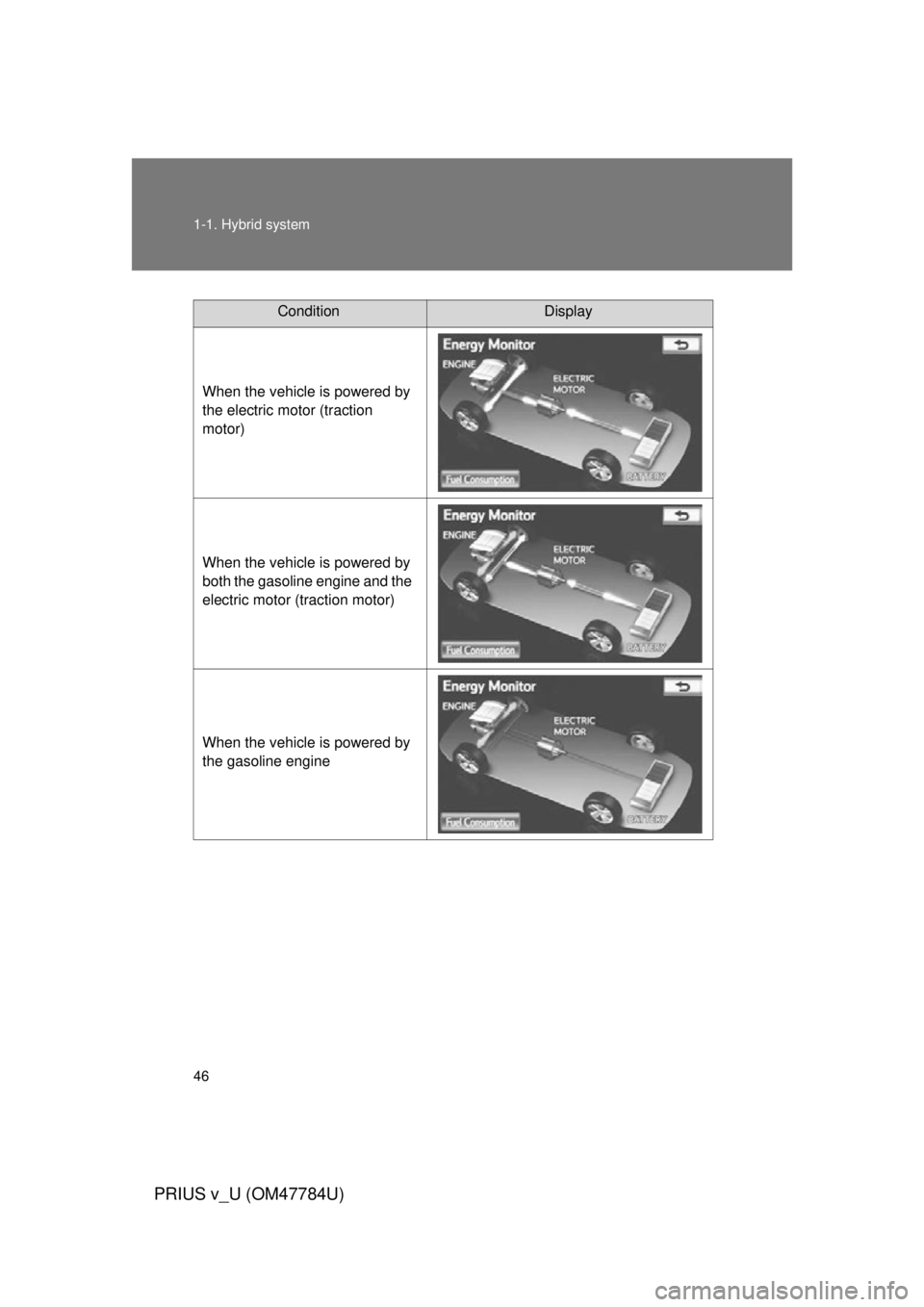
ConditionDisplay
When the vehicle is powered by
the electric motor (traction
motor)
When the vehicle is powered by
both the gasoline engine and the
electric motor (traction motor)
When the vehicle is powered by
the gasoline engine
Page 47 of 568
47
1-1. Hybrid system
1
Before driving
PRIUS v_U (OM47784U)
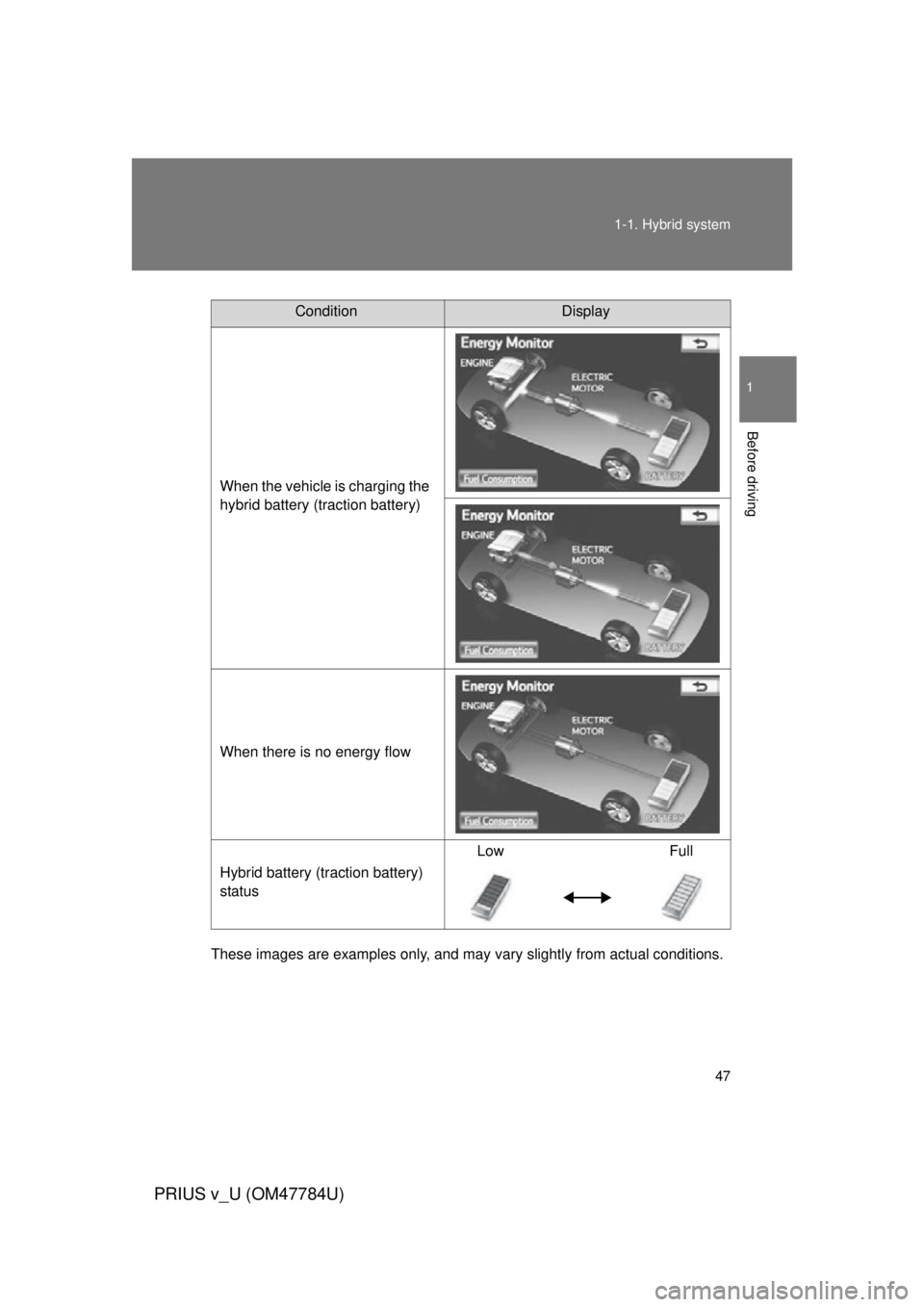
These images are examples only, and may va
ry slightly from actual conditions.
ConditionDisplay
When the vehicle is charging the
hybrid battery (traction battery)
When there is no energy flow
Hybrid battery (traction battery)
status Low Full
Page 48 of 568
48 1-1. Hybrid system
PRIUS v_U (OM47784U)
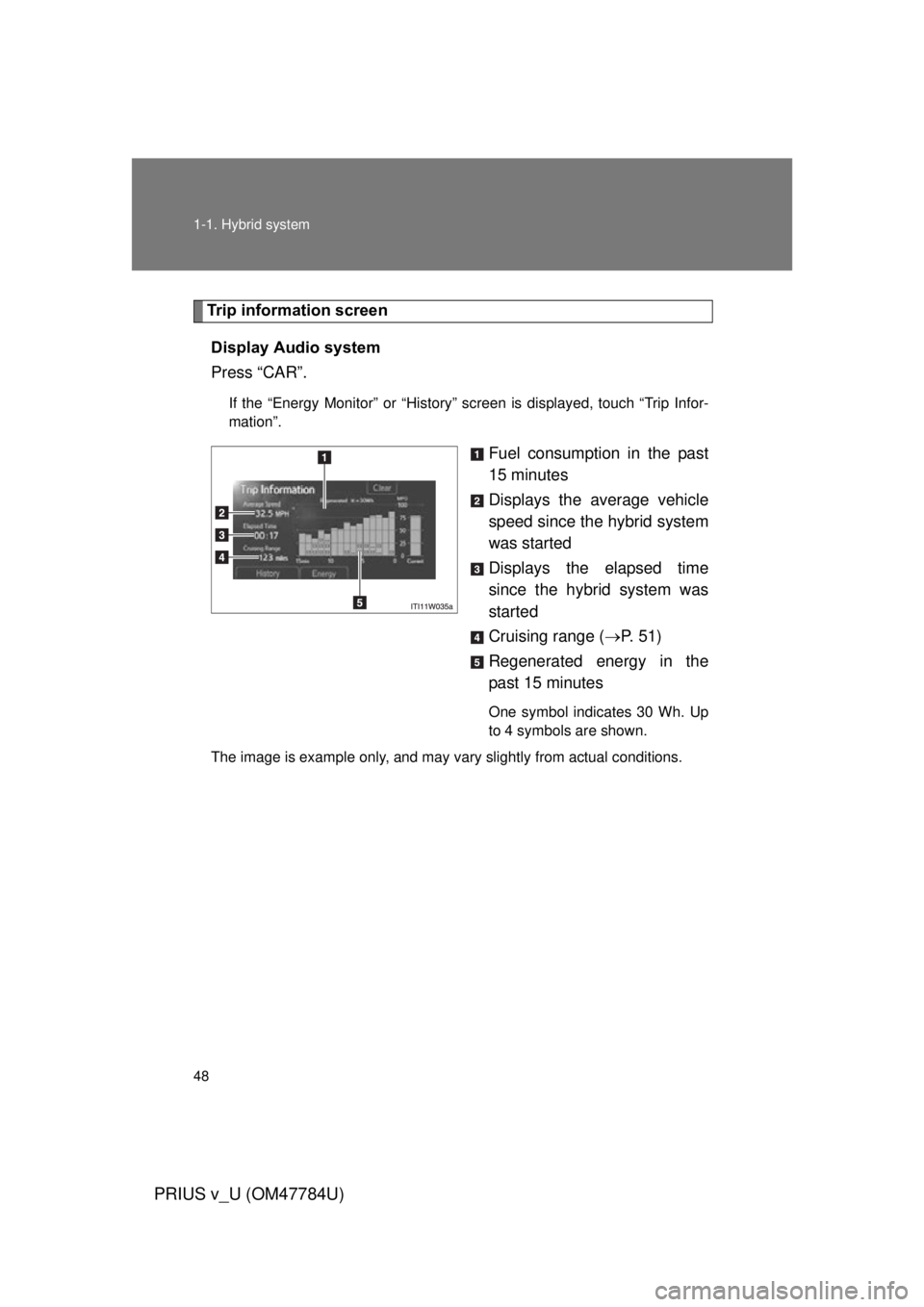
Trip information screenDisplay Audio system
Press “CAR”.
If the “Energy Monitor” or “History” screen is displayed, touch “Trip Infor-
mation”.
Fuel consumption in the past
15 minutes
Displays the average vehicle
speed since the hybrid system
was started
Displays the elapsed time
since the hybrid system was
started
Cruising range ( P. 5 1 )
Regenerated energy in the
past 15 minutes
One symbol indicates 30 Wh. Up
to 4 symbols are shown.
The image is example only, and may vary slightly from actual conditions.
Page 49 of 568
49
1-1. Hybrid system
1
Before driving
PRIUS v_U (OM47784U)
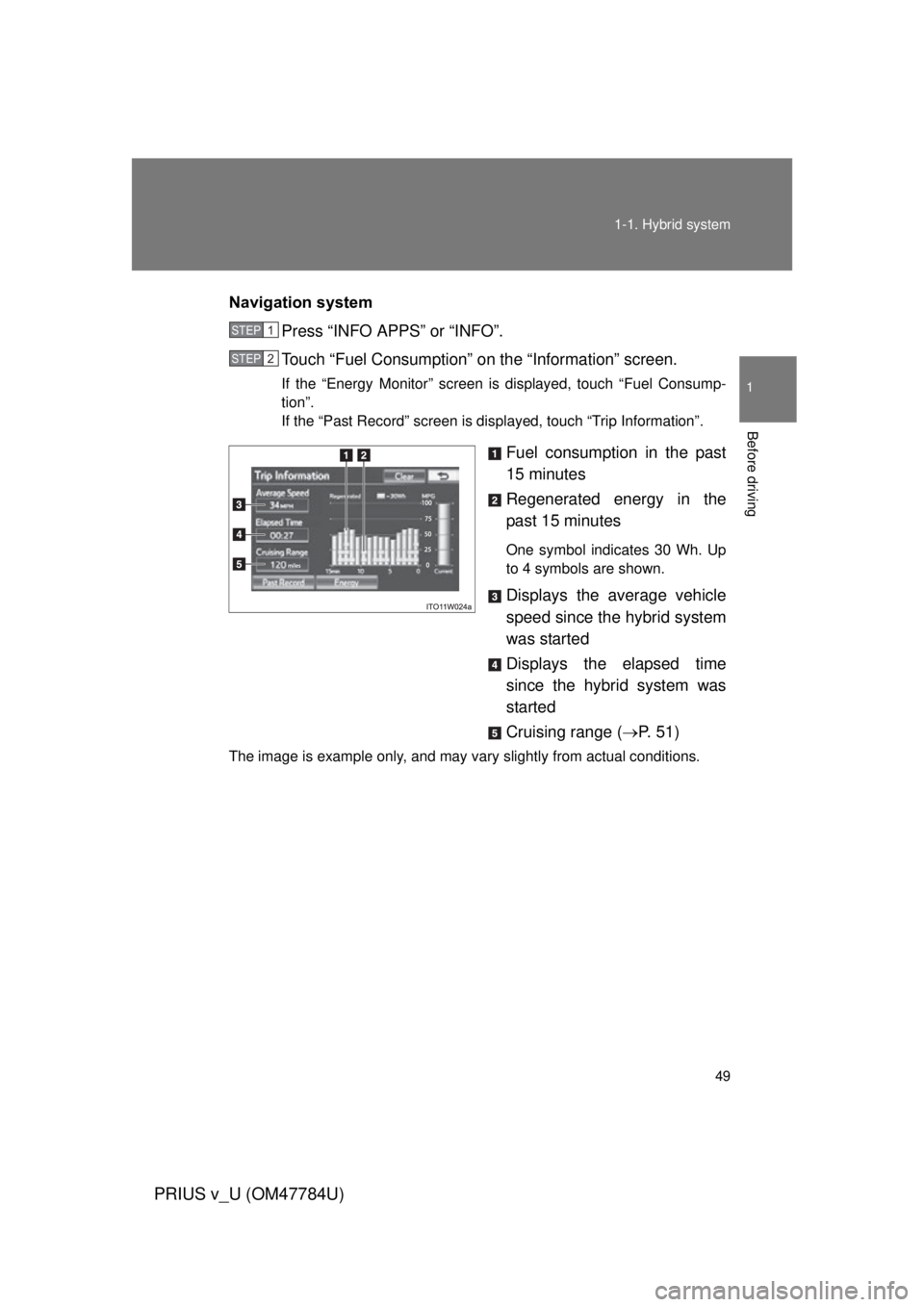
Navigation system
Press “INFO APPS” or “INFO”.
Touch “Fuel Consumption” on the “Information” screen.
If the “Energy Monitor” screen is displayed, touch “Fuel Consump-
tion”.
If the “Past Record” screen is displayed, touch “Trip Information”.
Fuel consumption in the past
15 minutes
Regenerated energy in the
past 15 minutes
One symbol indicates 30 Wh. Up
to 4 symbols are shown.
Displays the average vehicle
speed since the hybrid system
was started
Displays the elapsed time
since the hybrid system was
started
Cruising range (P. 5 1 )
The image is example only, and may vary slightly from actual conditions.
STEP 1
STEP 2
Page 50 of 568
50 1-1. Hybrid system
PRIUS v_U (OM47784U)
Past record screenDisplay Audio system
Press “CAR”.
If the “Energy Monitor” or “Trip Information” screen is displayed, touch
“History”.
Best past fuel consumption
Average fuel consumption
Displays a maximum of 5 past
record of the total average fuel
consumption.
The image is example only, and may vary slightly from actual conditions.
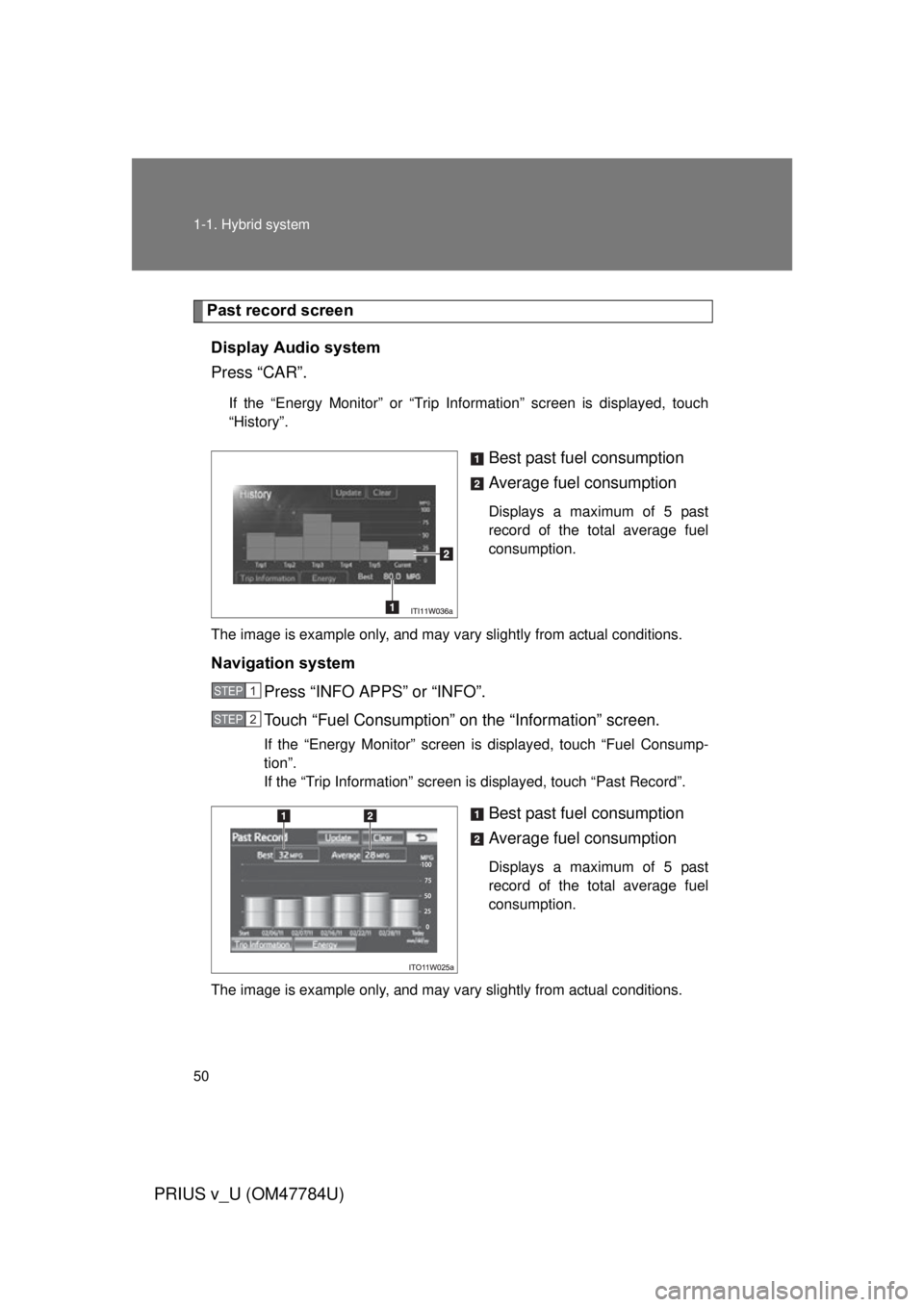
Navigation system Press “INFO APPS” or “INFO”.
Touch “Fuel Consumption” on the “Information” screen.
If the “Energy Monitor” screen is displayed, touch “Fuel Consump-
tion”.
If the “Trip Information” screen is displayed, touch “Past Record”.
Best past fuel consumption
Average fuel consumption
Displays a maximum of 5 past
record of the total average fuel
consumption.
The image is example only, and may vary slightly from actual conditions.
STEP 1
STEP 2
Page 51 of 568

51
1-1. Hybrid system
1
Before driving
PRIUS v_U (OM47784U)
■
Resetting the consumption data
Display Audio system
Selecting “Clear” on the “Trip Information” screen will reset the fuel con-
sumption and the regenerated energy for the past 15 minutes.
Selecting “Clear” on the “History” screen will reset the past records and best
past fuel consumption.
Selecting “Yes” on the following screen will confirm resetting of all the data.
Navigation system
Selecting “Clear” on the “Trip Information” screen will reset the fuel con-
sumption and the regenerated energy for the past 15 minutes.
Selecting “Clear” on the “Past Record” screen will reset the past records and
best past fuel consumption.
Selecting “Yes” on the following screen will confirm resetting of all the data.
■ Cruising range
Displays the estimated maximum distance that can be driven with the quan-
tity of fuel remaining.
This distance is computed based on your average fuel consumption.
As a result, the actual distance that can be driven may differ from that dis-
played.
Page 71 of 568

71
1-3. Opening, closing and locking the doors
1
Before driving
PRIUS v_U (OM47784U)
CAUTION
■
Caution regarding interfer ence with electronic devices
● People with implanted pacemakers or cardiac defibrillators should keep
away from the smart key system antennas. ( P. 60)
The radio waves may affect the operation of such devices. If necessary,
the entry function can be disabled. Ask your Toyota dealer for details, such
as the frequency of radio waves and timing of emitting the radio waves.
Then, consult your doctor to see if you should disable the entry function.
● Users of any electrical medical device other than implanted pacemakers
and implanted cardiac defibrillators should consult the manufacturer of the
device for information about its operation under the influence of radio
waves.
Radio waves could have unexpected effects on the operation of such
medical devices.
Ask your Toyota dealer for details on disabling the entry function.
On vehicles with the Display Audio system or the navigation system, the
entry function can be disabled personally. ( P. 526)
Page 149 of 568
149
1
1-8. Safety information
Before driving
PRIUS v_U (OM47784U)
Installing child restraints
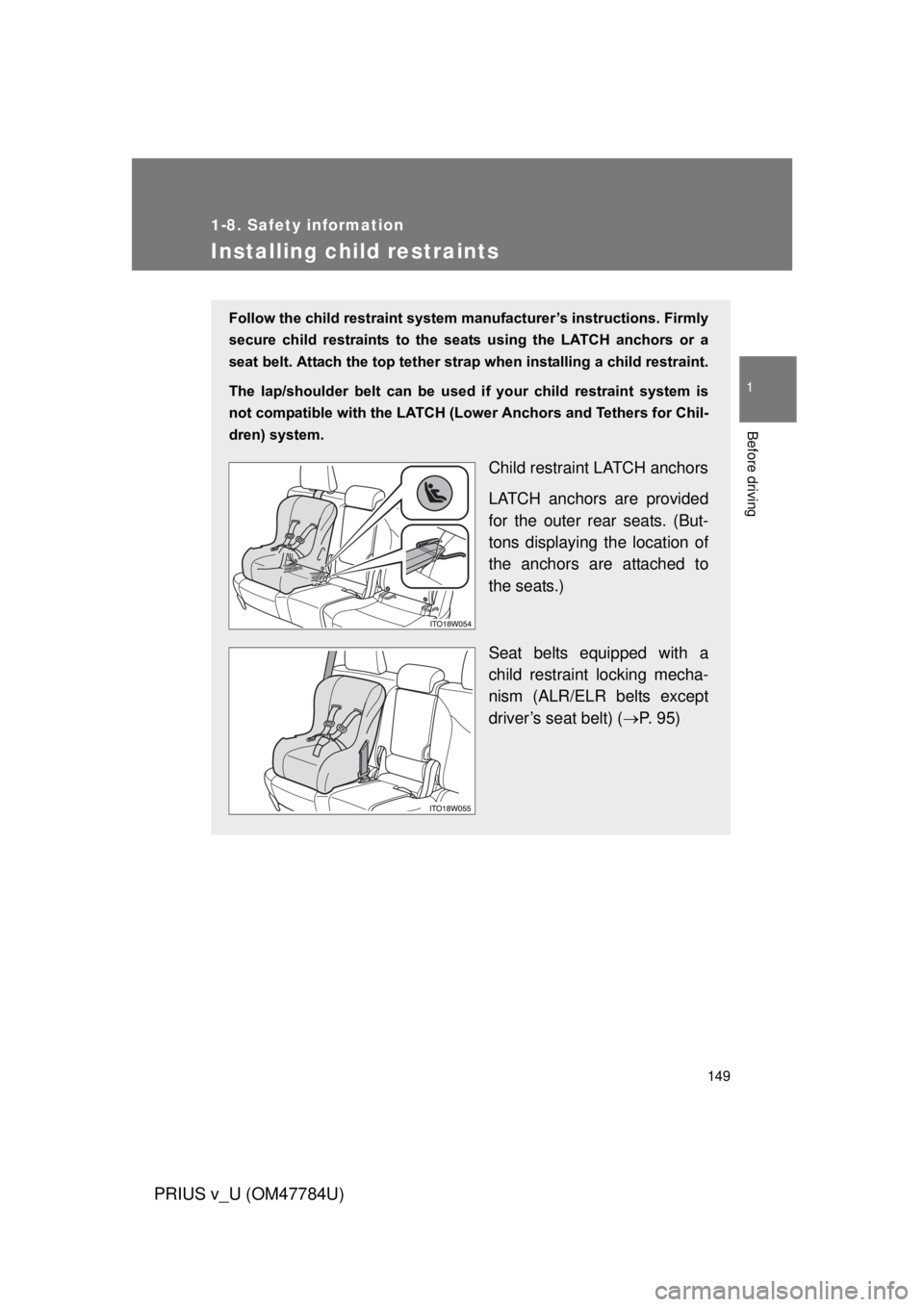
Follow the child restraint system manufacturer’s instructions. Firmly
secure child restraints to the seat s using the LATCH anchors or a
seat belt. Attach the top tether stra p when installing a child restraint.
The lap/shoulder belt can be used if your child restraint system is
not compatible with the LATCH (Low er Anchors and Tethers for Chil-
dren) system.
Child restraint LATCH anchors
LATCH anchors are provided
for the outer rear seats. (But-
tons displaying the location of
the anchors are attached to
the seats.)
Seat belts equipped with a
child restraint locking mecha-
nism (ALR/ELR belts except
driver’s seat belt) ( P. 95)
Page 169 of 568
169
2-1. Driving procedures
PRIUS v_U (OM47784U)
2
When driving
CAUTION
●
Do not drive in excess of the speed limit. Even if the legal speed limit per-
mits it, do not drive over 85 mph (140 km/h) unless your vehicle has high-
speed capability tires. Driving over 85 mph (140 km/h) may result in tire
failure, loss of control and possible injury. Be sure to consult a tire dealer
to determine whether the tires on your vehicle are high-speed capability
tires or not before driving at such speeds.
■ When driving on slippery road surfaces
● Sudden braking, acceleration and steering may cause tire slippage and
reduce your ability to control the vehicle, resulting in an accident.
● Abrupt changes from shift position D to B and rapid changes in the engine
speed could cause the vehicle to skid, resulting in an accident.
● After driving through a puddle, depress the brake pedal to make sure that
the brakes are functioning properly. Wet brake pads may prevent the
brakes from functioning properly. If the brakes on only one side are wet
and not functioning properly, steering control may be affected, resulting in
an accident.
■ When changing the shift position
Be careful not to change the shift position with the accelerator pedal
depressed.
Changing the shift position to any positions other than P or N may cause the
vehicle to accelerate abruptly, causing an accident and resulting in death or
serious injury.
After changing the shift position, make sure to confirm the current shift posi-
tion displayed on the shift position indicator inside the meter.
■ If you hear a squealing or scrapin g noise (brake pad wear limit indica-
tors)
Have your Toyota dealer check and replace the brake pads as soon as pos-
sible.
Rotor damage may result if the pads are not replaced when needed.
It is dangerous to drive the vehicle when the wear limits of the brake pads
and/or those of the brake discs are exceeded.