navigation system TOYOTA PRIUS V 2012 Owners Manual (in English)
[x] Cancel search | Manufacturer: TOYOTA, Model Year: 2012, Model line: PRIUS V, Model: TOYOTA PRIUS V 2012Pages: 32, PDF Size: 2.37 MB
Page 4 of 32
2
OVERVIEW
Instrument panel
A
O
A
P
S
T
F
H
A
In
H
1
2
NOT
Syste
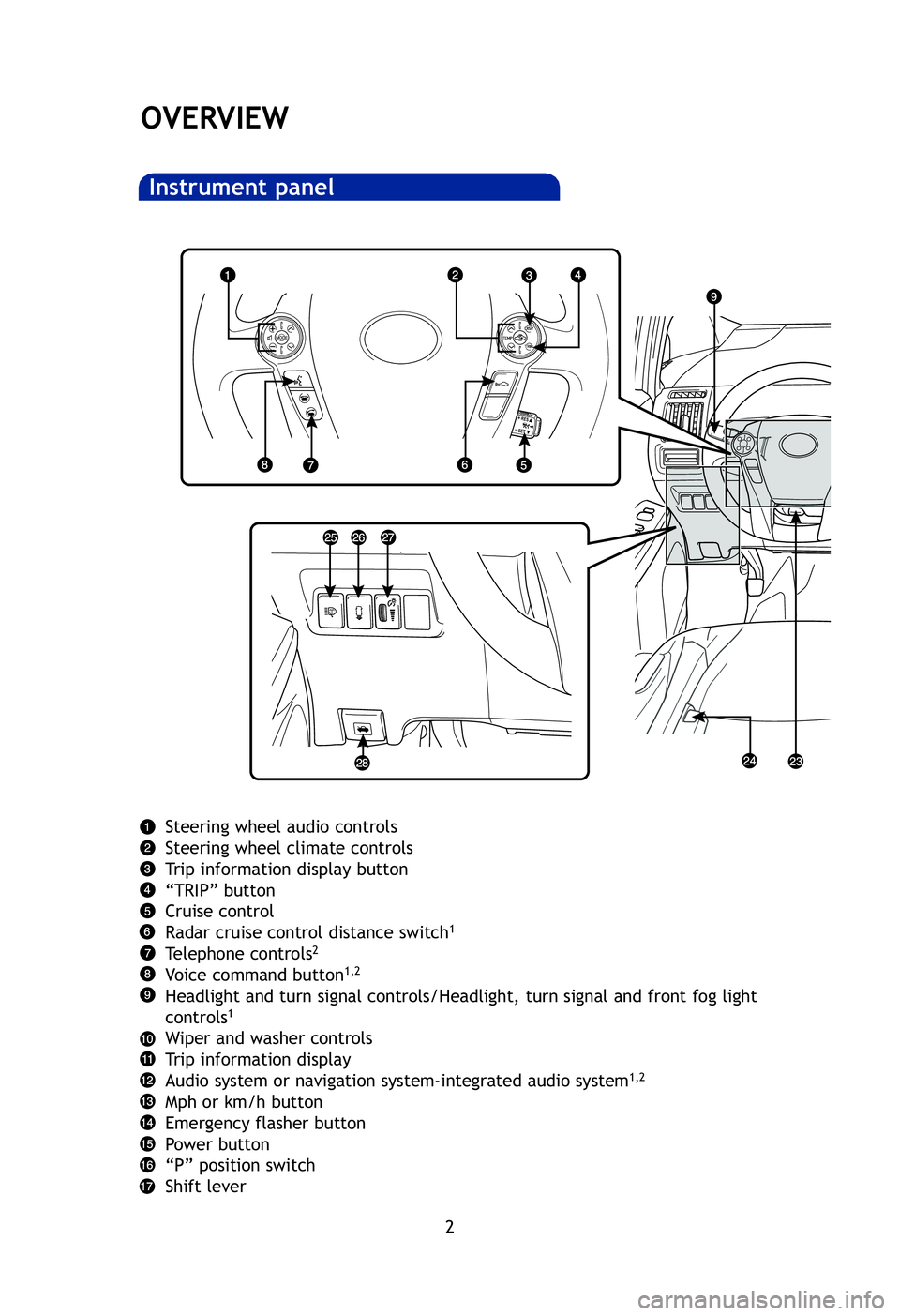
Steering wheel audio controls
Steering wheel climate controls
Trip information display button
“TRIP” button
Cruise control
Radar cruise control distance switch
1
Telephone controls2
Voice command button1,2
Headlight and turn signal controls/Headlight, turn signal and front fog \
light
controls1
Wiper and washer controls
Trip information display
Audio system or navigation system-integrated audio system
1,2
Mph or km/h button
Emergency flasher button
Power button
“P” position switch
Shift lever
2012-Prius-v-QRG.qxd:2012-Prius-v-QRG 9/13/11 5:14 PM Page 2
Page 5 of 32
OVERVIEW
FEATURES/OPERATIONS
SAFETY AND EMERGENCY FEATURES
3
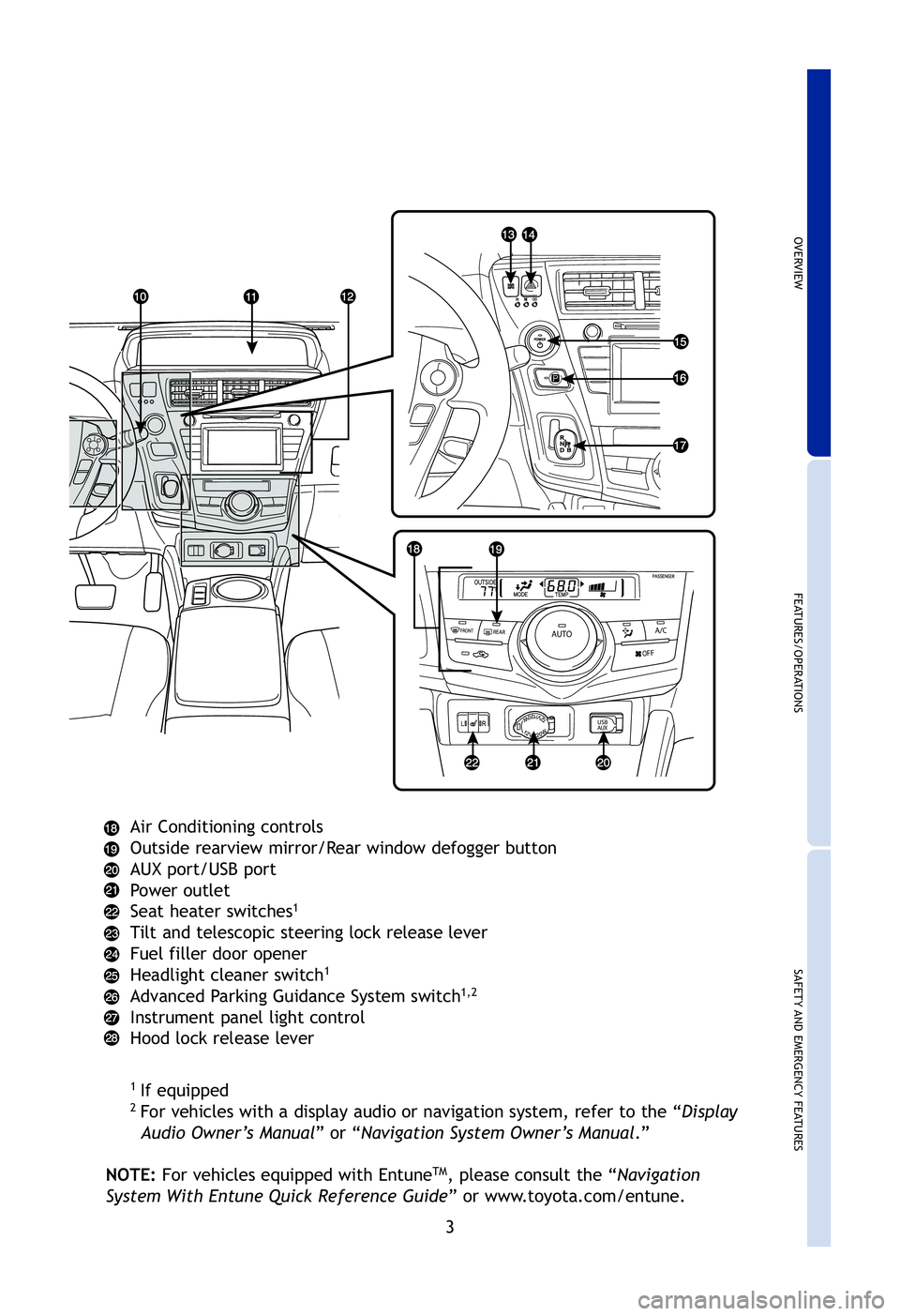
Air Conditioning controls
Outside rearview mirror/Rear window defogger button
AUX port/USB port
Power outlet
Seat heater switches
1
Tilt and telescopic steering lock release lever
Fuel filler door opener
Headlight cleaner switch
1
Advanced Parking Guidance System switch1,2
Instrument panel light control
Hood lock release lever
1If equipped2For vehicles with a display audio or navigation system, refer to the “\
Display
Audio Owner’s Manual ” or “Navigation System Owner’s Manual .”
NOTE: For vehicles equipped with Entune
TM, please consult the “ Navigation
System With Entune Quick Reference Guide ” or www.toyota.com/entune.
2012-Prius-v-QRG.qxd:2012-Prius-v-QRG 9/13/11 5:17 PM Page 3
Page 12 of 32
10
FEATURES/OPERATIONS
Tr a
* Thebra
Eco
Eco
acce
Refe
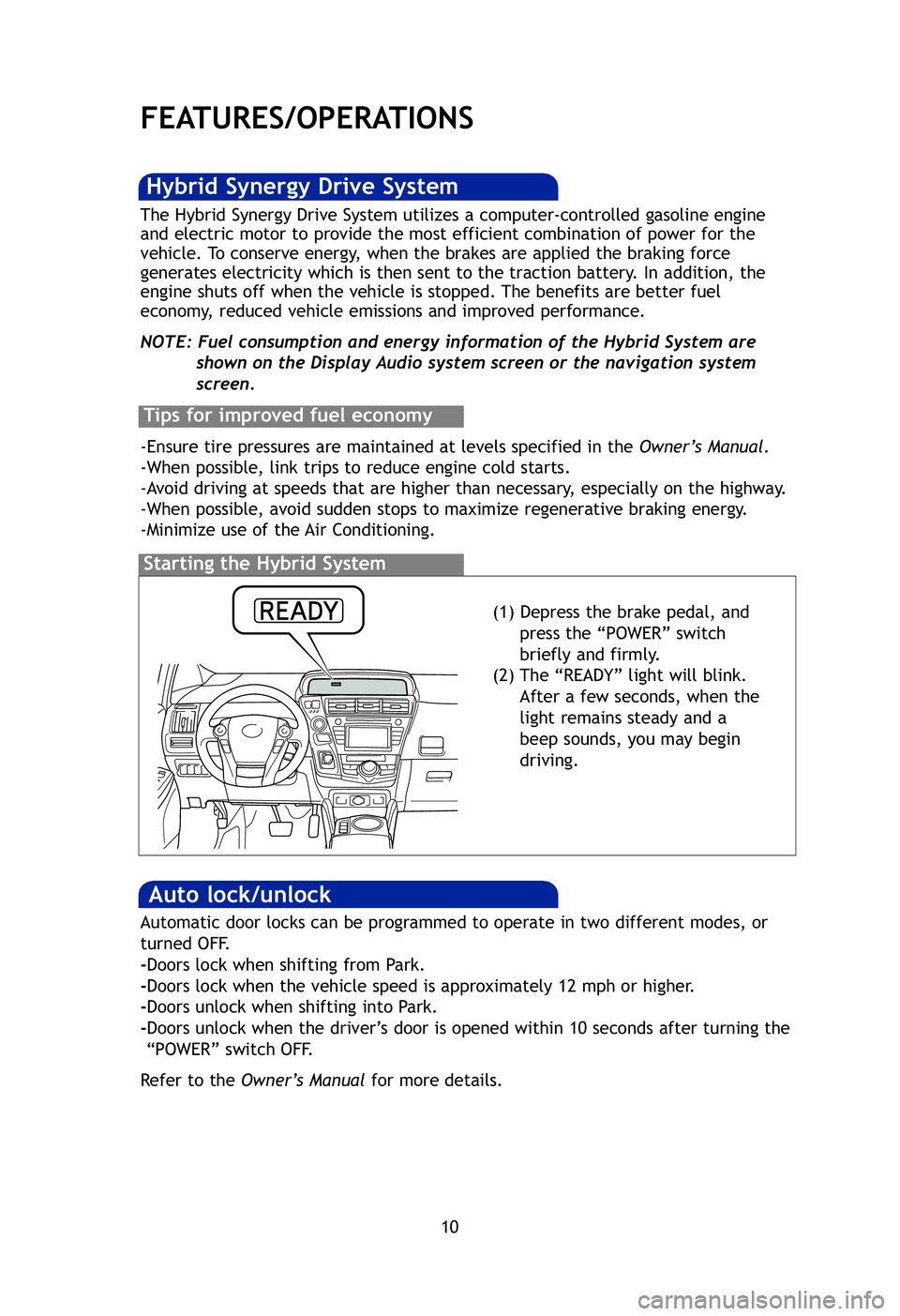
(1) Depress the brake pedal, and press the “POWER” switch
briefly and firmly.
(2) The “READY” light will blink. After a few seconds, when the
light remains steady and a
beep sounds, you may begin
driving.
Starting the Hybrid System
The Hybrid Synergy Drive System utilizes a computer-controlled gasoline \
engine
and electric motor to provide the most efficient combination of power fo\
r the
vehicle. To conserve energy, when the brakes are applied the braking force
generates electricity which is then sent to the traction battery. In addition, the
engine shuts off when the vehicle is stopped. The benefits are better fuel
economy, reduced vehicle emissions and improved performance.
NOTE: Fuel consumption and energy information of the Hybrid System are shown on the Display Audio system screen or the navigation system
screen.
Tips for improved fuel economy
-Ensure tire pressures are maintained at levels specified in the Owner’s Manual.
-When possible, link trips to reduce engine cold starts.
-Avoid driving at speeds that are higher than necessary, especially on the highway.
-When possible, avoid sudden stops to maximize regenerative braking ener\
gy.
-Minimize use of the Air Conditioning.
Hybrid Synergy Drive System
Auto lock/unlock
Automatic door locks can be programmed to operate in two different modes\
, or
turned OFF.
-Doors lock when shifting from Park.
-Doors lock when the vehicle speed is approximately 12 mph or higher.
-Doors unlock when shifting into Park.
-Doors unlock when the driver’s door is opened within 10 seconds after turning the
“POWER” switch OFF.
Refer to the Owner’s Manual for more details.
Pow
Use
mou
Refe
2012-Prius-v-QRG.qxd:2012-Prius-v-QRG 9/13/11 5:23 PM Page 10
Page 20 of 32
18
FEATURES/OPERATIONS
Ty p e 2 (additional function)
Audio (if equipped)
Ty p e 1
* Refer to the “ Navigation System With Entune Quick Reference Guide .”
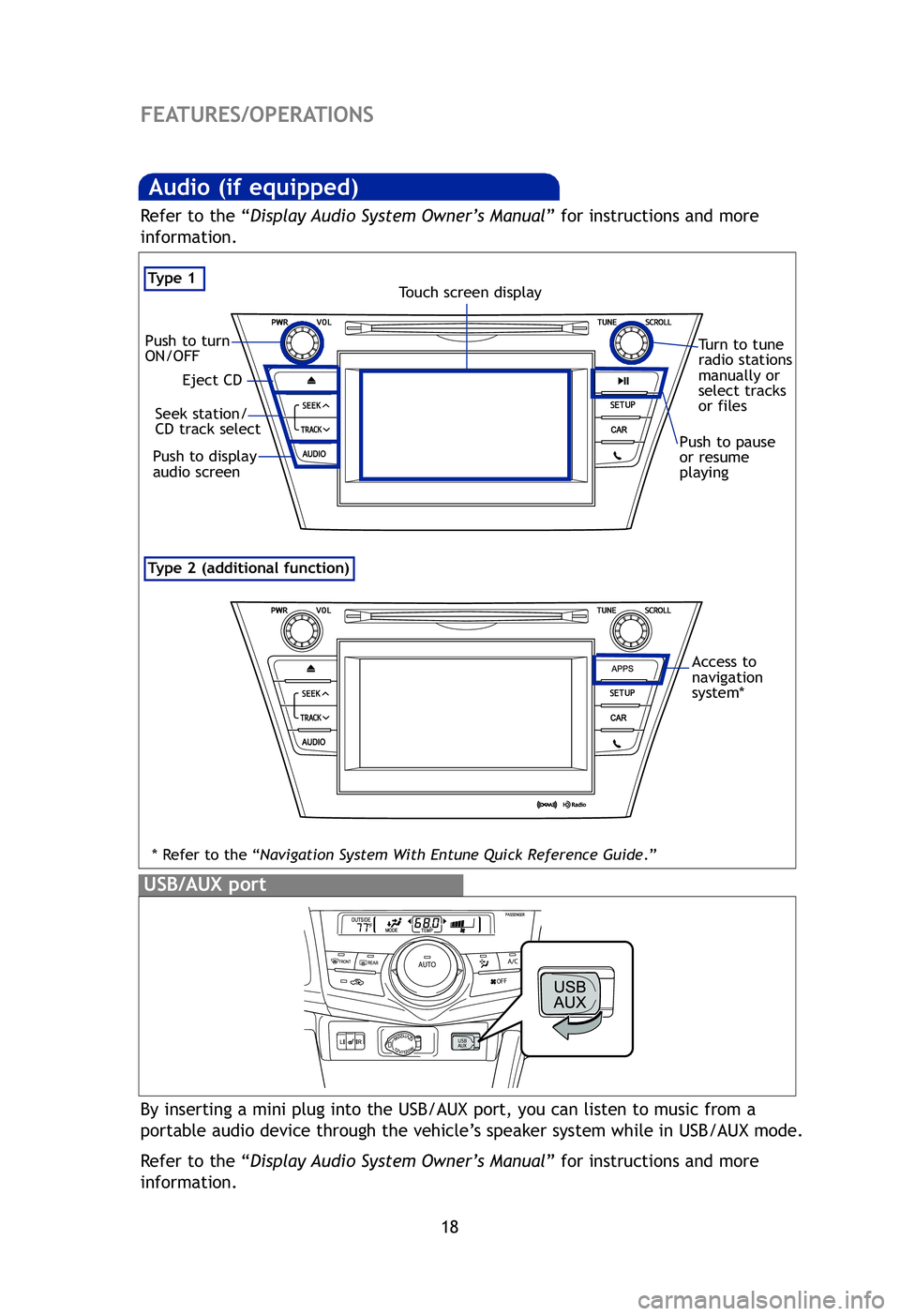
By inserting a mini plug into the USB/AUX port, you can listen to music fr\
om a
portable audio device through the vehicle’s speaker system while in USB/AUX mode.
Refer to the “Display Audio System Owner’s Manual ” for instructions and more
information.
USB/AUX port
Ste
Aud
“
P
a
“
U
V
Eject CD
Push to turn
ON/OFF
Seek station/
CD track select
Push to display
audio screen
Turn to tune
radio stations
manually or
select tracks
or files
Touch screen display
Push to pause
or resume
playing
Pa
Ope
Pus
pre
Access to
navigation
system*
Refer to the “ Display Audio System Owner’s Manual ” for instructions and more
information.
2012-Prius-v-QRG.qxd:2012-Prius-v-QRG 9/13/11 5:56 PM Page 18
Page 24 of 32
22
FEATURES/OPERATIONS
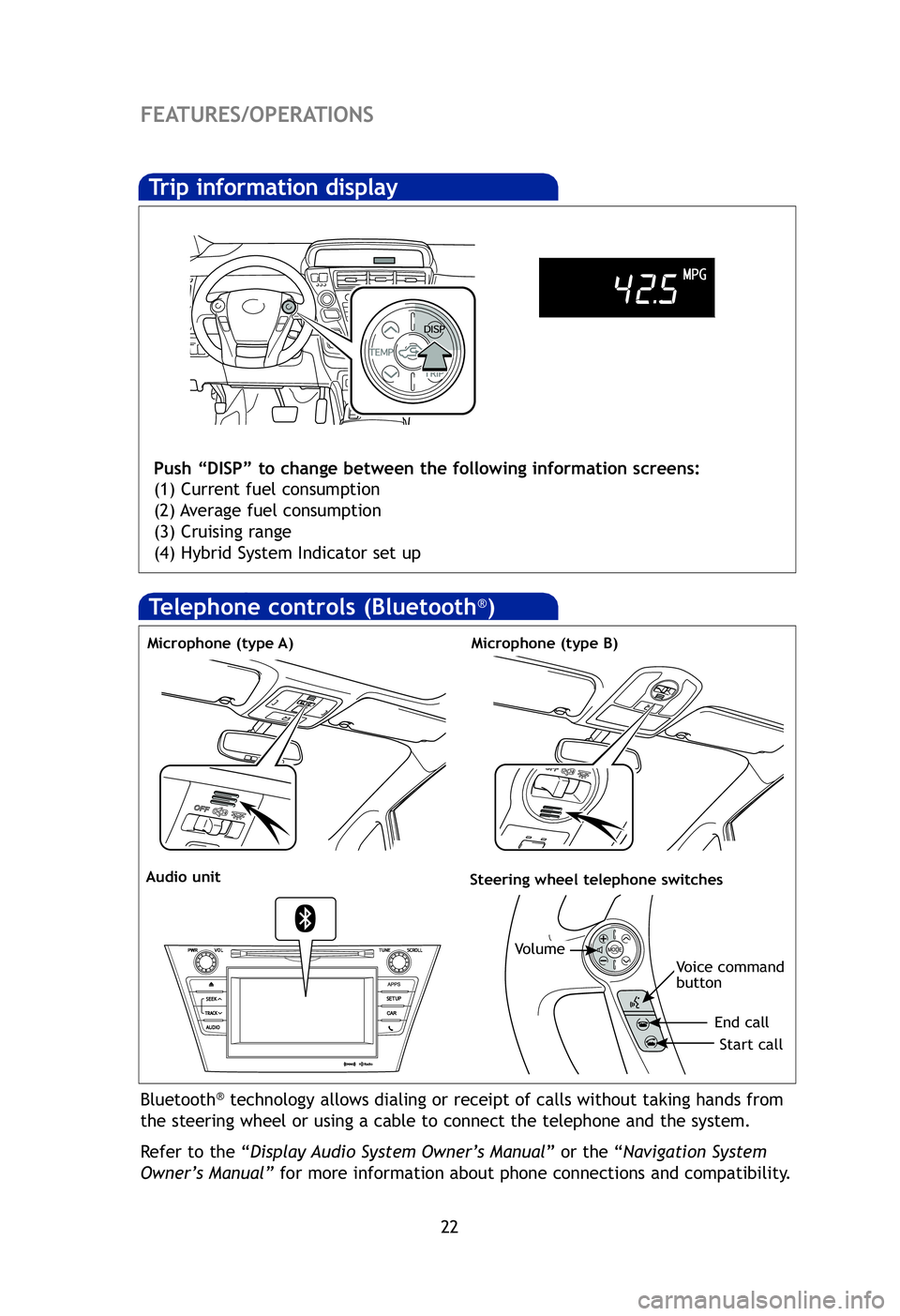
Trip information display
Push “DISP” to change between the following information screens:
(1) Current fuel consumption
(2) Average fuel consumption
(3) Cruising range
(4) Hybrid System Indicator set up
Bluetooth®technology allows dialing or receipt of calls without taking hands from
the steering wheel or using a cable to connect the telephone and the sys\
tem.
Refer to the “ Display Audio System Owner’s Manual ” or the “Navigation System
Owner’s Manual” for more information about phone connections and compatibility.
Microphone (type A)
Audio unitSteering wheel telephone switches
Volume
Start call
End call
Voice command
button
Microphone (type B)
Clo
Refe
HAC
on b
illum
Refe
Hi
Gar
pro
Ref
det
For
htt
* Ho
Ga
(if
Telephone controls (Bluetooth®)
2012-Prius-v-QRG.qxd:2012-Prius-v-QRG 9/13/11 6:01 PM Page 22