key battery TOYOTA PRIUS V 2017 ZVW40 / 1.G User Guide
[x] Cancel search | Manufacturer: TOYOTA, Model Year: 2017, Model line: PRIUS V, Model: TOYOTA PRIUS V 2017 ZVW40 / 1.GPages: 624, PDF Size: 13.82 MB
Page 377 of 624
PRIUS v_OM_OM47B23U_(U)
3776-2. Using the interior lights
6
Interior features
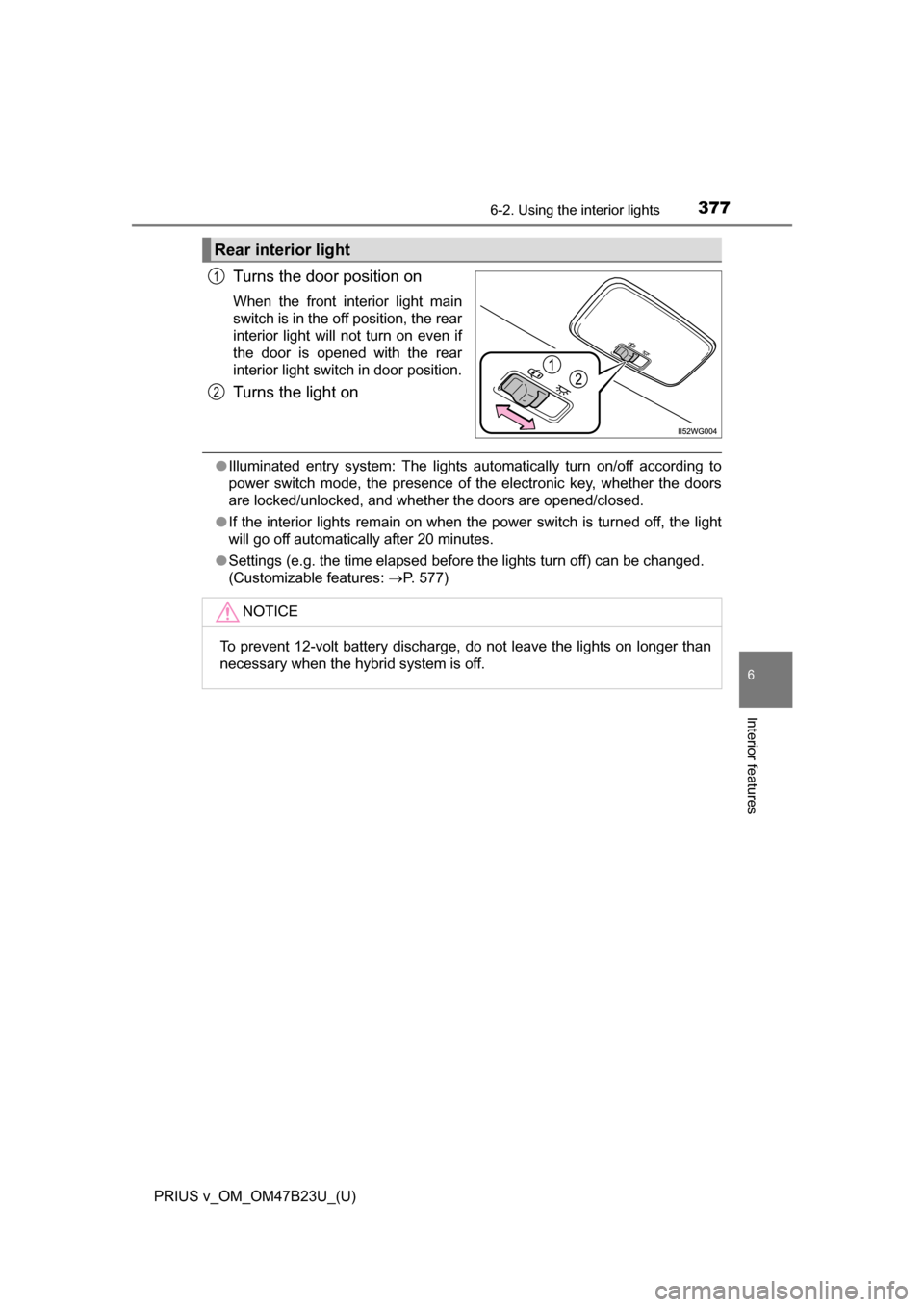
Turns the door position on
When the front interior light main
switch is in the off position, the rear
interior light will not turn on even if
the door is opened with the rear
interior light switch in door position.
Turns the light on
●Illuminated entry system: The lights automatically turn on/off according to
power switch mode, the presence of the electronic key, whether the doors
are locked/unlocked, and whether the doors are opened/closed.
● If the interior lights remain on when the power switch is turned off, the light
will go off automatically after 20 minutes.
● Settings (e.g. the time elapsed before the lights turn off) can be changed.
(Customizable features: P. 577)
Rear interior light
1
2
NOTICE
To prevent 12-volt battery discharge, do not leave the lights on longer than
necessary when the hybrid system is off.
Page 407 of 624
407
PRIUS v_OM_OM47B23U_(U)
7Maintenance and care
7-1. Maintenance and careCleaning and protecting the vehicle exterior .......... 408
Cleaning and protecting the vehicle interior ........... 412
7-2. Maintenance Maintenance requirements ................... 415
General maintenance........ 418
Emission inspection and maintenance (I/M)
programs ......................... 421
7-3. Do-it-yourself maintenance Do-it-yourself service precautions ..................... 422
Hood ................................. 424
Positioning a floor jack ...... 426
Engine compartment ......... 428
12-volt battery ................... 442
Tires .................................. 446
Tire inflation pressure ....... 455
Wheels .............................. 458
Air conditioning filter.......... 460
Wiper rubber replacement .................... 462
Electronic key battery........ 464
Checking and replacing fuses ............................... 466
Light bulbs......................... 469
Page 408 of 624
408
PRIUS v_OM_OM47B23U_(U)
7-1. Maintenance and care
Cleaning and protecting the vehicle exterior
●Working from top to bottom, liber ally apply water to the vehicle
body, wheel wells and underside of the vehicle to remove any dirt
and dust.
● Wash the vehicle body using a sponge or soft cloth, such as a
chamois.
● For hard-to-remove marks, use car wash soap and rinse thoroughly
with water.
● Wipe away any water.
● Wax the vehicle when the wate rproof coating deteriorates.
If water does not bead on a clean surface, apply wax when the vehicle
body is cool.
■Automatic car washes
●Fold the mirrors and remove the antenna before washing the vehicle. Start
washing from the front of the vehicle. Make sure to re-install the antenna
and extend the mirrors before driving.
● Brushes used in automatic car washes may scratch the vehicle surface and
harm your vehicle’s paint.
● Roof antenna and rear spoiler may not be washable in some automatic car
washes. There may also be an increased risk of damage to vehicle.
■ High pressure car washes
●Do not allow the nozzles of the car wash to come within close proximity of
the windows.
● Before using the car wash, check that the fuel filler door on your vehicle is
closed properly.
■ Note for a smart key system
If the door handle becomes wet while the electronic key is within the ef\
fective
range, the door may lock and unlock repeatedly. In that case, follow the fol-
lowing correction procedures to wash the vehicle:
●Place the key in a position 6 ft. (2 m) or more separate from the vehicle
while the vehicle is being washed. (Take care to ensure that the key is not
stolen.)
● Set the electronic key to battery-saving mode to disable the smart key sys-
tem. ( P. 133)
Perform the following to protect the vehicle and maintain it in
prime condition:
Page 443 of 624
PRIUS v_OM_OM47B23U_(U)
4437-3. Do-it-yourself maintenance
7
Maintenance and care
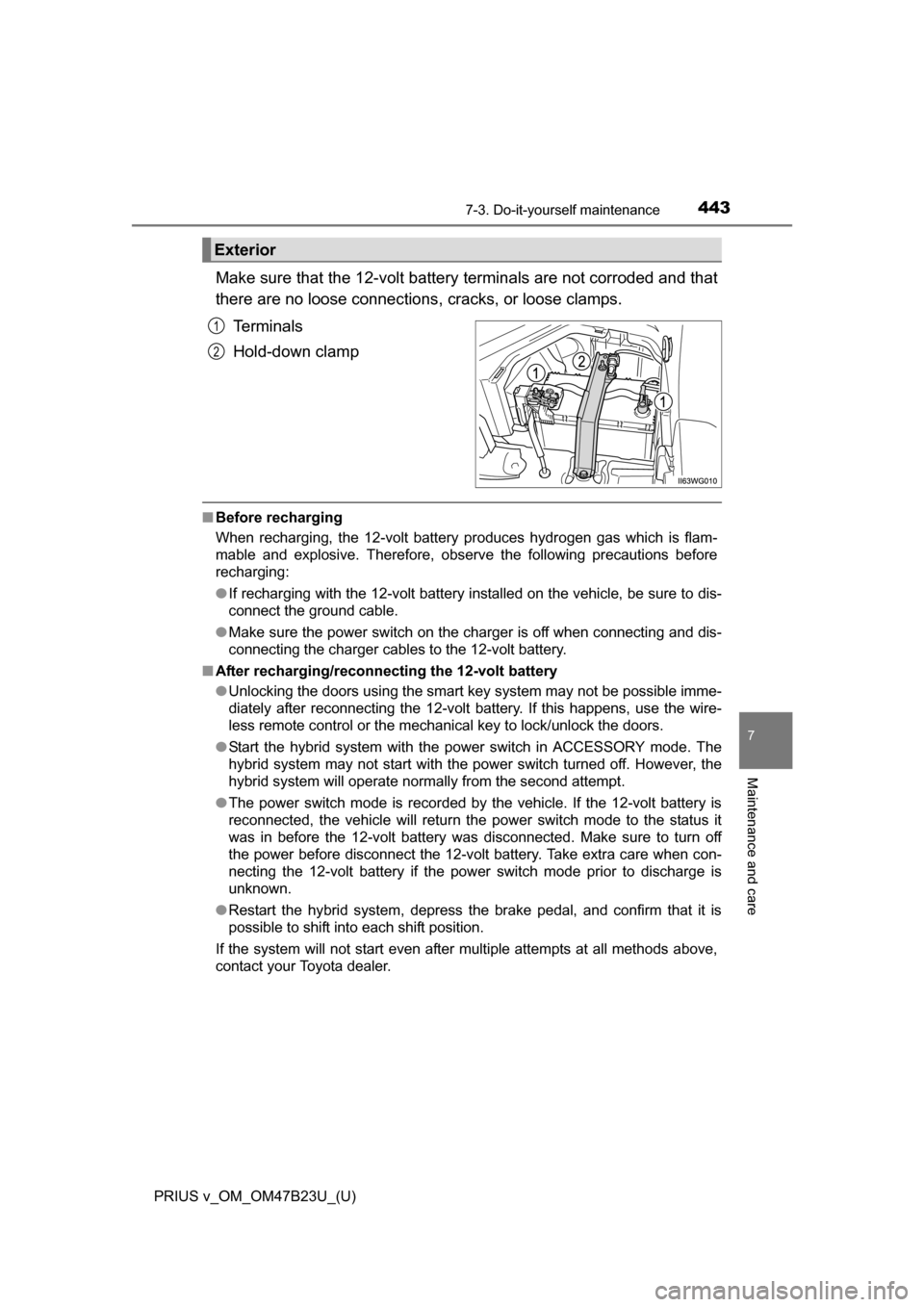
Make sure that the 12-volt battery terminals are not corroded and that
there are no loose connections, cracks, or loose clamps.
Terminals
Hold-down clamp
■ Before recharging
When recharging, the 12-volt battery produces hydrogen gas which is flam-
mable and explosive. Therefore, observe the following precautions before
recharging:
●If recharging with the 12-volt battery installed on the vehicle, be sure to dis-
connect the ground cable.
● Make sure the power switch on the charger is off when connecting and dis-
connecting the charger cables to the 12-volt battery.
■ After recharging/reconnecting the 12-volt battery
●Unlocking the doors using the smart key system may not be possible imme-
diately after reconnecting the 12-volt battery. If this happens, use the wire-
less remote control or the mechanical key to lock/unlock the doors.
● Start the hybrid system with the power switch in ACCESSORY mode. The
hybrid system may not start with the power switch turned off. However, the
hybrid system will operate normally from the second attempt.
● The power switch mode is recorded by the vehicle. If the 12-volt battery is
reconnected, the vehicle will return the power switch mode to the status it
was in before the 12-volt battery was disconnected. Make sure to turn off
the power before disconnect the 12-volt battery. Take extra care when con-
necting the 12-volt battery if the power switch mode prior to discharge is
unknown.
● Restart the hybrid system, depress the brake pedal, and confirm that it is
possible to shift into each shift position.
If the system will not start even after multiple attempts at all methods above,
contact your Toyota dealer.
Exterior
1
2
Page 464 of 624
464
PRIUS v_OM_OM47B23U_(U)
7-3. Do-it-yourself maintenance
Electronic key batter y
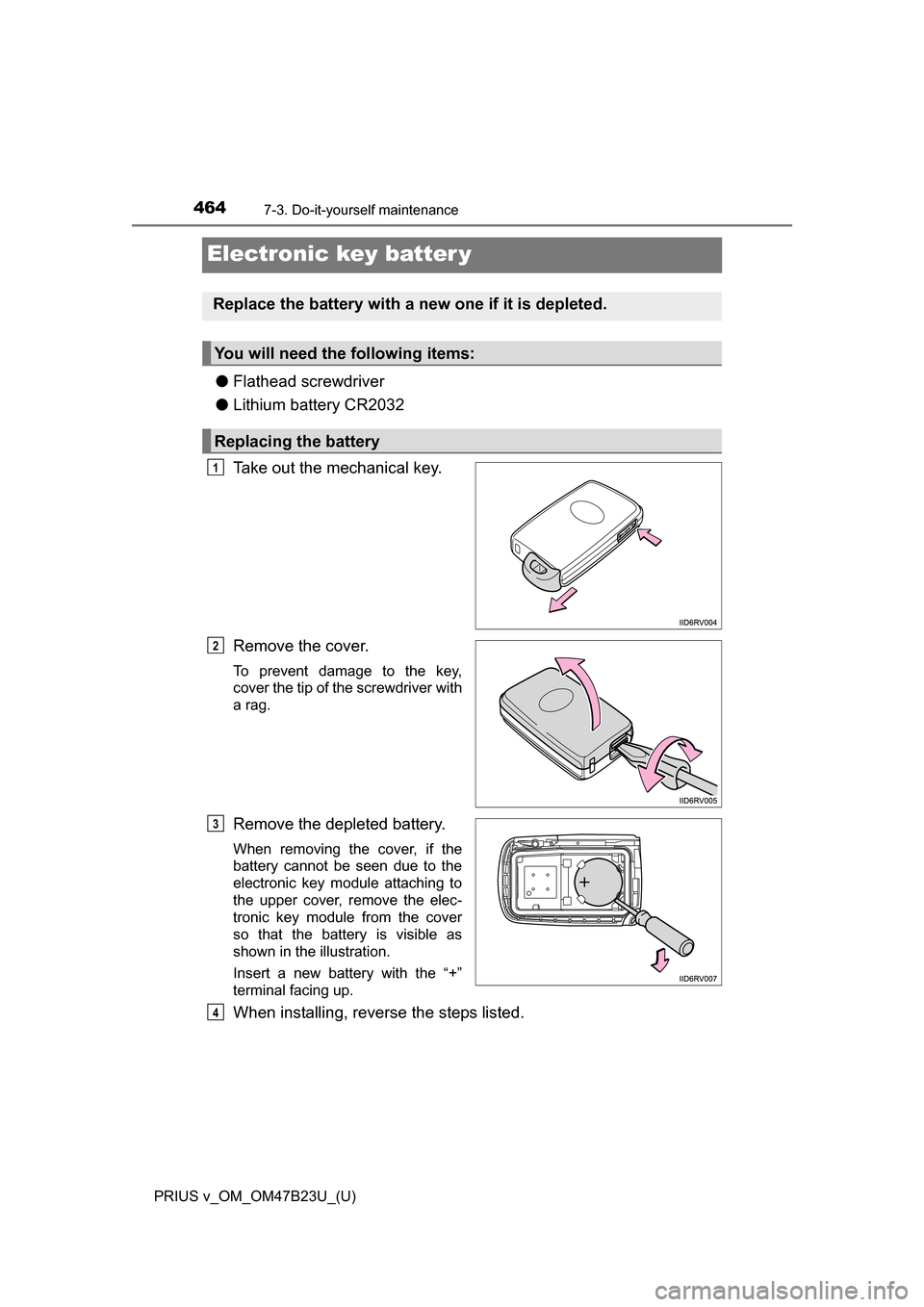
●Flathead screwdriver
● Lithium battery CR2032
Take out the mechanical key.
Remove the cover.
To prevent damage to the key,
cover the tip of the screwdriver with
a rag.
Remove the depleted battery.
When removing the cover, if the
battery cannot be seen due to the
electronic key module attaching to
the upper cover, remove the elec-
tronic key module from the cover
so that the battery is visible as
shown in the illustration.
Insert a new battery with the “+”
terminal facing up.
When installing, reverse the steps listed.
Replace the battery with a new one if it is depleted.
You will need the following items:
Replacing the battery
1
2
3
4
Page 465 of 624
PRIUS v_OM_OM47B23U_(U)
4657-3. Do-it-yourself maintenance
7
Maintenance and care
■Use a CR2032 lithium battery
●Batteries can be purchased at your Toyota dealer, local electrical appliance
shops or camera stores.
● Replace only with the same or equivalent type recommended by the manu-
facturer.
● Dispose of used batteries according to the local laws.
■ If the electronic key battery is depleted
The following symptoms may occur:
●The smart key system and wireless remote control will not function properly.
● The operational range will be reduced.
WARNING
■ Removed battery and other parts
These parts are small and if swallowed by a child, they can cause choking.
Keep away from children. Failure to do so could result in death or serious
injury.
NOTICE
■For normal operation after replacing the battery
Observe the following precautions to prevent accidents:
●Always work with dry hands.
Moisture may cause the battery to rust.
● Do not touch or move any other component inside the remote control.
● Do not bend either of the battery terminals.
Page 483 of 624
483
PRIUS v_OM_OM47B23U_(U)
8When trouble arises
8-1. Essential informationEmergency flashers .......... 484
If your vehicle has to be stopped in an
emergency ...................... 485
8-2. Steps to take in an emergency
If your vehicle needs to be towed ......................... 486
If you think something is wrong .............................. 491
If a warning light turns on or a warning buzzer
sounds ............................ 492
If a warning message is displayed ......................... 506
If you have a flat tire.......... 524
If the hybrid system will not start ........................... 537
If the electronic key does not operate properly........ 539
If the 12-volt battery is discharged ...................... 541
If your vehicle overheats ... 546
If the vehicle becomes stuck ............................... 551
Page 486 of 624
486
PRIUS v_OM_OM47B23U_(U)
8-2. Steps to take in an emergency
If your vehicle needs to be towed
In the following situations, it is not possible to be towed by another
vehicle using cables or chains, as the front wheels may be locked due
to the parking lock. Contact your Toyota dealer or commercial towing
service.
●There is a malfunction in the shift control system. ( P. 494, 508)
● There is a malfunction in the immobilizer system. ( P. 83)
● There is a malfunction in the smart key system. ( P. 539)
● The 12-volt battery is discharged. ( P. 541)
The following may indicate a problem with your hybrid transmission.
Contact your Toyota dealer or commercial towing service before tow-
ing.
● The hybrid system warning light turns on or the hybrid system
warning message is displayed on the multi-information display and
the vehicle does not move.
● The vehicle makes an abnormal sound.
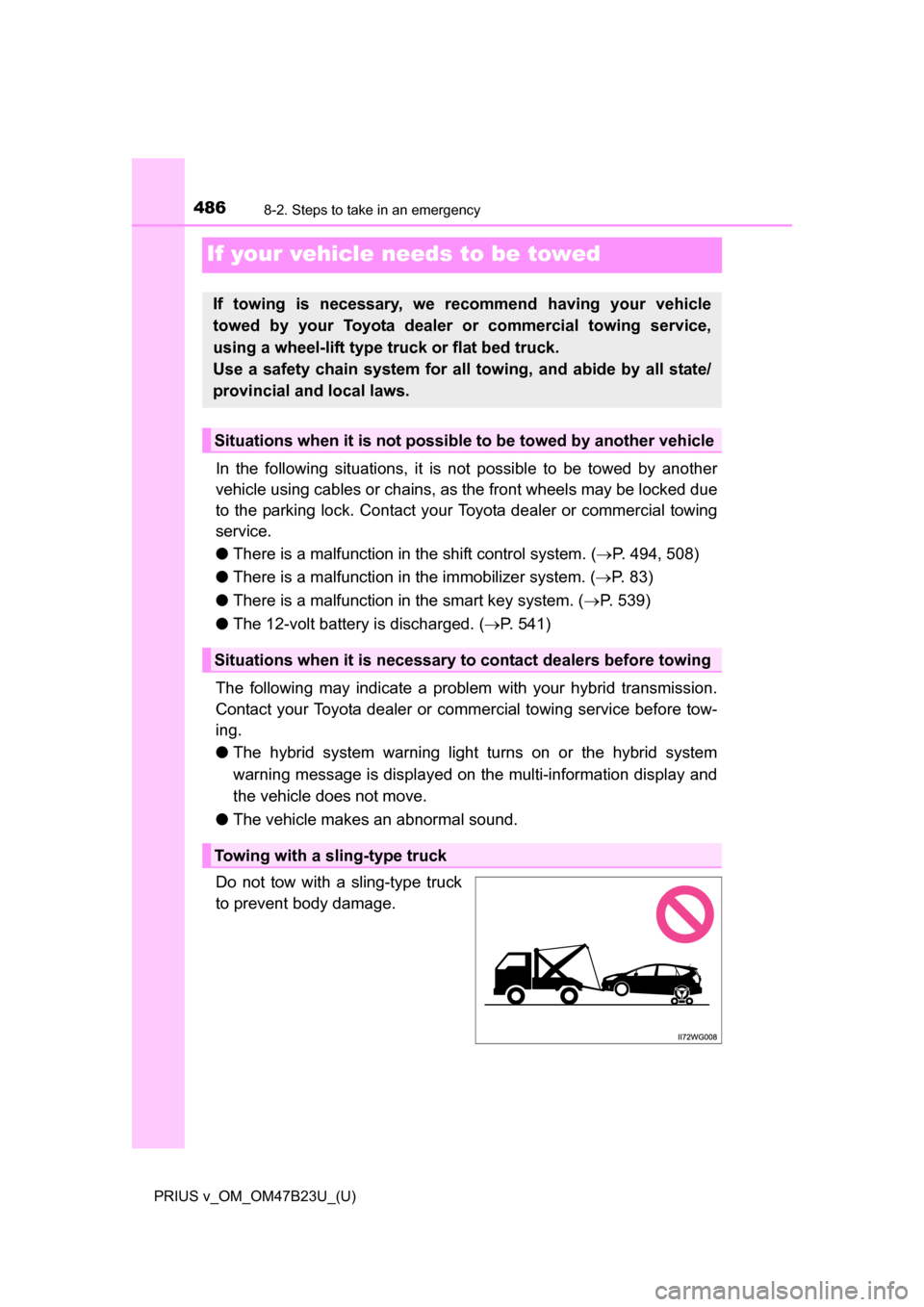
Do not tow with a sling-type truck
to prevent body damage.
If towing is necessary, we re commend having your vehicle
towed by your Toyota dealer or commercial towing service,
using a wheel-lift type tr uck or flat bed truck.
Use a safety chain system for all towing, and abide by all state/
provincial and local laws.
Situations when it is not possibl e to be towed by another vehicle
Situations when it is necessary to contact dealers before towing
Towing with a sling-type truck
Page 505 of 624
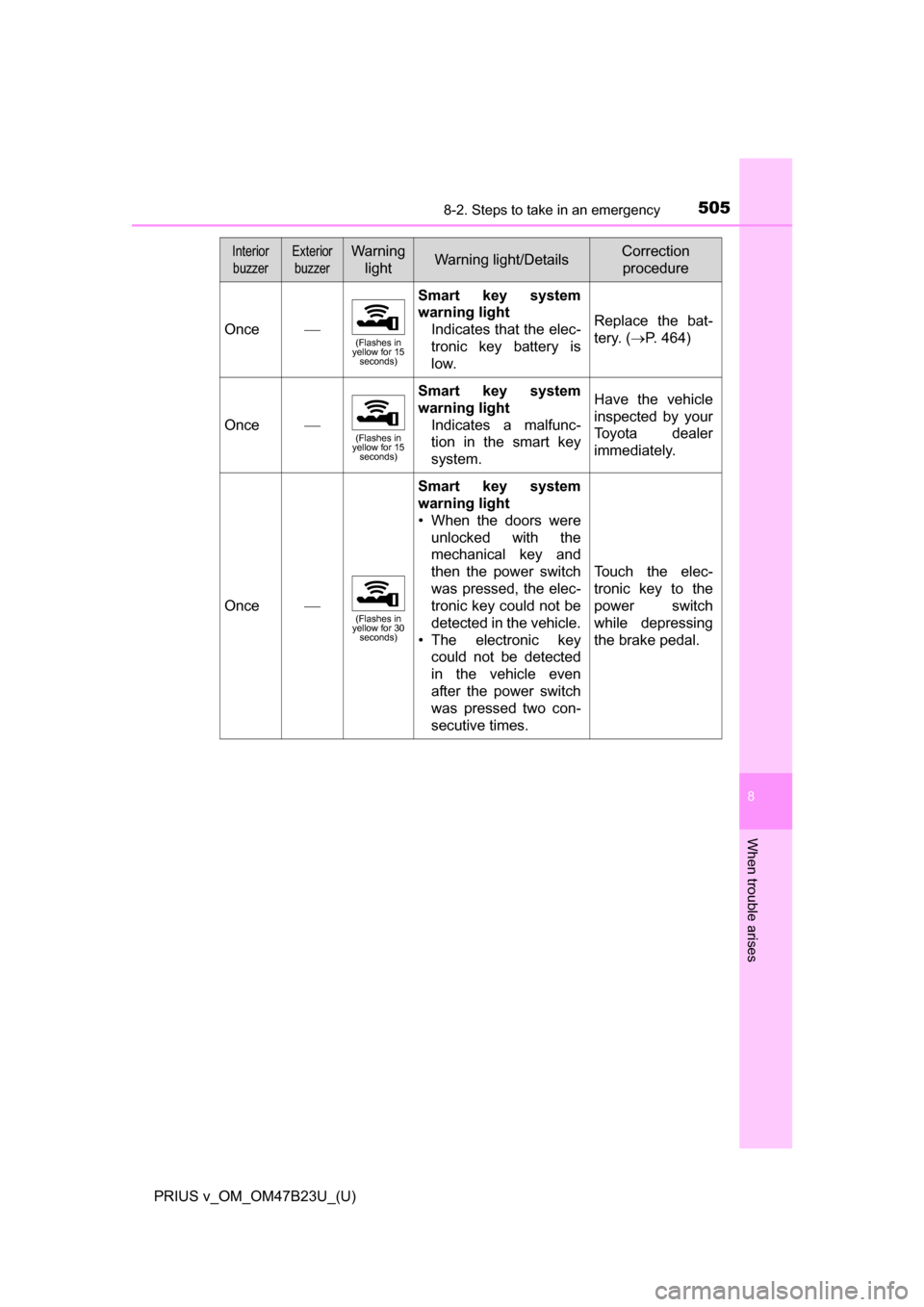
5058-2. Steps to take in an emergency
PRIUS v_OM_OM47B23U_(U)
8
When trouble arises
Once(Flashes in
yellow for 15 seconds)
Smart key system
warning light
Indicates that the elec-
tronic key battery is
low.
Replace the bat-
tery. (P. 464)
Once(Flashes in
yellow for 15 seconds)
Smart key system
warning light
Indicates a malfunc-
tion in the smart key
system.Have the vehicle
inspected by your
Toyota dealer
immediately.
Once(Flashes in
yellow for 30 seconds)
Smart key system
warning light
• When the doors were
unlocked with the
mechanical key and
then the power switch
was pressed, the elec-
tronic key could not be
detected in the vehicle.
• The electronic key could not be detected
in the vehicle even
after the power switch
was pressed two con-
secutive times.
Touch the elec-
tronic key to the
power switch
while depressing
the brake pedal.
InteriorbuzzerExterior buzzerWarning lightWarning light/DetailsCorrection procedure
Page 522 of 624
5228-2. Steps to take in an emergency
PRIUS v_OM_OM47B23U_(U)
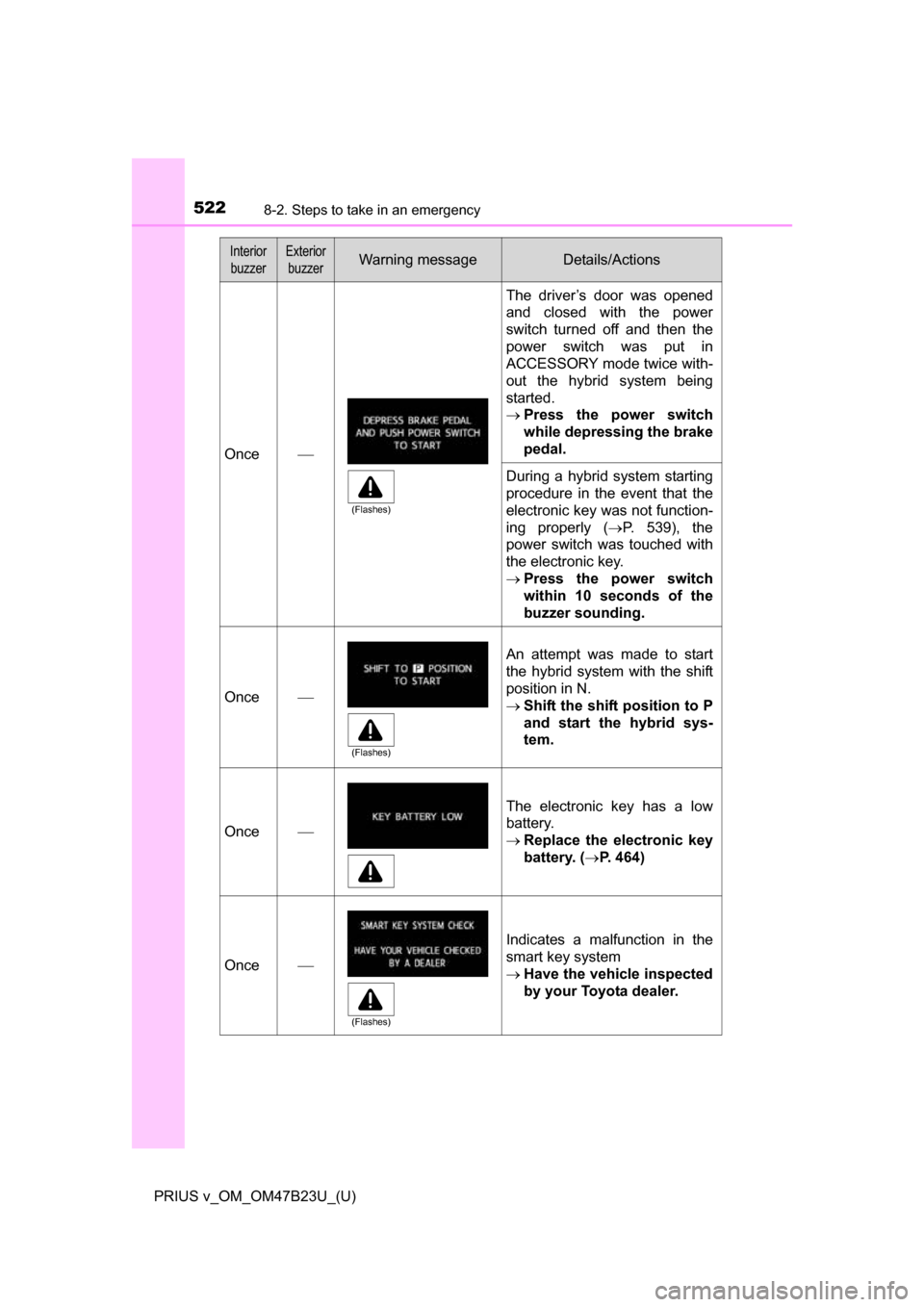
Once
The driver’s door was opened
and closed with the power
switch turned off and then the
power switch was put in
ACCESSORY mode twice with-
out the hybrid system being
started.
Press the power switch
while depressing the brake
pedal.
During a hybrid system starting
procedure in the event that the
electronic key was not function-
ing properly ( P. 539), the
power switch was touched with
the electronic key.
Press the power switch
within 10 seconds of the
buzzer sounding.
Once
An attempt was made to start
the hybrid system with the shift
position in N.
Shift the shift position to P
and start the hybrid sys-
tem.
Once
The electronic key has a low
battery.
Replace the electronic key
battery. ( P. 464)
Once
Indicates a malfunction in the
smart key system
Have the vehicle inspected
by your Toyota dealer.
Interior
buzzerExterior buzzerWarning messageDetails/Actions
(Flashes)
(Flashes)
(Flashes)