remote control TOYOTA PRIUS V 2017 ZVW40 / 1.G Owners Manual
[x] Cancel search | Manufacturer: TOYOTA, Model Year: 2017, Model line: PRIUS V, Model: TOYOTA PRIUS V 2017 ZVW40 / 1.GPages: 624, PDF Size: 13.82 MB
Page 5 of 624
5
1
9 8
7
6 4 3
2
PRIUS v_OM_OM47B23U_(U)
10
5
5-9. Bluetooth® phone
Using a Bluetooth®
Phone ............................. 323
Making a call..................... 326
Receiving a call ................ 329
Speaking on the phone..... 330
Bluetooth
® phone
message function ........... 333
Using the steering wheel switches.......................... 337
Bluetooth
® phone
settings ........................... 338
Contact/Call History Settings .......................... 339
What to do if... (Troubleshooting) ........... 348
5-10. Bluetooth
®
Bluetooth®........................ 352
5-11. Using the voice command system
Voice command system ............................ 358 6-1. Using the air conditioning
system and defogger
Automatic air conditioning system ............................. 366
Using the steering wheel climate remote control
switches........................... 373
Seat heaters ...................... 374
6-2. Using the interior lights Interior lights list................. 375
• Front interior light .......... 376
• Front personal lights...... 376
• Rear interior light ........... 377
6-3. Using the storage features List of storage features ...... 378
• Glove boxes .................. 379
• Console box .................. 379
• Cup holders/ bottle holders/
door pockets.................. 380
• Auxiliary boxes .............. 382
• Card holder ................... 382
Luggage compartment features ........................... 383
6Interior features
Page 12 of 624
12
PRIUS v_OM_OM47B23U_(U)The SRS airbag and seat belt pretensioner devices in your Toyota contain
explosive chemicals. If the vehicle is scrapped with the airbags and seat belt
pretensioners left as they are, this may cause an accident such as fire. Be
sure to have the systems of the SRS airbag and seat belt pretensioner
removed and disposed of by a qualified service shop or by your Toyota dealer
before you scrap your vehicle.
Special handling may apply,
See www.dtsc.ca.gov/hazardouswaste/perchlorate.
Your vehicle has components that may contain perchlorate. These compo-
nents may include airbag, seat belt pretensioners, and wireless remote con-
trol batteries.
Scrapping of your Toyota
Perchlorate Material
WARNING
■
General precautions while driving
Driving under the influence: Never drive your vehicle when under the influ-
ence of alcohol or drugs that have impaired your ability to operate your vehi-
cle. Alcohol and certain drugs delay reaction time, impair judgment and
reduce coordination, which could lead to an accident that could result in
death or serious injury.
Defensive driving: Always drive defensively. Anticipate mistakes that other
drivers or pedestrians might make and be ready to avoid accidents.
Driver distraction: Always give your full attention to driving. Anything that
distracts the driver, such as adjusting controls, talking on a cellular phone or
reading can result in a collision with resulting death or serious injury to you,
your occupants or others.
■ General precaution regard ing children’s safety
Never leave children unattended in the vehicle, and never allow children to
have or use the key.
Children may be able to start the vehicle or shift the vehicle into neutral.
There is also a danger that children may injure themselves by playing with
the windows or other features of the vehicle. In addition, heat build-up or
extremely cold temperatures inside the vehicle can be fatal to children.
Page 22 of 624
22Pictorial index
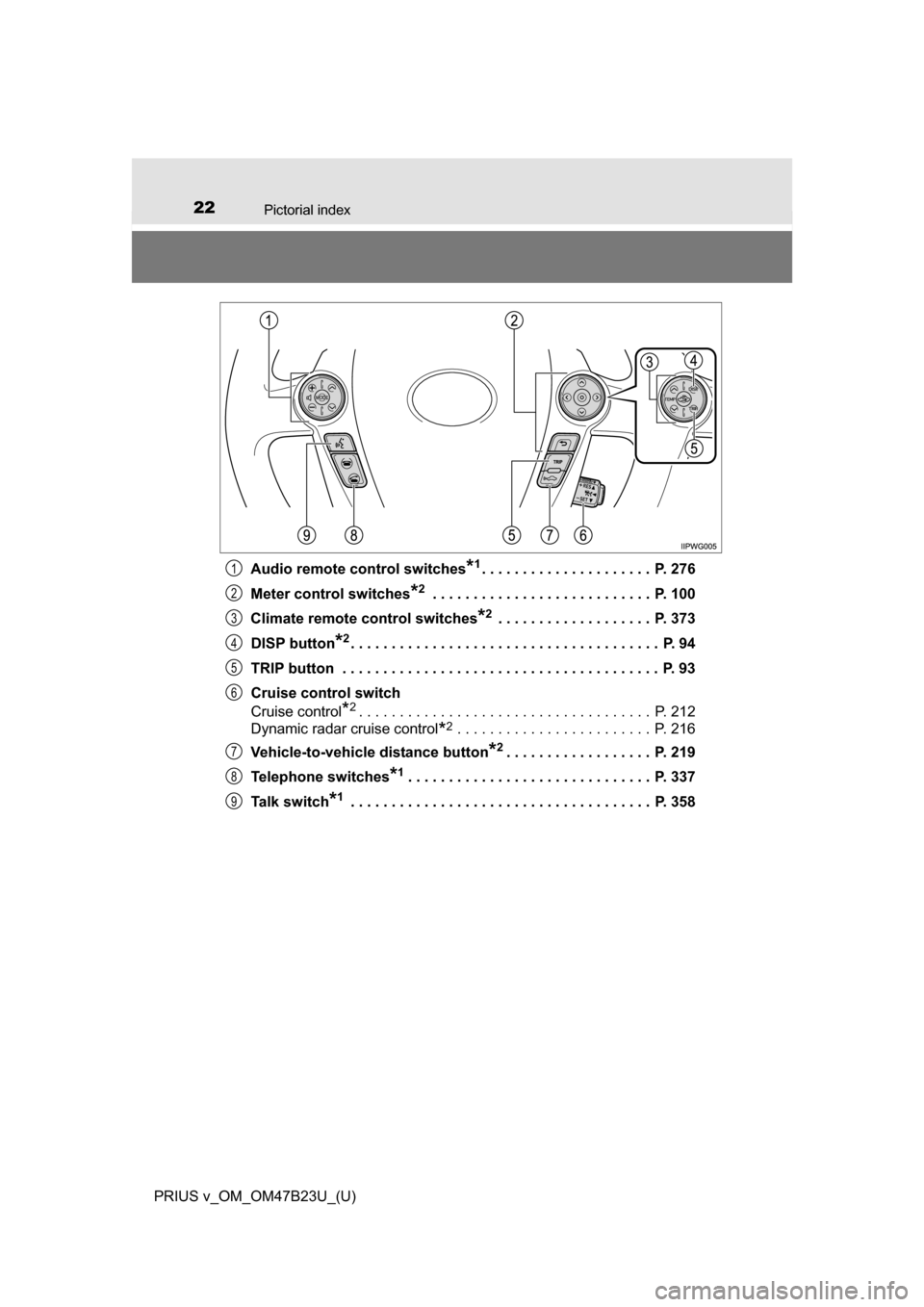
PRIUS v_OM_OM47B23U_(U)Audio remote control switches
*1. . . . . . . . . . . . . . . . . . . . . P. 276
Meter control switches
*2 . . . . . . . . . . . . . . . . . . . . . . . . . . . P. 100
Climate remote control switches
*2 . . . . . . . . . . . . . . . . . . . P. 373
DISP button
*2. . . . . . . . . . . . . . . . . . . . . . . . . . . . . . . . . . . . . . P. 94
TRIP button . . . . . . . . . . . . . . . . . . . . . . . . . . . . . . . . . . . . . . . P. 93
Cruise control switch
Cruise control
*2. . . . . . . . . . . . . . . . . . . . . . . . . . . . . . . . . . . . P. 212
Dynamic radar cruise control
*2 . . . . . . . . . . . . . . . . . . . . . . . . P. 216
Vehicle-to-vehicle distance button
*2. . . . . . . . . . . . . . . . . . P. 219
Telephone switches
*1. . . . . . . . . . . . . . . . . . . . . . . . . . . . . . P. 337
Talk switch
*1 . . . . . . . . . . . . . . . . . . . . . . . . . . . . . . . . . . . . . P. 358
1
2
3
4
5
6
7
8
9
Page 116 of 624
116
PRIUS v_OM_OM47B23U_(U)
3-1. Key information
Keys
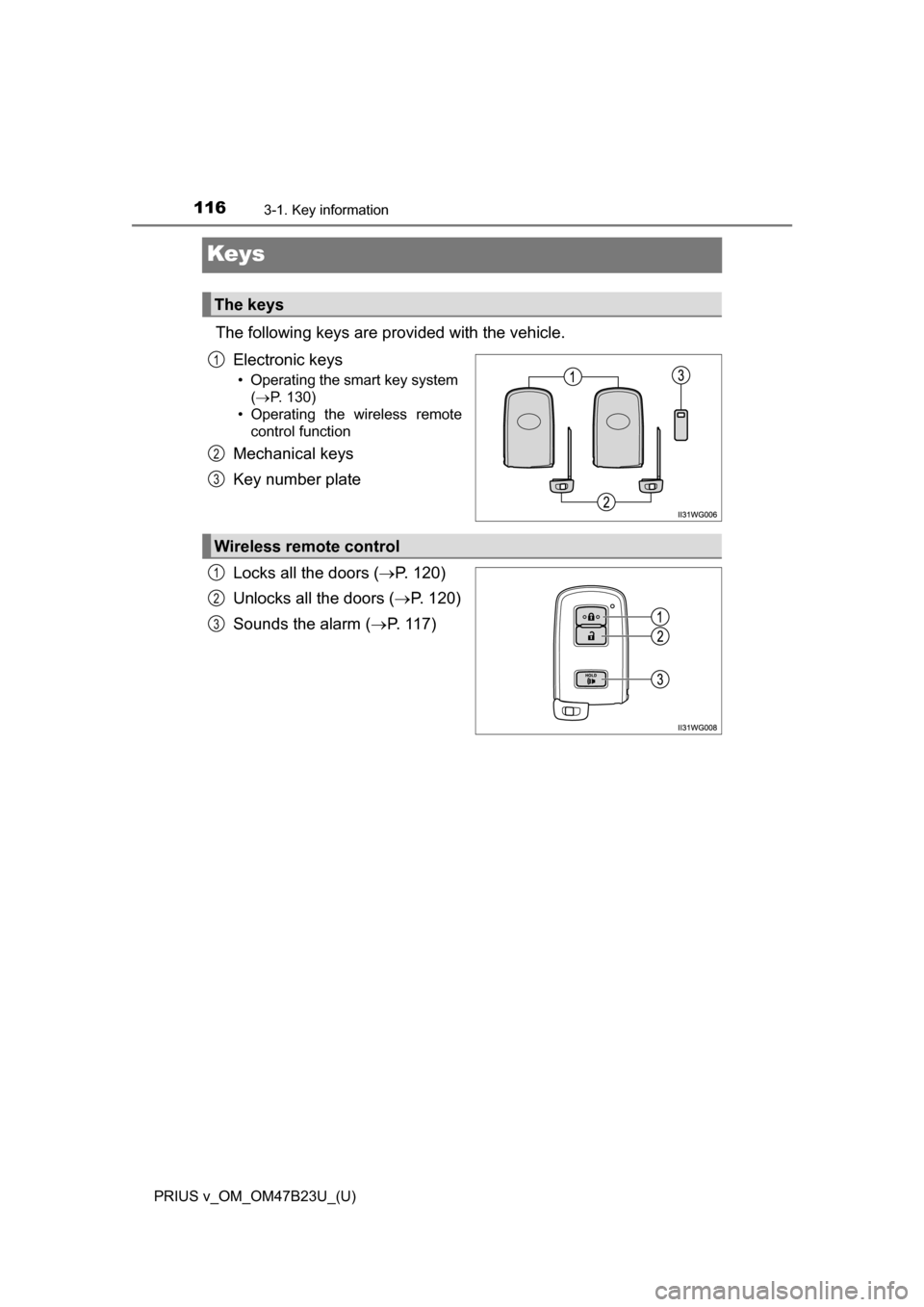
The following keys are provided with the vehicle.Electronic keys
• Operating the smart key system ( P. 130)
• Operating the wireless remote control function
Mechanical keys
Key number plate
Locks all the doors ( P. 120)
Unlocks all the doors ( P. 120)
Sounds the alarm ( P. 117)
The keys
1
2
3
Wireless remote control
1
2
3
Page 118 of 624
118
PRIUS v_OM_OM47B23U_(U)
3-1. Key information
■Electronic key battery depletion
●The standard battery life is 1 to 2 years.
● If the battery becomes low, an alarm will sound in the cabin, and the smart
key system warning light will flash (vehicles without multi-information dis-
play) or a message will be displayed on the multi-information display (vehi-
cles with multi-information display) when the hybrid system stops. ( P. 522)
● As the electronic key always receives radio waves, the battery will become
depleted even if the electronic key is not used. The following symptoms indi-
cate that the electronic key battery may be depleted. Replace the battery
when necessary. ( P. 464)
• The smart key system or the wireless remote control does not operate.
• The detection area becomes smaller.
• The LED indicator on the key surface does not turn on.
● To avoid serious deterioration, do not leave the electronic key within 3 ft.
(1 m) of the following electrical appliances that produce a magnetic field:
•TVs
• Personal computers
• Cellular phones, cordless phones and battery chargers
• Table lamps
• Induction cookers
■ Replacing the battery
P. 464
■ Confirmation of the registered key number
The number of keys already registered to the vehicle can be confirmed. Ask
your Toyota dealer.
■ If a wrong key is used
The key cylinder rotates freely to isolate inside mechanism.
Page 120 of 624
120
PRIUS v_OM_OM47B23U_(U)
3-2. Opening, closing and locking the doors
Side doors
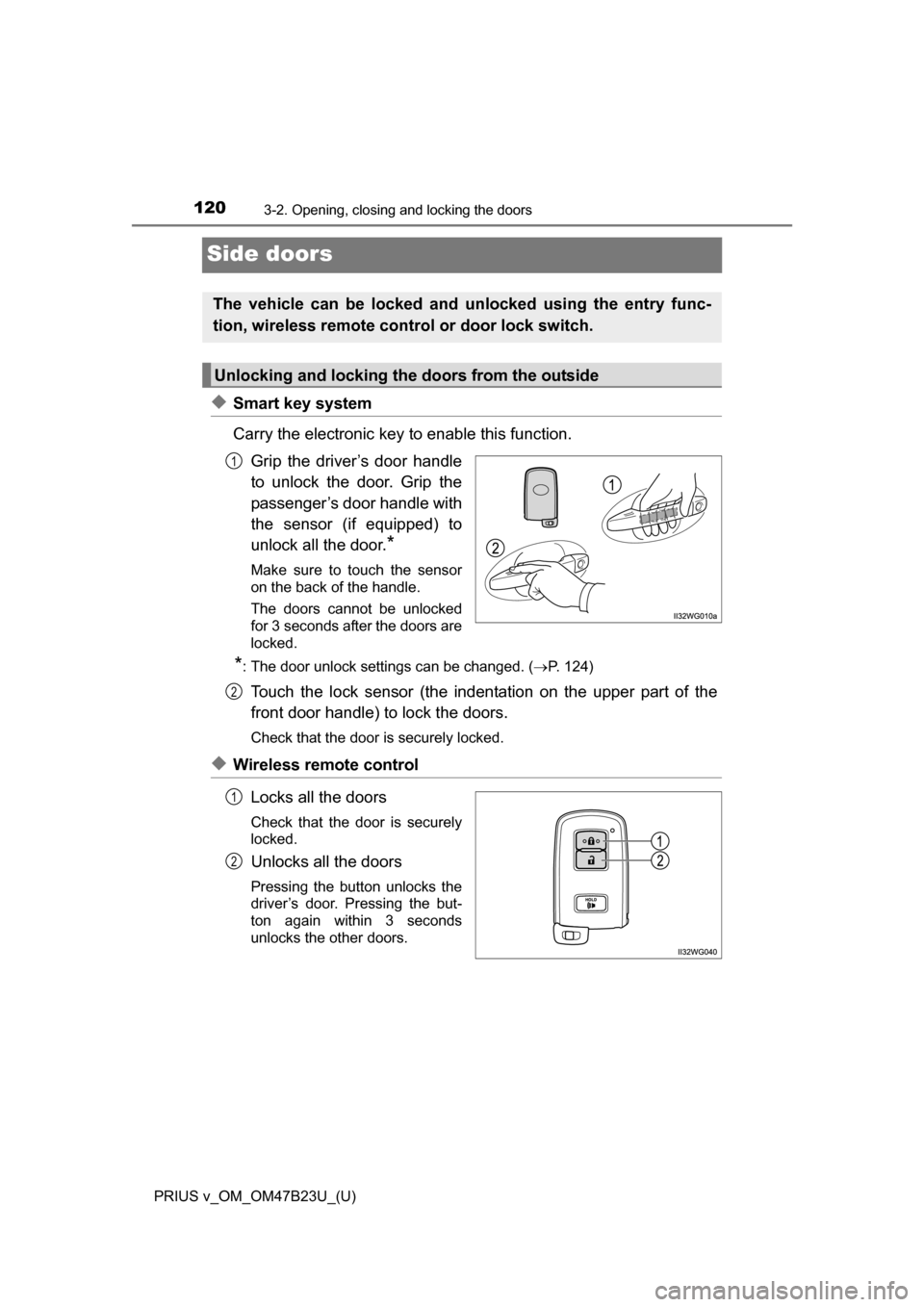
◆Smart key system
Carry the electronic key to enable this function.Grip the driver’s door handle
to unlock the door. Grip the
passenger’s door handle with
the sensor (if equipped) to
unlock all the door.
*
Make sure to touch the sensor
on the back of the handle.
The doors cannot be unlocked
for 3 seconds after the doors are
locked.
*: The door unlock settings can be changed. ( P. 124)
Touch the lock sensor (the indentation on the upper part of the
front door handle) to lock the doors.
Check that the door is securely locked.
◆Wireless remote control
Locks all the doors
Check that the door is securely
locked.
Unlocks all the doors
Pressing the button unlocks the
driver’s door. Pressing the but-
ton again within 3 seconds
unlocks the other doors.
The vehicle can be locked and unlocked using the entry func-
tion, wireless remote c ontrol or door lock switch.
Unlocking and locking the doors from the outside
1
2
1
2
Page 121 of 624
PRIUS v_OM_OM47B23U_(U)
1213-2. Opening, closing and locking the doors
3
Operation of each component
■Operation signals
A buzzer sounds and the emergency flashers flash to indicate that the doors
have been locked/unlocked. (Locked: Once; Unlocked: Twice)
■ Security feature
If a door is not opened within approximately 60 seconds after the vehicle is
unlocked, the security feature automatically locks the vehicle again.
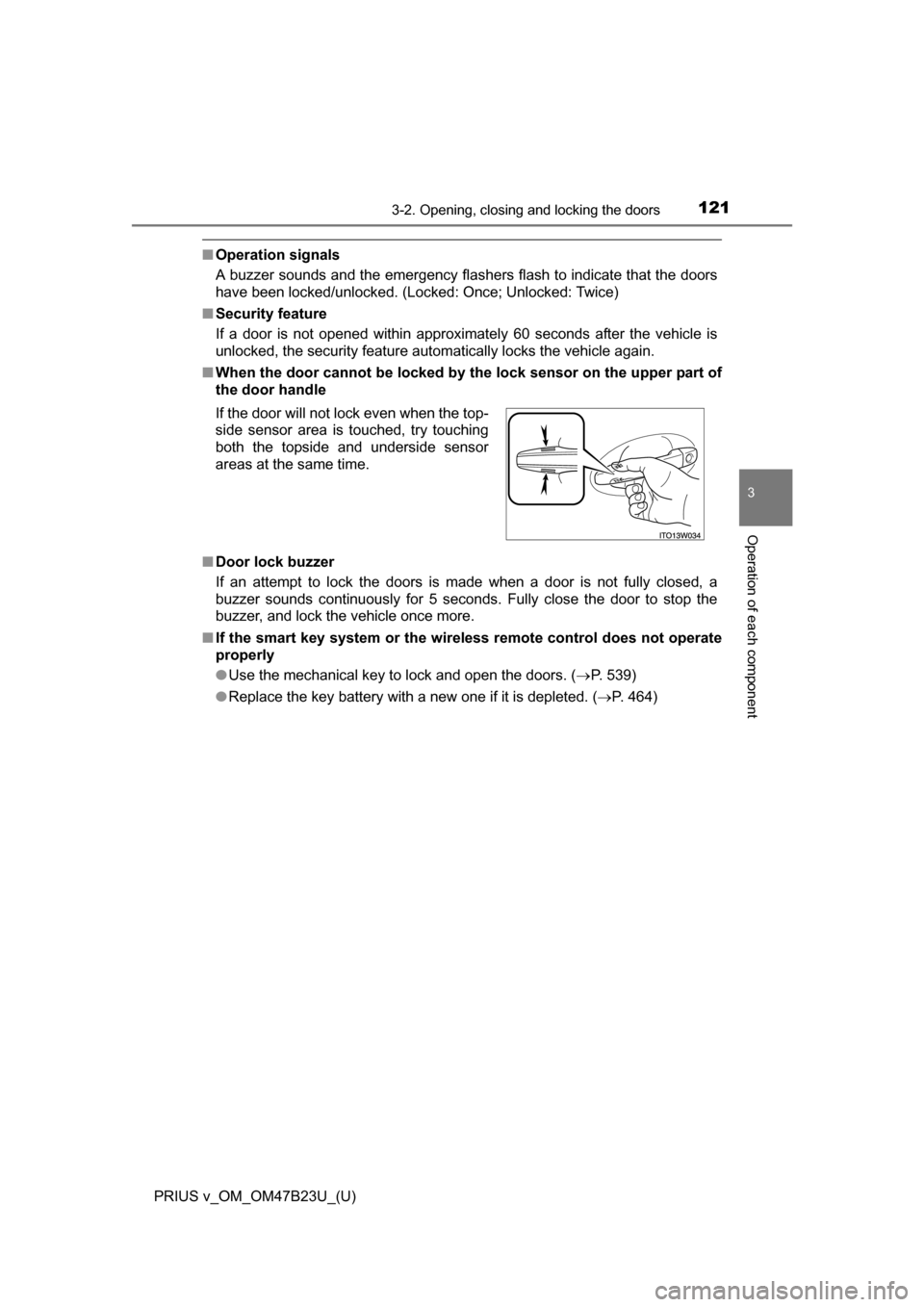
■ When the door cannot be locked by the lock sensor on the upper part of
the door handle
■ Door lock buzzer
If an attempt to lock the doors is made when a door is not fully closed, a
buzzer sounds continuously for 5 seconds. Fully close the door to stop the
buzzer, and lock the vehicle once more.
■ If the smart key system or the wireless remote control does not operate
properly
●Use the mechanical key to lock and open the doors. ( P. 539)
● Replace the key battery with a new one if it is depleted. ( P. 464)
If the door will not lock even when the top-
side sensor area is touched, try touching
both the topside and underside sensor
areas at the same time.
Page 125 of 624
125
PRIUS v_OM_OM47B23U_(U)
3-2. Opening, closing and locking the doors
3
Operation of each component
Back door
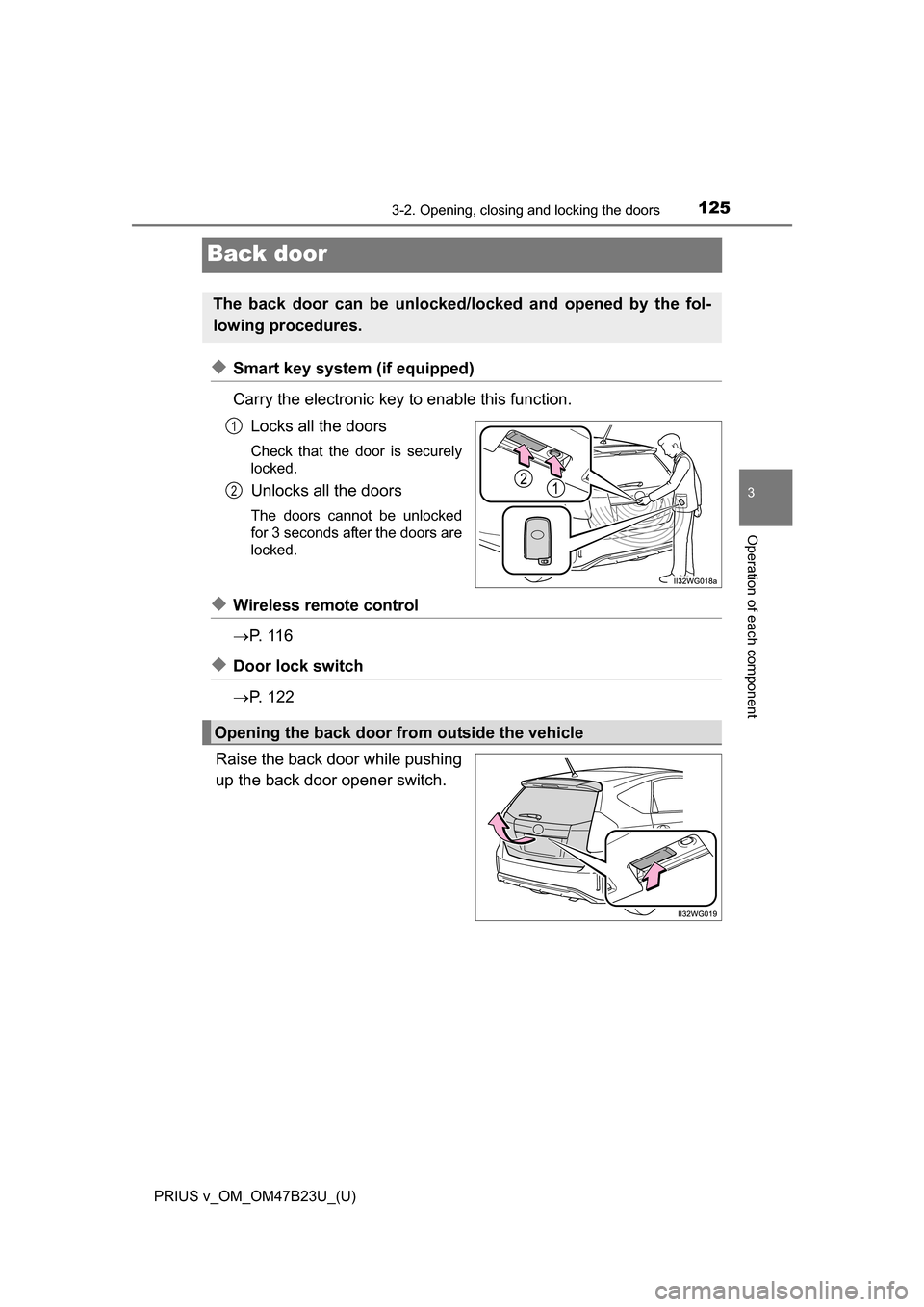
◆Smart key system (if equipped)
Carry the electronic key to enable this function.Locks all the doors
Check that the door is securely
locked.
Unlocks all the doors
The doors cannot be unlocked
for 3 seconds after the doors are
locked.
◆Wireless remote control
P. 1 1 6
◆Door lock switch
P. 1 2 2
Raise the back door while pushing
up the back door opener switch.
The back door can be unlocked/locked and opened by the fol-
lowing procedures.
1
2
Opening the back door from outside the vehicle
Page 132 of 624
132
PRIUS v_OM_OM47B23U_(U)
3-2. Opening, closing and locking the doors
■Battery-saving function
The battery-saving function will be activated in order to prevent the electronic
key battery and the 12-volt battery from being discharged while the vehicle is
not in operation for a long time.
●In the following situations, the smart key system may take some time to
unlock the doors.
• The electronic key has been left in an area of approximately 6 ft. (2 m) of
the outside of the vehicle for 10 minutes or longer.
• The smart key system has not been used for 5 days or longer.
● If the smart key system has not been used for 14 days or longer, the doors
cannot be unlocked at any doors except the driver’s door. In this case, take
hold of the driver’s door handle, or use the wireless remote control or the
mechanical key, to unlock the doors.
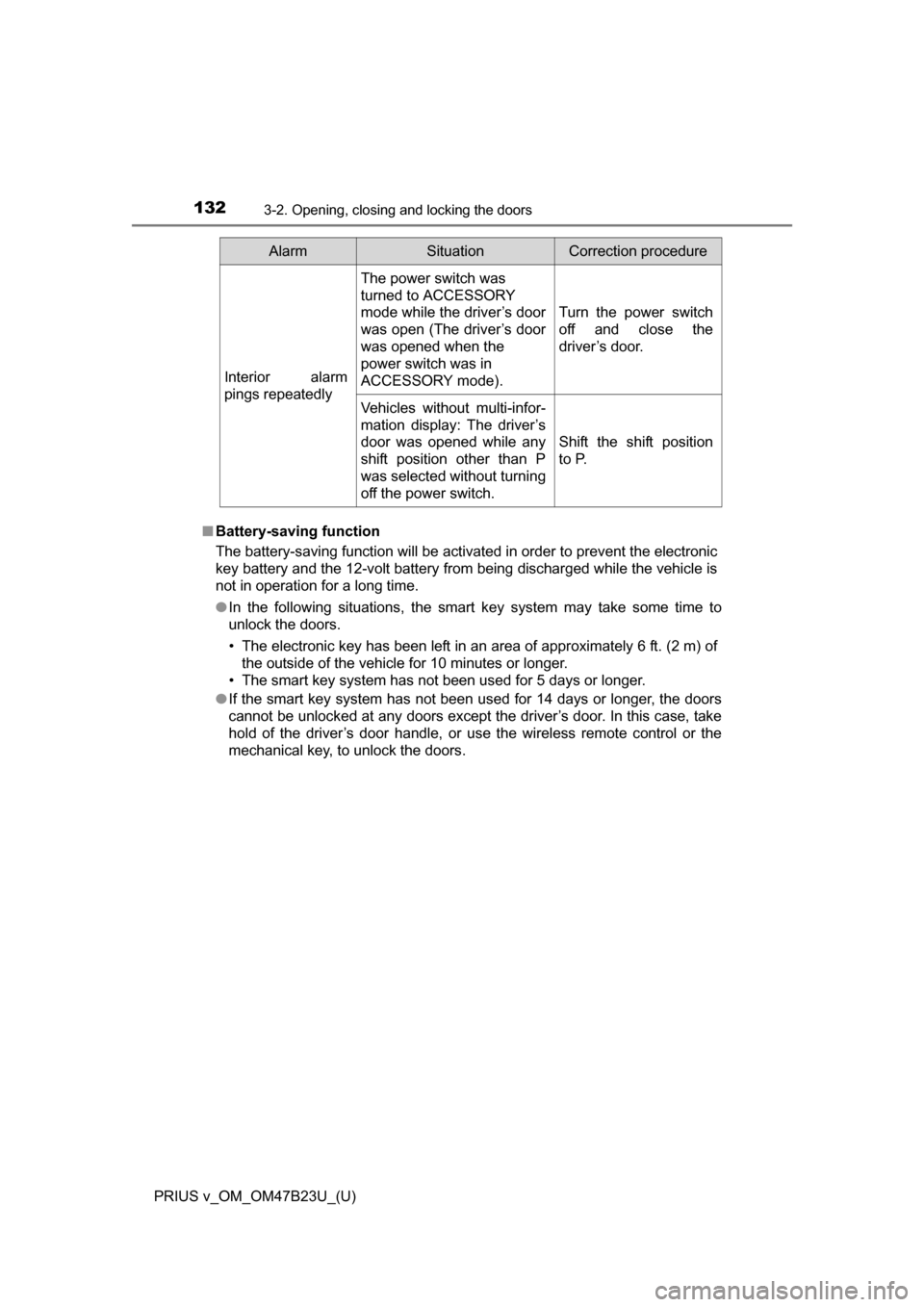
AlarmSituationCorrection procedure
Interior alarm
pings repeatedly
The power switch was
turned to ACCESSORY
mode while the driver’s door
was open (The driver’s door
was opened when the
power switch was in
ACCESSORY mode).
Turn the power switch
off and close the
driver’s door.
Vehicles without multi-infor-
mation display: The driver’s
door was opened while any
shift position other than P
was selected without turning
off the power switch.
Shift the shift position
to P.
Page 133 of 624
PRIUS v_OM_OM47B23U_(U)
1333-2. Opening, closing and locking the doors
3
Operation of each component
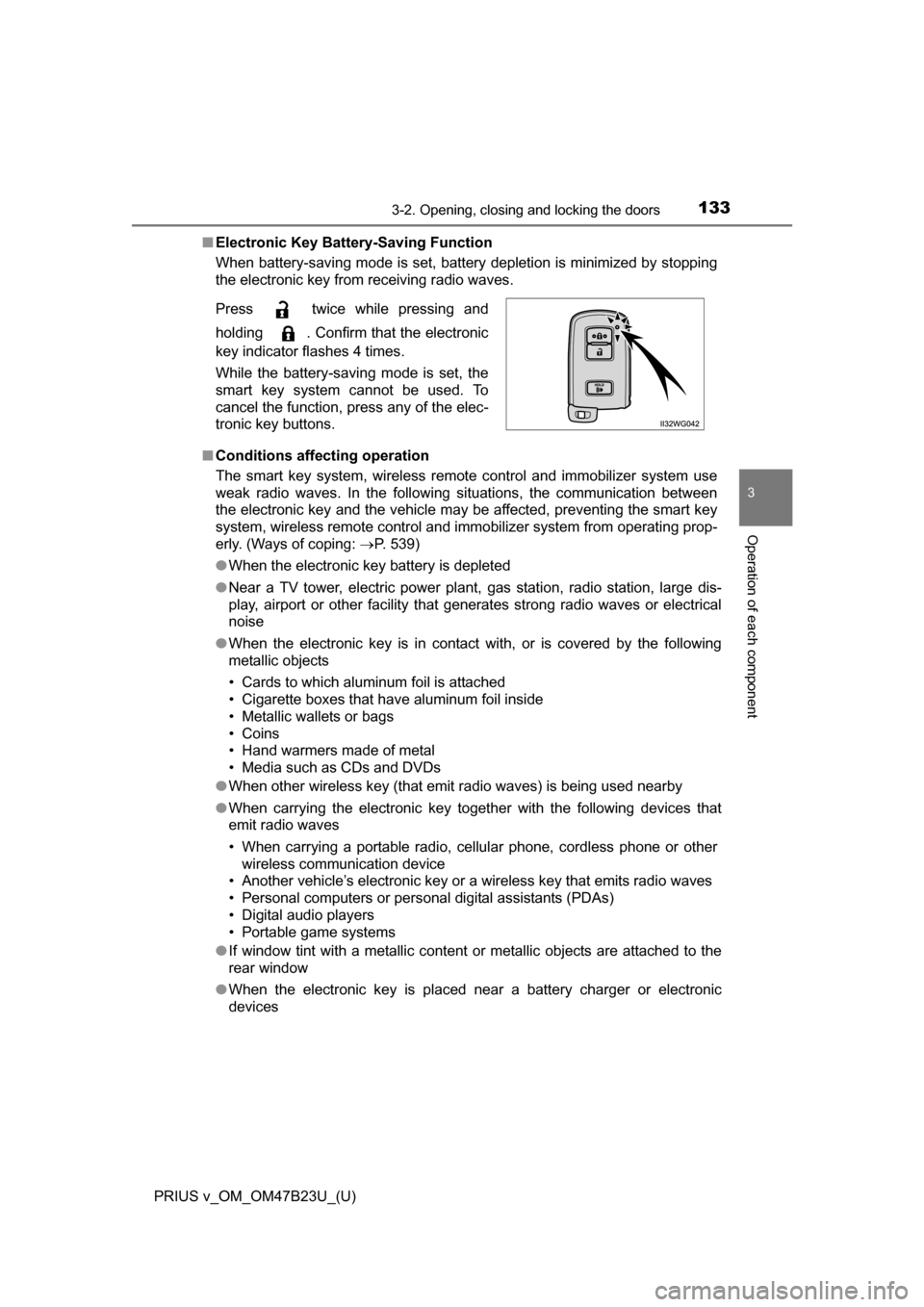
■Electronic Key Battery-Saving Function
When battery-saving mode is set, battery depletion is minimized by stopping
the electronic key from receiving radio waves.
■ Conditions affecting operation
The smart key system, wireless remote control and immobilizer system use
weak radio waves. In the following situations, the communication between\
the electronic key and the vehicle may be affected, preventing the smart key
system, wireless remote control and immobilizer system from operating prop-
erly. (Ways of coping: P. 539)
● When the electronic key battery is depleted
● Near a TV tower, electric power plant, gas station, radio station, large dis-
play, airport or other facility that generates strong radio waves or electrical
noise
● When the electronic key is in contact with, or is covered by the following
metallic objects
• Cards to which aluminum foil is attached
• Cigarette boxes that have aluminum foil inside
• Metallic wallets or bags
• Coins
• Hand warmers made of metal
• Media such as CDs and DVDs
● When other wireless key (that emit radio waves) is being used nearby
● When carrying the electronic key together with the following devices that
emit radio waves
• When carrying a portable radio, cellular phone, cordless phone or other
wireless communication device
• Another vehicle’s electronic key or a wireless key that emits radio waves
• Personal computers or personal digital assistants (PDAs)
• Digital audio players
• Portable game systems
● If window tint with a metallic content or metallic objects are attached to the
rear window
● When the electronic key is placed near a battery charger or electronic
devices
Press twice while pressing and
holding . Confirm that the electronic
key indicator flashes 4 times.
While the battery-saving mode is set, the
smart key system cannot be used. To
cancel the function, press any of the elec-
tronic key buttons.