ECO mode TOYOTA PRIUS V 2018 User Guide
[x] Cancel search | Manufacturer: TOYOTA, Model Year: 2018, Model line: PRIUS V, Model: TOYOTA PRIUS V 2018Pages: 607, PDF Size: 41.96 MB
Page 147 of 607
1453-4. Adjusting the steering wheel and mirrors
3
Operation of each component
PRIUS v_OM_OM47B78U_(U)
■Mirror angle can be adjusted when
The power switch is in ACCESSORY or ON mode.
■ When the mirrors are fogged up
The outside rear view mirrors can be cleared using the mirror defoggers. Turn
on the rear window defogger to turn on the outside rear view mirror defog-
gers. ( P. 362)
WARNING
■Important points while driving
Observe the following precautions while driving.
Failing to do so may result in loss of control of the vehicle and cause an
accident, resulting in death or serious injury.
●Do not adjust the mirrors while driving.
● Do not drive with the mirrors folded.
● Both the driver and passenger side mirrors must be extended and properly
adjusted before driving.
■ When a mirror is moving
To avoid personal injury and mirror malfunction, be careful not to get your
hand caught by the moving mirror.
■ When the mirror defoggers are operating
Do not touch the rear view mirror surfaces, as they can become very hot
and burn you.
Page 148 of 607
146
PRIUS v_OM_OM47B78U_(U)
3-5. Opening and closing the windows
Power windows
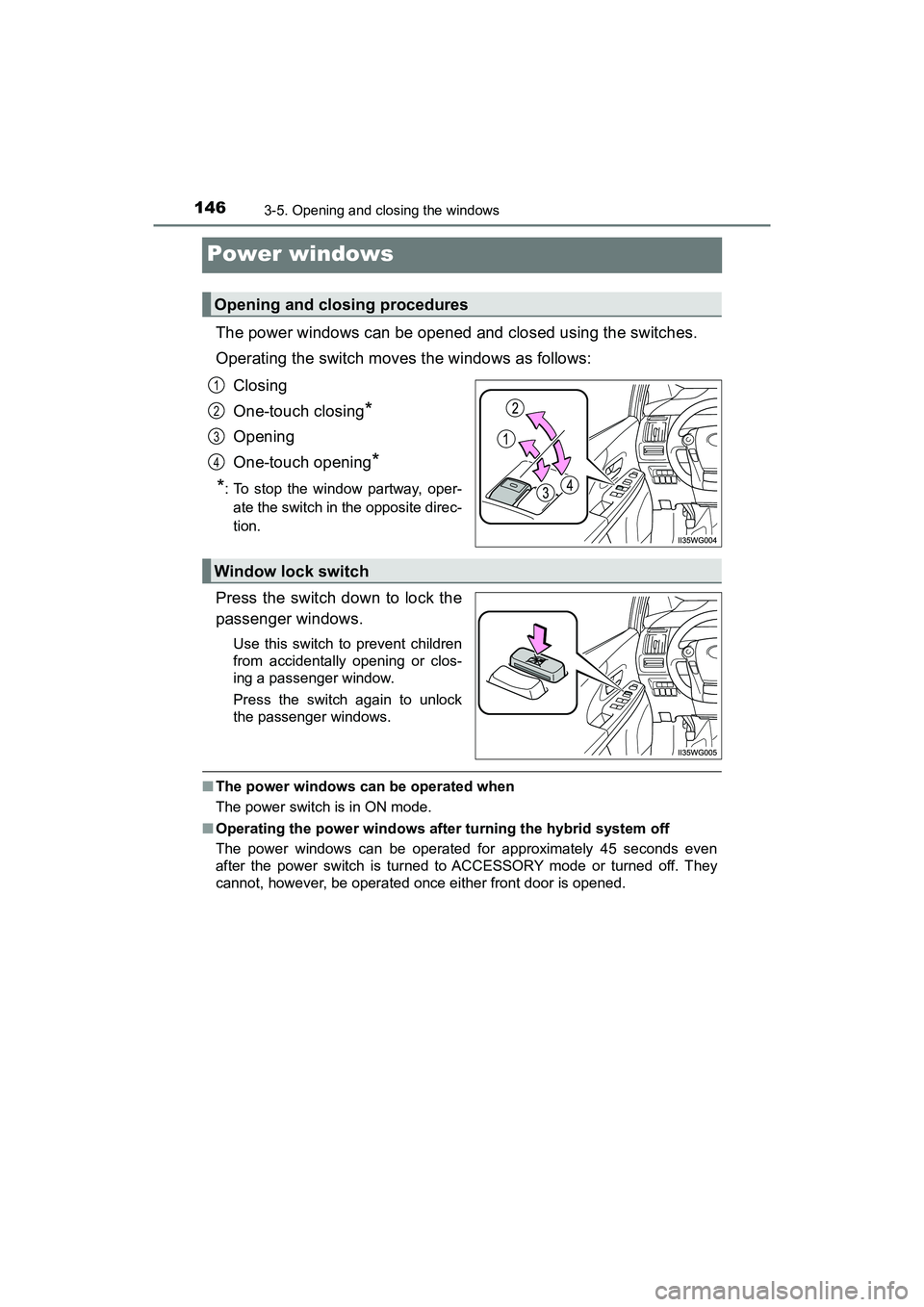
The power windows can be opened and closed using the switches.
Operating the switch moves the windows as follows:Closing
One-touch closing
*
Opening
One-touch opening
*
*
: To stop the window partway, oper- ate the switch in the opposite direc-
tion.
Press the switch down to lock the
passenger windows.
Use this switch to prevent children
from accidentally opening or clos-
ing a passenger window.
Press the switch again to unlock
the passenger windows.
■ The power windows can be operated when
The power switch is in ON mode.
■ Operating the power windows after turning the hybrid system off
The power windows can be operated for approximately 45 seconds even
after the power switch is turned to ACCESSORY mode or turned off. They
cannot, however, be operated once either front door is opened.
Opening and closing procedures
1
2
3
4
Window lock switch
Page 149 of 607
PRIUS v_OM_OM47B78U_(U)
1473-5. Opening and closing the windows
3
Operation of each component
■Jam protection function
If an object becomes jammed between the window and the window frame
while the window is closing, window movement is stopped and the window is
opened slightly.
■ Catch protection function
If an object becomes caught between the door and window while the window
is opening, window movement is stopped.
■ When the window cannot be opened or closed
When the jam protection function or catch protection function operates
unusually and the door window cannot be opened or closed, perform the fol-
lowing operations with the power window switch of that door.
●Stop the vehicle. With the power switch in ON mode, within 4 seconds of the
jam protection function or catch protec tion function activating, continuously
operate the power window switch in the one-touch closing direction or one-
touch opening direction so that the door window can be opened and closed.
● If the door window cannot be opened and closed even when performing the
above operations, perform the following pr ocedure for function initialization.
Turn the power switch to ON mode.
Pull and hold the power window switch in the one-touch closing direction
and completely close the door window.
Release the power window switch for a moment, resume pulling the
switch in the one-touch closing direction, and hold it there for approxi-
mately 6 seconds or more.
Press and hold the power window switch in the one-touch opening direc-
tion. After the door window is completely opened, continue holding the
switch for an additional 1 second or more.
Release the power window switch for a moment, resume pushing the
switch in the one-touch opening direction, and hold it there for approxi-
mately 4 seconds or more.
Pull and hold the power window switch in the one-touch closing direction
again. After the door window is completely closed, continue holding the
switch for a further 1 second or more.
If you release the switch while the window is moving, start again from the
beginning.
If the window reverses and cannot be fully closed or opened, have the vehicle
inspected by your Toyota dealer.
1
2
3
4
5
6
Page 173 of 607
PRIUS v_OM_OM47B78U_(U)
1714-2. Driving procedures
4
Driving
■Operation of the power switch
●If the switch is not pressed shortly and firmly, the power switch mode may
not change or the hybrid system may not start.
● If attempting to restart the hybrid system immediately after turning the power
switch off, the hybrid system may not start in some cases. After turning the
power switch off, please wait a few seconds before restarting the hybrid sys-
tem.
■ Automatically P position selection function
P. 178
■ When the shift control system malfunctions
The power switch will not be able to be turned off. In such a case, the switch
can be turned off after applying the parking brake.
Have the vehicle inspected by your Toyota dealer immediately.
■ Meter display
When the power switch is turned off, each display will turn off as follows.
●The shift position indicator will turn off after approximately 2 seconds.
● EV driving ratio and average fuel consum ption after hybrid system started,
turn off after approximately 6 seconds.
● The odometer, clock, etc. will turn off after approximately 30 seconds.
(Each display will also turn off immediately if a door is locked before 30 sec-
onds has elapsed.)
WARNING
■ When starting the hybrid system
Always start the hybrid system while sitting in the driver’s seat. Do not
depress the accelerator pedal while starting the hybrid system under any
circumstances.
Doing so may cause an accident resulting in death or serious injury.
■ Stopping the hybrid system in an emergency
If you want to stop the hybrid system in an emergency while driving the
vehicle, press and hold the power switch for more than 2 seconds, or press
it briefly 3 times or more in succession. ( P. 471)
However, do not touch the power switch while driving except in an emer-
gency. Turning the hybrid system off while driving will not cause loss of
steering or braking control, however, power assist to the steering will be
lost. This will make it more difficult to steer smoothly, so you should pull over
and stop the vehicle as soon as it is safe to do so.
Page 174 of 607
172
PRIUS v_OM_OM47B78U_(U)
4-2. Driving procedures
NOTICE
■To prevent 12-volt battery discharge
●Do not leave the power switch in ACCESSORY or ON mode for long peri-
ods of time without the hybrid system on.
● If “POWER ON” is displayed on the multi-information display the hybrid
system is not off. When exiting the vehicle, always check that the power
switch is off.
■ When starting the hybrid system
If the hybrid system becomes difficult to start, have your vehicle checked by
your Toyota dealer immediately.
■ Symptoms indicating a malfunction with the power switch
If the power switch seems to be operating somewhat differently than usual,
such as the switch sticking slightly, there may be a malfunction. Contact
your Toyota dealer immediately.
Page 176 of 607
174
PRIUS v_OM_OM47B78U_(U)
4-2. Driving procedures
■Switching to EV drive mode when the gasoline engine is cold
If the hybrid system is started while the gasoline engine is cold, the gasoline
engine will start automatically after a short period of time in order to warm up.
In this case, you will become unable to switch to EV drive mode.
After the hybrid system has started and the “READY” indicator has illumi-
nated, press the EV drive mode switch before the gasoline engine starts to
switch to EV drive mode.
■ Automatic cancelation of EV drive mode
When driving in EV drive mode, the gasoline engine may automatically restart
in the following situations. When EV drive mode is canceled, a buzzer will
sound and the EV drive mode indicator will flash and go off.
●The hybrid battery (traction battery) becomes low.
The remaining battery level indicated in the energy monitor display is low.
(P. 96, 103)
● Vehicle speed is high.
● The accelerator pedal is depressed firmly or the vehicle is on a hill etc.
When it is possible to inform the driver of automatic cancelation in advance, a
prior notice screen will appear on the multi-information display.
■ Possible driving distance when driving in EV drive mode
EV drive mode’s possible driving distance ranges from a few hundred meters
to approximately 0.6 mile (1 km). However, depending on vehicle conditions,
there are situations when EV drive mode cannot be used. (The distance that
is possible depends on the hybrid battery [traction battery] level and driving
conditions.)
■ Changing a driving mode when in EV drive mode
EV drive mode can be used in conjunction with Eco drive mode and power
mode.
However, EV drive mode may be automatically canceled when used in con-
junction with power mode.
■ Fuel economy
The hybrid system is designed to achieve the best possible fuel economy
during normal driving (using the gasoline engine and electric motor [traction
motor]). Driving in EV drive mode more than necessary may lower fuel econ-
omy.
WARNING
■Caution while driving
When driving in EV drive mode, pay s pecial attention to the area around the
vehicle. Because there is no engine noise, pedestrians, people riding bicy-
cles or other people and vehicles in the area may not be aware of the vehi-
cle starting off or approaching them, so take extra care while driving.
Therefore, take extra care while drivi ng even if the vehicle proximity notifica-
tion system is active (vehicles with vehicle proximity notification system).
Page 178 of 607
176
PRIUS v_OM_OM47B78U_(U)
4-2. Driving procedures
*: For good fuel economy and noise reduction, the D position should usuallybe used.
P. 2 5 1
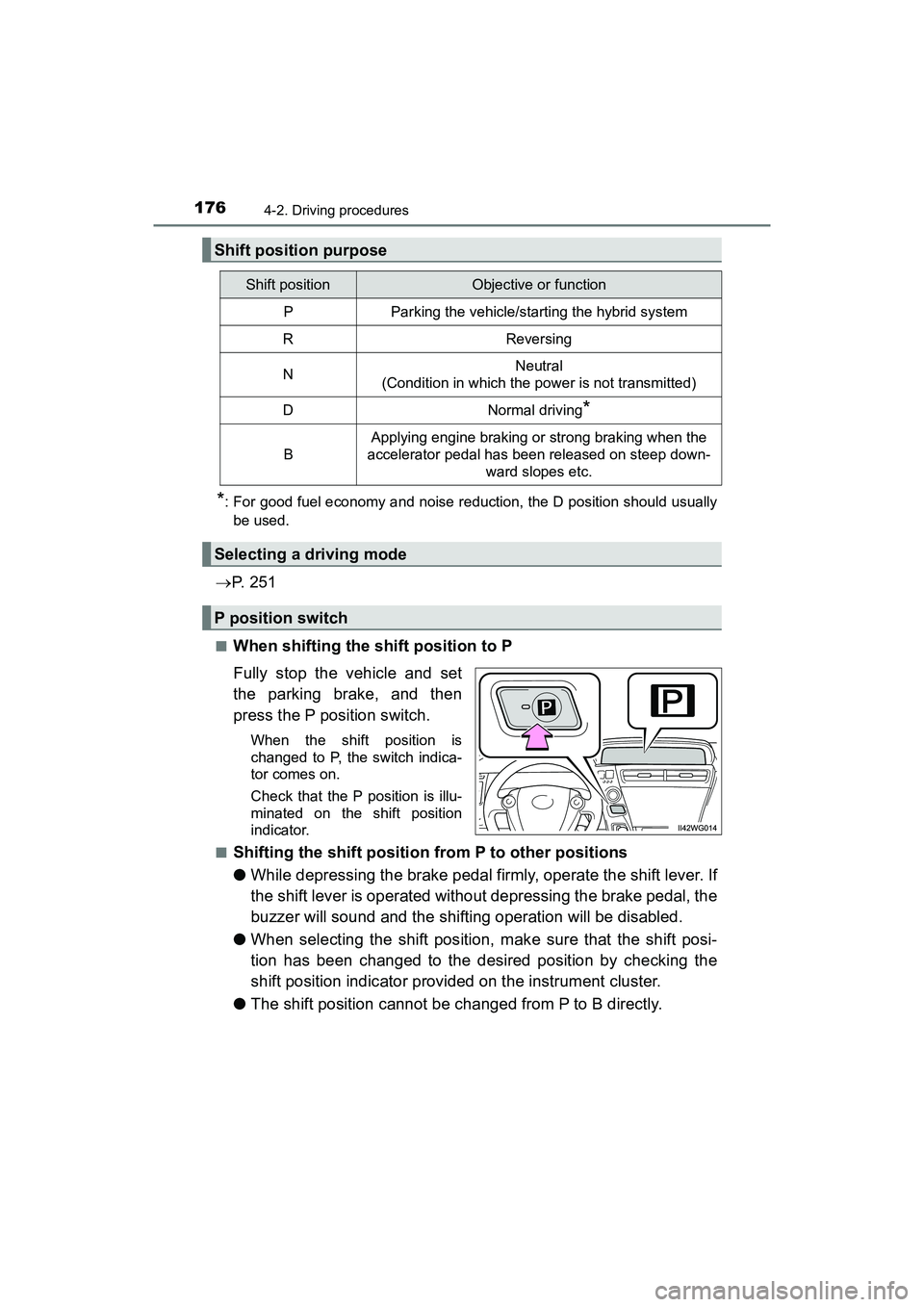
■When shifting the shift position to P
Fully stop the vehicle and set
the parking brake, and then
press the P position switch.
When the shift position is
changed to P, the switch indica-
tor comes on.
Check that the P position is illu-
minated on the shift position
indicator.
■
Shifting the shift position from P to other positions
● While depressing the brake pedal firmly, operate the shift lever. If
the shift lever is operated without depressing the brake pedal, the
buzzer will sound and the shifting operation will be disabled.
● When selecting the shift position, make sure that the shift posi-
tion has been changed to the desired position by checking the
shift position indicator provided on the instrument cluster.
● The shift position cannot be changed from P to B directly.
Shift position purpose
Shift positionObjective or function
PParking the vehicle/starting the hybrid system
RReversing
NNeutral
(Condition in which the power is not transmitted)
DNormal driving*
B
Applying engine braking or strong braking when the
accelerator pedal has been released on steep down-
ward slopes etc.
Selecting a driving mode
P position switch
Page 195 of 607
PRIUS v_OM_OM47B78U_(U)
1934-3. Operating the lights and wipers
4
Driving
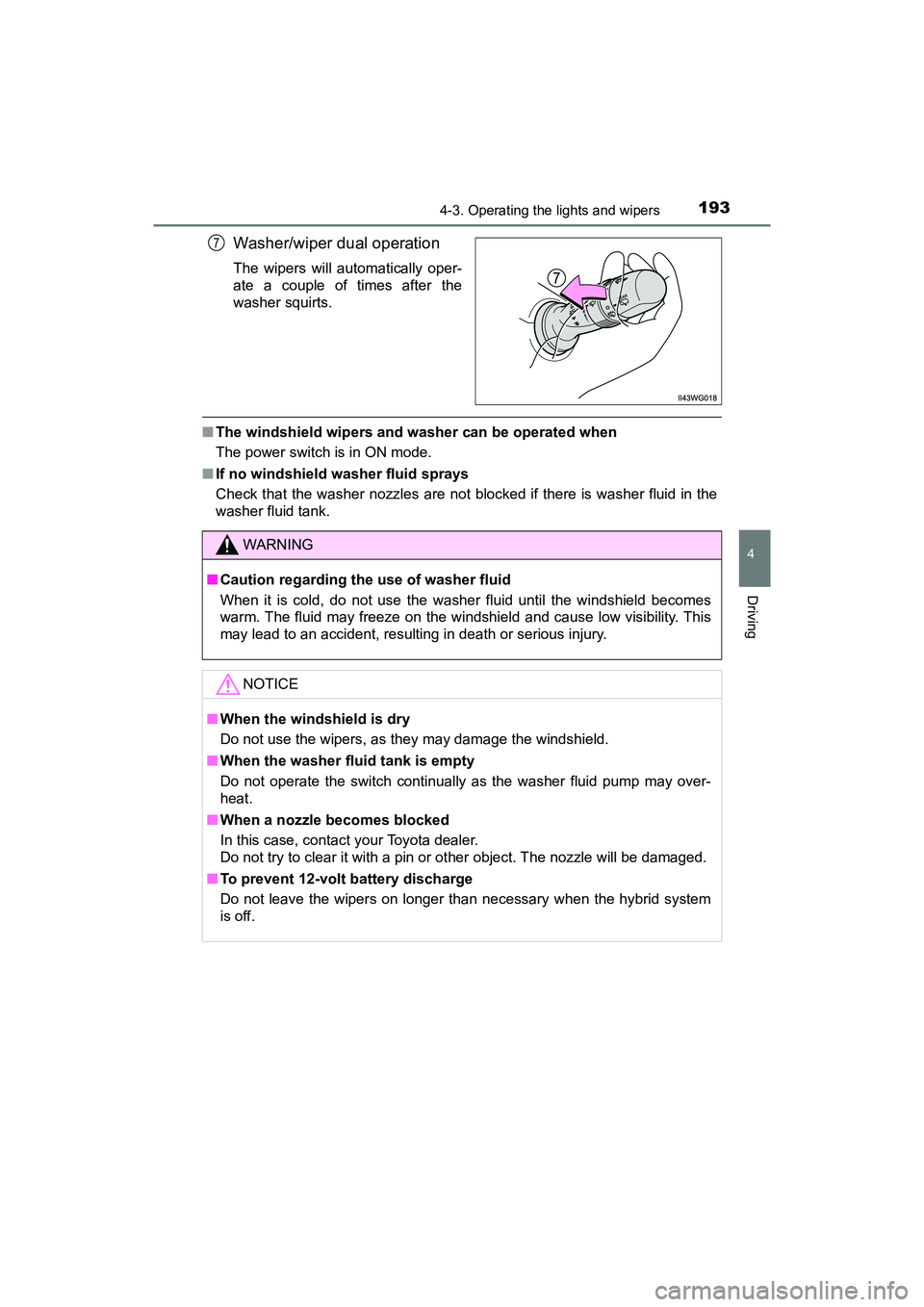
Washer/wiper dual operation
The wipers will automatically oper-
ate a couple of times after the
washer squirts.
■The windshield wipers and washer can be operated when
The power switch is in ON mode.
■ If no windshield washer fluid sprays
Check that the washer nozzles are not blocked if there is washer fluid in the
washer fluid tank.
7
WARNING
■Caution regarding the use of washer fluid
When it is cold, do not use the washer fluid until the windshield becomes
warm. The fluid may freeze on the windshield and cause low visibility. This
may lead to an accident, resulting in death or serious injury.
NOTICE
■When the windshield is dry
Do not use the wipers, as they may damage the windshield.
■ When the washer fluid tank is empty
Do not operate the switch continually as the washer fluid pump may over-
heat.
■ When a nozzle becomes blocked
In this case, contact your Toyota dealer.
Do not try to clear it with a pin or other object. The nozzle will be damaged.
■ To prevent 12-volt battery discharge
Do not leave the wipers on longer than necessary when the hybrid system
is off.
Page 225 of 607
PRIUS v_OM_OM47B78U_(U)
2234-5. Using the driving support systems
4
Driving
■Operation conditions of each function
●Lane departure alert function
This function operates when all of the following conditions are met.
• LDA is turned on.
• Vehicle speed is approximately 32 mph (50 km/h) or more.
• System recognizes white (yellow) lines.
• Width of traffic lane is approximately 9.8 ft. (3 m) or more.
• Turn signal lever is not operated.
• Vehicle is driven on a straight road or around a gentle curve with a radius
of more than approximately 492 ft. (150 m).
• No system malfunctions are detected. ( P. 226)
● Steering control function
This function operates when all of the following conditions are met in addi-
tion to the operation conditions for the lane departure alert function.
• Setting for “LDA STEERING ASSIST MODE” in the screen of the
multi-information display is set to “ON”. ( P. 9 4 )
• Vehicle is not accelerated or decelerated by a fixed amount or more.
• Steering wheel is not operated with a steering force level suitable for changing lanes.
• ABS, VSC, TRAC and PCS are not operating.
• TRAC or VSC is not turned off.
• Hands off steering wheel alert is not displayed. ( P. 224)
● Vehicle sway warning function
This function operates when all of the following conditions are met.
• Setting for “LANE SWAY WARNING STATUS” in the screen of
the multi-information display is set to “ON”. (P. 9 4 )
• Vehicle speed is approximately 32 mph (50 km/h) or more.
• Width of traffic lane is approximately 9.8 ft. (3 m) or more.
• No system malfunctions are detected. ( P. 226)
Page 234 of 607
232
PRIUS v_OM_OM47B78U_(U)
4-5. Using the driving support systems
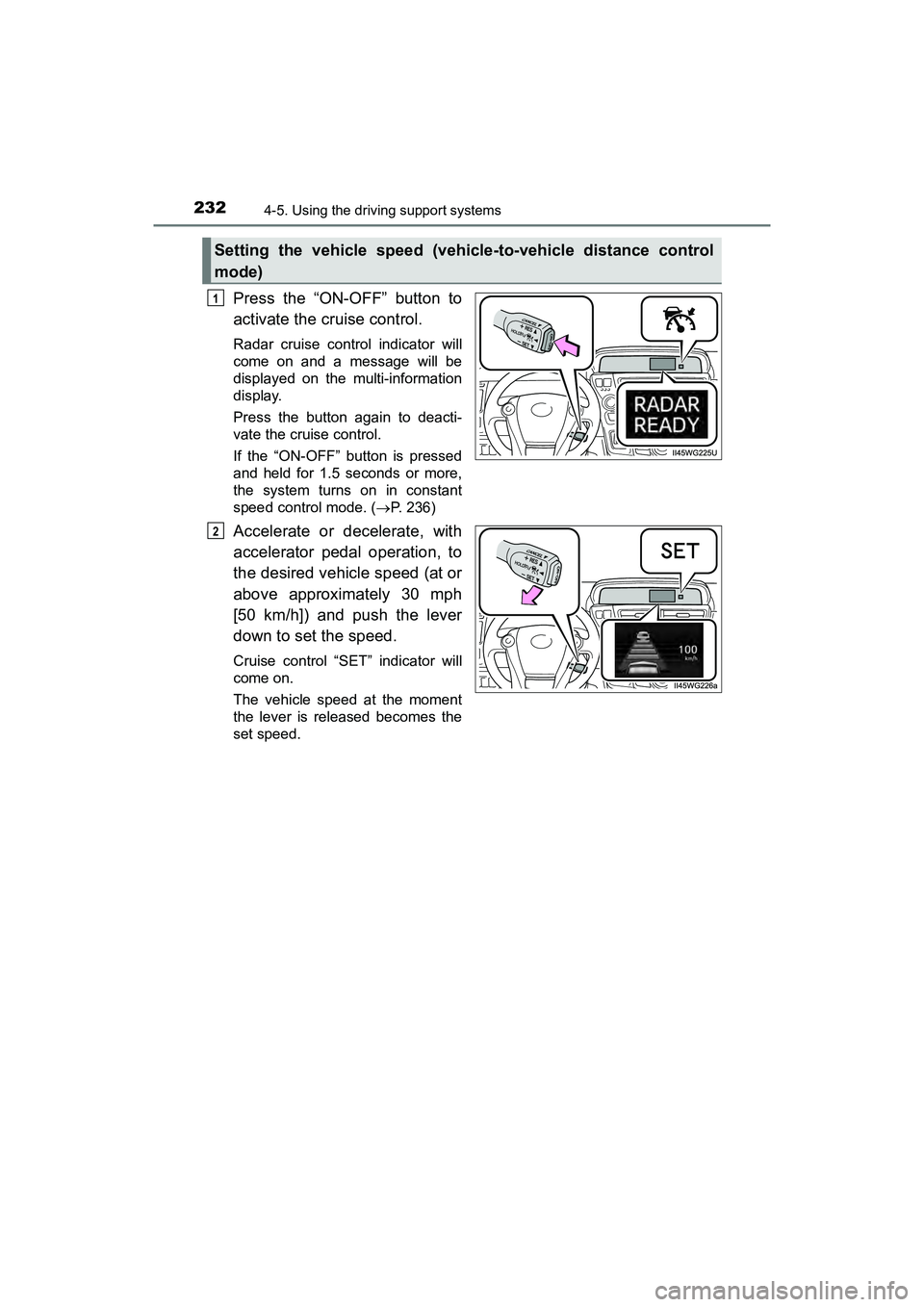
Press the “ON-OFF” button to
activate the cruise control.
Radar cruise control indicator will
come on and a message will be
displayed on the multi-information
display.
Press the button again to deacti-
vate the cruise control.
If the “ON-OFF” button is pressed
and held for 1.5 seconds or more,
the system turns on in constant
speed control mode. (P. 236)
Accelerate or decelerate, with
accelerator pedal operation, to
the desired vehicle speed (at or
above approximately 30 mph
[50 km/h]) and push the lever
down to set the speed.
Cruise control “SET” indicator will
come on.
The vehicle speed at the moment
the lever is released becomes the
set speed.
Setting the vehicle speed (vehicle-to-vehicle distance control
mode)
1
2