fog light TOYOTA PRIUS V 2018 User Guide
[x] Cancel search | Manufacturer: TOYOTA, Model Year: 2018, Model line: PRIUS V, Model: TOYOTA PRIUS V 2018Pages: 607, PDF Size: 41.96 MB
Page 204 of 607
202
PRIUS v_OM_OM47B78U_(U)
4-5. Using the driving support systems
WARNING
■To avoid malfunction of the camera sensor
Observe the following precautions.
Otherwise, the camera sensor may not operate properly, possibly leading to
an accident resulting in death or serious injury.
● Keep the windshield clean at all times.
• If the windshield is dirty or covered with an oily film, water droplets,
snow, etc., clear the windshield.
• If a glass coating agent is applied to the windshield, it will still be neces- sary to use the windshield wipers to remove water droplets, etc. from
the area of the windshield in front of the camera sensor.
• If the inner side of the windshield where the camera sensor is installed is dirty, contact your Toyota dealer.
● If the part of the windshield in front of the camera sensor is fogged up or
covered with condensation or ice, use the windshield defogger to remove
the fog, condensation or ice. ( P. 362)
● If water droplets cannot be properly removed from the area of the wind-
shield in front of the camera sensor by the windshield wipers, replace the
wiper insert or wiper blade.
• To replace the wiper insert: P. 4 4 7
• If the wiper blades need to be replaced, contact your Toyota dealer.
● Do not attach window tinting to the windshield.
● Replace the windshield if it is damaged or cracked.
If the windshield needs to be replaced, contact your Toyota dealer.
● Do not get the camera sensor wet.
● Do not allow bright lights to shine into the camera sensor.
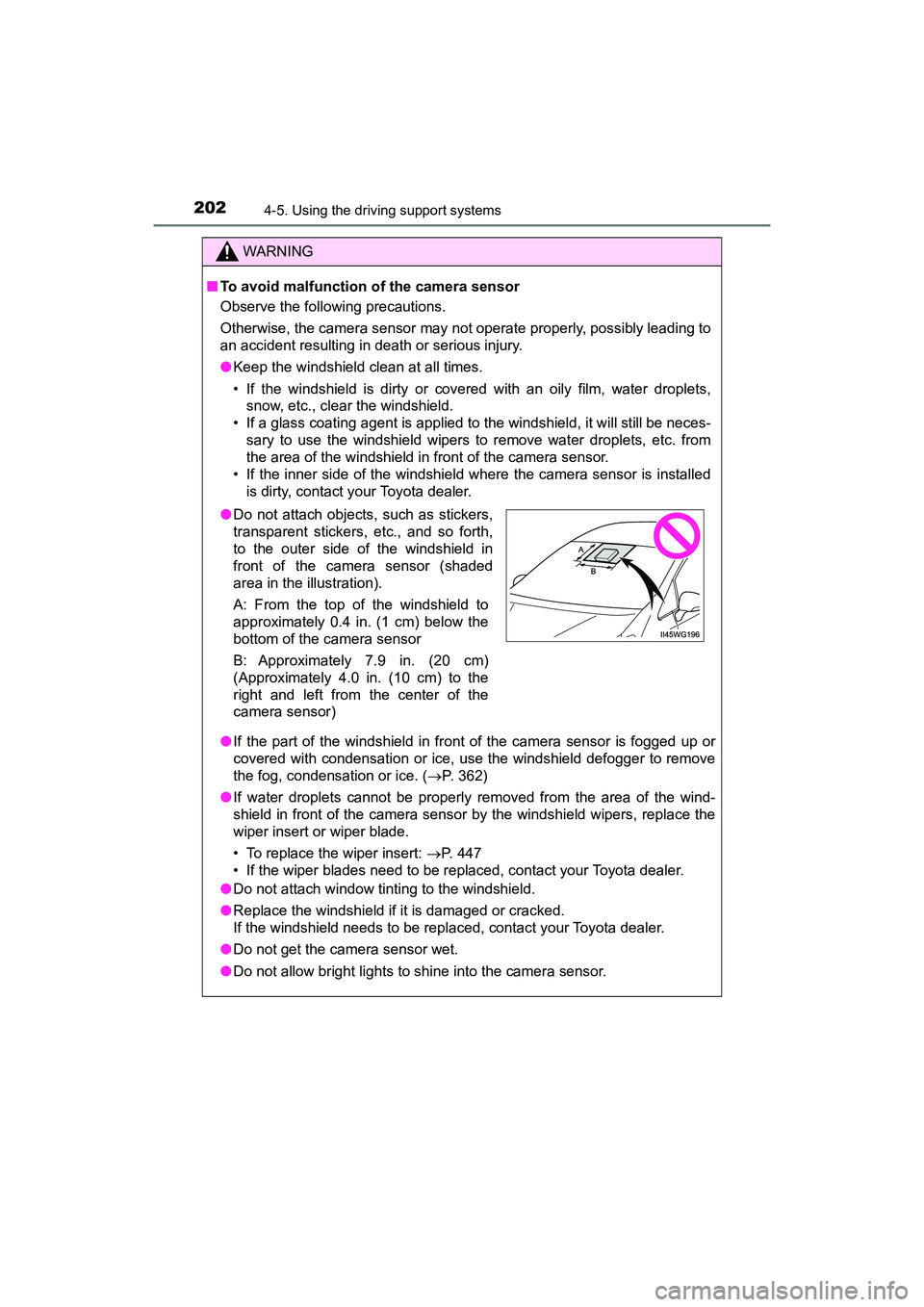
●Do not attach objects, such as stickers,
transparent stickers, etc., and so forth,
to the outer side of the windshield in
front of the camera sensor (shaded
area in the illustration).
A: From the top of the windshield to
approximately 0.4 in. (1 cm) below the
bottom of the camera sensor
B: Approximately 7.9 in. (20 cm)
(Approximately 4.0 in. (10 cm) to the
right and left from the center of the
camera sensor)
Page 216 of 607
214
PRIUS v_OM_OM47B78U_(U)
4-5. Using the driving support systems
• When driving in inclement weather such as heavy rain, fog, snow or asandstorm
• When the vehicle is hit by water, snow, dust, etc. from a vehicle ahead
• When driving through steam or smoke
• When driving in a place where the surrounding brightness changes sud- denly, such as at the entrance or exit of a tunnel
• When a very bright light, such as the sun or the headlights of oncoming traffic, shines directly into the camera sensor
• When the surrounding area is dim, such as at dawn or dusk, or while at
night or in a tunnel
• After the hybrid system has started the vehicle has not been driven for a certain amount of time
• While making a left/right turn and for a few seconds after making a left/ right turn
• While driving on a curve and for a few seconds after driving on a curve
• If your vehicle is skidding
• If the wheels are misaligned
• If a wiper blade is blocking the camera sensor
• The vehicle is wobbling.
• The vehicle is being driven at extremely high speeds.
• When driving on a hill
• If the radar sensor or camera sensor is misaligned
● In some situations such as the following, sufficient braking force may not be
obtained, preventing the system from performing properly:
• If the braking functions cannot operate to their full extent, such as when
the brake parts are extremely cold, extremely hot, or wet
• If the vehicle is not properly maintained (brakes or tires are excessively
worn, improper tire inflation pressure, etc.)
• When the vehicle is being driven on a gravel road or other slippery sur-
face
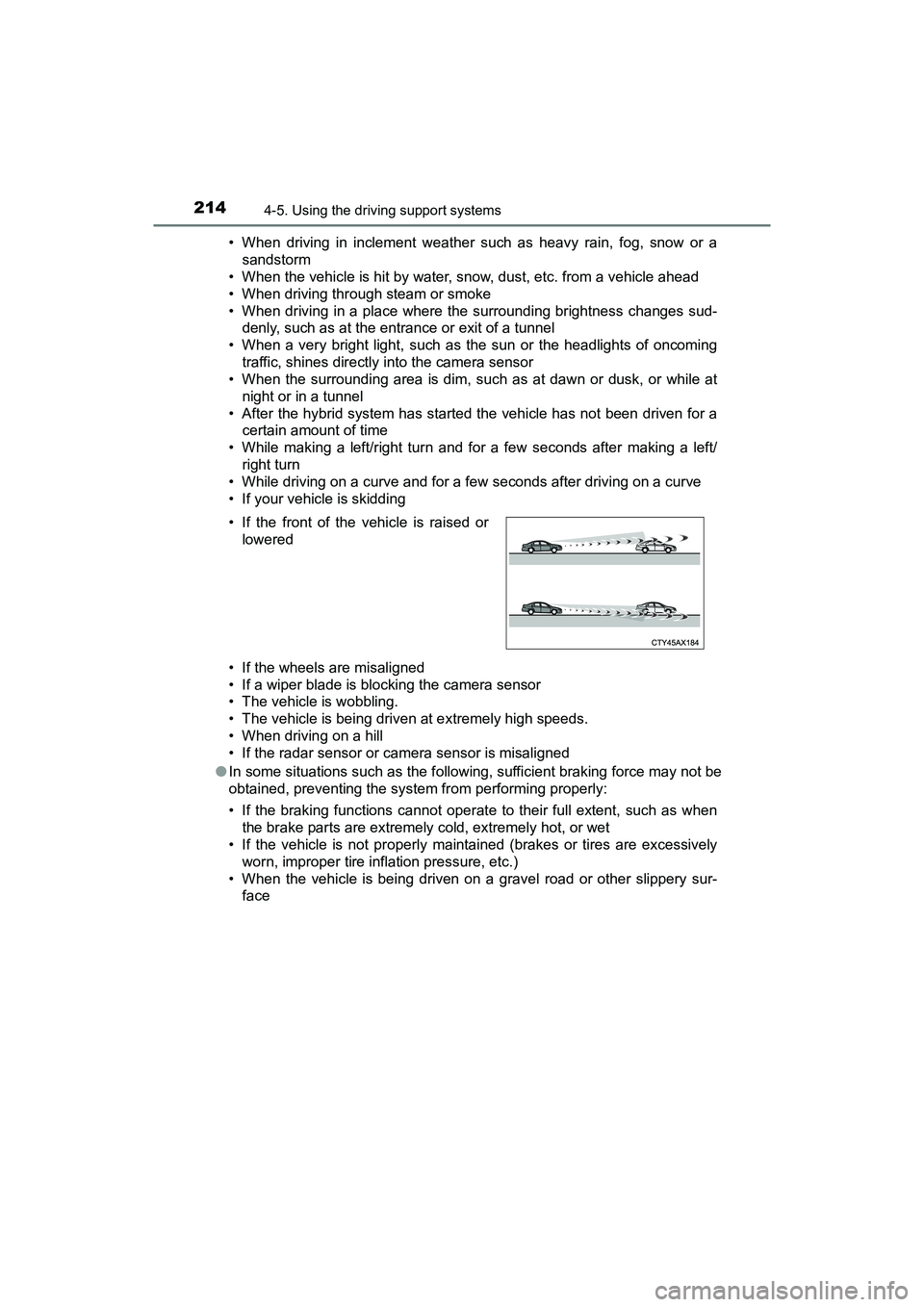
• If the front of the vehicle is raised or
lowered
Page 218 of 607
216
PRIUS v_OM_OM47B78U_(U)
4-5. Using the driving support systems
■If the PCS warning light flashes or illuminates and a warning message is
displayed on the multi-information display
The pre-collision system may be temporarily unavailable or there may be a
malfunction in the system.
●In the following situations, the warning light will turn off, the message will
disappear and the system will become operational when normal operating
conditions return:
• When the radar sensor or camera s ensor or the area around either sen-
sor is hot, such as in the sun
• When the radar sensor or camera s ensor or the area around either sen-
sor is cold, such as in an extremely cold environment
• When a front sensor is dirty or covered with snow, etc.
• When the part of the windshield in front of the camera sensor is fogged up or covered with condensation or ice (Defogging the windshield:
P. 362)
• If the camera sensor is obstructed, such as when the hood is open or a sticker is attached to the windshield near the camera sensor
● If the PCS warning light continues to flash or remains illuminated or the
warning message does not disappear even though the vehicle has returned
to normal, the system may be malfunctioning. Have the vehicle inspected by
your Toyota dealer immediately.
■ If VSC is disabled
●If VSC is disabled ( P. 254), the pre-collision brake assist and pre-collision
braking functions are also disabled.
● The PCS warning light will turn on and “VSC TURNED OFF PRE-
COLLISION BRAKE SYSTEM UNAVAILABLE” will be displayed on the
multi-information display.
Page 361 of 607
359
PRIUS v_OM_OM47B78U_(U)
6Interior features
6-1. Using the air conditioning system and defogger
Automatic air conditioning system............................. 360
Seat heaters ...................... 367
6-2. Using the interior lights Interior lights list ................ 368
• Front interior light .......... 369
• Front personal lights ..... 369
• Rear interior light .......... 370 6-3. Using the storage features
List of storage features ..... 371
• Glove boxes .................. 372
• Console box .................. 372
• Cup holders/ bottle holders/
door pockets ................. 373
• Auxiliary boxes.............. 375
• Card holder ................... 375
Luggage compartment features ........................... 376
6-4. Using the other interior features
Other interior features ....... 380
• Sun visors ..................... 380
• Vanity mirrors................ 380
• Clock ............................. 381
• Power outlet .................. 381
• Armrest ......................... 382
• Coat hooks.................... 382
• Assist grips ................... 383
• Panoramic roof shades .......................... 384
Garage door opener.......... 386
Page 369 of 607
367
PRIUS v_OM_OM47B78U_(U)
6-1. Using the air conditioning system and defogger
6
Interior features
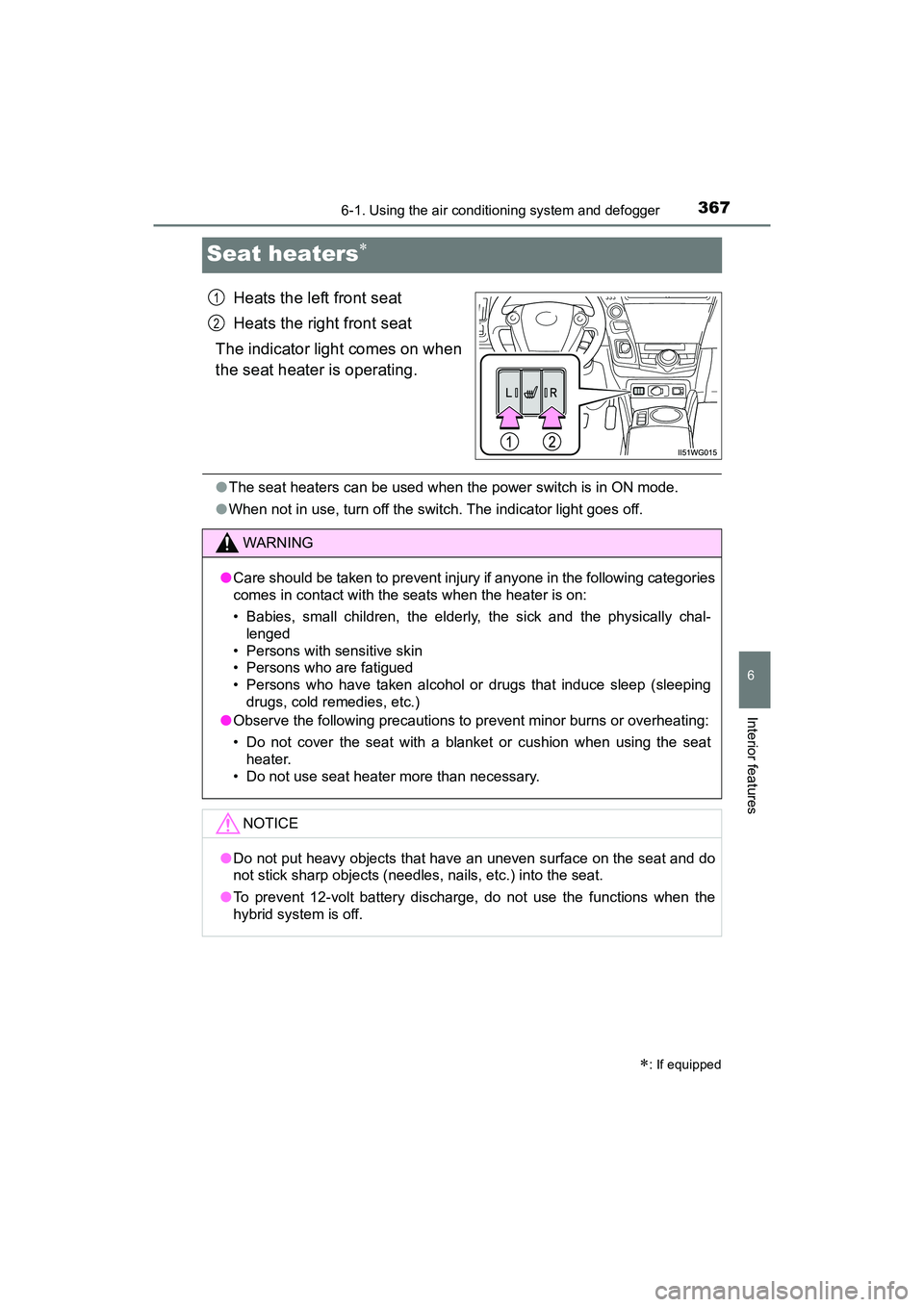
Seat heaters
Heats the left front seat
Heats the right front seat
The indicator light comes on when
the seat heater is operating.
● The seat heaters can be used when the power switch is in ON mode.
● When not in use, turn off the switch. The indicator light goes off.
: If equipped
1
2
WARNING
●Care should be taken to prevent injury if anyone in the following categories
comes in contact with the seats when the heater is on:
• Babies, small children, the elderly, the sick and the physically chal-
lenged
• Persons with sensitive skin
• Persons who are fatigued
• Persons who have taken alcohol or drugs that induce sleep (sleeping drugs, cold remedies, etc.)
● Observe the following precautions to prevent minor burns or overheating:
• Do not cover the seat with a blanket or cushion when using the seat
heater.
• Do not use seat heater more than necessary.
NOTICE
● Do not put heavy objects that have an uneven surface on the seat and do
not stick sharp objects (needles, nails, etc.) into the seat.
● To prevent 12-volt battery discharge, do not use the functions when the
hybrid system is off.
Page 402 of 607
400
PRIUS v_OM_OM47B78U_(U)
7-1. Maintenance and care
NOTICE
■Cleaning detergents
●Do not use the following types of detergent, as they may discolor the vehi-
cle interior or cause streaks or damage to painted surfaces:
• Non-seat portions: Organic substances such as benzene or gasoline,
alkaline or acidic solutions, dye, and bleach
• Seats: Alkaline or acidic solutions, such as thinner, benzene, and alco- hol
● Do not use polish wax or polish cleaner. The instrument panel’s or other
interior part’s painted surface may be damaged.
■ Preventing damage to leather surfaces
Observe the following precautions to avoid damage to and deterioration of
leather surfaces:
● Remove any dust or dirt from leather surfaces immediately.
● Do not expose the vehicle to direct sunlight for extended periods of time.
Park the vehicle in the shade, especially during summer.
● Do not place items made of vinyl, plastic, or containing wax on the uphol-
stery, as they may stick to the leather surface if the vehicle interior heats
up significantly.
■ Water on the floor
Do not wash the vehicle floor with water.
Vehicle systems such as the audio system may be damaged if water comes
into contact with electrical components such as the audio system above or
under the floor of the vehicle. Water may also cause the body to rust.
■ When cleaning the inside of the windshield
Do not allow glass cleaner to contact the lens. Also, do not touch the lens.
(P. 200)
■ Cleaning the inside of the rear window
●Do not use glass cleaner to clean the rear window, as this may cause
damage to the rear window defogger heater wires. Use a cloth dampened
with lukewarm water to gently wipe the window clean. Wipe the window in
strokes running parallel to the heater wires.
● Be careful not to scratch or damage the heater wires.
Page 457 of 607
PRIUS v_OM_OM47B78U_(U)
4557-3. Do-it-yourself maintenance
7
Maintenance and care
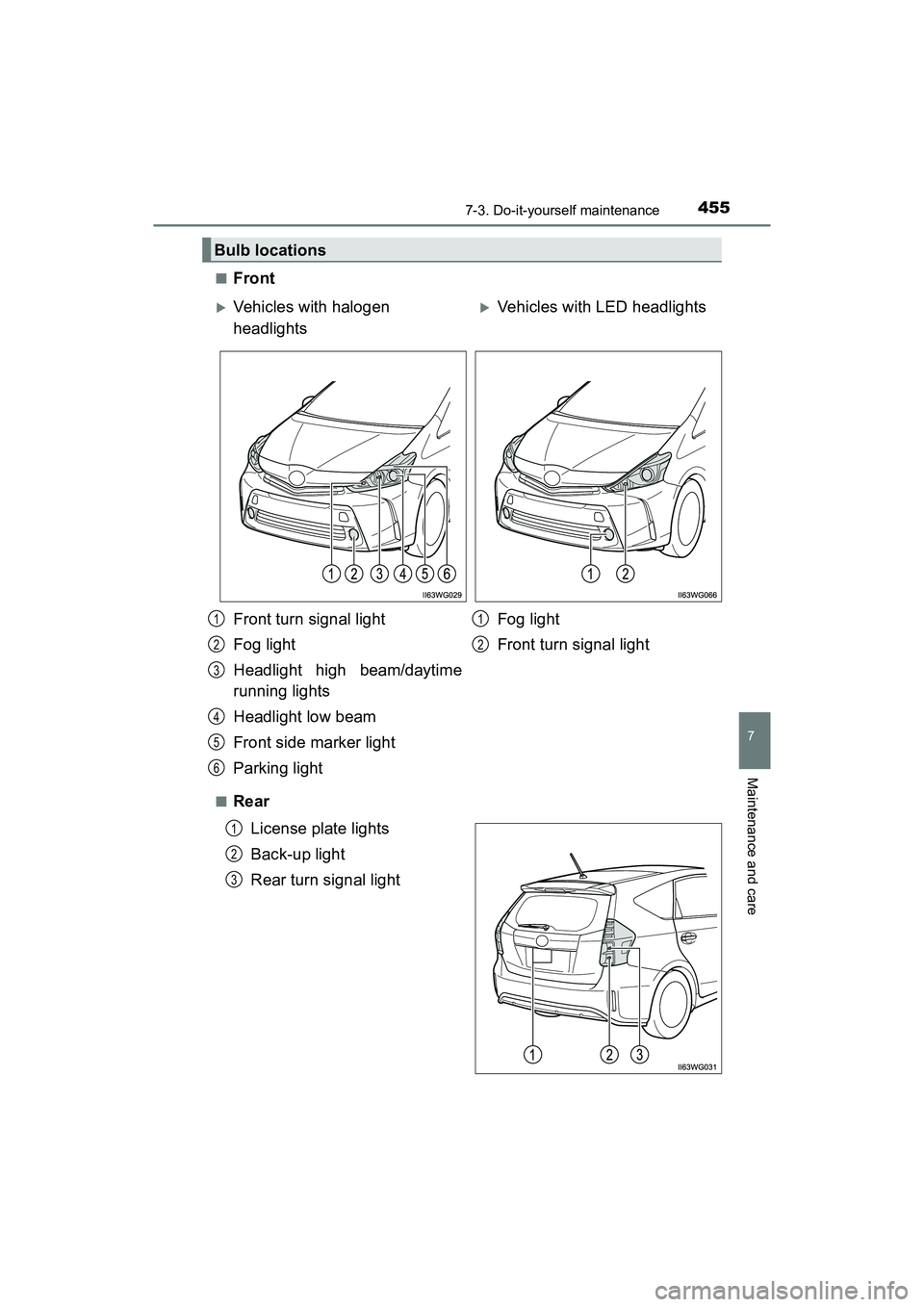
■Front
■RearLicense plate lights
Back-up light
Rear turn signal light
Bulb locations
Vehicles with halogen
headlightsVehicles with LED headlights
Front turn signal light
Fog light
Headlight high beam/daytime
running lights
Headlight low beam
Front side marker light
Parking light Fog light
Front turn signal light
1
2
3
4
5
6
1
2
1
2
3
Page 463 of 607
PRIUS v_OM_OM47B78U_(U)
4617-3. Do-it-yourself maintenance
7
Maintenance and care
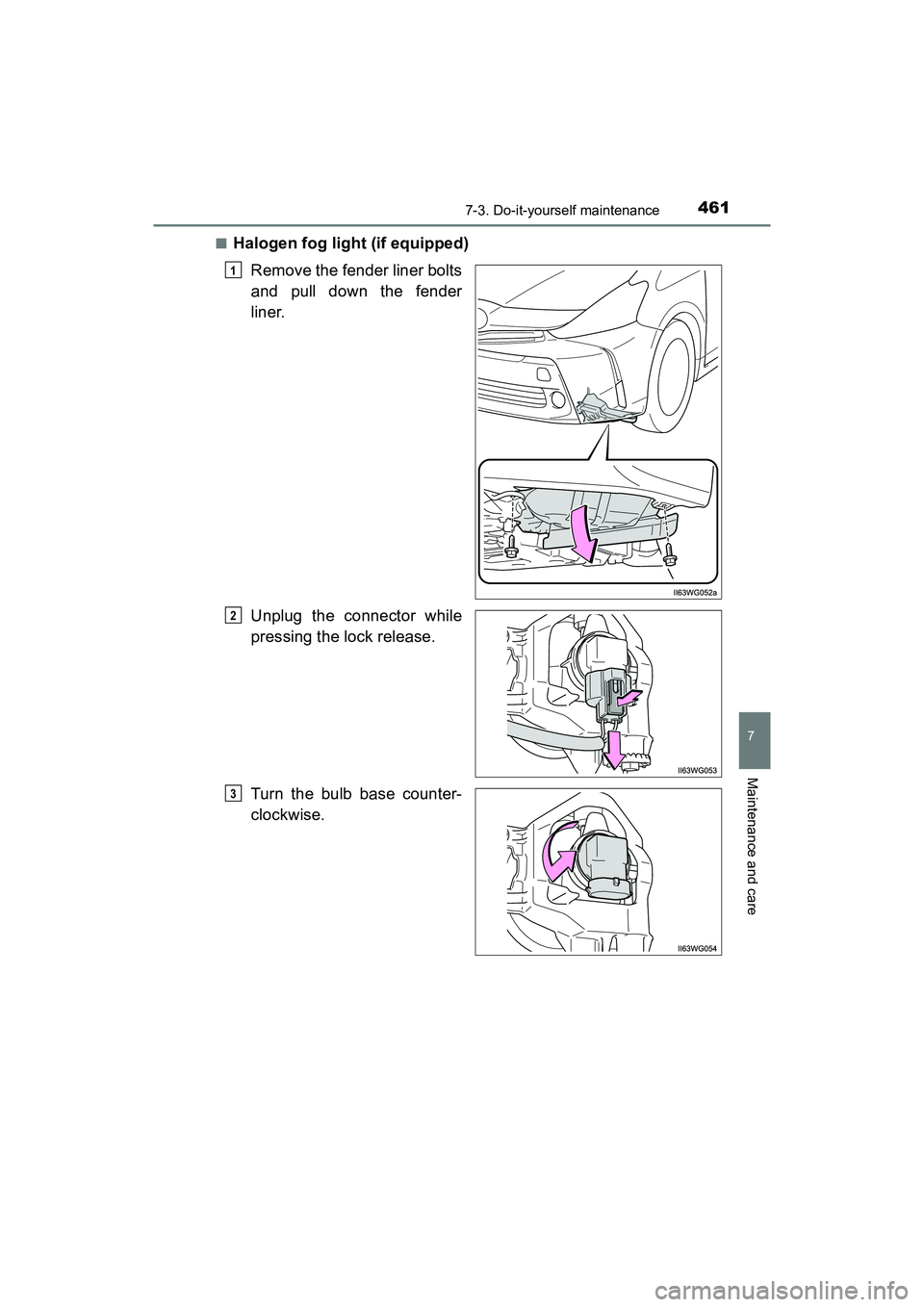
■Halogen fog light (if equipped)Remove the fender liner bolts
and pull down the fender
liner.
Unplug the connector while
pressing the lock release.
Turn the bulb base counter-
clockwise.
1
2
3
Page 464 of 607
462
PRIUS v_OM_OM47B78U_(U)
7-3. Do-it-yourself maintenance
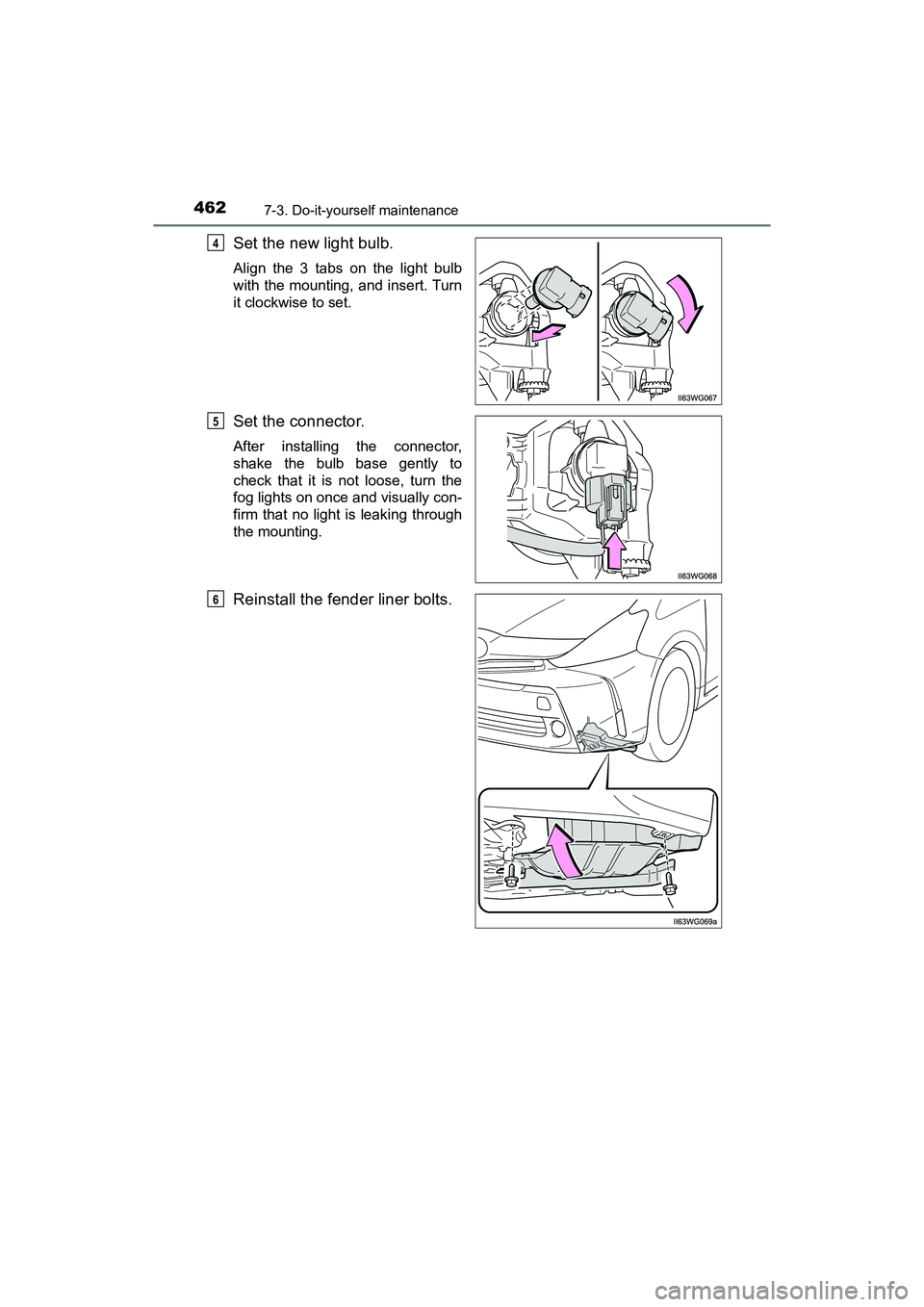
Set the new light bulb.
Align the 3 tabs on the light bulb
with the mounting, and insert. Turn
it clockwise to set.
Set the connector.
After installing the connector,
shake the bulb base gently to
check that it is not loose, turn the
fog lights on once and visually con-
firm that no light is leaking through
the mounting.
Reinstall the fender liner bolts.
4
5
6
Page 546 of 607
544
PRIUS v_OM_OM47B78U_(U)
9-1. Specifications
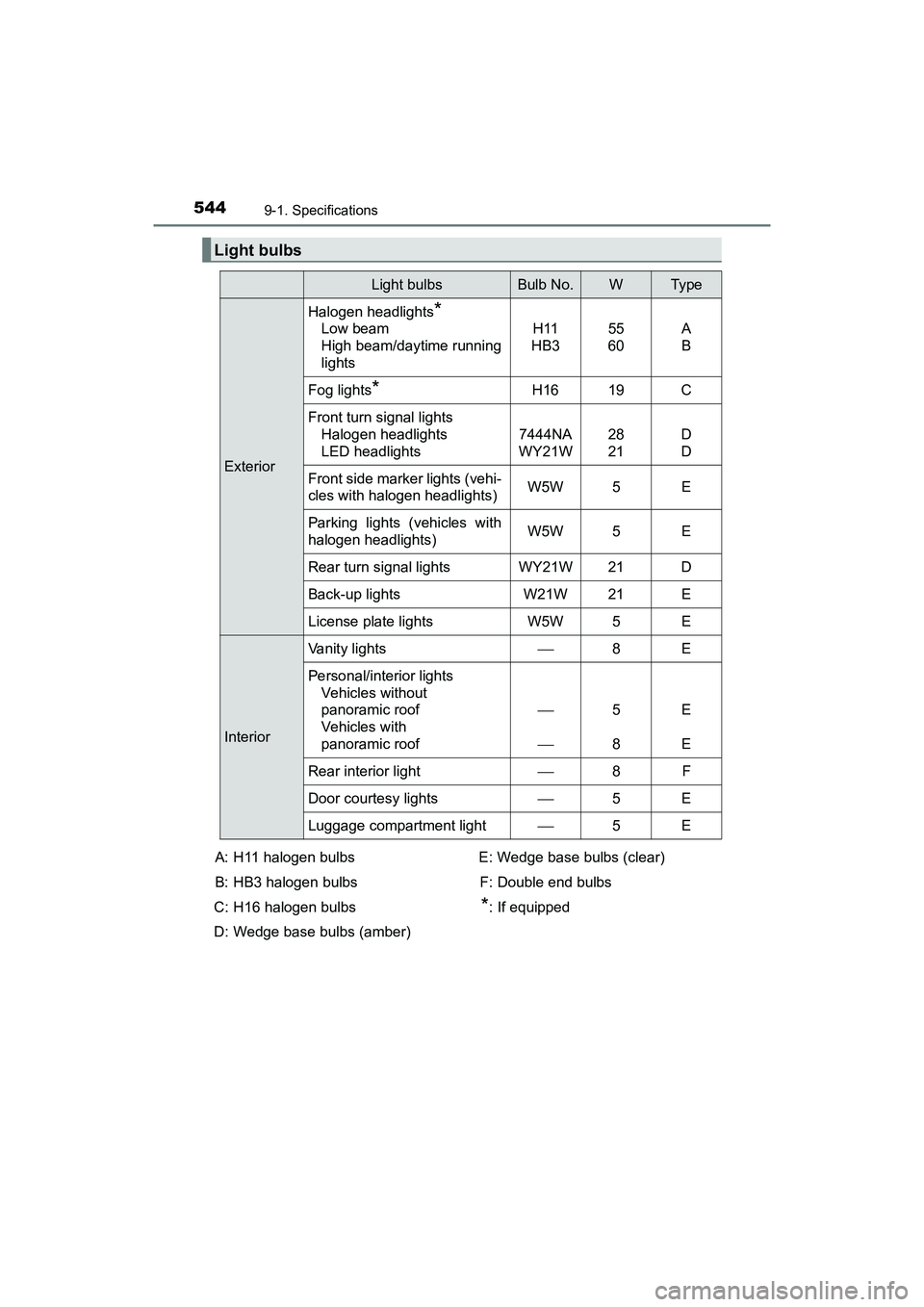
Light bulbs
Light bulbsBulb No.WTy p e
Exterior
Halogen headlights*
Low beam
High beam/daytime running
lightsH11
HB355
60A
B
Fog lights*H1619C
Front turn signal lights Halogen headlights
LED headlights
7444NA
WY21W28
21D
D
Front side marker lights (vehi-
cles with halogen headlights)W5W5E
Parking lights (vehicles with
halogen headlights)W5W5E
Rear turn signal lightsWY21W21D
Back-up lightsW21W21E
License plate lightsW5W5E
Interior
Vanity lights8E
Personal/interior lights Vehicles without
panoramic roof
Vehicles with
panoramic roof
5
8E
E
Rear interior light8F
Door courtesy lights5E
Luggage compartment light5E
A: H11 halogen bulbs
B: HB3 halogen bulbs
C: H16 halogen bulbs
D: Wedge base bulbs (amber) E: Wedge base bulbs (clear)
F: Double end bulbs
*: If equipped