lock TOYOTA PRIUS V 2018 Owner's Manual
[x] Cancel search | Manufacturer: TOYOTA, Model Year: 2018, Model line: PRIUS V, Model: TOYOTA PRIUS V 2018Pages: 607, PDF Size: 41.96 MB
Page 73 of 607
711-1. For safe use
PRIUS v_OM_OM47B78U_(U)
1
For safety and security
■Laws and regulations pertaining to anchors
The LATCH system conforms to FMVSS225 or CMVSS210.2.
Child restraint systems conforming to FMVSS213 or CMVSS213 specifica-
tions can be used.
This vehicle is designed to conform to the SAE J1819.
WARNING
■When installing a booster seat
To prevent the belt from going into ALR lock mode, do not fully extend the
shoulder belt. ALR mode causes the belt to tighten only. This could cause
injury or discomfort to the child. ( P. 3 6 )
■ When installing a child restraint system
Follow the directions given in the child restraint system installation manual
and fix the child restraint system securely in place.
If the child restraint system is not correctly fixed in place, the child or other
passengers may be seriously injured or even killed in the event of sudden
braking, sudden swerving or an accident.
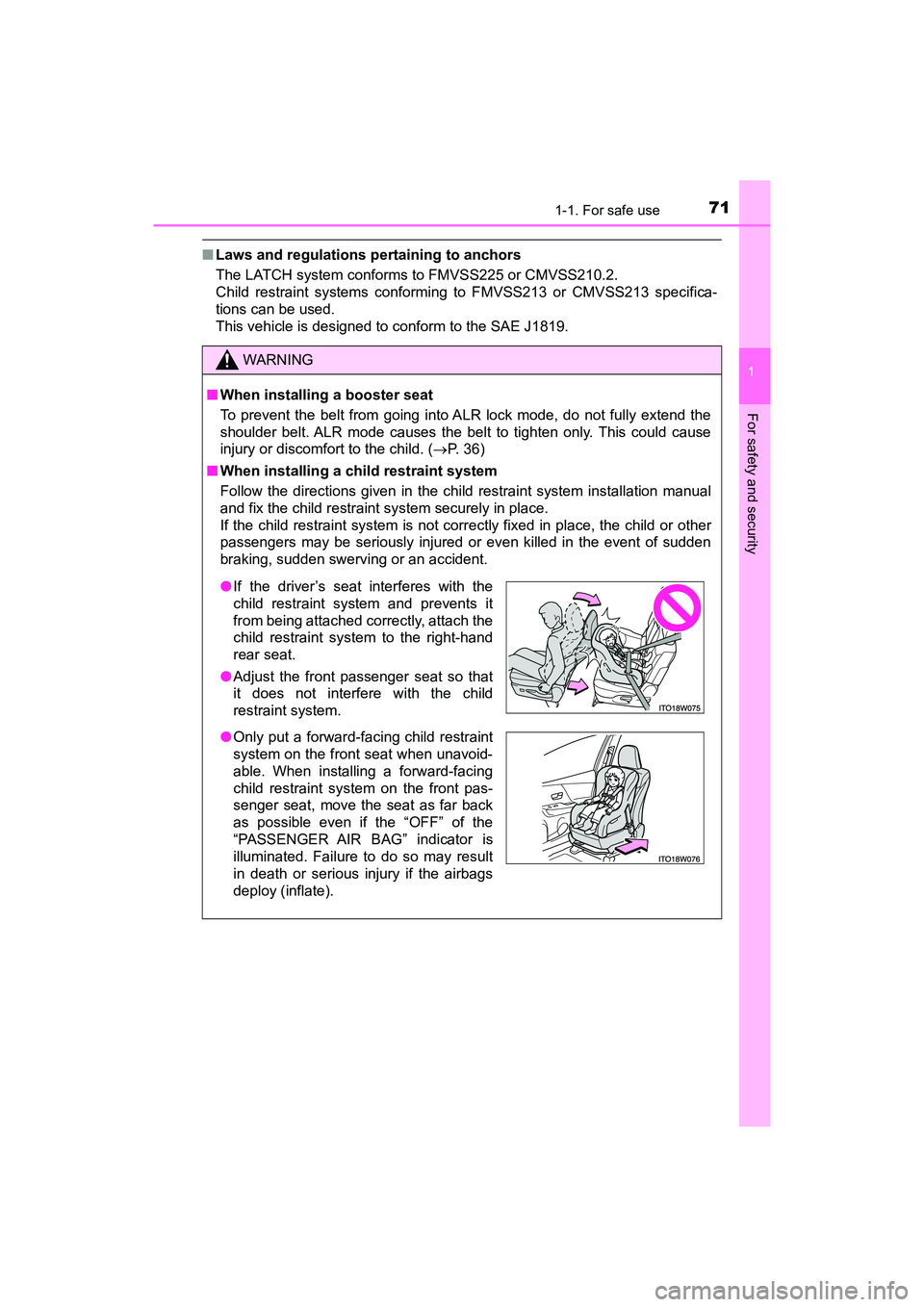
● If the driver’s seat interferes with the
child restraint system and prevents it
from being attached correctly, attach the
child restraint system to the right-hand
rear seat.
● Adjust the front passenger seat so that
it does not interfere with the child
restraint system.
● Only put a forward-facing child restraint
system on the front seat when unavoid-
able. When installing a forward-facing
child restraint system on the front pas-
senger seat, move the seat as far back
as possible even if the “OFF” of the
“PASSENGER AIR BAG” indicator is
illuminated. Failure to do so may result
in death or serious injury if the airbags
deploy (inflate).
Page 74 of 607
721-1. For safe use
PRIUS v_OM_OM47B78U_(U)
WARNING
■When installing a child restraint system
● When installing a child restraint system in the rear center seat, adjust both
seat cushions to the same position and align both seatbacks at the same
angle. The seatbacks must be adjusted to the same angle. Otherwise, the
child restraint system cannot be securely restrained and this may cause
death or serious injuries in the event of sudden braking, sudden swerving
or an accident.
● When using the LATCH system, move the seat as far back as possible
and adjust the seatback as upright as possible.
● When a booster seat is installed, always ensure that the shoulder belt is
positioned across the center of the child’s shoulder. The belt should be
kept away from the child’s neck, but not so that it could fall off the child’s
shoulder. Failing to do so may result in death or serious injury in the event
of sudden braking, sudden swerving or an accident.
● Ensure that the belt and plate are securely locked and the seat belt is not
twisted.
● Shake the child restraint system left and right, and forward and backward
to ensure that it has been securely installed.
● After securing a child restraint system, never adjust the seat.
● Follow all installation instructions provided by the child restraint system
manufacturer.
● When securing some types of child restraint systems in rear seat, it may
not be possible to properly use the seat belts in positions next to the child
restraint without interfering with it or affecting seat belt effectiveness. Be
sure your seat belt fits snugly across your shoulder and low on your hips. If
it does not, or if it interferes with the child restraint, move to a different
position. Failure to do so may result in death or serious injury.
■ Do not use a seat belt extender
If a seat belt extender is used when installing a child restraint system, the
seat belt will not securely hold the child restraint system, which could cause
death or serious injury to the child or other passengers in the event of sud-
den braking, sudden swerving or an accident.
■ To correctly attach a child restraint system to the anchors
When using the LATCH anchors, be sure that there are no foreign objects
around the anchors and that the seat belt is not caught behind the child
restraint system. Make sure the child restraint system is securely attached,
or it may cause death or serious inju ry to the child or other passengers in
the event of a sudden stop, sudden swerve or accident.
Page 81 of 607
791-2. Hybrid system
PRIUS v_OM_OM47B78U_(U)
1
For safety and security
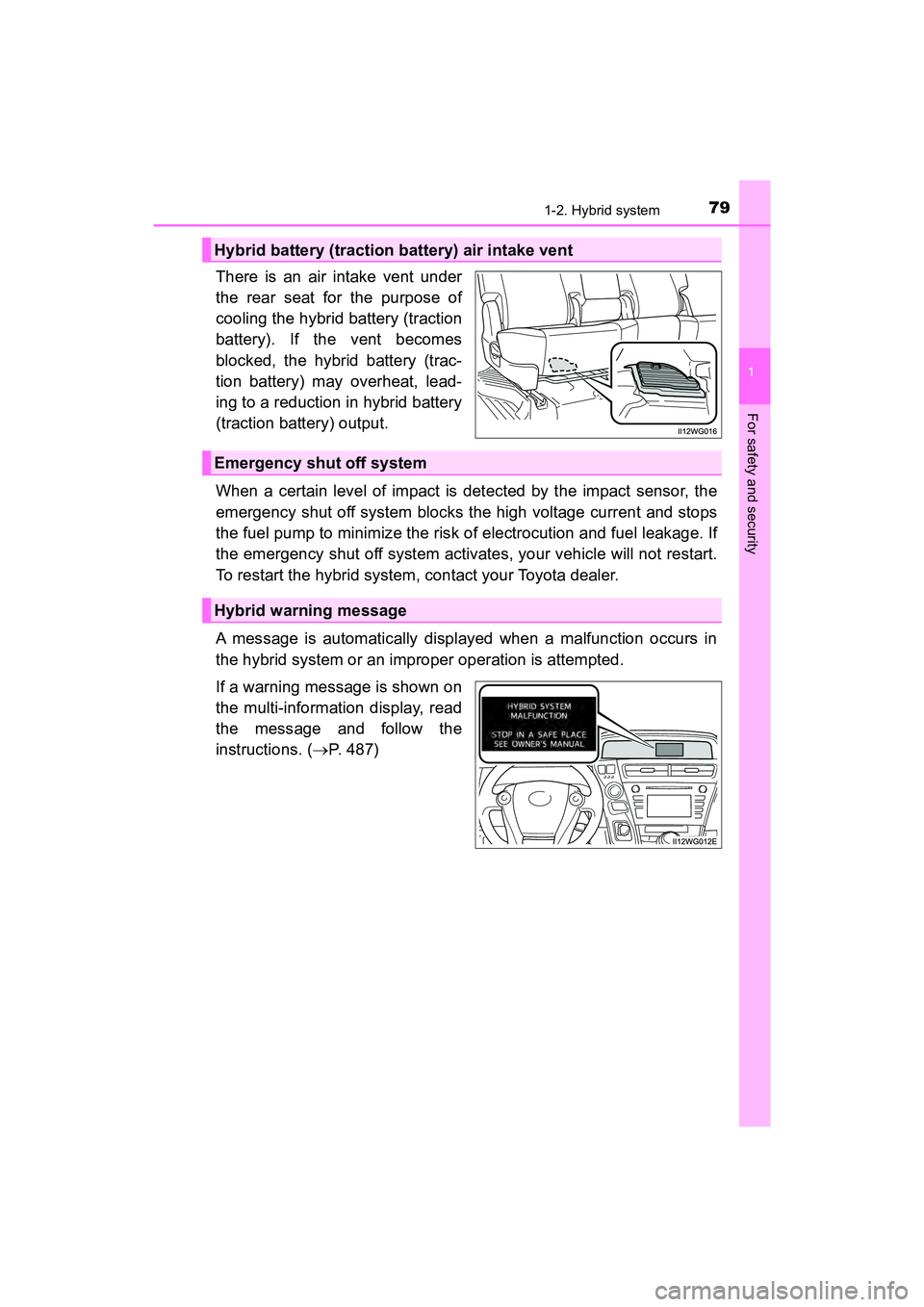
There is an air intake vent under
the rear seat for the purpose of
cooling the hybrid battery (traction
battery). If the vent becomes
blocked, the hybrid battery (trac-
tion battery) may overheat, lead-
ing to a reduction in hybrid battery
(traction battery) output.
When a certain level of impact is detected by the impact sensor, the
emergency shut off system blocks the high voltage current and stops
the fuel pump to minimize the risk of electrocution and fuel leakage. If
the emergency shut off system activates, your vehicle will not restart.
To restart the hybrid system, contact your Toyota dealer.
A message is automatically displayed when a malfunction occurs in
the hybrid system or an improper operation is attempted.
If a warning message is shown on
the multi-information display, read
the message and follow the
instructions. (P. 487)
Hybrid battery (traction battery) air intake vent
Emergency shut off system
Hybrid warning message
Page 84 of 607
821-2. Hybrid system
PRIUS v_OM_OM47B78U_(U)
WARNING
■Hybrid battery (traction battery)
●Never resell, hand over or modify the hybrid battery. To prevent accidents,
hybrid batteries that have been removed from a disposed vehicle are col-
lected through Toyota dealer. Do not dispose of the battery yourself.
Unless the battery is properly collected, the following may occur, resulting
in death or serious injury:
• The hybrid battery may be illegally disposed of or dumped, and it is haz-
ardous to the environment or someone may touch a high voltage part,
resulting in an electric shock.
• The hybrid battery is intended to be used exclusively with your hybrid
vehicle. If the hybrid battery is used outside of your vehicle or modified
in any way, accidents such as electric shock, heat generation, smoke
generation, an explosion and electrolyte leakage may occur.
When reselling or handing over your vehicle, the possibility of an accident
is extremely high because the person receiving the vehicle may not be
aware of these dangers.
● If your vehicle is disposed of without the hybrid battery having been
removed, there is a danger of serious electric shock if high voltage parts,
cables and their connectors are touched. In the event that your vehicle
must be disposed of, the hybrid battery must be disposed of by your
Toyota dealer or a qualified service shop. If the hybrid battery is not dis-
posed of properly, it may cause electric shock that can result in death or
serious injury.
NOTICE
■Hybrid battery (traction battery) air intake vent
●Do not place objects that will block the air intake vent. The hybrid battery
(traction battery) may overheat and be damaged.
● Clean the air intake vent regularly to prevent the hybrid battery (traction
battery) from overheating.
● Do not get water or foreign materials in the air intake vent as this may
cause a short circuit and damage the hybrid battery (traction battery).
● Do not carry large amounts of water such as water cooler bottles in the
vehicle. If water spills onto the hybrid battery (traction battery), the battery
may be damaged. Have the vehicle inspected by your Toyota dealer.
Page 92 of 607
90
PRIUS v_OM_OM47B78U_(U)
2. Instrument cluster
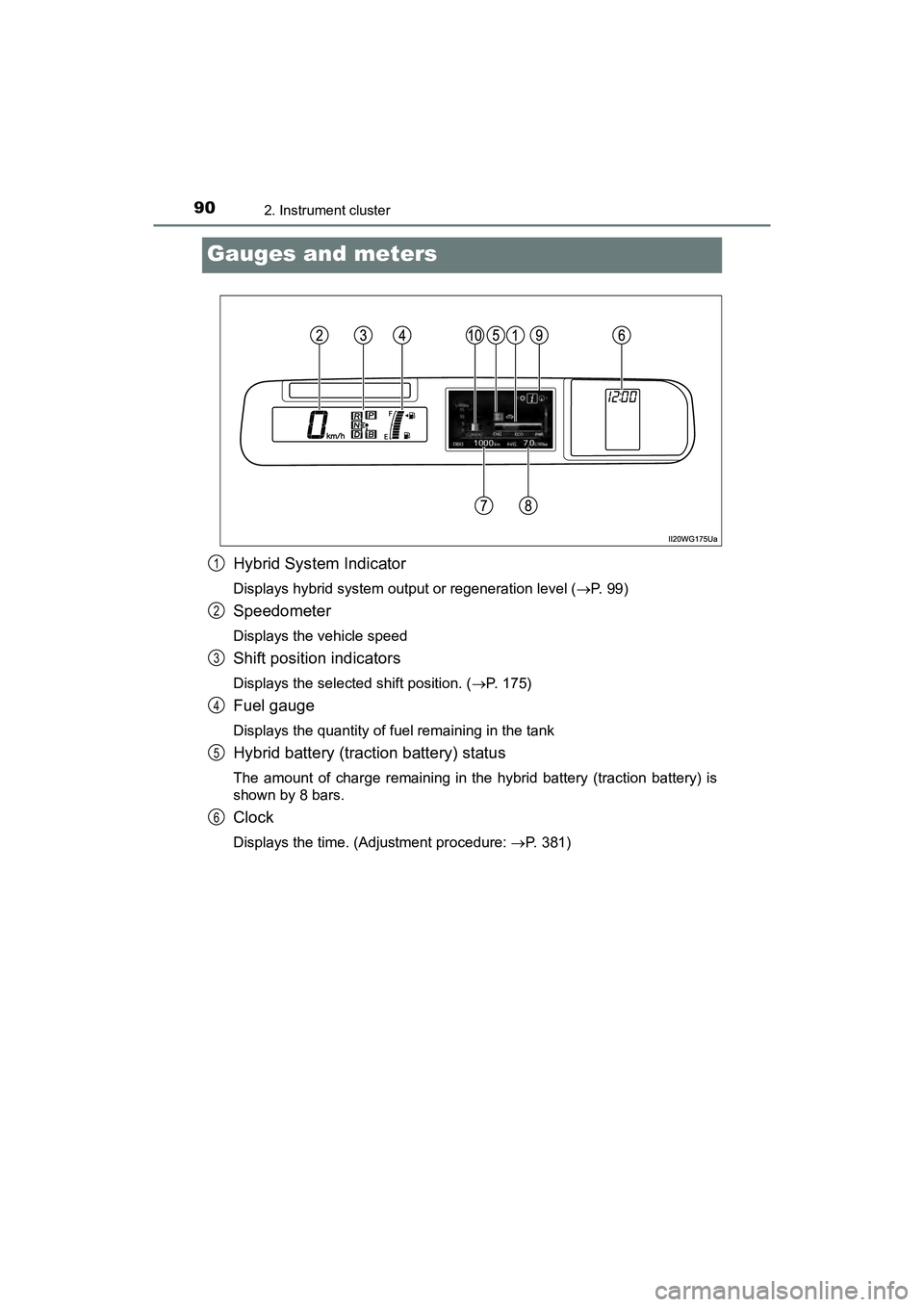
Gauges and meters
Hybrid System Indicator
Displays hybrid system output or regeneration level (P. 9 9 )
Speedometer
Displays the vehicle speed
Shift position indicators
Displays the selected shift position. (P. 175)
Fuel gauge
Displays the quantity of fuel remaining in the tank
Hybrid battery (traction battery) status
The amount of charge remaining in the hybrid battery (traction battery) is
shown by 8 bars.
Clock
Displays the time. (Adjustment procedure: P. 381)
1
2
3
4
5
6
Page 97 of 607
PRIUS v_OM_OM47B78U_(U)
952. Instrument cluster
2
Instrument cluster
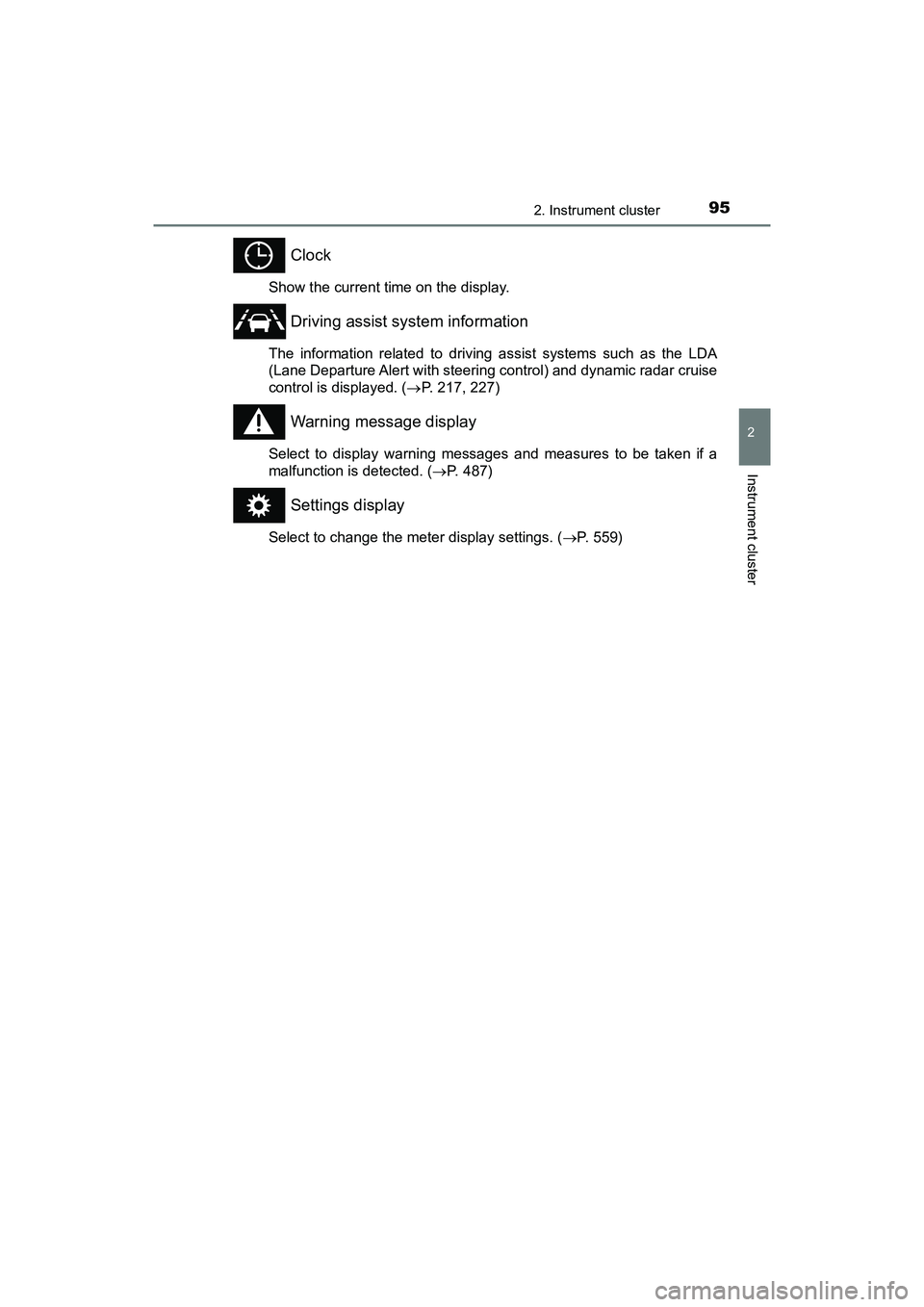
Clock
Show the current time on the display.
Driving assist system information
The information related to driving assist systems such as the LDA
(Lane Departure Alert with steering control) and dynamic radar cruise
control is displayed. (P. 217, 227)
Warning message display
Select to display warning messages and measures to be taken if a
malfunction is detected. ( P. 487)
Settings display
Select to change the meter display settings. ( P. 559)
Page 111 of 607
109
PRIUS v_OM_OM47B78U_(U)
3
Operation of
each component
3-1. Key information
Keys .................................. 110
3-2. Opening, closing and locking the doors
Side doors ......................... 114
Back door .......................... 119
Smart key system ............. 124
3-3. Adjusting the seats Front seats ........................ 131
Rear seats......................... 135
Head restraints.................. 138
3-4. Adjusting the steering wheel and mirrors
Steering wheel .................. 140
Inside rear view mirror ...... 142
Outside rear view mirrors ............................. 144
3-5. Opening and closing the windows
Power windows ................. 146
Page 112 of 607
110
PRIUS v_OM_OM47B78U_(U)
3-1. Key information
Keys
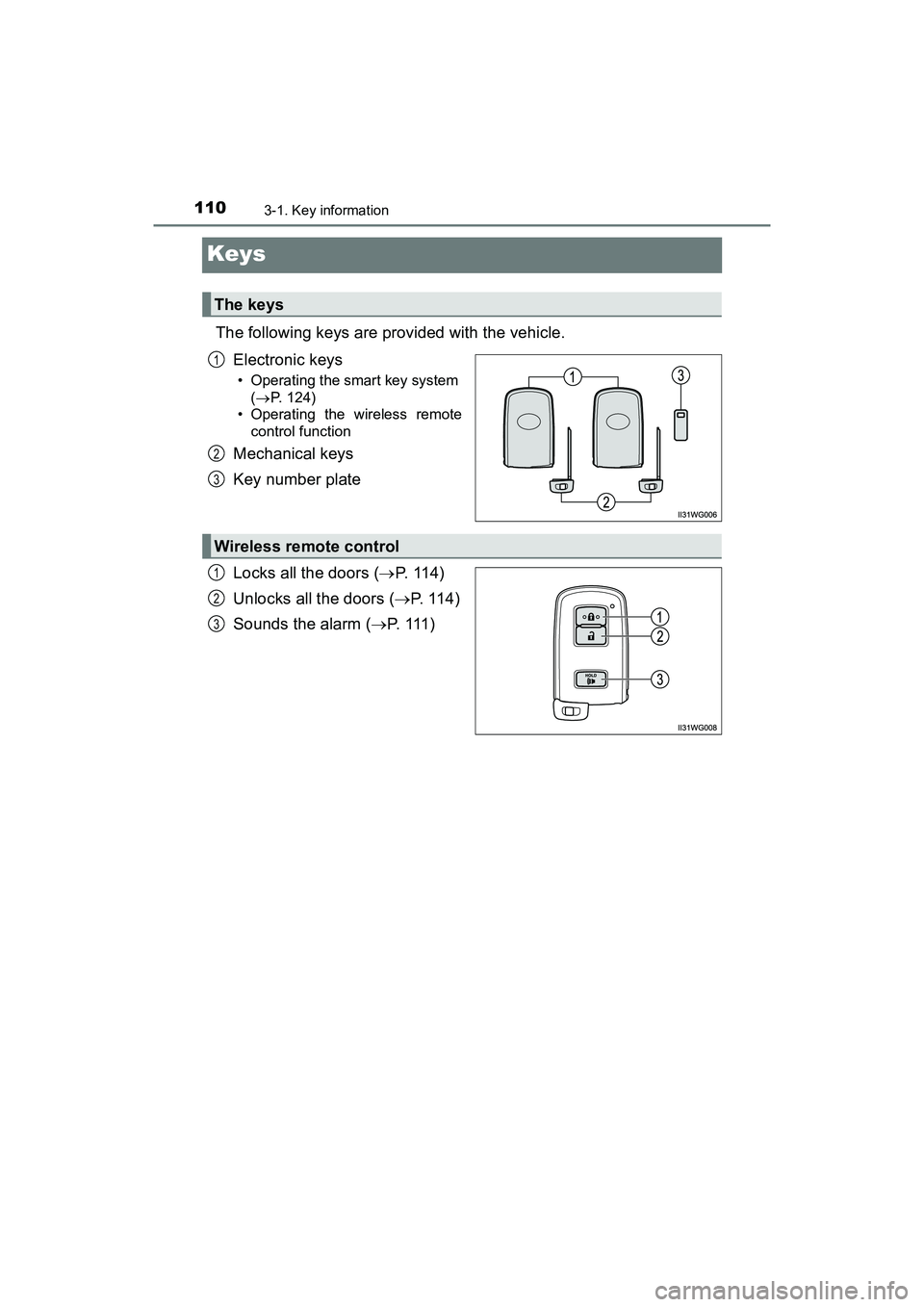
The following keys are provided with the vehicle.Electronic keys
• Operating the smart key system ( P. 124)
• Operating the wireless remote
control function
Mechanical keys
Key number plate
Locks all the doors ( P. 1 1 4 )
Unlocks all the doors ( P. 1 1 4 )
Sounds the alarm ( P. 111 )
The keys
1
2
3
Wireless remote control
1
2
3
Page 116 of 607
114
PRIUS v_OM_OM47B78U_(U)
3-2. Opening, closing and locking the doors
Side doors
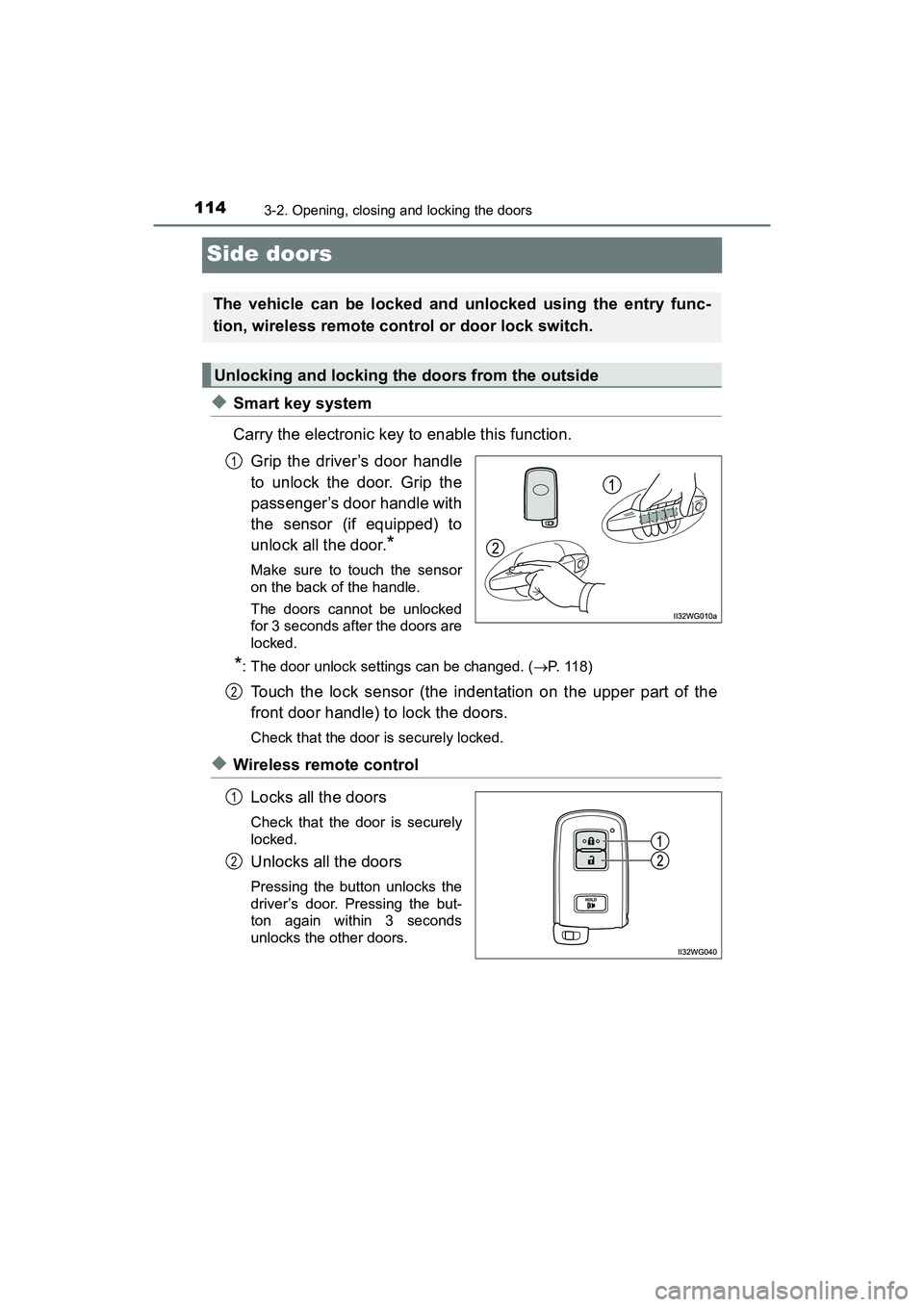
◆Smart key system
Carry the electronic key to enable this function.Grip the driver’s door handle
to unlock the door. Grip the
passenger’s door handle with
the sensor (if equipped) to
unlock all the door.
*
Make sure to touch the sensor
on the back of the handle.
The doors cannot be unlocked
for 3 seconds after the doors are
locked.
*: The door unlock settings can be changed. ( P. 118)
Touch the lock sensor (the indentation on the upper part of the
front door handle) to lock the doors.
Check that the door is securely locked.
◆Wireless remote control
Locks all the doors
Check that the door is securely
locked.
Unlocks all the doors
Pressing the button unlocks the
driver’s door. Pressing the but-
ton again within 3 seconds
unlocks the other doors.
The vehicle can be locked and unlocked using the entry func-
tion, wireless remote control or door lock switch.
Unlocking and locking the doors from the outside
1
2
1
2
Page 117 of 607
PRIUS v_OM_OM47B78U_(U)
1153-2. Opening, closing and locking the doors
3
Operation of each component
■Operation signals
A buzzer sounds and the emergency flashers flash to indicate that the doors
have been locked/unlocked. (Locked: Once; Unlocked: Twice)
■ Security feature
If a door is not opened within approximately 60 seconds after the vehicle is
unlocked, the security feature automatically locks the vehicle again.
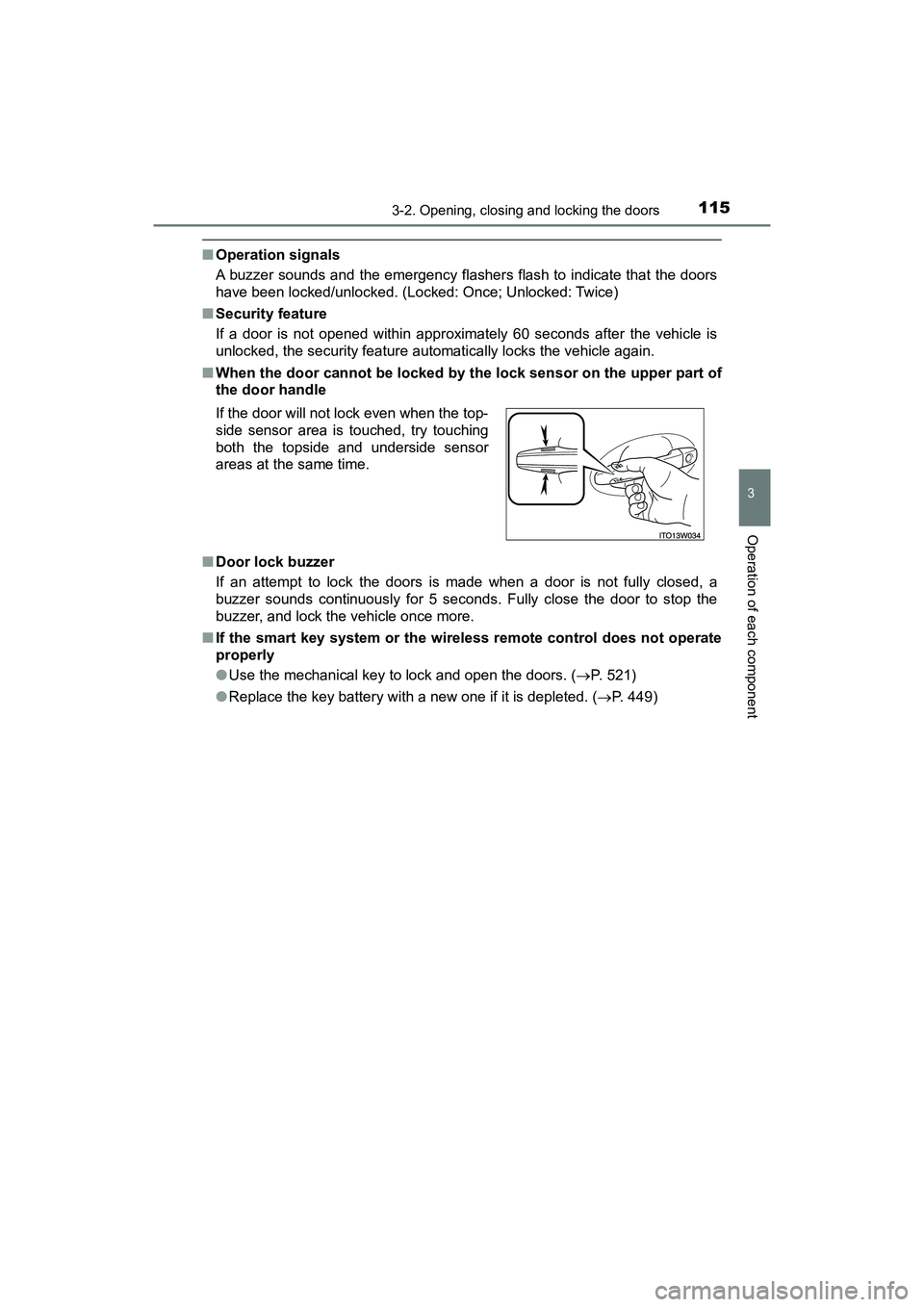
■ When the door cannot be locked by the lock sensor on the upper part of
the door handle
■ Door lock buzzer
If an attempt to lock the doors is made when a door is not fully closed, a
buzzer sounds continuously for 5 seconds. Fully close the door to stop the
buzzer, and lock the vehicle once more.
■ If the smart key system or the wire less remote control does not operate
properly
● Use the mechanical key to lock and open the doors. ( P. 521)
● Replace the key battery with a new one if it is depleted. ( P. 449)
If the door will not lock even when the top-
side sensor area is touched, try touching
both the topside and underside sensor
areas at the same time.