ESP TOYOTA PROACE 2016 User Guide
[x] Cancel search | Manufacturer: TOYOTA, Model Year: 2016, Model line: PROACE, Model: TOYOTA PROACE 2016Pages: 516, PDF Size: 91.65 MB
Page 35 of 516
35
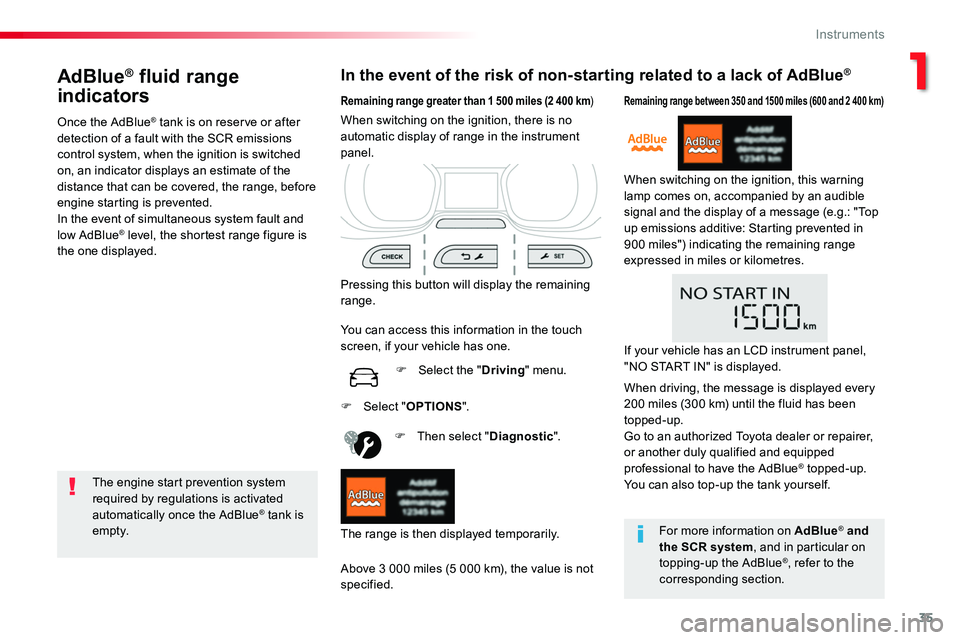
AdBlue® fluid range
indicators
Once the AdBlue® tank is on reserve or after detection of a fault with the SCR emissions control system, when the ignition is switched on, an indicator displays an estimate of the distance that can be covered, the range, before engine starting is prevented.In the event of simultaneous system fault and
low AdBlue® level, the shortest range figure is the one displayed.
In the event of the risk of non-starting related to a lack of AdBlue®
The engine start prevention system required by regulations is activated automatically once the AdBlue® tank is e m pt y.
Remaining range greater than 1 500 miles (2 400 km)
Pressing this button will display the remaining range.
F Then select "Diagnostic".
Above 3 000 miles (5 000 km), the value is not specified.
When switching on the ignition, there is no automatic display of range in the instrument panel.
The range is then displayed temporarily.
You can access this information in the touch screen, if your vehicle has one.
F Select the "Driving" menu.
Remaining range between 350 and 1500 miles (600 and 2 400 km)
When switching on the ignition, this warning lamp comes on, accompanied by an audible signal and the display of a message (e.g.: "Top up emissions additive: Starting prevented in 900 miles") indicating the remaining range expressed in miles or kilometres.
F Select "OPTIONS".
For more information on AdBlue® and
the SCR system, and in particular on topping-up the AdBlue®, refer to the corresponding section.
If your vehicle has an LCD instrument panel, "NO START IN" is displayed.
When driving, the message is displayed every 200 miles (300 km) until the fluid has been topped-up.Go to an authorized Toyota dealer or repairer, or another duly qualified and equipped professional to have the AdBlue® topped-up.You can also top-up the tank yourself.
1
Instruments
Page 36 of 516
36
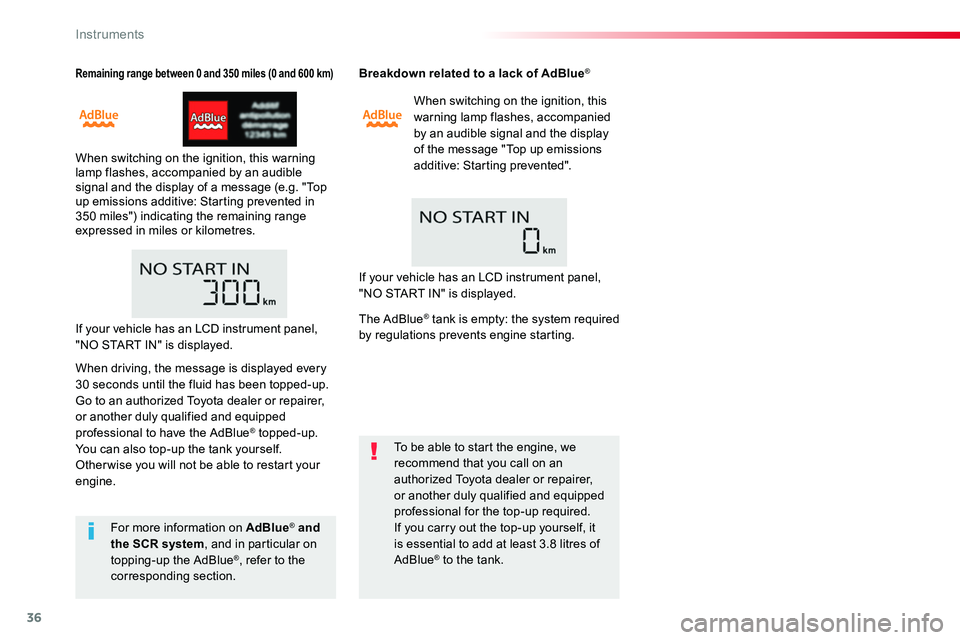
Remaining range between 0 and 350 miles (0 and 600 km)
When switching on the ignition, this warning lamp flashes, accompanied by an audible signal and the display of a message (e.g. "Top up emissions additive: Starting prevented in 350 miles") indicating the remaining range expressed in miles or kilometres.
Breakdown related to a lack of AdBlue®
When switching on the ignition, this warning lamp flashes, accompanied by an audible signal and the display of the message "Top up emissions additive: Starting prevented".
To be able to start the engine, we recommend that you call on an authorized Toyota dealer or repairer, or another duly qualified and equipped professional for the top-up required.If you carry out the top-up yourself, it is essential to add at least 3.8 litres of AdBlue® to the tank.
For more information on AdBlue® and the SCR system, and in particular on topping-up the AdBlue®, refer to the corresponding section.
If your vehicle has an LCD instrument panel, "NO START IN" is displayed.
If your vehicle has an LCD instrument panel, "NO START IN" is displayed.
When driving, the message is displayed every 30 seconds until the fluid has been topped-up.Go to an authorized Toyota dealer or repairer, or another duly qualified and equipped professional to have the AdBlue® topped-up.You can also top-up the tank yourself.Other wise you will not be able to restart your engine.
The AdBlue® tank is empty: the system required by regulations prevents engine starting.
Instruments
Page 44 of 516
44
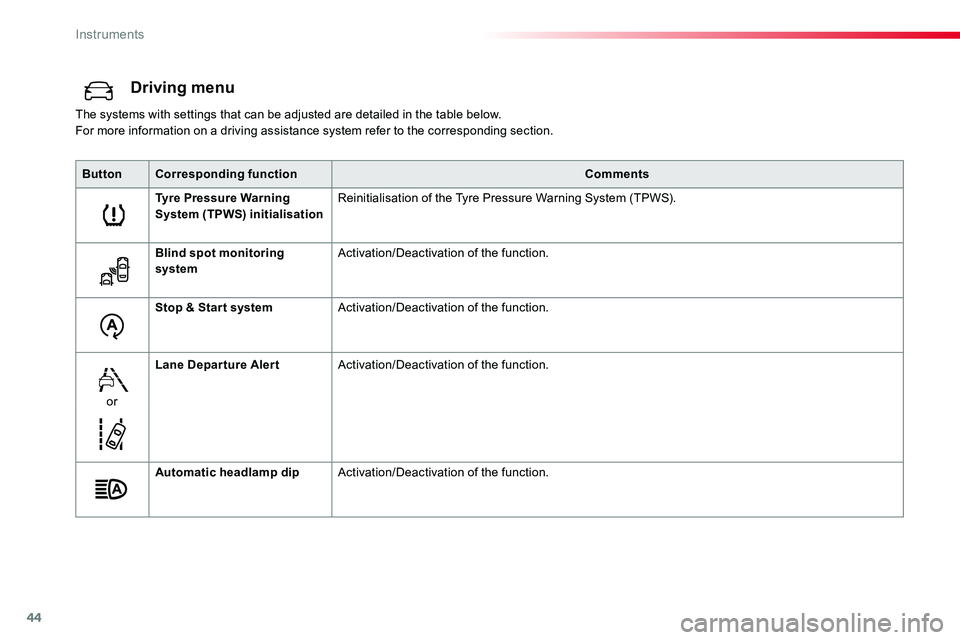
Driving menu
The systems with settings that can be adjusted are detailed in the table below.For more information on a driving assistance system refer to the corresponding section.
ButtonCorresponding functionComments
Tyre Pressure Warning System (TPWS) initialisationReinitialisation of the Tyre Pressure Warning System (TPWS).
Blind spot monitoring systemActivation/Deactivation of the function.
Stop & Star t systemActivation/Deactivation of the function.
or
Lane Departure AlertActivation/Deactivation of the function.
Automatic headlamp dipActivation/Deactivation of the function.
Instruments
Page 45 of 516
45
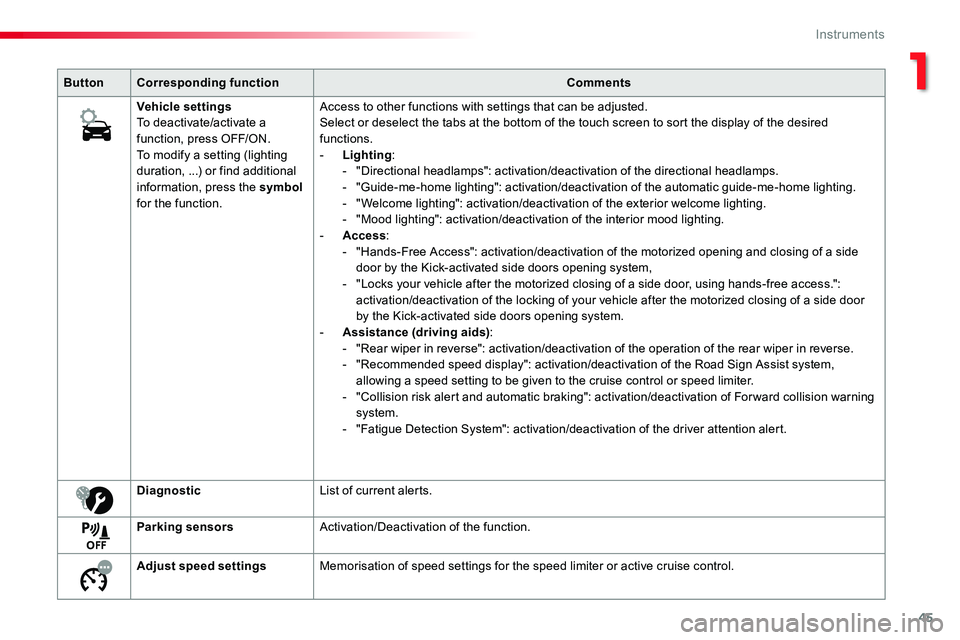
ButtonCorresponding functionComments
Vehicle settingsTo deactivate/activate a function, press OFF/ON.To modify a setting (lighting duration, ...) or find additional information, press the symbol for the function.
Access to other functions with settings that can be adjusted.Select or deselect the tabs at the bottom of the touch screen to sort the display of the desired functions.- Lighting:- "Directional headlamps": activation/deactivation of the directional headlamps.- "Guide-me-home lighting": activation/deactivation of the automatic guide-me-home lighting.- "Welcome lighting": activation/deactivation of the exterior welcome lighting.- "Mood lighting": activation/deactivation of the interior mood lighting.- Access:- "Hands-Free Access": activation/deactivation of the motorized opening and closing of a side door by the Kick-activated side doors opening system,- "Locks your vehicle after the motorized closing of a side door, using hands-free access.": activation/deactivation of the locking of your vehicle after the motorized closing of a side door by the Kick-activated side doors opening system.- Assistance (driving aids):- "Rear wiper in reverse": activation/deactivation of the operation of the rear wiper in reverse.- "Recommended speed display": activation/deactivation of the Road Sign Assist system, allowing a speed setting to be given to the cruise control or speed limiter.- "Collision risk alert and automatic braking": activation/deactivation of For ward collision warning system.- "Fatigue Detection System": activation/deactivation of the driver attention alert.
DiagnosticList of current alerts.
Parking sensorsActivation/Deactivation of the function.
Adjust speed settingsMemorisation of speed settings for the speed limiter or active cruise control.
1
Instruments
Page 53 of 516
53
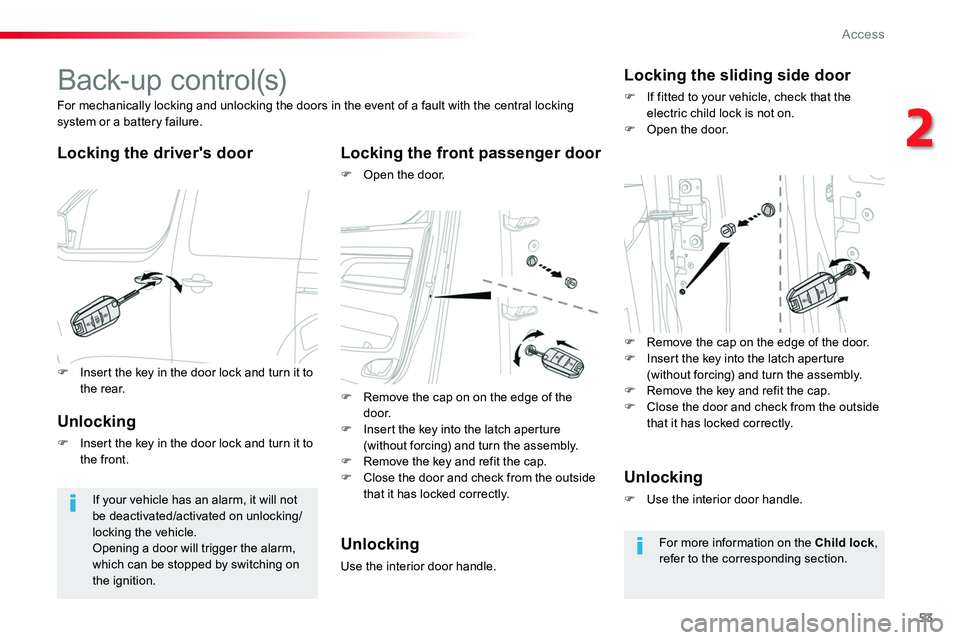
B a c k- u p c o nt r o l (s)
Locking the driver's doorLocking the front passenger door
F Open the door.
For mechanically locking and unlocking the doors in the event of a fault with the central locking system or a battery failure.
If your vehicle has an alarm, it will not be deactivated/activated on unlocking/locking the vehicle.Opening a door will trigger the alarm, which can be stopped by switching on the ignition.
Locking the sliding side door
F If fitted to your vehicle, check that the electric child lock is not on.F Open the door.
Unlocking
F Insert the key in the door lock and turn it to the front.
Unlocking
Use the interior door handle.
Unlocking
F Use the interior door handle.
For more information on the Child lock, refer to the corresponding section.
F Insert the key in the door lock and turn it to the rear.F Remove the cap on on the edge of the d o o r.F Insert the key into the latch aperture (without forcing) and turn the assembly.F Remove the key and refit the cap.F Close the door and check from the outside that it has locked correctly.
F Remove the cap on the edge of the door.F Insert the key into the latch aperture (without forcing) and turn the assembly.F Remove the key and refit the cap.F Close the door and check from the outside that it has locked correctly.
2
Access
Page 59 of 516
59
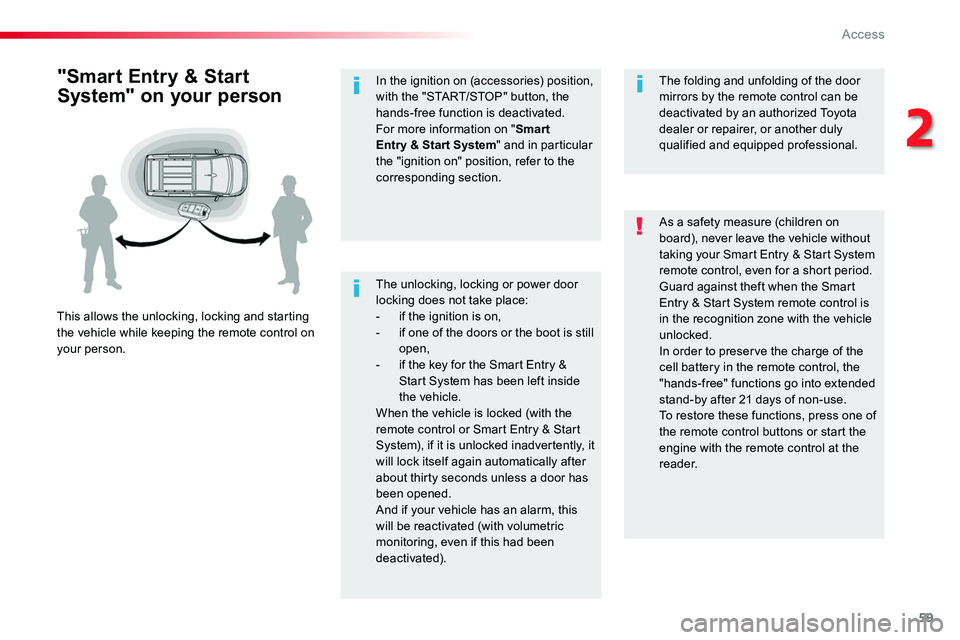
The unlocking, locking or power door locking does not take place:- if the ignition is on,- if one of the doors or the boot is still open,- if the key for the Smart Entry & Start System has been left inside the vehicle.When the vehicle is locked (with the remote control or Smart Entry & Start System), if it is unlocked inadvertently, it will lock itself again automatically after about thirty seconds unless a door has been opened.And if your vehicle has an alarm, this will be reactivated (with volumetric monitoring, even if this had been deactivated).
"Smart Entry & Start
System" on your person
This allows the unlocking, locking and starting the vehicle while keeping the remote control on your person.
As a safety measure (children on board), never leave the vehicle without taking your Smart Entry & Start System remote control, even for a short period.Guard against theft when the Smart Entry & Start System remote control is in the recognition zone with the vehicle unlocked.In order to preserve the charge of the cell battery in the remote control, the "hands-free" functions go into extended stand-by after 21 days of non-use.To restore these functions, press one of the remote control buttons or start the engine with the remote control at the reader.
The folding and unfolding of the door mirrors by the remote control can be deactivated by an authorized Toyota dealer or repairer, or another duly qualified and equipped professional.
In the ignition on (accessories) position, with the "START/STOP" button, the hands-free function is deactivated.For more information on "Smart Entry & Start System" and in particular the "ignition on" position, refer to the corresponding section.
2
Access
Page 60 of 516
60
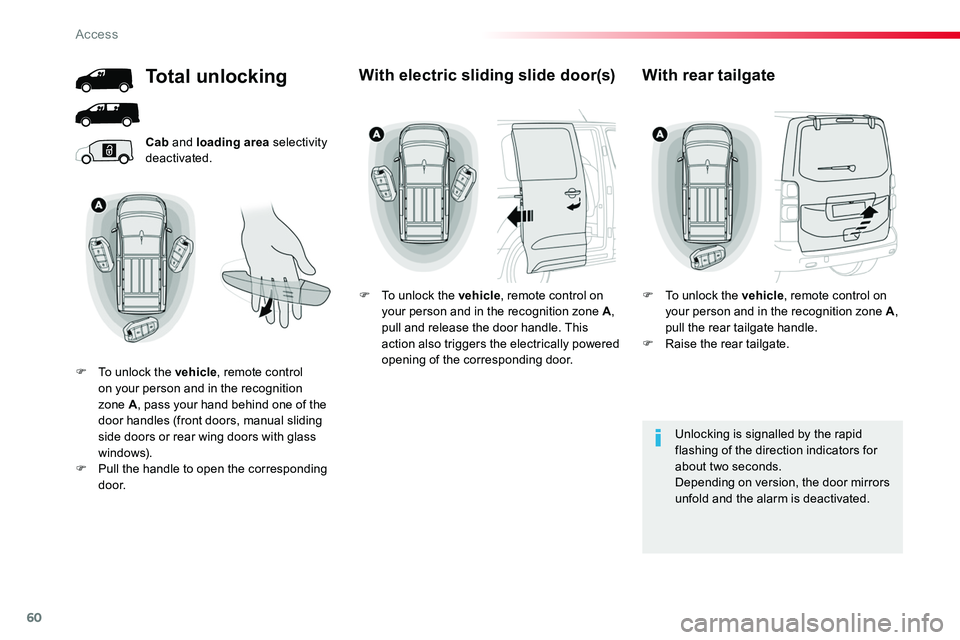
Cab and loading area selectivity deactivated.
Unlocking is signalled by the rapid flashing of the direction indicators for about two seconds.Depending on version, the door mirrors unfold and the alarm is deactivated.
Total unlocking
F To unlock the vehicle, remote control on your person and in the recognition zone A, pass your hand behind one of the door handles (front doors, manual sliding side doors or rear wing doors with glass windows).F Pull the handle to open the corresponding d o o r.
With electric sliding slide door(s)
F To unlock the vehicle, remote control on your person and in the recognition zone A, pull and release the door handle. This action also triggers the electrically powered opening of the corresponding door.
With rear tailgate
F To unlock the vehicle, remote control on your person and in the recognition zone A, pull the rear tailgate handle.F Raise the rear tailgate.
Access
Page 61 of 516
61
Depending on version, the door mirrors unfold only on unlocking the cab, the alarm is deactivated
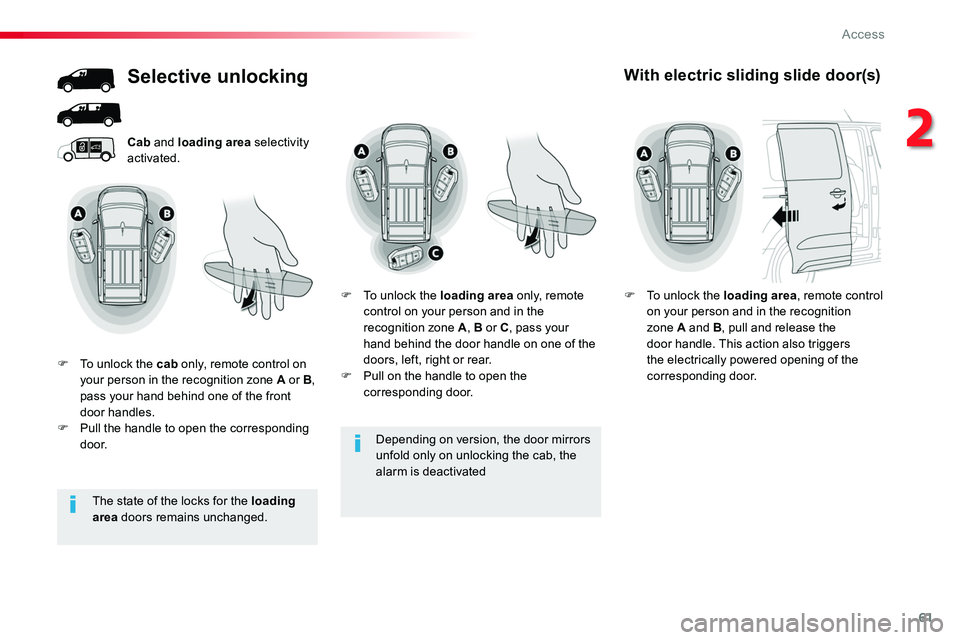
Cab and loading area selectivity activated.
Selective unlocking
F To unlock the cab only, remote control on your person in the recognition zone A or B, pass your hand behind one of the front door handles.F Pull the handle to open the corresponding d o o r.
F To unlock the loading area only, remote control on your person and in the recognition zone A, B or C, pass your hand behind the door handle on one of the doors, left, right or rear.F Pull on the handle to open the corresponding door.
With electric sliding slide door(s)
F To unlock the loading area, remote control on your person and in the recognition zone A and B, pull and release the door handle. This action also triggers the electrically powered opening of the corresponding door.
The state of the locks for the loading area doors remains unchanged.
2
Access
Page 63 of 516
63
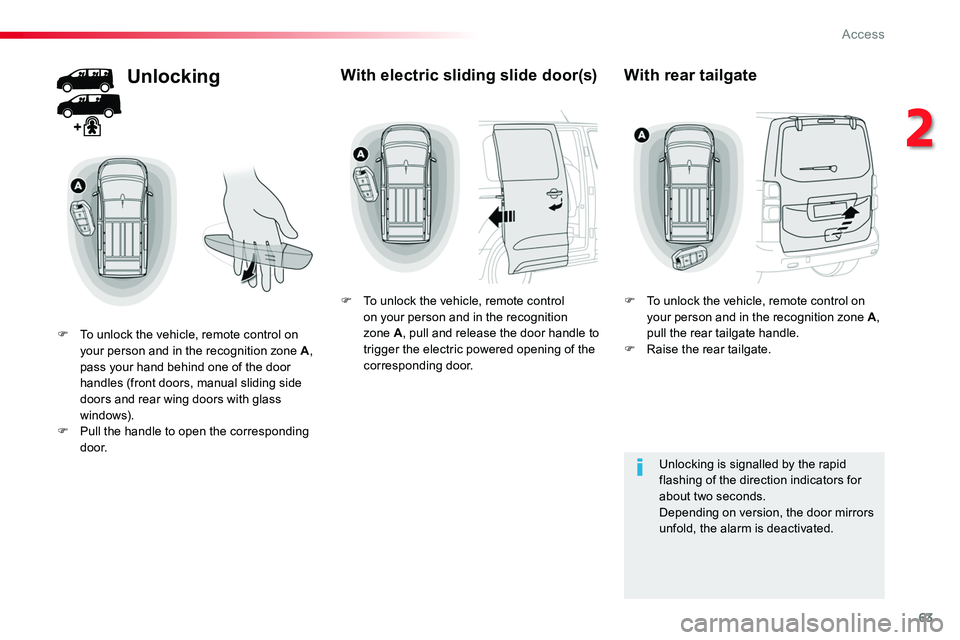
Unlocking
F To unlock the vehicle, remote control on your person and in the recognition zone A, pass your hand behind one of the door handles (front doors, manual sliding side doors and rear wing doors with glass windows).F Pull the handle to open the corresponding d o o r.
With electric sliding slide door(s)
F To unlock the vehicle, remote control on your person and in the recognition zone A, pull and release the door handle to trigger the electric powered opening of the corresponding door.
With rear tailgate
F To unlock the vehicle, remote control on your person and in the recognition zone A, pull the rear tailgate handle.F Raise the rear tailgate.
Unlocking is signalled by the rapid flashing of the direction indicators for about two seconds.Depending on version, the door mirrors unfold, the alarm is deactivated.
2
Access
Page 69 of 516
69
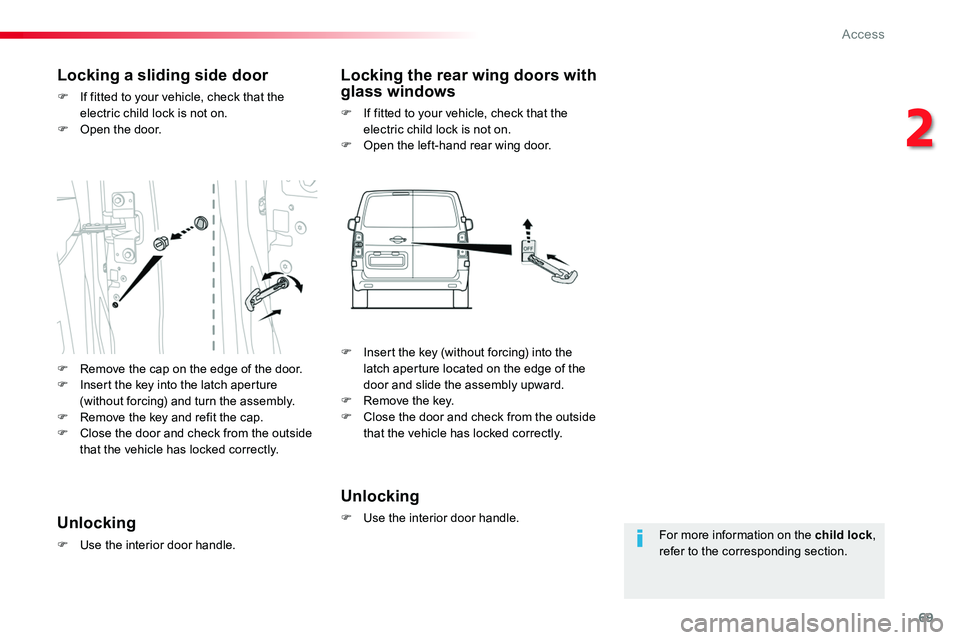
For more information on the child lock, refer to the corresponding section.
Locking a sliding side door
F If fitted to your vehicle, check that the electric child lock is not on.F Open the door.
Locking the rear wing doors with glass windows
F If fitted to your vehicle, check that the electric child lock is not on.F Open the left-hand rear wing door.
Unlocking
F Use the interior door handle.Unlocking
F Use the interior door handle.
F Remove the cap on the edge of the door.F Insert the key into the latch aperture (without forcing) and turn the assembly.F Remove the key and refit the cap.
F Close the door and check from the outside that the vehicle has locked correctly.
F Insert the key (without forcing) into the latch aperture located on the edge of the door and slide the assembly upward.F Remove the key.F Close the door and check from the outside that the vehicle has locked correctly.
2
Access