audio TOYOTA PROACE 2016 Owner's Manual
[x] Cancel search | Manufacturer: TOYOTA, Model Year: 2016, Model line: PROACE, Model: TOYOTA PROACE 2016Pages: 516, PDF Size: 91.65 MB
Page 253 of 516
253
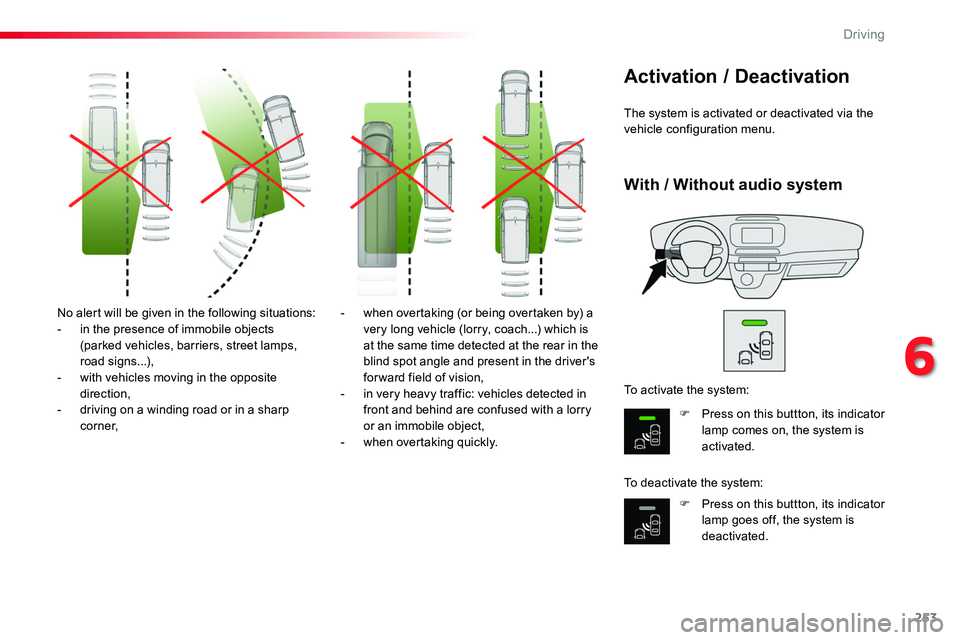
No alert will be given in the following situations:- in the presence of immobile objects (parked vehicles, barriers, street lamps, road signs...),- with vehicles moving in the opposite direction,- driving on a winding road or in a sharp c o r n e r,
- when overtaking (or being overtaken by) a very long vehicle (lorry, coach...) which is at the same time detected at the rear in the blind spot angle and present in the driver's forward field of vision,- in very heavy traffic: vehicles detected in front and behind are confused with a lorry or an immobile object,
- when overtaking quickly.
The system is activated or deactivated via the vehicle configuration menu.
Activation / Deactivation
F Press on this buttton, its indicator lamp comes on, the system is activated.
F Press on this buttton, its indicator lamp goes off, the system is deactivated.
To activate the system:
To deactivate the system:
With / Without audio system
6
Driving
Page 256 of 516
256
Front parking sensors
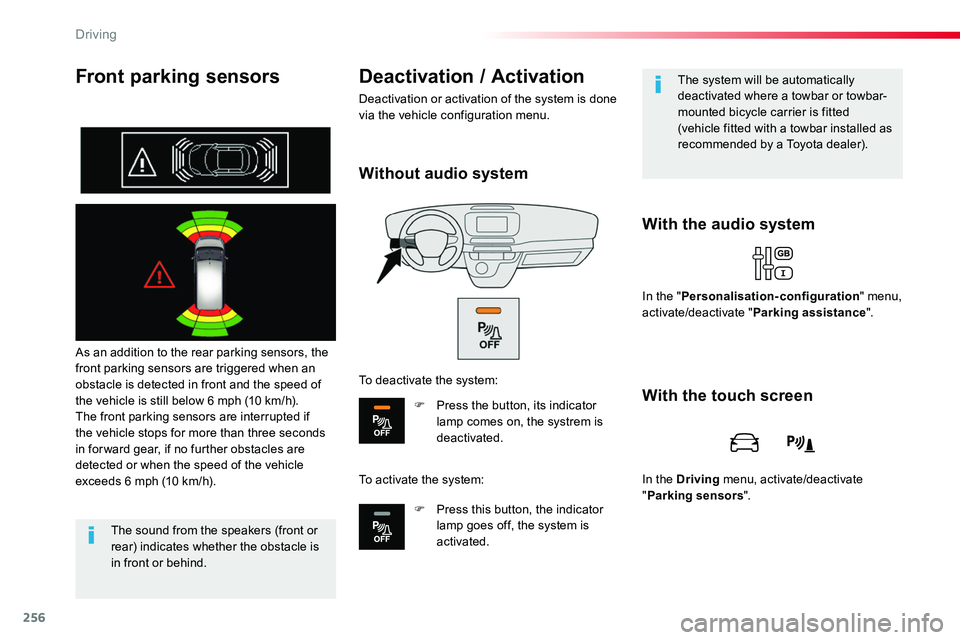
As an addition to the rear parking sensors, the front parking sensors are triggered when an obstacle is detected in front and the speed of the vehicle is still below 6 mph (10 km/h).The front parking sensors are interrupted if the vehicle stops for more than three seconds in for ward gear, if no further obstacles are detected or when the speed of the vehicle exceeds 6 mph (10 km/h).
With the audio system
Deactivation / Activation
Deactivation or activation of the system is done via the vehicle configuration menu.
The sound from the speakers (front or rear) indicates whether the obstacle is in front or behind.
The system will be automatically deactivated where a towbar or towbar-mounted bicycle carrier is fitted (vehicle fitted with a towbar installed as recommended by a Toyota dealer).
In the "Personalisation-configuration" menu, activate/deactivate "Parking assistance".
With the touch screen
In the Driving menu, activate/deactivate "Parking sensors".
Without audio system
To deactivate the system:
F Press the button, its indicator lamp comes on, the systrem is deactivated.
To activate the system:
F Press this button, the indicator lamp goes off, the system is activated.
Driving
Page 264 of 516
264
In the Driving menu, select "Under-inflation initialisation".
With the audio system
In the "Personalisation-configuration" menu, select "Under-inflation initialisation".
Operating fault
The flashing and then fixed illumination of the tyre pressure warning lamp accompanied by illumination of the Service warning lamp
indicates a fault with the system.
In this case, tyre pressure monitoring of the tyres is no longer assured.Have the system checked by an authorized Toyota dealer or repairer, or another duly qualified and equipped professional.
Before doing anything to the system, the pressures of the four tyres must be checked and the system reinitialised.
With the touch screen
Press on "Ye s" to Confirm the command, initialisation is confirmed by an audible signal and a message.
Without audio system
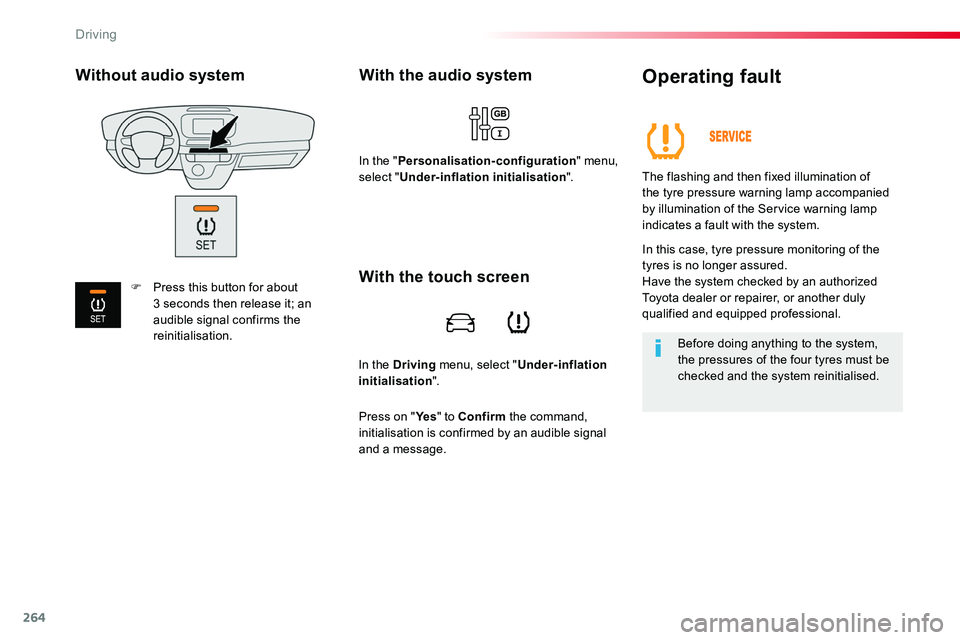
F Press this button for about 3 seconds then release it; an audible signal confirms the reinitialisation.
Driving
Page 270 of 516
270
Energy economy mode
System which manages the duration of use of certain functions to conserve a sufficient level of charge in the battery.After the engine has stopped, you can still use functions such as the audio and telematics system, windscreen wipers, dipped beam headlamps, courtesy lamps, etc. for a maximum combined duration of about forty minutes.
Switching to economy
mode
A message appears in the instrument panel screen indicating that the vehicle has switched to economy mode and the active functions are put on standby.
If a telephone call is being made at this time, it will be maintained for around 10 minutes with the Bluetooth hands-free system of your audio system.
Exiting economy mode
These functions are reactivated automatically next time the vehicle is driven.In order to restore the use of these functions immediately, start the engine and let it run:- for less than ten minutes, to use the equipment for approximately five minutes,- for more than ten minutes, to use the equipment for up to approximately thirty minutes.Let the engine run for the duration specified to ensure that the battery charge is sufficient.Do not repeatedly and continuously restart the engine in order to charge the battery.A flat battery prevents the engine from starting.For more information on the 12 V batter y, refer to the corresponding section.
Load reduction mode
System which manages the use of certain functions according to the level of charge remaining in the battery.When the vehicle is being driven, the load reduction function temporarily deactivates certain functions, such as the air conditioning, the heated rear screen...The deactivated functions are reactivated automatically as soon as conditions permit.
Practical information
Page 272 of 516
272
By visiting a Toyota dealer, you can also obtain products for cleaning and maintenance (exterior and interior) - including ecological products in the Toyota range, topping-up products (screenwash...), touch-up pens and paint aerosols for the exact colour of your vehicle, refills (cartridge for the temporary puncture repair kit...), ...
"Multimedia"
Smartphone support, table support or semi-integral navigation support, range of audio systems and portable navigation systems, driving recorder, Bluetooth hands-free kit, DVD player, multimedia support, driving aids, vehicle tracking system, ...
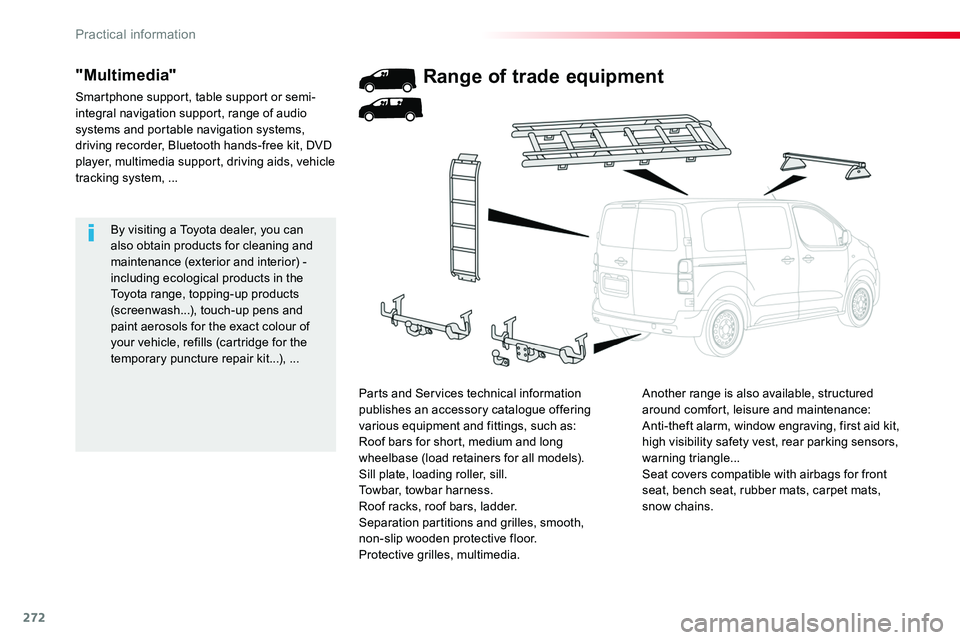
Range of trade equipment
Another range is also available, structured around comfort, leisure and maintenance:Anti-theft alarm, window engraving, first aid kit, high visibility safety vest, rear parking sensors, warning triangle...Seat covers compatible with airbags for front seat, bench seat, rubber mats, carpet mats, snow chains.
Parts and Services technical information publishes an accessory catalogue offering various equipment and fittings, such as:Roof bars for short, medium and long wheelbase (load retainers for all models).Sill plate, loading roller, sill.Towbar, towbar harness.Roof racks, roof bars, ladder.Separation partitions and grilles, smooth,
non-slip wooden protective floor.Protective grilles, multimedia.
Practical information
Page 273 of 516
273
Roof bars / Roof rack
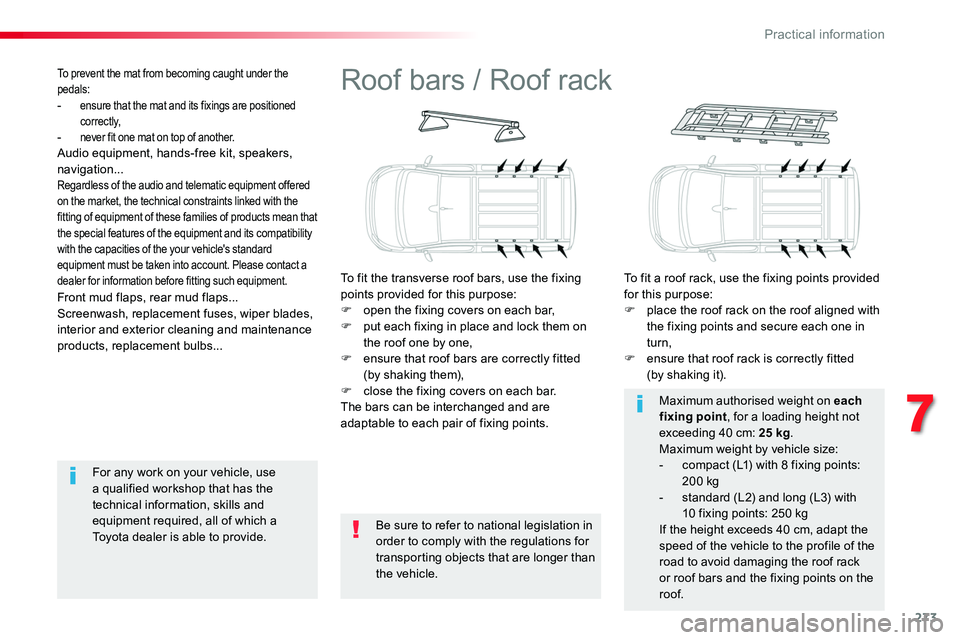
To fit the transverse roof bars, use the fixing points provided for this purpose:F open the fixing covers on each bar,F put each fixing in place and lock them on the roof one by one,F ensure that roof bars are correctly fitted (by shaking them),F close the fixing covers on each bar.The bars can be interchanged and are adaptable to each pair of fixing points.
To fit a roof rack, use the fixing points provided for this purpose:F place the roof rack on the roof aligned with the fixing points and secure each one in turn,F ensure that roof rack is correctly fitted (by shaking it).
Be sure to refer to national legislation in order to comply with the regulations for transporting objects that are longer than the vehicle.
Maximum authorised weight on each fixing point, for a loading height not exceeding 40 cm: 25 kg.Maximum weight by vehicle size:- compact (L1) with 8 fixing points: 200 kg- standard (L2) and long (L3) with 10 fixing points: 250 kgIf the height exceeds 40 cm, adapt the
speed of the vehicle to the profile of the road to avoid damaging the roof rack or roof bars and the fixing points on the roof.
Front mud flaps, rear mud flaps...Screenwash, replacement fuses, wiper blades, interior and exterior cleaning and maintenance products, replacement bulbs...
To prevent the mat from becoming caught under the pedals:- ensure that the mat and its fixings are positioned c o r r e c t l y,- never fit one mat on top of another.Audio equipment, hands-free kit, speakers, navigation...Regardless of the audio and telematic equipment offered on the market, the technical constraints linked with the fitting of equipment of these families of products mean that the special features of the equipment and its compatibility with the capacities of the your vehicle's standard equipment must be taken into account. Please contact a dealer for information before fitting such equipment.
For any work on your vehicle, use a qualified workshop that has the technical information, skills and equipment required, all of which a Toyota dealer is able to provide.
7
Practical information
Page 318 of 516
318
FuseN°Rating(A)Functions
F110Electric power steering, clutch switch
F415Horn.
F520Front/rear screenwash pump.
F620Front/rear screenwash pump.
F710Rear 12 V accessory socket.
F820Single or double rear wipers.
F10/F1130Front and rear, exterior, interior locks.
F1310Front air conditioning controls, radio controls, gear lever, head-up display.
F145Alarm, ER A-GLONASS emergency call system.
F175Instrument panel.
F193Steering mounted controls.
F213"Smart Entry & Start System" system or ignition switch.
F223Rain and sunshine sensor, multifunction detection camera.
F235Seat belt unfastened or not fastened display screen.
F245Touch screen, reversing camera and parking sensors.
F255Airbags.
F2920Audio system, touch screen, CD player, navigation.
F3115Audio system (battery +).
F3215Front 12 V accessory socket.
F345Blind spot monitoring system, door mirror electric controls.
F355Heated washer jets, headlamp beam height control.
F365Torch charger, rear courtesy lamp.
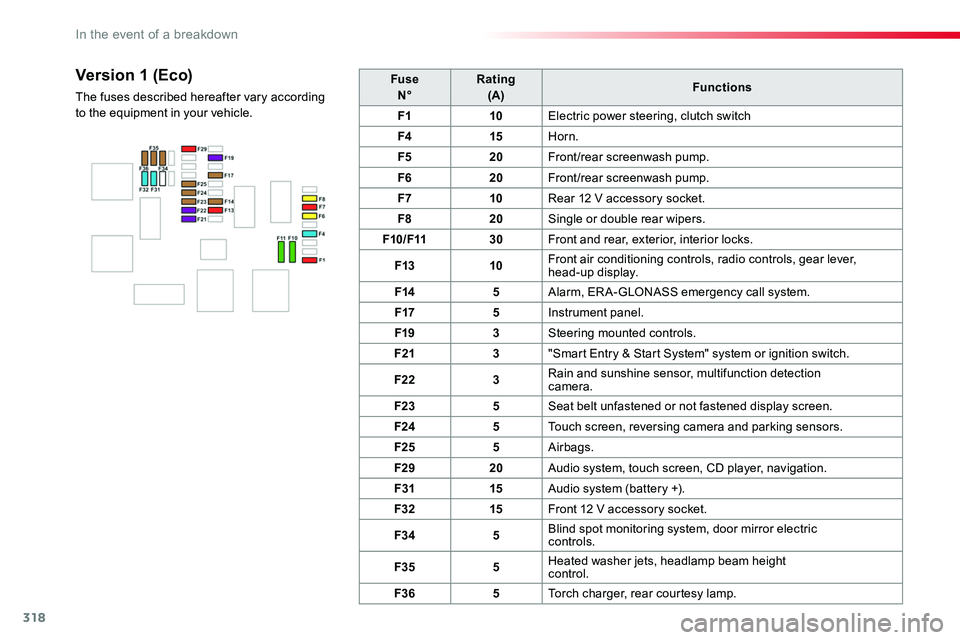
Version 1 (Eco)
The fuses described hereafter vary according to the equipment in your vehicle.
In the event of a breakdown
Page 319 of 516
319
FuseN°Rating(A)Functions
F13"Smart Entry & Start System" system or ignition switch.
F55Touch screen, reversing camera and parking sensors.
F710Rear air conditioning controls, Hi-Fi amplifier.
F820Single or double rear wiper.
F10/F1130Front and rear, exterior, interior locks.
F123Alarm.
F1710Rear 12 V accessory socket.
F185ERA-GLONASS emergency call system.
F213Torch charger, rear courtesy lamp.
F223Glove box lamp, rear courtesy lamps.
F235Blind spot monitoring system, door mirror electric controls.
F245Steering mounted controls.
F255Headlamp beam height control.
F263Seat belt unfastened or not fastened display screen.
F273Rain and sunshine sensor, multifunction detection camera.
F2810Front air conditioning controls, radio controls, gear lever, head-up display.
F30A or B15Audio system (battery +).
F315Airbags.
F3315Front 12 V accessory socket.
F355Instrument panel.
F3620Audio system, touch screen, CD player, navigation.
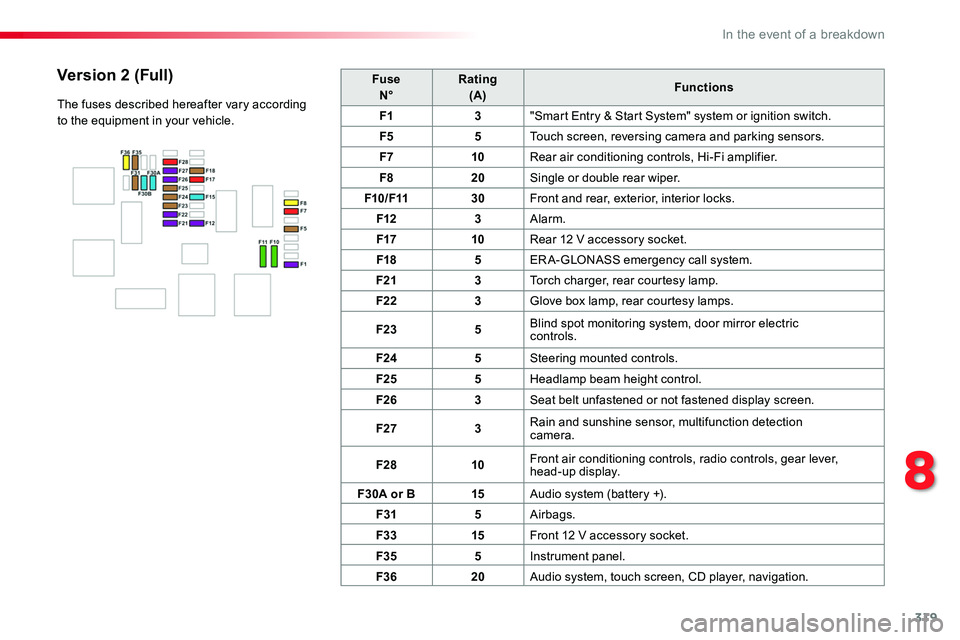
Version 2 (Full)
The fuses described hereafter vary according to the equipment in your vehicle.
8
In the event of a breakdown
Page 322 of 516
322
Starting using another
battery
Never try to start the engine by connecting a battery charger.Never use a 24 V or higher battery b o o s t e r.First check that the slave battery has a nominal voltage of 12 V and a capacity at least equal to that of the discharged battery.The two vehicles must not be in contact with each other.Switch off the electrical consumers on both vehicles (audio system, wipers, lighting, ...).Ensure that the jump lead cables do not pass close to moving parts of the engine (cooling fan, belts, ...).Do not disconnect the (+) terminal when the engine is running.
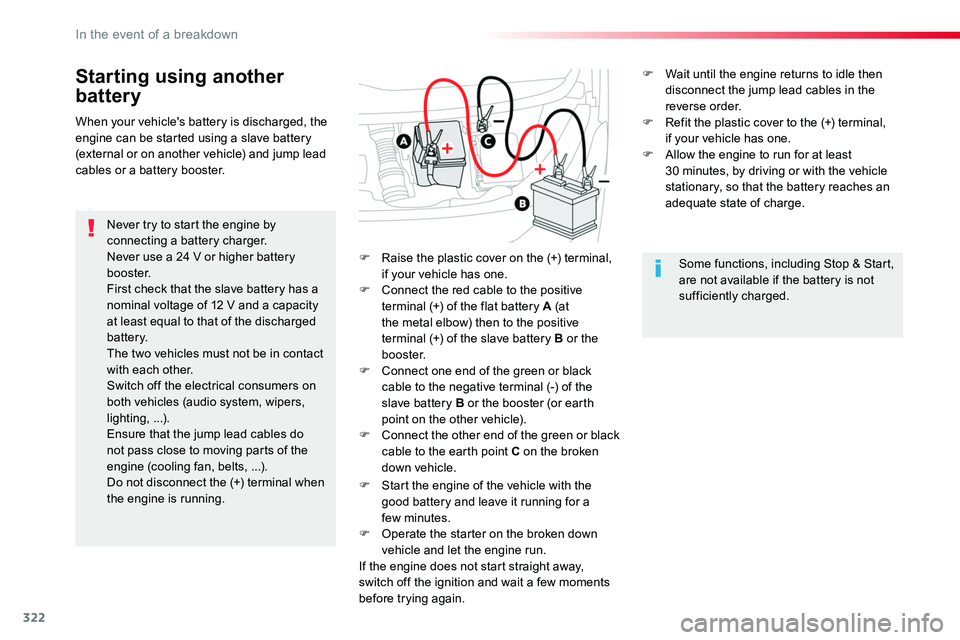
F Raise the plastic cover on the (+) terminal, if your vehicle has one.F Connect the red cable to the positive terminal (+) of the flat battery A (at the metal elbow) then to the positive terminal (+) of the slave battery B or the b o o s t e r.F Connect one end of the green or black cable to the negative terminal (-) of the slave battery B or the booster (or earth point on the other vehicle).F Connect the other end of the green or black cable to the earth point C on the broken down vehicle.
F Start the engine of the vehicle with the good battery and leave it running for a few minutes.
F Operate the starter on the broken down vehicle and let the engine run.If the engine does not start straight away, switch off the ignition and wait a few moments before trying again.
When your vehicle's battery is discharged, the engine can be started using a slave battery (external or on another vehicle) and jump lead cables or a battery booster.
Some functions, including Stop & Start, are not available if the battery is not sufficiently charged.
F Wait until the engine returns to idle then disconnect the jump lead cables in the reverse order.F Refit the plastic cover to the (+) terminal, if your vehicle has one.F Allow the engine to run for at least 30 minutes, by driving or with the vehicle stationary, so that the battery reaches an adequate state of charge.
In the event of a breakdown
Page 323 of 516
323
For optimum service life of the battery, it is essential to maintain an adequate state of charge.In some circumstances it may be necessary to charge the battery:- if you use your vehicle essentially for short journeys,- if the vehicle is to be taken off the road for several weeks.Contact an authorized Toyota dealer or repairer, or another duly qualified and equipped professional.
Charging the battery using
a battery charger
F Switch off the ignition.F Switch off all electrical consumers (audio system, lighting, wipers, ...).
If you envisage charging your vehicle's battery yourself, use only a charger compatible with lead-acid batteries of a nominal voltage of 12 V.
Follow the instructions for use provided by the manufacturer of the charger.Never reverse polarities.
Never try to charge a frozen battery.If the battery has been frozen, have it checked by an authorized Toyota dealer or repairer, or another duly qualified and equipped professional, who will check that the internal components have not been damaged and the casing is not cracked, which could cause a leak of toxic and corrosive acid.
If this label is present, it is essential to use only a 12 V charger, to avoid causing irreversible damage to the electrical components related to the Stop & Start system.
It is not necessary to disconnect the battery.
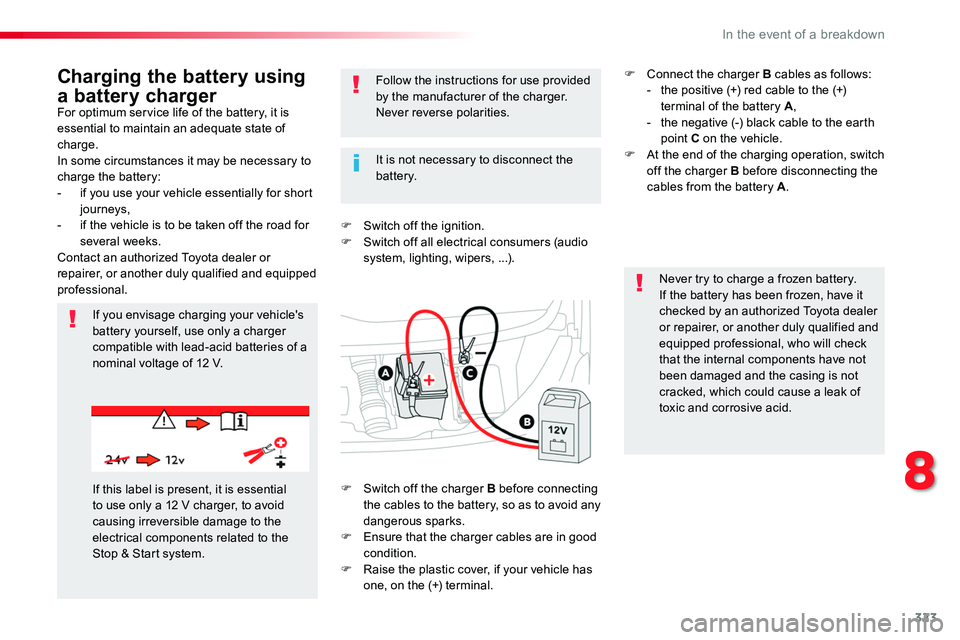
F Switch off the charger B before connecting the cables to the battery, so as to avoid any dangerous sparks.F Ensure that the charger cables are in good condition.F Raise the plastic cover, if your vehicle has one, on the (+) terminal.
F Connect the charger B cables as follows:- the positive (+) red cable to the (+) terminal of the battery A,- the negative (-) black cable to the earth point C on the vehicle.F At the end of the charging operation, switch off the charger B before disconnecting the cables from the battery A.
8
In the event of a breakdown