engine TOYOTA PROACE CITY 2020 Workshop Manual
[x] Cancel search | Manufacturer: TOYOTA, Model Year: 2020, Model line: PROACE CITY, Model: TOYOTA PROACE CITY 2020Pages: 272, PDF Size: 61.18 MB
Page 111 of 272
111
Driving
6
NOTIC E
During parking manoeuvres, STOP mode is not available for a few seconds after coming out of reverse gear or turning the steering wheel.
Restarting the engine (START mode)
The engine automatically restarts as soon as the driver indicates the intention of moving off again.– With a manual gearbox: with the clutch pedal fully depressed.– With an automatic gearbox:• With the selector in position D or M: with the brake pedal released.• With the selector in position N and the brake pedal released: with the selector at D or M.• With the selector in position P and the brake pedal depressed: with the selector at R, N, D or M.
Special cases
The engine will restart automatically if all conditions for operation are met again and in the following case.– Speed of the vehicle exceeds 3 km/h (2 mph) (depending on the engine).In this case, this indicator lamp flashes for a few seconds, then goes off.
Malfunctions
Depending on the vehicle’s equipment:In the event of a system malfunction, this warning lamp flashes on the instrument panel.The warning lamp in this button flashes and a message appears, accompanied by an audible signal.Have the vehicle checked by a TOYOTA dealer or a qualified workshop.
The vehicle stalls in STOP mode
All of the instrument panel warning lamps come on if there is a fault.Depending on version, a warning message may also be displayed, prompting you to place the gear selector in position N and depress the brake pedal.► Switch off the ignition then start the engine again with the key or the "START/STOP" button.
WARNI NG
The Stop & Start system requires a 12 V battery of specific technology and specification.All work concerning the battery must be carried out only by a TOYOTA dealer or a qualified workshop.
Under-inflation detection
This system automatically checks the pressures of the tyres while driving.It compares the information given by the wheel speed sensors with reference values, which must be reinitialised every time the tyre pressures are adjusted or a wheel changed.The system triggers an alert as soon as it detects a drop in the inflation pressure of one or more tyres.
WARNI NG
Under-inflation detection does not replace the need for vigilance on the part of the driver.This system does not avoid the need to regularly check the tyre pressures (including the spare wheel) as well as before a long journey.Driving with under-inflated tyres, particularly in adverse conditions (heavy load, high speed, long journey):– worsens road-holding.– lengthens braking distances.– causes premature wear of the tyres.– increases fuel consumption.
Page 113 of 272
11 3
Driving
6
With audio system or touch screen
With the vehicle stationary, the system is reinitialised via the vehicle configuration menu.
Malfunction
These warning lamps come on in the event of a malfunction.In this case, the tyre under-inflation monitoring function is no longer performed.Have the system checked by a TOYOTA dealer or a qualified workshop.
Head-up display
This system projects various information onto a smoked projection blade situated in the driver's field of vision, enabling them to drive without taking their eyes off the road.
Information displayed
during operation
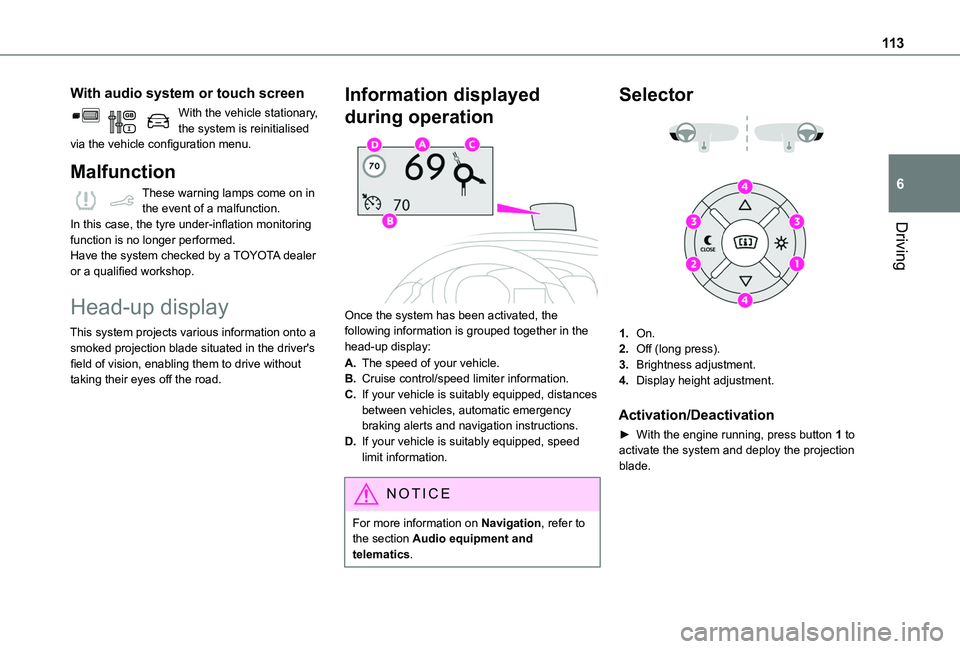
Once the system has been activated, the following information is grouped together in the head-up display:
A.The speed of your vehicle.
B.Cruise control/speed limiter information.
C.If your vehicle is suitably equipped, distances between vehicles, automatic emergency braking alerts and navigation instructions.
D.If your vehicle is suitably equipped, speed limit information.
NOTIC E
For more information on Navigation, refer to the section Audio equipment and
telematics.
Selector
1.On.
2.Off (long press).
3.Brightness adjustment.
4.Display height adjustment.
Activation/Deactivation
► With the engine running, press button 1 to
activate the system and deploy the projection blade.
Page 114 of 272
11 4
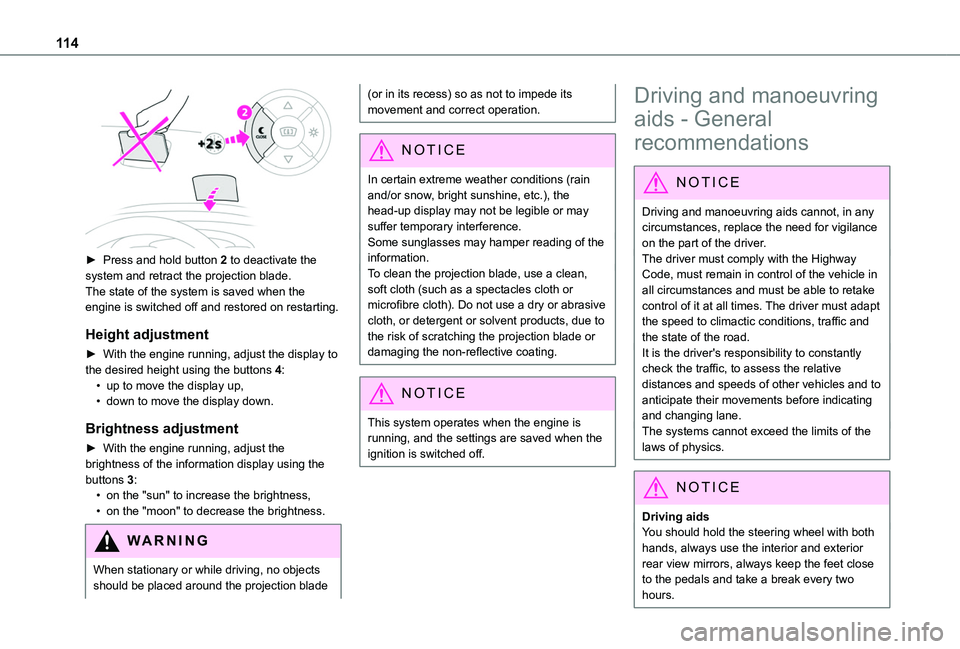
► Press and hold button 2 to deactivate the system and retract the projection blade.The state of the system is saved when the engine is switched off and restored on restarting.
Height adjustment
► With the engine running, adjust the display to the desired height using the buttons 4:• up to move the display up,• down to move the display down.
Brightness adjustment
► With the engine running, adjust the brightness of the information display using the buttons 3:• on the "sun" to increase the brightness,• on the "moon" to decrease the brightness.
W ARNI NG
When stationary or while driving, no objects should be placed around the projection blade
(or in its recess) so as not to impede its movement and correct operation.
NOTIC E
In certain extreme weather conditions (rain and/or snow, bright sunshine, etc.), the head-up display may not be legible or may suffer temporary interference.Some sunglasses may hamper reading of the
information.To clean the projection blade, use a clean, soft cloth (such as a spectacles cloth or microfibre cloth). Do not use a dry or abrasive cloth, or detergent or solvent products, due to the risk of scratching the projection blade or damaging the non-reflective coating.
NOTIC E
This system operates when the engine is running, and the settings are saved when the ignition is switched off.
Driving and manoeuvring
aids - General
recommendations
NOTIC E
Driving and manoeuvring aids cannot, in any circumstances, replace the need for vigilance on the part of the driver.The driver must comply with the Highway Code, must remain in control of the vehicle in all circumstances and must be able to retake control of it at all times. The driver must adapt the speed to climactic conditions, traffic and the state of the road.It is the driver's responsibility to constantly check the traffic, to assess the relative distances and speeds of other vehicles and to anticipate their movements before indicating and changing lane.The systems cannot exceed the limits of the
laws of physics.
NOTIC E
Driving aidsYou should hold the steering wheel with both hands, always use the interior and exterior rear view mirrors, always keep the feet close to the pedals and take a break every two hours.
Page 117 of 272
11 7
Driving
6
Qualifier plate detectedDisplay of the speed associated with the qualifier plate
Speed limit if towing
If an approved towing device is fixed to the vehicle:90 km/h (56 mph) (for example)
Speed limit applicable over a certain distanceExample:
70 km/h (43 mph) (for example)
Speed limit for vehicles whose gross vehicle weight or gross train weight is less than 3.5 tonnes
90 km/h (56 mph) (for example)
Speed limit in snowExample:
If the exterior temperature is below 3°C:
30 km/h (19 mph) (for example)with a "snowflake" symbol
Qualifier plate detectedDisplay of the speed associated with the qualifier plate
Speed limit at certain timesExample:
30 km/h (19 mph) (for example)with a "clock" symbol
WARNI NG
The units for the speed limit (km/h or mph) depend on the country you are driving in.This should be taken into account so that you observe the speed limit.For the system to work correctly when changing country, the speed unit in the instrument panel must correspond to that of the country you are driving in.
WARNI NG
The automatic reading of road signs is a driving aid system and does not always display speed limits correctly.The speed limit signs present on the road always take priority over the display by the system. The system is designed to detect signs that conform to the Vienna Convention on road signs.
NOTIC E
Specific speed limits, such as those for heavy goods vehicles, are not displayed.The display of the speed limit in the instrument panel is updated when passing a speed limit sign intended for cars (light vehicles).
Activation / Deactivation
By default, the system is automatically activated at every engine start.It is set via the vehicle configuration menu.
Page 122 of 272
122
allow running at a constant speed and keeping an adequate safety distance.Remain vigilant when the cruise control is activated. If you hold one of the speed setting modification buttons, a very rapid change in the speed of your vehicle may occur.When descending a steep hill, the cruise control system cannot prevent the vehicle from exceeding the set speed. Brake if necessary to control the speed of your vehicle.On steep climbs or when towing, the set speed may not be reached or maintained.
NOTIC E
Exceeding the programmed speed settingYou can temporarily exceed the speed setting by pressing the accelerator pedal (the programmed speed flashes).To return to the speed setting, release the accelerator pedal (when the set speed is
reached again, the displayed speed stops flashing).
WARNI NG
Operating limitsNever use the system in the following situations:– in an urban area with the risk of
pedestrians crossing the road,
– in heavy traffic,– on winding or steep roads,– on slippery or flooded roads,– in unfavourable climatic conditions,– driving on a speed circuit,– driving on a rolling road,– use of snow chains, non-slip covers or studded tyres.
Programmable cruise
control
Refer to the General recommendations on the use of driving and manoeuvring aids and to Cruise control - particular recommendations.This system automatically keeps the vehicle’s speed at the cruise value programmed by the driver (speed setting), without using the accelerator pedal.The cruise control is switched on manually.It requires a minimum vehicle speed of 40 km/h (25 mph).
With a manual gearbox, third gear or higher must be engaged.With an automatic gearbox, mode D or second gear or higher in mode M must be engaged.
NOTIC E
The cruise control remains active after changing gear, regardless of the gearbox type, on engines fitted with Stop & Start.
NOTIC E
Switching off the ignition cancels any speed setting.
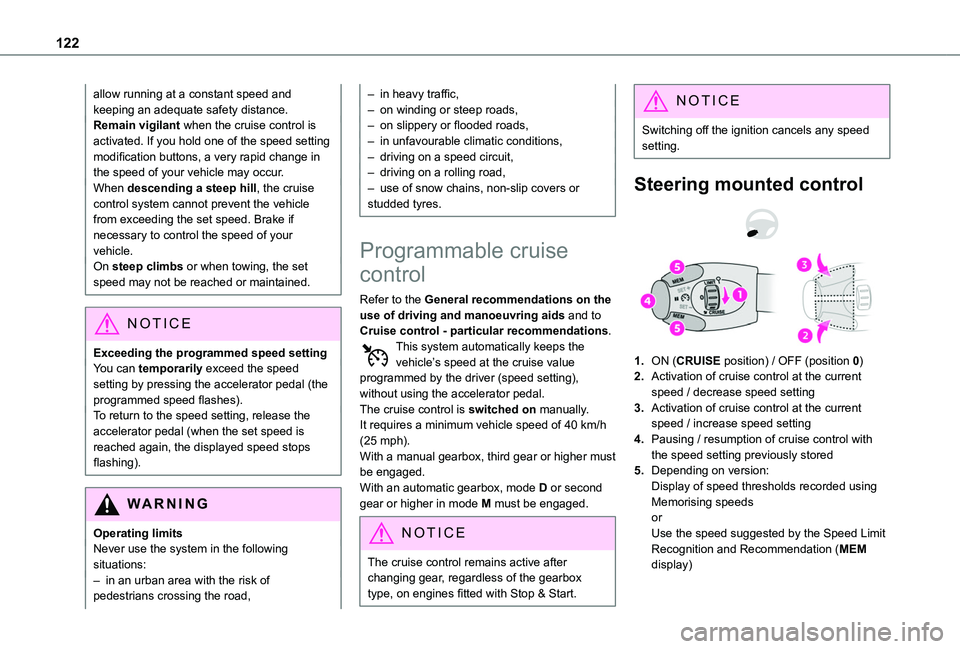
Steering mounted control
1.ON (CRUISE position) / OFF (position 0)
2.Activation of cruise control at the current speed / decrease speed setting
3.Activation of cruise control at the current speed / increase speed setting
4.Pausing / resumption of cruise control with the speed setting previously stored
5.Depending on version:Display of speed thresholds recorded using Memorising speedsorUse the speed suggested by the Speed Limit Recognition and Recommendation (MEM display)
Page 125 of 272
125
Driving
6
To do so, it has a camera located at the top of the windscreen and, depending on version, a radar located in the front bumper.
WARNI NG
Primarily designed for driving on main roads and motorways, this system only works with moving vehicles driving in the same direction as your vehicle.
NOTIC E
If the driver operates a direction indicator to overtake a slower vehicle, the cruise control allows the vehicle to temporarily approach the vehicle in front to assist the overtaking manoeuvre, without ever exceeding the speed setting.
WARNI NG
Some vehicles present on the road may not be properly seen or may be poorly interpreted by the camera and/or radar (e.g. a lorry), which may lead to a poor assessment of the distances and lead to the vehicle inappropriately accelerating or braking.
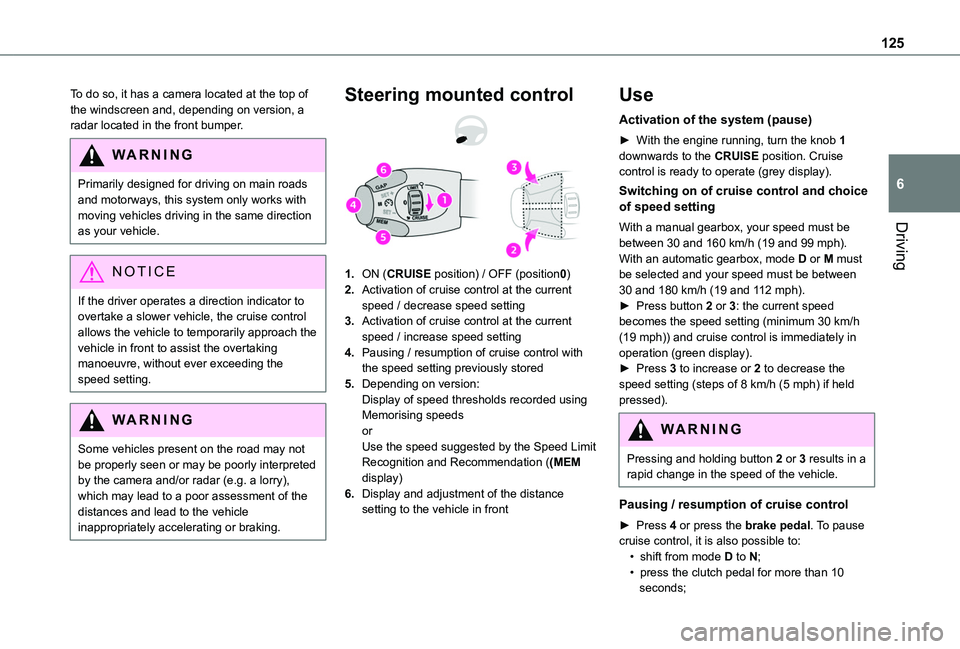
Steering mounted control
1.ON (CRUISE position) / OFF (position0)
2.Activation of cruise control at the current speed / decrease speed setting
3.Activation of cruise control at the current speed / increase speed setting
4.Pausing / resumption of cruise control with the speed setting previously stored
5.Depending on version:Display of speed thresholds recorded using Memorising speedsorUse the speed suggested by the Speed Limit Recognition and Recommendation ((MEM display)
6.Display and adjustment of the distance setting to the vehicle in front
Use
Activation of the system (pause)
► With the engine running, turn the knob 1 downwards to the CRUISE position. Cruise control is ready to operate (grey display).
Switching on of cruise control and choice of speed setting
With a manual gearbox, your speed must be between 30 and 160 km/h (19 and 99 mph).With an automatic gearbox, mode D or M must be selected and your speed must be between 30 and 180 km/h (19 and 112 mph).► Press button 2 or 3: the current speed becomes the speed setting (minimum 30 km/h (19 mph)) and cruise control is immediately in operation (green display).► Press 3 to increase or 2 to decrease the speed setting (steps of 8 km/h (5 mph) if held pressed).
WARNI NG
Pressing and holding button 2 or 3 results in a rapid change in the speed of the vehicle.
Pausing / resumption of cruise control
► Press 4 or press the brake pedal. To pause cruise control, it is also possible to:• shift from mode D to N;• press the clutch pedal for more than 10 seconds;
Page 126 of 272
126
• press the electric parking brake control;► Press 4 to restart cruise control. Cruise control may have been paused automatically:• when the speed of the vehicle goes below 30 km/h (19 mph) with a manual gearbox;• when the speed of the engine goes below 1100 rpm with a manual gearbox;• by triggering of the ESC system.With a manual gearbox, the driver should press the accelerator pedal to move off, then above 30 km/h (19 mph), reactivate the system by pressing one of the buttons 2, 3 or 4.With an automatic gearbox, following braking of the vehicle bringing it to a complete stop, the system holds the vehicle stationary; the cruise control is paused. The driver should press the accelerator pedal to move off, then above 30 km/h (19 mph), reactivate the system by pressing one of the buttons 2, 3 or 4.If the driver takes no action following this immobilisation, the electric parking brake is applied automatically after about 5 minutes.
N OTIC E
Cruise control remains active after changing gear regardless of the gearbox type.
WARNI NG
When the driver attempts to reactivate cruise control which was paused, the message "Activation not possible, unsuitable
conditions" is briefly displayed if reactivation is not possible (safety conditions not met).
Modifying the programmed speed setting with the Speed Limit Recognition and Recommendation function
► Press 5 to accept the speed suggested by the function in the instrument panel, then press again to confirm.
WARNI NG
To prevent any sudden acceleration or deceleration of the vehicle, select a speed setting fairly close to the current speed of the vehicle.
Changing the inter-vehicle distance
► Press 6 to display the distance setting thresholds (“Distant”, “Normal”, “Close“), then press again to select a threshold.After a few seconds, the option is accepted and will be memorised when the ignition is switched off.
Temporarily exceeding the speed setting
► Press the accelerator pedal fully. Distance monitoring and cruise control are deactivated as long as acceleration is maintained. "Cruise control suspended" is displayed.
System deactivation
► Turn knob 1 upwards to the OFF position.
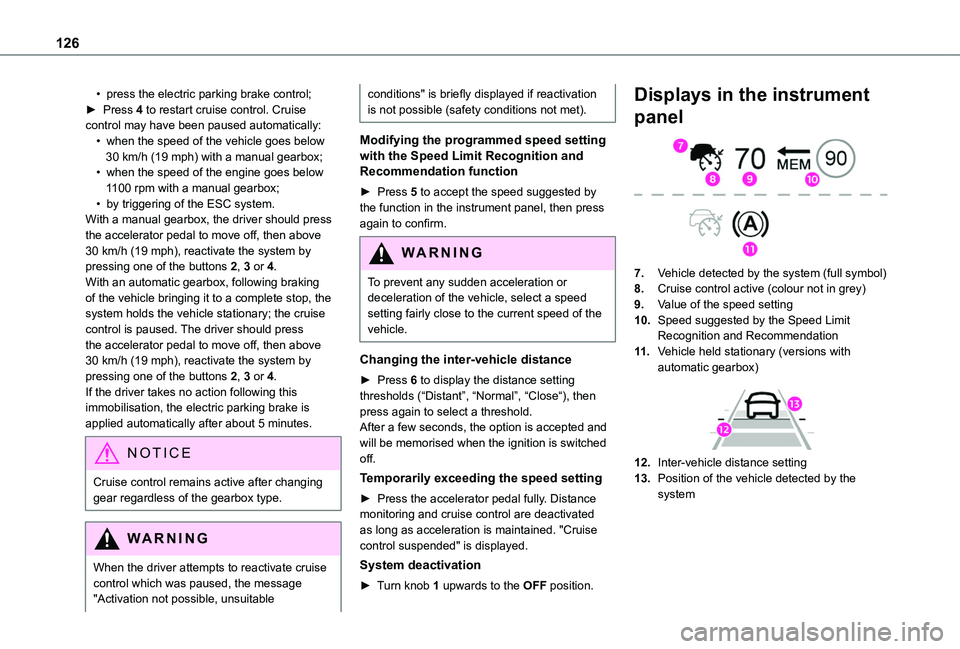
Displays in the instrument
panel
7.Vehicle detected by the system (full symbol)
8.Cruise control active (colour not in grey)
9.Value of the speed setting
10.Speed suggested by the Speed Limit Recognition and Recommendation
11 .Vehicle held stationary (versions with automatic gearbox)
12.Inter-vehicle distance setting
13.Position of the vehicle detected by the system
Page 129 of 272
129
Driving
6
– a collision to be prevented, or its severity to be limited, by reducing the vehicle’s speed.This system is comprised of three functions:– Collision Risk Alert,– Intelligent emergency braking assistance,– Active Safety Brake (automatic emergency braking).
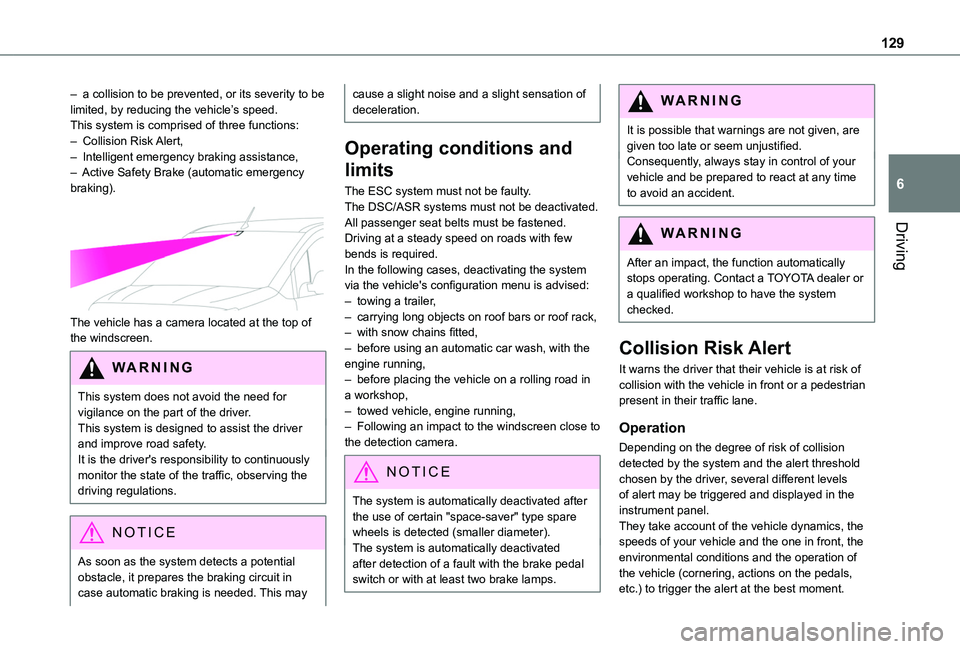
The vehicle has a camera located at the top of the windscreen.
W ARNI NG
This system does not avoid the need for vigilance on the part of the driver.This system is designed to assist the driver and improve road safety.It is the driver's responsibility to continuously monitor the state of the traffic, observing the
driving regulations.
NOTIC E
As soon as the system detects a potential obstacle, it prepares the braking circuit in case automatic braking is needed. This may
cause a slight noise and a slight sensation of deceleration.
Operating conditions and
limits
The ESC system must not be faulty.The DSC/ASR systems must not be deactivated.All passenger seat belts must be fastened.Driving at a steady speed on roads with few bends is required.In the following cases, deactivating the system via the vehicle's configuration menu is advised:– towing a trailer,– carrying long objects on roof bars or roof rack,– with snow chains fitted,– before using an automatic car wash, with the engine running,– before placing the vehicle on a rolling road in a workshop,– towed vehicle, engine running,– Following an impact to the windscreen close to the detection camera.
NOTIC E
The system is automatically deactivated after the use of certain "space-saver" type spare wheels is detected (smaller diameter).The system is automatically deactivated after detection of a fault with the brake pedal switch or with at least two brake lamps.
WARNI NG
It is possible that warnings are not given, are given too late or seem unjustified.Consequently, always stay in control of your vehicle and be prepared to react at any time to avoid an accident.
WARNI NG
After an impact, the function automatically stops operating. Contact a TOYOTA dealer or a qualified workshop to have the system checked.
Collision Risk Alert
It warns the driver that their vehicle is at risk of collision with the vehicle in front or a pedestrian present in their traffic lane.
Operation
Depending on the degree of risk of collision detected by the system and the alert threshold chosen by the driver, several different levels of alert may be triggered and displayed in the instrument panel.They take account of the vehicle dynamics, the speeds of your vehicle and the one in front, the environmental conditions and the operation of the vehicle (cornering, actions on the pedals, etc.) to trigger the alert at the best moment.
Page 130 of 272
130
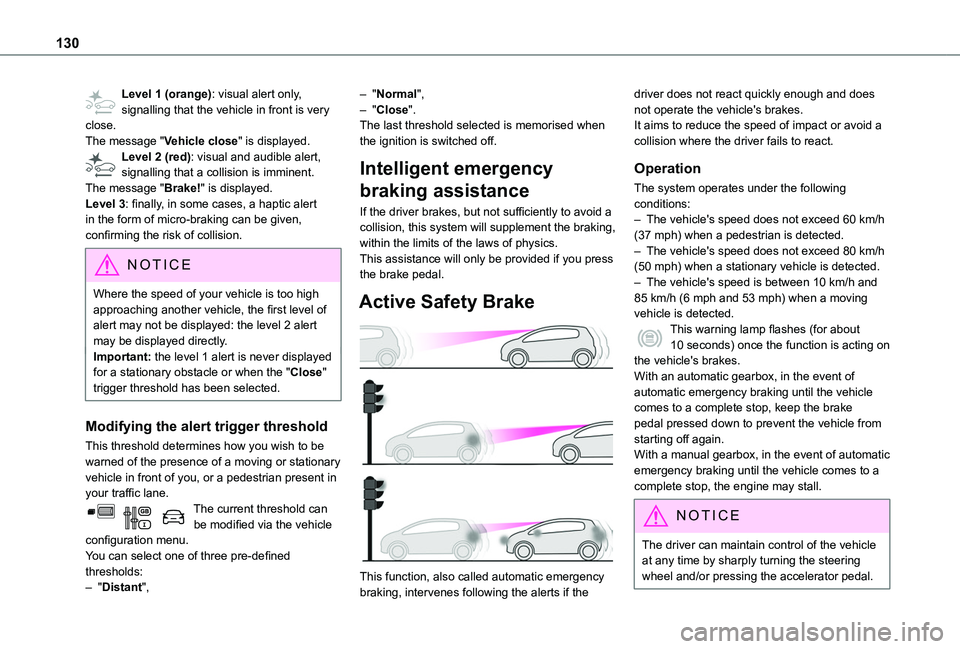
Level 1 (orange): visual alert only, signalling that the vehicle in front is very close.The message "Vehicle close" is displayed.Level 2 (red): visual and audible alert, signalling that a collision is imminent.The message "Brake!" is displayed.Level 3: finally, in some cases, a haptic alert in the form of micro-braking can be given, confirming the risk of collision.
NOTIC E
Where the speed of your vehicle is too high approaching another vehicle, the first level of alert may not be displayed: the level 2 alert may be displayed directly.Important: the level 1 alert is never displayed for a stationary obstacle or when the "Close" trigger threshold has been selected.
Modifying the alert trigger threshold
This threshold determines how you wish to be warned of the presence of a moving or stationary vehicle in front of you, or a pedestrian present in your traffic lane.The current threshold can be modified via the vehicle configuration menu.You can select one of three pre-defined thresholds:– "Distant",
– "Normal",– "Close".The last threshold selected is memorised when the ignition is switched off.
Intelligent emergency
braking assistance
If the driver brakes, but not sufficiently to avoid a collision, this system will supplement the braking, within the limits of the laws of physics.This assistance will only be provided if you press the brake pedal.
Active Safety Brake
This function, also called automatic emergency braking, intervenes following the alerts if the
driver does not react quickly enough and does not operate the vehicle's brakes.It aims to reduce the speed of impact or avoid a collision where the driver fails to react.
Operation
The system operates under the following conditions:– The vehicle's speed does not exceed 60 km/h (37 mph) when a pedestrian is detected.– The vehicle's speed does not exceed 80 km/h (50 mph) when a stationary vehicle is detected.– The vehicle's speed is between 10 km/h and 85 km/h (6 mph and 53 mph) when a moving vehicle is detected.This warning lamp flashes (for about 10 seconds) once the function is acting on the vehicle's brakes.With an automatic gearbox, in the event of automatic emergency braking until the vehicle comes to a complete stop, keep the brake pedal pressed down to prevent the vehicle from starting off again.
With a manual gearbox, in the event of automatic emergency braking until the vehicle comes to a complete stop, the engine may stall.
NOTIC E
The driver can maintain control of the vehicle at any time by sharply turning the steering wheel and/or pressing the accelerator pedal.
Page 131 of 272
131
Driving
6
NOTIC E
Operation of the function may be felt by slight vibration in the brake pedal.If the vehicle comes to a complete stop, the automatic braking is maintained for 1 to 2 seconds.
Deactivation/Activation
By default, the system is automatically activated at every engine start.This system can be deactivated or activated via the vehicle settings menu.Deactivation of the system is signalled by the illumination of this indicator lamp, accompanied by the display of a message.
Malfunction
In the event of a system malfunction, this warning lamp comes on on the instrument panel, accompanied by an onscreen message
and an audible signal.Contact a TOYOTA dealer or a qualified workshop to have the system checked.If these warning lamps come on after the engine has been switched off and then restarted, contact a TOYOTA dealer or a qualified workshop to have the system checked.
Active Lane Departure
Warning System
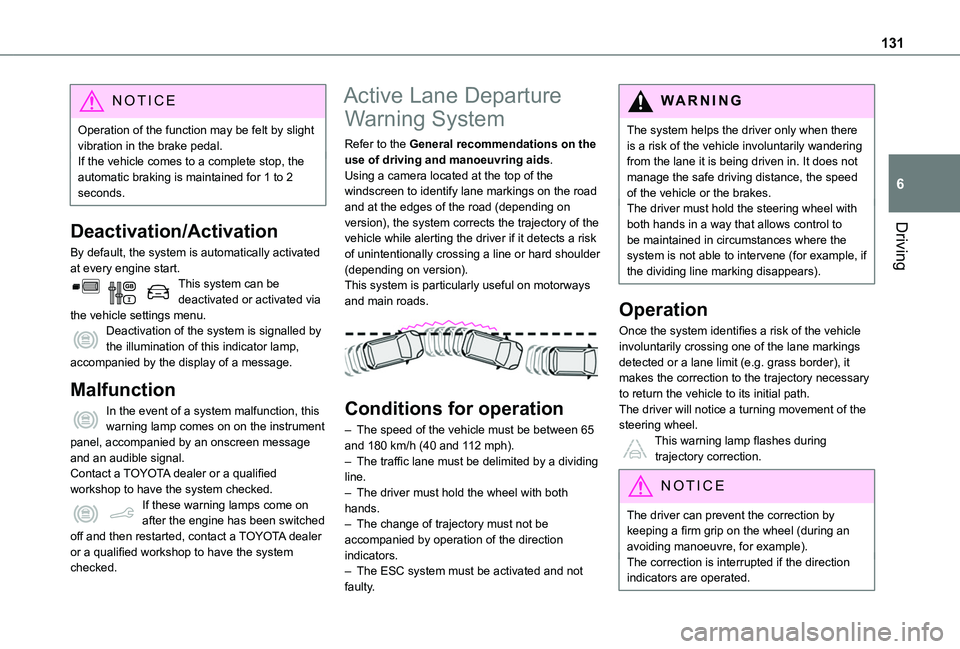
Refer to the General recommendations on the use of driving and manoeuvring aids.Using a camera located at the top of the windscreen to identify lane markings on the road and at the edges of the road (depending on version), the system corrects the trajectory of the vehicle while alerting the driver if it detects a risk of unintentionally crossing a line or hard shoulder (depending on version).This system is particularly useful on motorways and main roads.
Conditions for operation
– The speed of the vehicle must be between 65 and 180 km/h (40 and 112 mph).– The traffic lane must be delimited by a dividing line.– The driver must hold the wheel with both hands.– The change of trajectory must not be accompanied by operation of the direction indicators.– The ESC system must be activated and not faulty.
WARNI NG
The system helps the driver only when there is a risk of the vehicle involuntarily wandering from the lane it is being driven in. It does not manage the safe driving distance, the speed of the vehicle or the brakes.The driver must hold the steering wheel with both hands in a way that allows control to be maintained in circumstances where the system is not able to intervene (for example, if the dividing line marking disappears).
Operation
Once the system identifies a risk of the vehicle involuntarily crossing one of the lane markings detected or a lane limit (e.g. grass border), it makes the correction to the trajectory necessary to return the vehicle to its initial path.The driver will notice a turning movement of the steering wheel.This warning lamp flashes during
trajectory correction.
NOTIC E
The driver can prevent the correction by keeping a firm grip on the wheel (during an avoiding manoeuvre, for example).The correction is interrupted if the direction indicators are operated.