service TOYOTA PROACE EV 2021 Owner's Manual
[x] Cancel search | Manufacturer: TOYOTA, Model Year: 2021, Model line: PROACE EV, Model: TOYOTA PROACE EV 2021Pages: 360, PDF Size: 68.91 MB
Page 219 of 360
219
Practical information
7
Air filter
Depending on the environment and the use of the vehicle (e.g. dusty atmosphere, city driving), change it twice as often, if necessary.
Oil filter
Change the oil filter each time the engine oil is changed.
Particle filter (Diesel)
The start of clogging of the particle filter is indicated by the temporary lighting of this warning lamp, accompanied by an alert message.As soon as the traffic conditions permit, regenerate the filter by driving at a speed of at least 60 km/h (37 mph) until the warning lamp goes off.
NOTIC E
If the warning lamp stays on, this indicates a low Diesel additive level.For more information on Checking levels, refer to the corresponding section.
NOTIC E
Following prolonged operation of the vehicle at very low speed or at idle, you may, in exceptional circumstances, notice the emission of water vapour at the exhaust while accelerating. This has no impact on the vehicle’s behaviour or the environment.
NOTIC E
New vehicleDuring the first few particle filter regeneration operations, you may notice a "burning" smell. This is perfectly normal.
Manual gearbox
The gearbox does not require any maintenance (no oil change).
Automatic gearbox
The gearbox does not require any maintenance (no oil change).
Drive selector (Electric)
The drive selector does not require any maintenance.
Manual parking brake
If you notice excessive brake lever travel or decreased effectiveness, the parking
brake must be adjusted, even between two services.This system must be checked by any authorized Toyota retailer or Toyota authorized repairer, or any reliable repairer.
Electric parking brake
This system does not require any routine servicing. However, in the event of a problem, do not hesitate to have the system checked by a TOYOTA dealer or a qualified workshop.
NOTIC E
For more information on the Electric parking brake, refer to the corresponding section.
Brake pads
Brake wear depends on the style of driving, particularly in the case of vehicles used in town, over short distances. It may be necessary to have the condition of the brakes checked, even between vehicle services.Unless there is a leak in the circuit, a drop in the brake fluid level indicates that the brake pads are worn.
Page 221 of 360
221
Practical information
7
AdBlue® (Diesel engines)
To respect the environment and ensure compliance with the Euro 6 standard, without adversely affecting the performance or fuel consumption of its Diesel engines, TOYOTA has taken the decision to equip its vehicles with a system that associates SCR (Selective Catalytic Reduction) with a Diesel particle filter (DPF) for the treatment of exhaust gases.
SCR system
Using a liquid called AdBlue® that contains urea, a catalytic converter turns up to 85% of the nitrogen oxides (NOx) into nitrogen and water, which are harmless to health and the environment.The AdBlue® is contained in a special tank holding about 20 litres.Its capacity allows a driving range of approximately 3,000 miles (5,000 km) (which may vary considerably depending on your driving style and the vehicle). An alert system
is automatically triggered when the remaining range reaches 1,500 miles (2,400 km), i.e. once the reserve level has been reached.Several alerts are triggered successively during the remaining 1,500 miles (2,400 km) until the tank is empty and the vehicle is immobilised.If the estimated distance travelled by the vehicle between two services is greater than 3,000 miles (5,000 km), it will be necessary to top up the AdBlue.
NOTIC E
For more information on the Warning and indicator lamps and the associated alerts, or the Indicators, please refer to the corresponding sections.
WARNI NG
Once the AdBlue® tank is empty, a device
required by law prevents the engine from being restarted.If the SCR system is faulty, the level of emissions from the vehicle will no longer meet the Euro 6 standard and the vehicle starts polluting the environment.In the event of a confirmed SCR system malfunction, it is essential to visit any authorized Toyota retailer or Toyota authorized repairer, or any reliable repairer. After 685 miles (1,100 km), a device is automatically activated to prevent the engine from starting.In both cases, a range indicator indicates the distance that can be travelled before the vehicle is stopped.
NOTIC E
Freezing of the AdBlue®
AdBlue® freezes at temperatures below around -11°C.The SCR system includes a heater for the AdBlue® tank, allowing you to continue driving in very cold conditions.
Supply of AdBlue®
It is recommended that the AdBlue® be topped up as soon as the first alert is issued indicating that the reserve level has been reached.
WARNI NG
For the correct operation of the SCR system:– Use only AdBlue® fluid that meets the ISO 22241 standard.– Never transfer AdBlue® to another container as it would lose its purity.– Never dilute AdBlue® with water.
You can obtain AdBlue® from any authorized Toyota retailer or Toyota authorized repairer, or any reliable repairer, as well as service stations equipped with AdBlue® pumps specially designed for passenger vehicles.
Page 223 of 360
223
Practical information
7
Accessing the AdBlue® tank
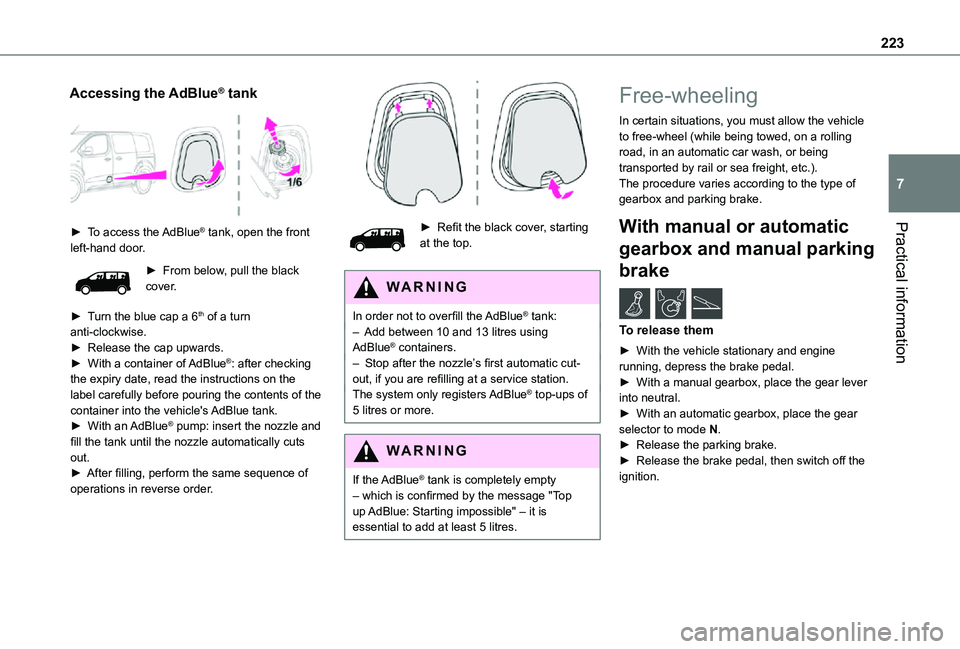
► To access the AdBlue® tank, open the front left-hand door.
► From below, pull the black cover.
► Turn the blue cap a 6th of a turn anti-clockwise.► Release the cap upwards.► With a container of AdBlue®: after checking the expiry date, read the instructions on the label carefully before pouring the contents of the container into the vehicle's AdBlue tank.► With an AdBlue® pump: insert the nozzle and fill the tank until the nozzle automatically cuts out.► After filling, perform the same sequence of operations in reverse order.
► Refit the black cover, starting at the top.
WARNI NG
In order not to overfill the AdBlue® tank:– Add between 10 and 13 litres using AdBlue® containers.– Stop after the nozzle’s first automatic cut-out, if you are refilling at a service station.The system only registers AdBlue® top-ups of 5 litres or more.
WARNI NG
If the AdBlue® tank is completely empty – which is confirmed by the message "Top up AdBlue: Starting impossible" – it is essential to add at least 5 litres.
Free-wheeling
In certain situations, you must allow the vehicle to free-wheel (while being towed, on a rolling road, in an automatic car wash, or being transported by rail or sea freight, etc.).The procedure varies according to the type of gearbox and parking brake.
With manual or automatic
gearbox and manual parking
brake /
To release them
► With the vehicle stationary and engine running, depress the brake pedal.► With a manual gearbox, place the gear lever into neutral.► With an automatic gearbox, place the gear selector to mode N.
► Release the parking brake.► Release the brake pedal, then switch off the ignition.
Page 247 of 360
247
In the event of a breakdown
8
Starting using another
battery
If the vehicle's battery is flat, the engine can be started using a backup battery (either external or from another vehicle) and jump leads or using a battery booster.
WARNI NG
Never start the engine by connecting a battery charger.Never use a 24 V or higher battery booster.Check beforehand that the backup battery has a nominal voltage of 12 V and a capacity at least equal to that of the discharged battery.The two vehicles must not be in contact with each other.Switch off all electricity-consuming equipment on both vehicles (audio system, wipers, lighting, etc.).Make sure that the jump leads are well away from the engine’s moving parts (fan, belt, etc.).Do not disconnect the (+) terminal while the engine is running.
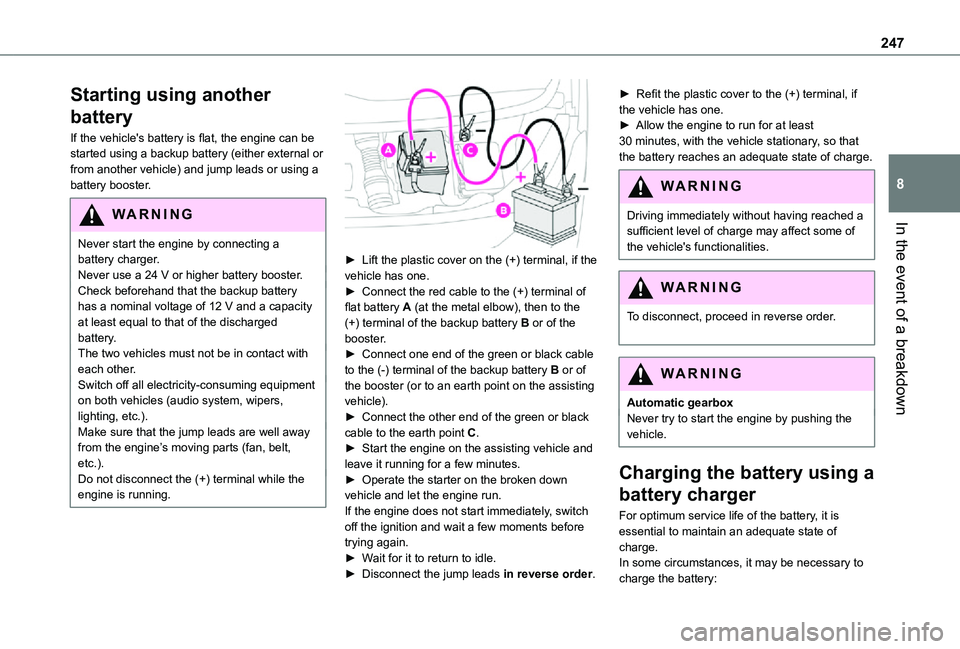
► Lift the plastic cover on the (+) terminal, if the vehicle has one.► Connect the red cable to the (+) terminal of flat battery A (at the metal elbow), then to the (+) terminal of the backup battery B or of the booster.► Connect one end of the green or black cable to the (-) terminal of the backup battery B or of the booster (or to an earth point on the assisting vehicle).► Connect the other end of the green or black cable to the earth point C.► Start the engine on the assisting vehicle and leave it running for a few minutes.► Operate the starter on the broken down vehicle and let the engine run.If the engine does not start immediately, switch off the ignition and wait a few moments before trying again.► Wait for it to return to idle.► Disconnect the jump leads in reverse order.
► Refit the plastic cover to the (+) terminal, if the vehicle has one.► Allow the engine to run for at least 30 minutes, with the vehicle stationary, so that the battery reaches an adequate state of charge.
WARNI NG
Driving immediately without having reached a sufficient level of charge may affect some of
the vehicle's functionalities.
WARNI NG
To disconnect, proceed in reverse order.
WARNI NG
Automatic gearboxNever try to start the engine by pushing the vehicle.
Charging the battery using a
battery charger
For optimum service life of the battery, it is essential to maintain an adequate state of
charge.In some circumstances, it may be necessary to charge the battery:
Page 250 of 360
250
Towing
Procedure for having your vehicle towed or for towing another vehicle using a removable mechanical device.
NOTIC E
General recommendationsObserve the legislation in force in the country where you are driving.Ensure that the weight of the towing vehicle is higher than that of the towed vehicle.The driver must remain at the wheel of the towed vehicle and must have a valid driving licence.When towing a vehicle with all four wheels on the ground, always use an approved towbar; ropes and straps are prohibited.The towing vehicle must move off gently.When the vehicle is towed with its engine off, there is no longer braking and steering assistance.
WARNI NG
A professional recovery service must be called if:– broken down on a motorway or main road;– not possible to put the gearbox into neutral, unlock the steering, or release the parking brake;– not possible to tow a vehicle with an automatic gearbox, with the engine running;– towing with only two wheels on the ground;– four-wheel drive vehicle;– no approved towbar available.
WARNI NG
Before towing the vehicle, it is essential to put the vehicle in free-wheeling mode.For more information on Free-wheeling, refer to the corresponding section.
NOTIC E
Electric motorAn electric vehicle cannot under any circumstances be used to tow another vehicle.However, it may be used, for example, to exit a rut.
WARNI NG
With a manual gearbox, place the gear lever in neutral.With an automatic gearbox, place the gear selector in position N.Failure to adhere to this instruction may lead to damage to some braking components and the lack of braking assistance on restarting the engine.
Page 267 of 360
267
Bluetooth® audio system
10
Select "RadioText (TXT) display" and confirm OK to save.
DAB (Digital Audio
Broadcasting) radio
Terrestrial Digital Radio
Depending on version
NOTIC E
If the current DAB radio station is not available on FM, "DAB FM" is struck out.
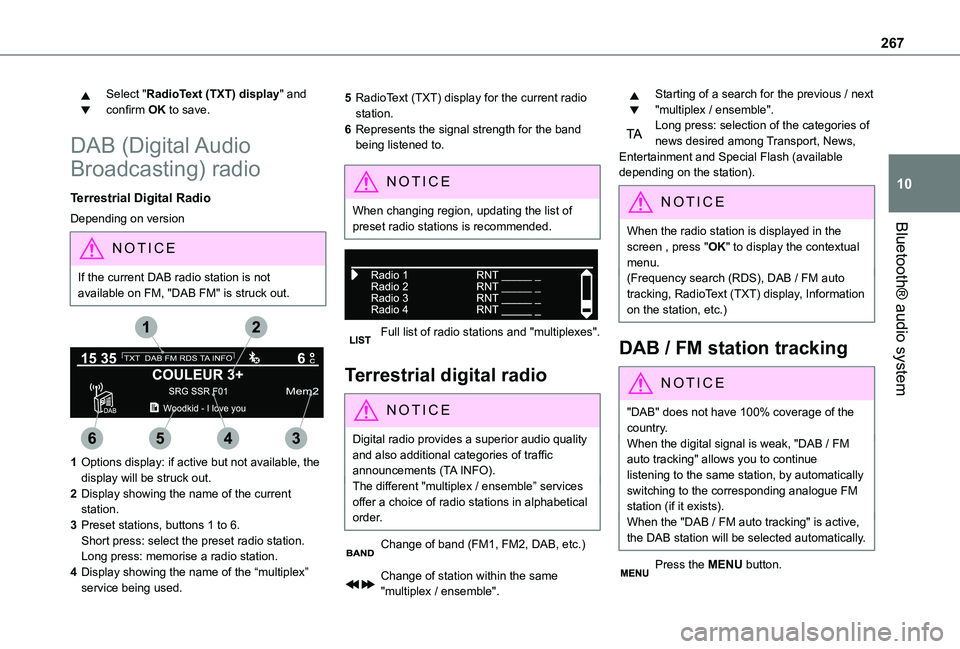
1Options display: if active but not available, the display will be struck out.
2Display showing the name of the current station.
3Preset stations, buttons 1 to 6.Short press: select the preset radio station.Long press: memorise a radio station.
4Display showing the name of the “multiplex” service being used.
5RadioText (TXT) display for the current radio station.
6Represents the signal strength for the band being listened to.
NOTIC E
When changing region, updating the list of preset radio stations is recommended.
Full list of radio stations and "multiplexes".
Terrestrial digital radio
NOTIC E
Digital radio provides a superior audio quality and also additional categories of traffic announcements (TA INFO).The different "multiplex / ensemble” services offer a choice of radio stations in alphabetical order.
Change of band (FM1, FM2, DAB, etc.)
Change of station within the same "multiplex / ensemble".
Starting of a search for the previous / next "multiplex / ensemble".Long press: selection of the categories of news desired among Transport, News, Entertainment and Special Flash (available depending on the station).
NOTIC E
When the radio station is displayed in the
screen , press "OK" to display the contextual menu.(Frequency search (RDS), DAB / FM auto tracking, RadioText (TXT) display, Information on the station, etc.)
DAB / FM station tracking
NOTIC E
"DAB" does not have 100% coverage of the country.When the digital signal is weak, "DAB / FM auto tracking" allows you to continue listening to the same station, by automatically switching to the corresponding analogue FM station (if it exists).When the "DAB / FM auto tracking" is active, the DAB station will be selected automatically.
Press the MENU button.
Page 271 of 360
271
Bluetooth® audio system
10
Telephone
Pairing a Bluetooth®
telephone
WARNI NG
As a safety measure and because they require prolonged attention on the part of the
driver, the operations for pairing of the Bluetooth mobile telephone with the Bluetooth hands-free system of your audio system must be carried out with the vehicle stationary and the ignition on.
NOTIC E
Activate the telephone's Bluetooth function and ensure that it is "visible to all" (telephone configuration).
NOTIC E
The services available depend on the network, the SIM card and the compatibility of the Bluetooth telephone used.Check the instructions for your telephone and with your service provider for the services to which you have access.
Procedure from the telephone
Select the name of the system in the list of devices detected.
Procedure from the system
Press the MENU button.
Select "Connections".
Confirm with OK.
Select "Search for a device".
Confirm with OK.
A window is displayed with a search in progress message.In the list of devices detected, select a telephone to pair. Only one telephone can be paired at a time.
Completing the pairing
WARNI NG
To complete the pairing, whichever procedure is used (from the telephone or from the system), ensure that the code is the same in the system and in the telephone.
If pairing fails, the number of attempts is not restricted.
A message appears in the screen confirming the pairing.
Information and advice
The "Telephone" menu gives access to the following functions in particular: "Directory", if your telephone equipment is fully compatible, "Call log", "View paired devices".Depending on the type of telephone, you may be asked to accept or confirm access by the system to each of these functions.
NOTIC E
Go to the Brand's website for more information (compatibility, more help, etc.).
Managing connections
NOTIC E
The telephone connection automatically includes hands free operation and audio streaming.The ability of the system to connect to just one profile depends on the telephone. Both profiles may connect by default.
Press the MENU button.
Select "Connections".
Page 275 of 360
275
Bluetooth® audio system
10
The USB stick has not been recognised, or may be corrupted.► Reformat the USB memory stick.The CD is systematically ejected or is not played.The CD is upside down, cannot be read, does not contain audio files or contains audio files of a format not recognised by the audio system.The CD is protected by an anti-pirating system not recognised by the audio system.► Check that the CD is inserted in the player the right way up.► Check the condition of the CD: the CD cannot be played if it is too badly damaged.► Check the content in the case of a burned CD: read the recommendations in the "Audio" section.Due to poor quality, certain burned CDs will not be played by the audio system.The CD audio quality is is poor.The CD is scratched or of poor quality.► Insert good quality CDs and store them in suitable conditions.
The audio settings (bass, treble, ambience) are unsuitable.► Return bass and treble settings to 0, without selecting an ambience.I am unable to play the music files on my smartphone via the USB port.Depending on the smartphone, access by the audio system to music on the smartphone may have to be approved on the latter.
► Manually activate the MTP profile on the smartphone (USB settings menu).
Telephone
I am unable to access my voicemail.Few telephones or service providers allow the use of this function.► Call your voicemail, via the telephone menu, using the number provided by your operator.I am unable to access my directory of contacts.► Check the compatibility of your telephone.You did not grant access to your contacts when pairing the telephone.► Accept or confirm access by the system to the contacts on your telephone.I am unable to continue a conversation when getting into my vehicle.Handset mode is activated.► Deselect handset mode to transfer the call to the vehicle.I am unable to pair my telephone by Bluetooth.
Telephones (models, versions of operating systems) have their own specificities in the pairing procedure and some telephones are not compatible.► Before starting the pairing procedure, delete the telephone pairing from the system and the system pairing from the telephone, in order to view the compatibility of the telephones.
Page 285 of 360
285
TOYOTA Pro Touch
11
Depending on the smartphone, it may be necessary to activate the "Android Auto" function.During the procedure, several screen pages relating to certain features are displayed.Accept to start and complete the connection.When connecting a smartphone to the system, we recommend enabling Bluetooth® on the smartphone.
Telephone connected by Bluetooth®
From the system, press "Telephone" to display the main page.Press the "PHONE" button to display the secondary page.Press "Android Auto" to start the application in the system.Access to the different audio sources remains available in the margin of the Android Auto display, using the touch buttons located in the upper bar.Access to the menus for the system is possible
at any time using the dedicated buttons.
NOTIC E
There may be a pause before applications become available, depending on the quality of the network.
Pairing a Bluetooth®
telephone
WARNI NG
The services available depend on the network, the SIM card and the compatibility of the Bluetooth devices used. Consult the telephone user guide and the service provider
to check which services are available.
NOTIC E
The Bluetooth function must be activated and the telephone configured as "Visible to all” (in the telphone settings).
To complete the pairing, whichever procedure is used (from the telephone or from the system), ensure that the code is the same in the system and in the telephone.
NOTIC E
If the pairing procedure fails, we recommend deactivating and then reactivating the Bluetooth function on the telephone.
Procedure from the telephone
Select the name of the system in the list of detected devices.
In the system, accept the connection request from the telephone.
Procedure from the system
Press Telephone to display the main page.Press "Bluetooth search".The list of detected telephones is displayed.Select the name of the chosen telephone in the list.
Connection sharing
The system offers to connect the telephone with 3 profiles:– "Telephone" (hands-free kit, telephone only),– “Streaming" (streaming: wireless playing of audio files on the telephone),– "Mobile internet data".Select one or more profiles.
Press "OK" to confirm.
Depending on the type of telephone, you may by prompted to accept the transfer of contacts and messages.
NOTIC E
The ability of the system to connect just one profile depends on the telephone.All three profiles may connect by default.
Page 289 of 360
289
TOYOTA Pro Touch
11
Frequently asked
questions
The following information groups together the answers to the most frequently asked questions concerning the system.
Radio
The reception quality of the tuned radio station gradually deteriorates or the station presets are not working (no sound, 87.5 MHz is displayed, etc.).The vehicle is too far from the selected station’s transmitter, or no transmitter is present in the geographical area.► Activate the "RDS" function in the upper bar to enable the system to check whether there is a more powerful transmitter in the geographical area.The environment (hills, buildings, tunnels, basement car parks, etc.) is blocking reception, including in RDS mode.This is a perfectly normal phenomenon, and is
not indicative of an audio system malfunction.The aerial is missing or has been damaged (for example while entering a car wash or underground car park).► Have the aerial checked by a dealer.I cannot find some radio stations in the list of received stations.The name of the radio station changes.The station is no longer received or its name has
changed in the list.
► Press the round arrow on the "List" tab on the "Radio" page.Some radio stations send other information in place of their name (the title of the song for example).The system interprets these details as the station name.► Press the round arrow on the "List" tab on the "Radio" page.
Media
Playback of my USB memory stick starts only after a very long wait (around 2 to 3 minutes).Some files supplied with the memory stick may greatly slow down access to reading the memory stick (multiplication by 10 of the cataloguing time).► Delete the files supplied with the memory stick and limit the number of sub-folders in the file structure on the memory stick. Some characters in information about the currently playing media are not displayed correctly.
The audio system is unable to process certain types of character.► Use standard characters to name tracks and folders.Playback of streaming files does not start.The connected device does not automatically launch playback.► Start playback from the device.Track names and playing times are not
displayed on the audio streaming screen.
The Bluetooth profile does not allow the transfer of this information.
Telephone
I cannot connect my Bluetooth telephone.The telephone's Bluetooth function may be switched off or the device may not be visible.► Check that the telephone has Bluetooth switched on.► Check in the telephone settings that it is "visible to all".The Bluetooth telephone is not compatible with the system.► Check the compatibility of the telephone on the Brand's website (services).Android Auto and/or CarPlay do not work.Android Auto and CarPlay may not activate if the USB cables are of poor quality.► Use genuine USB cables to ensure compatibility.Android Auto and/or CarPlay do not work.Android Auto and CarPlay are not available in all countries.
► Check the Google Android Auto or Apple website to see which countries are supported.The volume of the telephone connected in Bluetooth mode is inaudible.The volume depends on both the system and the telephone.► Increase the volume of the audio system, to maximum if required, and increase the volume of the telephone if necessary.