phone TOYOTA PROACE VERSO 2016 Workshop Manual
[x] Cancel search | Manufacturer: TOYOTA, Model Year: 2016, Model line: PROACE VERSO, Model: TOYOTA PROACE VERSO 2016Pages: 504, PDF Size: 81.64 MB
Page 451 of 504
451
1
1
27
28
29
30
23
24
25
26
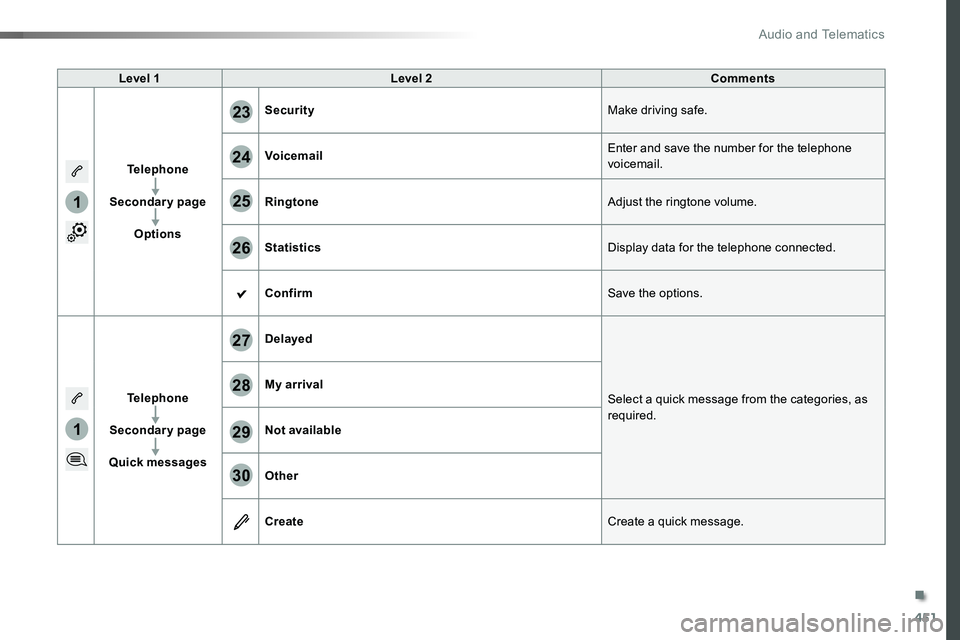
Level 1Level 2Comments
Telephone
Secondary page
Options
SecurityMake driving safe.
VoicemailEnter and save the number for the telephone voicemail.
RingtoneAdjust the ringtone volume.
StatisticsDisplay data for the telephone connected.
ConfirmSave the options.
Telephone
Secondary page
Quick messages
Delayed
Select a quick message from the categories, as required.
My arrival
Not available
Other
CreateCreate a quick message.
.
Audio and Telematics
Page 452 of 504
452
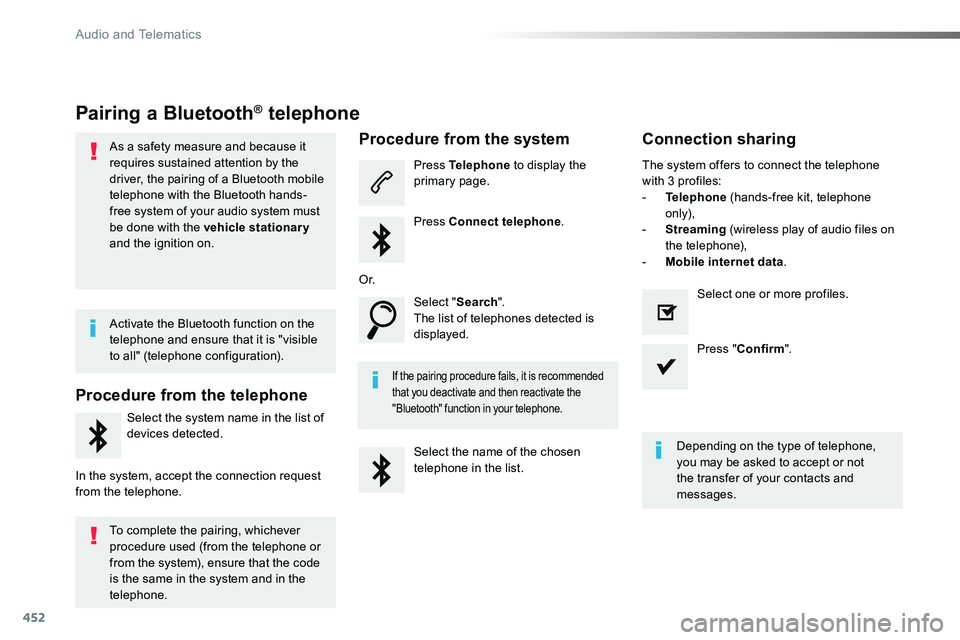
Pairing a Bluetooth® telephone
As a safety measure and because it requires sustained attention by the driver, the pairing of a Bluetooth mobile telephone with the Bluetooth hands-free system of your audio system must
be done with the vehicle stationary and the ignition on.
Procedure from the telephone
Select the system name in the list of
devices detected.
In the system, accept the connection request from the telephone.
Procedure from the system
Press Telephone to display the primary page.
Press Connect telephone.
Select "Search".The list of telephones detected is displayed.
If the pairing procedure fails, it is recommended that you deactivate and then reactivate the "Bluetooth" function in your telephone.
The system offers to connect the telephone with 3 profiles:- Telephone (hands-free kit, telephone only),- Streaming (wireless play of audio files on the telephone),- Mobile internet data.
Depending on the type of telephone, you may be asked to accept or not the transfer of your contacts and messages.
Select the name of the chosen telephone in the list.
Press "Confirm".
Select one or more profiles.O r.
Activate the Bluetooth function on the telephone and ensure that it is "visible to all" (telephone configuration).
To complete the pairing, whichever procedure used (from the telephone or from the system), ensure that the code is the same in the system and in the
telephone.
Connection sharing
Audio and Telematics
Page 453 of 504
453
1
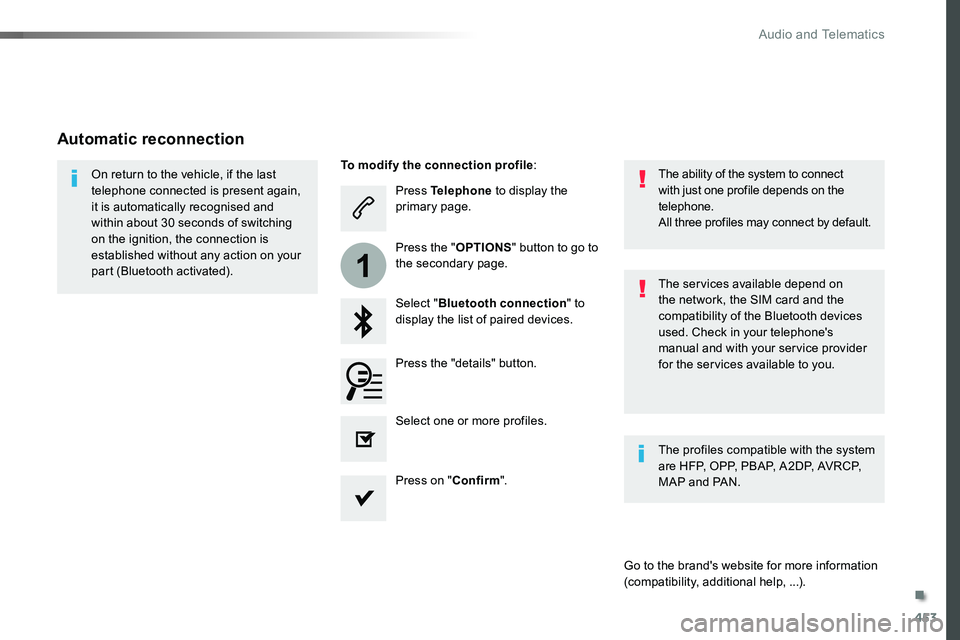
Press Telephone to display the primary page.
Select "Bluetooth connection" to display the list of paired devices.
On return to the vehicle, if the last telephone connected is present again, it is automatically recognised and within about 30 seconds of switching on the ignition, the connection is established without any action on your part (Bluetooth activated).The services available depend on the network, the SIM card and the compatibility of the Bluetooth devices used. Check in your telephone's manual and with your service provider for the services available to you.
The ability of the system to connect with just one profile depends on the telephone.All three profiles may connect by default.
Go to the brand's website for more information (compatibility, additional help, ...).
To modify the connection profile:
Automatic reconnection
Press the "details" button.
Press the "OPTIONS" button to go to the secondary page.
Press on "Confirm".
Select one or more profiles.
The profiles compatible with the system are HFP, OPP, PBAP, A2DP, AVRCP, MAP and PAN.
.
Audio and Telematics
Page 454 of 504
454
1
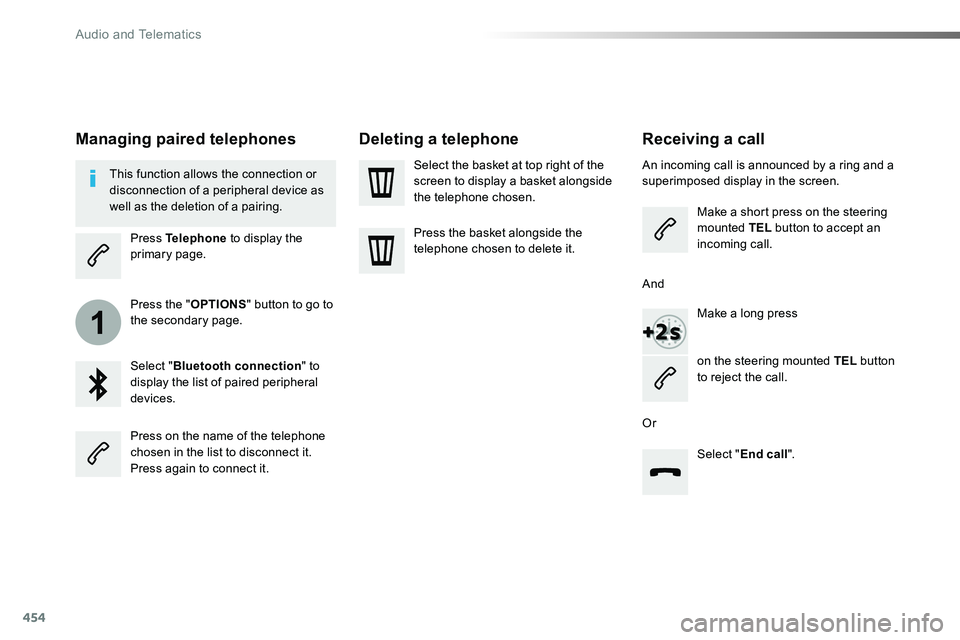
Receiving a call
An incoming call is announced by a ring and a superimposed display in the screen.
Make a short press on the steering mounted TEL button to accept an incoming call.
Make a long press
on the steering mounted TEL button to reject the call.
Or
And
Select "End call".
Press on the name of the telephone chosen in the list to disconnect it.Press again to connect it.
Select the basket at top right of the screen to display a basket alongside the telephone chosen.
Press the basket alongside the telephone chosen to delete it.
Managing paired telephones
This function allows the connection or disconnection of a peripheral device as well as the deletion of a pairing.
Press Telephone to display the primary page.
Press the "OPTIONS" button to go to the secondary page.
Select "Bluetooth connection" to display the list of paired peripheral devices.
Deleting a telephone
Audio and Telematics
Page 455 of 504

455
2
3
on the steering mounted button.
Using the telephone is not recommended while driving.Park the vehicle.Make the call using the steering
mounted controls.
Making a call
Calling a new number
Press Telephone to display the primary page.
Enter the phone number using the digital keypad.
Press "Call" to start the call.
Calling a contact
Press Telephone to display the primary page.
Or make a long press
on the steering mounted TEL button.
Select "Contact".
Select the desired contact from the list offered.
Select "Call".
Calling a recently used number
Press Telephone to display the primary page.
Make a long press
Select "Calls".
Select the desired contact from the list offered.
It is always possible to make a call directly from the telephone; as a safety measure, first park the vehicle.
Or
.
Audio and Telematics
Page 456 of 504
456
2
12
13
14
1
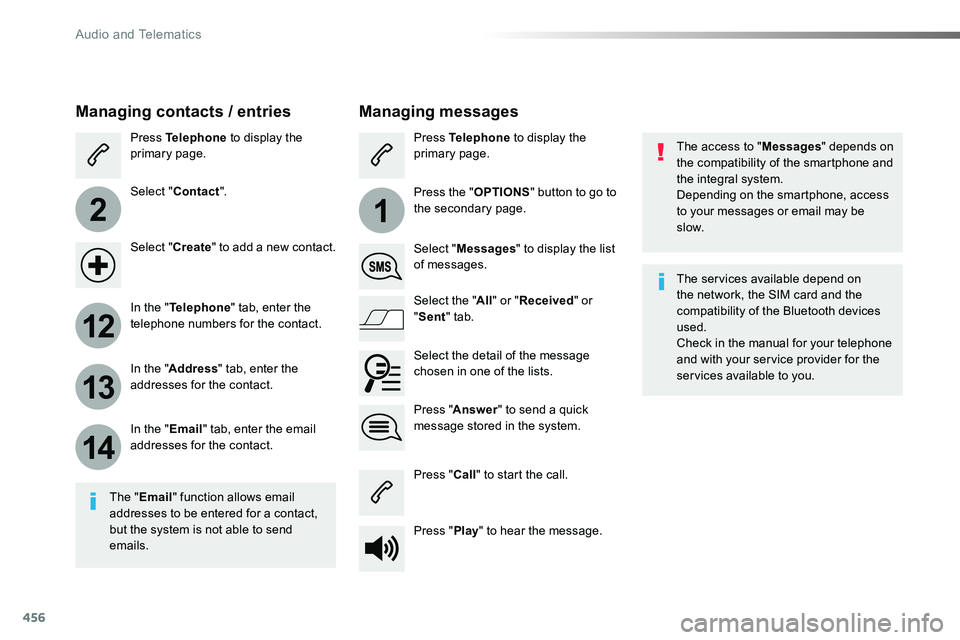
The access to "Messages" depends on the compatibility of the smartphone and the integral system.Depending on the smartphone, access to your messages or email may be
slow.
Managing messages
The "Email" function allows email addresses to be entered for a contact, but the system is not able to send emails.
Managing contacts / entries
Press Telephone to display the primary page.
Select "Contact".
Select "Create" to add a new contact.
In the "Telephone" tab, enter the telephone numbers for the contact.
In the "Address" tab, enter the addresses for the contact.
In the "Email" tab, enter the email addresses for the contact.
Press "Answer" to send a quick message stored in the system.
Press Telephone to display the primary page.
Press the "OPTIONS" button to go to the secondary page.
Select "Messages" to display the list of messages.
Select the "All" or "Received" or "Sent" tab.
Select the detail of the message chosen in one of the lists.
Press "Call" to start the call.
Press "Play" to hear the message.
The services available depend on the network, the SIM card and the compatibility of the Bluetooth devices used.Check in the manual for your telephone and with your service provider for the services available to you.
Audio and Telematics
Page 457 of 504
457
11
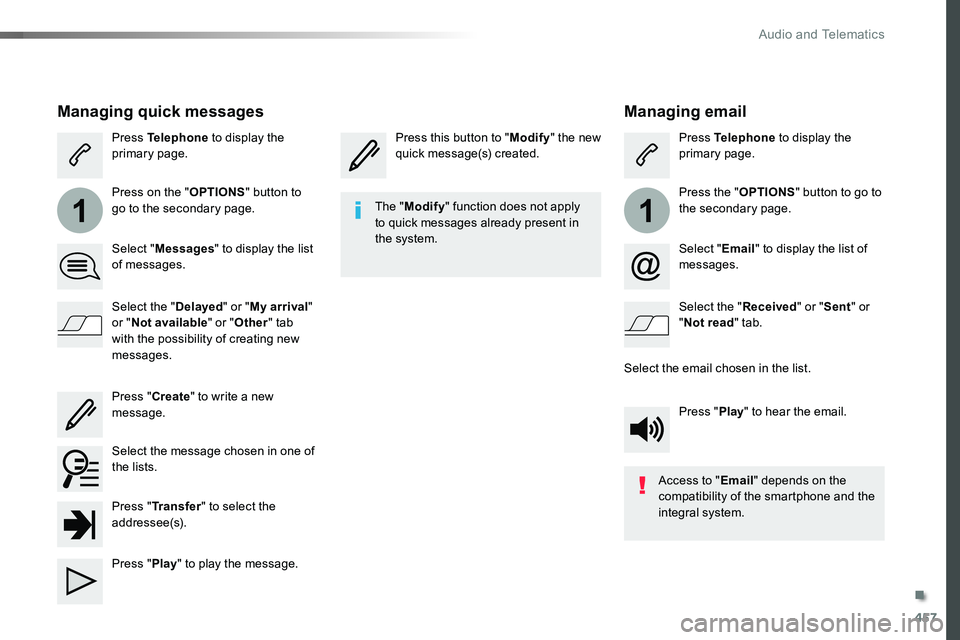
Managing email
Press this button to "Modify" the new quick message(s) created.Press Telephone to display the primary page.
Press the "OPTIONS" button to go to the secondary page.
Select "Email" to display the list of messages.
Select the "Received" or "Sent" or "Not read" tab.
Select the email chosen in the list.
Press "Play" to hear the email.
The "Modify" function does not apply to quick messages already present in the system.
Access to "Email" depends on the compatibility of the smartphone and the integral system.
Managing quick messages
Press Telephone to display the primary page.
Press on the "OPTIONS" button to go to the secondary page.
Select "Messages" to display the list of messages.
Select the "Delayed" or "My arrival" or "Not available" or "Other" tab with the possibility of creating new messages.
Select the message chosen in one of the lists.
Press "Create" to write a new message.
Press "Transfer" to select the addressee(s).
Press "Play" to play the message.
.
Audio and Telematics
Page 470 of 504
470
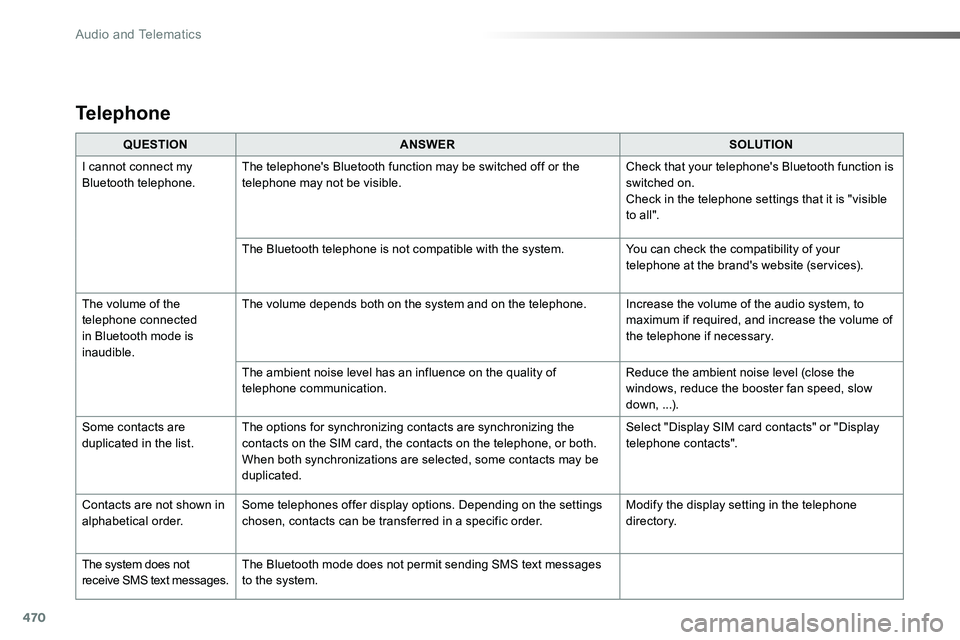
QUESTIONANSWERSOLUTION
I cannot connect my Bluetooth telephone.The telephone's Bluetooth function may be switched off or the telephone may not be visible.Check that your telephone's Bluetooth function is switched on.Check in the telephone settings that it is "visible to all ".
The Bluetooth telephone is not compatible with the system.You can check the compatibility of your telephone at the brand's website (services).
The volume of the telephone connected in Bluetooth mode is inaudible.
The volume depends both on the system and on the telephone.Increase the volume of the audio system, to maximum if required, and increase the volume of the telephone if necessary.
The ambient noise level has an influence on the quality of telephone communication.Reduce the ambient noise level (close the windows, reduce the booster fan speed, slow down, ...).
Some contacts are duplicated in the list.The options for synchronizing contacts are synchronizing the contacts on the SIM card, the contacts on the telephone, or both. When both synchronizations are selected, some contacts may be duplicated.
Select "Display SIM card contacts" or "Display telephone contacts".
Contacts are not shown in alphabetical order.Some telephones offer display options. Depending on the settings chosen, contacts can be transferred in a specific order.Modify the display setting in the telephone di r e c to r y.
The system does not receive SMS text messages.The Bluetooth mode does not permit sending SMS text messages to the system.
Telephone
Audio and Telematics
Page 473 of 504
473
Toyota Radio Bluetooth
ContentsFirst steps 474
Steering mounted controls - Type 1 475
Steering mounted controls - Type 2 476
Menus 477
Radio 478
DAB (Digital Audio Broadcasting) radio 480
Media 482
Telephone 487
Frequently asked questions 492
Your audio system is coded in such a way that it will only operate in your vehicle.
The different functions and adjustments described vary according to the version and configuration of your vehicle.
As a safety measure and because it requires the sustained attention of the driver, the pairing of your Bluetooth telephone to the Bluetooth hands-free audio system must only be carried out with the vehicle stationary and the ignition on.To avoid discharging the battery, the audio system may switch off after a few minutes if the engine is not running.
.
Audio and Telematics
Page 474 of 504
474
First steps
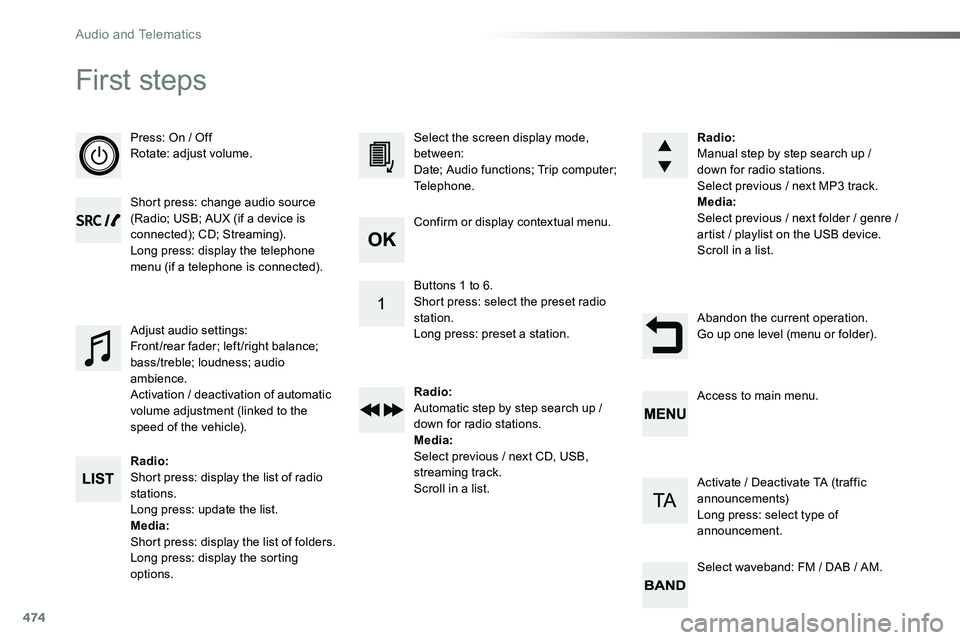
Press: On / OffRotate: adjust volume.
Short press: change audio source (Radio; USB; AUX (if a device is connected); CD; Streaming).Long press: display the telephone menu (if a telephone is connected).
Radio:Short press: display the list of radio stations.Long press: update the list.Media:Short press: display the list of folders.Long press: display the sorting options.
Select the screen display mode, between:Date; Audio functions; Trip computer; Telephone.
Adjust audio settings:Front/rear fader; left/right balance; bass/treble; loudness; audio ambience.Activation / deactivation of automatic volume adjustment (linked to the speed of the vehicle).
Radio:Manual step by step search up / down for radio stations.Select previous / next MP3 track.Media:Select previous / next folder / genre / artist / playlist on the USB device.Scroll in a list.
Abandon the current operation.Go up one level (menu or folder).
Confirm or display contextual menu.
Buttons 1 to 6.Short press: select the preset radio station.Long press: preset a station.
Radio:Automatic step by step search up / down for radio stations.Media:Select previous / next CD, USB, streaming track.Scroll in a list.
Access to main menu.
Activate / Deactivate TA (traffic announcements)Long press: select type of announcement.
Select waveband: FM / DAB / AM.
Audio and Telematics