door TOYOTA PROACE VERSO 2023 Owners Manual
[x] Cancel search | Manufacturer: TOYOTA, Model Year: 2023, Model line: PROACE VERSO, Model: TOYOTA PROACE VERSO 2023Pages: 360, PDF Size: 70.22 MB
Page 2 of 360
2
■Overview
Overview 4Labels 6
■Eco-driving
1Instruments
Instrument Panel 10Warning and indicator lamps 12Indicators 18Lighting dimmer 24Trip computer 24Touch screen 26Remotely operable functions (Electric) 28Setting the date and time 29
2Access
Electronic key with remote control function and built-in key, 30Unlocking/Complete or selective unlocking 32Back-up procedures 36Central locking 39Electric sliding side door(s) 40General recommendations for the sliding side doors 42Hands-free sliding side door(s) 44Side-hinged rear doors 46Tailgate 47Tailgate rear screen 48Alarm 48Electric windows 50
3Ease of use and comfort
Front seats 522-seat front bench seat 54
Steering wheel adjustment 56Mirrors 56Smart Cargo 58Precautions for the seats and bench seats 62Fixed one-piece bench seat 63Fixed rear seat and bench seat 65Rear seat and bench seat on rails 67Individual rear seat(s) on rails 69Crew Cab, fixed 72Crew Cab, folding 73Interior fittings 74Loading area fittings 78Seating area fittings 80Panoramic sunroof 82Retractable sliding table 82Heating and Ventilation 86Heating 87Manual air conditioning 87Dual-zone automatic air conditioning 88Front demisting - defrosting 91Rear screen and/or door mirror demisting/de-icing 91Rear heating - air conditioning 92Additional heating/ventilation system 92A/C preconditioning (Electric) 96Courtesy lamp(s) 96
4Lighting and visibility
Lighting control lever 99Direction indicators 100Daytime running lamps/Sidelamps 101Automatic illumination of headlamps 101Guide-me-home and welcome lighting 101Automatic lighting systems - General recommendations 102Automatic headlamp dipping 103
Headlamp beam height adjustment 104Interior ambient lighting 104Wiper control lever 105Automatic wipers 106Changing a wiper blade 108
5Safety
General safety recommendations 109Hazard warning lamps 11 0Emergency or assistance 11 0Horn 11 2Pedestrian horn (Electric) 11 2Vehicle stability control (VSC) 11 2Toyota Traction Select 11 5Seat belts 11 6Airbags 120Child seats 123Deactivating the front passenger airbag 125ISOFIX and i-Size child seats 131i-Size child seats 143Manual child lock 146Electric child lock 146Child lock on rear windows 147
6Driving
Driving recommendations 148Starting/switching off the engine 150Manual parking brake 155Electric parking brake 155Hill start assist 1586-speed manual gearbox 159Gear efficiency indicator 159Automatic gearbox 160Drive selector (Electric) 164Driving modes (Electric) 165Stop & Start 166
Page 5 of 360
5
Overview
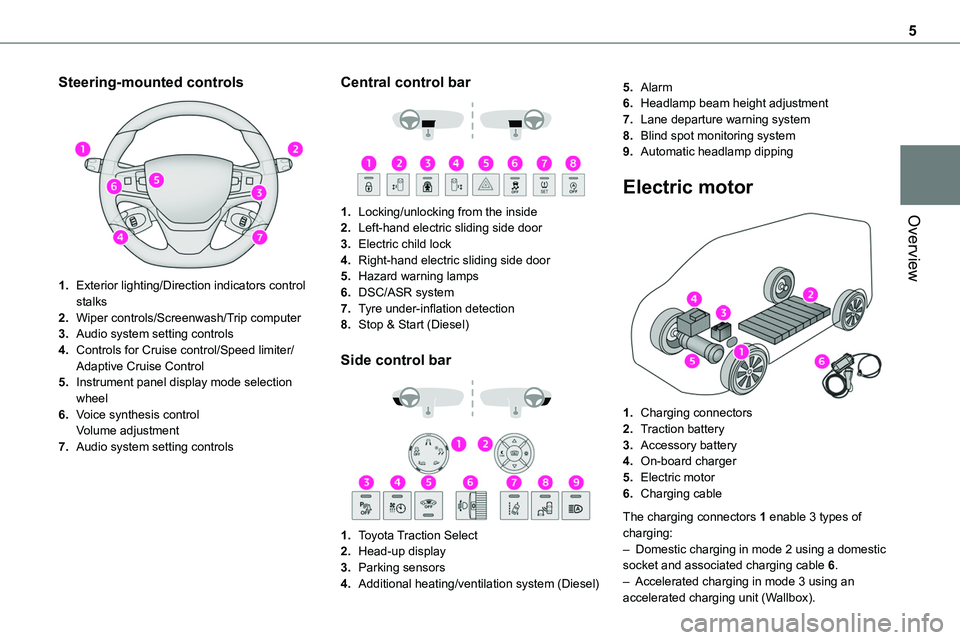
Steering-mounted controls
1.Exterior lighting/Direction indicators control stalks
2.Wiper controls/Screenwash/Trip computer
3.Audio system setting controls
4.Controls for Cruise control/Speed limiter/Adaptive Cruise Control
5.Instrument panel display mode selection wheel
6.Voice synthesis controlVolume adjustment
7.Audio system setting controls
Central control bar
1.Locking/unlocking from the inside
2.Left-hand electric sliding side door
3.Electric child lock
4.Right-hand electric sliding side door
5.Hazard warning lamps
6.DSC/ASR system
7.Tyre under-inflation detection
8.Stop & Start (Diesel)
Side control bar
1.Toyota Traction Select
2.Head-up display
3.Parking sensors
4.Additional heating/ventilation system (Diesel)
5.Alarm
6.Headlamp beam height adjustment
7.Lane departure warning system
8.Blind spot monitoring system
9.Automatic headlamp dipping
Electric motor
1.Charging connectors
2.Traction battery
3.Accessory battery
4.On-board charger
5.Electric motor
6.Charging cable
The charging connectors 1 enable 3 types of charging:– Domestic charging in mode 2 using a domestic socket and associated charging cable 6.– Accelerated charging in mode 3 using an accelerated charging unit (Wallbox).
Page 6 of 360
6
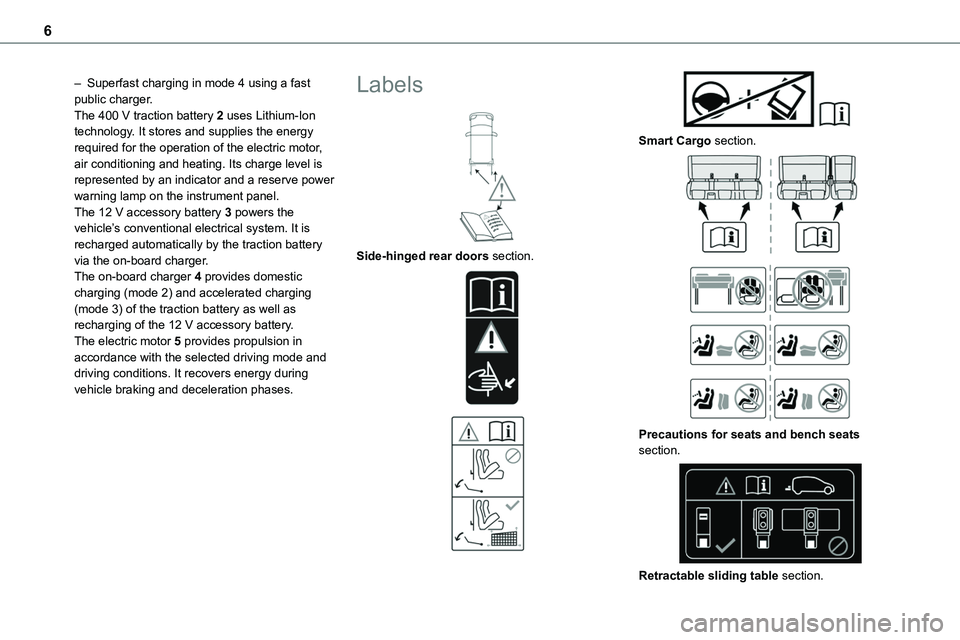
– Superfast charging in mode 4 using a fast public charger.The 400 V traction battery 2 uses Lithium-Ion technology. It stores and supplies the energy required for the operation of the electric motor, air conditioning and heating. Its charge level is represented by an indicator and a reserve power warning lamp on the instrument panel.The 12 V accessory battery 3 powers the
vehicle’s conventional electrical system. It is recharged automatically by the traction battery via the on-board charger.The on-board charger 4 provides domestic charging (mode 2) and accelerated charging (mode 3) of the traction battery as well as recharging of the 12 V accessory battery.The electric motor 5 provides propulsion in accordance with the selected driving mode and driving conditions. It recovers energy during vehicle braking and deceleration phases.
Labels
Side-hinged rear doors section.
Smart Cargo section.
Precautions for seats and bench seats section.
Retractable sliding table section.
Page 8 of 360
8
Eco-driving
Eco-driving refers to a range of everyday practices that allow the motorist to optimise the vehicle's energy consumption (fuel and/or electricity) and CO2 emissions.
Optimise your use of the gearbox
With a manual gearbox, move off gently and change up promptly. While accelerating, change
up early.With an automatic gearbox, favour automatic mode. Do not depress the accelerator pedal heavily or suddenly.The gear shift indicator prompts you to engage the most suitable gear. Whenever this indication is displayed on the instrument panel, follow it straight away.With an automatic gearbox, this indicator appears only in manual mode.
Drive smoothly
Maintain a safe distance between vehicles, use engine braking rather than the brake pedal and press the accelerator gradually. These practices help to save on energy consumption, reduce CO2 emissions and decrease general traffic noise.When the traffic is flowing smoothly, select the cruise control.
Control the use of electrical equipment
Before moving off, if the passenger compartment is too warm, ventilate it by opening the windows and air vents before using the air conditioning.At speeds above 31 mph (50 km/h), close the windows and leave the air vents open.Consider using equipment that can help keep the temperature in the passenger compartment down (e.g. sunroof blind, window blinds).
Unless automatically regulated, switch off the air conditioning as soon as the desired temperature has been reached.Switch off the demisting and defrosting functions, if they are not managed automatically.Switch off the heated seat as soon as possible.Adapt the use of headlamps and/or foglamps to the level of visibility, in accordance with current legislation in the country in which you are driving.Avoid running the engine before moving off, particularly in winter (other than in severe wintry conditions: temperature below -23°C). The vehicle will warm up much faster while driving.As a passenger, avoid connecting your multimedia devices (e.g. film, music, video game) to help reduce the consumption of energy.Disconnect all portable devices before leaving the vehicle.
Limit the causes of excess consumption
Spread loads throughout the vehicle. Place the heaviest items in the boot as close as possible to the rear seats.
Limit the loads carried in the vehicle and minimise wind resistance (e.g. roof bars, roof rack, bicycle carrier, trailer). Preferably, use a roof box.Remove roof bars and roof racks after use.At the end of winter, remove snow tyres and refit summer tyres.
Comply with the servicing instructions
Check tyre pressures regularly, with the tyres
cold, referring to the label in the door aperture on the driver's side.Carry out this check in particular:– before a long journey.– at each change of season.– after a long period out of use.Do not forget the spare wheel and, where applicable, the tyres on your trailer or caravan.Have your vehicle serviced regularly (e.g. engine oil, oil filter, air filter, passenger compartment filter, etc.). Observe the schedule of operations in the manufacturer's service schedule.With a Diesel engine, if the SCR system is faulty, your vehicle will emit pollution. Check with any authorized Toyota retailer or Toyota authorized repairer, or any reliable repairer as soon as possible to restore your vehicle's nitrogen oxide emissions to legal levels.When filling the fuel tank, do not continue after the third cut-out of the nozzle, to avoid overflow.You will only see the fuel consumption of your new vehicle settle down to a consistent average after the first 1,900 miles (3,000 kilometres).
Page 13 of 360
13
Instruments
1
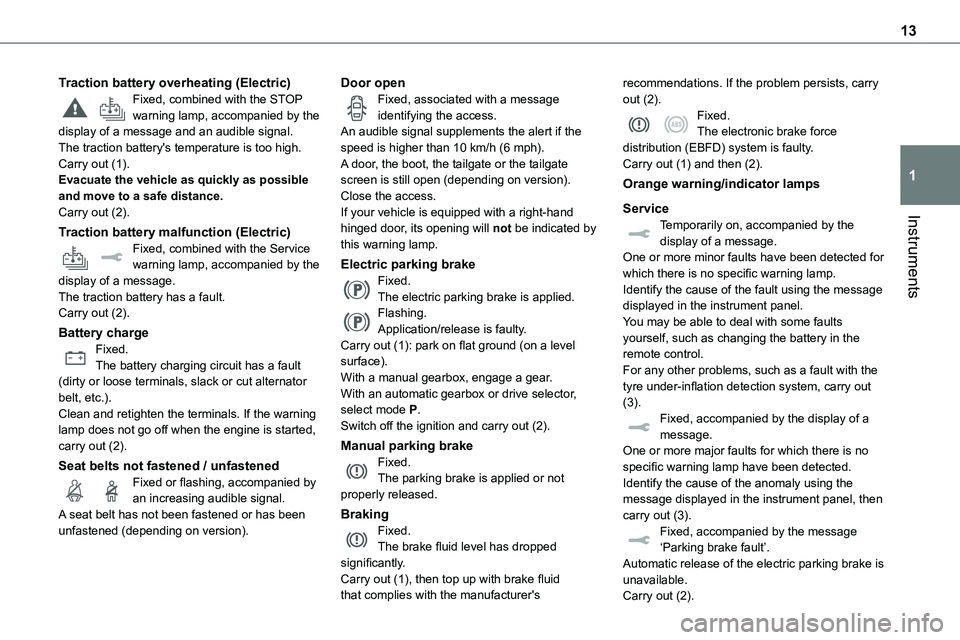
Traction battery overheating (Electric)Fixed, combined with the STOP warning lamp, accompanied by the display of a message and an audible signal.The traction battery's temperature is too high.Carry out (1).Evacuate the vehicle as quickly as possible and move to a safe distance.Carry out (2).
Traction battery malfunction (Electric)Fixed, combined with the Service warning lamp, accompanied by the display of a message.The traction battery has a fault.Carry out (2).
Battery chargeFixed.The battery charging circuit has a fault (dirty or loose terminals, slack or cut alternator belt, etc.).Clean and retighten the terminals. If the warning lamp does not go off when the engine is started, carry out (2).
Seat belts not fastened / unfastenedFixed or flashing, accompanied by an increasing audible signal.A seat belt has not been fastened or has been unfastened (depending on version).
Door openFixed, associated with a message identifying the access.An audible signal supplements the alert if the speed is higher than 10 km/h (6 mph).A door, the boot, the tailgate or the tailgate screen is still open (depending on version).Close the access.If your vehicle is equipped with a right-hand
hinged door, its opening will not be indicated by this warning lamp.
Electric parking brakeFixed.The electric parking brake is applied.Flashing.Application/release is faulty.Carry out (1): park on flat ground (on a level surface). With a manual gearbox, engage a gear.With an automatic gearbox or drive selector, select mode P.Switch off the ignition and carry out (2).
Manual parking brakeFixed.The parking brake is applied or not properly released.
BrakingFixed.The brake fluid level has dropped significantly.Carry out (1), then top up with brake fluid that complies with the manufacturer's
recommendations. If the problem persists, carry out (2).Fixed.The electronic brake force distribution (EBFD) system is faulty.Carry out (1) and then (2).
Orange warning/indicator lamps
Service
Temporarily on, accompanied by the display of a message.One or more minor faults have been detected for which there is no specific warning lamp.Identify the cause of the fault using the message displayed in the instrument panel.You may be able to deal with some faults yourself, such as changing the battery in the remote control.For any other problems, such as a fault with the tyre under-inflation detection system, carry out (3).Fixed, accompanied by the display of a message.One or more major faults for which there is no specific warning lamp have been detected.Identify the cause of the anomaly using the message displayed in the instrument panel, then carry out (3).Fixed, accompanied by the message ‘Parking brake fault’.Automatic release of the electric parking brake is unavailable.Carry out (2).
Page 22 of 360
22
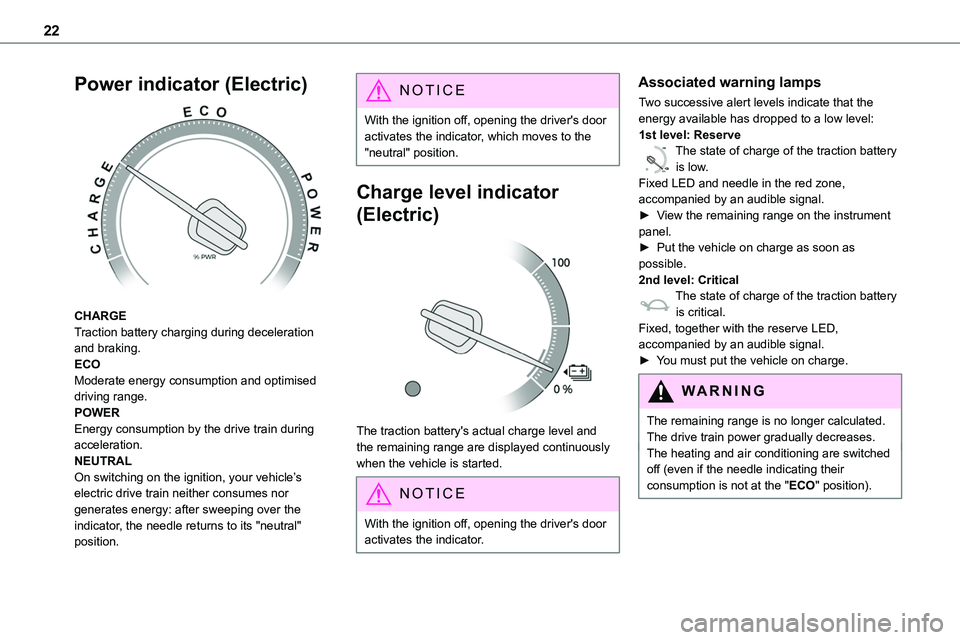
Power indicator (Electric)
CHARGETraction battery charging during deceleration and braking.ECOModerate energy consumption and optimised driving range.POWEREnergy consumption by the drive train during acceleration.NEUTRALOn switching on the ignition, your vehicle’s electric drive train neither consumes nor generates energy: after sweeping over the indicator, the needle returns to its "neutral"
position.
NOTIC E
With the ignition off, opening the driver's door activates the indicator, which moves to the "neutral" position.
Charge level indicator
(Electric)
The traction battery's actual charge level and the remaining range are displayed continuously when the vehicle is started.
NOTIC E
With the ignition off, opening the driver's door activates the indicator.
Associated warning lamps
Two successive alert levels indicate that the energy available has dropped to a low level:1st level: Reserve
0 %
100
The state of charge of the traction battery is low.Fixed LED and needle in the red zone, accompanied by an audible signal.►
View the remaining range on the instrument
panel.► Put the vehicle on charge as soon as possible.2nd level: CriticalThe state of charge of the traction battery is critical.Fixed, together with the reserve LED, accompanied by an audible signal.► You must put the vehicle on charge.
WARNI NG
The remaining range is no longer calculated. The drive train power gradually decreases.The heating and air conditioning are switched off (even if the needle indicating their consumption is not at the "ECO" position).
Page 23 of 360
23
Instruments
1
Thermal comfort
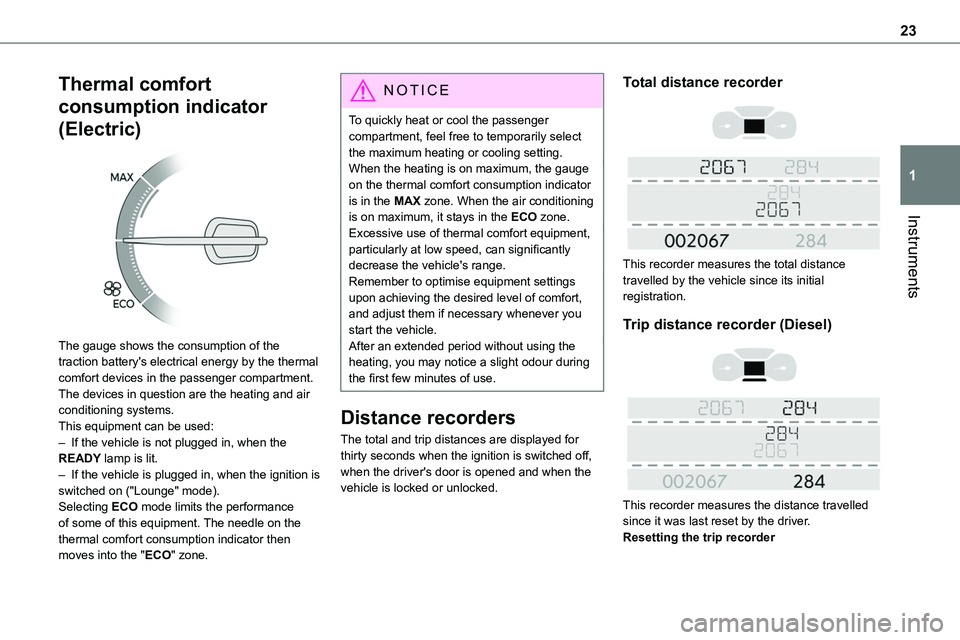
consumption indicator
(Electric)
The gauge shows the consumption of the traction battery's electrical energy by the thermal comfort devices in the passenger compartment.The devices in question are the heating and air conditioning systems.This equipment can be used:
– If the vehicle is not plugged in, when the READY lamp is lit.– If the vehicle is plugged in, when the ignition is switched on ("Lounge" mode).Selecting ECO mode limits the performance of some of this equipment. The needle on the thermal comfort consumption indicator then moves into the "ECO" zone.
NOTIC E
To quickly heat or cool the passenger compartment, feel free to temporarily select the maximum heating or cooling setting.When the heating is on maximum, the gauge on the thermal comfort consumption indicator is in the MAX zone. When the air conditioning is on maximum, it stays in the ECO zone.
Excessive use of thermal comfort equipment, particularly at low speed, can significantly decrease the vehicle's range.Remember to optimise equipment settings upon achieving the desired level of comfort, and adjust them if necessary whenever you start the vehicle.After an extended period without using the heating, you may notice a slight odour during the first few minutes of use.
Distance recorders
The total and trip distances are displayed for thirty seconds when the ignition is switched off, when the driver's door is opened and when the vehicle is locked or unlocked.
Total distance recorder
This recorder measures the total distance travelled by the vehicle since its initial registration.
Trip distance recorder (Diesel)
This recorder measures the distance travelled since it was last reset by the driver.Resetting the trip recorder
Page 30 of 360
30
Electronic key with
remote control function
and built-in key,
NOTIC E
If one of the doors or the boot is still open or if the electronic key for the Smart Entry & Start
system has been left inside the vehicle, central locking will not take place.However, if the vehicle is fitted with an alarm, it will be activated after 45 seconds.
NOTIC E
If the vehicle is unlocked but the doors or boot are not subsequently opened, the vehicle will automatically lock itself again after about 30 seconds. If the vehicle is fitted with an alarm, it will be reactivated automatically.
NOTIC E
Automatic door mirror folding and unfolding can be deactivated by any authorized Toyota retailer or Toyota authorized repairer, or any reliable repairer.
WARNI NG
As a safety measure, never leave the vehicle, even for a short time, without taking the Smart Entry & Start system’s electronic key with you.Be aware of the risk of theft of the vehicle if the key is present in one of the defined areas while the vehicle is unlocked.
If a door is not properly closed (except the right-hand door with side-hinged rear doors):– when the vehicle is stationary and engine running, this warning lamp comes on, accompanied by a warning message for a few seconds, – when the vehicle is moving (at speeds above 6 mph (10 km/h)), this warning lamp comes on, accompanied by an audible signal and a warning message for a few seconds.
Remote control key
This allows the central locking or unlocking of the vehicle using the door lock or remotely.It also allows the vehicle to be located, the fuel filler cap to be removed and refitted and the engine to be started or switched off, as well as providing protection against theft.
NOTIC E
The remote control buttons are not active with the ignition switched on.
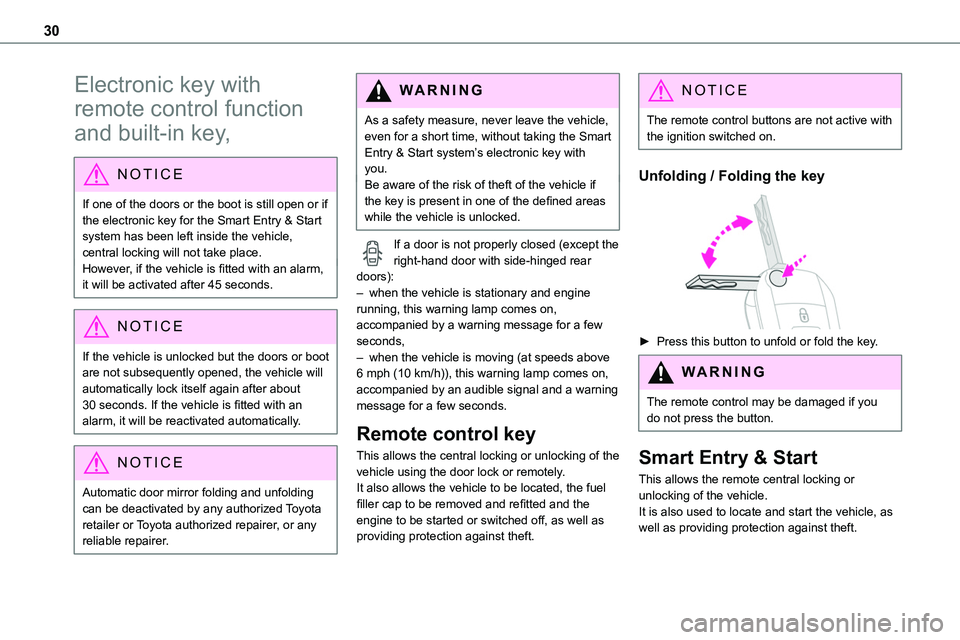
Unfolding / Folding the key
► Press this button to unfold or fold the key.
WARNI NG
The remote control may be damaged if you do not press the button.
Smart Entry & Start
This allows the remote central locking or unlocking of the vehicle.It is also used to locate and start the vehicle, as well as providing protection against theft.
Page 31 of 360
31
Access
2
Integral key
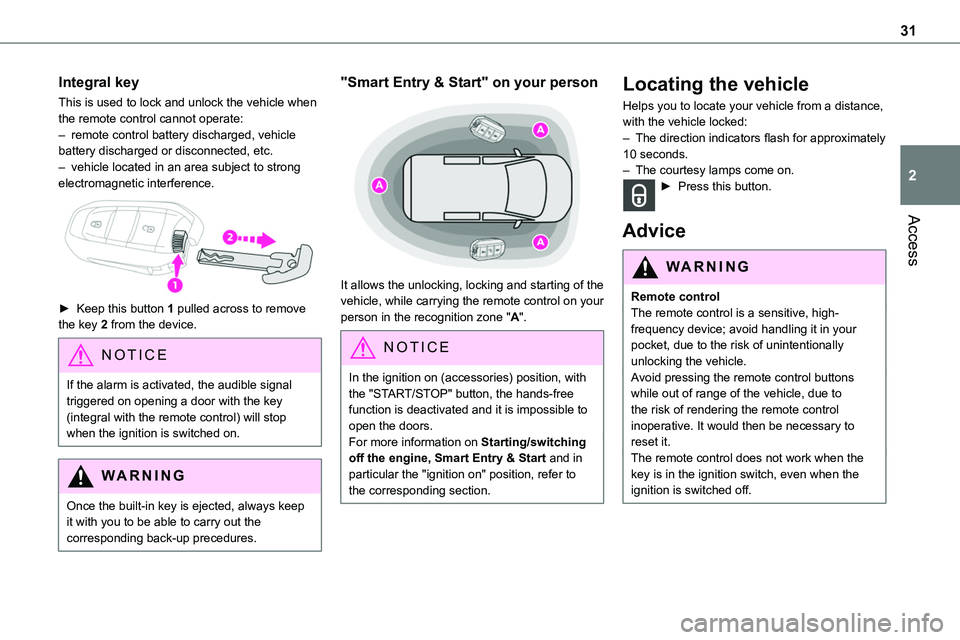
This is used to lock and unlock the vehicle when the remote control cannot operate:– remote control battery discharged, vehicle battery discharged or disconnected, etc.– vehicle located in an area subject to strong electromagnetic interference.
► Keep this button 1 pulled across to remove the key 2 from the device.
NOTIC E
If the alarm is activated, the audible signal triggered on opening a door with the key (integral with the remote control) will stop when the ignition is switched on.
WARNI NG
Once the built-in key is ejected, always keep it with you to be able to carry out the corresponding back-up precedures.
"Smart Entry & Start" on your person
It allows the unlocking, locking and starting of the vehicle, while carrying the remote control on your person in the recognition zone "A".
NOTIC E
In the ignition on (accessories) position, with the "START/STOP" button, the hands-free function is deactivated and it is impossible to open the doors.For more information on Starting/switching off the engine, Smart Entry & Start and in particular the "ignition on" position, refer to the corresponding section.
Locating the vehicle
Helps you to locate your vehicle from a distance, with the vehicle locked:– The direction indicators flash for approximately 10 seconds.– The courtesy lamps come on.► Press this button.
Advice
WARNI NG
Remote controlThe remote control is a sensitive, high-frequency device; avoid handling it in your pocket, due to the risk of unintentionally unlocking the vehicle.Avoid pressing the remote control buttons while out of range of the vehicle, due to the risk of rendering the remote control inoperative. It would then be necessary to reset it.The remote control does not work when the key is in the ignition switch, even when the ignition is switched off.
Page 32 of 360
32
WARNI NG
Anti-theft protectionDo not modify the electronic vehicle immobiliser, as this might result in malfunctions.For vehicles with a key ignition switch, remember to remove the key and turn the steering wheel to engage the steering lock.
WARNI NG
Locking the vehicleDriving with the doors locked could make it more difficult for the emergency services to enter the passenger compartment in an emergency.As a safety precaution, remove the key from the ignition or take the electronic key with you when leaving the vehicle, even for a short time.
NOTIC E
Purchasing a second-hand vehicleHave the key codes memorised by any authorized Toyota retailer or Toyota authorized repairer, or any reliable repairer, to ensure that the keys in your possession are the only ones able to start the vehicle.
WARNI NG
To preserve the battery charge in the electronic key and the vehicle's battery, the "hands-free" functions are set to hibernation mode after 21 days without use. To restore these functions, press one of the remote control buttons or start the engine with the electronic key in the reader.
For more information on starting with the Smart Entry & Start system, refer to the corresponding section.
NOTIC E
Electrical interferenceThe electronic key may not operate if close to certain electronic devices such as telephones (switched on or on standby) or laptop computers, strong magnetic fields, etc. If this happens, remove the electronic key from the electronic device.
WARNI NG
Accumulations (water, dust, grime, salt, etc.) on the inner surface of the door handle may
affect detection.If cleaning the inner surface of the door handle using a cloth does not restore detection, contact any authorized Toyota
retailer or Toyota authorized repairer, or any reliable repairer.A sudden splash of water (stream of water, high pressure jet washer, etc.) may be identified by the system as the desire to open the vehicle.
Unlocking/Complete or
selective unlocking
Unlocking/Complete
unlocking
NOTIC E
Unlocking is signalled by rapid flashing of the direction indicators for a few seconds.Depending on version, the door mirrors unfold and the alarm is deactivated.
With the key
► To unlock the vehicle fully, turn the key in the front left-hand door lock towards the front of the vehicle.If the vehicle has an alarm, it will not be deactivated. Opening a door will trigger the alarm, which can be stopped by switching the ignition on.