Neutral TOYOTA PROACE VERSO EV 2021 Owners Manual
[x] Cancel search | Manufacturer: TOYOTA, Model Year: 2021, Model line: PROACE VERSO EV, Model: TOYOTA PROACE VERSO EV 2021Pages: 360, PDF Size: 68.91 MB
Page 11 of 360
11
Instruments
1
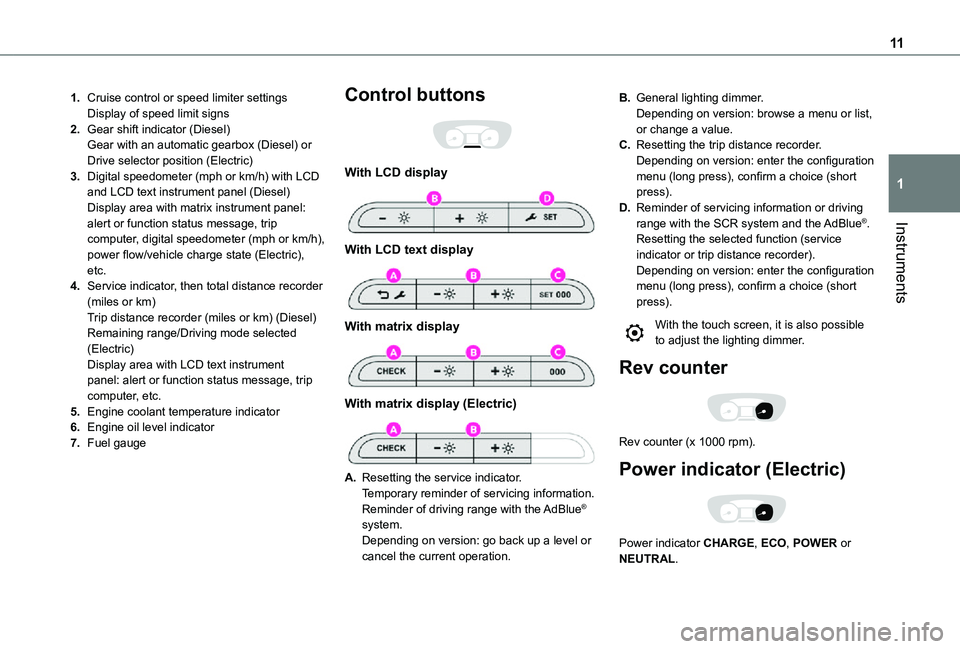
1.Cruise control or speed limiter settingsDisplay of speed limit signs
2.Gear shift indicator (Diesel)Gear with an automatic gearbox (Diesel) or Drive selector position (Electric)
3.Digital speedometer (mph or km/h) with LCD and LCD text instrument panel (Diesel)Display area with matrix instrument panel: alert or function status message, trip computer, digital speedometer (mph or km/h), power flow/vehicle charge state (Electric), etc.
4.Service indicator, then total distance recorder (miles or km)Trip distance recorder (miles or km) (Diesel)Remaining range/Driving mode selected (Electric)Display area with LCD text instrument panel: alert or function status message, trip computer, etc.
5.Engine coolant temperature indicator
6.Engine oil level indicator
7.Fuel gauge
Control buttons
With LCD display
With LCD text display
With matrix display
With matrix display (Electric)
A.Resetting the service indicator.Temporary reminder of servicing information.Reminder of driving range with the AdBlue® system.Depending on version: go back up a level or cancel the current operation.
B.General lighting dimmer.Depending on version: browse a menu or list, or change a value.
C.Resetting the trip distance recorder.Depending on version: enter the configuration menu (long press), confirm a choice (short press).
D.Reminder of servicing information or driving range with the SCR system and the AdBlue®.Resetting the selected function (service indicator or trip distance recorder).Depending on version: enter the configuration menu (long press), confirm a choice (short press).
With the touch screen, it is also possible to adjust the lighting dimmer.
Rev counter
Rev counter (x 1000 rpm).
Power indicator (Electric)
Power indicator CHARGE, ECO, POWER or NEUTRAL.
Page 21 of 360
21
Instruments
1
Malfunction of the SCR emissions
control system
Malfunction detection
If a malfunction is detected, these warning lamps come on, accompanied by an audible signal and an "Emissions fault” or “NO START IN” message.
The alert is triggered while driving, when the fault is detected for the first time, and thereafter when switching on the ignition for subsequent journeys, while the cause of the fault persists.
NOTIC E
If the fault is temporary, the alert disappears during the next journey, after self-diagnostic checks of the SCR emissions control system.
Malfunction confirmed during the permitted driving phase (between 1,100 km and 0 km (685 miles and 0 miles))
If the fault indication is still displayed permanently after 50 km (31 miles) of driving, the fault in the SCR system is confirmed.The AdBlue warning lamp flashes, and an "Emissions fault: Starting prevented in X miles" or "NO START IN X miles" message is displayed, indicating the driving range in miles or kilometres.
While driving, the message is displayed every 30 seconds. The alert is repeated when switching on the ignition.You can continue driving for up to 1,100 km (685 miles) before the engine immobiliser system is triggered.
WARNI NG
Have the system checked by any authorized
Toyota retailer or Toyota authorized repairer, or any reliable repairer as soon as possible.
Starting prevented
Whenever the ignition is switched on, the "Emissions fault: Starting prevented" or "NO START IN" message is displayed.
WARNI NG
To be able to restart the engine, contact any authorized Toyota retailer or Toyota authorized repairer, or any reliable repairer.
Power indicator (Electric)
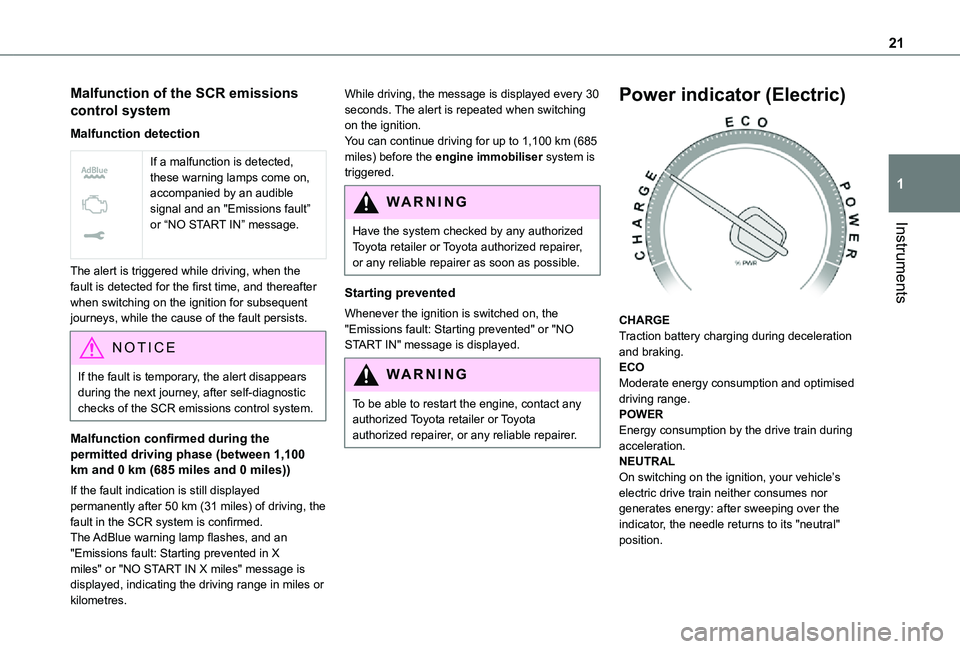
CHARGETraction battery charging during deceleration and braking.ECOModerate energy consumption and optimised driving range.POWEREnergy consumption by the drive train during acceleration.NEUTRALOn switching on the ignition, your vehicle’s electric drive train neither consumes nor generates energy: after sweeping over the indicator, the needle returns to its "neutral" position.
Page 22 of 360
22
NOTIC E
With the ignition off, opening the driver's door activates the indicator, which moves to the "neutral" position.
Charge level indicator
(Electric)
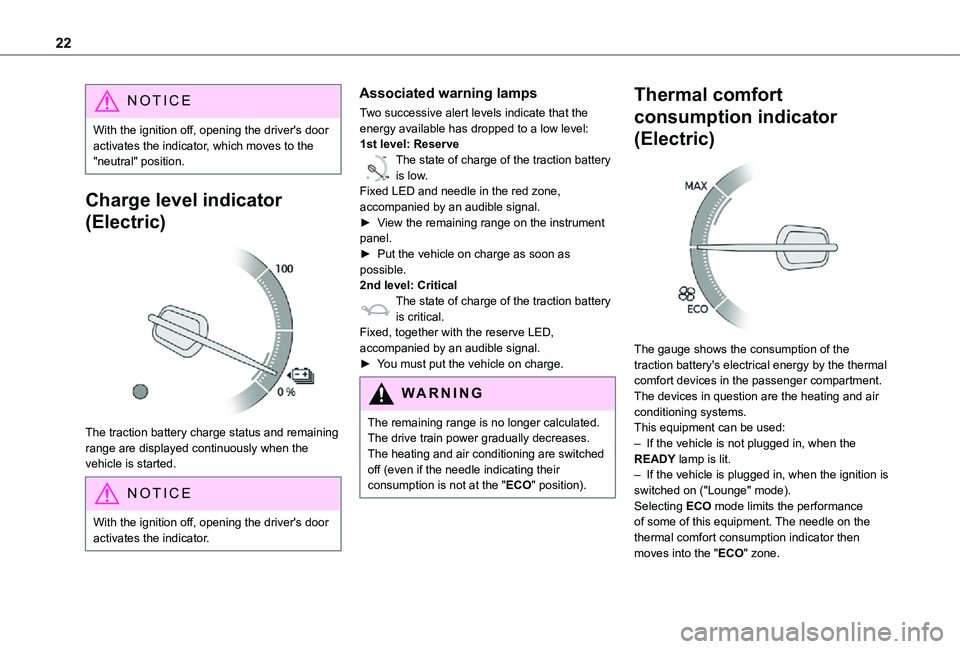
The traction battery charge status and remaining range are displayed continuously when the vehicle is started.
NOTIC E
With the ignition off, opening the driver's door activates the indicator.
Associated warning lamps
Two successive alert levels indicate that the energy available has dropped to a low level:1st level: Reserve
0 %
100
The state of charge of the traction battery is low.Fixed LED and needle in the red zone, accompanied by an audible signal.►
View the remaining range on the instrument panel.► Put the vehicle on charge as soon as possible.2nd level: CriticalThe state of charge of the traction battery is critical.Fixed, together with the reserve LED, accompanied by an audible signal.► You must put the vehicle on charge.
WARNI NG
The remaining range is no longer calculated. The drive train power gradually decreases.The heating and air conditioning are switched off (even if the needle indicating their consumption is not at the "ECO" position).
Thermal comfort
consumption indicator
(Electric)
The gauge shows the consumption of the traction battery's electrical energy by the thermal comfort devices in the passenger compartment.The devices in question are the heating and air conditioning systems.This equipment can be used:– If the vehicle is not plugged in, when the READY lamp is lit.– If the vehicle is plugged in, when the ignition is switched on ("Lounge" mode).Selecting ECO mode limits the performance of some of this equipment. The needle on the thermal comfort consumption indicator then
moves into the "ECO" zone.
Page 39 of 360

39
Access
2
located in the corner, then clip the cover onto the unit.► Reinitialise the remote control.For more information on Reinitialising the remote control, refer to the corresponding section.
EC O
Do not throw remote control batteries away, as they contain metals that are harmful to the environment. Take them to an approved disposal point.
Reinitialising the remote
control
Following replacement of the battery or in the event of a fault, it may be necessary to reinitialise the remote control.
Without Smart Entry & Start
► Switch the ignition off.► Turn the key to position 2 (Ignition on).► Immediately press the closed padlock button for a few seconds.► Switch off the ignition and remove the key from the ignition switch.The remote control is now fully operational again.
With Smart Entry & Start
► Insert the mechanical key (incorporated into the remote control) into the lock to open the
vehicle.► Place the electronic key against the back-up reader on the steering column and hold it there until the ignition is switched on.► With a manual gearbox, place the gear lever in neutral then fully depress the clutch pedal.► With an automatic gearbox or drive selector, while in mode P, depress the brake pedal.
► Switch on the ignition by pressing the "START/STOP" button.If the fault persists after reinitialisation, contact any authorized Toyota retailer or Toyota authorized repairer, or any reliable repairer without delay.
Central locking
Manual
► Press this button to lock/unlock the vehicle (doors, tailgate or side-hinged doors) from inside the vehicle. The indicator lamp comes on to confirm the central locking of the vehicle.
WARNI NG
Central locking does not take place if any of the doors are open.
Page 148 of 360
148
Driving recommendations
► Observe the driving regulations and remain vigilant whatever the traffic conditions.► Monitor your environment and keep your hands on the wheel to be able to react to anything that may happen any time.► Drive smoothly, anticipate the need for braking and maintain a longer safety distance, especially in bad weather.► Stop the vehicle to carry out operations that require close attention (such as adjustments).► During long trips, take a break every two hours.To ensure the durability of the vehicle and for safety reasons, remember that certain precautionary measures must be taken when driving the vehicle:
Manoeuvre cautiously, at low speed
Manoeuvre slowly.Before turning, check that there are no obstacles at mid-height along the sides.Before reversing, check that there are no
obstacles, particularly at high level behind the vehicle.Be aware of the external dimensions, if ladders are fitted.
Drive the vehicle carefully
Take corners gently.Anticipate the need to brake as the stopping distance is increased, particularly on wet or icy roads.
Be aware of the effect of side winds on the vehicle.
Maintenance
Inflate to the minimum pressure indicated on the label, or even over-inflate by 0.2 to 0.3 bar for long journeys.
Important!
WARNI NG
Never leave the engine running in a closed space without sufficient ventilation. Internal combustion engines emit toxic exhaust gases such as carbon monoxide. Danger of poisoning and death!
WARNI NG
In severe wintry conditions (temperature below -23°C), let the engine run for 4 minutes before moving off, to ensure the correct operation and durability of the mechanical components of your vehicle (engine and gearbox).
WARNI NG
Never drive with the parking brake applied. Risk of overheating and damage to the braking system!
WARNI NG
Do not park the vehicle or leave the engine running on a flammable surface (dry grass, dead leaves, etc.). The exhaust system of your vehicle is very hot, even several minutes after the engine stops. Risk of fire!
WARNI NG
Never leave a vehicle unattended with the engine running. If you have to leave your vehicle with the engine running, apply the parking brake and put the gearbox into neutral or position N or P (depending on the type of gearbox).
WARNI NG
Never leave children inside the vehicle unsupervised.
On flooded roads
We strongly advise against driving on flooded roads, as this could cause serious damage to the engine or gearbox, as well as to your vehicle's
electrical systems.
Page 150 of 360
150
NOTIC E
If a genuine TOYOTA towing device is used, the rear parking sensors will be deactivated automatically to avoid the audible signal.
When driving
Cooling
Towing a trailer uphill causes the coolant temperature to increase. The maximum towable load depends on the gradient and the exterior temperature. The fan’s cooling capacity does not increase with engine speed.► Reduce speed and lower the engine speed to limit the amount of heating produced.In all cases, pay attention to the coolant temperature.If this warning lamp and the STOP warning lamp come on, stop the vehicle and switch off the engine as soon as possible.
Brakes
Braking distances are increased when towing a trailer. To avoid overheating the brakes, the use of engine braking is recommended.
Side wind
Bear in mind that the vehicle will be more susceptible to wind when towing.
Anti-theft protection
Electronic immobiliser
The remote control contains an electronic chip which has a special code. When the ignition is switched on, this code must be recognised in order for starting to be possible.A few seconds after switching off the ignition, this system locks the engine control system, therefore preventing the engine from being started in the event of a break-in.In the event of a fault, you are informed by illumination of this warning lamp, an audible signal and a message on the screen.The vehicle will not start; contact any authorized Toyota retailer or Toyota authorized repairer, or any reliable repairer as soon as possible.
Starting/switching off the
engine
Starting
The parking brake must be applied.
► With a manual gearbox, place the gear lever in neutral, fully depress the clutch pedal and keep the pedal down until the engine starts.► With an automatic gearbox, place the selector in position P then depress the brake pedal.
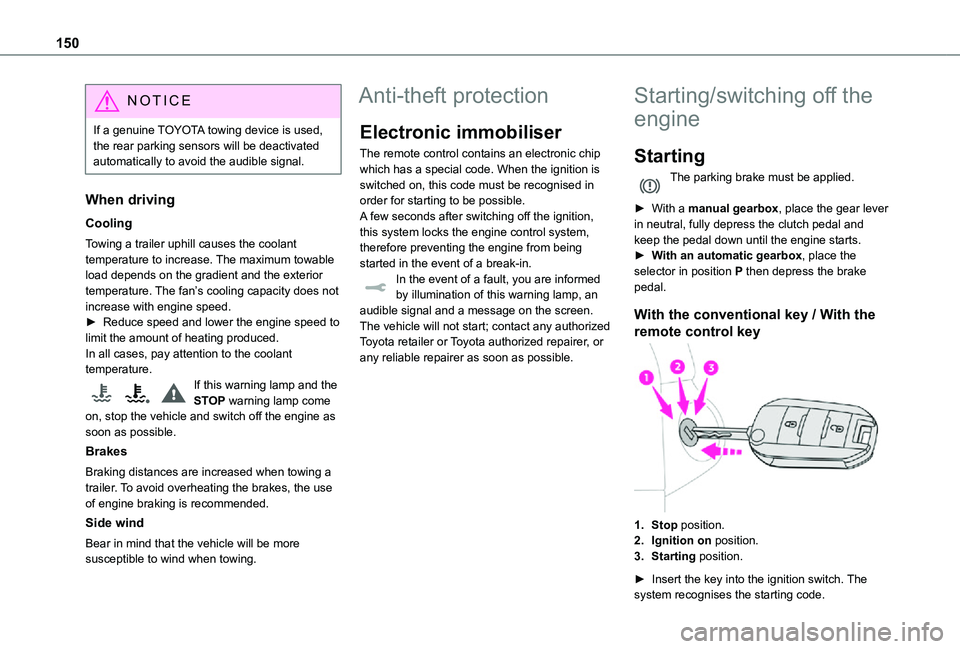
With the conventional key / With the
remote control key
1.Stop position.
2.Ignition on position.
3.Starting position.
► Insert the key into the ignition switch. The system recognises the starting code.
Page 154 of 360
154
On starting, the instrument panel lights up and the power indicator needle performs one sweep then moves to the "neutral" position. The steering column automatically unlocks (you may hear a sound and feel the steering wheel move).
Switching off
► If using a conventional or remote control key, turn the key fully to position 1 (Stop).► If using Smart Entry & Start, press the "START/STOP" button.Before exiting the vehicle, check that:– The drive selector is in mode P.– The READY indicator lamp is off.
NOTIC E
The drive selector moves automatically to mode P when the motor is switched off or when the driver's door is opened.
NOTIC E
If the driver's door is opened while the required conditions for stopping are not satisfied, an audible signal is emitted, accompanied by the display of a warning message.
Special case with Smart
Entry & Start
Switching on the ignition without
starting the engine
With the Smart Entry & Start system’s electronic key inside the vehicle, pressing the "START/STOP" button, with no action on the pedals, allows the ignition to be switched on.► Pressing this button again switches off the ignition and allows the vehicle to be locked.
Back-up starting
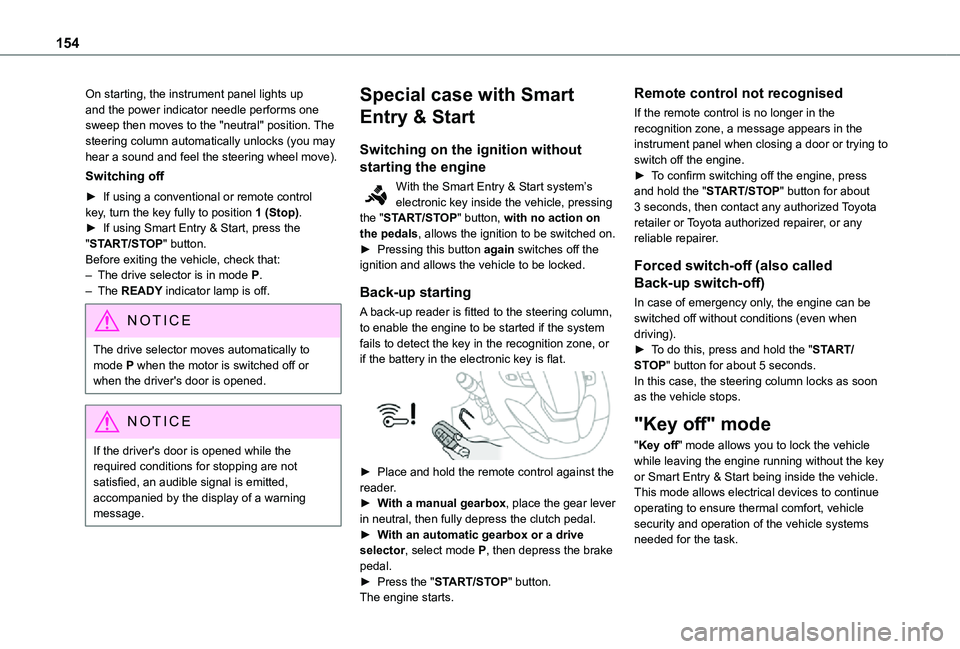
A back-up reader is fitted to the steering column, to enable the engine to be started if the system fails to detect the key in the recognition zone, or if the battery in the electronic key is flat.
► Place and hold the remote control against the reader.► With a manual gearbox, place the gear lever in neutral, then fully depress the clutch pedal.► With an automatic gearbox or a drive selector, select mode P, then depress the brake pedal.► Press the "START/STOP" button.The engine starts.
Remote control not recognised
If the remote control is no longer in the recognition zone, a message appears in the instrument panel when closing a door or trying to switch off the engine.► To confirm switching off the engine, press and hold the "START/STOP" button for about 3 seconds, then contact any authorized Toyota retailer or Toyota authorized repairer, or any reliable repairer.
Forced switch-off (also called
Back-up switch-off)
In case of emergency only, the engine can be switched off without conditions (even when driving).► To do this, press and hold the "START/STOP" button for about 5 seconds.In this case, the steering column locks as soon as the vehicle stops.
"Key off" mode
"Key off" mode allows you to lock the vehicle while leaving the engine running without the key or Smart Entry & Start being inside the vehicle.This mode allows electrical devices to continue operating to ensure thermal comfort, vehicle security and operation of the vehicle systems needed for the task.
Page 159 of 360
159
Driving
6
WARNI NG
If your vehicle has an automatic gearbox and you have to move off on a steep slope (uphill or downhill) with a loaded vehicle, press the brake pedal, select position D, release the parking brake then release the brake pedal.
Operation
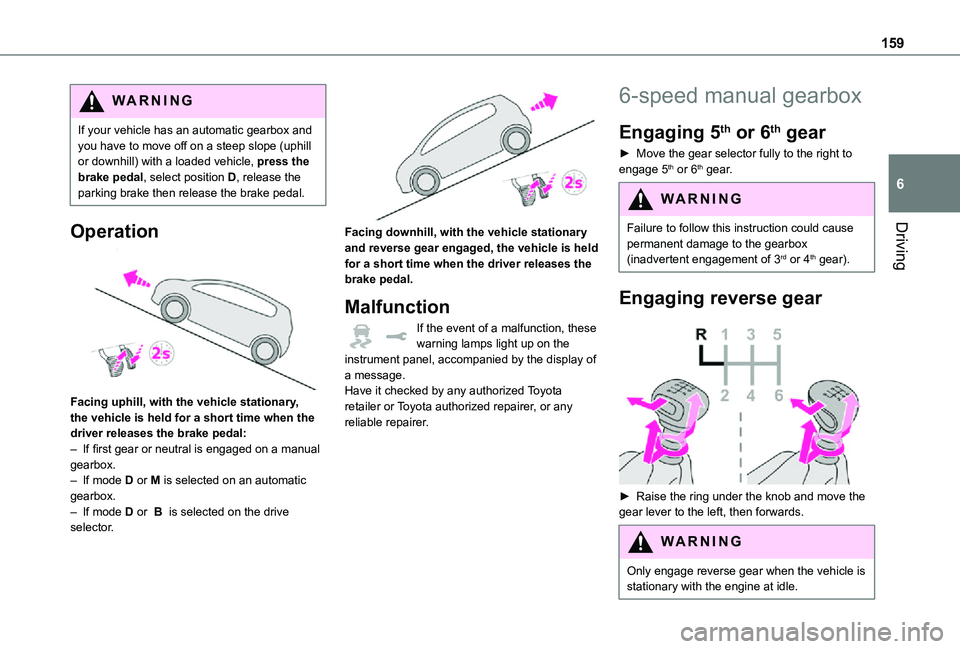
Facing uphill, with the vehicle stationary, the vehicle is held for a short time when the driver releases the brake pedal:– If first gear or neutral is engaged on a manual gearbox.– If mode D or M is selected on an automatic gearbox.– If mode D or B is selected on the drive selector.
Facing downhill, with the vehicle stationary and reverse gear engaged, the vehicle is held for a short time when the driver releases the brake pedal.
Malfunction
If the event of a malfunction, these warning lamps light up on the instrument panel, accompanied by the display of a message.Have it checked by any authorized Toyota retailer or Toyota authorized repairer, or any reliable repairer.
6-speed manual gearbox
Engaging 5th or 6th gear
► Move the gear selector fully to the right to engage 5th or 6th gear.
WARNI NG
Failure to follow this instruction could cause
permanent damage to the gearbox (inadvertent engagement of 3rd or 4th gear).
Engaging reverse gear
► Raise the ring under the knob and move the gear lever to the left, then forwards.
WARNI NG
Only engage reverse gear when the vehicle is stationary with the engine at idle.
Page 160 of 360
160
NOTIC E
As a safety precaution and to facilitate engine starting:– always select neutral,– depress the clutch pedal.
Gear efficiency indicator
(Depending on engine.)This system helps reduce fuel consumption by recommending the most appropriate gear.
Operation
Depending on the driving situation and the vehicle's equipment, the system may advise to skip one or more gears.Gear shift recommendations should not be considered compulsory. In fact, the road layout, the traffic density and safety remain the deciding factors when choosing the best gear. The driver therefore remains responsible for deciding
whether or not to follow the indications issued by the system.This function cannot be deactivated.On certain Diesel versions with manual gearbox, the system may suggest changing into neutral (N is displayed in the instrument panel) so that the engine can go into standby (STOP mode with Stop & Start), in certain driving conditions.
NOTIC E
With an automatic gearbox, the system is only active in manual operation.
The information appears in the instrument panel, in the form of an ascending or descending arrow and the recommended gear.
NOTIC E
The system adapts its gear shift recommendation according to the driving conditions (slope, load, etc.) and the driver’s requirements (request for power, acceleration, braking, etc.).The system never suggests:– engaging first gear.– engaging reverse.
Automatic gearbox
Automatic 6 or 8-speed gearbox, with electronic management of gear changes. It also offers a manual mode with sequential gear changes via control paddles located behind the steering wheel.
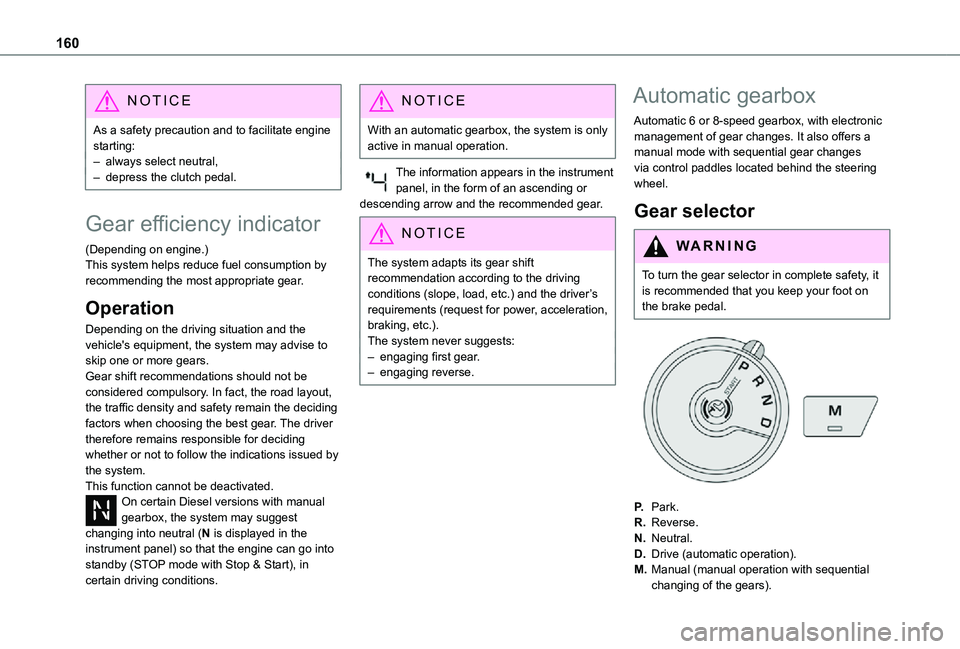
Gear selector
WARNI NG
To turn the gear selector in complete safety, it is recommended that you keep your foot on the brake pedal.
P.Park.
R.Reverse.
N.Neutral.
D.Drive (automatic operation).
M.Manual (manual operation with sequential changing of the gears).
Page 161 of 360
161
Driving
6
NOTIC E
Position N can be used in traffic jams or in a car wash tunnel.
Steering mounted controls
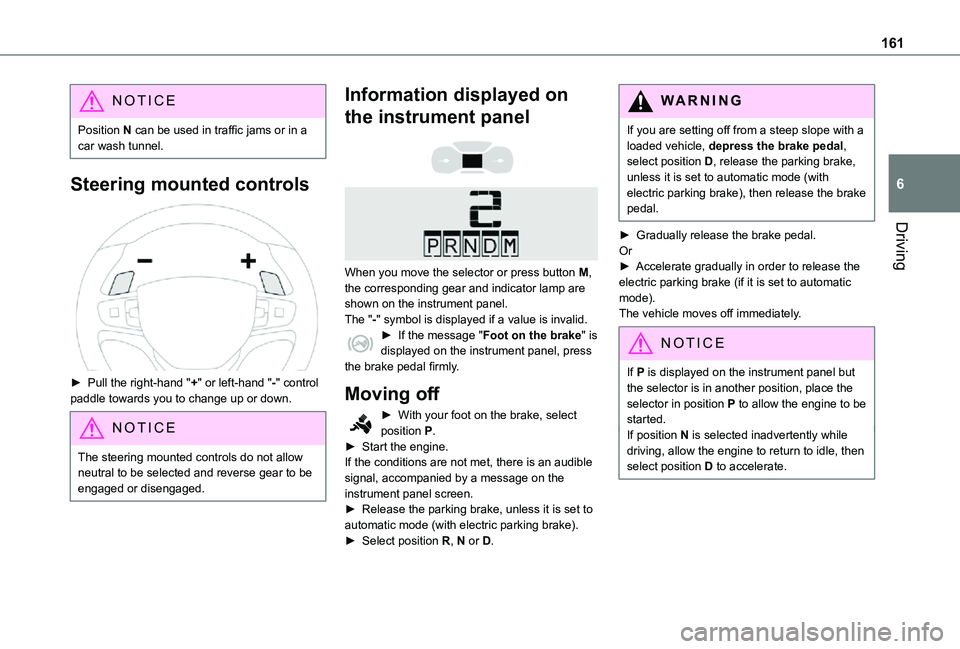
► Pull the right-hand "+" or left-hand "-" control paddle towards you to change up or down.
NOTIC E
The steering mounted controls do not allow neutral to be selected and reverse gear to be engaged or disengaged.
Information displayed on
the instrument panel
When you move the selector or press button M, the corresponding gear and indicator lamp are shown on the instrument panel.The "-" symbol is displayed if a value is invalid.► If the message "Foot on the brake" is displayed on the instrument panel, press the brake pedal firmly.
Moving off
► With your foot on the brake, select position P.► Start the engine.If the conditions are not met, there is an audible signal, accompanied by a message on the instrument panel screen.► Release the parking brake, unless it is set to automatic mode (with electric parking brake).► Select position R, N or D.
WARNI NG
If you are setting off from a steep slope with a loaded vehicle, depress the brake pedal, select position D, release the parking brake, unless it is set to automatic mode (with electric parking brake), then release the brake pedal.
► Gradually release the brake pedal.Or► Accelerate gradually in order to release the electric parking brake (if it is set to automatic mode).The vehicle moves off immediately.
NOTIC E
If P is displayed on the instrument panel but the selector is in another position, place the selector in position P to allow the engine to be started.If position N is selected inadvertently while driving, allow the engine to return to idle, then select position D to accelerate.