door lock TOYOTA PROACE VERSO EV 2022 Owner's Manual
[x] Cancel search | Manufacturer: TOYOTA, Model Year: 2022, Model line: PROACE VERSO EV, Model: TOYOTA PROACE VERSO EV 2022Pages: 360, PDF Size: 70.79 MB
Page 47 of 360
47
Access
2
NOTIC E
Make the movement without interruption and do not repeat it immediately afterwards or several times.If the door does not open, wait about 2 seconds before trying again.Do not keep the foot in the air.
NOTIC E
Confirmation that the door is going to open or close is signalled by the direction indicators flashing for a few seconds, accompanied by an audible signal.The movement of the door is reversed if the movement of the foot takes place during the manoeuvre.If the vehicle is so equipped, the electric door mirrors fold/unfold on locking/unlocking the vehicle.
Automatic locking
The vehicle locks itself following the hands-free closing of the sliding door.
NOTIC E
If your vehicle is not fitted with an alarm, locking is signalled by the fixed illumination of the direction indicators for about two seconds.Depending on your version, the door mirrors fold at the same time.
Activation/Deactivation
With audio system or touch screen
By default, hands-free access is activated.The "Hands-Free Tailgate Access" function or automatic vehicle locking when the sliding door is closed is activated and deactivated via the vehicle configuration menu.
Malfunction
An audible signal repeated three times while using the function indicates a fault with the system.Contact any authorized Toyota retailer or Toyota authorized repairer, or any reliable repairer to have the system checked.
NOTIC E
If the "Hands-free tailgate access self-locking" option is selected in the vehicle menu and after closing the door, check that the vehicle is properly locked.Locking will not take place:– if the ignition is on,– if one of the doors or the tailgate is open,
– if a "Smart Entry & Start" remote control is inside the vehicle. If a number of gestures with your foot have no effect, wait a few seconds before starting again.The system is automatically deactivated in heavy rain or with accumulations of snow.If it does not work, make sure that the remote control is not exposed to a source of electromagnetic interference (smartphone, etc.).Operation may be affected if using a prosthetic leg.This system may not work correctly if your vehicle is fitted with a towbar.
NOTIC E
The side door may open or close without
warning if: – Your vehicle is fitted with a towbar.– A trailer is coupled or decoupled.– A bicycle carrier is installed or removed.
Page 49 of 360
49
Access
2
WARNI NG
When parked with the rear doors open to 90°, the doors will cover the rear lamps. In order to warn other road users travelling in the same direction (who may not be aware that the vehicle is stationary) of the vehicle's position, use a warning triangle or other device required by legislation and regulations in your
country.
Tailgate
Opening
► After unlocking the vehicle, pull the handle, then raise the tailgate.
Closing
► Lower the tailgate using the interior grab handle, then lock it.If the tailgate is not properly closed, the "door open" warning lamp comes on. For more information on the list of warning and indicator lamps, and in particular the door open warning, refer to the corresponding section.
WARNI NG
In the event of a malfunction or if you experience difficulty opening or closing the tailgate, have it checked by any authorized Toyota retailer or Toyota authorized repairer, or any reliable repairer without delay, to avoid the issue deteriorating and prevent any risk of the tailgate dropping, potentially causing serious injury.
Tailgate rear screen
The opening rear screen allows you to access the rear of the vehicle directly, without having to open the tailgate.
Opening
After unlocking the vehicle, press this control and lift the rear screen to open it.
Closing
Close the rear screen by pressing the centre of the glass until it is fully closed.If the tailgate rear screen is not properly closed, the "door open" warning lamp comes on. For more information on the list of warning and indicator lamps and in particular the door open warning, refer to the corresponding section.
NOTIC E
The tailgate and rear screen cannot both be open at the same time, to avoid damaging them.
Page 50 of 360
50
Alarm
(Depending on version)
System which protects and provides a deterrent against theft and break-ins.
Exterior perimeter monitoring
The system checks for opening of the vehicle.The alarm is triggered if anyone tries to open a door, the boot or the bonnet, for example.
Interior volumetric monitoring
The system only checks for any variation in volume in the cab. The alarm is triggered if someone breaks a window or enters the vehicle’s cab; however it is not triggered if
someone enters the loading area.
The system checks for any variation in volume in the passenger compartment.The alarm is triggered if anyone breaks a window, enters the passenger compartment or moves inside the vehicle.
Self-protection function
The system checks for the putting out of service of its components.The alarm is triggered if the battery, the central control or the siren wiring is put out of service or damaged.
WARNI NG
For all work on the alarm system, contact any authorized Toyota retailer or Toyota authorized repairer, or any reliable repairer.
NOTIC E
If your vehicle is fitted with Additional Heating / Ventilation, volumetric monitoring is not compatible with this system.For more information on Additional Heating / Ventilation, refer to the corresponding section.
Locking the vehicle with full
alarm system
Activation
► Switch off the ignition and exit the vehicle.► Lock or deadlock the vehicle using the remote control or with the "Smart Entry & Start" system.
When the monitoring system is active, the red indicator lamp in the button flashes once per second and the direction indicators come on for about 2 seconds.The exterior perimeter monitoring is activated after 5 seconds and the interior volumetric monitoring after 45 seconds.
WARNI NG
If an opening (door, tailgate/side-hinged doors or bonnet) is not properly closed, the vehicle is not locked, but the exterior perimeter monitoring will be activated after 45 seconds, at the same time as the interior volumetric monitoring.
Deactivation
► Press the remote control unlocking
button.or► Unlock the vehicle with the Smart Entry & Start system.
Page 51 of 360
51
Access
2
The monitoring system is deactivated: the indicator lamp in the button goes off and the direction indicators flash for about 2 seconds.
NOTIC E
When the vehicle automatically locks itself again (as happens if a door or the boot is not opened within 30 seconds of unlocking), the monitoring system is also reactivated automatically.
Triggering of the alarm
This is indicated by sounding of the siren and flashing of the direction indicators for 30 seconds.The monitoring functions remain active until the alarm has been triggered ten times in succession.When the vehicle is unlocked, rapid flashing of the indicator lamp in the button indicates that the alarm was triggered during your absence. When the ignition is switched on, this flashing stops immediately.
Locking the vehicle
with exterior perimeter
monitoring only
Deactivate the interior volumetric monitoring to avoid the unwanted triggering of the alarm, in certain cases such as:– Slightly open window.– Washing the vehicle.
– Changing a wheel.– Towing the vehicle.– Transport on a ship or ferry.
Deactivating interior volumetric
monitoring
► Switch off the ignition and within 10 seconds press the alarm button until the indicator lamp is on fixed.► Exit the vehicle.► Immediately lock the vehicle using the remote control or the "Smart Entry & Start" system.Only exterior perimeter monitoring is activated; the red indicator lamp in the button flashes every second.To take effect, this deactivation must be performed whenever the ignition is switched off.
Reactivating interior volumetric
monitoring
► Deactivate exterior perimeter monitoring by unlocking the vehicle using the remote control or the "Smart Entry & Start" system.The indicator lamp in the button goes off.► Reactivate the full alarm system by locking the vehicle using the remote control or the "Smart Entry & Start" system.
The red indicator lamp in the button once again flashes every second.
Locking the vehicle without
activating the alarm
► Lock or deadlock the vehicle using the key (integral to the remote control) in the driver's door lock.
Failure of the remote control
To deactivate the monitoring functions:► unlock the vehicle using the key (integral to the remote control) in the driver's door lock,► open the door; the alarm is triggered,► switch on the ignition; the alarm stops; the indicator lamp in the button goes off.
Malfunction
When the ignition is switched on, the fixed lighting of the red indicator lamp in the button indicates a system malfunction.
Page 52 of 360
52
Have it checked by any authorized Toyota retailer or Toyota authorized repairer, or any reliable repairer.
Automatic activation
(Depending on the country of sale)The system is activated automatically 2 minutes after the last door or the boot is closed.► To avoid triggering the alarm on entering the
vehicle, first press the unlocking button on the remote control or unlock the vehicle using the “Smart Entry & Start” system.
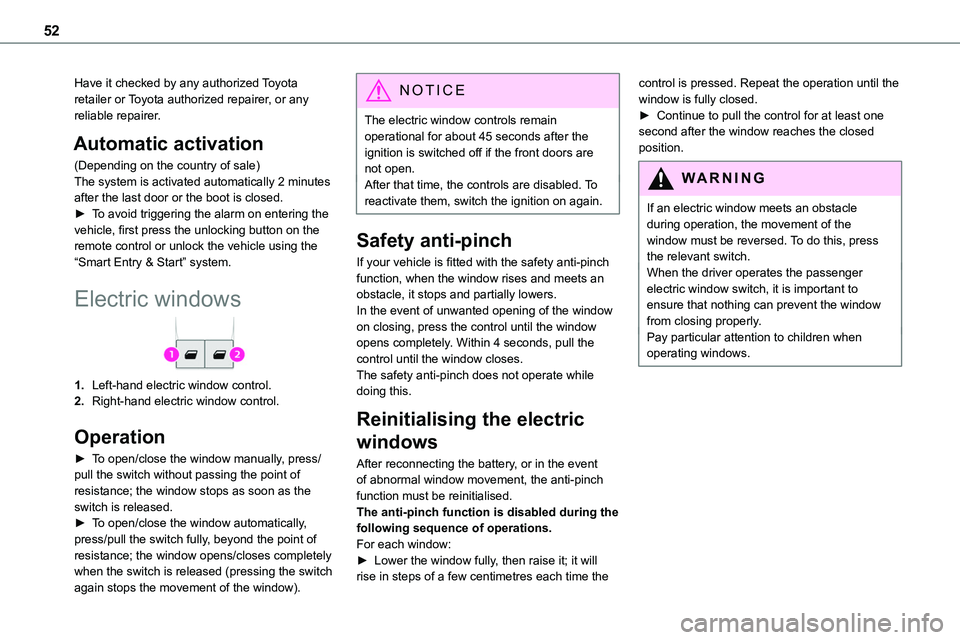
Electric windows
1.Left-hand electric window control.
2.Right-hand electric window control.
Operation
► To open/close the window manually, press/pull the switch without passing the point of resistance; the window stops as soon as the switch is released.► To open/close the window automatically, press/pull the switch fully, beyond the point of resistance; the window opens/closes completely when the switch is released (pressing the switch
again stops the movement of the window).
NOTIC E
The electric window controls remain operational for about 45 seconds after the ignition is switched off if the front doors are not open.After that time, the controls are disabled. To reactivate them, switch the ignition on again.
Safety anti-pinch
If your vehicle is fitted with the safety anti-pinch function, when the window rises and meets an obstacle, it stops and partially lowers.In the event of unwanted opening of the window on closing, press the control until the window opens completely. Within 4 seconds, pull the control until the window closes.The safety anti-pinch does not operate while doing this.
Reinitialising the electric
windows
After reconnecting the battery, or in the event of abnormal window movement, the anti-pinch function must be reinitialised.The anti-pinch function is disabled during the following sequence of operations.For each window:► Lower the window fully, then raise it; it will rise in steps of a few centimetres each time the
control is pressed. Repeat the operation until the window is fully closed.► Continue to pull the control for at least one second after the window reaches the closed position.
WARNI NG
If an electric window meets an obstacle during operation, the movement of the window must be reversed. To do this, press the relevant switch.When the driver operates the passenger electric window switch, it is important to ensure that nothing can prevent the window from closing properly.Pay particular attention to children when operating windows.
Page 53 of 360
53
Ease of use and comfort
3
Correct driving position
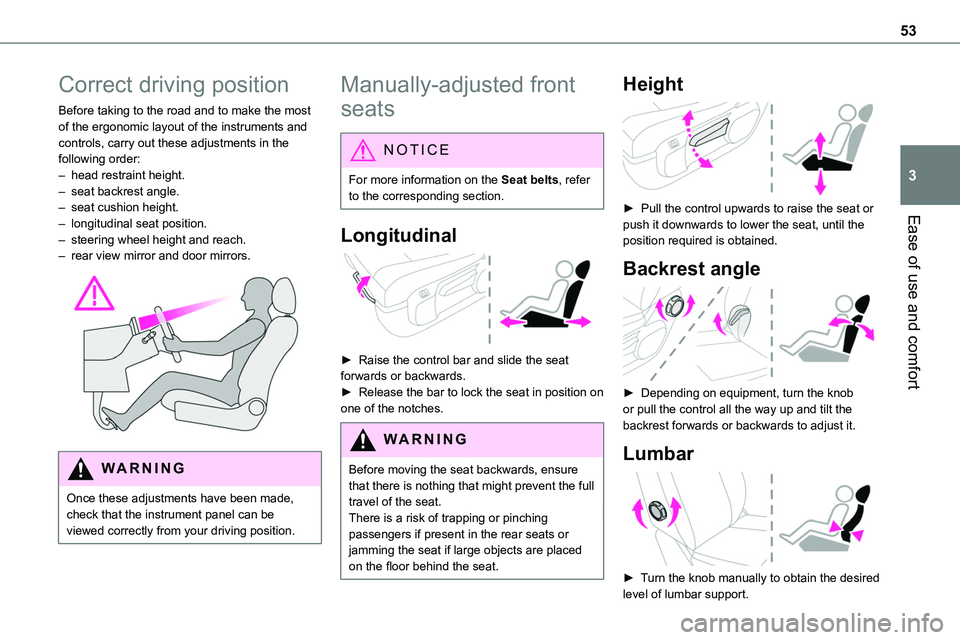
Before taking to the road and to make the most of the ergonomic layout of the instruments and controls, carry out these adjustments in the following order:– head restraint height.– seat backrest angle.– seat cushion height.
– longitudinal seat position.– steering wheel height and reach.– rear view mirror and door mirrors.
WARNI NG
Once these adjustments have been made, check that the instrument panel can be viewed correctly from your driving position.
Manually-adjusted front
seats
NOTIC E
For more information on the Seat belts, refer to the corresponding section.
Longitudinal
► Raise the control bar and slide the seat forwards or backwards.► Release the bar to lock the seat in position on one of the notches.
WARNI NG
Before moving the seat backwards, ensure that there is nothing that might prevent the full travel of the seat.There is a risk of trapping or pinching
passengers if present in the rear seats or jamming the seat if large objects are placed on the floor behind the seat.
Height
► Pull the control upwards to raise the seat or
push it downwards to lower the seat, until the position required is obtained.
Backrest angle
► Depending on equipment, turn the knob or pull the control all the way up and tilt the backrest forwards or backwards to adjust it.
Lumbar
► Turn the knob manually to obtain the desired
level of lumbar support.
Page 58 of 360
58
Steering wheel
adjustment
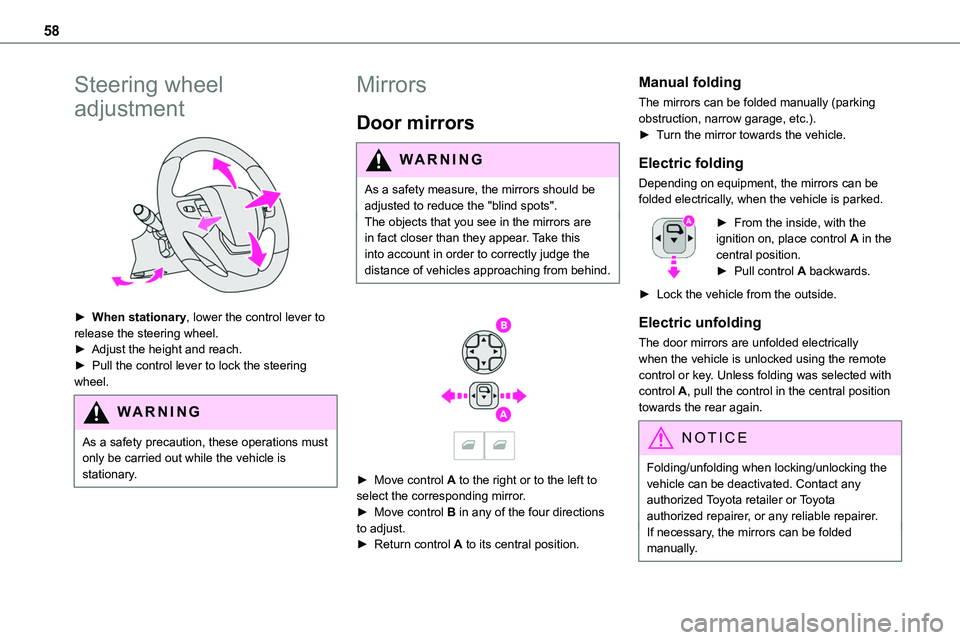
► When stationary, lower the control lever to release the steering wheel.► Adjust the height and reach.► Pull the control lever to lock the steering wheel.
WARNI NG
As a safety precaution, these operations must only be carried out while the vehicle is stationary.
Mirrors
Door mirrors
WARNI NG
As a safety measure, the mirrors should be adjusted to reduce the "blind spots".The objects that you see in the mirrors are
in fact closer than they appear. Take this into account in order to correctly judge the distance of vehicles approaching from behind.
► Move control A to the right or to the left to select the corresponding mirror.► Move control B in any of the four directions to adjust.
► Return control A to its central position.
Manual folding
The mirrors can be folded manually (parking obstruction, narrow garage, etc.).► Turn the mirror towards the vehicle.
Electric folding
Depending on equipment, the mirrors can be folded electrically, when the vehicle is parked.
► From the inside, with the ignition on, place control A in the central position.► Pull control A backwards.
► Lock the vehicle from the outside.
Electric unfolding
The door mirrors are unfolded electrically when the vehicle is unlocked using the remote control or key. Unless folding was selected with control A, pull the control in the central position towards the rear again.
NOTIC E
Folding/unfolding when locking/unlocking the vehicle can be deactivated. Contact any authorized Toyota retailer or Toyota authorized repairer, or any reliable repairer.If necessary, the mirrors can be folded manually.
Page 68 of 360
68
Tilting
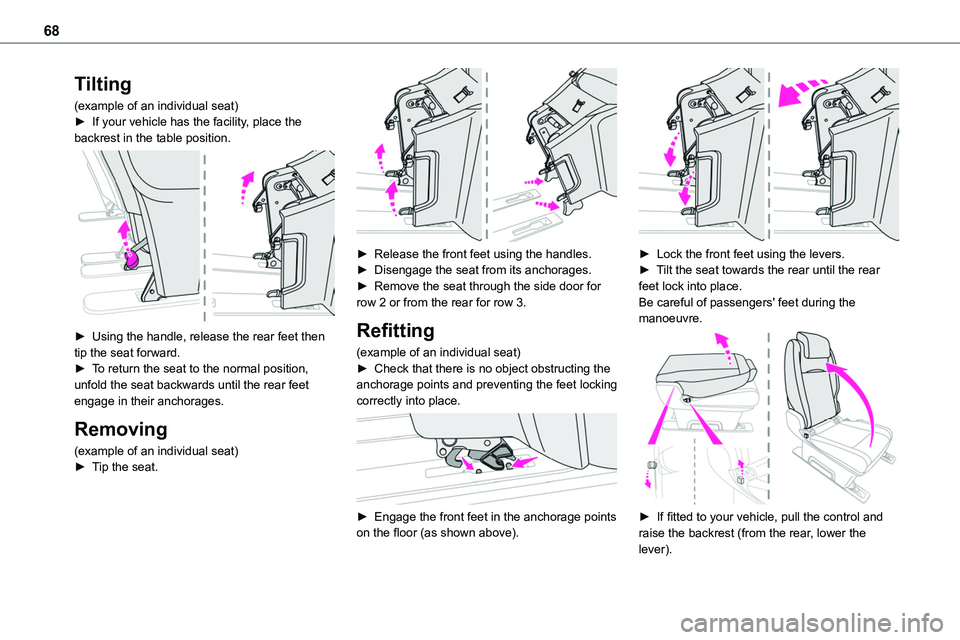
(example of an individual seat)► If your vehicle has the facility, place the backrest in the table position.
► Using the handle, release the rear feet then tip the seat forward.► To return the seat to the normal position, unfold the seat backwards until the rear feet engage in their anchorages.
Removing
(example of an individual seat)► Tip the seat.
► Release the front feet using the handles.► Disengage the seat from its anchorages.► Remove the seat through the side door for row 2 or from the rear for row 3.
Refitting
(example of an individual seat)► Check that there is no object obstructing the anchorage points and preventing the feet locking correctly into place.
► Engage the front feet in the anchorage points on the floor (as shown above).
► Lock the front feet using the levers.► Tilt the seat towards the rear until the rear feet lock into place.Be careful of passengers' feet during the manoeuvre.
► If fitted to your vehicle, pull the control and raise the backrest (from the rear, lower the lever).
Page 86 of 360
86
Removal
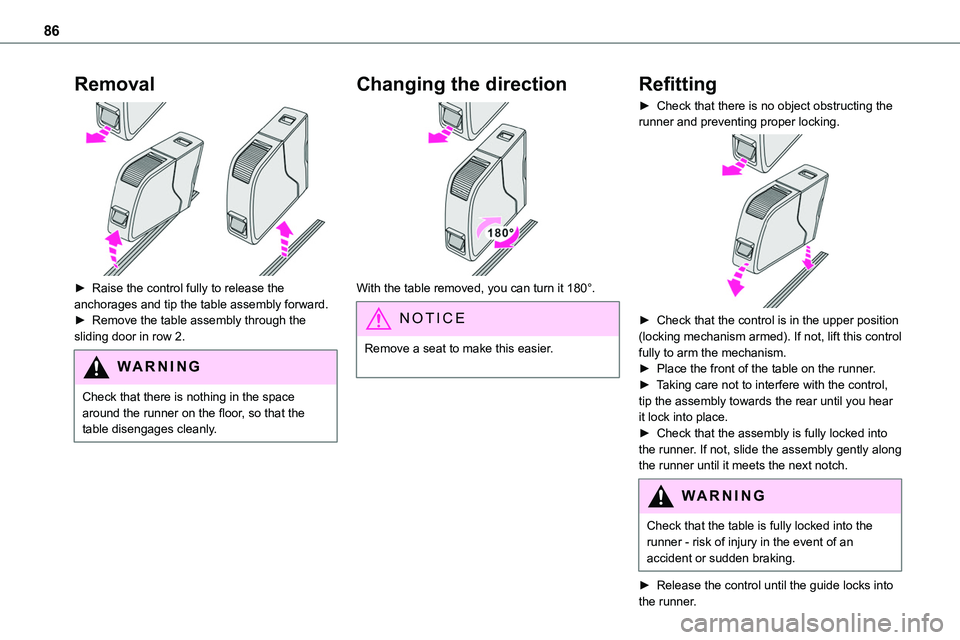
► Raise the control fully to release the anchorages and tip the table assembly forward. ► Remove the table assembly through the sliding door in row 2.
WARNI NG
Check that there is nothing in the space around the runner on the floor, so that the table disengages cleanly.
Changing the direction
With the table removed, you can turn it 180°.
NOTIC E
Remove a seat to make this easier.
Refitting
► Check that there is no object obstructing the runner and preventing proper locking.
► Check that the control is in the upper position (locking mechanism armed). If not, lift this control fully to arm the mechanism.► Place the front of the table on the runner.► Taking care not to interfere with the control, tip the assembly towards the rear until you hear it lock into place.► Check that the assembly is fully locked into the runner. If not, slide the assembly gently along the runner until it meets the next notch.
WARNI NG
Check that the table is fully locked into the runner - risk of injury in the event of an accident or sudden braking.
► Release the control until the guide locks into the runner.
Page 99 of 360
99
Ease of use and comfort
3
Courtesy lamp(s)
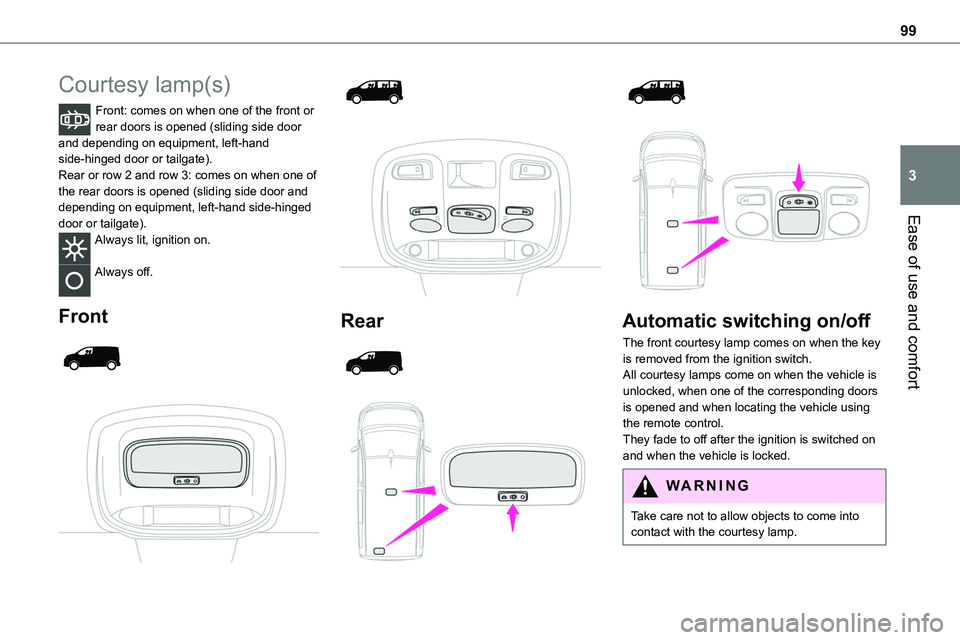
Front: comes on when one of the front or rear doors is opened (sliding side door and depending on equipment, left-hand side-hinged door or tailgate).Rear or row 2 and row 3: comes on when one of the rear doors is opened (sliding side door and depending on equipment, left-hand side-hinged
door or tailgate).Always lit, ignition on.
Always off.
Front
Rear
Automatic switching on/off
The front courtesy lamp comes on when the key is removed from the ignition switch.All courtesy lamps come on when the vehicle is unlocked, when one of the corresponding doors is opened and when locating the vehicle using the remote control.
They fade to off after the ignition is switched on and when the vehicle is locked.
WARNI NG
Take care not to allow objects to come into contact with the courtesy lamp.