change time TOYOTA RAIZE 2023 User Guide
[x] Cancel search | Manufacturer: TOYOTA, Model Year: 2023, Model line: RAIZE, Model: TOYOTA RAIZE 2023Pages: 516, PDF Size: 44.62 MB
Page 115 of 516
1132-1. Instrument cluster
RAIZE_OM_General_BZ358E
Instrument cluster
2
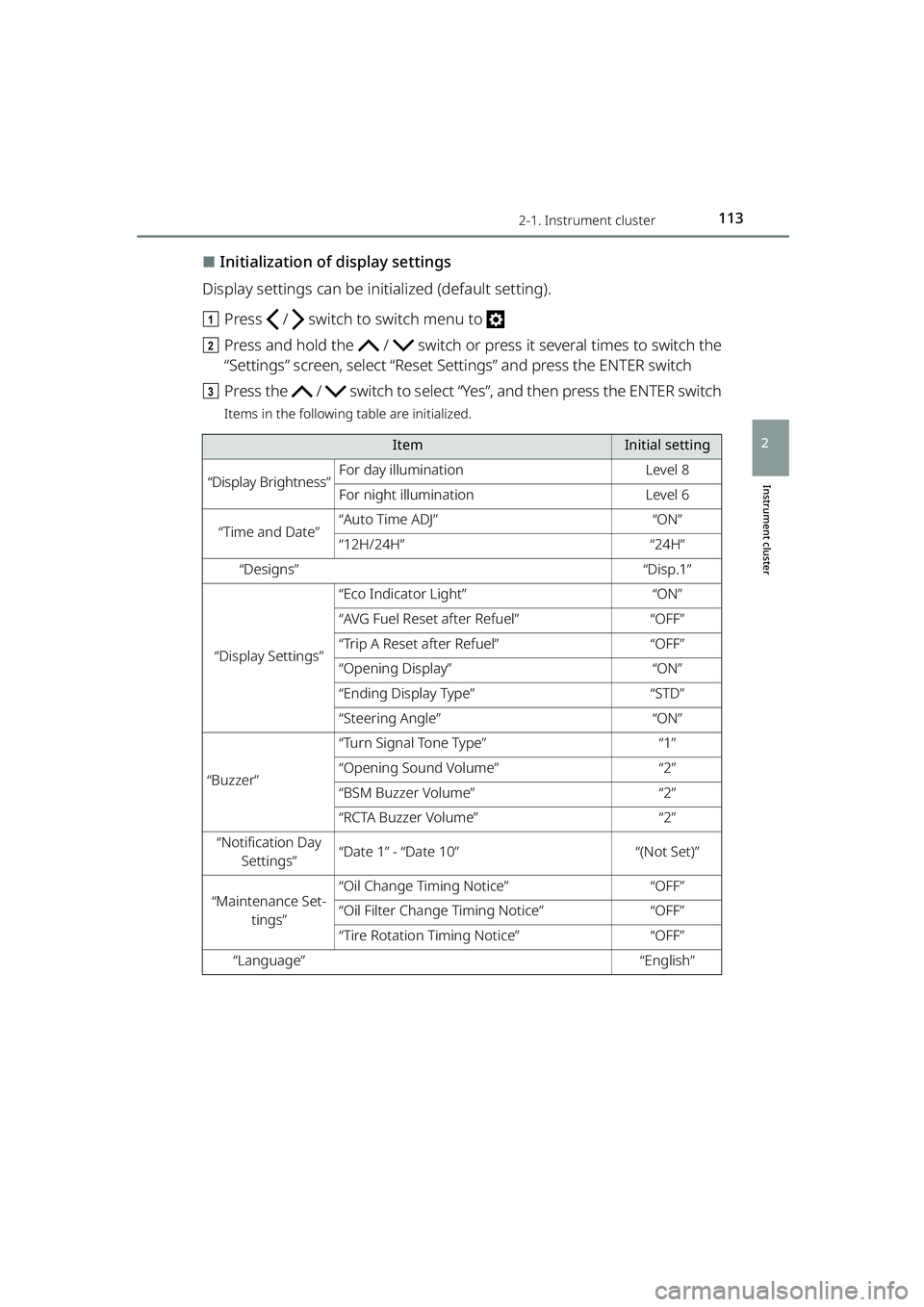
⬛Initialization of display settings
Display settings can be initialized (default setting).
a Press / switch to switch menu to
b Press and hold the / switch or press it several times to switch the
“Settings” screen, select “Reset Settings” and press the ENTER switch
c Press the / switch to select “Y es”, and then press the ENTER switch
Items in the following table are initialized.
ItemInitial setting
“Display Brightness”For day illuminationLevel 8
For night illuminationLevel 6
“Time and Date”“Auto Time ADJ”“ON”
“12H/24H”“24H”
“Designs”“Disp.1”
“Display Settings”
“Eco Indicator Light”“ON”
“AVG Fuel Reset after Refuel”“OFF”
“Trip A Reset after Refuel”“OFF”
“Opening Display”“ON”
“Ending Display Type”“STD”
“Steering Angle”“ON”
“Buzzer”
“Turn Signal Tone Type”“1”
“Opening Sound Volume”“2”
“BSM Buzzer Volume”“2”
“RCTA Buzzer Volume”“2”
“Notification Day
Settings”“Date 1” - “Date 10”“(Not Set)”
“Maintenance Set- tings”“Oil Change Timing Notice”“OFF”
“Oil Filter Change Timing Notice”“OFF”
“Tire Rotation Timing Notice”“OFF”
“Language”“English”
RAIZE_OM_General_BZ358E.book 113 ページ 2022年5月17日 火曜日 午後1時59分
Page 116 of 516
1142-1. Instrument cluster
RAIZE_OM_General_BZ358E
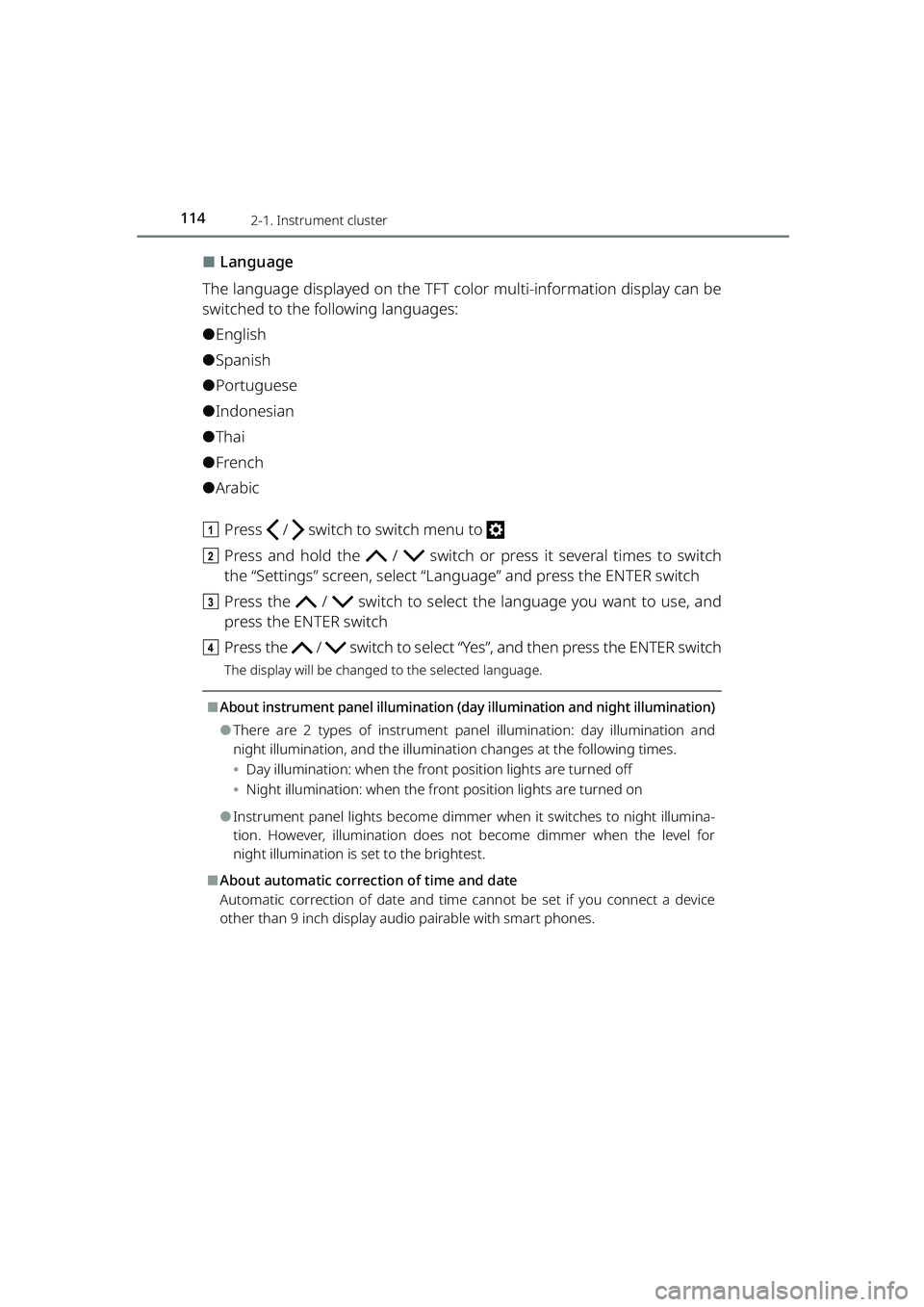
⬛Language
The language displayed on the TFT color multi-information display can be
switched to the following languages:
⚫English
⚫Spanish
⚫Portuguese
⚫Indonesian
⚫Thai
⚫French
⚫Arabic
a Press / switch to switch menu to
b Press and hold the / switch or press it several times to switch
the “Settings” screen, select “Lan guage” and press the ENTER switch
c Press the / switch to select th e language you want to use, and
press the ENTER switch
d Press the / switch to select “Y es”, and then press the ENTER switch
The display will be changed to the selected language.
⬛About instrument panel illumination (day illumination and night illumination)
⚫There are 2 types of instrument pa nel illumination: day illumination and
night illumination, and the illumination changes at the following times.
⦁ Day illumination: when the front po sition lights are turned off
⦁ Night illumination: when the fron t position lights are turned on
⚫Instrument panel lights become dimmer when it switches to night illumina-
tion. However, illumination does not become dimmer when the level for
night illumination is set to the brightest.
⬛About automatic correction of time and date
Automatic correction of da te and time cannot be set if you connect a device
other than 9 inch display audio pairable with smart phones.
RAIZE_OM_General_BZ358E.book 114 ページ 2022年5月17日 火曜日 午後1時59分
Page 117 of 516
1152-1. Instrument cluster
RAIZE_OM_General_BZ358E
Instrument cluster
2
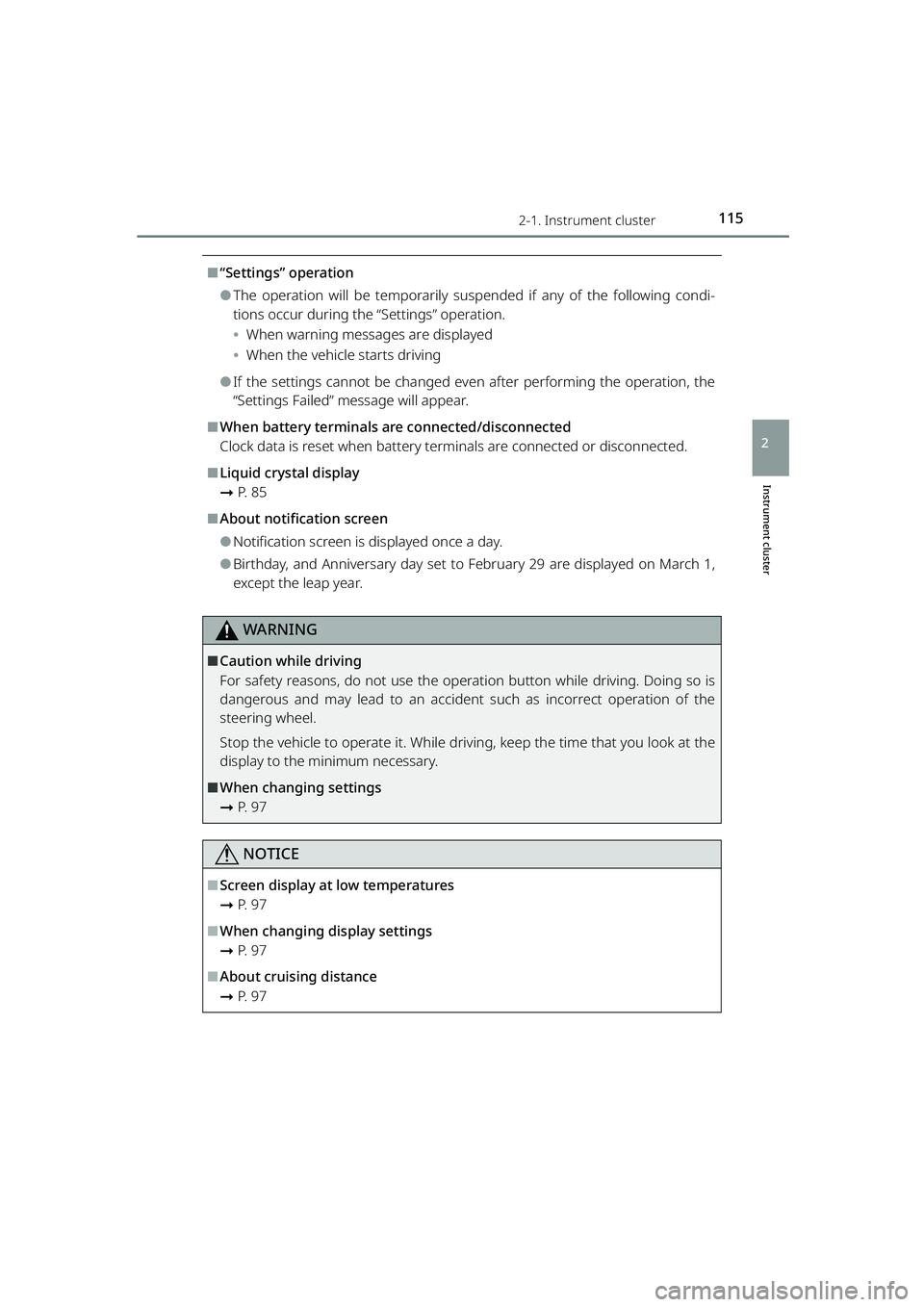
⬛“Settings” operation
⚫The operation will be temporarily suspended if any of the following condi-
tions occur during the “Settings” operation.
⦁When warning messages are displayed
⦁ When the vehicle starts driving
⚫If the settings cannot be changed even after performing the operation, the
“Settings Failed” message will appear.
⬛When battery terminals are connected/disconnected
Clock data is reset when battery terminals are connected or disconnected.
⬛Liquid crystal display
➞ P. 8 5
⬛About notification screen
⚫Notification screen is displayed once a day.
⚫Birthday, and Anniversary day set to Fe bruary 29 are displayed on March 1,
except the leap year.
WARNING
⬛Caution while driving
For safety reasons, do not use the oper ation button while driving. Doing so is
dangerous and may lead to an accident such as incorrect operation of the
steering wheel.
Stop the vehicle to operate it. While drivin g, keep the time that you look at the
display to the minimum necessary.
⬛When changing settings
➞ P. 9 7
NOTICE
⬛Screen display at low temperatures
➞P. 9 7
⬛When changing display settings
➞P. 9 7
⬛About cruising distance
➞P. 9 7
RAIZE_OM_General_BZ358E.book 115 ページ 2022年5月17日 火曜日 午後1時59分
Page 123 of 516
121
RAIZE_OM_General_BZ358E✽
: If equipped
Operation of each component
3
3-2. Opening, closing and locking the doors
Key-free system✽
Function overview
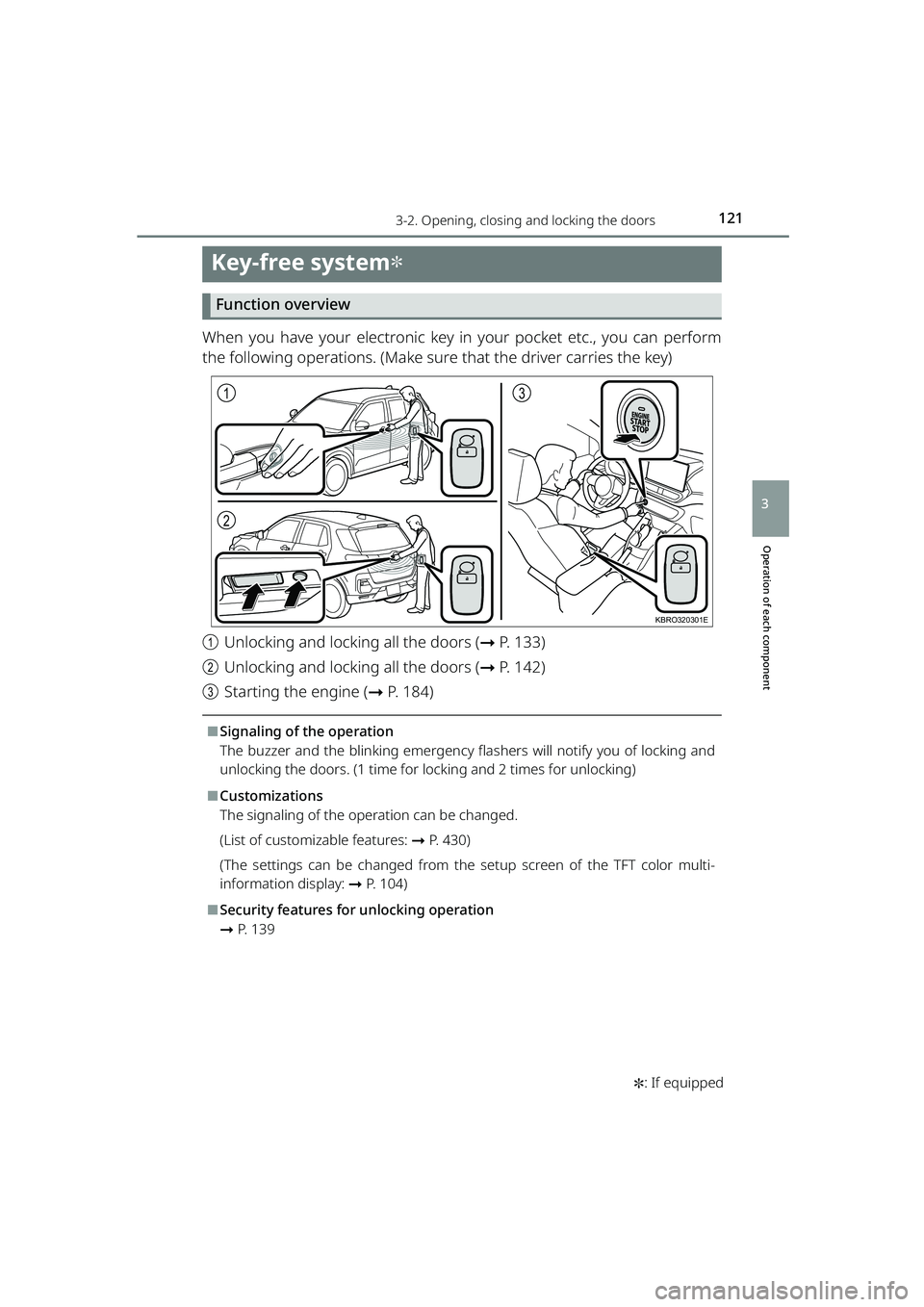
When you have your electronic key in your pocket etc., you can perform
the following operations. (Make sure that the driver carries the key)
aUnlocking and locking all the doors ( ➞P. 133)
b Unlocking and locking all the doors ( ➞P. 142)
c Starting the engine ( ➞P. 184)
⬛Signaling of the operation
The buzzer and the blinking emergency flas hers will notify you of locking and
unlocking the doors. (1 time for locking and 2 times for unlocking)
⬛Customizations
The signaling of the operation can be changed.
(List of customizable features: ➞ P. 430)
(The settings can be changed from the setup screen of the TFT color multi-
information display: ➞ P. 104)
⬛Security features for unlocking operation
➞P. 1 3 9
1
2
3
KBRO320301E
RAIZE_OM_General_BZ358E.book 121 ページ 2022年5月17日 火曜日 午後1時59分
Page 133 of 516
1313-2. Opening, closing and locking the doors
RAIZE_OM_General_BZ358E ✽
: If equipped
Operation of each component
3
Wireless remote control
Function overview
You can lock and unlock the doors.
▶Vehicles without key-free system
➞ P. 1 3 3
▶Vehicles with key-free system
➞ P. 1 3 3
⬛Signaling of the operation
The buzzer and the blinking emergency flashers will notify you of the opera-
tion. (1 time for locking and 2 times for unlocking)
⬛Customizations
The signaling of the operation can be changed.
(List of customizable features: ➞ P. 430)
(The settings can be changed from the setup screen of the multi-information
display
✽: ➞ P. 9 1 )
(The settings can be changed from the setup screen of the TFT color multi-
information display
✽: ➞ P. 104)
⬛Security features for unlocking operation
➞ P. 1 3 9
⬛Situations where the function may not work properly
▶Vehicles without key-free system
In the following cases, the wireless remote control may not work as intended.
⚫When the wireless key’s battery is low
⚫When you are in an area with strong radio waves or noise present, such as
near TV towers, power plants, gas stat ions, broadcast stations, large display,
airports, and so on
⚫When you have a wireless communication device such as a radio, mobile
phone, and cordless telephone with you
⚫If the wireless remote control touches or is covered by a metal object
⚫When a wireless key (that emits radio waves) is in use near by
⚫When a metal-containing film is pasted on the rear window
▶Vehicles with key-free system
➞ P. 1 2 5
RAIZE_OM_General_BZ358E.book 131 ページ 2022年5月17日 火曜日 午後1時59分
Page 187 of 516
1854-2. Driving procedures
RAIZE_OM_General_BZ358E
Driving
4
Stopping the engine
aStop the vehicle completely
b Continuously variable transmission vehicles: Apply the parking brake
( ➞ P. 197) and set the shift lever in P
Manual transmission vehicles: Apply the parking brake ( ➞P. 197) and
set the shift lever in N
c Press the engine switch
d Release your foot from the brake pedal, and make sure that the engine
switch indicator light is off
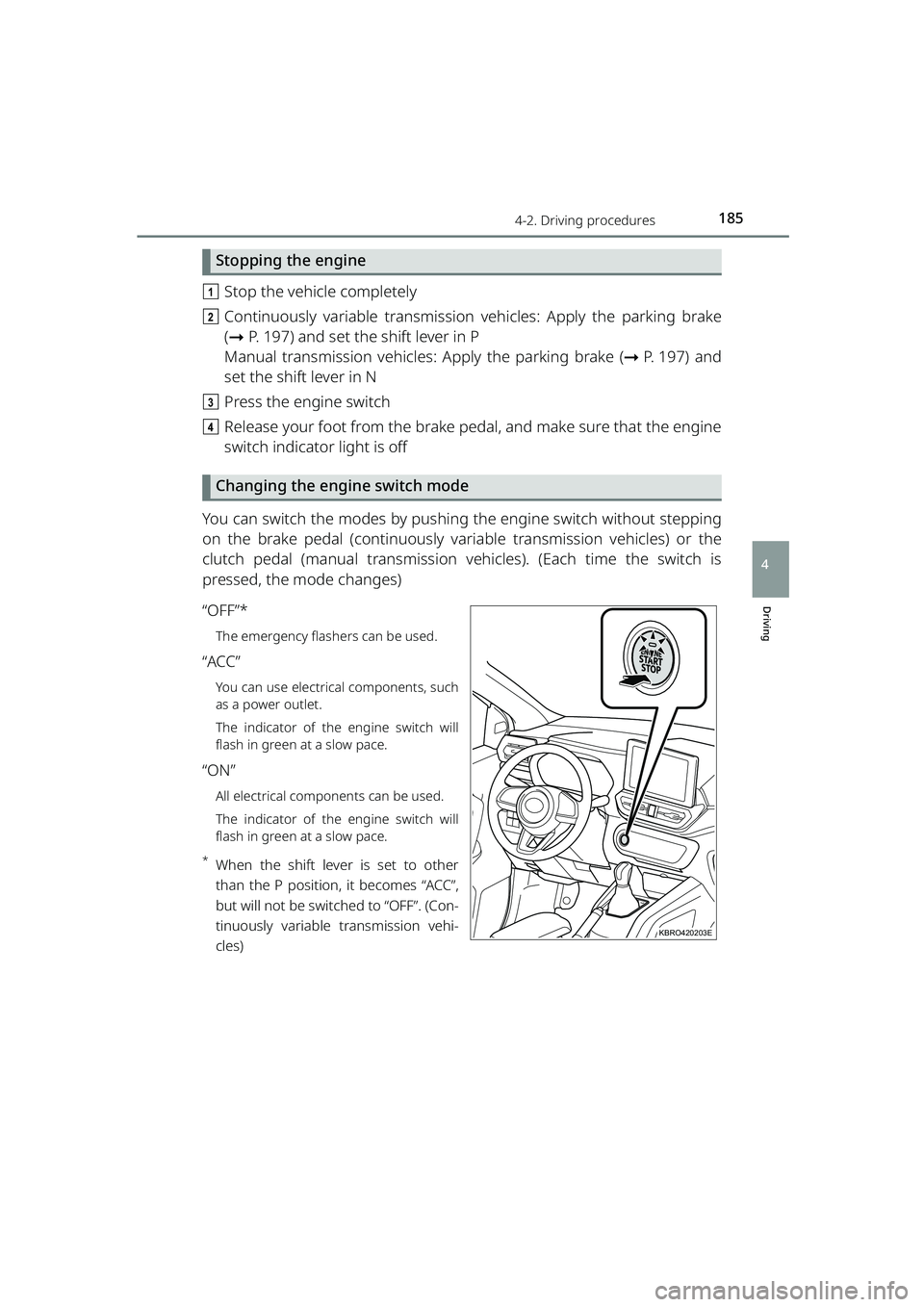
Changing the engine switch mode
You can switch the modes by pushing the engine switch without stepping
on the brake pedal (continuously vari able transmission vehicles) or the
clutch pedal (manual transmission ve hicles). (Each time the switch is
pressed, the mode changes)
“OFF”*
The emergency flashers can be used.
“ACC”
You can use electrical components, such
as a power outlet.
The indicator of the engine switch will
flash in green at a slow pace.
“ON”
All electrical components can be used.
The indicator of the engine switch will
flash in green at a slow pace.
*When the shift lever is set to other
than the P position, it becomes “ACC”,
but will not be switched to “OFF”. (Con-
tinuously variable transmission vehi-
cles)
KBRO420203E
RAIZE_OM_General_BZ358E.book 185 ページ 2022年5月17日 火曜日 午後1時59分
Page 192 of 516
1904-2. Driving procedures
RAIZE_OM_General_BZ358E✽
: If equipped
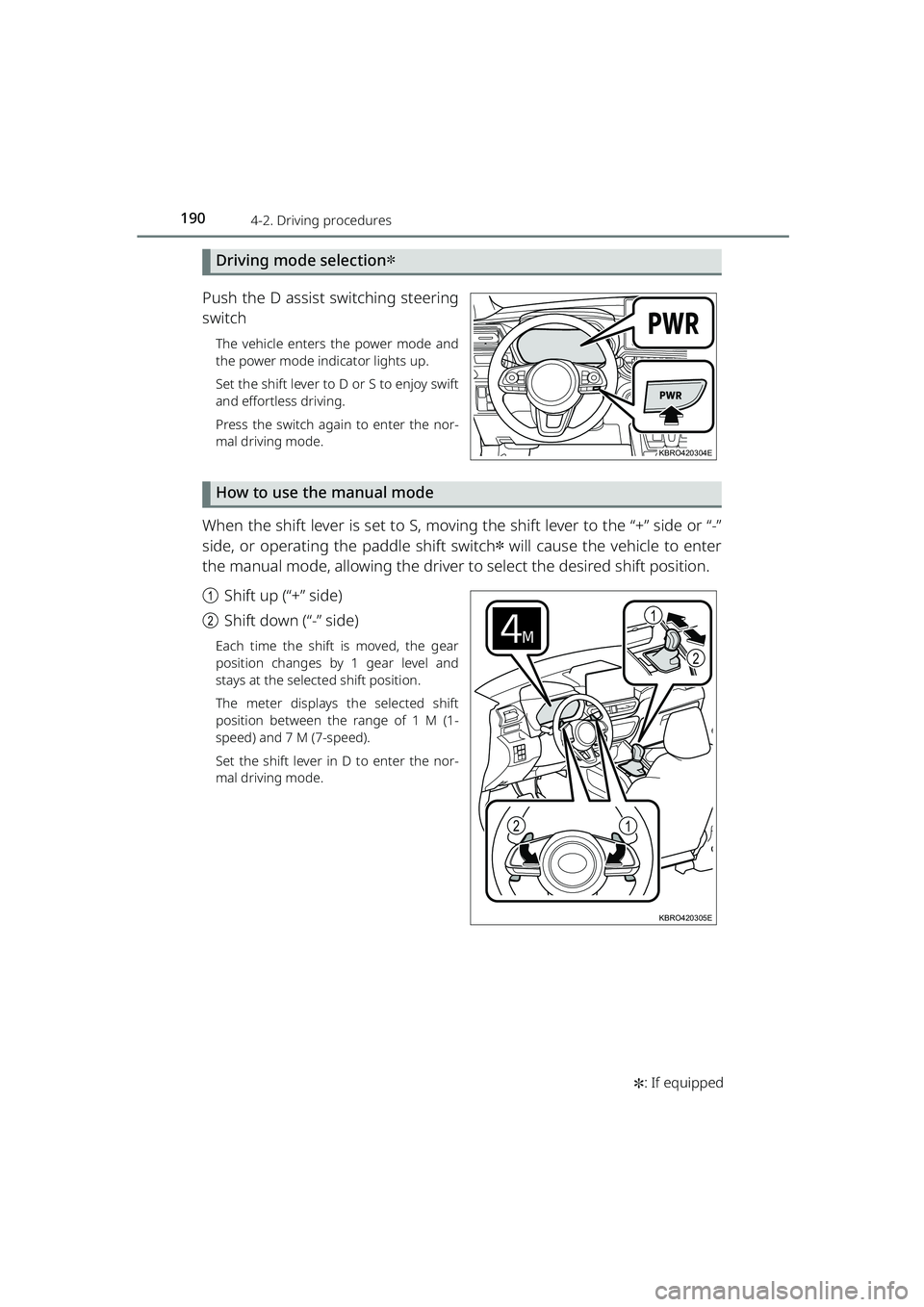
Driving mode selection✽
Push the D assist switching steering
switch
The vehicle enters the power mode and
the power mode indicator lights up.
Set the shift lever to D or S to enjoy swift
and effortless driving.
Press the switch again to enter the nor-
mal driving mode.
How to use the manual mode
When the shift lever is set to S, moving the shift lever to the “+” side or “-”
side, or operating the paddle shift switch
✽ will cause the vehicle to enter
the manual mode, allowing the driver to select the desired shift position.
a Shift up (“+” side)
b Shift down (“-” side)
Each time the shift is moved, the gear
position changes by 1 gear level and
stays at the selected shift position.
The meter displays the selected shift
position between the range of 1 M (1-
speed) and 7 M (7-speed).
Set the shift lever in D to enter the nor-
mal driving mode.
KBRO420304E
1
2
12
KBRO420305E
RAIZE_OM_General_BZ358E.book 190 ページ 2022年5月17日 火曜日 午後1時59分
Page 198 of 516
1964-2. Driving procedures
RAIZE_OM_General_BZ358E✽
: If equipped
Turn signal lever
Operation instructions
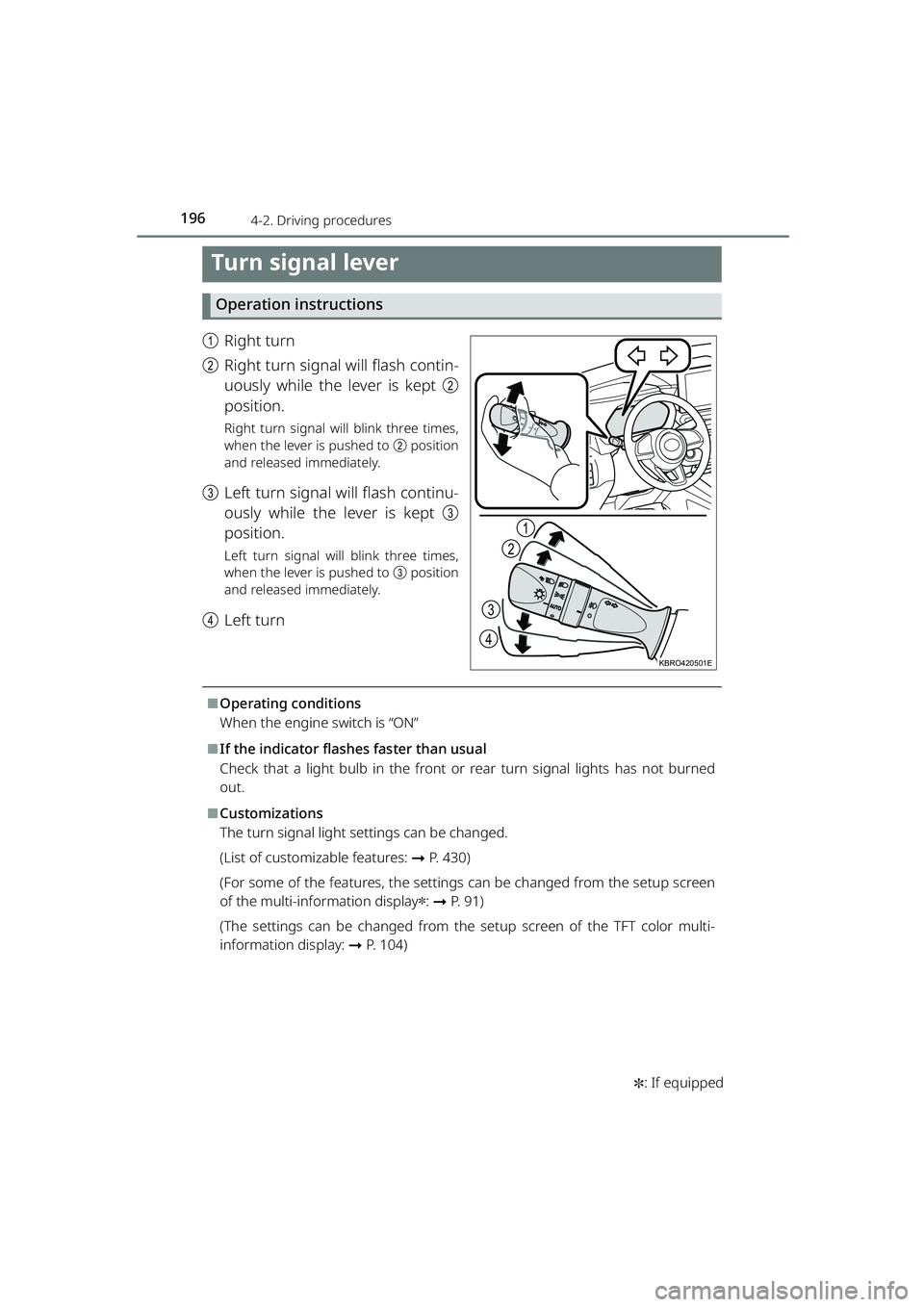
a Right turn
b Right turn signal will flash contin-
uously while the lever is kept b
position.
Right turn signal will blink three times,
when the lever is pushed to b position
and released immediately.
c Left turn signal will flash continu-
ously while the lever is kept c
position.
Left turn signal will blink three times,
when the lever is pushed to c position
and released immediately.
d Left turn
⬛Operating conditions
When the engine switch is “ON”
⬛If the indicator flashe s faster than usual
Check that a light bulb in the front or rear turn signal lights has not burned
out.
⬛Customizations
The turn signal light settings can be changed.
(List of customizable features: ➞P. 430)
(For some of the features, the settings can be changed from the setup screen
of the multi-info rmation display
✽: ➞ P. 9 1 )
(The settings can be changed from the setup screen of the TFT color multi-
information display: ➞ P. 104)
1
2
3
4
KBRO420501E
RAIZE_OM_General_BZ358E.book 196 ページ 2022年5月17日 火曜日 午後1時59分
Page 205 of 516
2034-3. Operating the lights and windshield wipers
RAIZE_OM_General_BZ358E
Driving
4
Windshield wipers and washer (front)
Operation instructions
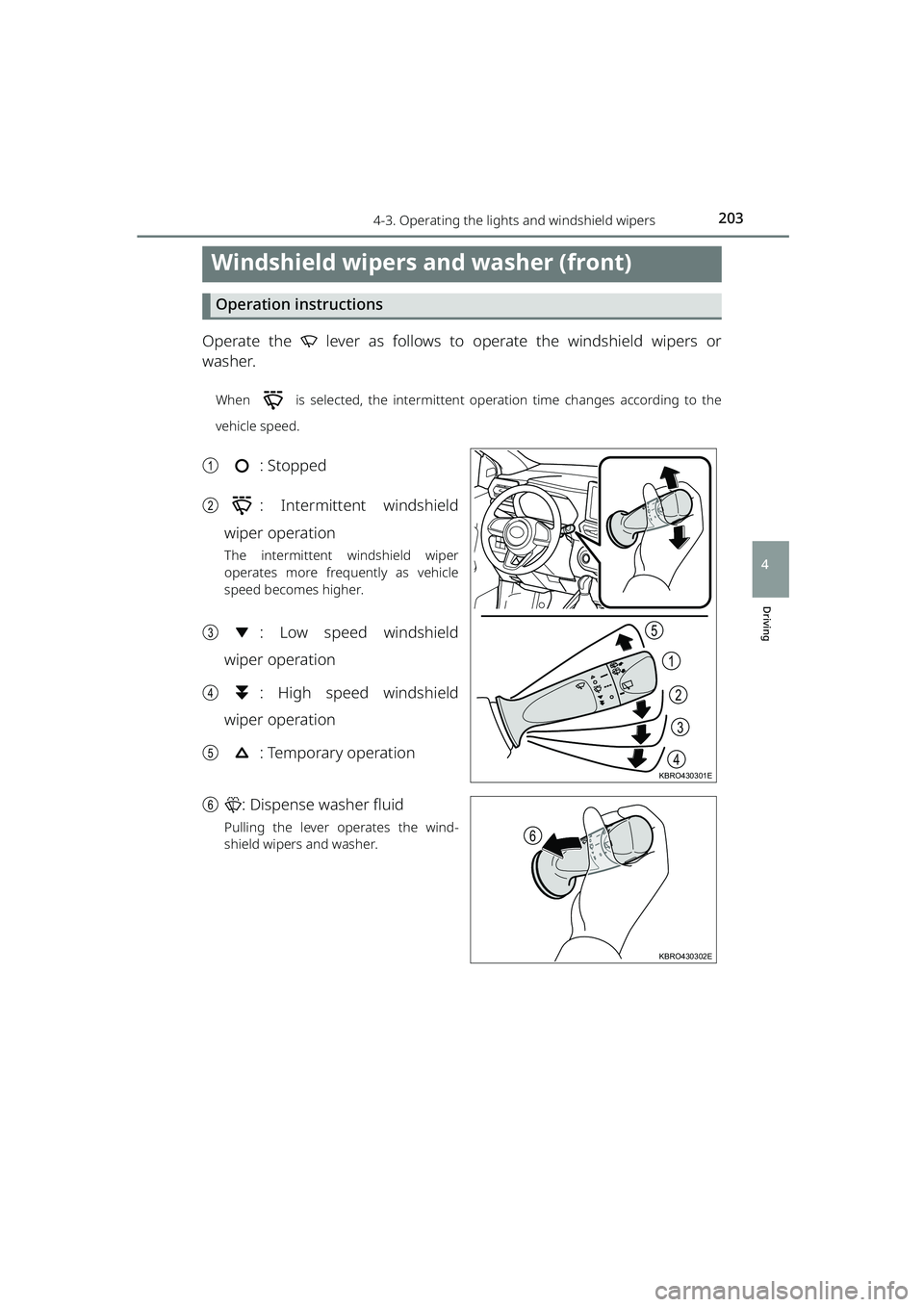
Operate the lever as follows to operate the windshield wipers or
washer.
When is selected, the intermittent operation time changes according to the
vehicle speed.
a: Stopped
b : Intermittent windshield
wiper operation
The intermittent windshield wiper
operates more frequently as vehicle
speed becomes higher.
c : Low speed windshield
wiper operation
d : High speed windshield
wiper operation
e : Temporary operation
f : Dispense washer fluid
Pulling the lever operates the wind-
shield wipers and washer.
2
1
3
4
5
KBRO430301E
6
KBRO430302E
RAIZE_OM_General_BZ358E.book 203 ページ 2022年5月17日 火曜日 午後1時59分
Page 208 of 516
2064-3. Operating the lights and windshield wipers
RAIZE_OM_General_BZ358E✽
: If equipped
⬛Operating conditions
When the engine switch is “ON”
⬛When the washer flui d does not come out
If the washer fluid does not come out even though the washer fluid tank level
is not low, check the nozzles for clogging.
⬛Reverse wiper function
While the windshield wiper is operating, setting the shift lever to R will move
the rear wiper several times. After the windshield wiper is stopped, setting the
shift lever to R within approximately 10 seconds will also move the rear wiper
several times.
⬛Customizations
The settings such as operation intervals can be modified.
(List of customizable features: ➞ P. 430)
(For some of the features, the settings can be changed from the setup screen
of the multi-info rmation display
✽: ➞ P. 9 1 )
(For some of the features, the settings can be changed from the setup screen
of the TFT color multi-information display
✽: ➞ P. 104)
NOTICE
⬛When the rear window is dry
Do not use the windshield wipers,
as they may damage the windshield.
⬛When the washer flui d does not come out
Do not operate the switch continually
as you may damage th e washer fluid pump.
⬛When a nozzle becomes clogged
When a nozzle becomes clogged, contact your Toyota dealer.
Do not try to clear it with a pin or other object.
The nozzle will be damaged.
⬛To prevent battery discharge
Do not leave the windshield wipers on longer than necessary when the engine
is not running.
RAIZE_OM_General_BZ358E.book 206 ページ 2022年5月17日 火曜日 午後1時59分