remote control TOYOTA RAIZE 2023 Owners Manual
[x] Cancel search | Manufacturer: TOYOTA, Model Year: 2023, Model line: RAIZE, Model: TOYOTA RAIZE 2023Pages: 516, PDF Size: 44.62 MB
Page 4 of 516
2
RAIZE_OM_General_BZ358E
TABLE OF CONTENTS
For your information................................ 6
Reading this manual .............................. 10
How to search ......................................... 11
Pictorial index .......................................... 12
1 For safety and security
1-1. For safe use
Before driving ............................... 28
For safe driving ............................ 30
Seat belts ....................................... 32
SRS airbags ................................... 37
Exhaust gas precautions............ 47
1-2. Safety information for children
When children are
in the vehicle .............................. 48
Child restraint systems ............... 49
1-3. Emergency assistance
eCall ................................................ 68
1-4. Theft deterrent system
Engine immobilizer system ....... 72
Alarm .............................................. 73
2 Instrument cluster
2-1. Instrument cluster
Warning lights and indicators... 78
Gauges and meters .................... 84
Multi-information display ........... 86
TFT color mult i-information
display ......................................... 98
3 Operation of each component
3-1. Keys
Keys .............................................. 118
3-2. Opening, closing and locking the doors
Key-free system.......................... 121
Wireless remote control .......... 131
Doors
(front doors, rear doors) ....... 133
Back door .................................... 142
3-3. Adjusting the seats
Front seats .................................. 148
Rear seats .................................... 149
Head restraints .......................... 152
3-4. Steering wheel position and mirrors
Steering wheel ........................... 154
Inside rear view mirror ............. 156
Outside rear view mirrors........ 157
3-5. Opening and closing the windows
Power windows .......................... 160
RAIZE_OM_General_BZ358E.book 2 ページ 2022年5月17日 火曜日 午後1時59分
Page 75 of 516
731-4. Theft deterrent system
RAIZE_OM_General_BZ358E✽
: If equipped
For safety and security
1
Alarm✽
The alarm
The alarm uses the emergency flashers and sound to give an alert when
an intrusion is detected.
The alarm is triggered in the following situations when the alarm is set:
⚫A locked door is unlocked and open ed in any way other than using the
key-free function or wireless remote control.
⚫The hood is opened.
Setting the alarm system
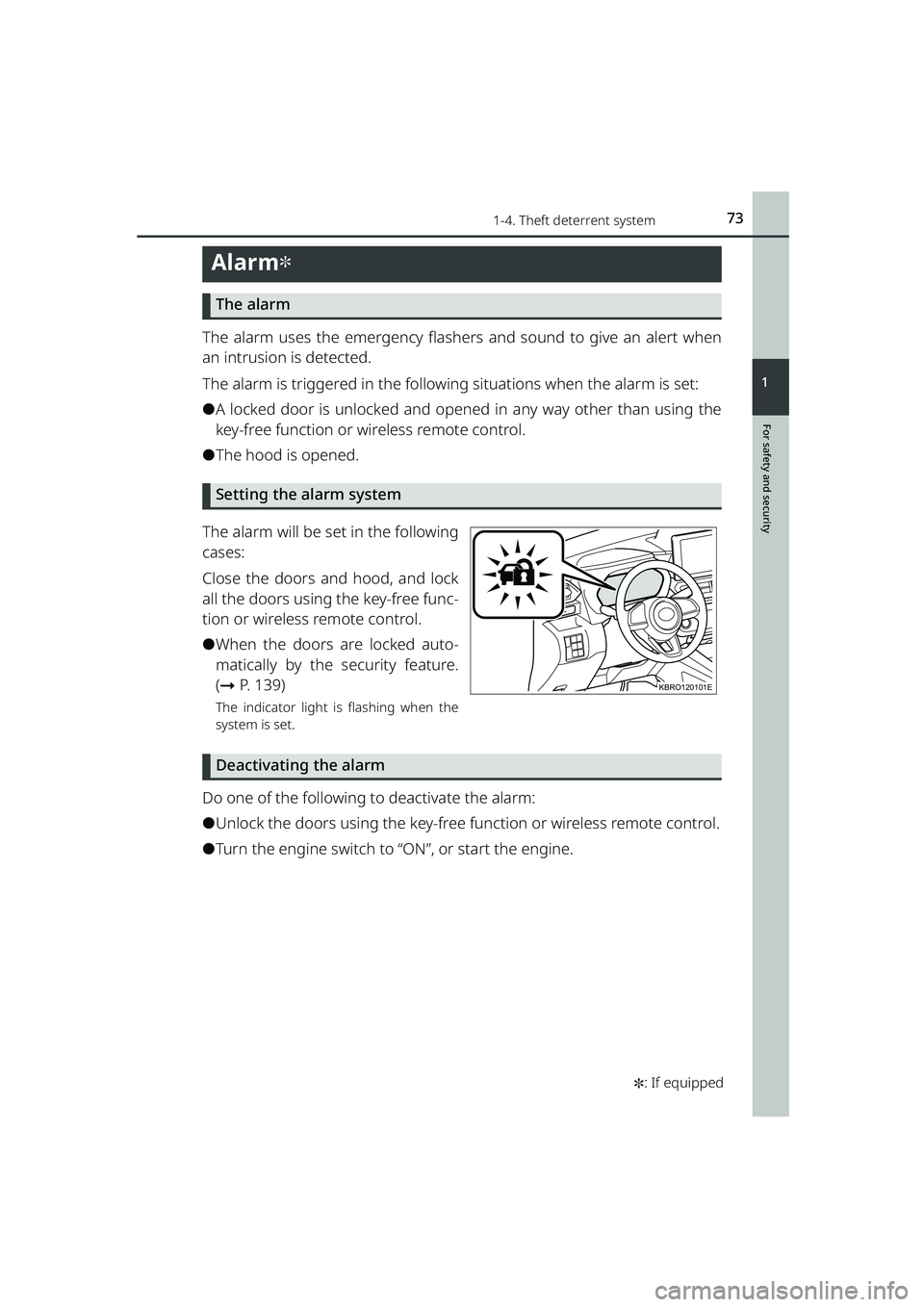
The alarm will be set in the following
cases:
Close the doors and hood, and lock
all the doors using the key-free func-
tion or wireless remote control.
⚫When the doors are locked auto-
matically by the security feature.
( ➞ P. 1 3 9 )
The indicator light is flashing when the
system is set.
Deactivating the alarm
Do one of the following to deactivate the alarm:
⚫Unlock the doors using the key-free function or wireless remote control.
⚫Turn the engine switch to “ON”, or start the engine.
KBRO120101E
RAIZE_OM_General_BZ358E.book 73 ページ 2022年5月17日 火曜日 午後1時59分
Page 76 of 516
741-4. Theft deterrent system
RAIZE_OM_General_BZ358E
Stopping the alarm
Do one of the following to stop the alarm:
⚫Press the lock or unlock button of the wireless remote control.
⚫Press the lock/unlock switch on the front door while carrying the elec-
tronic key with you.
⚫Press the lock button on the back do or while carrying the electronic key
with you (when opening the driver’s door).
⚫Press the back door opener switch on the back door while carrying the
electronic key with you (when closing the driver’s door).
⚫Get in the car with the electronic key.
⚫Turn the engine switch to “ON”, or start the engine.
⬛If the electronic key does not operate properly
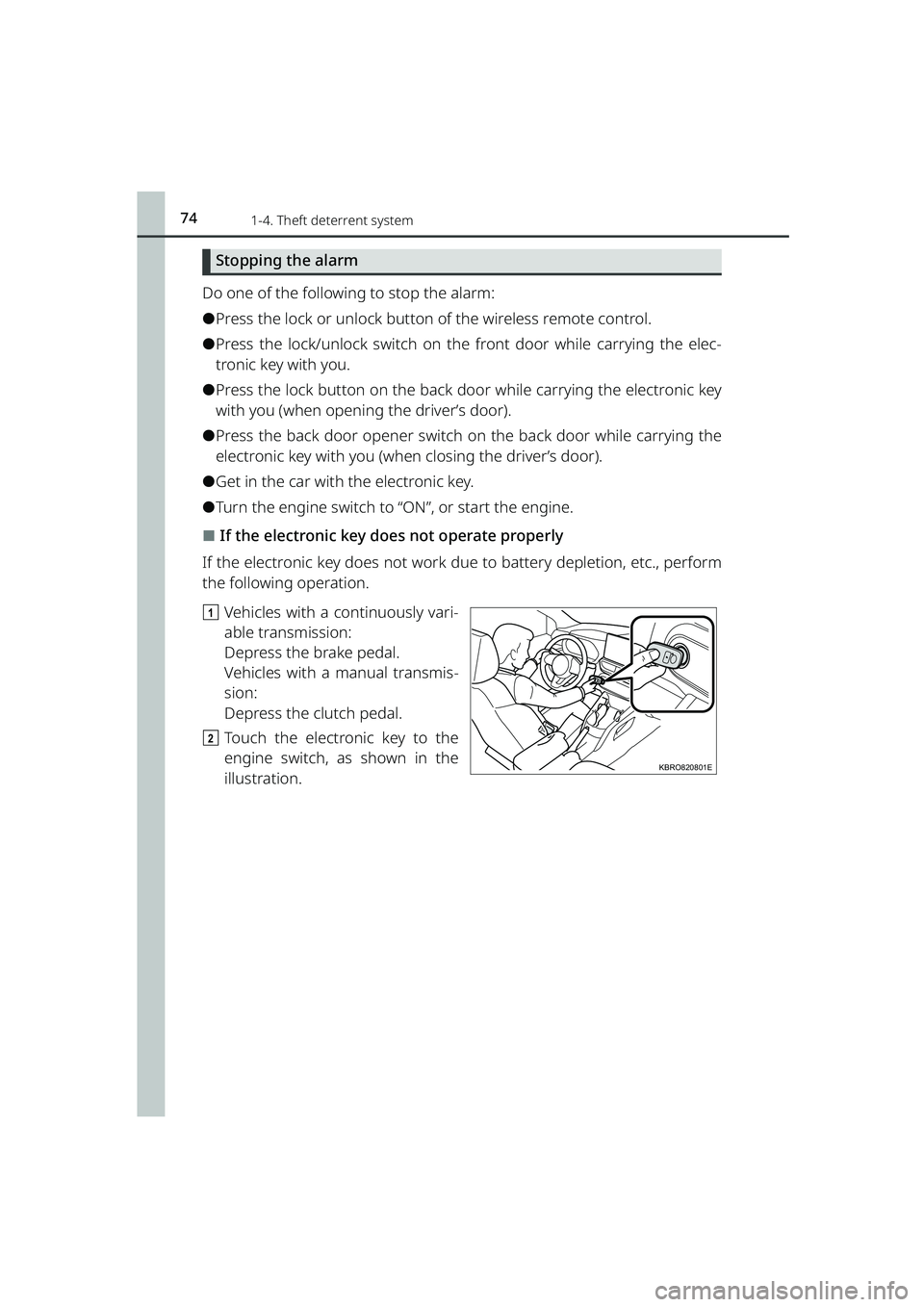
If the electronic key does not work du e to battery depletion, etc., perform
the following operation.
a Vehicles with a continuously vari-
able transmission:
Depress the brake pedal.
Vehicles with a manual transmis-
sion:
Depress the clutch pedal.
b Touch the electronic key to the
engine switch, as shown in the
illustration.
KBRO820801E
RAIZE_OM_General_BZ358E.book 74 ページ 2022年5月17日 火曜日 午後1時59分
Page 95 of 516
932-1. Instrument cluster
RAIZE_OM_General_BZ358E✽
: If equipped
Instrument cluster
2
*1When this is set to ON, the setting for shift-linked auto lock✽ turns OFF.
*2When this is set to ON, the setting for speed linked door locking function
turns OFF.
*3When this is set to ON, the setting for door unlocking linked with engine
switch OFF turns OFF.
*4When this is set to ON, the se tting for shift-linked auto unlock✽ turns OFF.
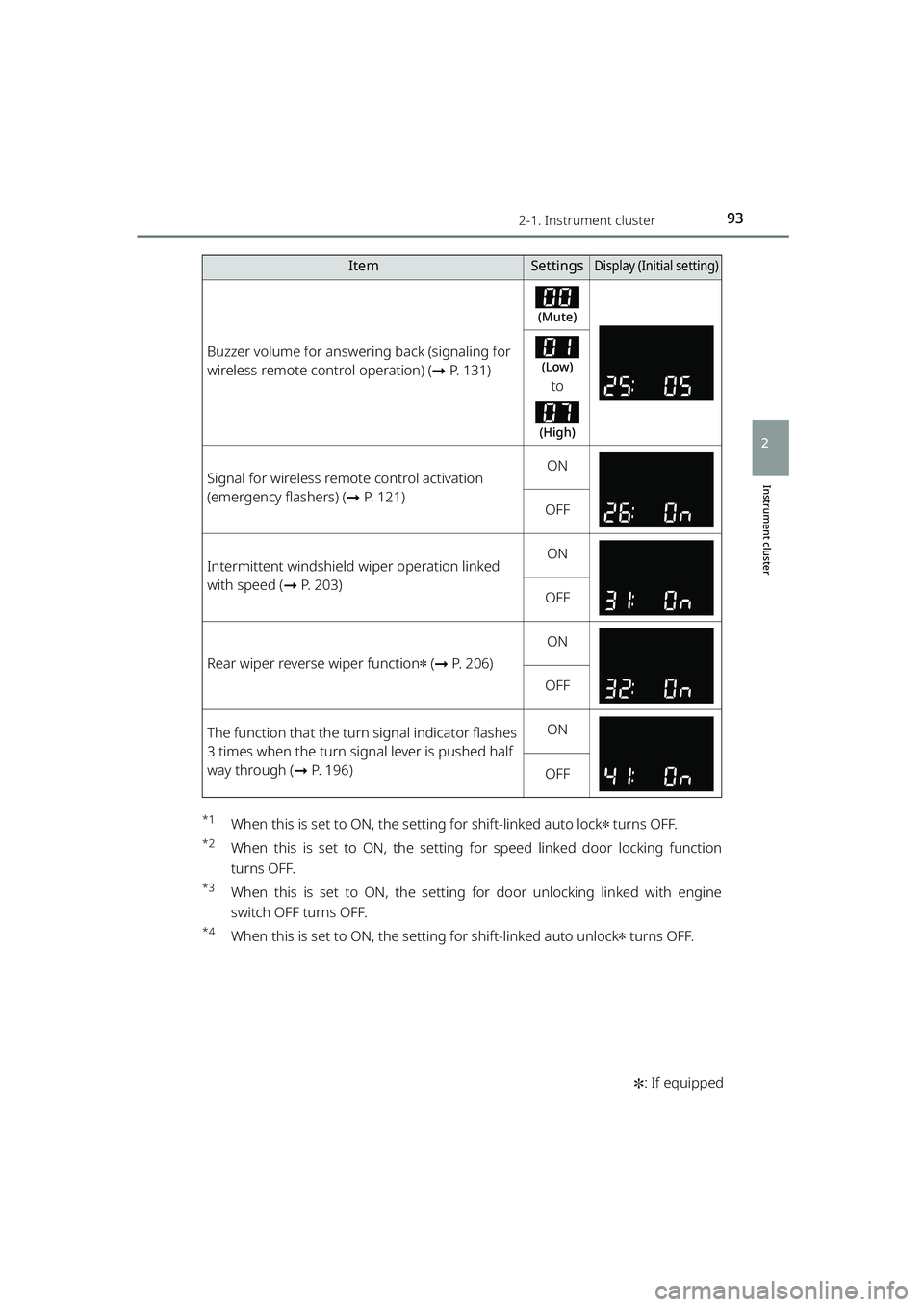
Buzzer volume for answering back (signaling for
wireless remote control operation) ( ➞P. 131)
(Mute)
(Low)
to
(High)
Signal for wireless remote control activation
(emergency flashers) ( ➞P. 121)ON
OFF
Intermittent windshield wiper operation linked
with speed ( ➞P. 203)ON
OFF
Rear wiper reverse wiper function✽ (➞ P. 206)
ON
OFF
The function that the turn signal indicator flashes
3 times when the turn signal lever is pushed half
way through ( ➞P. 196)ON
OFF
ItemSettingsDisplay (Initi al setting)
RAIZE_OM_General_BZ358E.book 93 ページ 2022年5月17日 火曜日 午後1時59分
Page 119 of 516
117
3
RAIZE_OM_General_BZ358E
Operation of eachcomponent
3-1. Keys
Keys .............................................. 118
3-2. Opening, closing and locking
the doors
Key-free system ......................... 121
Wireless remote control .......... 131
Doors
(front doors, rear doors) ....... 133
Back door .................................... 142
3-3. Adjusting the seats
Front seats .................................. 148
Rear seats ................................... 149
Head restraints .......................... 152
3-4. Steering wheel position and mirrors
Steering wheel ........................... 154
Inside rear view mirror............. 156
Outside rear view mirrors ....... 157
3-5. Opening and closing the windows
Power windows .......................... 160
RAIZE_OM_General_BZ358E.book 117 ページ 2022年5月17日 火曜日 午後1時59分
Page 125 of 516
1233-2. Opening, closing and locking the doors
RAIZE_OM_General_BZ358E
Operation of each component
3
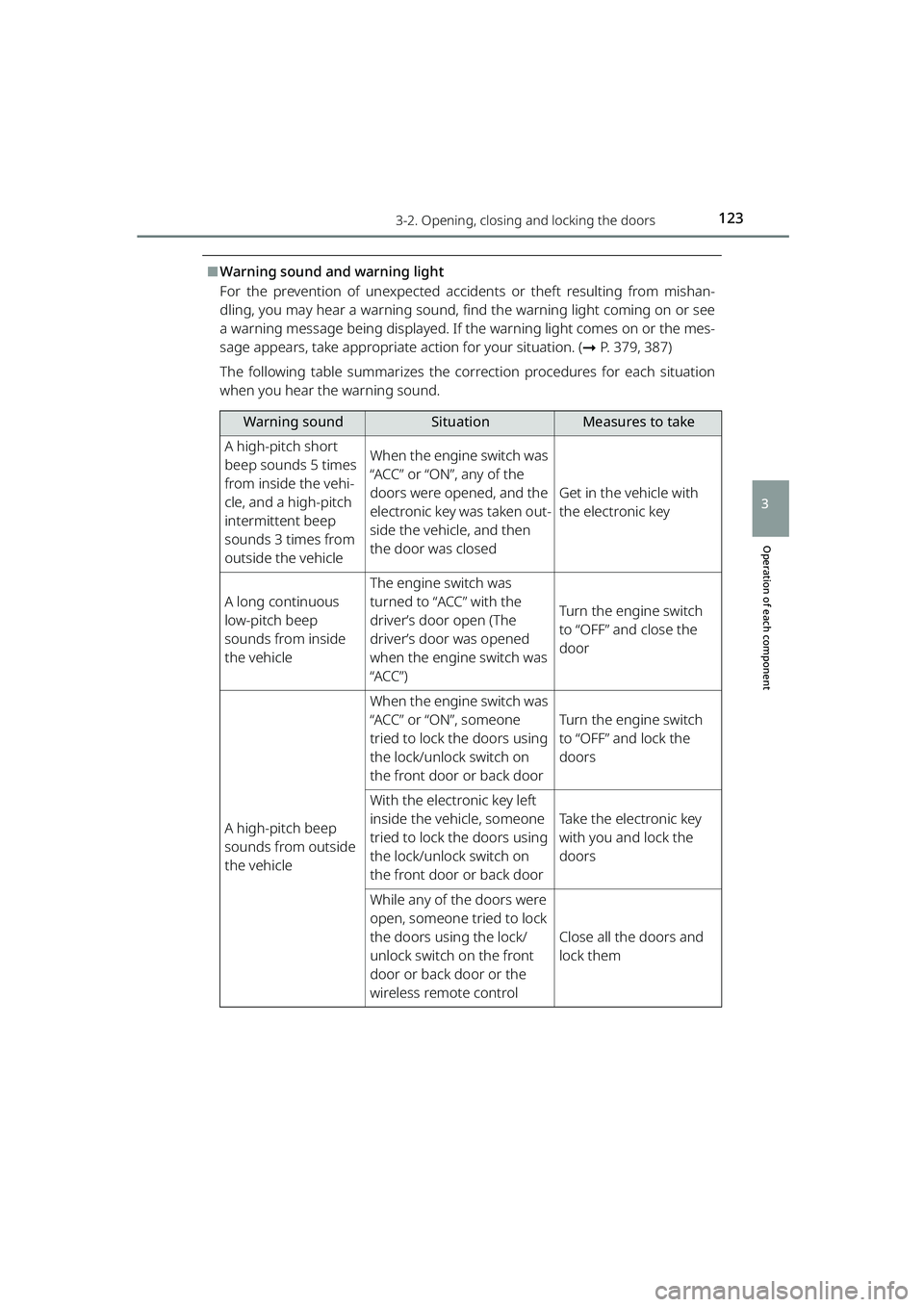
⬛Warning sound and warning light
For the prevention of unexpected accidents or theft resulting from mishan-
dling, you may hear a warning sound, find the warning light coming on or see
a warning message being displayed. If the warning light comes on or the mes-
sage appears, take appropriate action for your situation. ( ➞P. 379, 387)
The following table summarizes the corr ection procedures for each situation
when you hear the warning sound.
Warning soundSituationMeasures to take
A high-pitch short
beep sounds 5 times
from inside the vehi-
cle, and a high-pitch
intermittent beep
sounds 3 times from
outside the vehicleWhen the engine switch was
“ACC” or “ON”, any of the
doors were opened, and the
electronic key was taken out-
side the vehicle, and then
the door was closed
Get in the vehicle with
the electronic key
A long continuous
low-pitch beep
sounds from inside
the vehicle
The engine switch was
turned to “ACC” with the
driver’s door open (The
driver’s door was opened
when the engine switch was
“ACC”)
Turn the engine switch
to “OFF” and close the
door
A high-pitch beep
sounds from outside
the vehicle
When the engine switch was
“ACC” or “ON”, someone
tried to lock the doors using
the lock/unlock switch on
the front door or back door
Turn the engine switch
to “OFF” and lock the
doors
With the electronic key left
inside the vehicle, someone
tried to lock the doors using
the lock/unlock switch on
the front door or back door
Take the electronic key
with you and lock the
doors
While any of the doors were
open, someone tried to lock
the doors using the lock/
unlock switch on the front
door or back door or the
wireless remote control
Close all the doors and
lock them
RAIZE_OM_General_BZ358E.book 123 ページ 2022年5月17日 火曜日 午後1時59分
Page 127 of 516
1253-2. Opening, closing and locking the doors
RAIZE_OM_General_BZ358E
Operation of each component
3
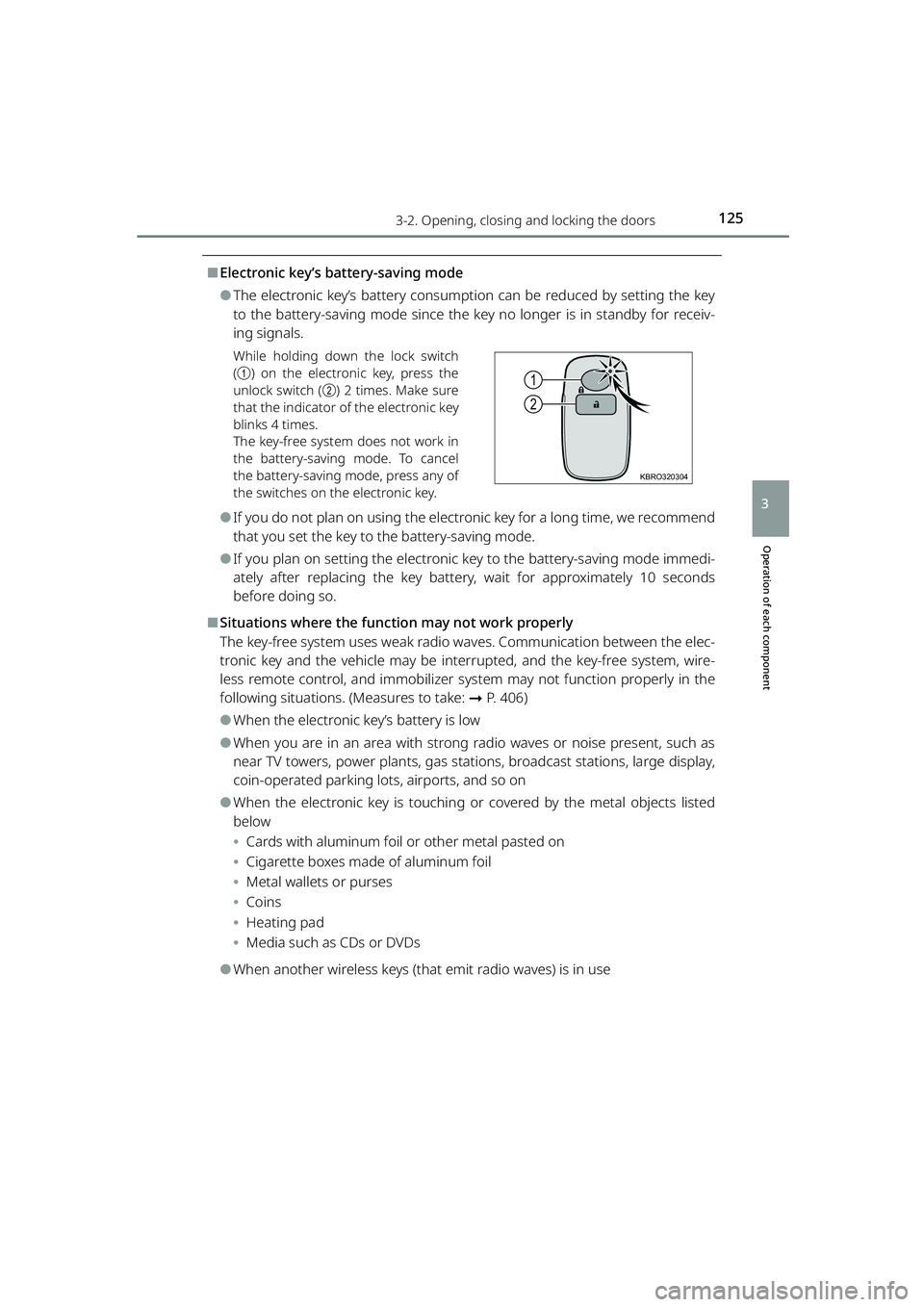
⬛Electronic key’s battery-saving mode
⚫The electronic key’s battery consumption can be reduced by setting the key
to the battery-saving mode since the key no longer is in standby for receiv-
ing signals.
While holding down the lock switch
(a ) on the electronic key, press the
unlock switch ( b) 2 times. Make sure
that the indicator of the electronic key
blinks 4 times.
The key-free system does not work in
the battery-saving mode. To cancel
the battery-saving mode, press any of
the switches on the electronic key.
⚫If you do not plan on using the electronic key for a long time, we recommend
that you set the key to the battery-saving mode.
⚫If you plan on setting the electronic key to the battery-saving mode immedi-
ately after replacing the key battery, wait for approximately 10 seconds
before doing so.
⬛Situations where the function may not work properly
The key-free system uses weak radio wa ves. Communication between the elec-
tronic key and the vehicle may be interrupted, and the key-free system, wire-
less remote control, and i mmobilizer system may not function properly in the
following situations. (Measures to take: ➞P. 406)
⚫When the electronic key’s battery is low
⚫When you are in an area with strong radio waves or noise present, such as
near TV towers, power plants, gas stat ions, broadcast stations, large display,
coin-operated parking lots, airports, and so on
⚫When the electronic key is touching or covered by the metal objects listed
below
⦁ Cards with aluminum foil or other metal pasted on
⦁ Cigarette boxes made of aluminum foil
⦁ Metal wallets or purses
⦁ Coins
⦁ Heating pad
⦁ Media such as CDs or DVDs
⚫When another wireless keys (that emit radio waves) is in use
1
2
KBRO320304
RAIZE_OM_General_BZ358E.book 125 ページ 2022年5月17日 火曜日 午後1時59分
Page 129 of 516
1273-2. Opening, closing and locking the doors
RAIZE_OM_General_BZ358E
Operation of each component
3
⚫If water splashes on the door handle during a car wash or heavy rain, the
doors may get locked and unlocked re peatedly while the electronic key is
located within the operating range. If that happens, perform the procedures
listed below. (Without opening or closing the doors, the unlocked doors will
be automatically locked appr oximately after 30 seconds)
⦁ Place the key approx. 3 m (9.8 ft.) or more away from the vehicle (beware
of theft)
⦁ Disabling the key-free system activation by setting the key to the battery-
saving mode ( ➞P. 125)
⚫When a part of your clothes touches the lock/unlock switch on the front
door, it could lock or unlock the do or while the electronic key is located
within the operating range.
⚫If you lock the vehicle using the wir eless remote control when the electronic
key is placed inside or near the vehicle, unlocking by the key-free system may
not work. (The system can be restored by unlocking the vehicle using the
wireless remote control)
⚫Operate the door handle switch properly and ensure that the door has been
locked or unlocked. If you operate th e switch too fast, the door may not be
locked or unlocked.
⚫If the door handle switch is covered wi th ice, snow, or mud, the switch may
not work. If the switch is not working, remove the ice, snow, or mud from the
surface, and operate the switch again.
⚫When you operate the door handle swit ch, your nails may touch the door. Be
careful not to damage the door or break your nails.
⚫When you operate the lock/unlock switch on the front door with gloves on,
the locking or unlocking gets delayed, or the door may not even get locked
or unlocked.
⚫Depending on the surrounding conditions, the doors may not get locked or
unlocked by operating the lock/unlock switch on the front door. In that case,
use the wireless function or the emergency key to lock and unlock the door.
( ➞ P. 133, 406)
⚫The power-saving function will be activ ated in the situations listed below in
order to prevent battery depletion of the electronic key and the battery dis-
charge of the vehicle. If that happens, it takes longer to lock and unlock the
vehicle using the key-free system.
⦁ The electronic key was left for approx. 2 minutes or longer within the
approx. 3 m (9.8 ft.) range from the vehicle
⦁ The key-free system was not used for approximately 5 days or longer
RAIZE_OM_General_BZ358E.book 127 ページ 2022年5月17日 火曜日 午後1時59分
Page 130 of 516
1283-2. Opening, closing and locking the doors
RAIZE_OM_General_BZ358E
⬛Important points when locking the doors
During an automatic car wash, the vehicl e’s internal buzzer may sound if water
splashes on the door handle while the electronic key is left inside the vehicle.
⬛Important points when unlocking the doors
⚫When you pull the door handle while operating the door handle switch, the
door may not get unlocked. In that case, restore the door handle to the orig-
inal position and operate the switch again (except for the back door). When
you verify that the door has been unlocked, pull the door handle.
⚫When another electronic key is placed within the operating range, it may
take longer to unlock the door from the time when you operate the switch
on the door handle.
⬛Leaving the vehicle unused for a long period
⚫To prevent theft, keep the electronic key away from the vehicle for approx. 3
m (9.8 ft.).
⚫You can also disable the key-free system beforehand.
Contact your Toyota dealer for further information.
⬛Starting the system normally
Make sure to carry the electronic ke y with you when you start the system.
When you start the system from outside the vehicle, be careful not to keep the
electronic key too close to the vehicle.
Depending on the electronic key’s position or how you hold it when starting
the system, the key may not be detected correctly, preventing the system from
starting normally. (It could cause the al arm to go off unexpectedly or the door
lock prevention func tion may not work. : ➞P. 139)
⬛When the key-free system does not work properly
⚫Locking and unlocking doors: ➞ P. 4 0 6
⚫Starting the engine: ➞P. 4 0 6
⬛Low battery
⚫The standard battery life is between 1 and 2 years.
⚫The battery still depletes without usin g the wireless remote control. Since
the electronic key is constantly receiving radio waves, the battery depletes
even when it is not in use. If you encounter any of the following situations,
the key may be running out of battery. Replace it with a new battery.
⦁ The key-free system or wireless remote control will not start
⦁ The operating range has become narrower
⦁ The LED of the electronic key will not light
RAIZE_OM_General_BZ358E.book 128 ページ 2022年5月17日 火曜日 午後1時59分
Page 133 of 516
1313-2. Opening, closing and locking the doors
RAIZE_OM_General_BZ358E ✽
: If equipped
Operation of each component
3
Wireless remote control
Function overview
You can lock and unlock the doors.
▶Vehicles without key-free system
➞ P. 1 3 3
▶Vehicles with key-free system
➞ P. 1 3 3
⬛Signaling of the operation
The buzzer and the blinking emergency flashers will notify you of the opera-
tion. (1 time for locking and 2 times for unlocking)
⬛Customizations
The signaling of the operation can be changed.
(List of customizable features: ➞ P. 430)
(The settings can be changed from the setup screen of the multi-information
display
✽: ➞ P. 9 1 )
(The settings can be changed from the setup screen of the TFT color multi-
information display
✽: ➞ P. 104)
⬛Security features for unlocking operation
➞ P. 1 3 9
⬛Situations where the function may not work properly
▶Vehicles without key-free system
In the following cases, the wireless remote control may not work as intended.
⚫When the wireless key’s battery is low
⚫When you are in an area with strong radio waves or noise present, such as
near TV towers, power plants, gas stat ions, broadcast stations, large display,
airports, and so on
⚫When you have a wireless communication device such as a radio, mobile
phone, and cordless telephone with you
⚫If the wireless remote control touches or is covered by a metal object
⚫When a wireless key (that emits radio waves) is in use near by
⚫When a metal-containing film is pasted on the rear window
▶Vehicles with key-free system
➞ P. 1 2 5
RAIZE_OM_General_BZ358E.book 131 ページ 2022年5月17日 火曜日 午後1時59分