automatic transmission TOYOTA RAV4 1999 User Guide
[x] Cancel search | Manufacturer: TOYOTA, Model Year: 1999, Model line: RAV4, Model: TOYOTA RAV4 1999Pages: 226, PDF Size: 3.89 MB
Page 95 of 226
'99 Rav4.U95
NOTICE
Do not hold the vehicle on an up-grade with the accelerator pedal. Itcan cause the transmission to over-heat. Always use the brake pedal or
parking brake.
(g) Rocking your vehicle if stuck
CAUTION
If your vehicle becomes stuck in
snow, mud, sand, etc., then you may
attempt to rock the vehicle free by
moving it forward and backward. Do
not attempt this procedure if people
or objects are anywhere near the ve-
hicle. During the rocking operation
the vehicle may suddenly move for-
ward or backward as it becomes un-
stuck, causing injury or damage to
nearby people or objects.
NOTICE
If you rock your vehicle, observe thefollowing precautions to prevent dam-age to the transmission and other parts.
Do not depress the accelerator ped-al while shifting the selector leveror before the transmission is com-
pletely shifted to forward or reversegear.
Do not race the engine and avoidspinning the wheels.
If your vehicle remains stuck after
rocking the vehicle several times,consider other ways such as tow-
ing.
(h) Driving in ºPOWERº mode
In the ºPOWERº mode, the transmission
is shifted up and down at a higher vehicle
speed than in the ºNORMALº mode and a
more powerful acceleration is achieved. To
set the ºPOWERº mode, push in the driv-
ing pattern selector button. The ºPOWERº
mode indicator light comes on.
For ordinary driving, Toyota recommends
using the ºNORMALº mode to improve fuel
economy.
(i) If you cannot shift the selector lever
out of ºPº position
If you cannot shift the selector lever from
the ºPº position even though the brake
pedal is depressed, use the shift lock
override button. For instructions, see ºIf
you cannot shift automatic transmission
selector leverº in Part 4.
Page 100 of 226
'99 Rav4.U
100
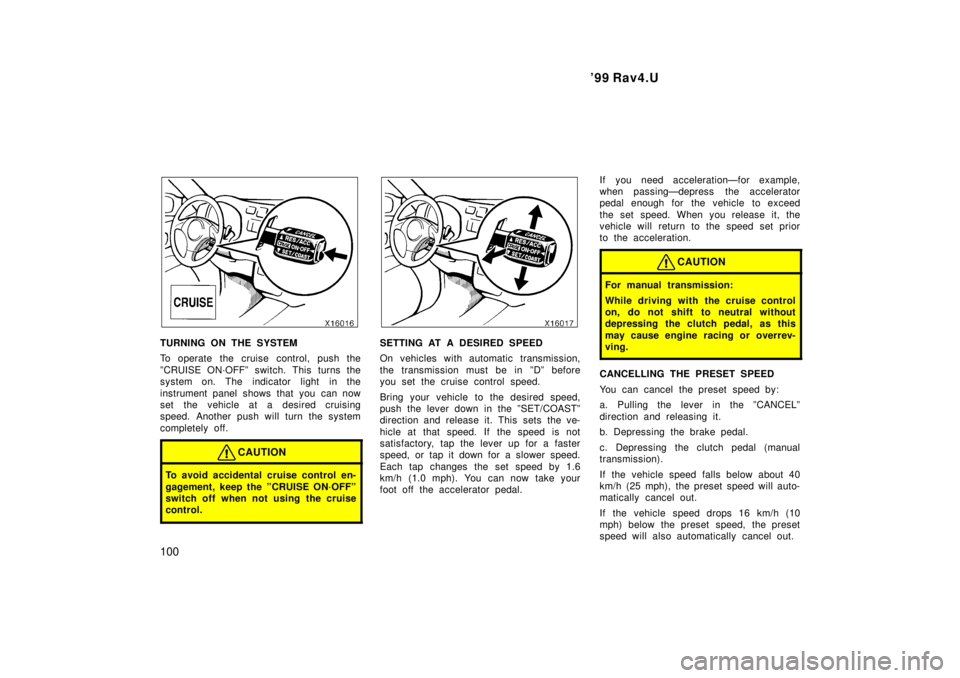
TURNING ON THE SYSTEM
To operate the cruise control, push the
ºCRUISE ON´OFFº switch. This turns the
system on. The indicator light in the
instrument panel shows that you can now
set the vehicle at a desired cruising
speed. Another push will turn the system
completely off.
CAUTION
To avoid accidental cruise control en-
gagement, keep the ºCRUISE ON´OFFº
switch off when not using the cruise
control.
SETTING AT A DESIRED SPEED
On vehicles with automatic transmission,
the transmission must be in ºDº before
you set the cruise control speed.
Bring your vehicle to the desired speed,
push the lever down in the ºSET/COASTº
direction and release it. This sets the ve-
hicle at that speed. If the speed is not
satisfactory, tap the lever up for a faster
speed, or tap it down for a slower speed.
Each tap changes the set speed by 1.6
km/h (1.0 mph). You can now take your
foot off the accelerator pedal. If you need accelerationÐfor example,
when passingÐdepress the accelerator
pedal enough for the vehicle to exceed
the set speed. When you release it, the
vehicle will return to the speed set prior
to the acceleration.
CAUTION
For manual transmission:
While driving with the cruise control
on, do not shift to neutral without
depressing the clutch pedal, as this
may cause engine racing or overrev-
ving.
CANCELLING THE PRESET SPEED
You can cancel the preset speed by:
a. Pulling the lever in the ºCANCELº
direction and releasing it.
b. Depressing the brake pedal.
c. Depressing the clutch pedal (manual
transmission).
If the vehicle speed falls below about 40
km/h (25 mph), the preset speed will auto-
matically cancel out.
If the vehicle speed drops 16 km/h (10
mph) below the preset speed, the preset
speed will also automatically cancel out.
Page 101 of 226

'99 Rav4.U101
If the preset speed automatically cancels
out other than for the above cases or, if
the indicator light flashes several times,
the cruise control may be malfunctioning.
In such cases, have your vehicle checked
by your Toyota dealer at the earliest op-
portunity.
RESETTING AT A FASTER SPEED
Push the lever up in the ºRES/ACCº direc-
tion and hold it. Release the lever when
the desired speed is attained. While the
lever is held up, the vehicle will gradually
gain speed.
However, a faster way to reset is to ac-
celerate the vehicle and then push the
lever down in the ºSET/COASTº direction.
RESETTING AT A SLOWER SPEED
Push the lever down in the ºSET/COASTº
direction and hold it. Release the lever
when the desired speed is attained. While
the lever is held down, the vehicle speed
will gradually decrease.
However, a faster way to reset is to de-
press the brake pedal and then push the
lever down in the ºSET/COASTº direction.
On vehicles with automatic transmission,
even if you turn off the overdrive switch
with the cruise control on, engine braking
will not be applied because the cruise
control is not cancelled. To decrease the
vehicle speed, reset to a slower speed
with the cruise control lever or depress
the brake pedal. If you use the brake
pedal, cruise control is cancelled.
RESUMING THE PRESET SPEED
If the preset speed is cancelled by pu
lling
the control lever or by depressing the
brake pedal or clutch pedal, pushing the
lever up in the ºRES/ACCº direction will
restore the speed set prior to cancellation.
However, once the vehicle speed falls be-
low about 40 km/h (25 mph), the preset
speed will not be resumed.
CRUISE CONTROL FAILURE WARNING
If the ºCRUISEº indicator light in the
instrument cluster flashes when using the
cruise control, press the ºCRUISE
ON´OFFº button to turn the system off and
then press it again to turn it on. If any of the following conditions then oc-
curs, there is some trouble in the cruise
control system.
The indicator light does not come on.
The indicator light flashes again.
The indicator light goes out after it
comes on.
If this is the case, contact your Toyota
dealer and have your vehicle inspected.
Page 145 of 226
'99 Rav4.U145
Part 3
STARTING AND DRIV-
ING
Before starting the engine
How to start the engine
Tips for driving in various
conditions
Off- road driving precautions
Winter driving tips
Tr ailer towing
How to save fuel and make your
vehicle last longer, too
Before starting the engine
1. Check the area around the vehicle be- fore entering it.
2. Adjust seat position, seatback angle, head restraint height and steering
wheel angle.
3. Adjust inside and outside rear view mirrors.
4. Lock side doors, back door (hardtop) and tailgate (soft- top).
5. Fasten seat belts. 1. Apply the parking brake firmly.
2. Turn off unnecessary lights and acces-
sories.
3. Manual transmission: Press the clutch
pedal to the floor and shift the trans-
mission into neutral. Hold the clutch
pedal to the floor until the engine is
started. A starter safety device will pre-
vent the starter from operating if the
clutch pedal is not fully depressed.
Automatic transmission: Put the se-
lector lever in ºPº. If you need to re-
start the engine while the vehicle is
moving, put the selector lever in ºNº.
A starter safety device will prevent the
starter from operating if the selector
lever is in any drive position.
4. Automatic transmission only: De-
press the brake pedal and hold it to
the floor until driving off.
How to start the engineÐ
(a) Before cranking
Page 149 of 226
'99 Rav4.U149
Winter driving tips
Make sure you have a proper freeze
protection of engine coolant.
Your coolant must contain ethylene- glycol
type coolant for a proper corrosion
protection of aluminum components. Use
ºToyota Long Life Coolantº or equivalent.
See Chapter 7- 2 for details about coolant
type selection.
NOTICE
Do not use alcohol type antifreeze or
plain water alone.
When it is extremely cold, we recommend
to use 60% solution for your Toyota, to
provide protection down to about -50 5C
(- 58 5F). Do not use more than 70% solu-
tion for better coolant performance.
Check the condition of the battery and
cables.
Cold temperatures reduce the capacity of
any battery, so it must be in top shape
to provide enough power for winter start-
ing. Chapter 7- 3 tells you how to visually
inspect the battery. Your Toyota dealer
and most service stations will be pleased
to check the level of charge. Make sure the engine oil viscosity is
suitable for the cold weather.
See Chapter 7- 2 for recommended viscos-
ity. Leaving a heavy summer oil in your
vehicle during winter months may cause
harder starting. If you are not sure about
which oil to use, call your Toyota dealer±
he will be pleased to help.
Keep the door locks from freezing.
Squirt lock de- icer or glycerine into the
locks to keep them from freezing. To open
a frozen lock, try heating the key before
inserting it.
Use a washer fluid containing an anti-
freeze solution.
This product is available at your Toyota
dealer and most auto parts stores. Follow
the manufacturer 's directions for how
much to mix with water.
NOTICE
Do not use engine antifreeze or any
other substitute because it may dam-age your vehicle's paint.
Do not use your parking brake when
there is a possibility it could freeze.
When parking, put the transmission into
ºPº (automatic) or into first or reverse
(manual) and block the rear wheels. Do
not use the parking brake, or snow or
water accumulated in and around the
parking brake mechanism may freeze,
making it hard to release.
Keep ice and snow from accumulating
under the fenders.
Ice and snow built up under your fenders
can make steering difficult. During bad
winter driving, stop and check under the
fenders occasionally.
Depending on where you are driving,
we recommend you carry some emer-
gency equipment.
Some of the things you might put in the
vehicle are tire chains, window scraper,
bag of sand or salt, flares, small shovel,
jumper cables, etc.
Page 154 of 226
'99 Rav4.U
154
Crosswinds and rough roads will ad-
versely affect handling of your vehicle
and trailer, causing sway. Pay attention
to the rear from time to time to pre-
pare yourself for being passed by large
trucks or buses, which may cause your
vehicle and trailer to sway. If swaying
happens, firmly grip the steering wheel
and reduce speed immediately but
gradually. Never increase speed. Steer
straight ahead. If you make no extreme
correction with the steering or brakes,
the vehicle and trailer will stabilize.
Be careful when passing other ve-
hicles. Passing requires considerable
distance. After passing a vehicle, do
not forget the length of your trailer and
be sure you have plenty of room be-
fore changing lanes.
In order to maintain engine braking effi-
ciency, do not use fifth gear (manual
transmission) or overdrive (automatic
transmission).
Because of the added load of the trail-
er, your vehicle's engine may overheat
on hot days (at temperatures over 30C [85 F]) when going up a long or
steep grade with a trailer. If the engine
coolant temperature gauge indicates
overheating, immediately turn off the air
conditioning (if in use), pull off the road
and stop in a safe spot. Refer to ºIf
your vehicle overheatsº in Part 4 of
this manual.
Always place wheel blocks under both
the vehicle and trailer wheels when
parking. Apply the parking brake firmly.
Put the transmission in ºPº (automatic)
or in first or reverse (manual). Avoid
parking on a slope with a trailer, but
if it cannot be avoided, do so only
after performing the following:
1. Apply the brakes and hold.
2. Have someone place wheel blocks un- der both the vehicle and trailer wheels.
3. When the wheel blocks are in place, release your brakes slowly until the
blocks absorb the load.
4. Apply the parking brake firmly.
5. Shift into first or reverse (manual) or ºPº (automatic) and turn off the engine. When restarting out after parking on a
slope:
1. With the transmission in ºPº position (automatic) or the clutch pedal de-
pressed (manual), start the engine.
(With an automatic transmission, be
sure to keep the brake pedal de-
pressed.)
2. Shift into gear.
3. Release the parking brake (also foot brake on automatic transmission ve-
hicles) and slowly pull or back away
from the wheel blo cks. Stop and apply
your brakes.
4. Have someone retrieve the blo cks.
CAUTION
Do not exceed 72 km/h (45 mph) or
the posted towing speed limit,
whichever is lower. Because insta-
bility (swaying) of a towing vehicle-
trailer combination usually in-
creases as the speed increases, ex-
ceeding 72 km/h (45 mph) may
cause loss of control.
Page 157 of 226
'99 Rav4.U157
Part 4
IN CASE OF AN
EMERGENCY
If your vehicle will not start
If your engine stalls while
driving
If your vehicle overheats
If you have a flat tire
If your vehicle needs to be
towed
If you cannot shift automatic
transmission selector lever
If you lose your keys
Before making these checks, make sure
you have followed the correct starting pro-
cedure given in ºHow to start the engineº
in Part 3 and that you have sufficient fuel.
If the engine is not turning over or is
turning over too slowlyÐ
1. Check that the battery terminals are tight and clean.
2. If the battery terminals are O.K., switch on the interior light.
3. If the light is out, dim or goes out when the starter is cranked, the battery
is discharged. You may try jump start-
ing. See º(c) Jump startingº for further
instructions.
If the light is O.K., but the engine still will
not start, it needs adjustment or repair.
Call a Toyota dealer or qualified repair
shop.
NOTICE
Do not pull- or push- start the vehicle. It may damage the vehicle or causea collision when the engine starts. Also the three- way catalytic converter
may overheat and become a fire haz-ard.
If the engine turns over at its normal
speed but will not startÐ
1. Check that all the push- on connectors are tight. (For example, connections at
the spark plugs, ignition coil and/or dis-
tributor)
2. If the connectors are O.K., the engine may be flooded because of repeated
cranking. See º(b) Starting a flooded
engineº for further instructions.
If your vehicle will not startÐ
(a) Simple checks
Page 161 of 226
'99 Rav4.U161
If your vehicle overheats
If your engine coolant temperature
gauge indicates overheating, if you ex-
perience a loss of power, or if you hear
a loud knocking or pinging noise, the
engine has probably overheated. You
should follow this procedure...
1. Pull safely off the road, stop the ve- hicle and turn on your emergency
flashers. Put the transmission in ºPº
(automatic) or neutral (manual) and ap-
ply the parking brake. Turn off the air
conditioning if it is being used.
2. If coolant or steam is boiling out of the radiator or reservoir, stop the engine.
Wait until the steam subsides before
opening the hood. If there is no coolant
boiling over or steam, leave the engine
running and make sure the electric
cooling fan is operating. If it is not,
turn the ignition off.
CAUTION
To help avoid personal injury, keep
the hood closed until there is no
steam. Escaping steam or coolant is
a sign of very high pressure.
3. Look for obvious coolant leaks from the radiator, hoses, and under the vehicle.
However, note that water draining from
the air conditioning is normal if it has
been used.
CAUTION
When the engine is running, keep
hands and clothing away from the
moving fan and engine drive belts.
4. If the coolant is leaking, stop the en-gine immediately. Call a Toyota dealer
for assistance.
5. If there are no obvious leaks, check the coolant reservoir. If it is dry, add
coolant to the reservoir while the en-
gine is running. Fill it about half full.
CAUTION
Do not attempt to remove the radiator
cap when the engine and radiator are
hot. Serious injury could result from
scalding hot fluid and steam blown
out under pressure.
6. After the engine coolant temperaturehas cooled to normal, again check the
coolant level in the reservoir. If neces-
sary, bring it up to half full again. Seri-
ous coolant loss indicates a leak in the
system. You s hould have it checked as
soon as possible at your Toyota dealer.
Page 162 of 226
'99 Rav4.U
162
If you have a flat tireÐ
1. Reduce your speed gradually, keeping a straight line. Move cautiously off the
road to a safe place well away from
the traffic. Avoid stopping on the center
divider of a highway. Park on a level
spot with firm ground.
2. Stop the engine and turn on your emergency flashers.
3. Firmly set the parking brake and put the transmission in ºPº (automatic) or
reverse (manual).
4. Have everyone get out of the vehicle on the side away from traffic.
5. Read the following instructions thor- oughly.
CAUTION
When jacking, be sure to observe the
following to reduce the possibility of
personal injury: Follow jacking instructions.
Do not start or run the engine while
your vehicle is supported by the
jack.
Stop the vehicle on a level firm
ground, firmly set the parking brake
and put the transmission in ºPº
(automatic) or reverse (manual).
Block the wheel diagonally opposite
to the one being changed if neces-
sary.
Make sure to set the jack properly
in the jack point. Raising the ve-
hicle with jack improperly posi-
tioned will damage the vehicle or
may allow the vehicle to fall off the
jack and cause personal injury.
Never get under the vehicle when
the vehicle is supported by the jack
alone.
Use the jack only for lifting your
vehicle during wheel changing.
Do not raise the vehicle with some-
one in the vehicle.
When raising the vehicle, do not
put an object on or under the jack.
Raise the vehicle only high enough
to remove and change the tire.NOTICE
Do not continue driving with a de-
flated tire. Driving even a short dis-tance can damage a tire beyond re- pair.
Page 170 of 226
'99 Rav4.U
170
TOWING PRECAUTIONS:
Use a safety chain system for all towing,
and abide by the state/provincial and local
laws. The wheels and axle on the ground
must be in good condition. If they are
damaged, use a towing dolly.
Two- wheel drive modelsÐ
(a) Towing with wheel lift type truck
From frontÐ
Release the parking brake.
NOTICE
When lifting wheels, take care to en-
sure adequate ground clearance fortowing at the opposite end of the
raised vehicle. Otherwise, the bumper
and/or underbody of the towed vehiclewill be damaged during towing.
From rearÐ
Manual transmission:
We recommend using a towing dolly
under the front wheels. If you do not
use a towing dolly, place the ignition
key in the ºACCº position and put the
transmission in neutral.
NOTICE
Do not tow with the key removed or
in the ºLOCKº position when towingfrom the rear without a towing dolly. The steering lock mechanism is not
strong enough to hold the frontwheels straight.
Automatic transmission:
Use a towing dolly under the front
wheels.
NOTICE
Never tow a vehicle with an automatic
transmission from the rear with thefront wheels on the ground, as this
may cause serious damage to the
transmission.
(b) Using flat bed truck
Four- wheel drive modelsÐ
(a) Towing with wheel lift type truck
Use a towing dolly under the wheels not
lifted by the truck.
(b) Using flat bed truck
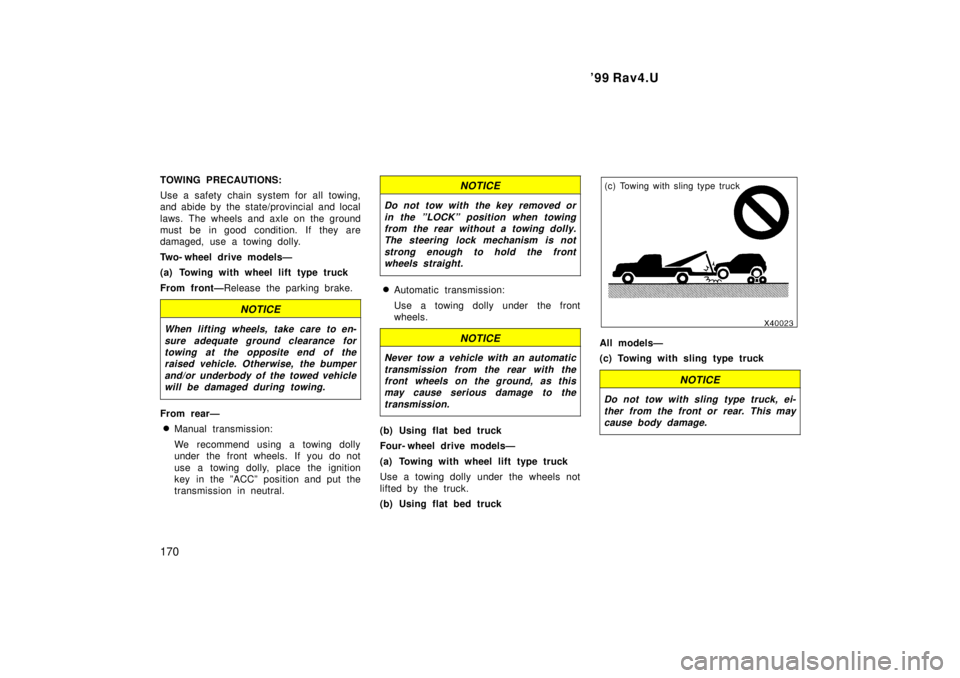
(c) Towing with sling type truck
All modelsÐ
(c) Towing with sling type truck
NOTICE
Do not tow with sling type truck, ei- ther from the front or rear. This maycause body damage.