Remote TOYOTA RAV4 2009 XA30 / 3.G User Guide
[x] Cancel search | Manufacturer: TOYOTA, Model Year: 2009, Model line: RAV4, Model: TOYOTA RAV4 2009 XA30 / 3.GPages: 516, PDF Size: 10.61 MB
Page 38 of 516

38
1-2. Opening, closing and locking the doors
Wireless remote control
■Operation signals
Doors: A buzzer sounds and the emergency flashers flash to indicate that
the doors have been locked/unlocked. (Locked: Once; Unlocked:
Twice)
The wireless remote control can be used to lock and unlock the vehi-
cle from outside the vehicle.
Vehicles without smart key system
Locks all doors
Pushing and holding:
Sounds alarm
Unlocks all doors
Pressing the button unlocks
the driver’s door. Pressing
the button again within 3
seconds unlocks the other
doors.
Vehicles with smart key system Locks all doors
Unlocks all doors
Pressing the button unlocks
the driver’s door. Pressing
the button again within 3
seconds unlocks the other
doors.
Pushing and holding:
Sounds alarm
Page 39 of 516

39
1-2. Opening, closing and locking the doors
1
Before driving
■
Panic mode
Vehicles without smart key system
Vehicles with smart key system
■ Door lock buzzer
If a door is not fully closed, a buzzer sounds continuously if an attempt to
lock the door is made. Fully close the door to stop the buzzer, and lock the
vehicle once more.
■ Key battery depletion
Vehicles without smart key system
The standard battery life is 1 to 2 years. (The battery becomes depleted
even if the key is not used.) If the wireless remote control function does not
operate, the battery may be depleted. Replace the battery when necessary.
( P. 384)
Vehicles with smart key system
P. 384
When is pushed for longer than
about one second, an alarm will sound for
about 60 seconds and the vehicle lights
will flash to deter any person from trying
to break into or damage your vehicle.
To stop the alarm, push any button on the
wireless remote control.
When is pushed for longer than
about one second, an alarm will sound for
about 60 seconds and the vehicle lights
will flash to deter any person from trying
to break into or damage your vehicle.
To stop the alarm, push any button on the
wireless remote control.
Page 40 of 516

40 1-2. Opening, closing and locking the doors
■If the wireless remote control does not operate
Vehicles without smart key system
Locking and unlocking the doors: Use the key. ( P. 42)
Vehicles with smart key system
● Locking and unlocking the doors: Use the mechanical key. ( P. 455)
● Starting the engine. ( P. 143)
■ Security feature
If a door is not opened within approximately 60 seconds after the vehicle is
unlocked, the anti-theft system automatically locks the vehicle again.
■ Conditions affecting operation
Vehicles without smart key system
The wireless remote control function may not operate normally in the follow-
ing situations.
● Near a TV tower, radio station, electr ic power plant, airport or other facil-
ity that generates strong radio waves
● When carrying a portable radio, cell ular phone or other wireless commu-
nication devices
● When multiple wireless keys are in the vicinity
● When the wireless key is in contact with, or is covered by a metallic
object
● When a wireless key (that emits radio waves) is being used nearby
● When the wireless key has been left near an electrical appliance such as
a personal computer
Vehicles with smart key system
P. 3 0
■ Customization that can be co nfigured at Toyota dealer
Settings (e.g. wireless remote control) can be changed. (Customizable fea-
tures P. 491)
Page 41 of 516
41
1-2. Opening, closing and locking the doors
1
Before driving
■
Certification for wireless remote c ontrol (vehicles without smart key
system)
For vehicles sold in the U.S.A.
FCC ID: HYQ12BBY
FCC ID: HYQ13BBZ
FCC ID: HYQ12BDC
FCC ID: HYQ13BDC
NOTE:
This device complies with Part 15 of the FCC Rules. Operation is subject to
the following two conditions: (1) This device may not cause harmful interfer-
ence, and (2) this device must accept any interference received, including
interference that may cause undesired operation.
FCC WARNING:
Changes or modifications not expressly approved by the party responsible
for compliance could void the user's authority to operate the equipment. For vehicles sold in Canada
NOTE:
Operation is subject to the following two conditions: (1) this device may not
cause interference, and (2) this device must accept any interference, includ-
ing interference that may cause undesired operation of the device.
■ Certification for wireless remote control (vehicles with smart key sys-
tem)
P. 3 6
Page 42 of 516
42
1-2. Opening, closing and locking the doors
Side doors
The vehicle can be locked and unlocked using the entry function,
wireless remote control, key or door lock switch.
■Entry function (vehicles with smart key system)
P. 2 6
■ Wireless remote control
P. 3 8
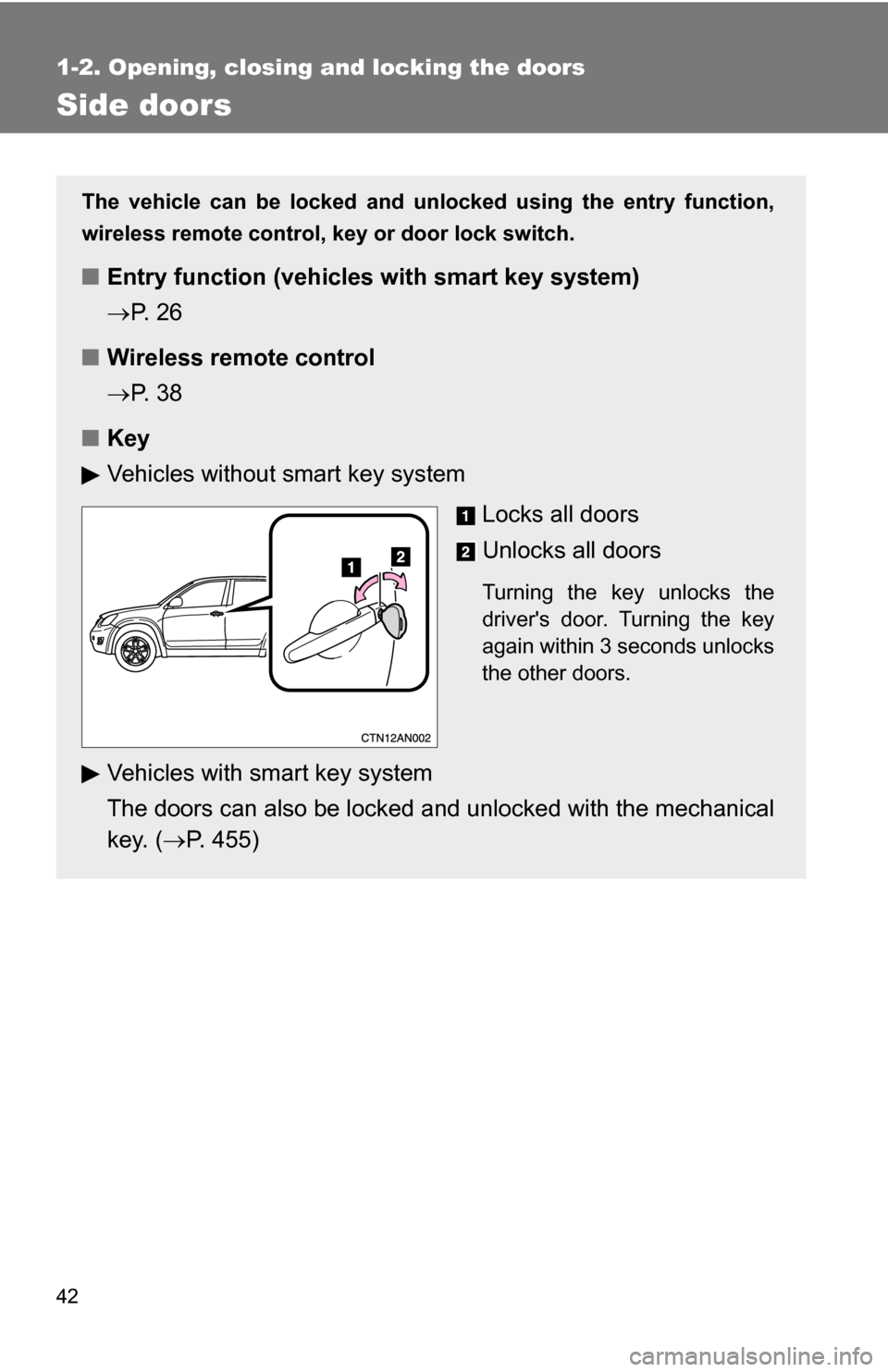
■ Key
Vehicles without smart key system
Locks all doors
Unlocks all doors
Turning the key unlocks the
driver's door. Turning the key
again within 3 seconds unlocks
the other doors.
Vehicles with smart key system
The doors can also be locked and unlocked with the mechanical
key. ( P. 455)
Page 44 of 516
44 1-2. Opening, closing and locking the doors
Locking the front doors from the outside without the wireless
remote control or keyMove the inside door lock button to the lock position.
Close the door.
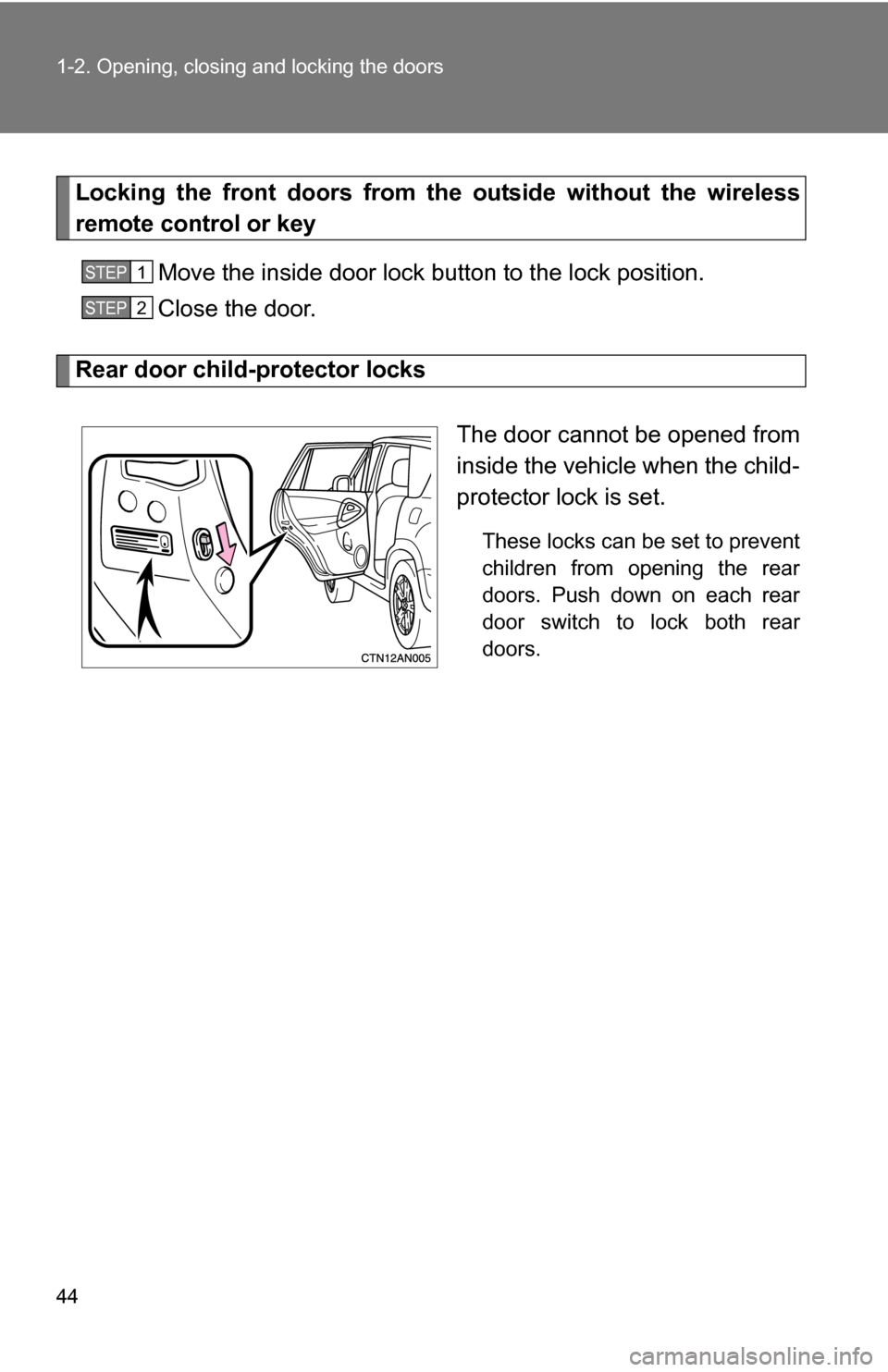
Rear door child-protector locks
The door cannot be opened from
inside the vehicle when the child-
protector lock is set.
These locks can be set to prevent
children from opening the rear
doors. Push down on each rear
door switch to lock both rear
doors.
STEP 1
STEP 2
Page 45 of 516
45
1-2. Opening, closing and locking the doors
1
Before driving
■
When all the doors are locked with the entry function (vehicles with
smart key system), wireless remote control or key
The doors cannot be unlocked with the door lock switch.
The door lock switch can be reset by unlocking all the doors with the entry
function (vehicles with smart key system), wireless remote control or key.
■ The doors cannot be locked when
Vehicles without smart key system
The key is in the engine switch and either front door is open. Vehicles with smart key system
The “ENGINE START STOP” switch is in ACCESSORY or IGNITION ON
mode, or the electronic key is left inside the vehicle.
Depending on the position of the electronic key, the key may not be detected
correctly and the door may be locked.
■ Customization that can be co nfigured at Toyota dealer
Settings (e.g. door unlocking function) can be changed. (Customizable fea-
tures P. 491)
CAUTION
■To prevent an accident
Observe the following precautions while driving the vehicle.
Failing to do so may result in a door opening and an occupant falling out,
resulting in death or serious injury.
●Always use a seat belt.
● Always lock the doors.
● Ensure that all doors are properly closed.
● Do not pull the inside handle of the doors while driving.
The doors may be opened and the passengers are thrown out of the vehi-
cle and it may result in serious injury or death.
Be especially careful for the front doors, the doors may be opened even if
the inside lock buttons are in locked position.
● Set the rear door child protector locks when children are seated in the rear
seats.
Page 46 of 516
46
1-2. Opening, closing and locking the doors
Back door
■Customization that can be co nfigured at Toyota dealer
Settings (e.g. wireless remote control) can be changed. (Customizable fea-
tures P. 491)
CAUTION
■ Caution while driving
●Keep the back door closed while driving.
If the back door is left open, it may hit near-by objects while driving or lug-
gage may be unexpectedly thrown out, causing an accident.
In addition, exhaust gases may enter the vehicle, causing death or a seri-
ous health hazard. Make sure to close the back door before driving.
● Before driving the vehicle, make sure that the back door is fully closed. If
the back door is not fully closed, it may open unexpectedly while driving,
causing an accident.
● Never let anyone sit in the luggage compartment. In the event of sudden
braking or a collision, they are susceptible to death or serious injury.
The back door can be opened using the back door handle. The back
door can be locked and unlocked us ing the wireless remote control,
entry function (vehicles with sm art key system) or door lock switch.
■Entry function (vehicles with smart key system)
P. 2 7
■ Wireless remote control
P. 3 8
■ Door lock switch
P. 4 3
Page 386 of 516
386 4-3. Do-it-yourself maintenance
■If the key battery is depleted
The following symptoms may occur.
●The smart key system and wireless remote control will not function prop-
erly.
● The operational range is reduced.
■ Use a CR2016 (vehicles without sm art key system) or CR1632 (vehicles
with smart key system) lithium battery
● Batteries can be purchased at your Toyota dealer, jewelers, or camera
stores.
● Replace only with the same or equivalent type recommended by your
Toyota dealer.
● Dispose of used batteries according to the local laws.
CAUTION
■Removed battery and other parts
Keep away from children.
These parts are small and if swallowed by a child they can cause choking.
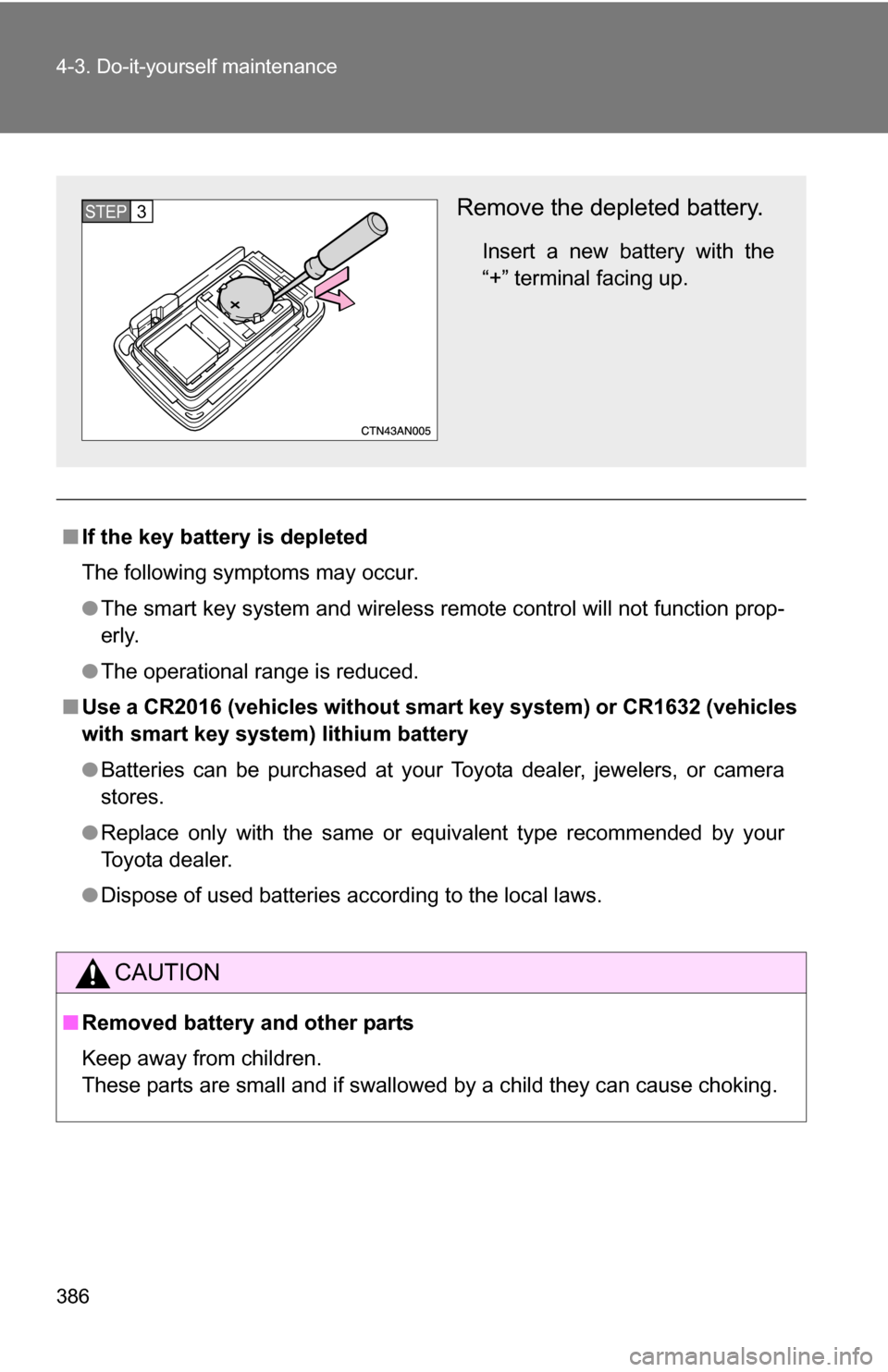
Remove the depleted battery.
Insert a new battery with the
“+” terminal facing up.
STEP 3
Page 387 of 516
387
4-3. Do-it-yourself maintenance
4
Maintenance and care
NOTICE
■
For normal operation after replacing the battery
Observe the following precautions to prevent accidents.
●Always work with dry hands.
Moisture may cause the battery to rust.
● Do not touch or move any other components inside the remote control.
● Do not bend either of the battery terminals.