Windows TOYOTA RAV4 2010 XA30 / 3.G User Guide
[x] Cancel search | Manufacturer: TOYOTA, Model Year: 2010, Model line: RAV4, Model: TOYOTA RAV4 2010 XA30 / 3.GPages: 513, PDF Size: 9.05 MB
Page 88 of 513
88
1-5. Refueling
Opening the fuel tank cap
Perform the following steps to open the fuel tank cap.
■Before refueling the vehicle
Vehicles without smart key system
Turn the engine switch to the “LOCK” position and ensure that
all the doors and windows are closed.
Vehicles with smart key system
Turn the “ENGINE START STOP” switch OFF and ensure that
all the doors and windows are closed.
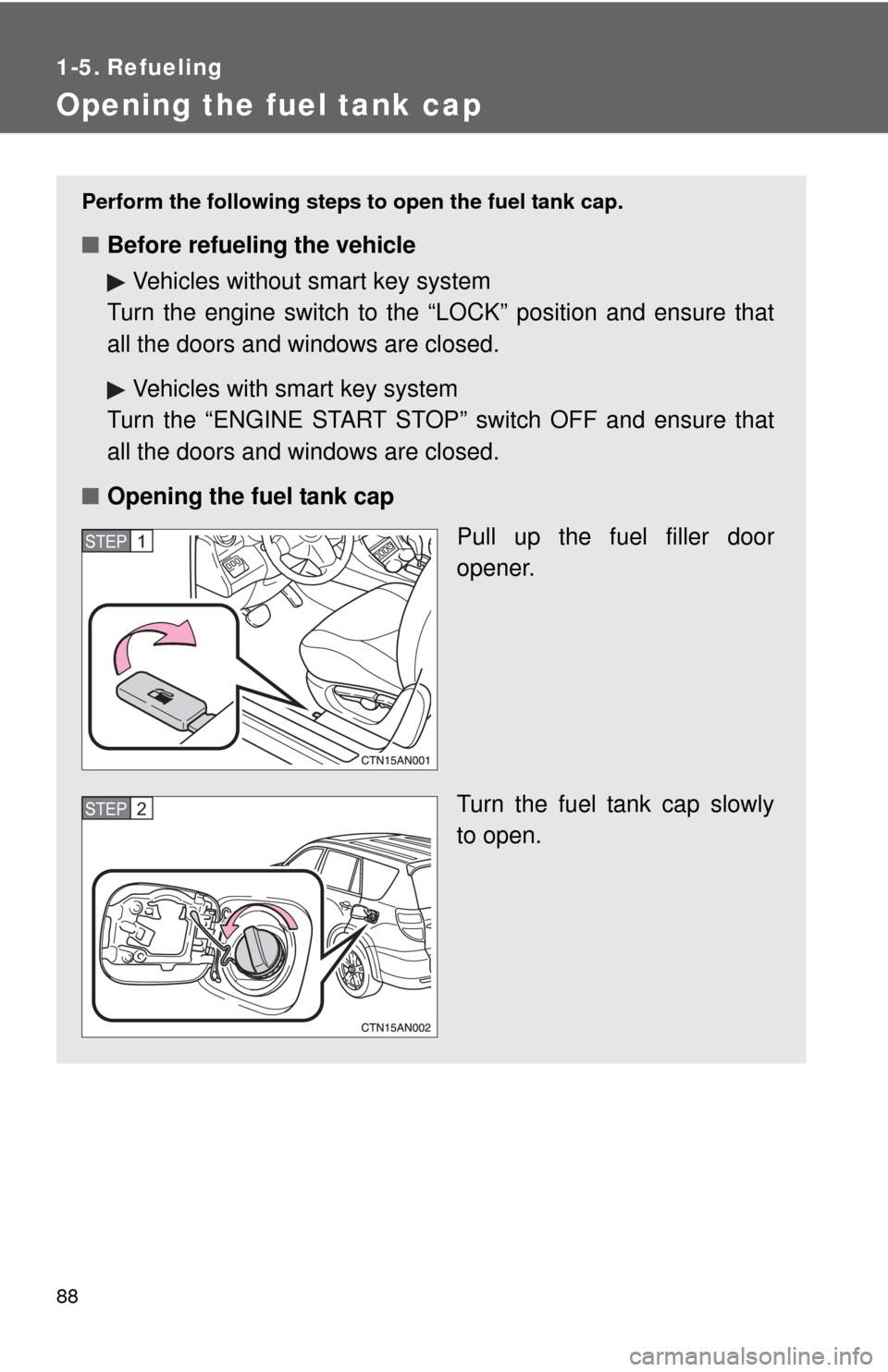
■ Opening the fuel tank cap
Pull up the fuel filler door
opener.
Turn the fuel tank cap slowly
to open.
STEP 1
STEP 2
Page 135 of 513

135
2-1. Driving procedures
2
When driving
Starting on a steep uphill
Firmly set the parking brake and shift the shift lever to D.
Gently depress the accelerator pedal.
Release the parking brake.
■Driving in the rain
●Drive carefully when it is raining, because visibility will be reduced, the
windows may become fogged-up, and the road will be slippery.
● Drive carefully when it starts to rain, because the road surface will be
especially slippery.
● Refrain from high speeds when driving on an expressway in the rain,
because there may be a layer of water between the tires and the road
surface, preventing the steering and brakes from operating properly.
■ Breaking in your new Toyota
To extend the life of the vehicle, the following precautions are recommended
to observe:
●For the first 200 miles (300 km):
Avoid sudden stops.
● For the first 500 miles (800 km):
Do not tow a trailer.
● For the first 1000 miles (1600 km):
• Do not drive at extremely high speeds.
• Avoid sudden acceleration.
• Do not drive continuously in the low gears.
• Do not drive at a constant speed for extended periods.
■ Drum-in-disc type parking brake system
Your vehicle has a drum-in-disc type parking brake system.
This type of brake system needs bedding-down of the brake shoes periodi-
cally or whenever the parking brake shoes and/or drums are replaced.
Have your Toyota dealer perform the bedding-down.
STEP 1
STEP 2
STEP 3
Page 136 of 513

136 2-1. Driving procedures
■Operating your vehicle in a foreign country
Comply with the relevant vehicle registration laws and confirm the availability
of the correct fuel. ( P. 466)
CAUTION
■When starting the vehicle
Always keep your foot on the brake pedal while stopped with the engine run-
ning. This prevents the vehicle from creeping.
■ When driving the vehicle
●Do not drive if you are unfamiliar with the location of the brake and accel-
erator pedals to avoid depressing the wrong pedal.
• Accidentally depressing the accelerator pedal instead of the brake
pedal will result in sudden acceleration that may lead to an accident
that could result in death or serious injury.
• When backing up, you may twist your body around, leading to a diffi- culty in operating the pedals. Make sure to operate the pedals properly.
• Make sure to keep a correct driving posture even when moving the vehicle only slightly, allowing you to depress the brake and accelerator
pedals properly.
• Depress the brake pedal using your right foot. Depressing the brake pedal using your left foot may delay response in an emergency, result-
ing in an accident.
● Do not drive the vehicle over or st op the vehicle near flammable materials.
The exhaust system and exhaust gases can be extremely hot. This may
cause a fire if there is any flammable material nearby.
● Do not let the vehicle roll backwards while the shift lever is in a driving
position, or roll forward while the shift lever is in R.
Doing so may cause the engine to stall or lead to poor brake and steering
performance, resulting in an accident or damage to the vehicle.
● If the smell of exhaust is noticed inside the vehicle, open the windows and
check that the back door is closed. Large amounts of exhaust in the vehi-
cle can cause driver drowsiness and an accident, resulting in death or a
serious health hazard. Have the vehicle inspected by your Toyota dealer
immediately.
Page 222 of 513
222 3-1. Using the air conditioning system and defogger
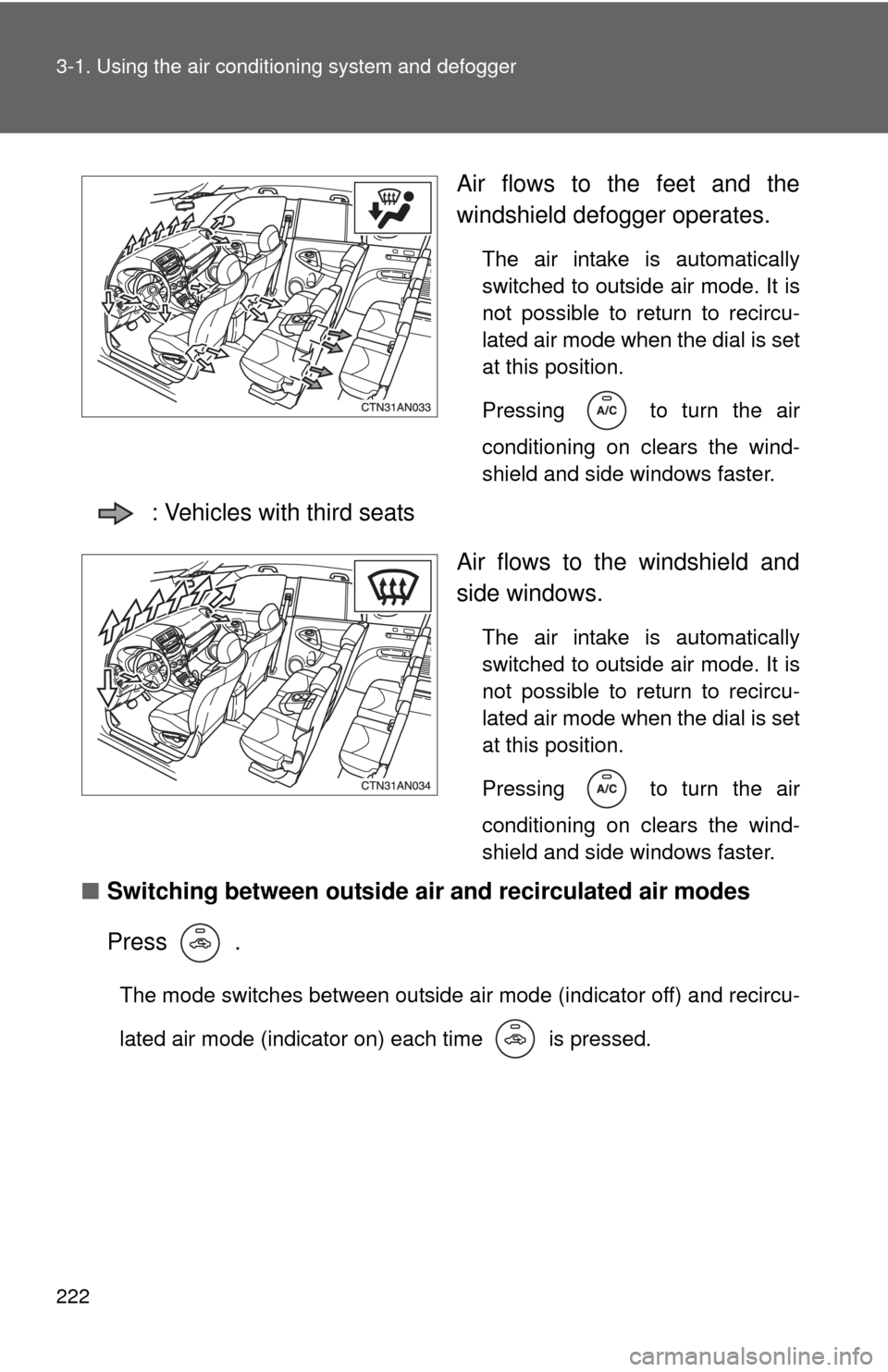
Air flows to the feet and the
windshield defogger operates.
The air intake is automatically
switched to outside air mode. It is
not possible to return to recircu-
lated air mode when the dial is set
at this position.
Pressing
to turn the air
conditioning on clears the wind-
shield and side windows faster.
: Vehicles with third seats
Air flows to the windshield and
side windows.
The air intake is automatically
switched to outside air mode. It is
not possible to return to recircu-
lated air mode when the dial is set
at this position.
Pressing
to turn the air
conditioning on clears the wind-
shield and side windows faster.
■ Switching between outside air and recirculated air modes
Press .
The mode switches between outside air mode (indicator off) and recircu-
lated air mode (indicator on) each time is pressed.
Page 224 of 513
224 3-1. Using the air conditioning system and defogger
■Using the system in recirculated air mode
The windows will fog up more easily if the recirculated air mode is used for
an extended period.
■ Window defogger feature
Recirculated air mode may automatically be switched to outside air mode in
situations where the windows need to be defogged.
■ When outside air temperat ure approaches 32°F (0°C)
The air conditioning system may not operate even when
is pressed.
■ When the indicator light on flashes
Press
and turn off the air conditioning system before turning it on once
more. There may be a problem in the ai r conditioning system if the indicator
light keeps flashing. Turn the air conditioning system off and have it
inspected by your Toyota dealer.
■ When
is selected for the air outlets used
For your driving comfort, air flowing to the feet may be warmer than air flow-
ing to the upper body depending on the position of the temperature setting.
■ Air conditioning odors
●During use, various odors from inside and outside the vehicle may enter
into and accumulate in the air conditioning system. This may then cause
odor to be emitted from the vents.
● To reduce potential odors from occurring:
It is recommended that the air conditioning system be set to outside air
mode prior to turning the vehicle off.
CAUTION
■To prevent the windshield from fogging up
Do not set the air outlet selection dial to during cool air operation in
extremely humid weather. The difference between the temperature of the
outside air and that of the windshield can cause the outer surface of the
windshield to fog up, blocking your vision.
Page 229 of 513
229
3-1. Using the air conditioning system
and defogger
3
Interior features
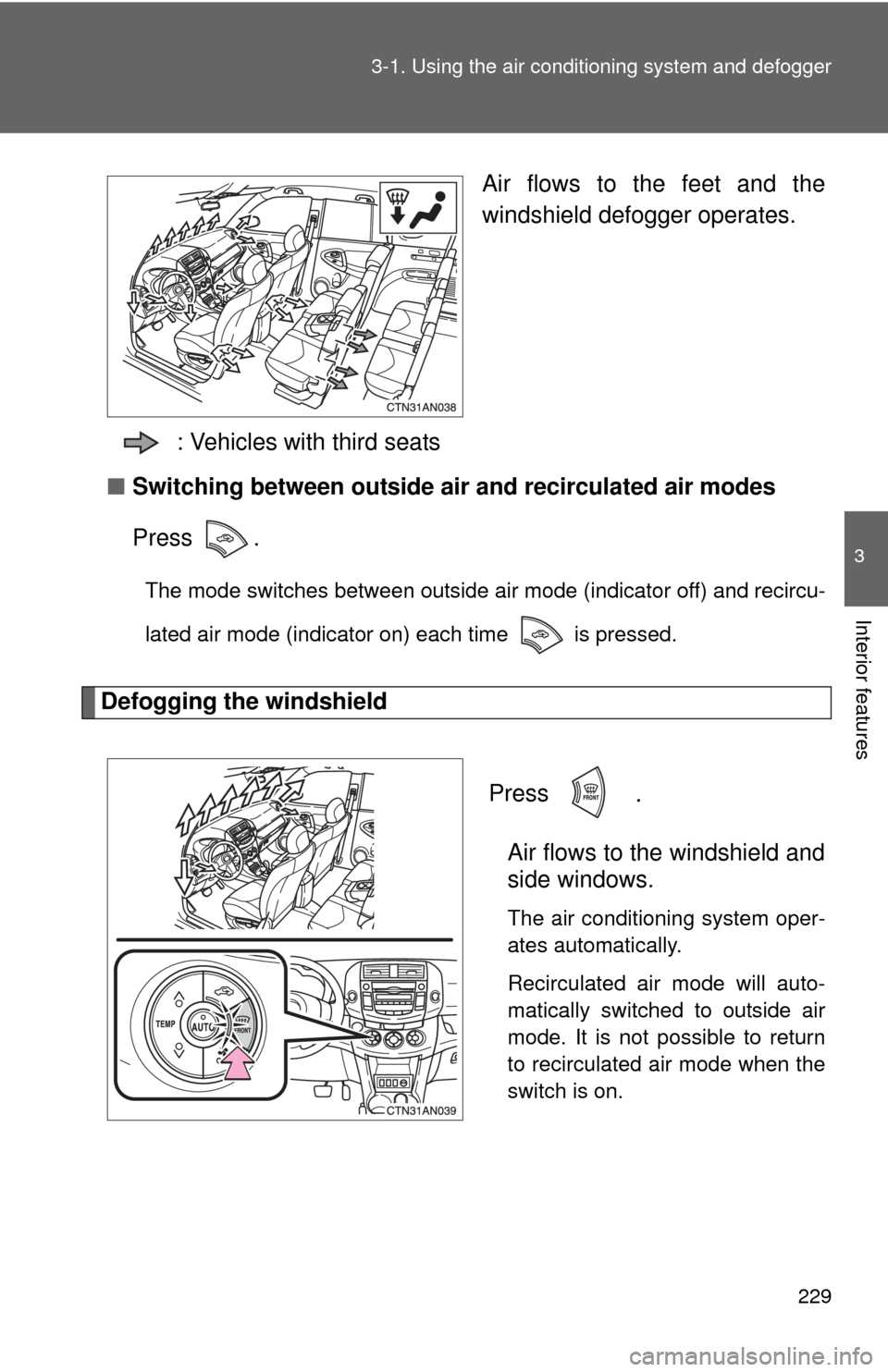
Air flows to the feet and the
windshield defogger operates.
: Vehicles with third seats
■ Switching between outside air and recirculated air modes
Press .
The mode switches between outside air mode (indicator off) and recircu-
lated air mode (indicator on) each time is pressed.
Defogging the windshield
Press
.
Air flows to the windshield and
side windows.
The air conditioning system oper-
ates automatically.
Recirculated air mode will auto-
matically switched to outside air
mode. It is not possible to return
to recirculated air mode when the
switch is on.
Page 231 of 513
231
3-1. Using the air conditioning system
and defogger
3
Interior features
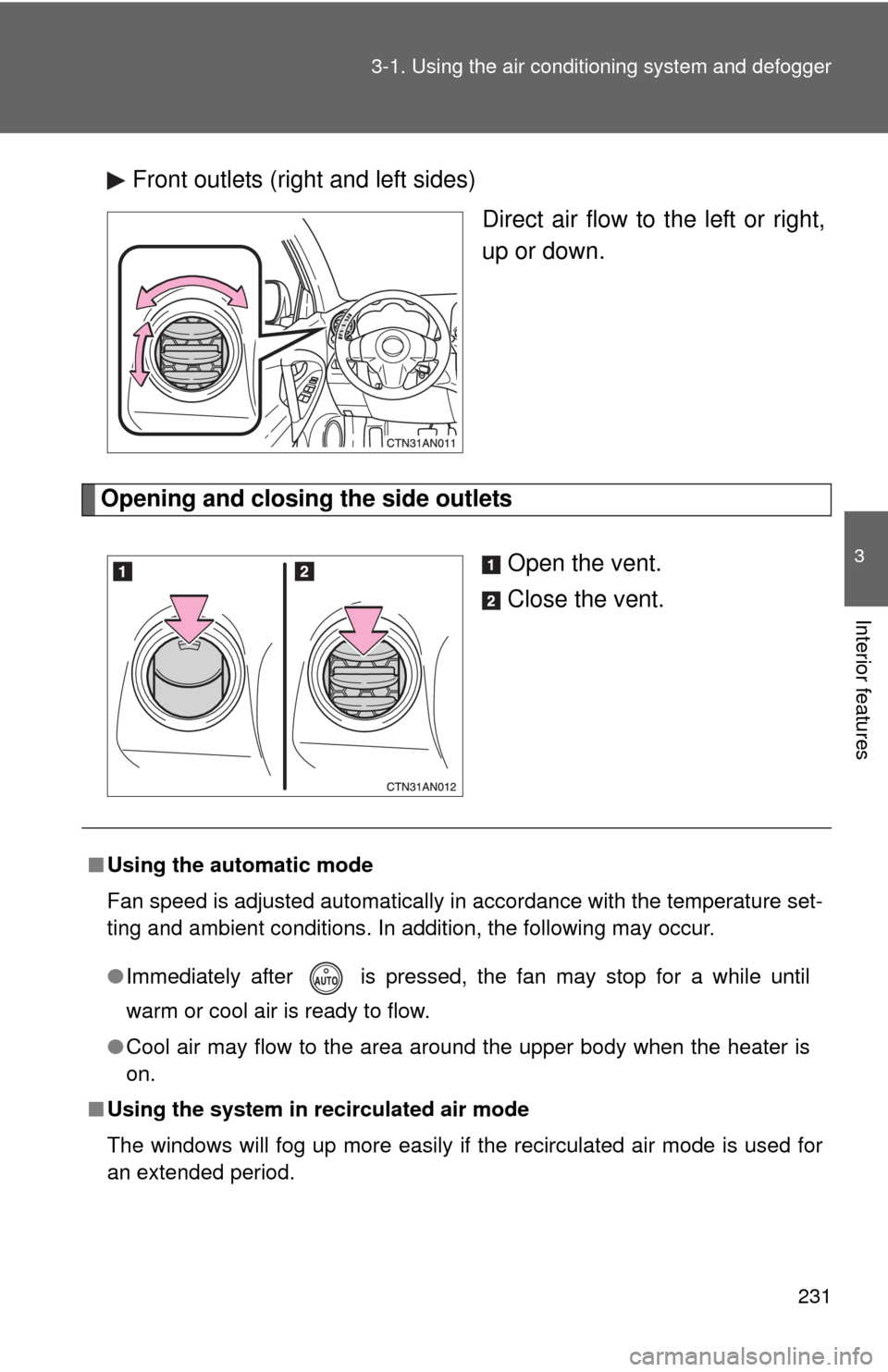
Front outlets (right and left sides)
Direct air flow to the left or right,
up or down.
Opening and closing the side outlets
Open the vent.
Close the vent.
■Using the automatic mode
Fan speed is adjusted automatically in accordance with the temperature set-
ting and ambient conditions. In addition, the following may occur.
●Immediately after is pressed, the fan may stop for a while until
warm or cool air is ready to flow.
● Cool air may flow to the area around the upper body when the heater is
on.
■ Using the system in recirculated air mode
The windows will fog up more easily if the recirculated air mode is used for
an extended period.
Page 232 of 513
232 3-1. Using the air conditioning system and defogger
■Switching between outside air and recirculated air modes
Recirculated air mode or outside air mode may be automatically switched to
in accordance with the temperature setting and the inside temperature.
■ Window defogger feature
Recirculated air mode may automatically switch to outside air mode in situa-
tions where the windows need to be defogged.
■ When outside temper ature approaches 32F (0 C)
The air conditioning system may not operate even when is pressed.
■ When
is selected for the air outlets used
For your driving comfort, air flowing to the feet may be warmer than air flow-
ing to the upper body depending on the position of the temperature setting.
■ Micro dust and pollen filter
●In order to prevent the windows from fogging up when the outside air is
cold, the following may occur.
• Outside air mode is not switched to recirculated air mode.
• The air conditioning system operates automatically.
• The operation is canceled after 1 minute.
● In rainy weather, the windows may fog up. Press .
■ When the indicator light on flashes
Press
and turn off the air conditioning system before turning it on once
more. There may be a problem in the ai r conditioning system if the indicator
light keep flashing. Turn the air conditioning system off and have it inspected
by your Toyota dealer.
■ Air conditioning odors
●During use, various odors from inside and outside the vehicle may enter
into and accumulate in the air conditioning system. This may then cause
odor to be emitted from the vents.
● To reduce potential odors from occurring:
• It is recommended that the air conditioning system be set to outside air
mode prior to turning the vehicle off.
• The start timing of the blower may be delayed for a short period of time immediately after the air conditioning system is started in automatic
mode.
Page 257 of 513

256 3-2. Using the audio system
■MP3 and WMA files
MP3 (MPEG Audio LAYER3) is a standard audio compression format.
Files can be compressed to approximately 1/10 of their original size using
MP3 compression.
WMA (Windows Media
TM Audio) is a Microsoft audio compression format.
This format compresses audio data to a size smaller than that of the MP3
format.
There is a limit to the MP3 and WMA file standards that can be used and to
the media/formats on which the files are recorded.
● MP3 file compatibility
• Compatible standards
MP3 (MPEG1 LAYER3, MPEG2 LSF LAYER3)
• Compatible sampling frequencies MPEG1 LAYER3: 32, 44.1, 48 (kHz)
MPEG2 LSF LAYER3: 16, 22.05, 24 (kHz)
• Compatible bit rates (compatible with VBR) MPEG1 LAYER3: 64, 80, 96, 112, 128, 160, 192, 224, 256, 320 (kbps)
MPEG2 LSF LAYER3: 64, 80, 96, 112, 128, 144, 160 (kbps)
• Compatible channel modes: stereo, joint stereo, dual channel and monaural
● WMA file compatibility
• Compatible standards
WMA Ver. 7, 8, 9
• Compatible sampling frequencies 32, 44.1, 48 (kHz)
• Compatible bit rates (only compatible with 2-channel playback) Ver. 7, 8: CBR 48, 64, 80, 96, 128, 160, 192 (kbps)
Ver. 9: CBR 48, 64, 80, 96, 128, 160, 192, 256, 320 (kbps)
● Compatible media
Media that can be used for MP3 and WMA playback are CD-Rs and CD-
RWs.
Playback in some instances may not be possible if the CD-R or CD-RW is
not finalized. Playback may not be possible or the audio may jump if the
disc is scratched or marked with fingerprints.
Page 259 of 513
258 3-2. Using the audio system
●Extensions
If the file extensions .mp3 and .wma are used for files other than MP3 and
WMA files, they will be mistakenly recognized and played as MP3 and
WMA files. This may result in large amounts of interference and damage
to the speakers.
● Playback
• To play MP3 file with steady sound quality, we recommend a fixed bit
rate of at least 128 kbps and a sampling frequency of 44.1 kHz.
• CD-R or CD-RW playback may not be possible in some instances, depending on the characteristics of the disc.
• There is a wide variety of freeware and other encoding software for MP3 and WMA files on the market, and depending on the status of the
encoding and the file format, poor sound quality or noise at the start of
playback may result. In some cases, playback may not be possible at
all.
• When files other than MP3 or WMA files are recorded on a disc, it may take more time to recognize the disc and in some cases, playback may
not be possible at all.
• Microsoft, Windows, and Windows Media are the registered trade- marks of Microsoft Corporation in the U.S. and other countries.
NOTICE
■ CDs that cannot be used
P. 250
■ CD player precautions
P. 251