Smart key TOYOTA RAV4 2010 XA30 / 3.G Owners Manual
[x] Cancel search | Manufacturer: TOYOTA, Model Year: 2010, Model line: RAV4, Model: TOYOTA RAV4 2010 XA30 / 3.GPages: 513, PDF Size: 9.05 MB
Page 2 of 513

TABLE OF CONTENTSIndex
2
1-1. Key informationKeys ..................................... 24
1-2. Opening, closing and locking the doors
Smart key system................. 26
Wireless remote control ....... 38
Side doors ............................ 42
Back door ............................. 46
1-3. Adjustable components (seats, mirrors,
steering wheel)
Front seats ........................... 49
Rear seats ............................ 54
Head restraints ..................... 65
Seat belts ............................. 68
Steering wheel ..................... 76
Anti-glare inside rear view mirror.......................... 77
Outside rear view mirrors ..... 79
1-4. Opening and closing the windows and moon roof
Power windows .................... 81
Moon roof ............................. 84
1-5. Refueling Opening the fuel tank cap .... 88 1-6. Theft deterrent system
Engine immobilizer system ................................ 92
Theft prevention labels (U.S.A.)............................... 95
1-7. Safety information Correct driving posture ......... 96
SRS airbags ......................... 98
Front passenger occupant classification system ......... 111
Child restraint systems ....... 117
Installing child restraints ..... 121
2-1. Driving procedures Driving the vehicle .............. 134
Engine (ignition) switch (vehicles with smart
key system) ...................... 143
Engine (ignition) switch (vehicles without smart
key system) ...................... 147
Automatic transmission ...... 150
Turn signal lever ................. 153
Parking brake ..................... 154
Horn .................................... 155
2-2. Instrument cluster Gauges and meters ............ 156
Indicators and warning lights ................................. 159
Trip information display ...... 162
1Before driving
2When driving
Page 14 of 513
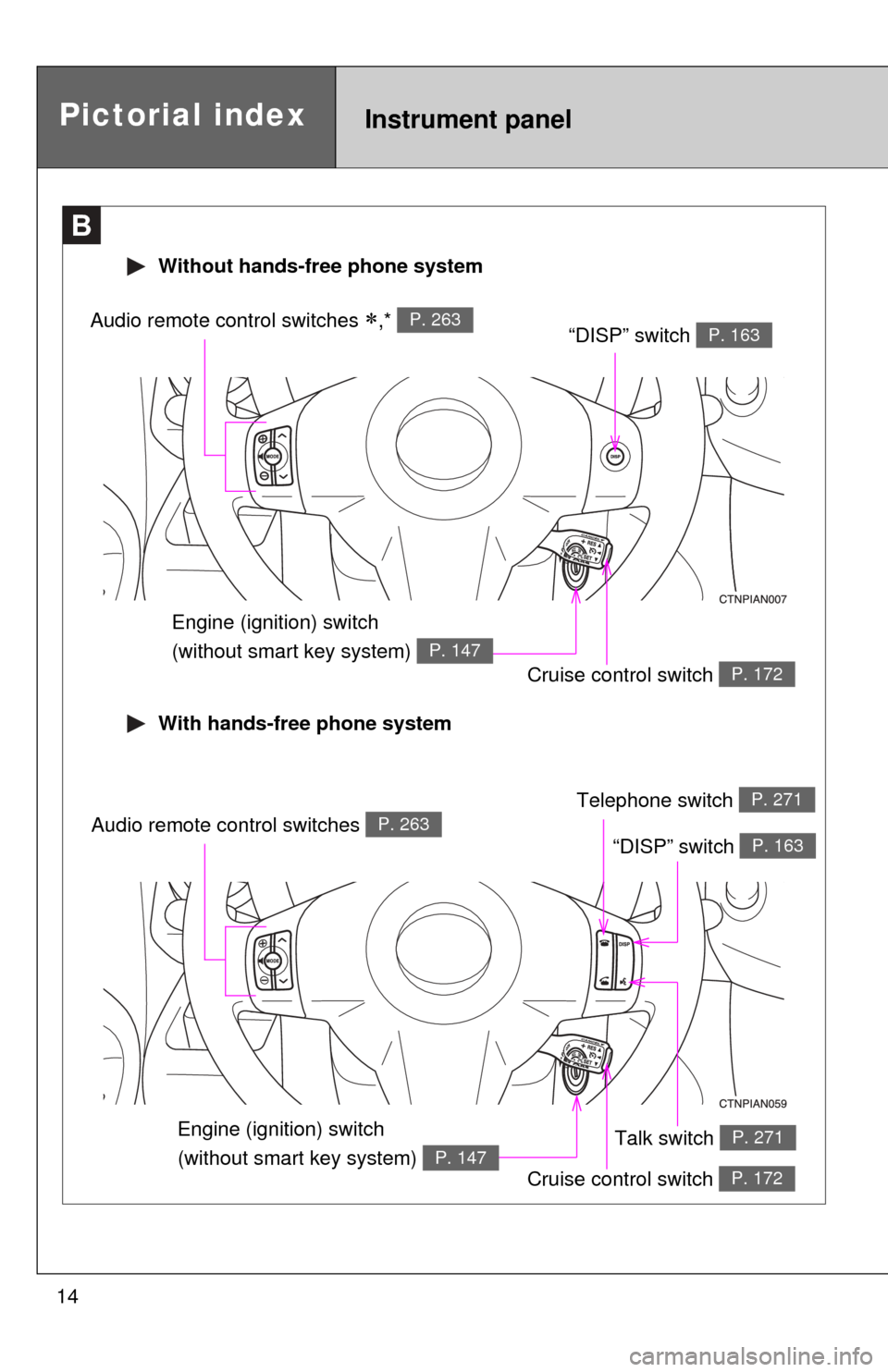
14
B
Cruise control switch P. 172
“DISP” switch P. 163Audio remote control switches ,* P. 263
Without hands-free phone system
Engine (ignition) switch
(without smart key system)
P. 147
Instrument panelPictorial index
With hands-free phone system
Cruise control switch P. 172
“DISP” switch P. 163Audio remote control switches P. 263
Talk switch P. 271
Telephone switch P. 271
Engine (ignition) switch
(without smart key system)
P. 147
Page 15 of 513
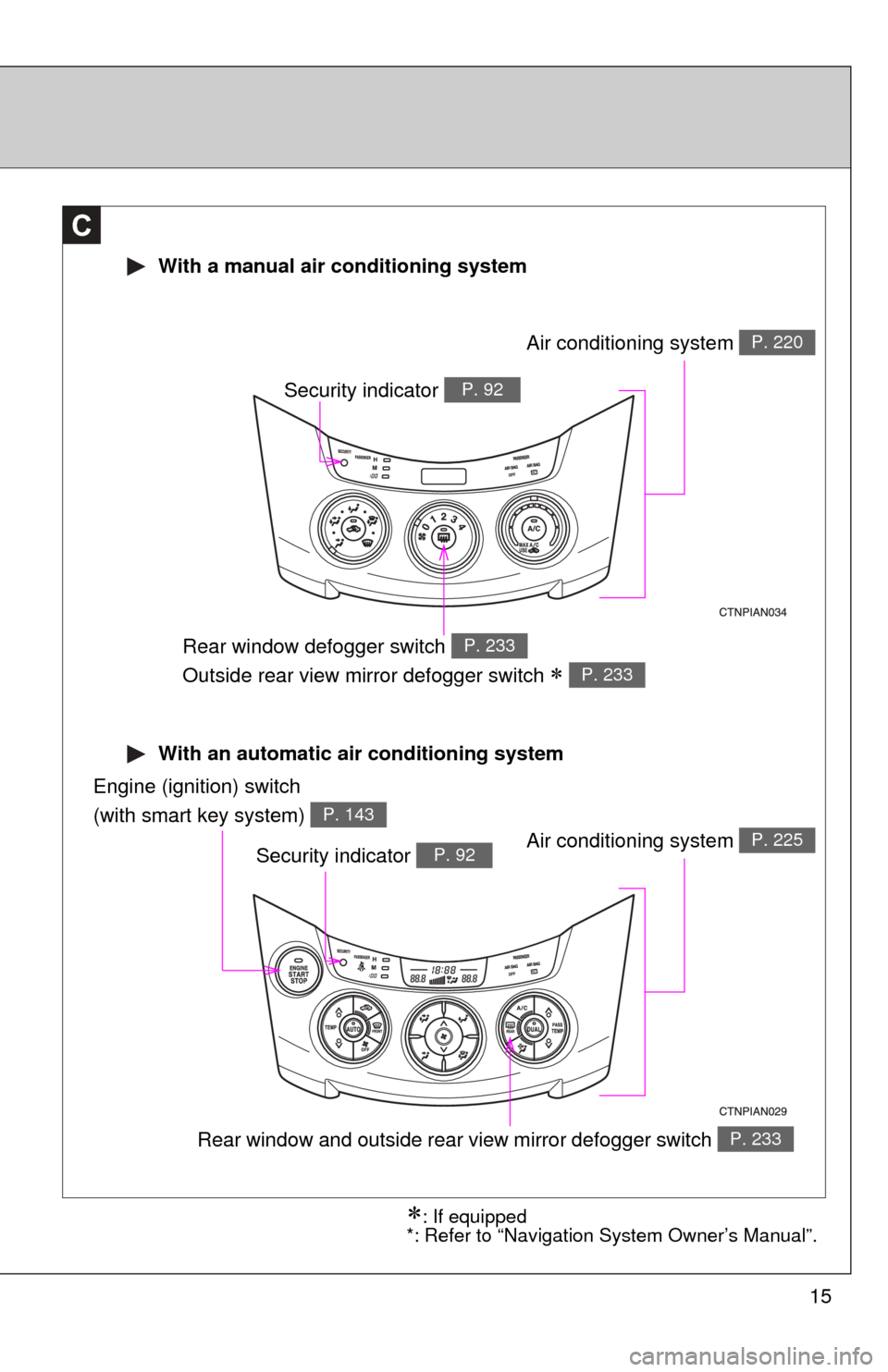
15
With an automatic air conditioning system
With a manual air conditioning system
C
Air conditioning system P. 220
Rear window defogger switch
Outside rear view mirror defogger switch
P. 233
P. 233
Engine (ignition) switch
(with smart key system)
P. 143
Air conditioning system P. 225
Rear window and outside rear view mirror defogger switch P. 233
Security indicator P. 92
Security indicator P. 92
: If equipped
*: Refer to “Navigation System Owner’s Manual”.
Page 23 of 513
Before driving1
23
1-1. Key informationKeys ................................... 24
1-2. Opening, closing and locking the doors
Smart key system .............. 26
Wireless remote control ..... 38
Side doors .......................... 42
Back door ........................... 46
1-3. Adjustable components (seats, mirrors,
steering wheel)
Front seats ......................... 49
Rear seats.......................... 54
Head restraints................... 65
Seat belts ........................... 68
Steering wheel ................... 76
Anti-glare inside rear view mirror ....................... 77
Outside rear view mirrors.............................. 79
1-4. Opening and closing the windows and moon roof
Power windows .................. 81
Moon roof ........................... 84
1-5. Refueling Opening the fuel tank cap ................................... 88 1-6. Theft deterrent system
Engine immobilizer system ............................. 92
Theft prevention labels (U.S.A.) ............................ 95
1-7. Safety information Correct driving posture....... 96
SRS airbags ....................... 98
Front passenger occupant classification system ...... 111
Child restraint systems..... 117
Installing child restraints ........................ 121
Page 24 of 513
24
1-1. Key information
Keys
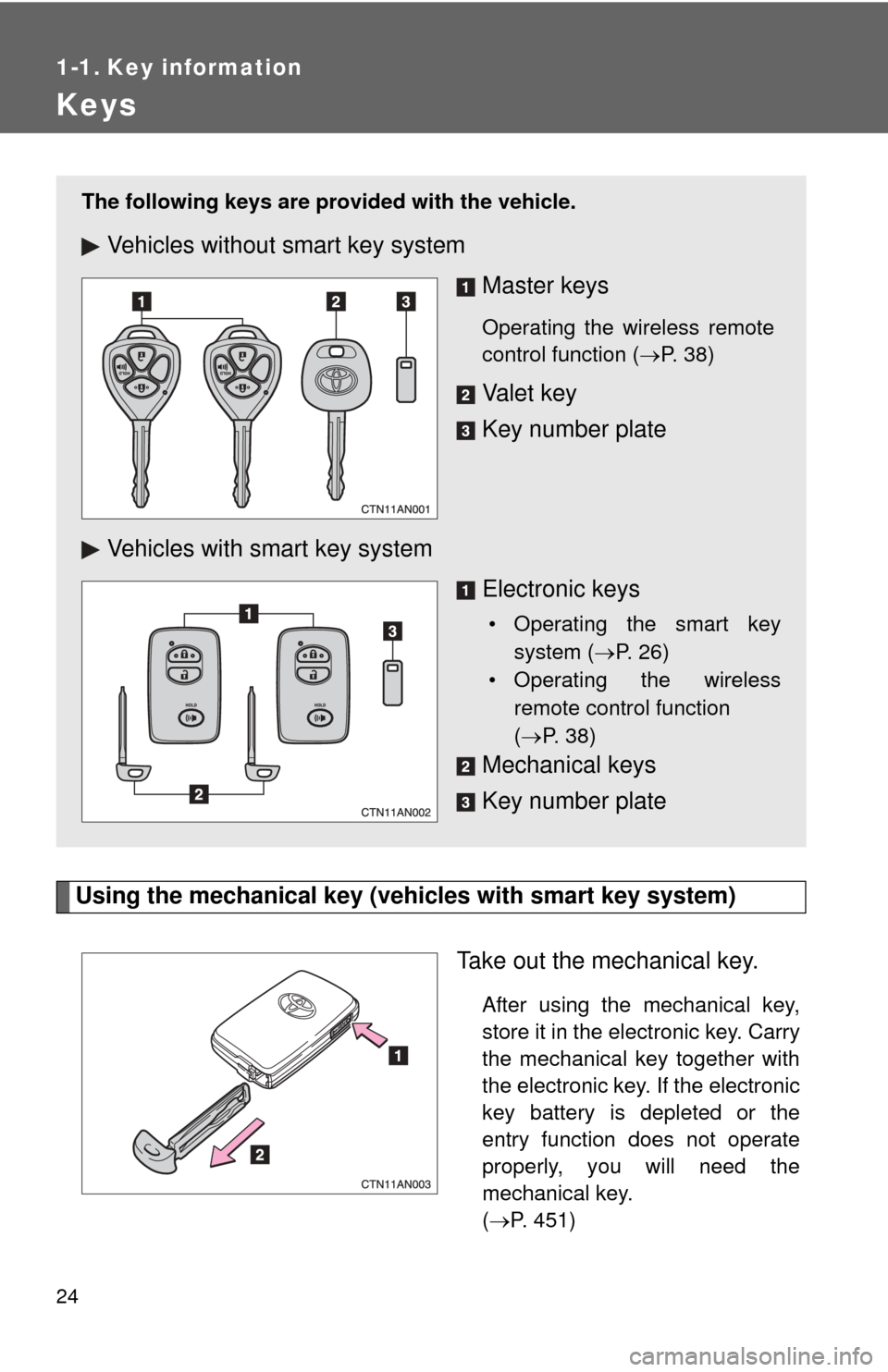
Using the mechanical key (vehicles with smart key system)Take out the mechanical key.
After using the mechanical key,
store it in the electronic key. Carry
the mechanical key together with
the electronic key. If the electronic
key battery is depleted or the
entry function does not operate
properly, you will need the
mechanical key.
(P. 451)
The following keys are provid ed with the vehicle.
Vehicles without smart key system
Master keys
Operating the wireless remote
control function (P. 38)
Va l e t k e y
Key number plate
Vehicles with smart key system Electronic keys
• Operating the smart keysystem ( P. 26)
• Operating the wireless
remote control function
( P. 38)
Mechanical keys
Key number plate
Page 25 of 513

25
1-1. Key information
1
Before driving
■
When required to leave a key to th e vehicle with a parking attendant
Lock the glove box as circumstances demand. ( P. 305)
Vehicles without smart key system: Carry the master key for your own use
and leave the valet key only with the attendant.
Vehicles with smart key system: Remove the mechanical key for your own
use and provide the attendant with the electronic key only.
■ Key number plate
Keep the plate in a safe place such as your wallet, not in the vehicle. In the
event that a key is lost, a new key can be made by your Toyota dealer using
the key number plate. ( P. 450)
■ When riding in an aircraft
When bringing a key with wireless remote control function onto an aircra\
ft,
make sure you do not press any buttons on the key while inside the aircraft
cabin. If you are carrying the key in your bag etc, ensure that the buttons are
not likely to be pressed accidentally. Pressing a button may cause the key to
emit radio waves that could interfere with the operation of the aircraft.
NOTICE
■To prevent key damage
●Do not subject the keys to strong shocks, expose them to high tempera-
tures by placing them in direct sunlight, or get them wet.
● Do not expose the keys to electromagnetic materials or attach any mate-
rial that blocks electromagnetic waves to the key surface.
● Do not disassemble the key.
Page 26 of 513
26
1-2. Opening, closing and locking the doors
Smart key system
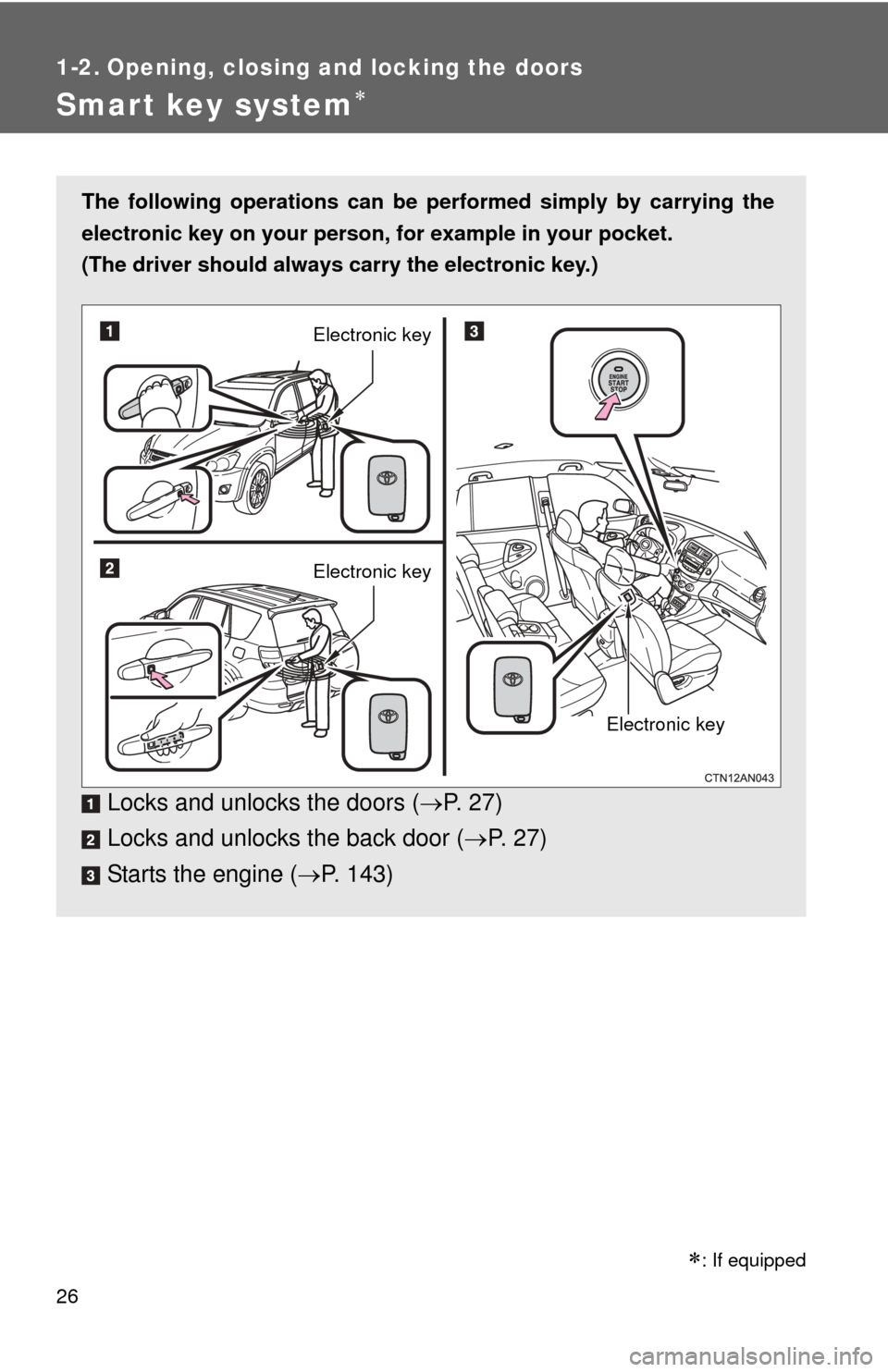
The following operations can be performed simply by carrying the
electronic key on your person, for example in your pocket.
(The driver should always carry the electronic key.)
Locks and unlocks the doors ( P. 2 7 )
Locks and unlocks the back door ( P. 27)
Starts the engine ( P. 143)
Electronic key
Electronic key
Electronic key
: If equipped
Page 30 of 513
30 1-2. Opening, closing and locking the doors
■Operation signals
A buzzer sounds and the emergency flashers flash to indicate that the doors
have been locked/unlocked. (Locked: Once; Unlocked: Twice)
■ Conditions affecting operation
The smart key system uses weak radio waves. In the following situations,
the communication between the electronic key and the vehicle may be
affected, preventing the smart key system and wireless remote control from
operating properly. (Ways of coping: P. 451)
● When the electronic key battery is depleted
● Near a TV tower, electric power plant, gas station, radio station, large dis-
play, airport or other facility that generates strong radio waves or electri-
cal noise
● When carrying a portable radio, ce llular phone, cordless phone or other
wireless communication devices
● When the electronic key is in contact with, or is covered by a metallic
object
● When multiple electronic keys are in the vicinity
● When carrying or using the electronic key together with the following
devices that emit radio waves
• Another vehicle’s electronic key
• A wireless key that emits radio waves
• Personal computer
● If window tint with a metallic content or metallic objects is attached to the
rear window
■ Switching the door unlock function
It is possible to set which doors the entry function unlocks.
Turn the “ENGINE START STOP” switch OFF.
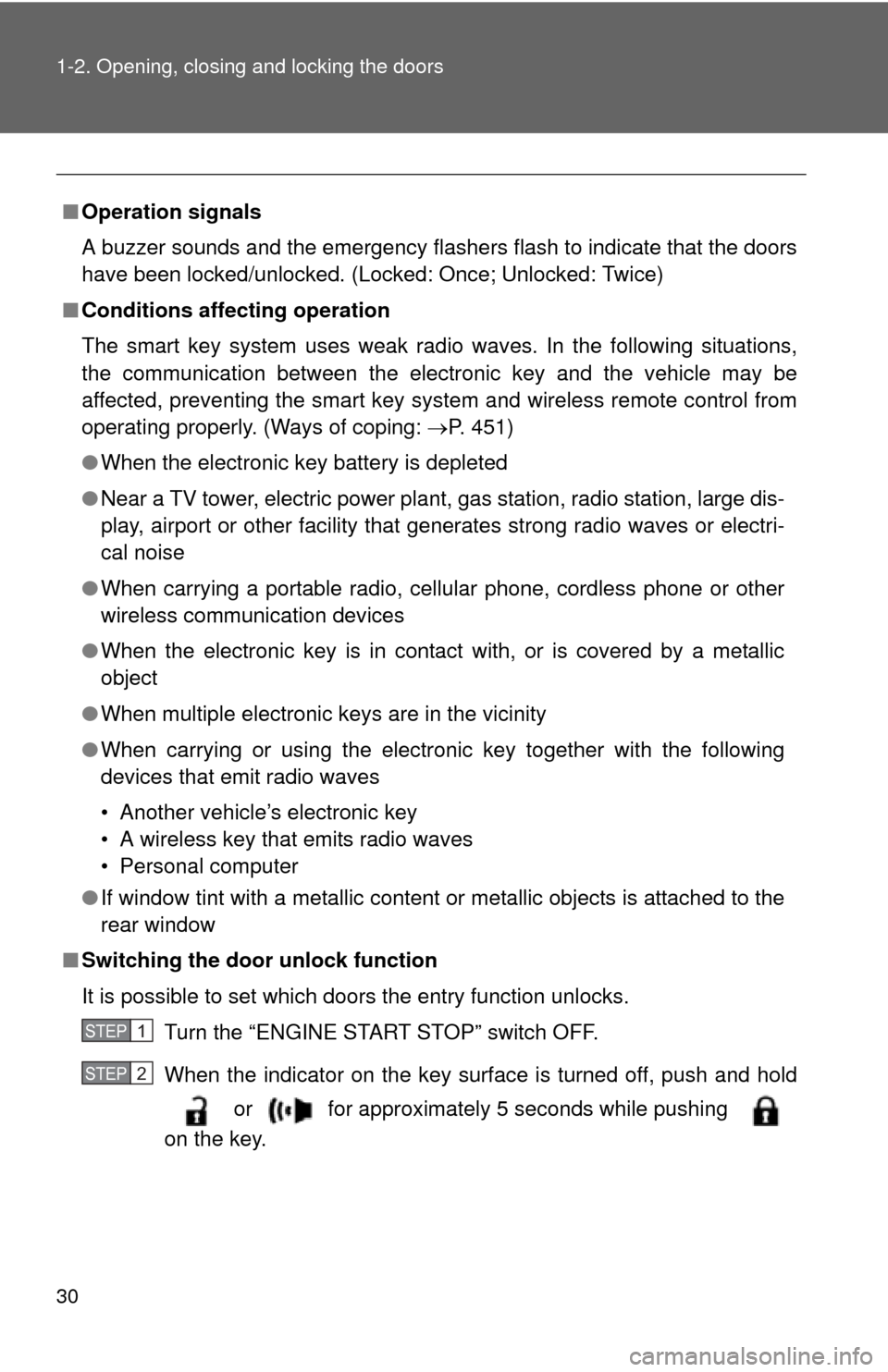
When the indicator on the key surface is turned off, push and hold or for approximately 5 seconds while pushing
on the key.
STEP 1
STEP 2
Page 32 of 513

32 1-2. Opening, closing and locking the doors
■Electronic key battery depletion
●The standard battery life is 1 to 2 years. (The battery becomes depleted
even if the electronic key is not used.) If the smart key system or the
wireless remote control function does not operate, or the detection area
becomes smaller, the battery may be depleted. Replace the battery when
necessary. ( P. 380)
● If the battery becomes low, an alarm will sound in the cabin when the
engine stops. ( P. 33)
● To avoid serious deterioration, do not leave the electronic key within 3 ft.
(1 m) of the following electrical appliances that produce a magnetic field:
•TVs
• Personal computers
• Recharging cellular phones or cordless phones
• Table lamps
■ To operate the system properly
Make sure to carry the electronic key when operating the system. Do not get
the electronic key too close to the vehicle when operating the system from
the outside of the vehicle.
Depending on the position and holding condition of the electronic key, the
key may not be detected correctly and the system may not operate properly.
(The alarm may go off accidentally, or the door lock prevention may not func-
tion.)
■ Note for the entry function
●Even when the electronic key is within the effective range (detection
areas), the system may not operate properly in the following cases.
• The electronic key is too close to the window or outside door handle,
near the ground, or in a high place when the doors are locked or
unlocked.
• The electronic key is on the instrument panel, luggage cover or floor, in the glove box when the engine is started or “ENGINE START STOP”
switch modes are changed.
● As long as the electronic key is within the effective range, the doors may
be locked or unlocked by anyone.
● Even if the electronic key is not inside the vehicle, it may be possible to
start the engine if the electronic key is near the window.
Page 35 of 513
35
1-2. Opening, closing and locking the doors
1
Before driving
■
If the smart key system does not operate properly
● Locking and unlocking the doors: Use the mechanical key. ( P. 451)
● Starting the engine. ( P. 451)
■ When the electronic key battery is fully depleted
P. 380
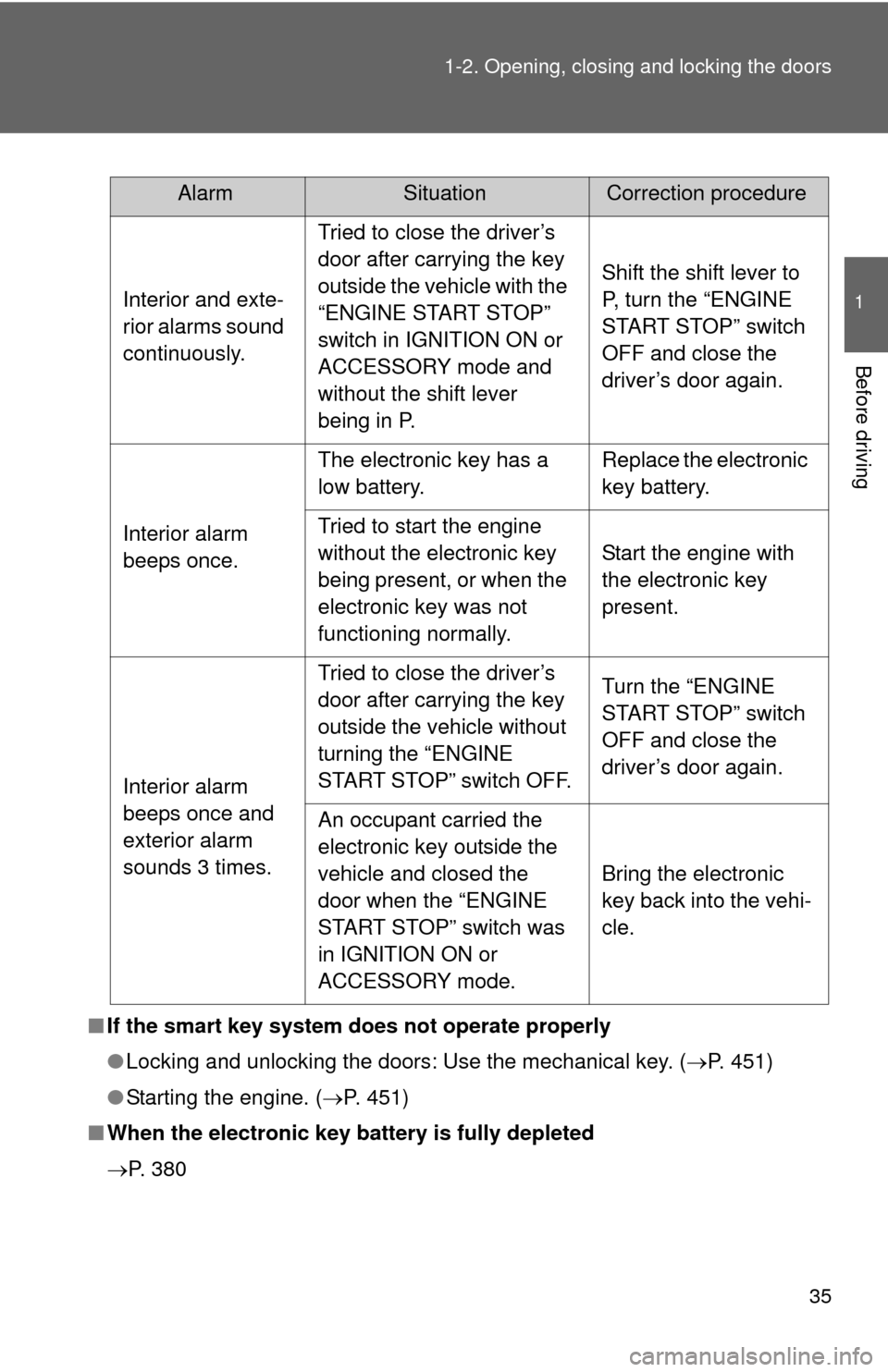
AlarmSituationCorrection procedure
Interior and exte-
rior alarms sound
continuously. Tried to close the driver’s
door after carrying the key
outside the vehicle with the
“ENGINE START STOP”
switch in IGNITION ON or
ACCESSORY mode and
without the shift lever
being in P. Shift the shift lever to
P, turn the “ENGINE
START STOP” switch
OFF and close the
driver’s door again.
Interior alarm
beeps once. The electronic key has a
low battery.
Replace the electronic
key battery.
Tried to start the engine
without the electronic key
being present, or when the
electronic key was not
functioning normally. Start the engine with
the electronic key
present.
Interior alarm
beeps once and
exterior alarm
sounds 3 times. Tried to close the driver’s
door after carrying the key
outside the vehicle without
turning the “ENGINE
START STOP” switch OFF.
Turn the “ENGINE
START STOP” switch
OFF and close the
driver’s door again.
An occupant carried the
electronic key outside the
vehicle and closed the
door when the “ENGINE
START STOP” switch was
in IGNITION ON or
ACCESSORY mode. Bring the electronic
key back into the vehi-
cle.