engine TOYOTA RAV4 2011 XA30 / 3.G Owner's Guide
[x] Cancel search | Manufacturer: TOYOTA, Model Year: 2011, Model line: RAV4, Model: TOYOTA RAV4 2011 XA30 / 3.GPages: 536, PDF Size: 9.52 MB
Page 142 of 536

142 2-1. Driving procedures
NOTICE
■When encountering flooded roads
Do not drive on a road that has flooded after heavy rain etc. Doing so may
cause the following serious damage to the vehicle.
●Engine stalling
● Short in electrical components
● Engine damage caused by water immersion
In the event that you drive on a flooded road and the vehicle is flooded, be
sure to have your Toyota dealer check the following.
● Brake function
● Changes in quantity and quality of oil and fluid used for the engine, tran-
saxle, transfer (4WD models), rear differential (4WD models), etc.
● Lubricant condition for the propeller shaft (4WD models), bearings and
suspension joints (where possible) and the function of all joints, bearings,
etc.
Page 143 of 536
143
2-1. Driving procedures
2
When driving
Engine (ignition) switch (vehicles with smart key system)
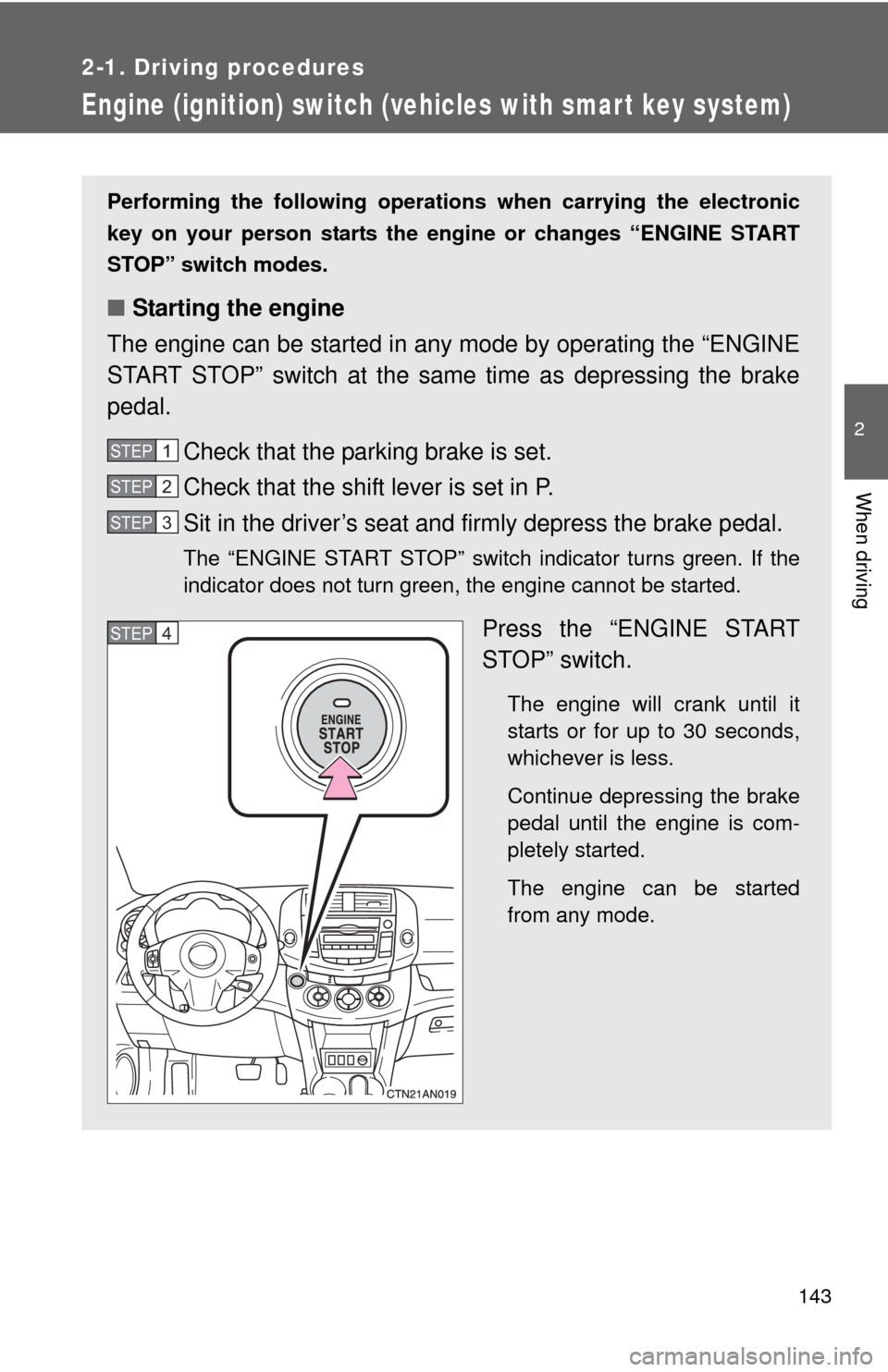
Performing the following operations when carrying the electronic
key on your person starts the en gine or changes “ENGINE START
STOP” switch modes.
■ Starting the engine
The engine can be started in any mode by operating the “ENGINE
START STOP” switch at the same time as depressing the brake
pedal.
Check that the parking brake is set.
Check that the shift lever is set in P.
Sit in the driver’s seat and firmly depress the brake pedal.
The “ENGINE START STOP” switch indicator turns green. If the
indicator does not turn green, the engine cannot be started.
Press the “ENGINE START
STOP” switch.
The engine will crank until it
starts or for up to 30 seconds,
whichever is less.
Continue depressing the brake
pedal until the engine is com-
pletely started.
The engine can be started
from any mode.
STEP 1
STEP 2
STEP 3
STEP 4
Page 144 of 536
144 2-1. Driving procedures
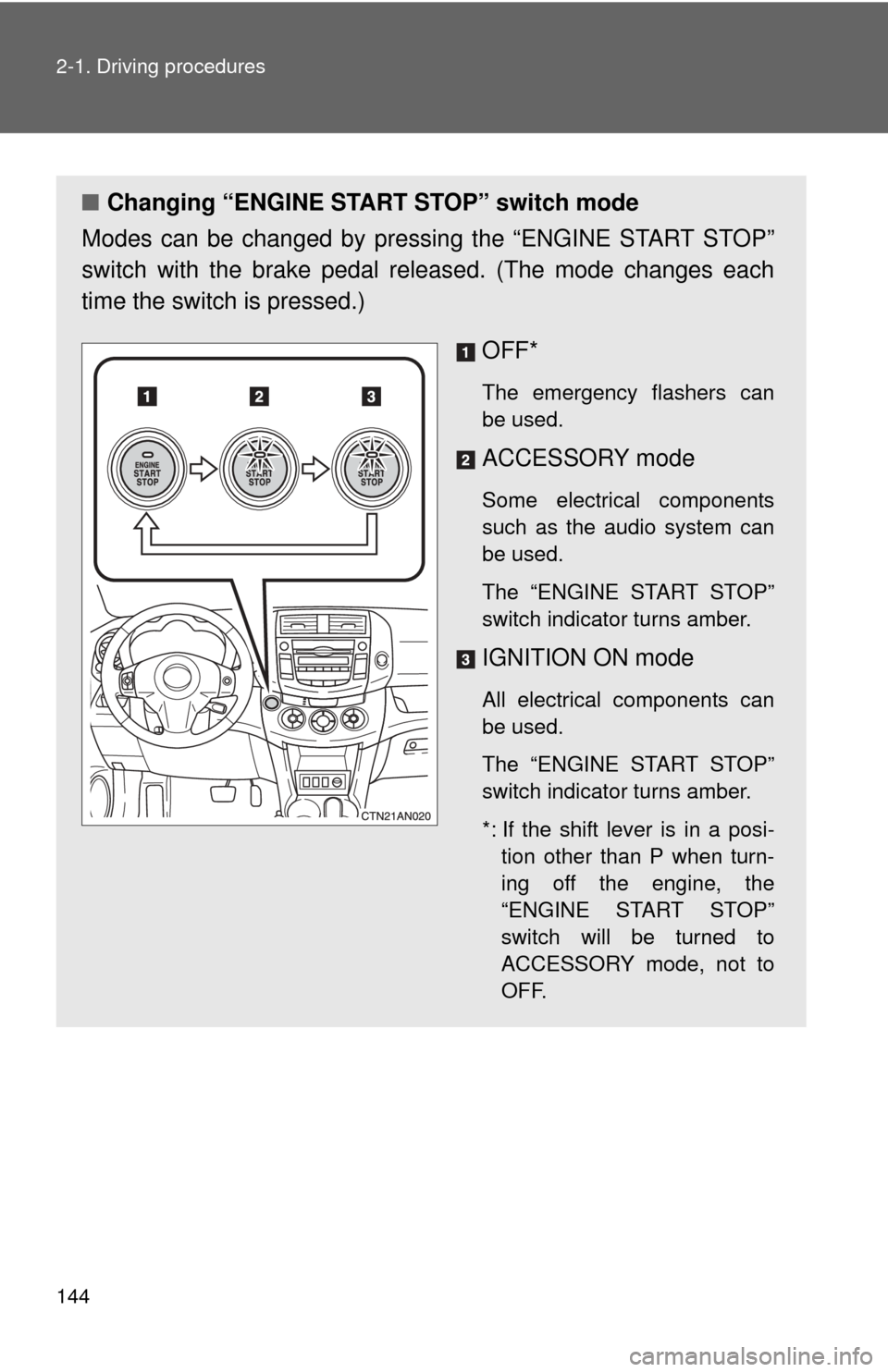
■Changing “ENGINE START STOP” switch mode
Modes can be changed by pressing the “ENGINE START STOP”
switch with the brake pedal released. (The mode changes each
time the switch is pressed.)
OFF*
The emergency flashers can
be used.
ACCESSORY mode
Some electrical components
such as the audio system can
be used.
The “ENGINE START STOP”
switch indicator turns amber.
IGNITION ON mode
All electrical components can
be used.
The “ENGINE START STOP”
switch indicator turns amber.
*: If the shift lever is in a posi-tion other than P when turn-
ing off the engine, the
“ENGINE START STOP”
switch will be turned to
ACCESSORY mode, not to
OFF.
Page 145 of 536
145
2-1. Driving procedures
2
When driving
■
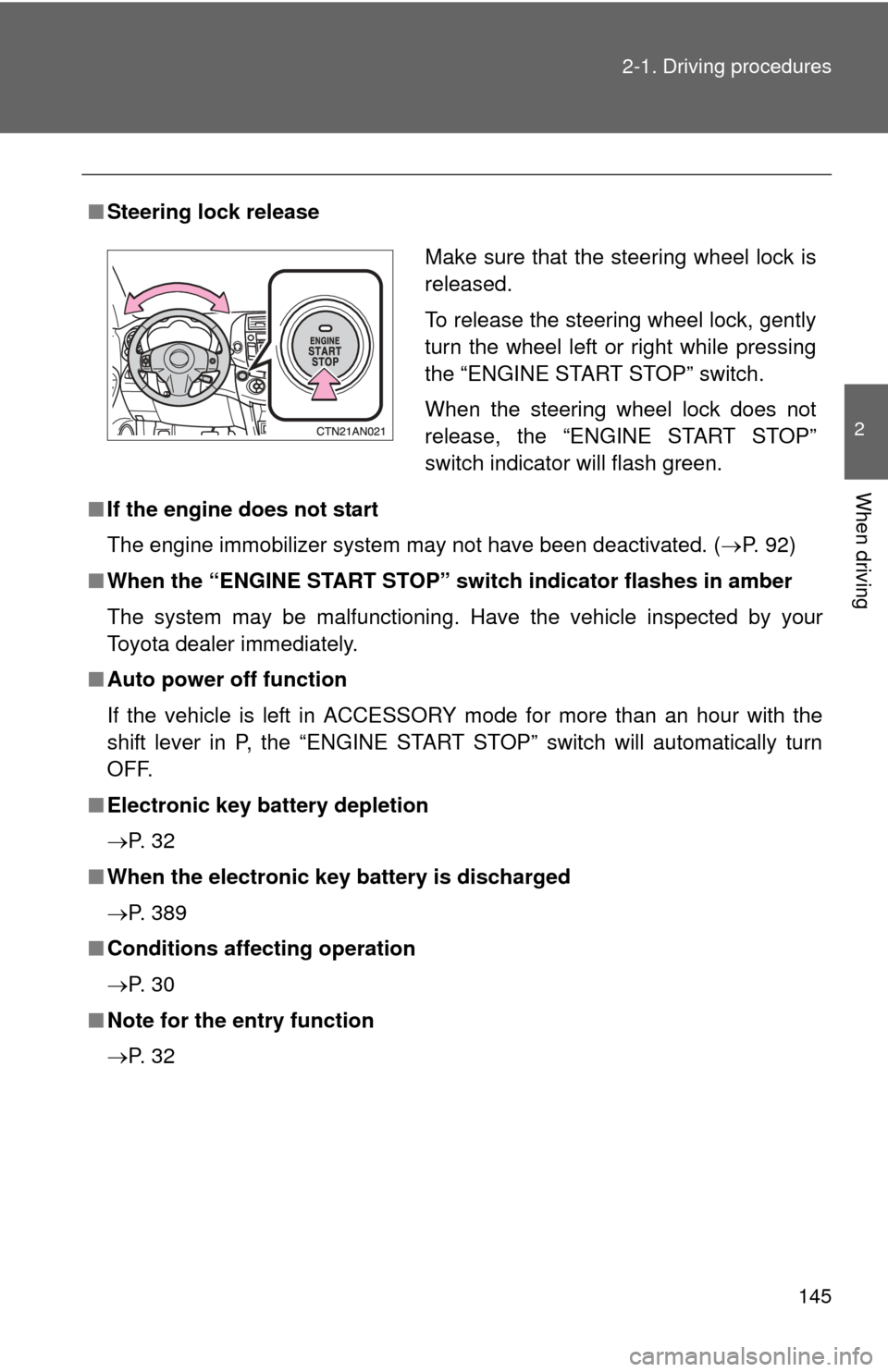
Steering lock release
■ If the engine does not start
The engine immobilizer system may not have been deactivated. ( P. 92)
■ When the “ENGINE START STOP” sw itch indicator flashes in amber
The system may be malfunctioning. Have the vehicle inspected by your
Toyota dealer immediately.
■ Auto power off function
If the vehicle is left in ACCESSORY mode for more than an hour with the
shift lever in P, the “ENGINE START STOP” switch will automatically turn
OFF.
■ Electronic key battery depletion
P. 3 2
■ When the electronic key battery is discharged
P. 389
■ Conditions affecting operation
P. 3 0
■ Note for the entry function
P. 3 2
Make sure that the steering wheel lock is
released.
To release the steering wheel lock, gently
turn the wheel left or right while pressing
the “ENGINE START STOP” switch.
When the steering wheel lock does not
release, the “ENGINE START STOP”
switch indicator will flash green.
Page 146 of 536
146 2-1. Driving procedures
CAUTION
■When starting the engine
Always start the engine while sitting in the driver's seat. Do not depress the
accelerator pedal while starting the engine under any circumstances.
Doing so may cause an accident resulting in death or serious injury.
■ Stopping the engine in an emergency
If you want to stop the engine in an emergency while driving the vehicle,
push and hold the “ENGINE START STOP” switch for more than 3 seconds.
However, do not touch the “ENGINE START STOP” switch while driving
except in an emergency. If the engine stops while the vehicle is being driven,
this could lead to an unexpected accident.
NOTICE
■To prevent battery discharge
Do not leave the “ENGINE START STOP” switch in ACCESSORY or IGNI-
TION ON mode for long periods without the engine running.
■ When starting the engine
●Do not race a cold engine.
● If the engine becomes difficult to start or stalls frequently, have the engine
checked immediately.
Page 147 of 536
147
2-1. Driving procedures
2
When driving
Engine (ignition) switch (vehicles without smart key system)
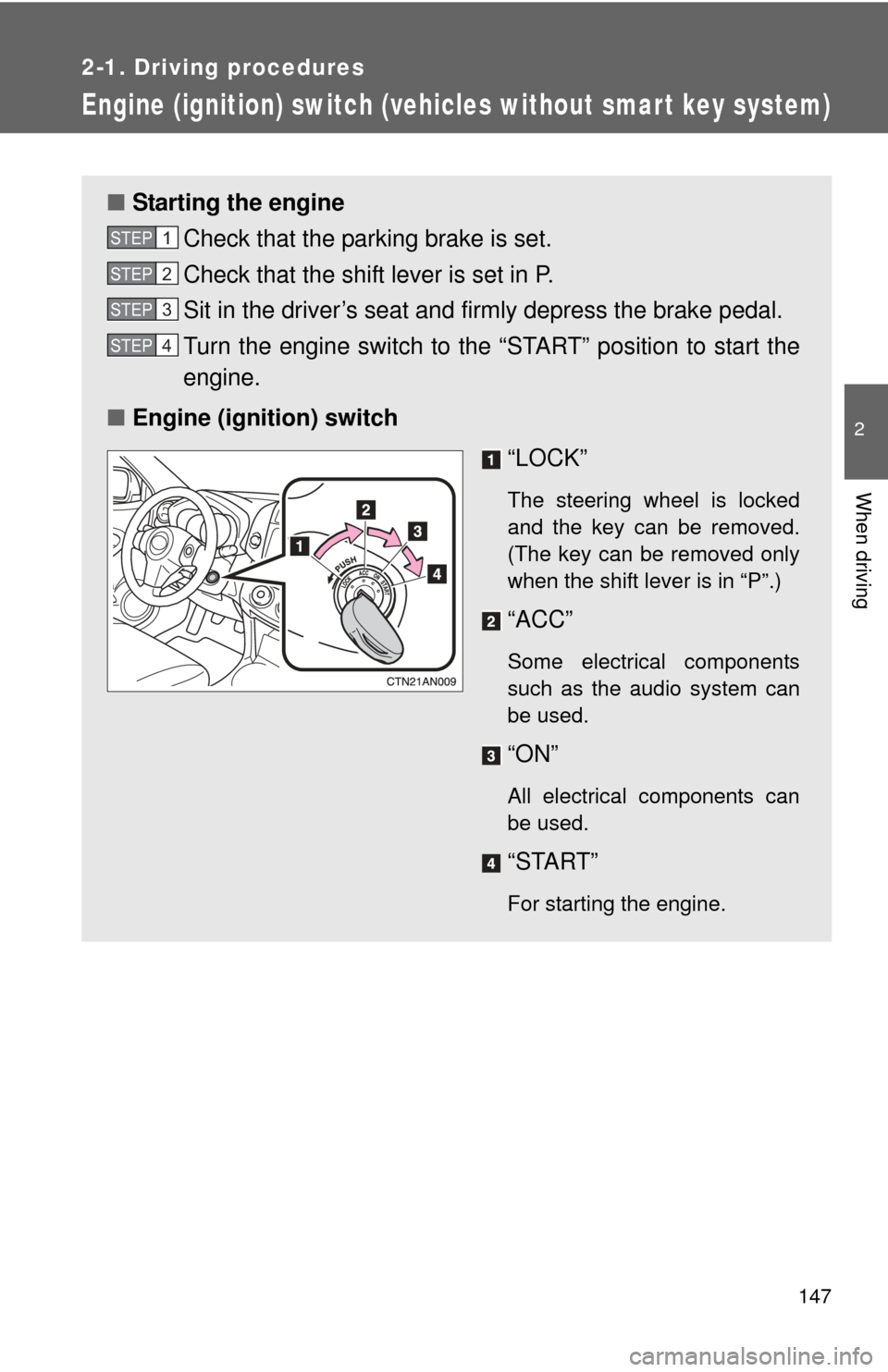
■Starting the engine
Check that the parking brake is set.
Check that the shift lever is set in P.
Sit in the driver’s seat and firmly depress the brake pedal.
Turn the engine switch to the “START” position to start the
engine.
■ Engine (ignition) switch
“LOCK”
The steering wheel is locked
and the key can be removed.
(The key can be removed only
when the shift lever is in “P”.)
“ACC”
Some electrical components
such as the audio system can
be used.
“ON”
All electrical components can
be used.
“START”
For starting the engine.
STEP 1
STEP 2
STEP 3
STEP 4
Page 148 of 536
148 2-1. Driving procedures
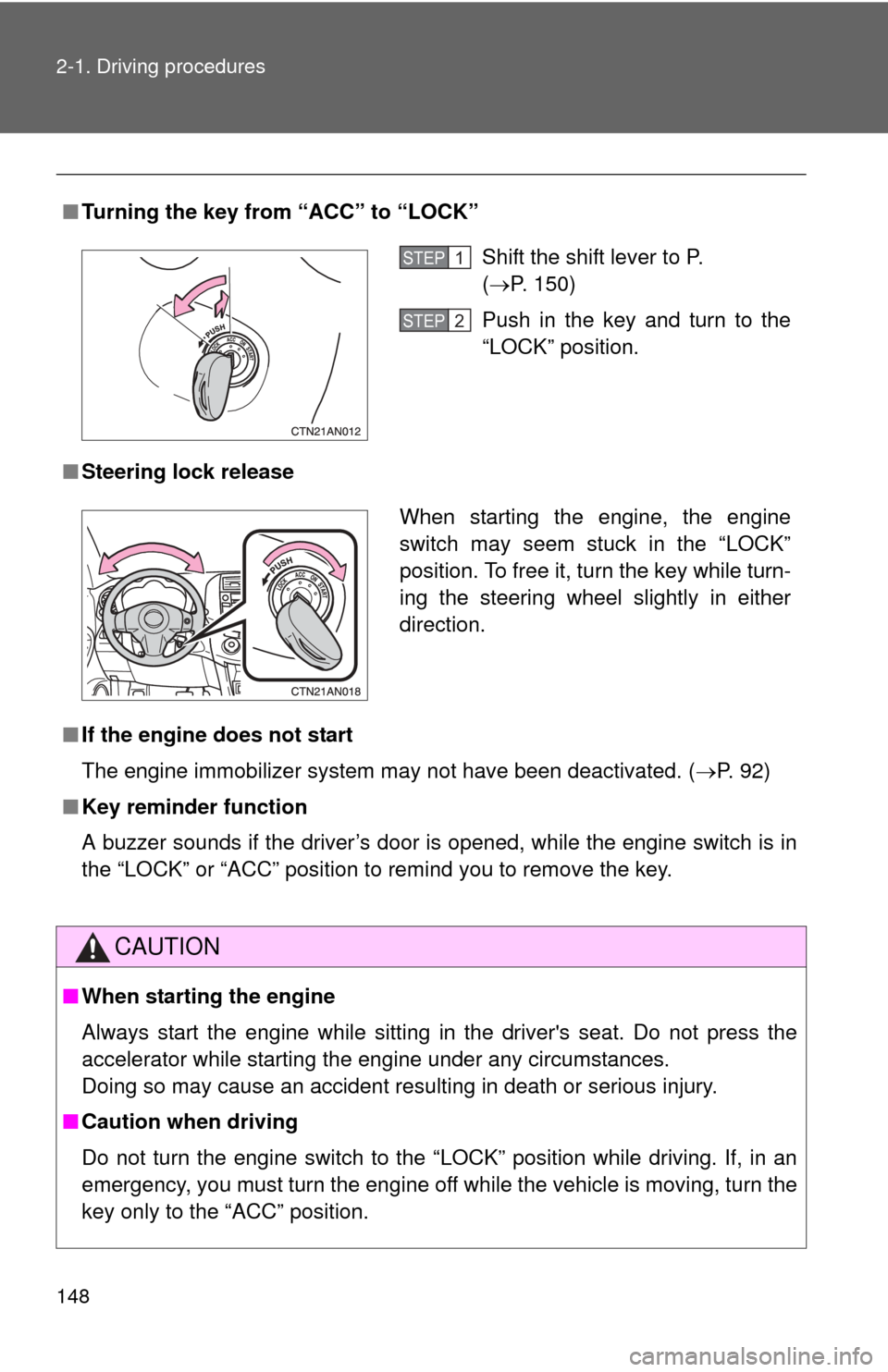
■Turning the key from “ACC” to “LOCK”
■ Steering lock release
■ If the engine does not start
The engine immobilizer system may not have been deactivated. ( P. 92)
■ Key reminder function
A buzzer sounds if the driver’s door is opened, while the engine switch is in
the “LOCK” or “ACC” position to remind you to remove the key.
CAUTION
■When starting the engine
Always start the engine while sitting in the driver's seat. Do not press the
accelerator while starting the engine under any circumstances.
Doing so may cause an accident resulting in death or serious injury.
■ Caution when driving
Do not turn the engine switch to the “LOCK” position while driving. If, in an
emergency, you must turn the engine off while the vehicle is moving, turn the
key only to the “ACC” position.
Shift the shift lever to P.
(P. 150)
Push in the key and turn to the
“LOCK” position.STEP 1
STEP 2
When starting the engine, the engine
switch may seem stuck in the “LOCK”
position. To free it, turn the key while turn-
ing the steering wheel slightly in either
direction.
Page 149 of 536

149
2-1. Driving procedures
2
When driving
NOTICE
■
To prevent battery discharge
Do not leave the key in the “ACC” or “ON” position for a long period if the
engine is not running.
■ When starting the engine
●Do not crank for more than 30 seconds at a time. This may overheat the
starter and wiring systems.
● Do not race a cold engine.
● If the engine becomes difficult to start or stalls frequently, have the engine
checked immediately.
Page 151 of 536
151
2-1. Driving procedures
2
When driving
Vehicles without
smart key system:
While the engine switch is in the “ON” position, depress the
brake pedal and move the shift lever.
Vehicles with smart key system:
While the “ENGINE START STOP” switch is in IGNITION
ON mode, depress the brake pedal and move the shift
lever.
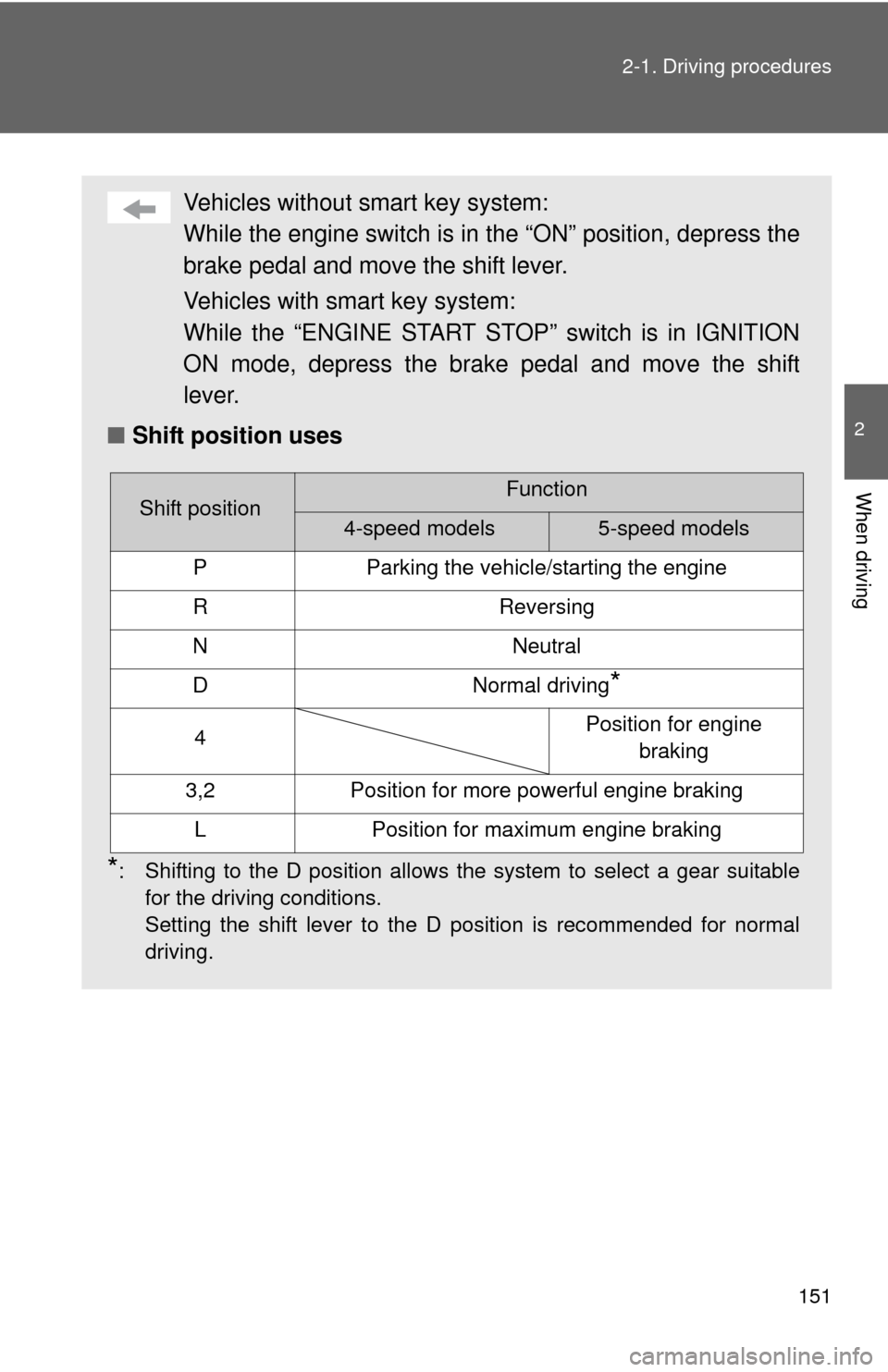
■ Shift position uses
*: Shifting to the D position allows the system to select a gear suitable
for the driving conditions.
Setting the shift lever to the D position is recommended for normal
driving.
Shift positionFunction
4-speed models5-speed models
PParking the vehicle/starting the engine
RReversing
NNeutral
DNormal driving*
4Position for engine braking
3,2Position for more powerful engine braking
LPosition for maximum engine braking
Page 152 of 536
152 2-1. Driving procedures
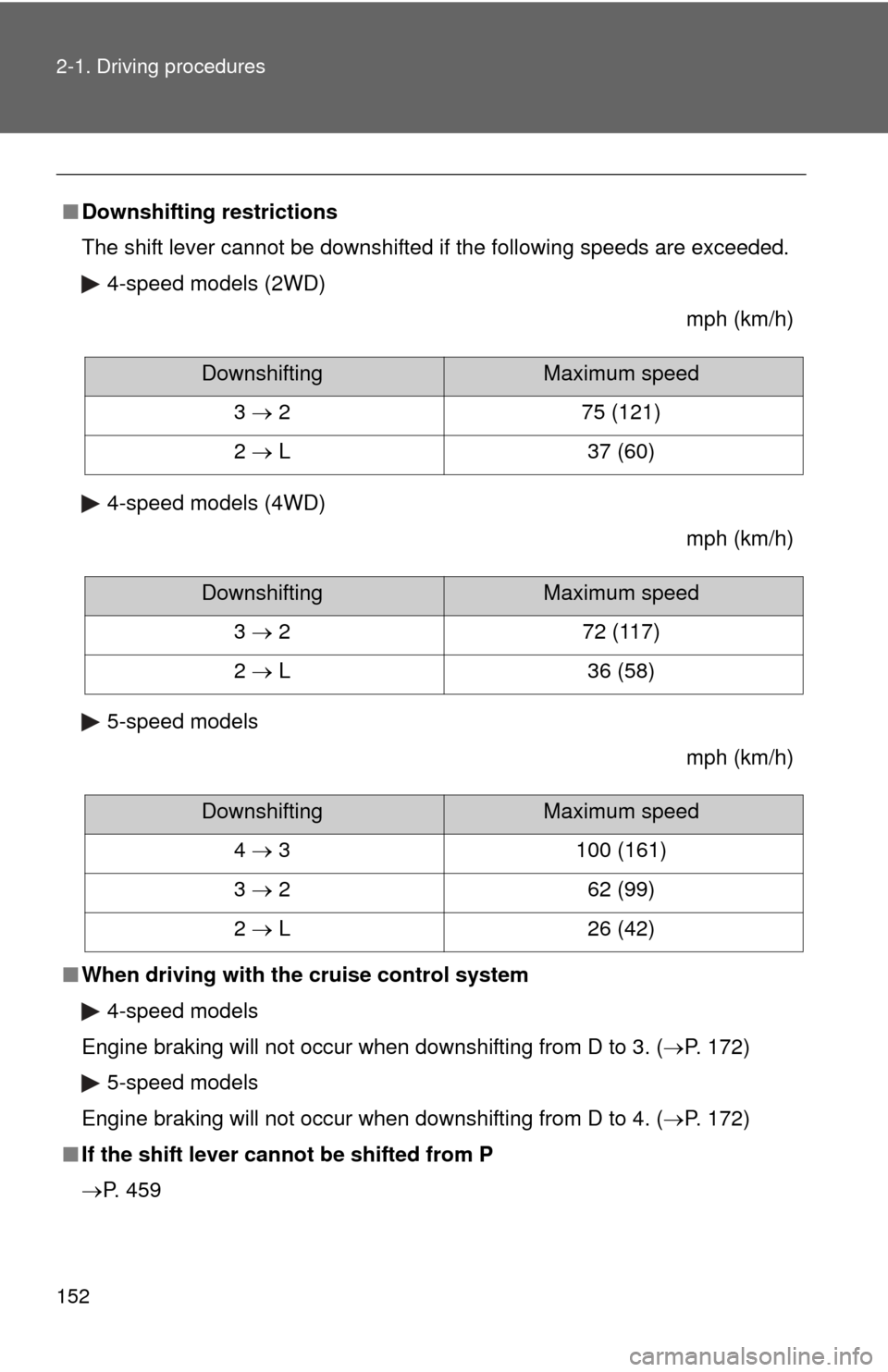
■Downshifting restrictions
The shift lever cannot be downshifted if the following speeds are exceeded.
4-speed models (2WD)
mph (km/h)
4-speed models (4WD) mph (km/h)
5-speed models mph (km/h)
■ When driving with the cruise control system
4-speed models
Engine braking will not occur when downshifting from D to 3. (P. 172) 5-speed models
Engine braking will not occur when downshifting from D to 4. (P. 172)
■ If the shift lever cannot be shifted from P
P. 459
DownshiftingMaximum speed
3 2 75 (121)
2 L 37 (60)
DownshiftingMaximum speed
3 2 72 (117)
2 L 36 (58)
DownshiftingMaximum speed
4 3 100 (161)
3 2 62 (99)
2 L 26 (42)