air conditioning TOYOTA RAV4 2011 XA30 / 3.G Owners Manual
[x] Cancel search | Manufacturer: TOYOTA, Model Year: 2011, Model line: RAV4, Model: TOYOTA RAV4 2011 XA30 / 3.GPages: 536, PDF Size: 9.52 MB
Page 1 of 536
TABLE OF CONTENTS
1
1Before drivingAdjusting and operating features such as door locks,
mirrors, and steering column.
2When drivingDriving, stopping and safe-driving information.
3Interior
featuresAir conditioning and audio systems, as well as other
interior features for a comfortable driving experience.
4Maintenance
and careCleaning and protecting your vehicle, performing do-it-
yourself maintenance, and maintenance information.
5When trouble
arisesWhat to do if the vehicle needs to be towed, gets a flat
tire, or is involved in an accident.
6Vehicle
specificationsDetailed vehicle information.
7For ownersReporting safety defects for U.S. owners and seat belt
and SRS airbag instructions for Canadian owners
IndexAlphabetical listing of information contained in this
manual.
Page 3 of 536

1
2
3
4
5
6
7
3
2-3. Operating the lights and wipers
Headlight switch .................. 165
Fog light switch ................... 168
Windshield wipers and washer .............................. 169
Rear window wiper and washer .............................. 171
2-4. Using other driving systems
Cruise control ...................... 172
Rear view monitor system (vehicles with auto
anti-glare inside rear
view mirror) ....................... 176
Driving assist systems ........ 184
Hill-start assist control ......... 191
Downhill assist control system .............................. 193
Four-wheel drive lock switch (4WD models) ........ 196
2-5. Driving information Utility vehicle precautions ....................... 197
Cargo and luggage ............. 202
Vehicle load limits ............... 208
Winter driving tips ............... 210
Trailer towing ...................... 214
Dinghy towing ..................... 224 3-1. Using the air conditioning
system and defogger
Manual air conditioning system .............................. 226
Automatic air conditioning system .............................. 232
Rear window and outside rear view
mirror defoggers ............... 240
Windshield wiper de-icer .... 242
3-2. Using the audio system Audio system types ............ 243
Using the radio ................... 246
Using the CD player ........... 252
Playing back MP3 and WMA discs ....................... 259
Optimal use of the audio system .............................. 266
Using the AUX port............. 269
Using the steering wheel audio switches.................. 270
3-3. Using the hands-free phone system
(for cellular phone)
Hands-free phone system (for cellular phone)
features ............................ 273
Using the hands-free phone system
(for cellular phone) ........... 277
Making a phone call ........... 285
Setting a cellular phone ...... 291
3Interior features
Page 4 of 536

TABLE OF CONTENTSIndex
4
Security and system setup ................................ 296
Using the phone book ........ 299
3-4. Using the interior lights Interior lights list ................. 307
• Personal/interior light main switch ...................... 308
• Personal/interior lights...... 308
• Interior light ...................... 309
• Luggage compartment light .................................. 309
3-5. Using the storage features List of storage features....... 311
• Glove box ......................... 312
• Console box ..................... 313
• Overhead console ............ 314
• Cup holders ...................... 315
• Bottle holders ................... 316
• Auxiliary box ..................... 318
3-6. Other interior features Sun visors .......................... 319
Vanity mirrors ..................... 320
Clock .................................. 321
Power outlets ..................... 322
Seat heaters ....................... 327
Armrest............................... 329
Coat hooks ......................... 330
Floor mat ............................ 331
Luggage compartment features ............................ 332 4-1. Maintenance and care
Cleaning and protecting the vehicle exterior ........... 338
Cleaning and protecting the vehicle interior ............ 341
4-2. Maintenance Maintenance requirements .................... 344
General maintenance ......... 346
Emission inspection and maintenance (I/M)
programs .......................... 349
4-3. Do-it-yourself maintenance Do-it-yourself service precautions ....................... 350
Hood ................................... 354
Positioning a floor jack........ 356
Engine compartment .......... 358
Tires.................................... 373
Tire inflation pressure ......... 380
Wheels................................ 384
Air conditioning filter ........... 386
Key battery ......................... 388
Checking and replacing fuses ................................. 392
Light bulbs .......................... 404
5-1. Essential information Emergency flashers ............ 414
4Maintenance and care
5When trouble arises
Page 15 of 536
15
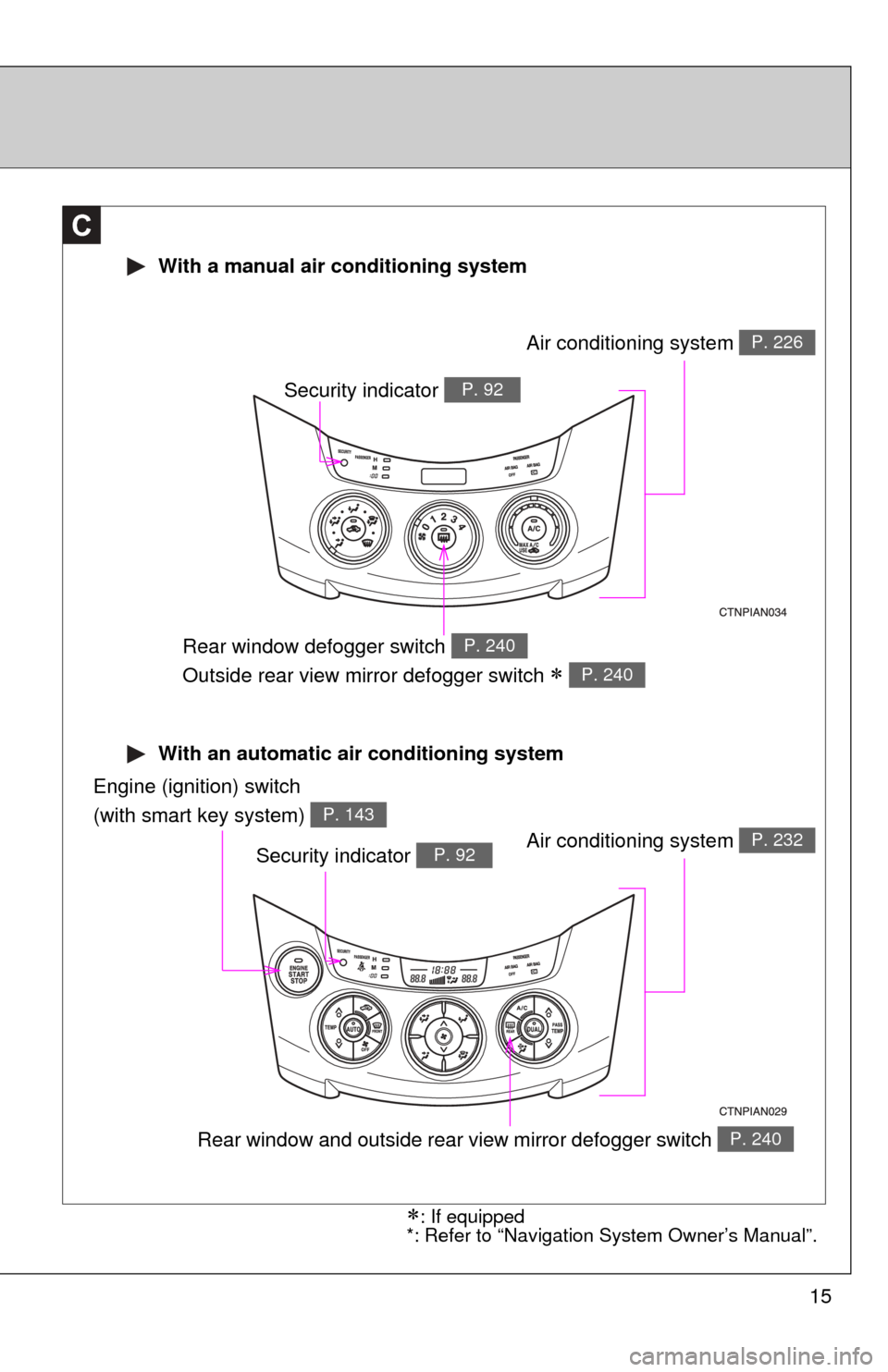
With an automatic air conditioning system
With a manual air conditioning system
C
Air conditioning system P. 226
Rear window defogger switch
Outside rear view mirror defogger switch
P. 240
P. 240
Engine (ignition) switch
(with smart key system)
P. 143
Air conditioning system P. 232
Rear window and outside rear view mirror defogger switch P. 240
Security indicator P. 92
Security indicator P. 92
: If equipped
*: Refer to “Navigation System Owner’s Manual”.
Page 225 of 536
Interior features3
225
3-1. Using the air conditioning system and defogger
Manual air conditioning system ........................... 226
Automatic air conditioning system ....... 232
Rear window and outside rear view
mirror defoggers ............ 240
Windshield wiper de-icer ............................ 242
3-2. Using the audio system Audio system types .......... 243
Using the radio ................. 246
Using the CD player ......... 252
Playing back MP3 and WMA discs ..................... 259
Optimal use of the audio system ........................... 266
Using the AUX port .......... 269
Using the steering wheel audio switches ............... 270
3-3. Using the hands-free phone system
(for cellular phone)
Hands-free phone system (for cellular phone)
features .......................... 273
Using the hands-free phone system
(for cellular phone) ......... 277
Making a phone call ......... 285
Setting a cellular phone ... 291 Security and system
setup .............................. 296
Using the phone book ...... 299
3-4. Using the interior lights Interior lights list ............... 307
• Personal/interior light main switch .................... 308
• Personal/interior lights ... 308
• Interior light .................... 309
• Luggage compartment light ................................ 309
3-5. Using the storage features List of storage features .... 311
• Glove box....................... 312
• Console box ................... 313
• Overhead console .......... 314
• Cup holders ................... 315
• Bottle holders ................. 316
• Auxiliary box .................. 318
3-6. Other interior features Sun visors ........................ 319
Vanity mirrors ................... 320
Clock ................................ 321
Power outlets ................... 322
Seat heaters..................... 327
Armrest ............................ 329
Coat hooks ....................... 330
Floor mat .......................... 331
Luggage compartment features .......................... 332
Page 226 of 536
226
3-1. Using the air conditioning system and defogger
Manual air conditioning system
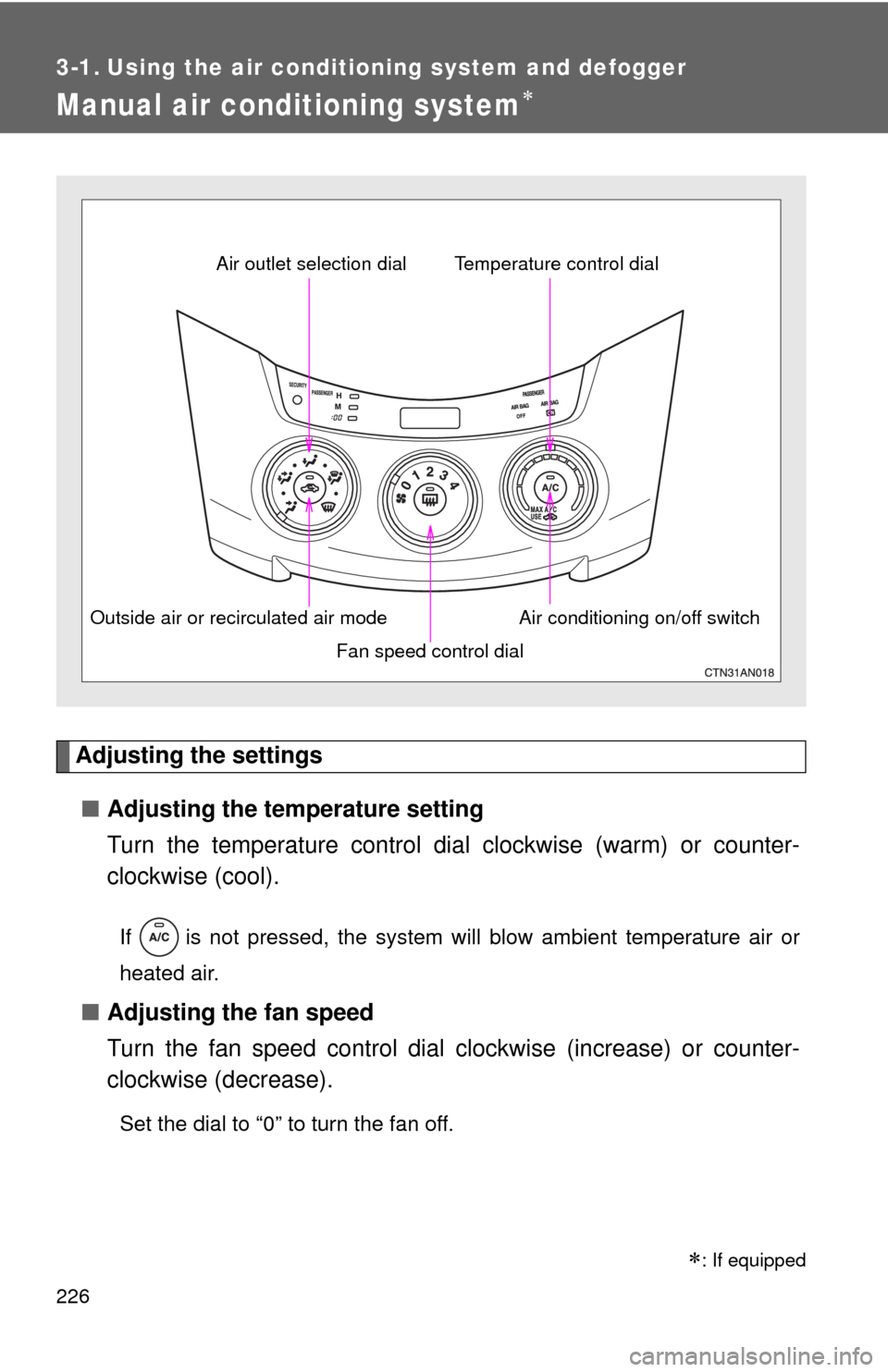
Adjusting the settings■ Adjusting the temperature setting
Turn the temperature control dial clockwise (warm) or counter-
clockwise (cool).
If is not pressed, the system will blow ambient temperature air or
heated air.
■ Adjusting the fan speed
Turn the fan speed control dial clockwise (increase) or counter-
clockwise (decrease).
Set the dial to “0” to turn the fan off.
Fan speed control dial
Air outlet selection dial
Air conditioning on/off switch
Temperature control dial
Outside air or recirculated air mode
: If equipped
Page 227 of 536
227
3-1. Using the air conditioning system
and defogger
3
Interior features
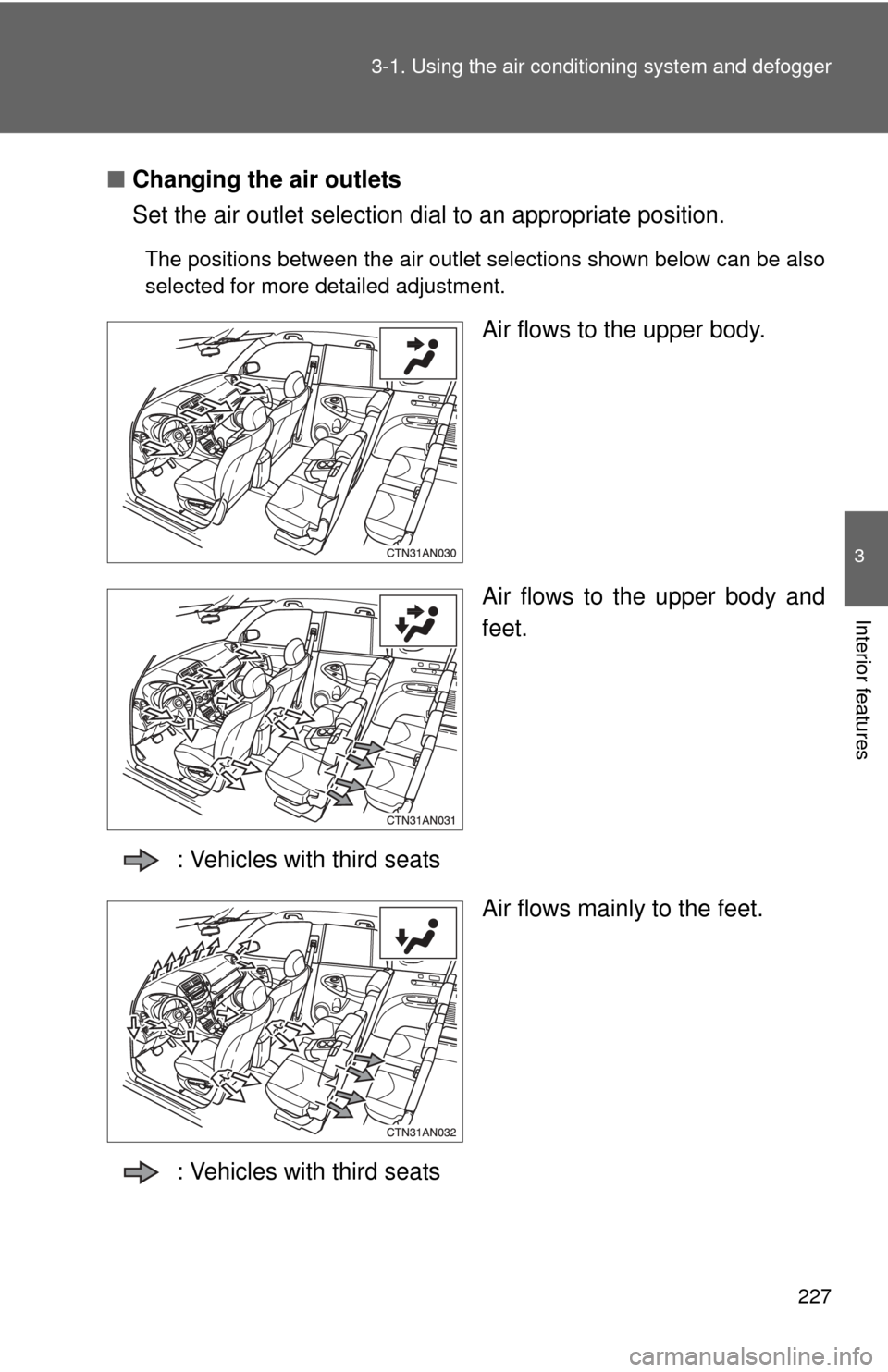
■Changing the air outlets
Set the air outlet selection di al to an appropriate position.
The positions between the air outlet selections shown below can be also
selected for more detailed adjustment.
Air flows to the upper body.
Air flows to the upper body and
feet.
: Vehicles with third seats Air flows mainly to the feet.
: Vehicles with third seats
Page 228 of 536
228 3-1. Using the air conditioning system and defogger
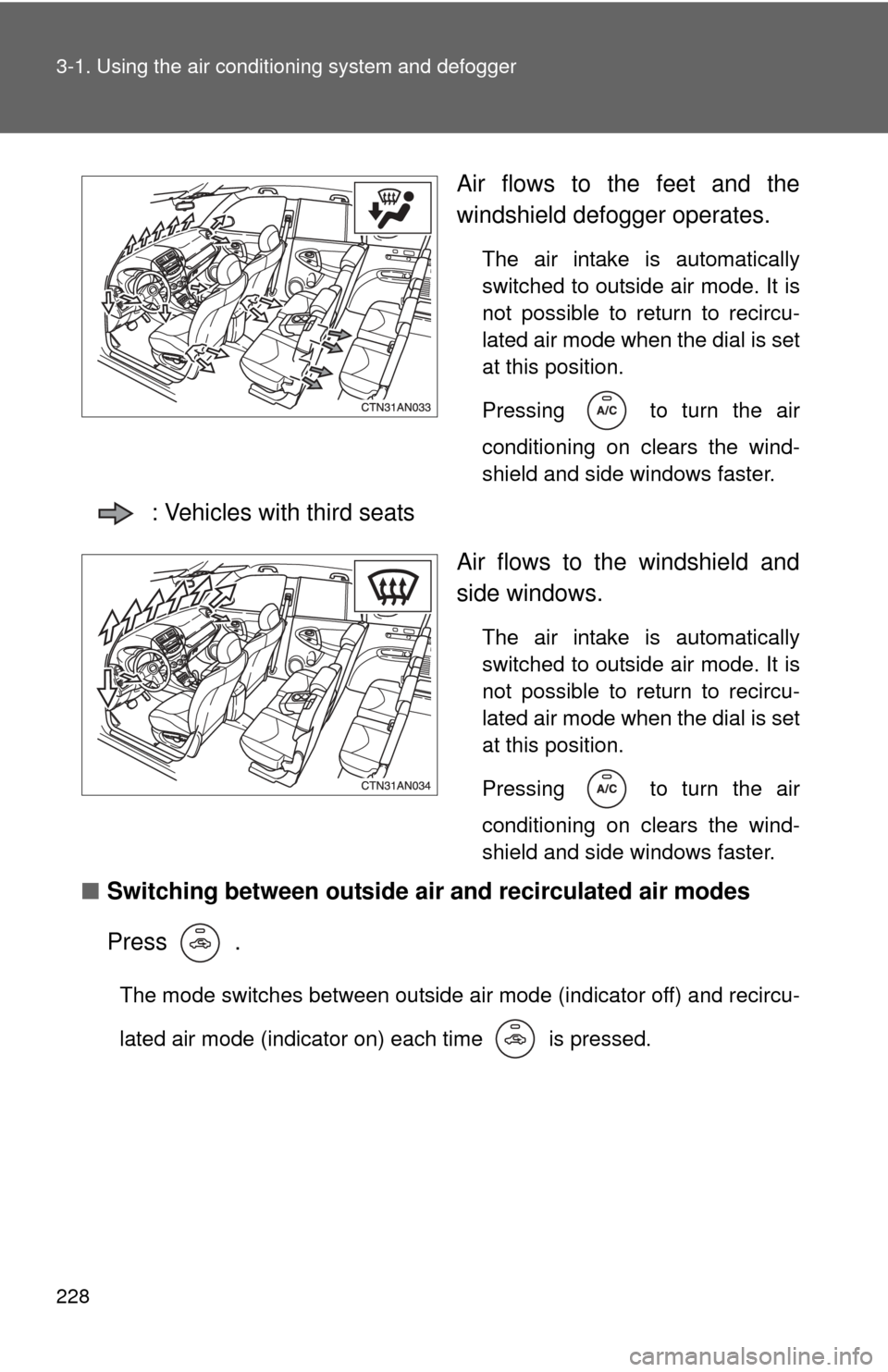
Air flows to the feet and the
windshield defogger operates.
The air intake is automatically
switched to outside air mode. It is
not possible to return to recircu-
lated air mode when the dial is set
at this position.
Pressing
to turn the air
conditioning on clears the wind-
shield and side windows faster.
: Vehicles with third seats
Air flows to the windshield and
side windows.
The air intake is automatically
switched to outside air mode. It is
not possible to return to recircu-
lated air mode when the dial is set
at this position.
Pressing
to turn the air
conditioning on clears the wind-
shield and side windows faster.
■ Switching between outside air and recirculated air modes
Press .
The mode switches between outside air mode (indicator off) and recircu-
lated air mode (indicator on) each time is pressed.
Page 229 of 536
229
3-1. Using the air conditioning system
and defogger
3
Interior features
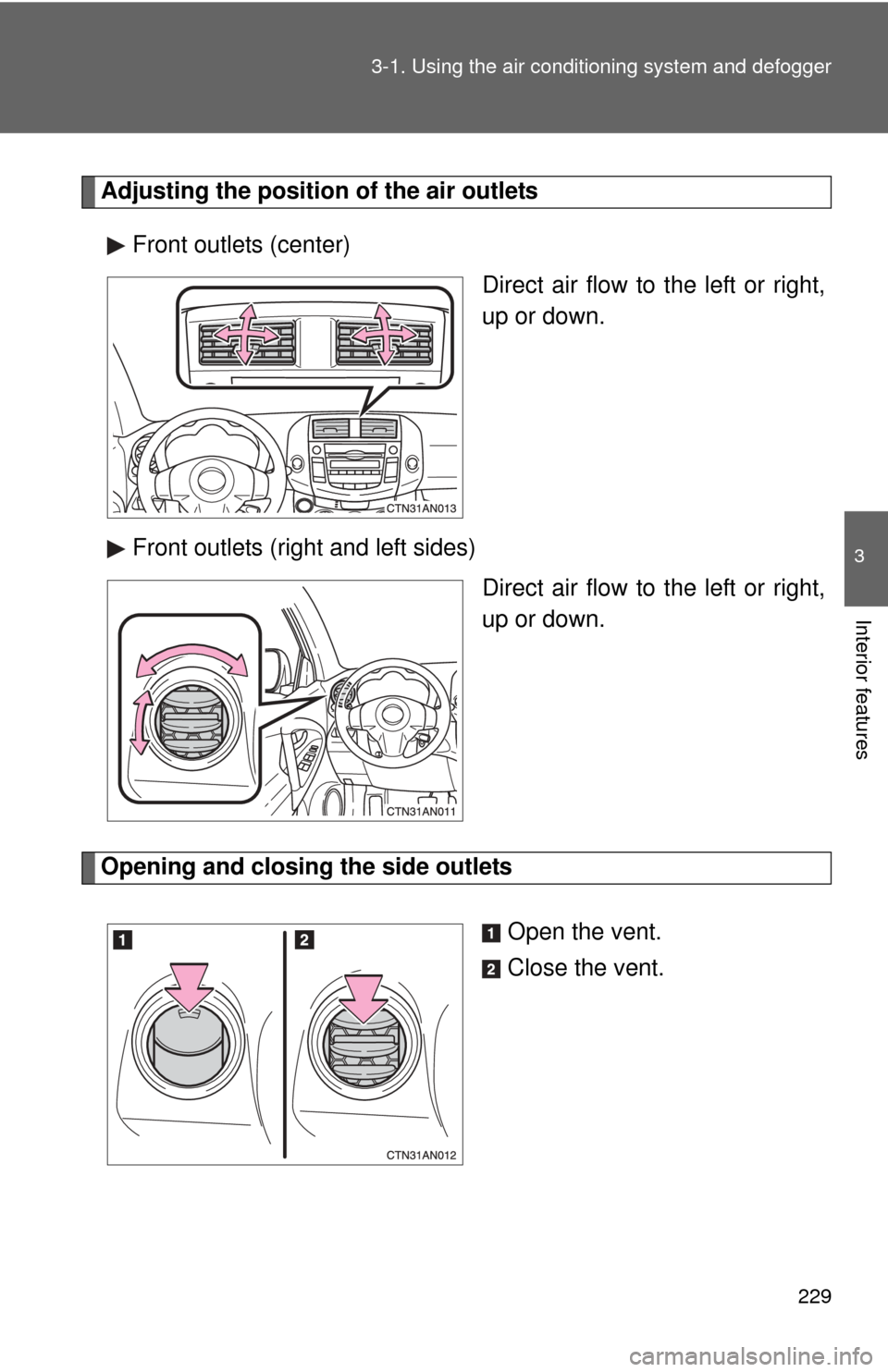
Adjusting the position of the air outlets
Front outlets (center) Direct air flow to the left or right,
up or down.
Front outlets (right and left sides) Direct air flow to the left or right,
up or down.
Opening and closing the side outlets
Open the vent.
Close the vent.
Page 230 of 536
230 3-1. Using the air conditioning system and defogger
■Using the system in recirculated air mode
The windows will fog up more easily if the recirculated air mode is used for
an extended period.
■ Window defogger feature
Recirculated air mode may automatically be switched to outside air mode in
situations where the windows need to be defogged.
■ When outside air temperat ure approaches 32°F (0°C)
The air conditioning system may not operate even when
is pressed.
■ When the indicator light on flashes
Press
and turn off the air conditioning system before turning it on once
more. There may be a problem in the ai r conditioning system if the indicator
light keeps flashing. Turn the air conditioning system off and have it
inspected by your Toyota dealer.
■ When
is selected for the air outlets used
For your driving comfort, air flowing to the feet may be warmer than air flow-
ing to the upper body depending on the position of the temperature setting.
■ Air conditioning odors
●During use, various odors from inside and outside the vehicle may enter
into and accumulate in the air conditioning system. This may then cause
odor to be emitted from the vents.
● To reduce potential odors from occurring:
It is recommended that the air conditioning system be set to outside air
mode prior to turning the vehicle off.
CAUTION
■To prevent the windshield from fogging up
Do not set the air outlet selection dial to during cool air operation in
extremely humid weather. The difference between the temperature of the
outside air and that of the windshield can cause the outer surface of the
windshield to fog up, blocking your vision.