stop start TOYOTA RAV4 2012 XA30 / 3.G Owner's Manual
[x] Cancel search | Manufacturer: TOYOTA, Model Year: 2012, Model line: RAV4, Model: TOYOTA RAV4 2012 XA30 / 3.GPages: 544, PDF Size: 10.25 MB
Page 147 of 544
147
2-1. Driving procedures
2
When driving
■
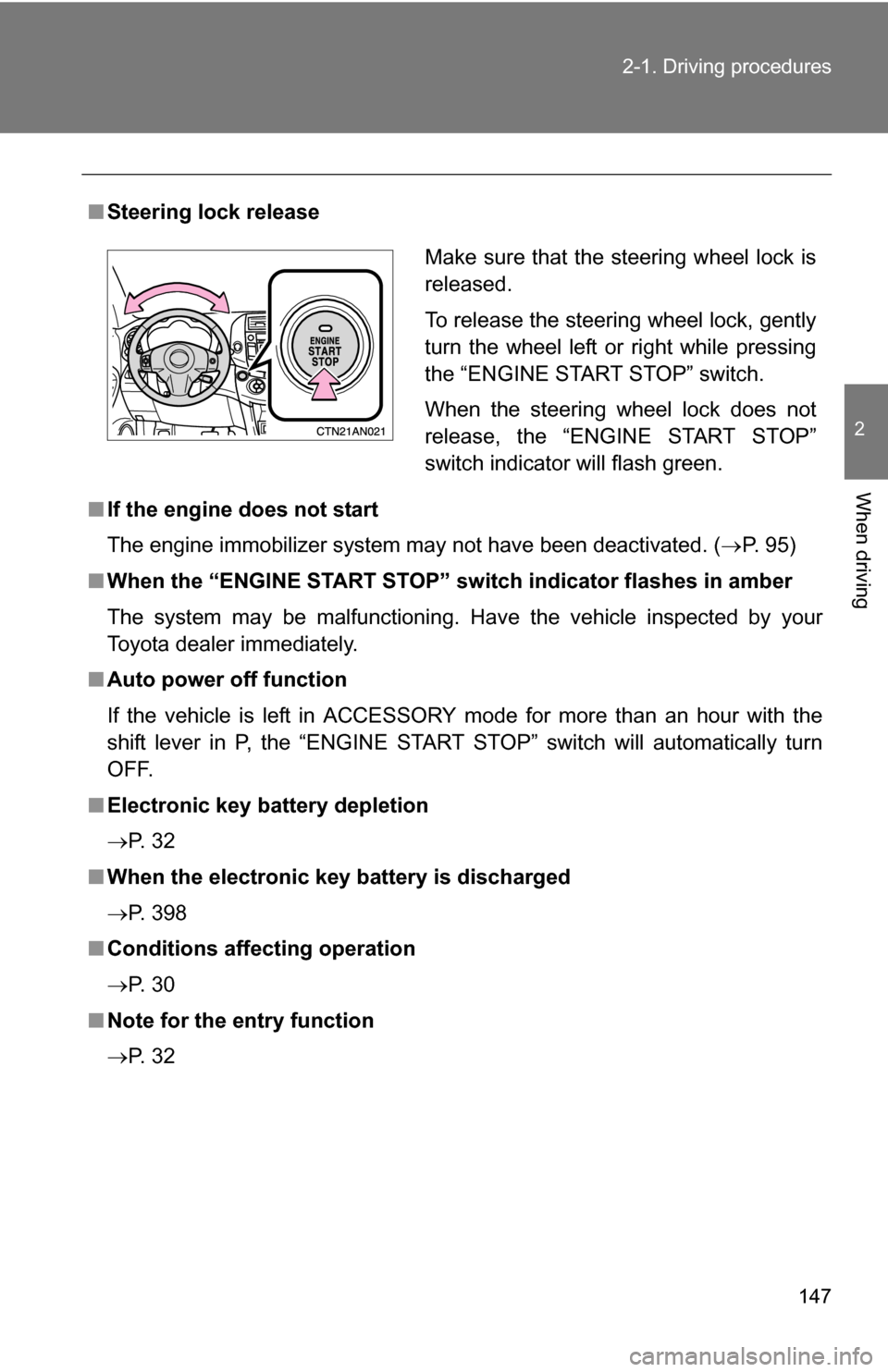
Steering lock release
■ If the engine does not start
The engine immobilizer system may not have been deactivated. ( P. 95)
■ When the “ENGINE START STOP” sw itch indicator flashes in amber
The system may be malfunctioning. Have the vehicle inspected by your
Toyota dealer immediately.
■ Auto power off function
If the vehicle is left in ACCESSORY mode for more than an hour with the
shift lever in P, the “ENGINE START STOP” switch will automatically turn
OFF.
■ Electronic key battery depletion
P. 3 2
■ When the electronic key battery is discharged
P. 398
■ Conditions affecting operation
P. 3 0
■ Note for the entry function
P. 3 2
Make sure that the steering wheel lock is
released.
To release the steering wheel lock, gently
turn the wheel left or right while pressing
the “ENGINE START STOP” switch.
When the steering wheel lock does not
release, the “ENGINE START STOP”
switch indicator will flash green.
Page 148 of 544
148 2-1. Driving procedures
CAUTION
■When starting the engine
Always start the engine while sitting in the driver's seat. Do not depress the
accelerator pedal while starting the engine under any circumstances.
Doing so may cause an accident resulting in death or serious injury.
■ Stopping the engine in an emergency
If you want to stop the engine in an emergency while driving the vehicle,
push and hold the “ENGINE START STOP” switch for more than 3 seconds.
However, do not touch the “ENGINE START STOP” switch while driving
except in an emergency. Turning the engine off while driving will not cause
loss of steering or braking control, but the power assist to these systems will
be lost. This will make it more difficult to steer and brake, so you should pull
over and stop the vehicle as soon as it is safe to do so.
NOTICE
■To prevent battery discharge
Do not leave the “ENGINE START STOP” switch in ACCESSORY or IGNI-
TION ON mode for long periods without the engine running.
■ When starting the engine
●Do not race a cold engine.
● If the engine becomes difficult to start or stalls frequently, have the engine
checked immediately.
Page 153 of 544
153
2-1. Driving procedures
2
When driving
Vehicles without
smart key system:
While the engine switch is in the “ON” position, depress the
brake pedal and move the shift lever.
Vehicles with smart key system:
While the “ENGINE START STOP” switch is in IGNITION
ON mode, depress the brake pedal and move the shift
lever.
■ Shift position uses
*: Shifting to the D position allows the system to select a gear suitable
for the driving conditions.
Setting the shift lever to the D position is recommended for normal
driving.
Shift positionFunction
4-speed models5-speed models
PParking the vehicle/starting the engine
RReversing
NNeutral
DNormal driving*
4Position for engine braking
3,2Position for more powerful engine braking
LPosition for maximum engine braking
Page 155 of 544
155
2-1. Driving procedures
2
When driving
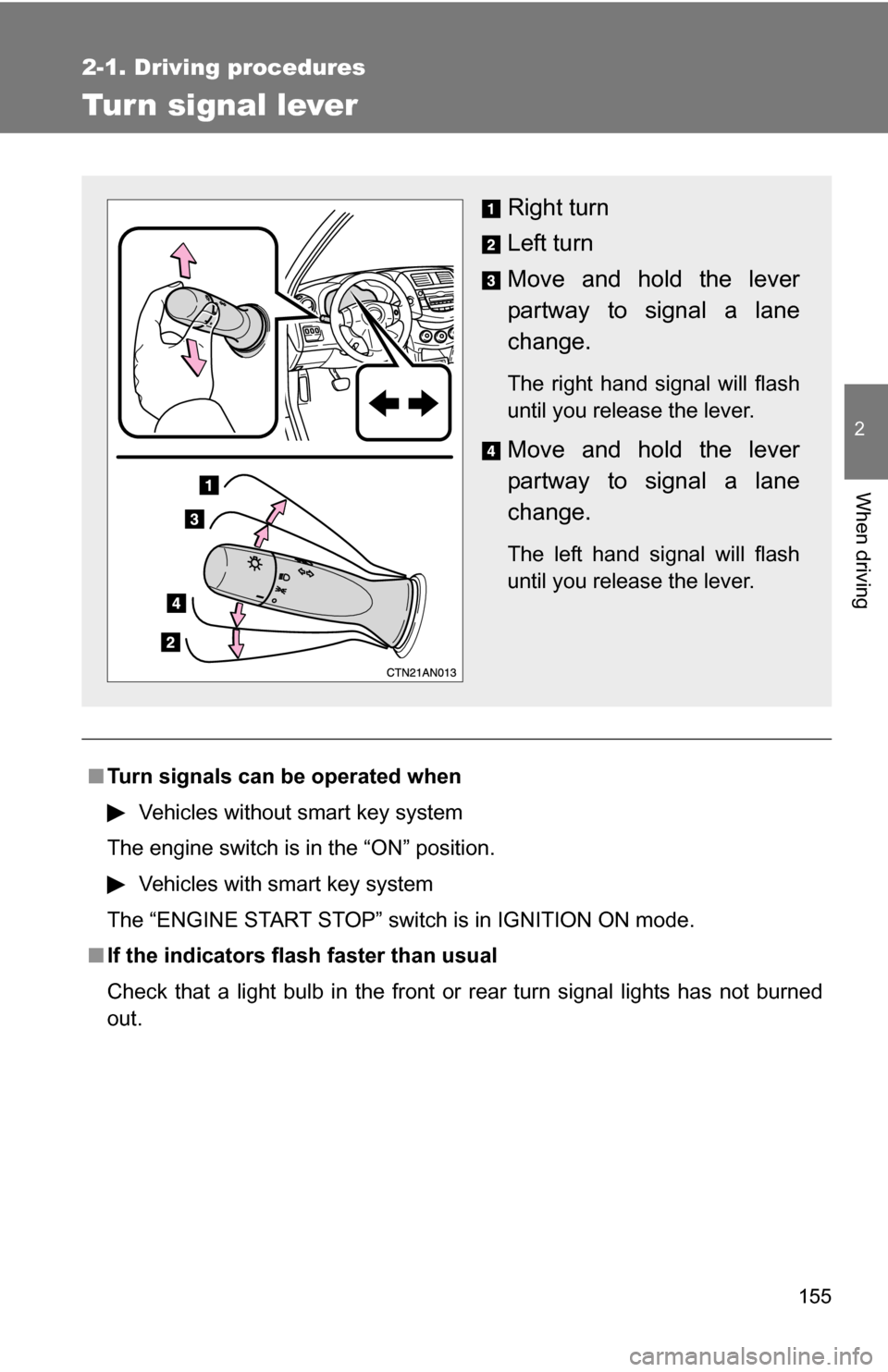
Tur n signal lever
■Turn signals can be operated when
Vehicles without smart key system
The engine switch is in the “ON” position.
Vehicles with smart key system
The “ENGINE START STOP” switch is in IGNITION ON mode.
■ If the indicators flash faster than usual
Check that a light bulb in the front or rear turn signal lights has not burned
out.
Right turn
Left turn
Move and hold the lever
partway to signal a lane
change.
The right hand signal will flash
until you release the lever.
Move and hold the lever
partway to signal a lane
change.
The left hand signal will flash
until you release the lever.
Page 158 of 544
158
2-2. Instrument cluster
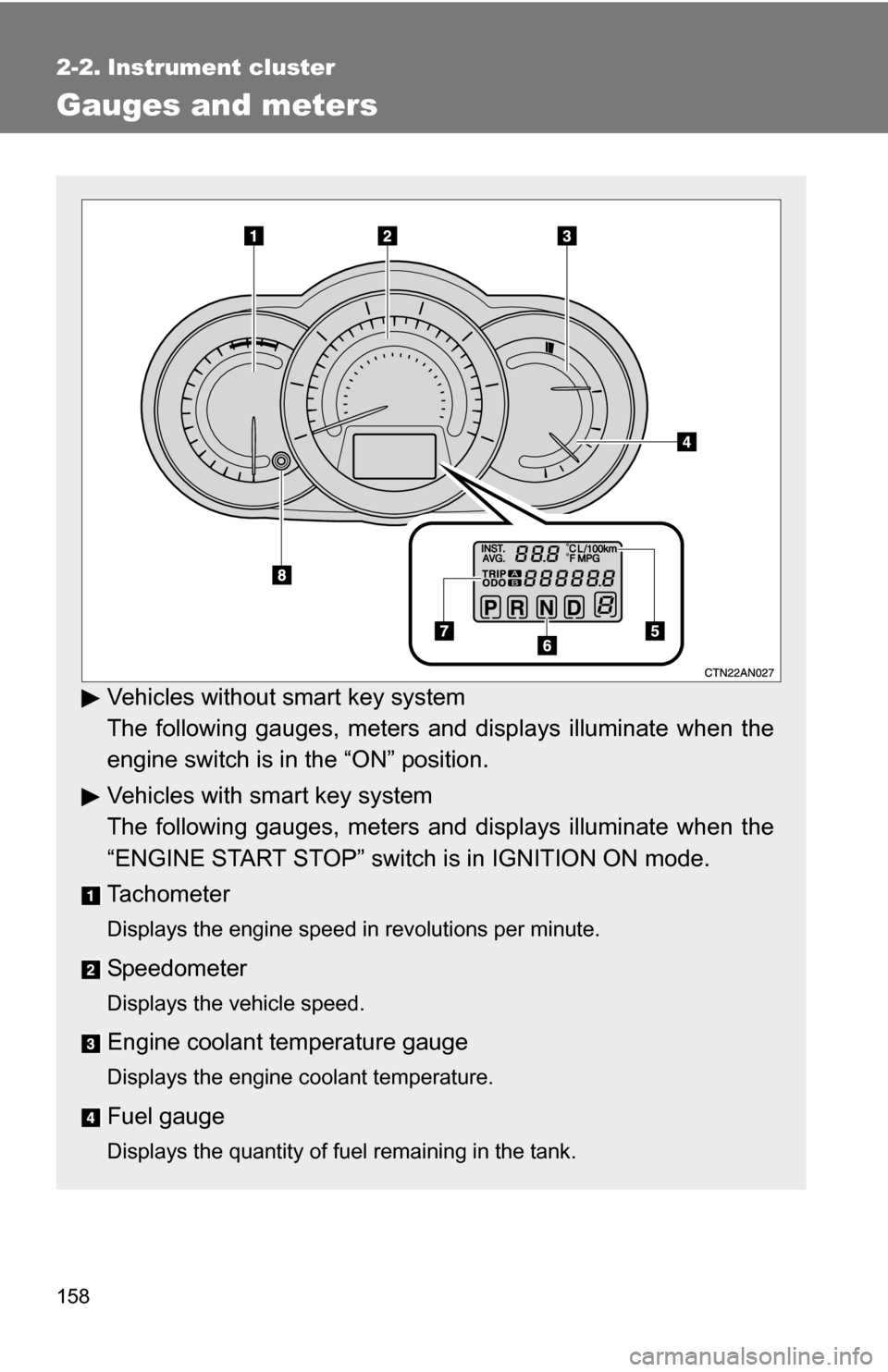
Gauges and meters
Vehicles without smart key system
The following gauges, meters and displays illuminate when the
engine switch is in the “ON” position.
Vehicles with smart key system
The following gauges, meters and displays illuminate when the
“ENGINE START STOP” switch is in IGNITION ON mode.
Tachometer
Displays the engine speed in revolutions per minute.
Speedometer
Displays the vehicle speed.
Engine coolant temperature gauge
Displays the engine coolant temperature.
Fuel gauge
Displays the quantity of fuel remaining in the tank.
Page 162 of 544
162 2-2. Instrument cluster
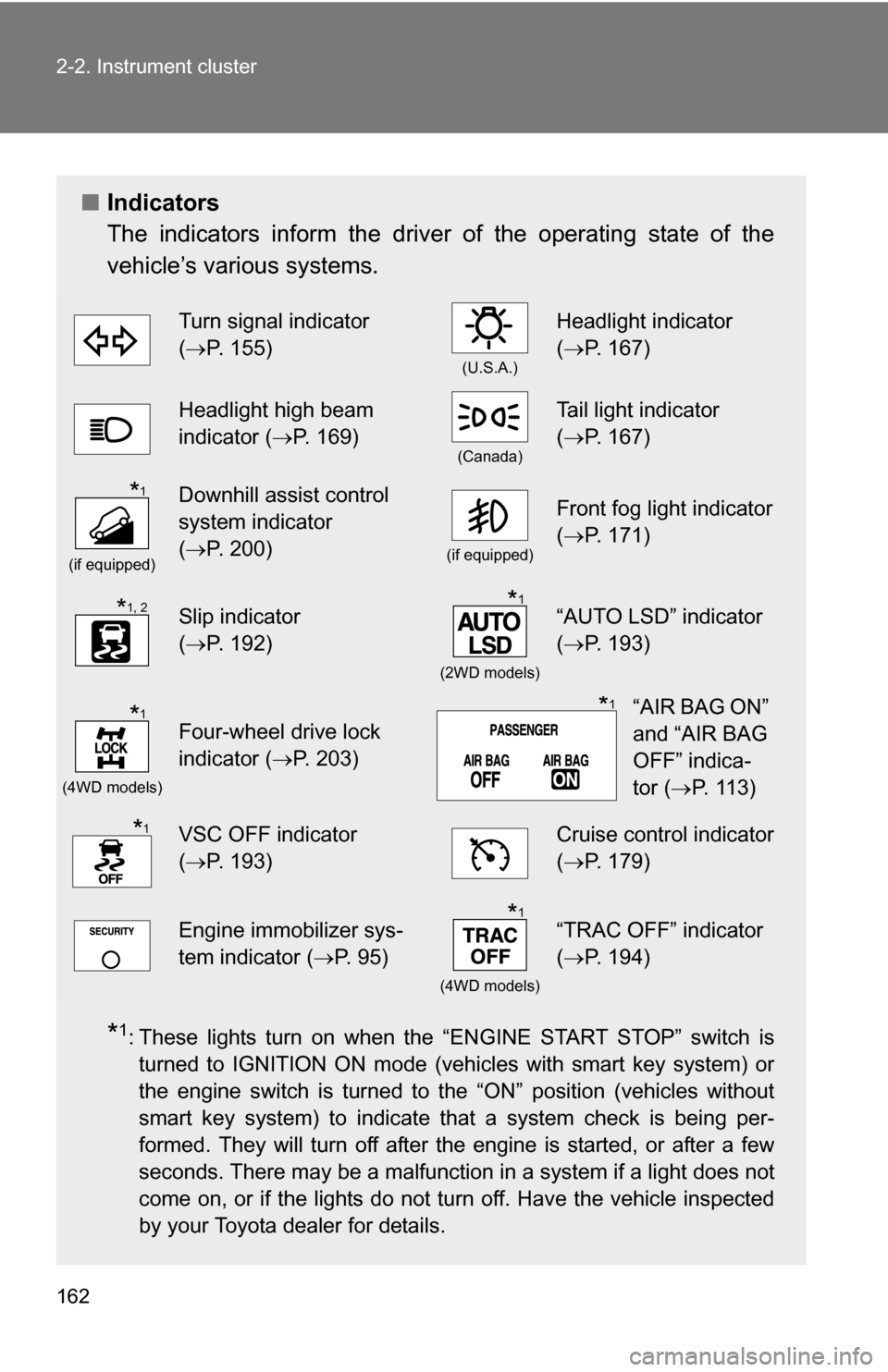
■Indicators
The indicators inform the driver of the operating state of the
vehicle’s various systems.
*1: These lights turn on when the “ENGINE START STOP” switch is
turned to IGNITION ON mode (vehicles with smart key system) or
the engine switch is turned to the “ON” position (vehicles without
smart key system) to indicate that a system check is being per-
formed. They will turn off after the engine is started, or after a few
seconds. There may be a malfunction in a system if a light does not
come on, or if the lights do not turn off. Have the vehicle inspected
by your Toyota dealer for details.
Turn signal indicator
(P. 155)
(U.S.A.)
Headlight indicator
( P. 167)
Headlight high beam
indicator ( P. 169)
(Canada)
Tail light indicator
(P. 167)
(if equipped)
Downhill assist control
system indicator
(P. 200)
(if equipped)
Front fog light indicator
( P. 171)
Slip indicator
(P. 192)
(2WD models)
“AUTO LSD” indicator
( P. 193)
(4WD models)
Four-wheel drive lock
indicator ( P. 203)
VSC OFF indicator
(P. 193)Cruise control indicator
( P. 179)
Engine immobilizer sys-
tem indicator ( P. 95)
(4WD models)
“TRAC OFF” indicator
(P. 194)
*1
*1, 2*1
*1“AIR BAG ON”
and “AIR BAG
OFF” indica-
tor ( P. 113)*1
*1
*1
Page 163 of 544
163
2-2. Instrument cluster
2
When driving
CAUTION
■
If a safety system warning light does not come on
Should a safety system light such as the ABS and SRS airbag warning light
not come on when you start the engine, this could mean that these systems
are not available to help protect you in an accident, which could result in
death or serious injury. Have the vehicle inspected by your Toyota dealer
immediately if this occurs.
*2: The light flashes to indicate that the system is operating.
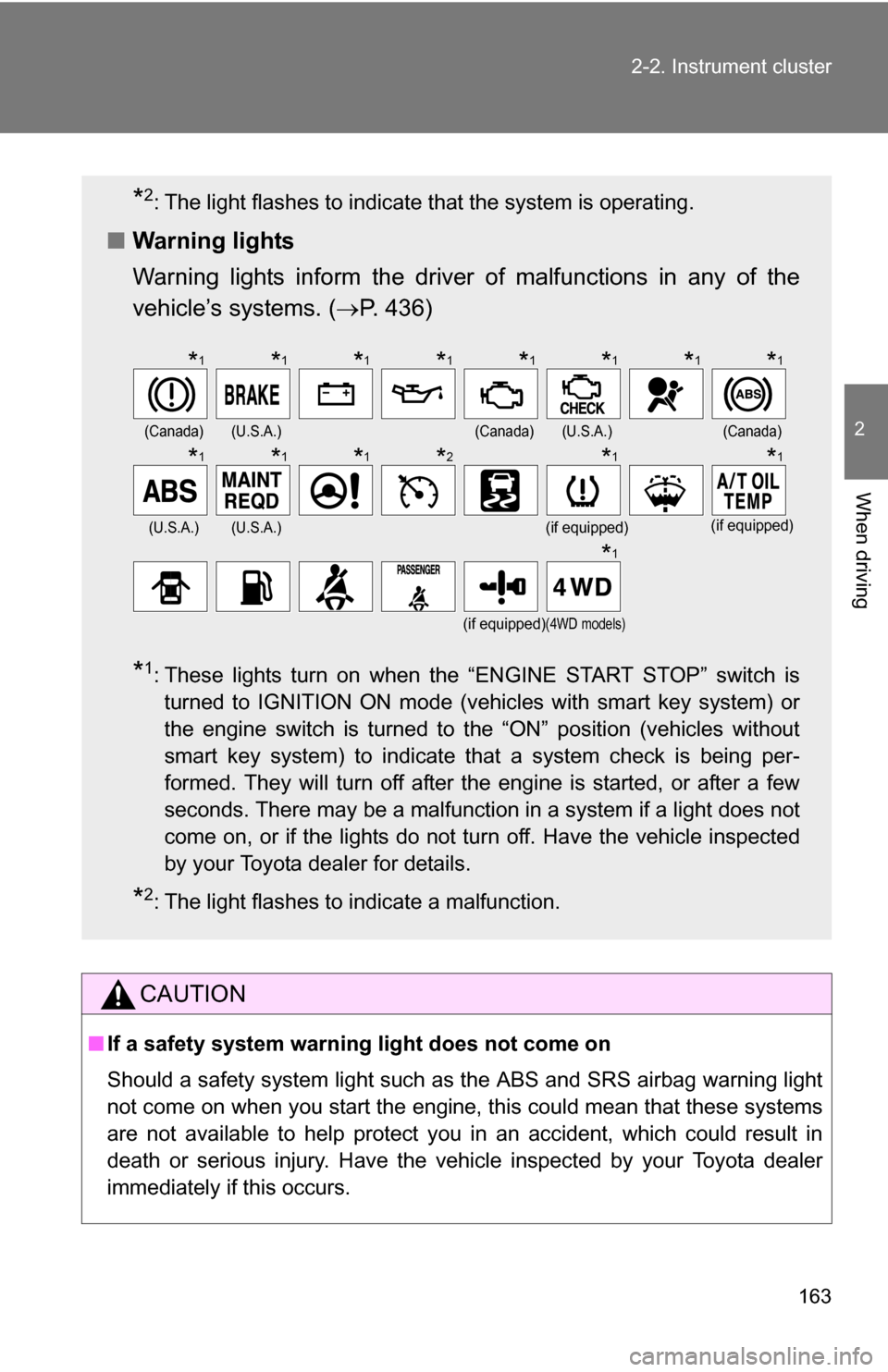
■ Warning lights
Warning lights inform the driver of malfunctions in any of the
vehicle’s systems. ( P. 436)
*1: These lights turn on when the “ENGINE START STOP” switch is
turned to IGNITION ON mode (vehicles with smart key system) or
the engine switch is turned to the “ON” position (vehicles without
smart key system) to indicate that a system check is being per-
formed. They will turn off after the engine is started, or after a few
seconds. There may be a malfunction in a system if a light does not
come on, or if the lights do not turn off. Have the vehicle inspected
by your Toyota dealer for details.
*2: The light flashes to indicate a malfunction.
(Canada)(U.S.A.)(Canada)(U.S.A.)(Canada)
(U.S.A.)(U.S.A.)(if equipped)(if equipped)
(if equipped)(4WD models)
*1*1*1*1*1*1*1*1
*1*1*1*2*1*1
*1
Page 167 of 544
167
2
When driving
2-3. Operating the lights and wipers
Headlight switch
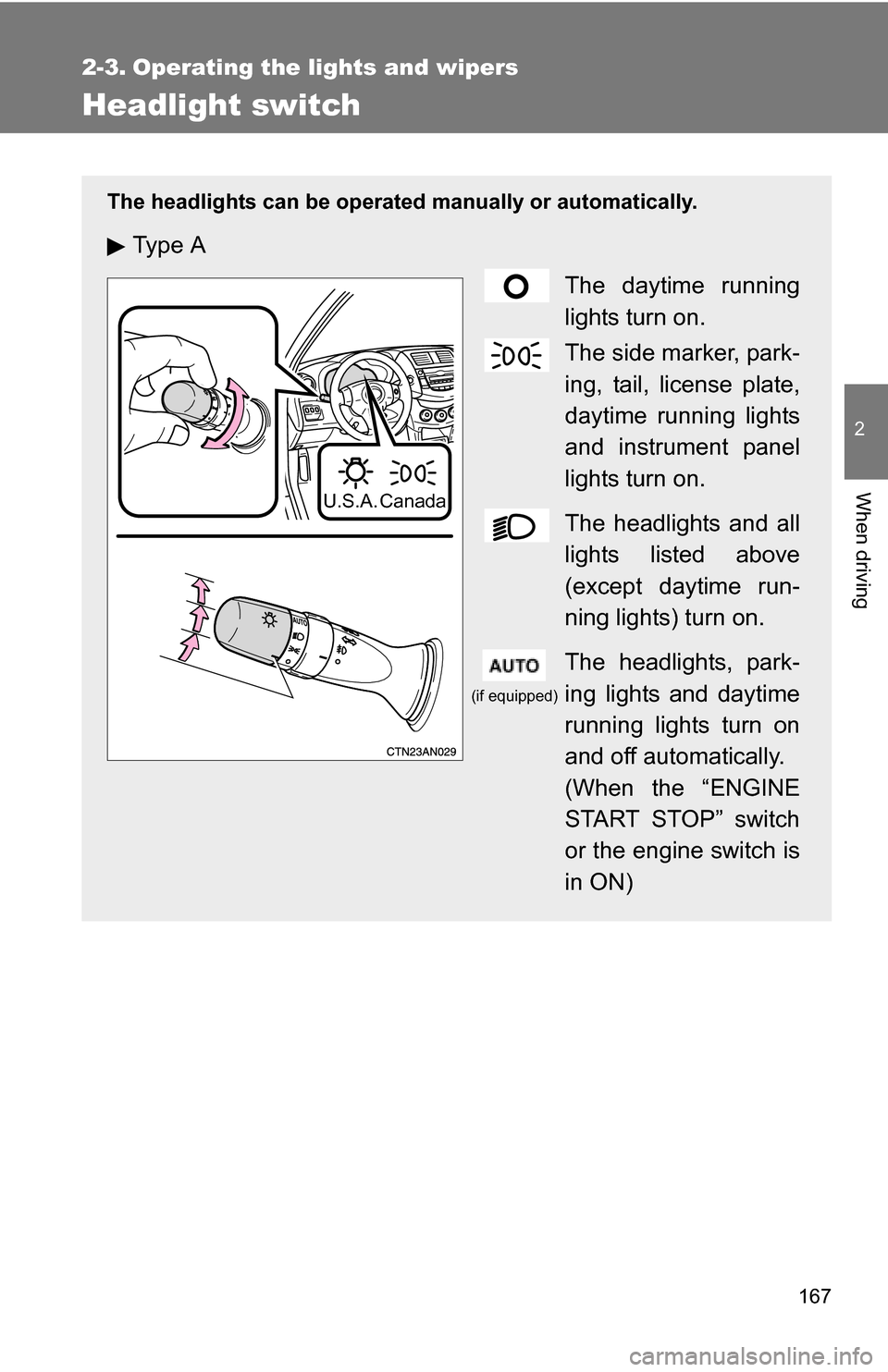
The headlights can be operated manually or automatically.
Ty p e AThe daytime running
lights turn on.
The side marker, park-
ing, tail, license plate,
daytime running lights
and instrument panel
lights turn on.
The headlights and all
lights listed above
(except daytime run-
ning lights) turn on.
The headlights, park-
ing lights and daytime
running lights turn on
and off automatically.
(When the “ENGINE
START STOP” switch
or the engine switch is
in ON)
U.S.A. Canada
(if equipped)
Page 168 of 544
168 2-3. Operating the lights and wipers
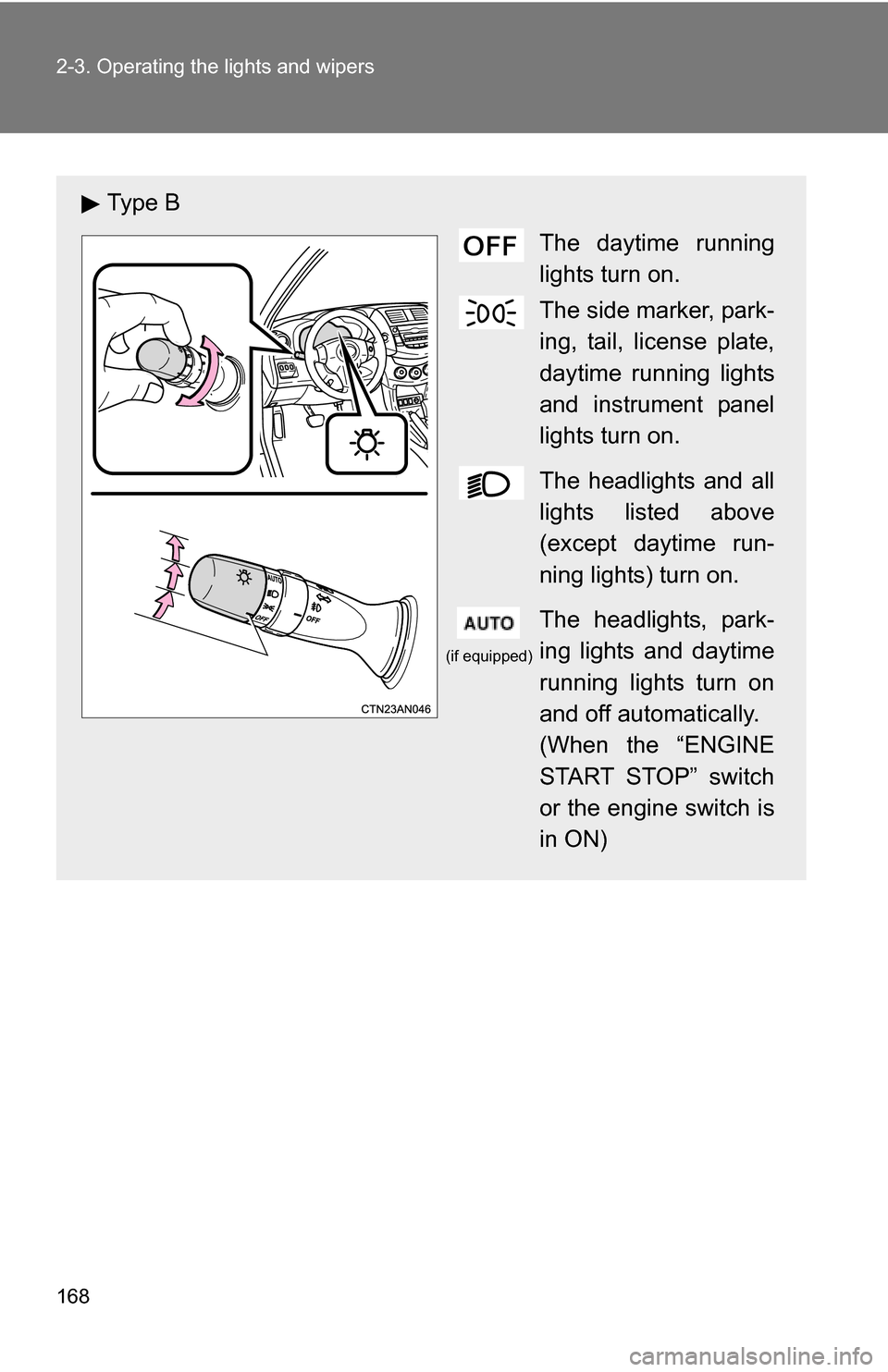
Ty p e BThe daytime running
lights turn on.
The side marker, park-
ing, tail, license plate,
daytime running lights
and instrument panel
lights turn on.
The headlights and all
lights listed above
(except daytime run-
ning lights) turn on.
The headlights, park-
ing lights and daytime
running lights turn on
and off automatically.
(When the “ENGINE
START STOP” switch
or the engine switch is
in ON)
(if equipped)
Page 170 of 544
170 2-3. Operating the lights and wipers
■Automatic light off system
Vehicles without smart key system:
The headlights and tail lights turn off 30 seconds after driver’s door is
opened and closed if the engine switch has been turned to “ACC” or “LOCK”
position.
To turn the lights on again, turn the engine switch to the “ON” position, or
turn the headlight switch off and then back to or .
Vehicles with smart key system:
The headlights and tail lights turn off 30 seconds after driver’s door is
opened and closed if the “ENGINE START STOP” switch has been turned to
ACCESSORY mode or turned OFF.
To turn the lights on again, turn the “ENGINE START STOP” switch to IGNI-
TION ON mode, or turn the headlight switch off and then back to or
.
■ Customization that can be co nfigured at Toyota dealer
Settings (e.g. light sensor sensitivity) can be deactivated.
(Customizable features P. 510)
NOTICE
■To prevent battery discharge
Do not leave the lights on longer than necessary when the engine is not run-
ning.