engine TOYOTA RAV4 2012 XA30 / 3.G Workshop Manual
[x] Cancel search | Manufacturer: TOYOTA, Model Year: 2012, Model line: RAV4, Model: TOYOTA RAV4 2012 XA30 / 3.GPages: 544, PDF Size: 10.25 MB
Page 175 of 544
175
2-3. Operating the lights and wipers
2
When driving
■
The windshield wipers and washer can be operated when
Vehicles without smart key system
The engine switch is in the “ON” position.
Vehicles with smart key system
The “ENGINE START STOP” switch is in IGNITION ON mode.
■ If no windshield washer fluid sprays
Check that the washer nozzles are not blocked and if there is washer fluid in
the windshield washer fluid reservoir.
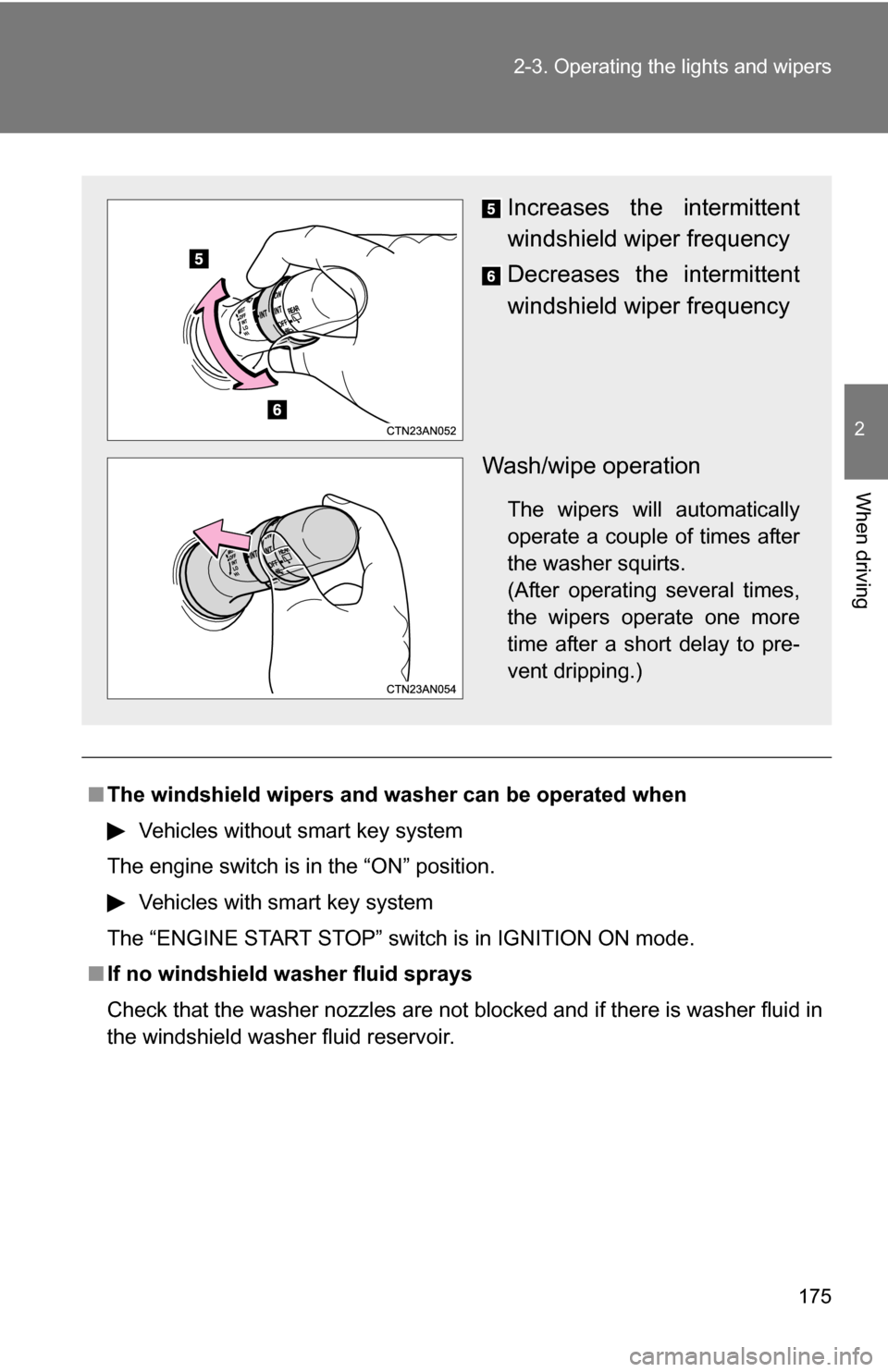
Increases the intermittent
windshield wiper frequency
Decreases the intermittent
windshield wiper frequency
Wash/wipe operation
The wipers will automatically
operate a couple of times after
the washer squirts.
(After operating several times,
the wipers operate one more
time after a short delay to pre-
vent dripping.)
Page 178 of 544
178 2-3. Operating the lights and wipers
■The rear window wiper and w asher can be operated when
Vehicles without smart key system
The engine switch is in the “ON” position.
Vehicles with smart key system
The “ENGINE START STOP” switch is in IGNITION ON mode.
NOTICE
■ When the rear window is dry
Do not use the wipers, as they may damage the rear window.
■ When a nozzle is blocked
Do not try to clear it with a pin or other object. The nozzle will be damaged.
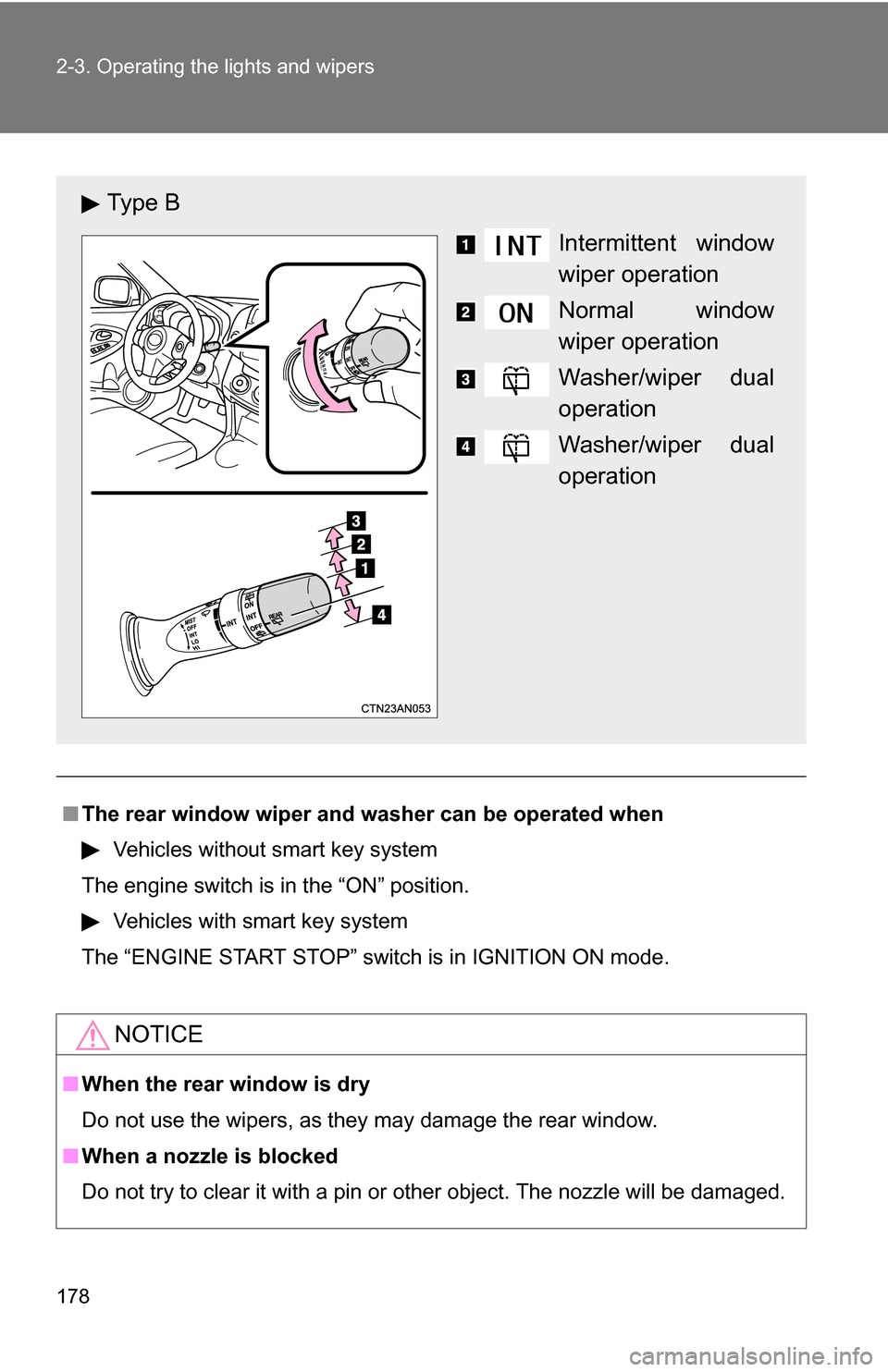
Ty p e B
Intermittent window
wiper operation
Normal window
wiper operation
Washer/wiper dual
operation
Washer/wiper dual
operation
Page 184 of 544
184 2-4. Using other driving systems
■The rear view monitor system can be operated when
Vehicles without smart key system
The shift lever is in R, the back door is fully closed and the engine switch is
in the “ON” position.
Vehicles with smart key system
The shift lever is in R, the back door is fully closed and the “ENGINE START
STOP” switch is in IGNITION ON mode.
■ Changing display modes
The rear view monitor display mode can be changed while the screen is on.
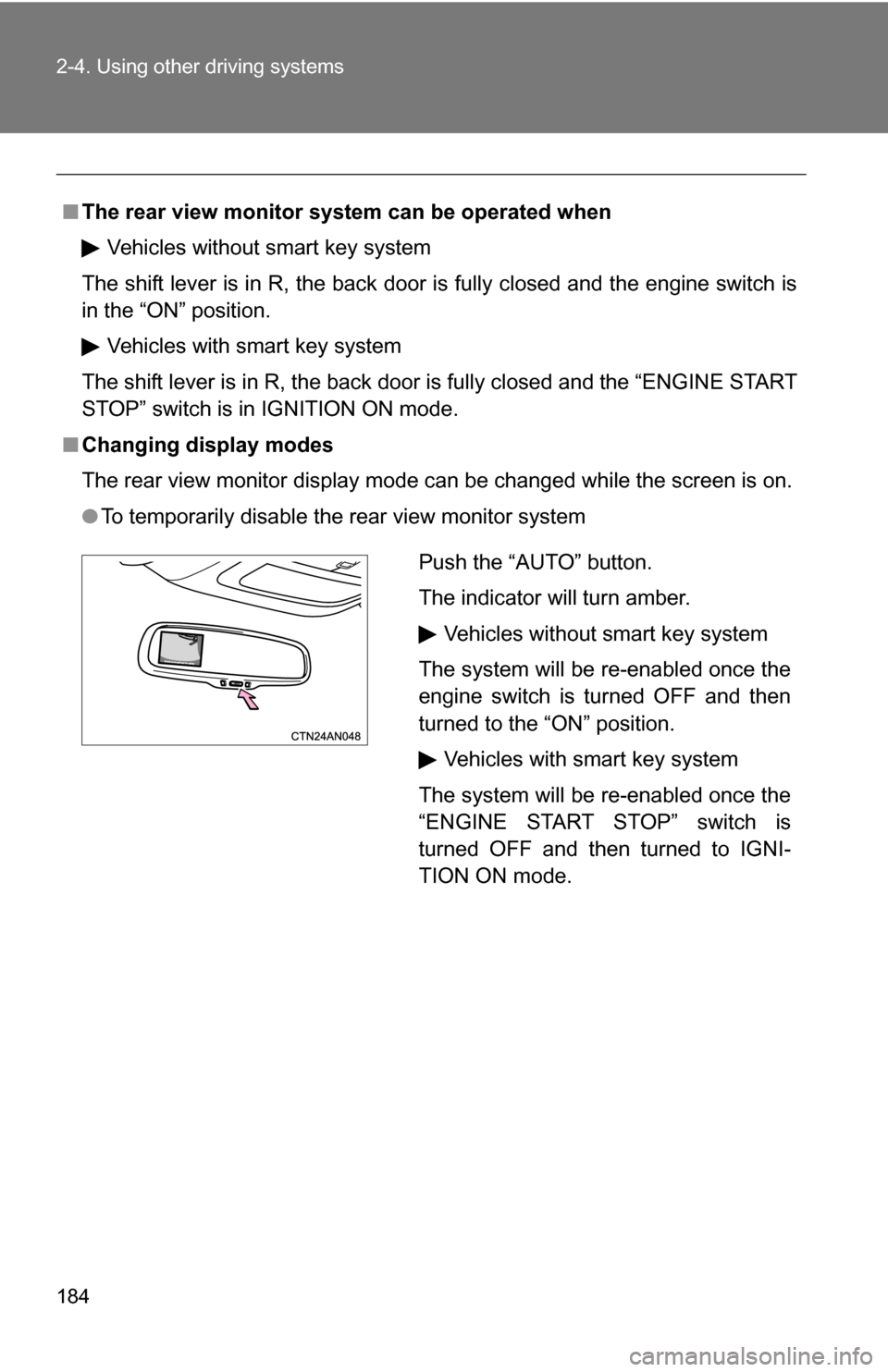
●To temporarily disable the rear view monitor system
Push the “AUTO” button.
The indicator will turn amber.
Vehicles without smart key system
The system will be re-enabled once the
engine switch is turned OFF and then
turned to the “ON” position.
Vehicles with smart key system
The system will be re-enabled once the
“ENGINE START STOP” switch is
turned OFF and then turned to IGNI-
TION ON mode.
Page 185 of 544
185
2-4. Using other
driving systems
2
When driving
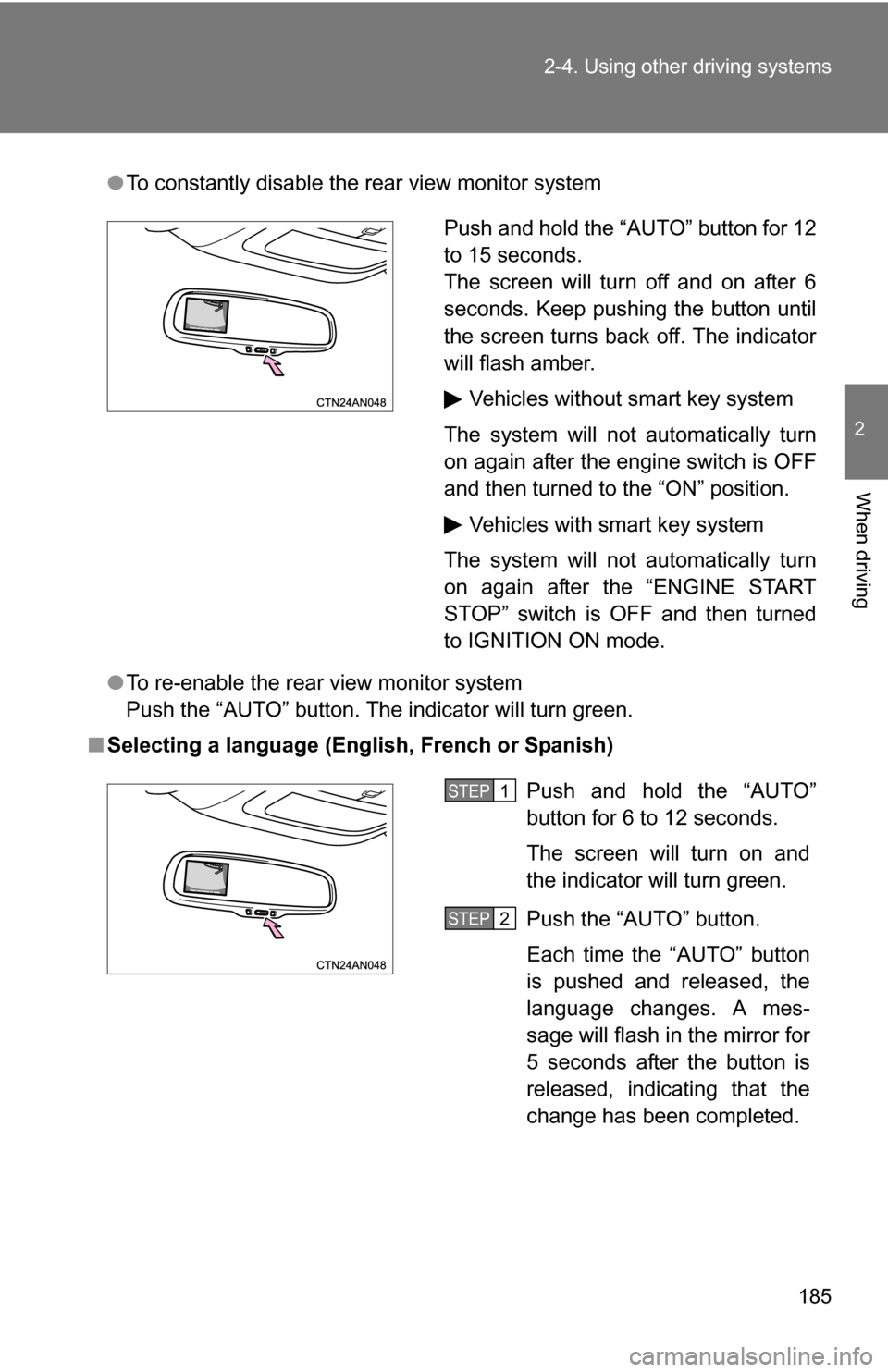
●To constantly disable the rear view monitor system
● To re-enable the rear view monitor system
Push the “AUTO” button. The indicator will turn green.
■ Selecting a language (Eng lish, French or Spanish)
Push and hold the “AUTO” button for 12
to 15 seconds.
The screen will turn off and on after 6
seconds. Keep pushing the button until
the screen turns back off. The indicator
will flash amber.
Vehicles without smart key system
The system will not automatically turn
on again after the engine switch is OFF
and then turned to the “ON” position. Vehicles with smart key system
The system will not automatically turn
on again after the “ENGINE START
STOP” switch is OFF and then turned
to IGNITION ON mode.
Push and hold the “AUTO”
button for 6 to 12 seconds.
The screen will turn on and
the indicator will turn green.
Push the “AUTO” button.
Each time the “AUTO” button
is pushed and released, the
language changes. A mes-
sage will flash in the mirror for
5 seconds after the button is
released, indicating that the
change has been completed.STEP 1
STEP 2
Page 193 of 544
193
2-4. Using other
driving systems
2
When driving
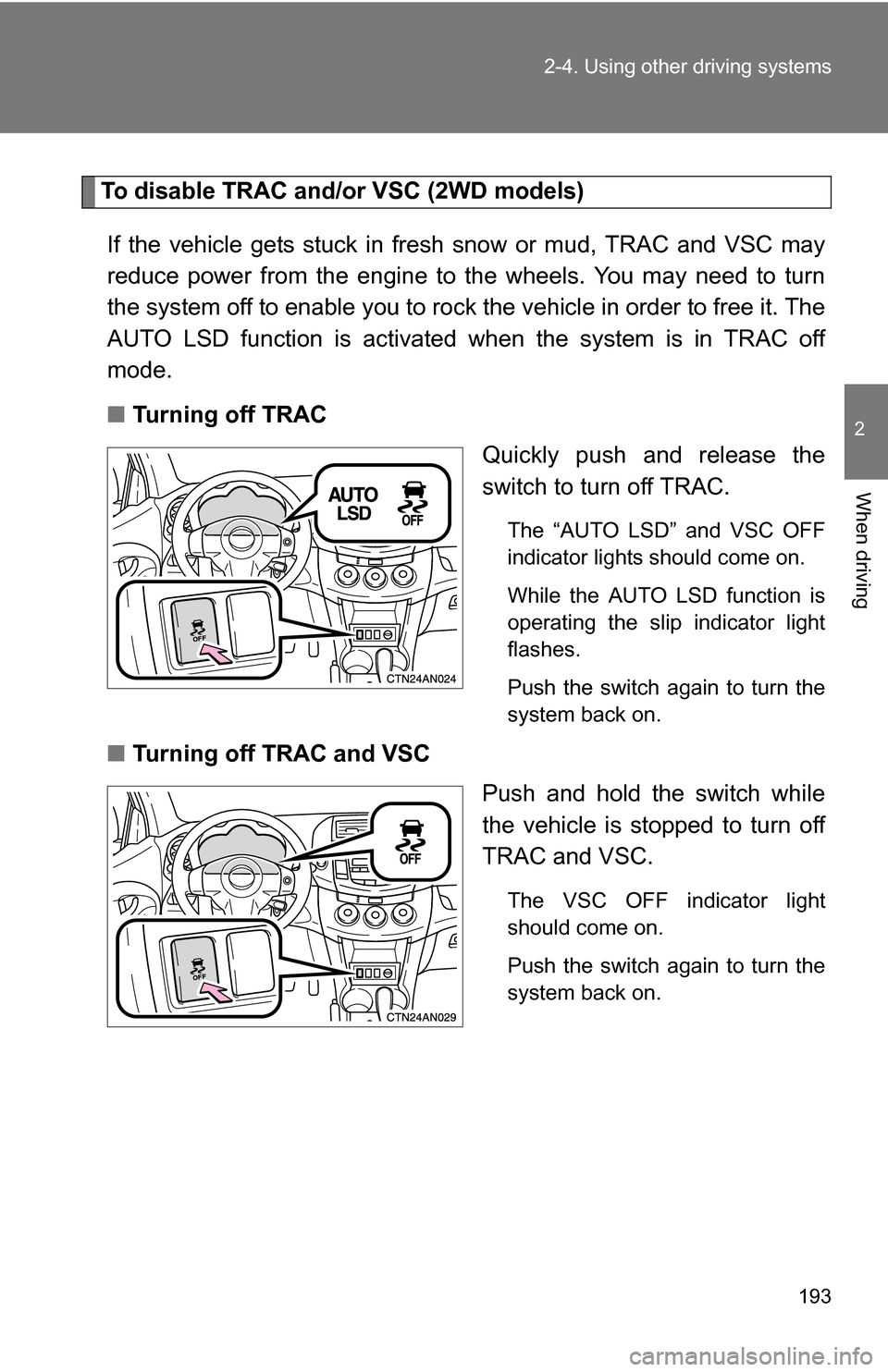
To disable TRAC and/or VSC (2WD models)
If the vehicle gets stuck in fresh snow or mud, TRAC and VSC may
reduce power from the engine to the wheels. You may need to turn
the system off to enable you to rock the vehicle in order to free it. The
AUTO LSD function is activated when the system is in TRAC off
mode.
■ Turning off TRAC
Quickly push and release the
switch to turn off TRAC.
The “AUTO LSD” and VSC OFF
indicator lights should come on.
While the AUTO LSD function is
operating the slip indicator light
flashes.
Push the switch again to turn the
system back on.
■Turning off TRAC and VSC
Push and hold the switch while
the vehicle is stopped to turn off
TRAC and VSC.
The VSC OFF indicator light
should come on.
Push the switch again to turn the
system back on.
Page 194 of 544
194 2-4. Using other driving systems
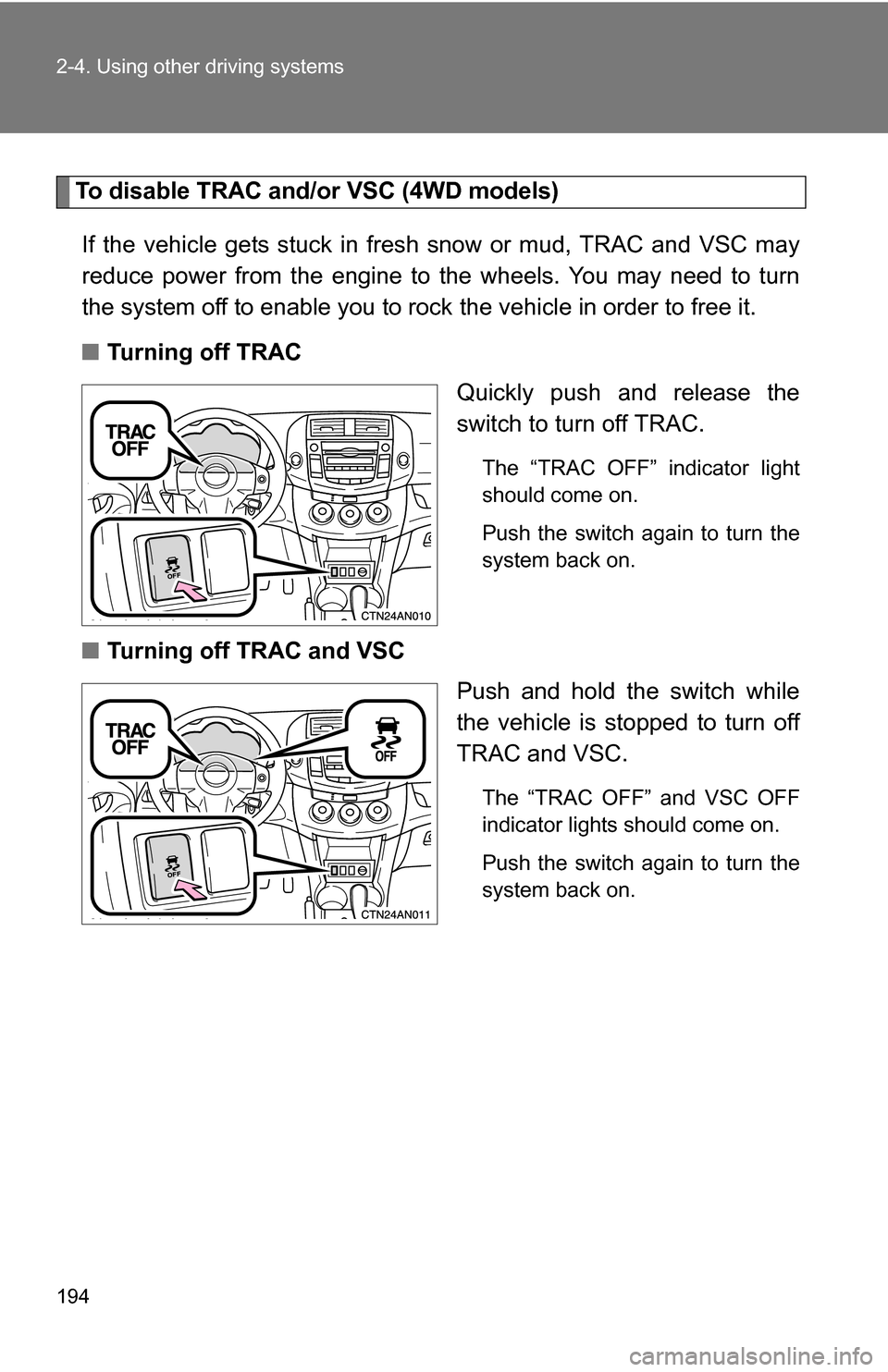
To disable TRAC and/or VSC (4WD models)If the vehicle gets stuck in fres h snow or mud, TRAC and VSC may
reduce power from the engine to the wheels. You may need to turn
the system off to enable you to rock the vehicle in order to free it.
■ Turning off TRAC
Quickly push and release the
switch to turn off TRAC.
The “TRAC OFF” indicator light
should come on.
Push the switch again to turn the
system back on.
■Turning off TRAC and VSC
Push and hold the switch while
the vehicle is stopped to turn off
TRAC and VSC.
The “TRAC OFF” and VSC OFF
indicator lights should come on.
Push the switch again to turn the
system back on.
Page 195 of 544
195
2-4. Using other
driving systems
2
When driving
■Automatic reactivation of TRAC and VSC
Vehicles without smart key system
Turning the engine switch OFF after turning off the TRAC and VSC systems
will automatically re-enable them.
Vehicles with smart key system
Turning the “ENGINE START STOP” switch OFF after turning off the TRAC
and VSC systems will automatically re-enable them.
■ Automatic TRAC reactivation
2WD models
If only the TRAC system is turned off, the TRAC system will be reactivated
while vehicle speed is increased. 4WD models
If only the TRAC system is turned off, the TRAC system will turn on when
vehicle speed increases.
■ Automatic TRAC and VSC reactivation
If the TRAC and VSC systems are turned off, the systems will not turn on
even when vehicle speed increases.
■ When the “AUTO LSD” indicator light flashes even if the VSC OFF
switch has not been pressed (2WD models)
TRAC, AUTO LSD, hill-start assist control and downhill assist control cannot
be operated. Contact your Toyota dealer.
■ When the “TRAC OFF” indicator light comes on even if the VSC OFF
switch has not been pressed (4WD models)
TRAC, hill-start assist control and downhill assist control cannot be oper-
ated. Contact your Toyota dealer.
■ Sounds and vibrations caused by the ABS, TRAC and VSC
● A sound may be heard from the engine compartment when the engine is
started or just after the vehicle begins to move. This sound does not indi-
cate that a malfunction has occurred in any of these systems.
Page 196 of 544
196 2-4. Using other driving systems
●Any of the following conditions may occur when the above systems are
operating. None of these indicates that a malfunction has occurred.
• Vibrations may be felt through the vehicle body and steering.
• A motor sound may be heard after the vehicle comes to a stop.
• The brake pedal may pulsate slightly when the ABS is activated.
• The brake pedal may move down slightly after the ABS is activated.
■ When the AUTO LSD function operates continuously
The brake actuator may overheat. In that case, the system will stop the
AUTO LSD function, a buzzer will sound and the slip indicator will stay on
steady. Refrain from using the AUTO LSD function until the slip indicator
goes off. (There is no problem with continuing driving normally.)
■ EPS operation sound
When the steering wheel operates, a motor sound (whirring sound) may be
heard.
This does not indicate a malfunction.
■ Reduced effectiveness of EPS
The effectiveness of EPS is reduced to prevent the system from overheating
when there is frequent steering input over an extended period of time. The
steering wheel may feel heavy as a result. Should this occur, refrain from
excessive steering input or stop the vehicle and turn the engine off. The sys-
tem should return to normal within 10 minutes.
■ If the slip indicator comes on
It may indicate a malfunction in the VSC, TRAC and AUTO LSD function.
Contact your Toyota dealer.
CAUTION
■The ABS does not operate effectively when
●Tires with inadequate gripping ability are used (such as excessively worn
tires on a snow covered road).
● The vehicle hydroplanes while driving at high speed on wet or slick road.
Page 201 of 544
201
2-4. Using other
driving systems
2
When driving
■Conditions in which the downhill assist control system does not oper-
ate or will stop operating
● In the following situations, the downhill assist control system indicator
flashes and the downhill assist control system does not operate or will
stop operating:
• The shift lever is not in L or R.
• The vehicle speed is higher than 15 mph (25 km/h).
● If the accelerate or brake pedal is depressed, the downhill assist control
system will stop operating with the downhill assist control system indica-
tor stayed on.
■ If the “DAC” switch is turned off while the downhill assist control sys-
tem is operating
The downhill assist control system gradually ceases operation. The downhill
assist control system indicator will flash during the canceling operation, and
then go off when the system is fully off.
■ Downhill assist control system operation sound
●A sound may be heard from the engine compartment while the downhill
assist control system is operating. This sound does not indicate a mal-
function.
● If the accelerator or brake pedal is depressed while the downhill assist
control system is operating, a sound caused by the release of system
operation may be heard, or you may f eel the brake pedal push-back. This
does not indicate a malfunction.
■ When the downhill assist cont rol system operates continuously
The brake actuator may overheat. In that case, the downhill assist control
system will stop operating, a buzzer will sound and the downhill assist con-
trol system indicator will start flashing. Refrain from using the system until
the downhill assist control system indicator stays on. (There is no problem
with continuing driving normally.)
■ If the slip indicator comes on
It may indicate a malfunction in the system. Contact your Toyota dealer.
Page 203 of 544
203
2-4. Using other driving systems
2
When driving
Four-wheel drive lock switch (4WD models)
■Four-wheel drive lock mode can be operated when
Vehicles without smart key system
The engine switch is in the “ON” position. Vehicles with smart key system
The “ENGINE START STOP” switch is in IGNITION ON mode.
■ Four-wheel drive lock mode
●Four-wheel drive lock mode is canceled when the brakes are applied to
ensure the ABS and VSC systems operate effectively.
● Four-wheel drive lock mode is canceled when the vehicle speed exceeds
25 mph (40 km/h).
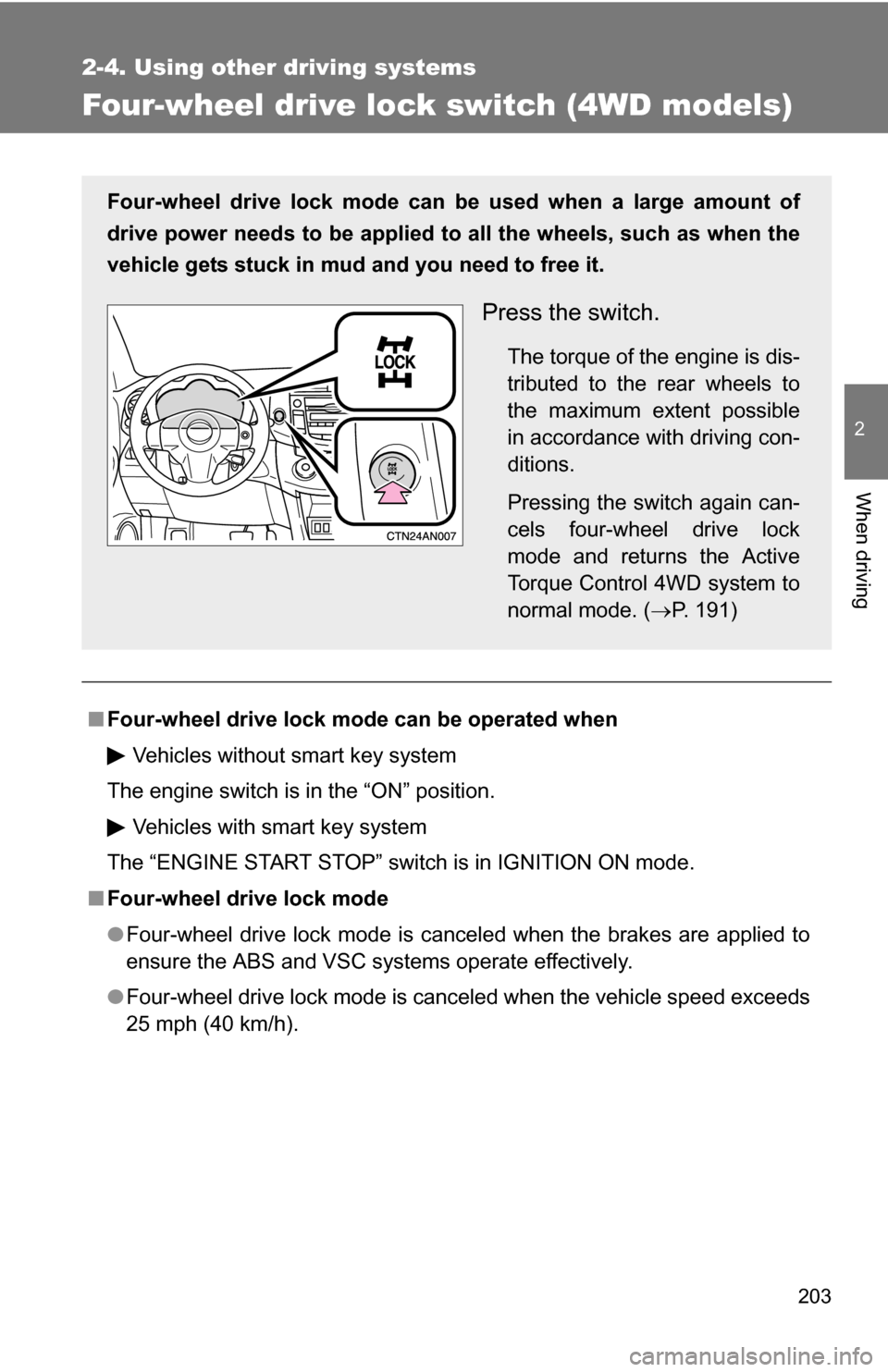
Four-wheel drive lock mode can be used when a large amount of
drive power needs to be applied to all the wheels, such as when the
vehicle gets stuck in mud and you need to free it.
Press the switch.
The torque of the engine is dis-
tributed to the rear wheels to
the maximum extent possible
in accordance with driving con-
ditions.
Pressing the switch again can-
cels four-wheel drive lock
mode and returns the Active
Torque Control 4WD system to
normal mode. (P. 191)