ECU TOYOTA RAV4 2012 XA30 / 3.G Owners Manual
[x] Cancel search | Manufacturer: TOYOTA, Model Year: 2012, Model line: RAV4, Model: TOYOTA RAV4 2012 XA30 / 3.GPages: 544, PDF Size: 10.25 MB
Page 4 of 544
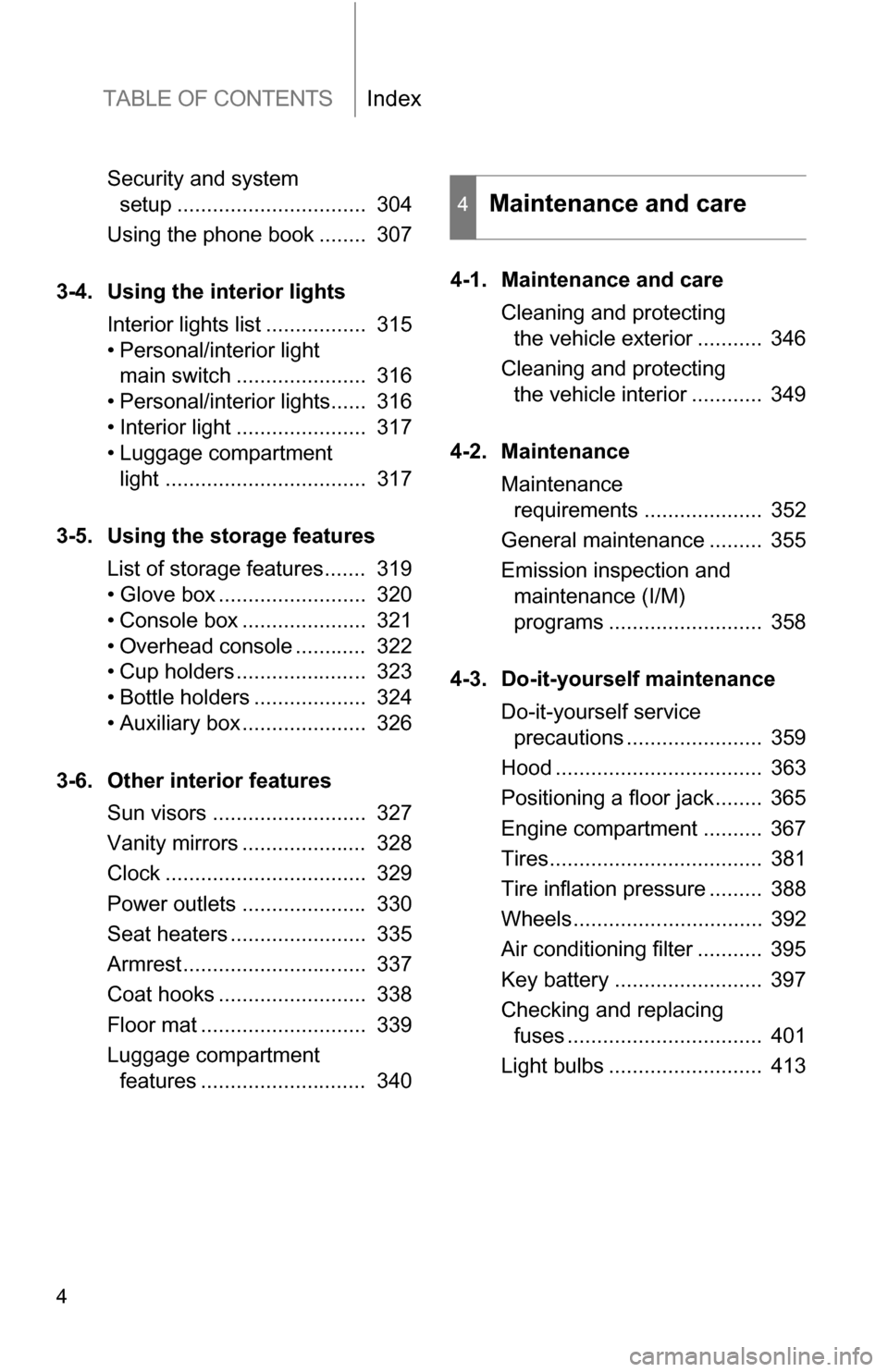
TABLE OF CONTENTSIndex
4
Security and system setup ................................ 304
Using the phone book ........ 307
3-4. Using the interior lights Interior lights list ................. 315
• Personal/interior light main switch ...................... 316
• Personal/interior lights...... 316
• Interior light ...................... 317
• Luggage compartment light .................................. 317
3-5. Using the storage features List of storage features....... 319
• Glove box ......................... 320
• Console box ..................... 321
• Overhead console ............ 322
• Cup holders ...................... 323
• Bottle holders ................... 324
• Auxiliary box ..................... 326
3-6. Other interior features Sun visors .......................... 327
Vanity mirrors ..................... 328
Clock .................................. 329
Power outlets ..................... 330
Seat heaters ....................... 335
Armrest............................... 337
Coat hooks ......................... 338
Floor mat ............................ 339
Luggage compartment features ............................ 340 4-1. Maintenance and care
Cleaning and protecting the vehicle exterior ........... 346
Cleaning and protecting the vehicle interior ............ 349
4-2. Maintenance Maintenance requirements .................... 352
General maintenance ......... 355
Emission inspection and maintenance (I/M)
programs .......................... 358
4-3. Do-it-yourself maintenance Do-it-yourself service precautions ....................... 359
Hood ................................... 363
Positioning a floor jack........ 365
Engine compartment .......... 367
Tires.................................... 381
Tire inflation pressure ......... 388
Wheels................................ 392
Air conditioning filter ........... 395
Key battery ......................... 397
Checking and replacing fuses ................................. 401
Light bulbs .......................... 413
4Maintenance and care
Page 15 of 544
15
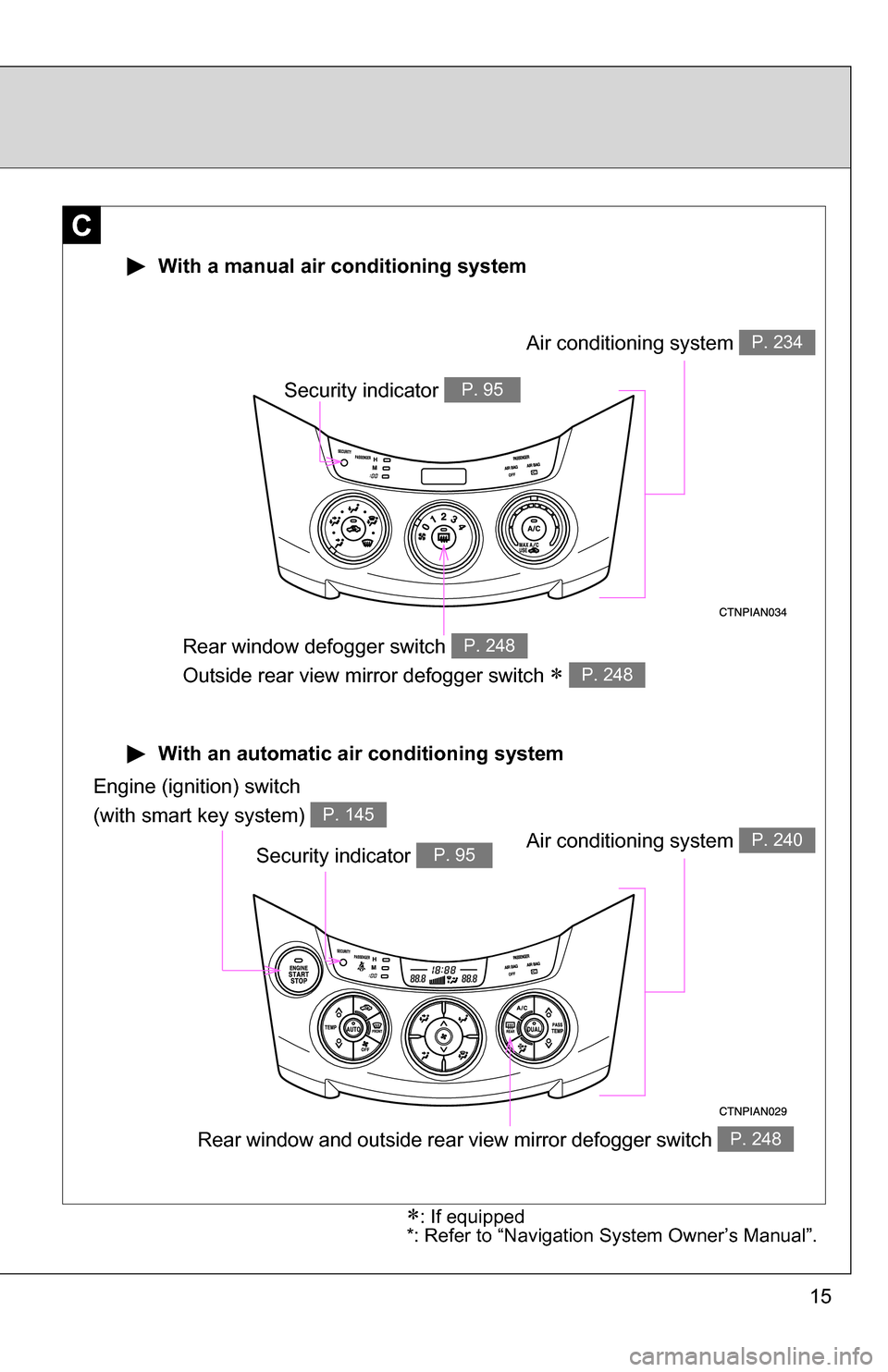
With an automatic air conditioning system
With a manual air conditioning system
C
Air conditioning system P. 234
Rear window defogger switch
Outside rear view mirror defogger switch
P. 248
P. 248
Engine (ignition) switch
(with smart key system)
P. 145
Air conditioning system P. 240
Rear window and outside rear view mirror defogger switch P. 248
Security indicator P. 95
Security indicator P. 95
: If equipped
*: Refer to “Navigation System Owner’s Manual”.
Page 33 of 544
33
1-2. Opening, closing and locking the doors
1
Before driving
●
As long as the electronic key is within the effective range, the doors may
be locked or unlocked by anyone.
● Even if the electronic key is not inside the vehicle, it may be possible to
start the engine if the electronic key is near the window.
● The doors may unlock if a large amount of water splashes on the door
handle, such as in the rain or in a car wash. (The doors will automatically
be locked after approximately 60 seconds if the doors are not opened
and closed.)
● Gripping the door handle when wearing a glove may not unlock the door.
● If the wireless remote control is used to lock the doors when the elec-
tronic key is near the vehicle, there is a possibility that the door may not
be unlocked by the entry function. (Use the wireless remote control to
unlock the doors.)
■ When the vehicle is not dr iven for extended periods
To prevent theft of the vehicle, do not leave the electronic key within 6 ft. (2
m) of the vehicle.
■ Security feature
If a door is not opened within approximately 60 seconds after the vehicle is
unlocked, the anti-theft system automatically locks the vehicle again.
■ Alarms and warning indicators
A combination of exterior and interior alarms as well as warning lights are
used to prevent the theft of the vehicle and accidents resulting from errone-
ous operation.
●When any warning lights come on:
Take appropriate measures in response to which warning light comes on.
( P. 436)
Page 40 of 544
40 1-2. Opening, closing and locking the doors
■If the wireless remote control does not operate
Vehicles without smart key system
Locking and unlocking the doors: Use the key. ( P. 42)
Vehicles with smart key system
Locking and unlocking the doors: Use the mechanical key. ( P. 471)
■ Security feature
If a door is not opened within approximately 60 seconds after the vehicle is
unlocked, the anti-theft system automatically locks the vehicle again.
■ Conditions affecting operation
Vehicles without smart key system
The wireless remote control function may not operate normally in the follow-
ing situations.
● Near a TV tower, radio station, electr ic power plant, airport or other facil-
ity that generates strong radio waves
● When carrying a portable radio, cell ular phone or other wireless commu-
nication devices
● When multiple wireless keys are in the vicinity
● When the wireless key is in contact with, or is covered by a metallic
object
● When a wireless key (that emits radio waves) is being used nearby
● When the wireless key has been left near an electrical appliance such as
a personal computer
Vehicles with smart key system
P. 3 0
■ Customization that can be co nfigured at Toyota dealer
Settings (e.g. wireless remote control) can be changed.
(Customizable features P. 510)
Page 48 of 544
48 1-2. Opening, closing and locking the doors
CAUTION
■Operating the back door
Observe the following precautions.
Failure to do so may cause parts of the body to be caught, resulting in death
or serious injury.
●When opening or closing the back door, thoroughly check to make sure
the surrounding area is safe.
● If anyone is in the vicinity, make sure they are safe and let them know that
the back door is about to open or close.
● Use caution when opening or closing the back door in windy weather as it
may move abruptly in strong wind.
● Do not attach any accessories other than genuine Toyota parts to the back
door. Such additional weight on the back door may interfere with the safety
opening and closing operation of the back door.
● If the open back door hides the stop, tail, rear side marker or rear turn sig-
nal lights while you are parked, other road users must be warned of the
presence of your vehicle by a warning triangle or other device.
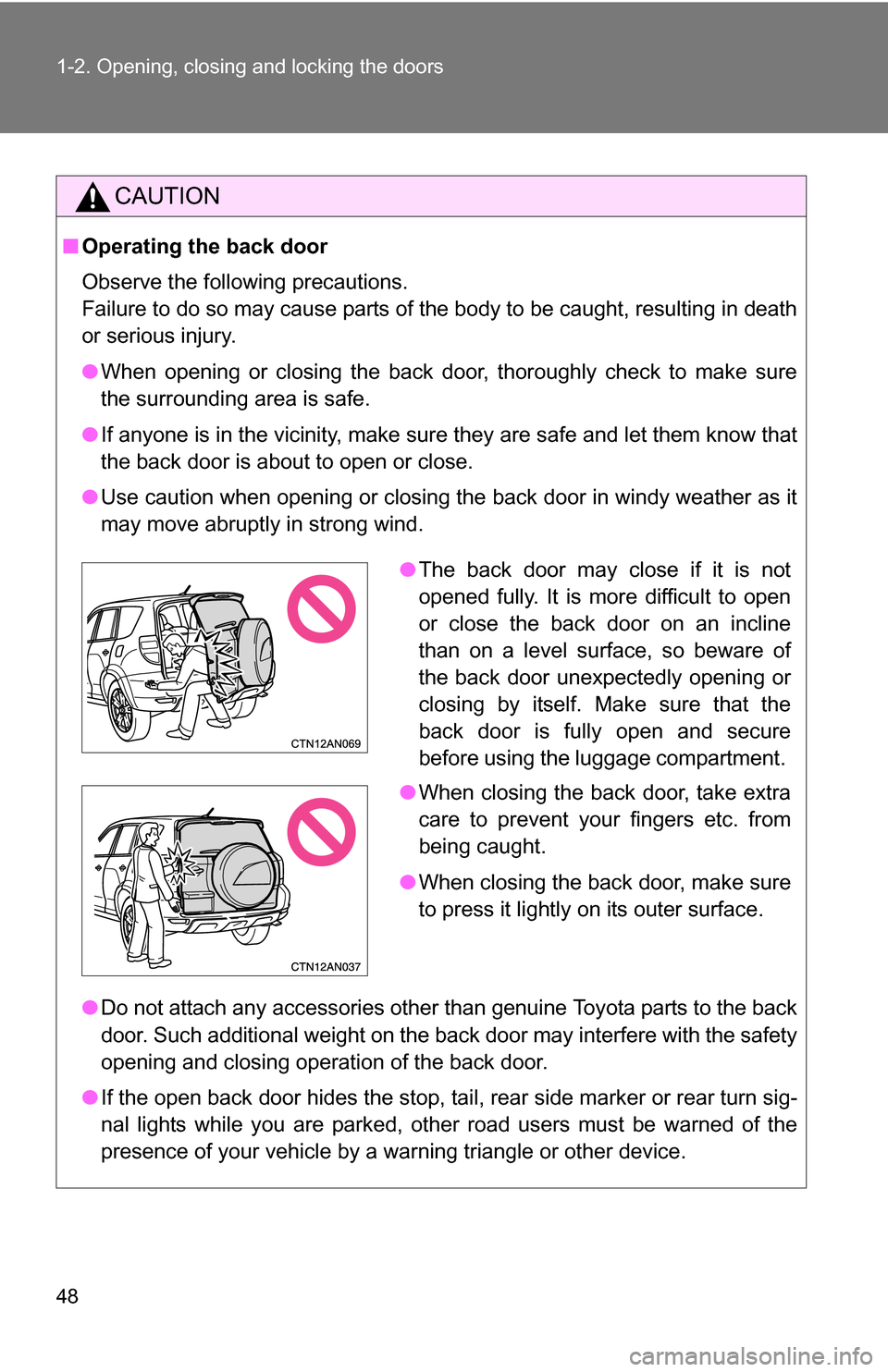
●The back door may close if it is not
opened fully. It is more difficult to open
or close the back door on an incline
than on a level surface, so beware of
the back door unexpectedly opening or
closing by itself. Make sure that the
back door is fully open and secure
before using the luggage compartment.
● When closing the back door, take extra
care to prevent your fingers etc. from
being caught.
● When closing the back door, make sure
to press it lightly on its outer surface.
Page 60 of 544
60 1-3. Adjustable components (seats, mirrors, steering wheel)
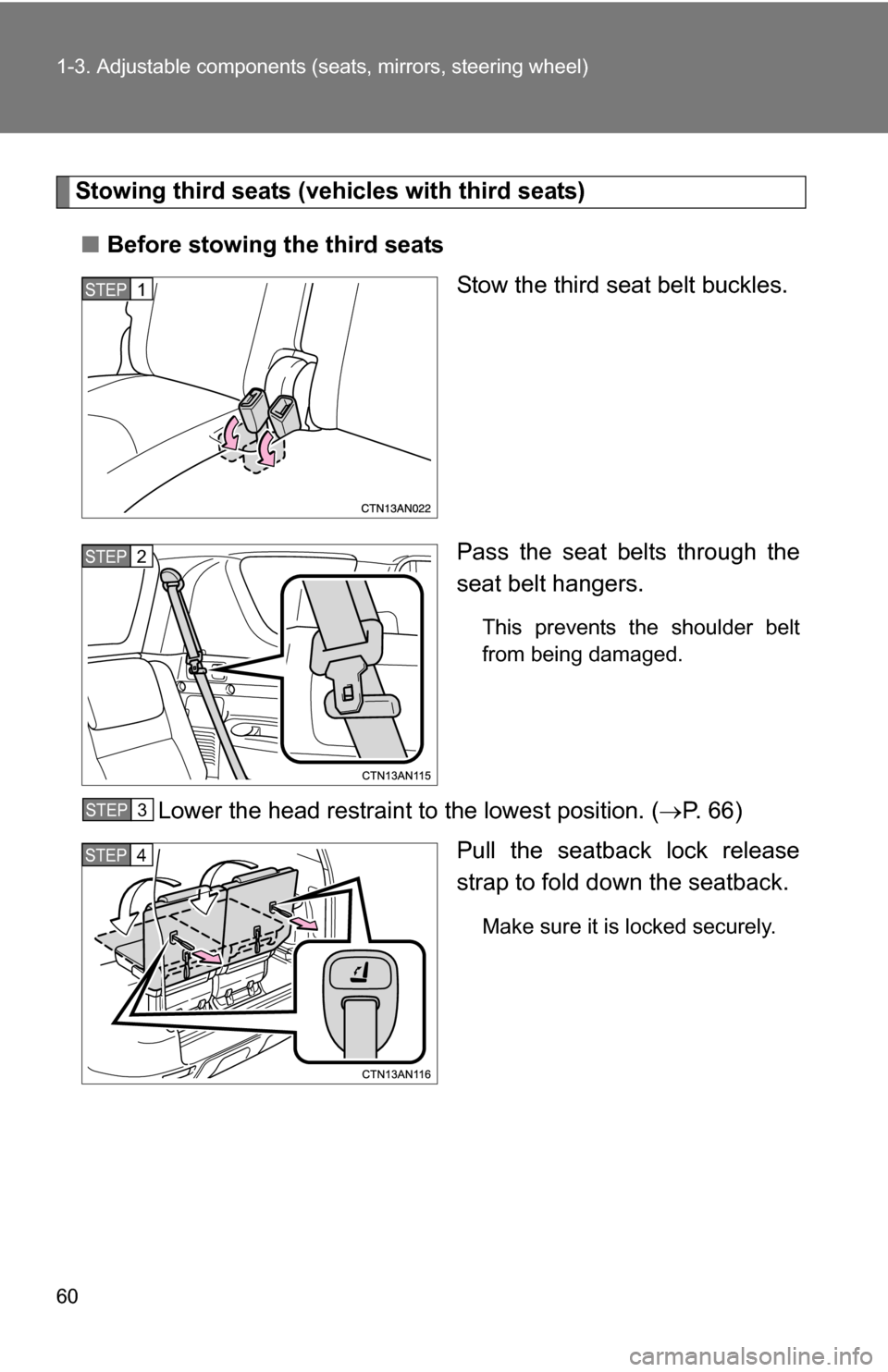
Stowing third seats (vehicles with third seats)
■ Before stowing the third seats
Stow the third seat belt buckles.
Pass the seat belts through the
seat belt hangers.
This prevents the shoulder belt
from being damaged.
Lower the head restraint to the lowest position. ( P. 66)
Pull the seatback lock release
strap to fold do wn the seatback.
Make sure it is locked securely.
STEP 1
STEP 2
STEP 3
STEP 4
Page 61 of 544
61
1-3. Adjustable components (s
eats, mirrors, steering wheel)
1
Before driving
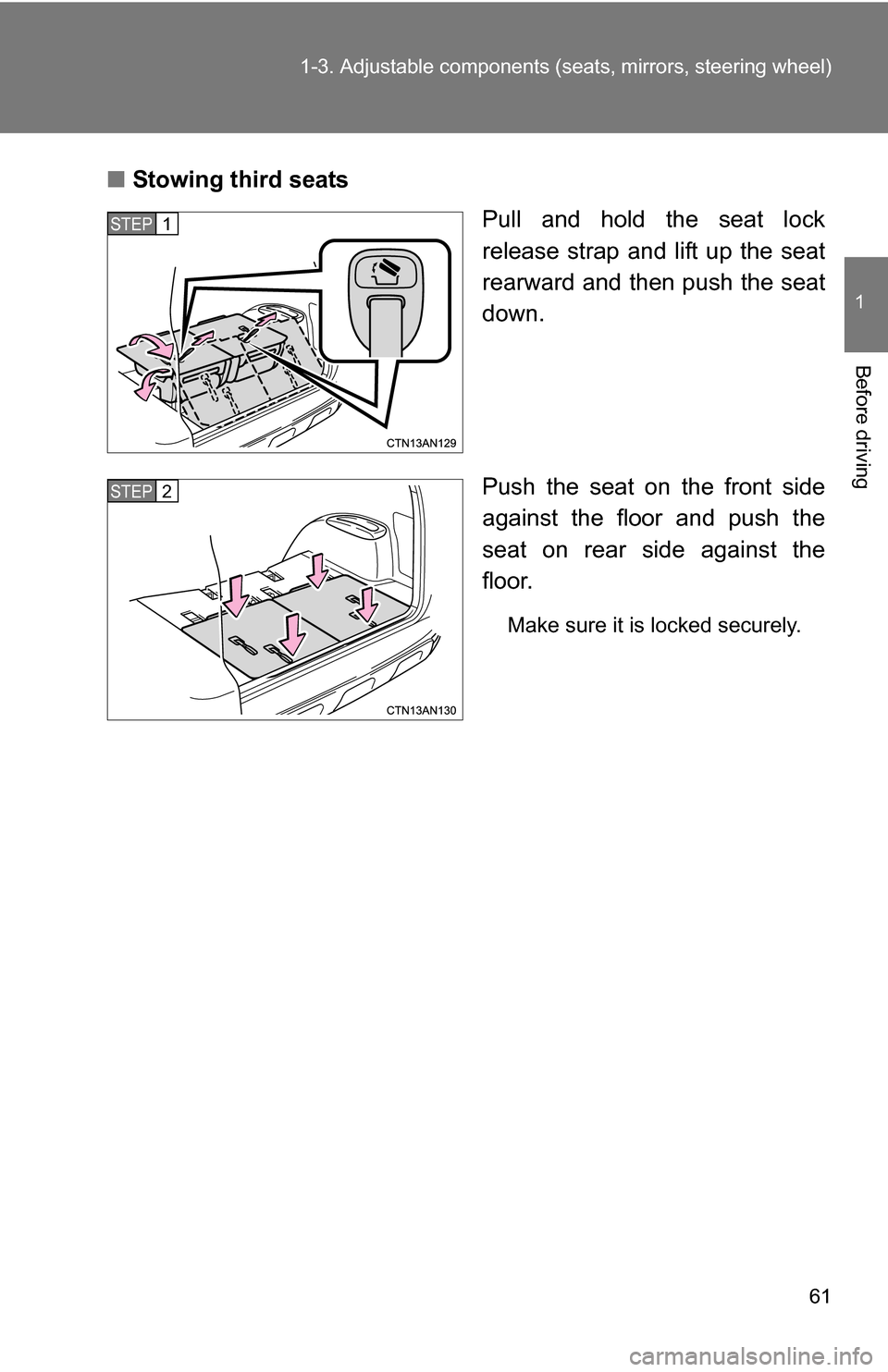
■Stowing third seats
Pull and hold the seat lock
release strap and lift up the seat
rearward and then push the seat
down.
Push the seat on the front side
against the floor and push the
seat on rear side against the
floor.
Make sure it is locked securely.
STEP 1
STEP 2
Page 62 of 544
62 1-3. Adjustable components (seats, mirrors, steering wheel)
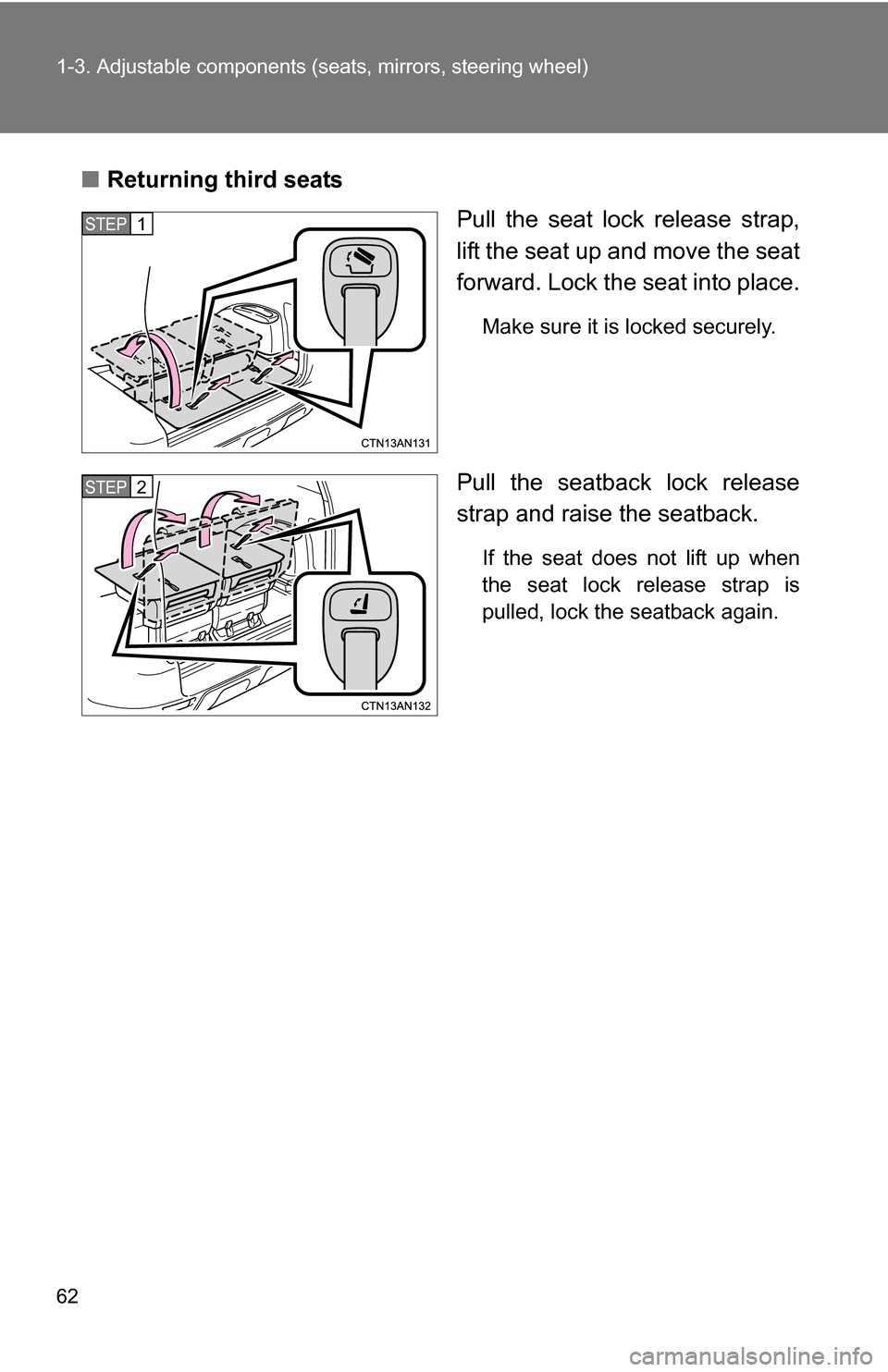
■Returning third seats
Pull the seat lock release strap,
lift the seat up and move the seat
forward. Lock the seat into place.
Make sure it is locked securely.
Pull the seatback lock release
strap and raise the seatback.
If the seat does not lift up when
the seat lock release strap is
pulled, lock the seatback again.
STEP 1
STEP 2
Page 64 of 544
64 1-3. Adjustable components (seats, mirrors, steering wheel)
CAUTION
■When folding second seats
●Stop the vehicle on level ground, set the parking brake and shift the shift
lever to P.
● Do not fold the second seatback when passengers sit or luggage is placed
on the seat.
● Do not allow passengers to ride on the folded seat or in the luggage com-
partment while driving.
● Make sure that no passengers or luggage are on the rear seats.
● Make sure the seatback is securely locked by pushing forward and rear-
ward on the top of the seatback.
Failure to do so will prevent the seat belt from operating properly.
■ When stowing third seats
●Make sure that no passenger or luggage are on the seats. Then, hold the
seat and slowly move it.
Otherwise, people may be injured or luggage may be damaged if the seat
hits them.
● Make sure the seat is securely locked by pushing forward and rearward on
the top of the seatback or by trying to pull up the edge of the bottom cush-
ion.
Failure to do so will prevent the seat belt from operating properly.
● Make sure the seat belts are not twisted or caught in the seatback and are
arranged in their proper position ready for use.
● Do not stow or return the seats when you are inside the vehicle in order to
prevent pinching your hands or feet in the seat.
Be sure to stow and return the seats from outside the vehicle.
Page 71 of 544
71
1-3. Adjustable components (s
eats, mirrors, steering wheel)
1
Before driving
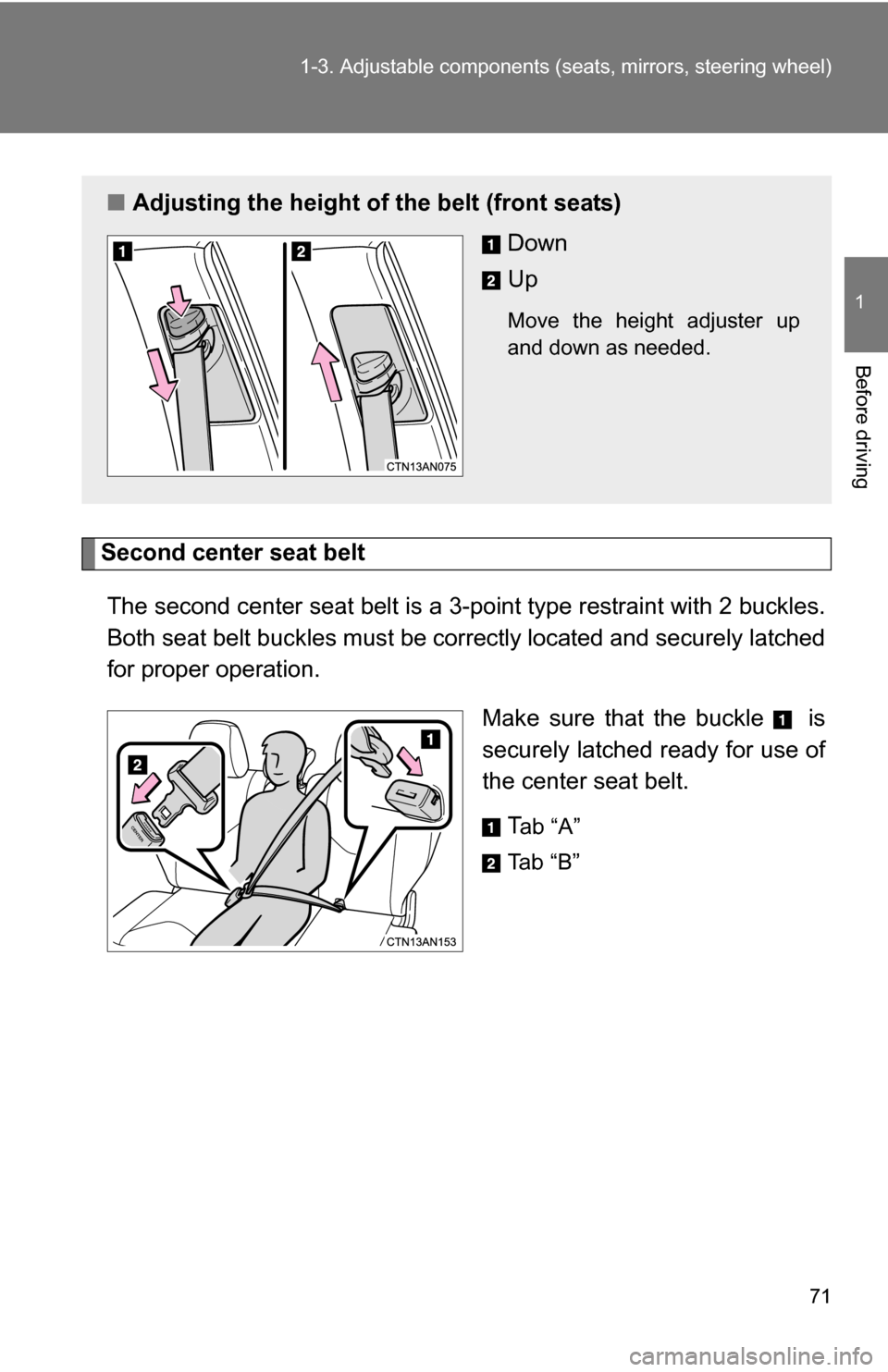
Second center seat belt
The second center seat belt is a 3-point type restraint with 2 buckles.
Both seat belt buckles must be co rrectly located and securely latched
for proper operation.
Make sure that the buckle is
securely latched ready for use of
the center seat belt.T
ab “A”
Ta b “ B ”
■ Adjusting the height of the belt (front seats)
Down
Up
Move the height adjuster up
and down as needed.