ECO mode TOYOTA RAV4 2013 XA40 / 4.G User Guide
[x] Cancel search | Manufacturer: TOYOTA, Model Year: 2013, Model line: RAV4, Model: TOYOTA RAV4 2013 XA40 / 4.GPages: 624, PDF Size: 9.82 MB
Page 145 of 624
RAV4_OM_OM42809U_(U)
1453-3. Adjusting the seats
3
Operation of each component
A desired driving position can be recalled linked with the unlocking of
the door.
■Setting procedure
Record your driving position to button “1” or “2” before performing
the following:
Carrying only the key to which you want to link the driving position,
shift the shift lever to P and then close the driver’s door.
If 2 or more keys are in the vehicle, the driving position cannot be
linked properly.
Turn the engine switch to IGNITION ON mode and recall the
position which you want to link.
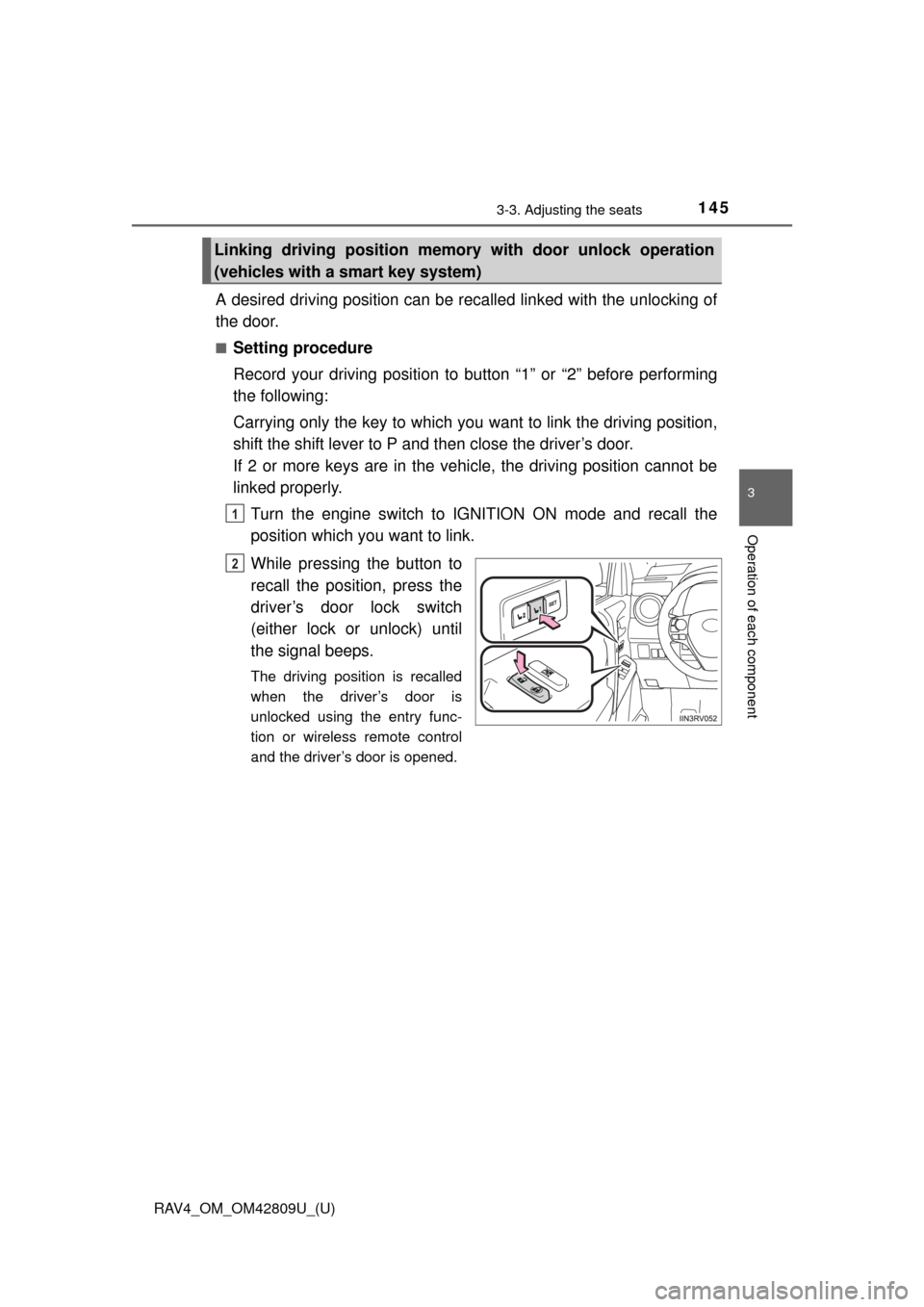
While pressing the button to
recall the position, press the
driver’s door lock switch
(either lock or unlock) until
the signal beeps.
The driving position is recalled
when the driver’s door is
unlocked using the entry func-
tion or wireless remote control
and the driver’s door is opened.
Linking driving position memo ry with door unlock operation
(vehicles with a smart key system)
1
2
Page 146 of 624

146
RAV4_OM_OM42809U_(U)
3-3. Adjusting the seats
■Cancelation procedure
Carry only the key for which you want to cancel the linked door
unlock operation.
If 2 or more keys are in the vehicle, the driving position cannot be
canceled properly.
Turn the engine switch to IGNITION ON mode.
While pressing the “SET” button, press the driver’s door lock
switch (either lock or unlock) until the signal beeps.
■When you want to stop the position recall operation part-way through
Perform any of the following operations:
● Press the “SET” button.
● Press button “1” or “2”.
● Adjust the seat using the switches.
■ Operating the driving position memo ry after turning the engine off
Memorized seat positions can be activated up to 180 seconds after the
driver’s door is opened and another 60 seconds after it is closed again.
■ If the battery is disconnected
The memorized positions are erased when the battery is disconnected.
CAUTION
■Seat adjustment caution
Take care during seat adjustment so that the seat does not strike the rear
passenger or squeeze your body against the steering wheel.
1
2
Page 155 of 624
1553-4. Adjusting the steering wheel and mirrors
3
Operation of each component
RAV4_OM_OM42809U_(U)
■Mirror angle can be adjusted when
Vehicles without a smart key system
The engine switch is in the “ACC” or “ON” position.
Vehicles with a smart key system
The engine switch is in ACCESSORY or IGNITION ON mode.
■ When the mirrors are fogged up (vehicles with outside rear view mirror
defoggers)
The outside rear view mirrors can be cleared using the mirror defoggers. Turn
on the rear window defogger to turn on the outside rear view mirror defog-
gers. ( P. 305)
CAUTION
■Important points while driving
Observe the following precautions while driving.
Failure to do so may result in loss of control of the vehicle and cause an
accident, resulting in death or serious injury.
●Do not adjust the mirrors while driving.
● Do not drive with the mirrors folded.
● Both the driver and passenger side mirrors must be extended and properly
adjusted before driving.
■ When a mirror is moving
To avoid personal injury and mirror malfunction, be careful not to get your
hand caught by the moving mirror.
■ When the mirror defoggers are opera ting (vehicles with outside rear
view mirror defoggers)
Do not touch the rear view mirror surfaces, as they can become very hot
and burn you.
Page 157 of 624

RAV4_OM_OM42809U_(U)
1573-5. Opening, closing the windows and moon roof
3
Operation of each component
■Operating the power windows after turning the engine off
Vehicles without a smart key system
The power windows can be operated for approximately 45 seconds after the
engine switch is turned to the “ACC” or “LOCK” position. They cannot, how-
ever, be operated once either front door is opened.
Vehicles with a smart key system
The power windows can be operated for approximately 45 seconds after the
engine switch is turned to ACCESSOR Y mode or turned off. They cannot,
however, be operated once either front door is opened.
■ Jam protection function (if equipped for driver’s window)
If an object becomes caught between the window and the window frame, win-
dow travel is stopped and the window is opened slightly.
■ When the power window does not close normally
If the jam protection function is operating abnormally and a window cannot be
closed, perform the following operations using the power window switch on
the driver’s door.
● Vehicles without a smart key system: After stopping the vehicle, the window
can be closed by holding the power window switch in the one-touch closing
position while the engine switch is turned to the “ON” position.
● Vehicles with a smart key system: After stopping the vehicle, the window
can be closed by holding the power window switch in the one-touch closing
position while the engine switch is turned to IGNITION ON mode.
● If the window still cannot be closed even by carrying out the operation as
explained above, initialize the function by performing the following proce-
dure.
Press and hold the power window switch. Continue holding the switch for
1 second or more after the window has opened completely.
Hold the power window switch in the one-touch closing position. Continue
holding the switch for 1 second or more after the window has closed com-
pletely.
If you release the switch while the window is moving, start again from the
beginning.
If the window continues to close but then re-open slightly even after perform-
ing the above procedure correctly, have the vehicle inspected by your Toyota
dealer.
1
2
Page 160 of 624

160
RAV4_OM_OM42809U_(U)
3-5. Opening, closing the windows and moon roof
■The moon roof can be operated when
Vehicles without a smart key system
The engine switch is in the “ON” position.
Vehicles with a smart key system
The engine switch is in IGNITION ON mode.
■ Operating the moon roof af ter turning the engine off
Vehicles without a smart key system
The moon roof can be operated for approximately 45 seconds after the
engine switch is turned to the “ACC” or “LOCK” position. It cannot, howe\
ver,
be operated once either front door is opened.
Vehicles with a smart key system
The moon roof can be operated for approximately 45 seconds after the
engine switch is turned to ACCESSORY mode or turned off. It cannot, how-
ever, be operated once either front door is opened.
■ Jam protection function
If an object is detected between the moon roof and the frame while the moon
roof is closing or tilting down, travel is stopped and the moon roof opens.
■ To reduce moon roof wind noise
When the moon roof is opened automatically, it will stop slightly before the
fully open position. Driving with the moon roof in this position can help reduce
wind noise.
■ Sunshade
The sunshade can be opened and closed manually. However, the sunshade
will open automatically when the moon roof is opened.
■ Opening the moon roof by small degrees
Quickly press and release the switch.
Page 161 of 624

RAV4_OM_OM42809U_(U)
1613-5. Opening, closing the windows and moon roof
3
Operation of each component
■Moon roof open reminder function
Vehicles without a smart key system
The buzzer sounds when the engine switch is turned to the “LOCK” position
and the driver’s door is opened with the moon roof open.
Vehicles with a smart key system
The buzzer sounds when the engine switch is turned off and the driver’s door
is opened with the moon roof open.
■ When the battery is disconnected or the moon roof does not close nor-
mally
The moon roof must be initialized in order to ensure proper operation.
Turn the engine switch to the “ON” position (vehicles without a smart key
system) or IGNITION ON mode (vehicles with a smart key system).
Press and hold the “CLOSE” or “UP” switch until the following movement
finishes.
The moon roof will tilt up and pause for 1 second or more.
Then it will tilt down, open and close fully.
Release the switch, and then press it in order to ensure proper operation.
If the moon roof does not move automat ically, perform the procedure again
from the beginning.
■ Customization
Settings (e.g. open reminder function) can be changed.
(Customizable features: P. 579)
1
2
3
Page 166 of 624

166
RAV4_OM_OM42809U_(U)
4-1. Before driving
■Driving in the rain
●Drive carefully when it is raining, because visibility will be reduced, the win-
dows may become fogged-up, and the road will be slippery.
● Drive carefully when it starts to rain, because the road surface will be espe-
cially slippery.
● Refrain from high speeds when driving on an expressway in the rain,
because there may be a layer of water between the tires and the road sur-
face, preventing the steering and brakes from operating properly.
■ Engine speed while driving
In the following conditions, the engine speed may become high while driving.
This is due to automatic up-shifting control or down-shifting implementation to
meet driving conditions. It does not indicate sudden acceleration.
●The vehicle is judged to be driving uphill or downhill
● When the accelerator pedal is released
● When the brake pedal is depressed while sport mode is selected
■ Breaking in your new Toyota
To extend the life of the vehicle, observing the following precautions is recom-
mended:
●For the first 200 miles (300 km):
Avoid sudden stops.
● For the first 500 miles (800 km):
Do not tow a trailer.
● For the first 600 miles (1000 km):
• Do not drive at extremely high speeds.
• Avoid sudden acceleration.
• Do not drive continuously in low gears.
• Do not drive at a constant speed for extended periods.
Page 167 of 624
RAV4_OM_OM42809U_(U)
1674-1. Before driving
4
Driving
■Drum-in-disc type parking brake system
Your vehicle has a drum-in-disc type parking brake system. This type of brake
system needs bedding-down of the brake shoes periodically or whenever the
parking brake shoes and/or drum are replaced. Have your Toyota dealer per-
form the bedding down operation.
■ Operating your vehicle in a foreign country
Comply with the relevant vehicle registration laws and confirm the availability
of the correct fuel. ( P. 563)
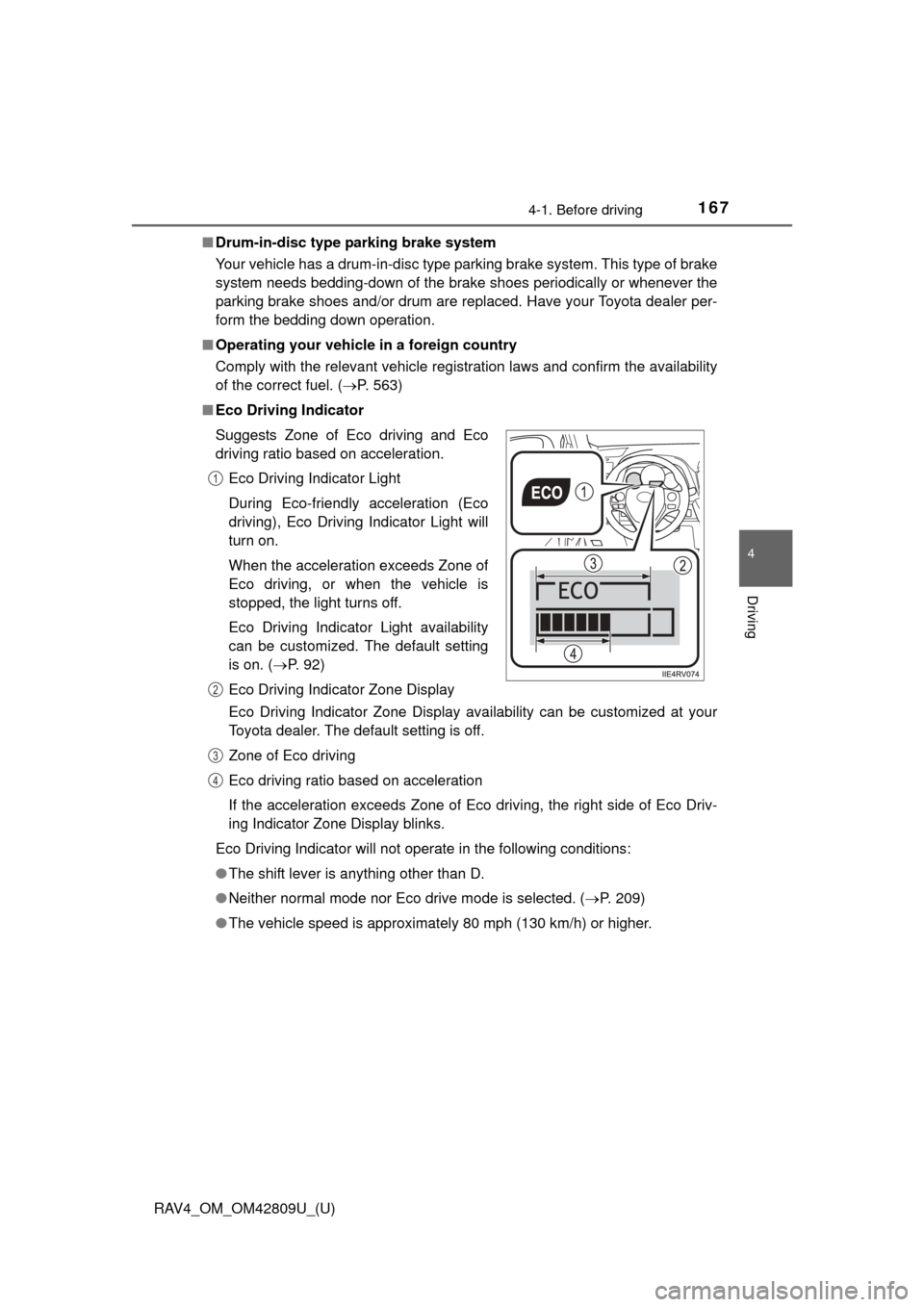
■ Eco Driving Indicator
Eco Driving Indicator Zone Display availability can be customized at your
Toyota dealer. The default setting is off.
Zone of Eco driving
Eco driving ratio based on acceleration
If the acceleration exceeds Zone of Eco driving, the right side of Eco Driv-
ing Indicator Zone Display blinks.
Eco Driving Indicator will not operate in the following conditions:
● The shift lever is anything other than D.
● Neither normal mode nor Eco drive mode is selected. ( P. 209)
● The vehicle speed is approximately 80 mph (130 km/h) or higher.
Suggests Zone of Eco driving and Eco
driving ratio based on acceleration.
Eco Driving Indicator Light
During Eco-friendly acceleration (Eco
driving), Eco Driving Indicator Light will
turn on.
When the acceleration exceeds Zone of
Eco driving, or when the vehicle is
stopped, the light turns off.
Eco Driving Indicator Light availability
can be customized. The default setting
is on. ( P. 92)
Eco Driving Indicator Zone Display
1
2
3
4
Page 173 of 624
RAV4_OM_OM42809U_(U)
1734-1. Before driving
4
Driving
CAUTION
■When taking a nap in the vehicle
Always turn the engine off. Otherwise, if you accidentally move the shift
lever or depress the accelerator pedal, this could cause an accident or fire
due to engine overheating. Additionally, if the vehicle is parked in a poorly
ventilated area, exhaust gases may collect and enter the vehicle, leading to
death or a serious health hazard.
■ When braking
●When the brakes are wet, drive more cautiously.
Braking distance increases when the brakes are wet, and this may cause
one side of the vehicle to brake differently than the other side. Also, the
parking brake may not securely hold the vehicle.
● If the power brake assist function does not operate, do not follow other\
vehicles closely and avoid hills or sharp turns that require braking.
In this case, braking is still possible, but the brake pedal should be
depressed more firmly than usual. Also, the braking distance will increase.
● Do not pump the brake pedal if the engine stalls.
Each push on the brake pedal uses up the reserve for the power-assisted
brakes.
● The brake system consists of 2 individual hydraulic systems; if one of the
systems fails, the other will still operate. In this case, the brake pedal
should be depressed more firmly than usual and the braking distance will
increase.
If this happens, do not continue to drive the vehicle. Have your brakes
fixed immediately.
■ If the vehicle becomes stuck (AWD models)
Do not spin the wheels excessively when any of the tires is up in the air, or
the vehicle is stuck in sand, mud, etc. This may damage the driveline com-
ponents or propel the vehicle forward or backward, causing an accident.
Page 200 of 624
200
RAV4_OM_OM42809U_(U)
4-2. Driving procedures
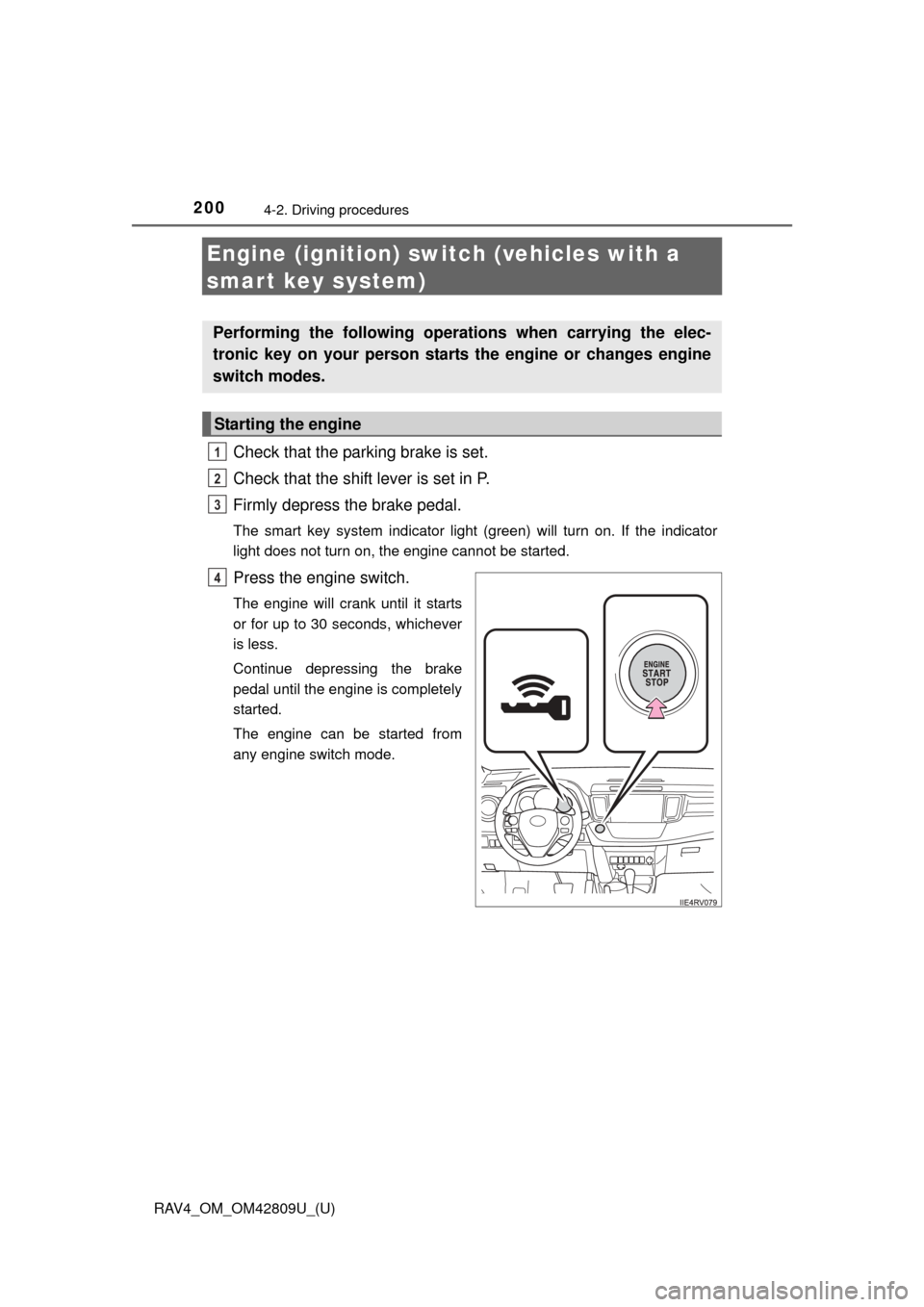
Engine (ignition) switch (vehicles with a
smart key system)
Check that the parking brake is set.
Check that the shift lever is set in P.
Firmly depress the brake pedal.
The smart key system indicator light (green) will turn on. If the indicator
light does not turn on, the engine cannot be started.
Press the engine switch.
The engine will crank until it starts
or for up to 30 seconds, whichever
is less.
Continue depressing the brake
pedal until the engine is completely
started.
The engine can be started from
any engine switch mode.
Performing the following operations when carrying the elec-
tronic key on your person starts the engine or changes engine
switch modes.
Starting the engine
1
2
3
4