Security TOYOTA RAV4 2014 XA40 / 4.G Owner's Guide
[x] Cancel search | Manufacturer: TOYOTA, Model Year: 2014, Model line: RAV4, Model: TOYOTA RAV4 2014 XA40 / 4.GPages: 732, PDF Size: 14.44 MB
Page 83 of 732
RAV4_OM_OM42A04U_(U)
832. Instrument cluster
2
Instrument cluster
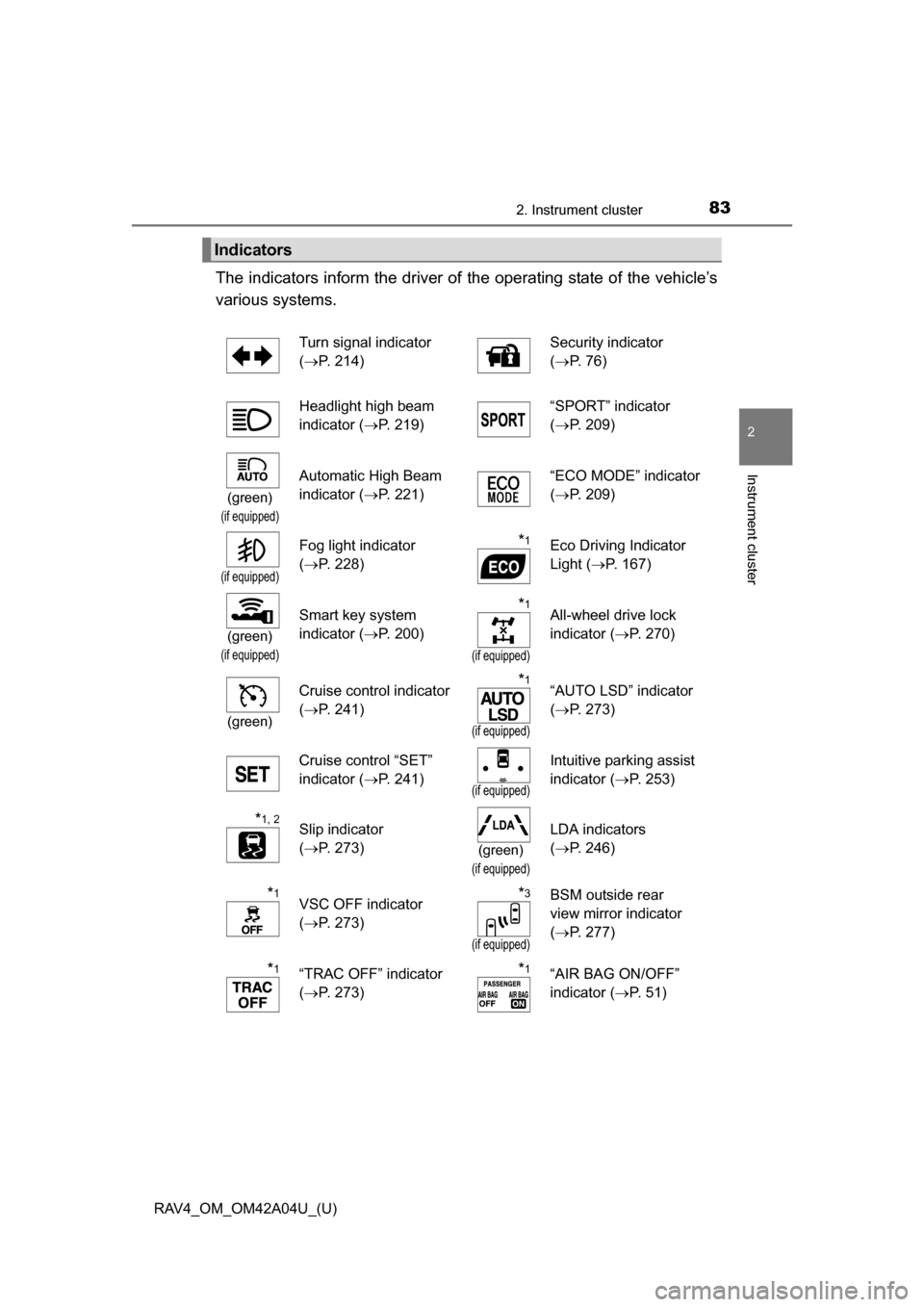
The indicators inform the driver of the operating state of the vehicle’s
various systems.
Indicators
Turn signal indicator
( P. 214) Security indicator
(
P. 76)
Headlight high beam
indicator ( P. 219) “SPORT” indicator
(
P. 209)
(green)
(if equipped)
Automatic High Beam
indicator ( P. 221) “ECO MODE” indicator
(
P. 209)
(if equipped)
Fog light indicator
(P. 228)*1Eco Driving Indicator
Light ( P. 167)
(green)
(if equipped)
Smart key system
indicator ( P. 200)*1
(if equipped)
All-wheel drive lock
indicator (P. 270)
(green)
Cruise control indicator
(P. 241)*1
(if equipped)
“AUTO LSD” indicator
(P. 273)
Cruise control “SET”
indicator ( P. 241)
(if equipped)
Intuitive parking assist
indicator (P. 253)
*1, 2Slip indicator
(P. 273)
(green)
(if equipped)
LDA indicators
(P. 246)
*1VSC OFF indicator
(P. 273)*3
(if equipped)
BSM outside rear
view mirror indicator
(P. 277)
*1“TRAC OFF” indicator
(P. 273)*1“AIR BAG ON/OFF”
indicator ( P. 5 1 )
Page 99 of 732
99
RAV4_OM_OM42A04U_(U)
3-2. Opening, closing and locking the doors
3
Operation of each component
Smar t key system
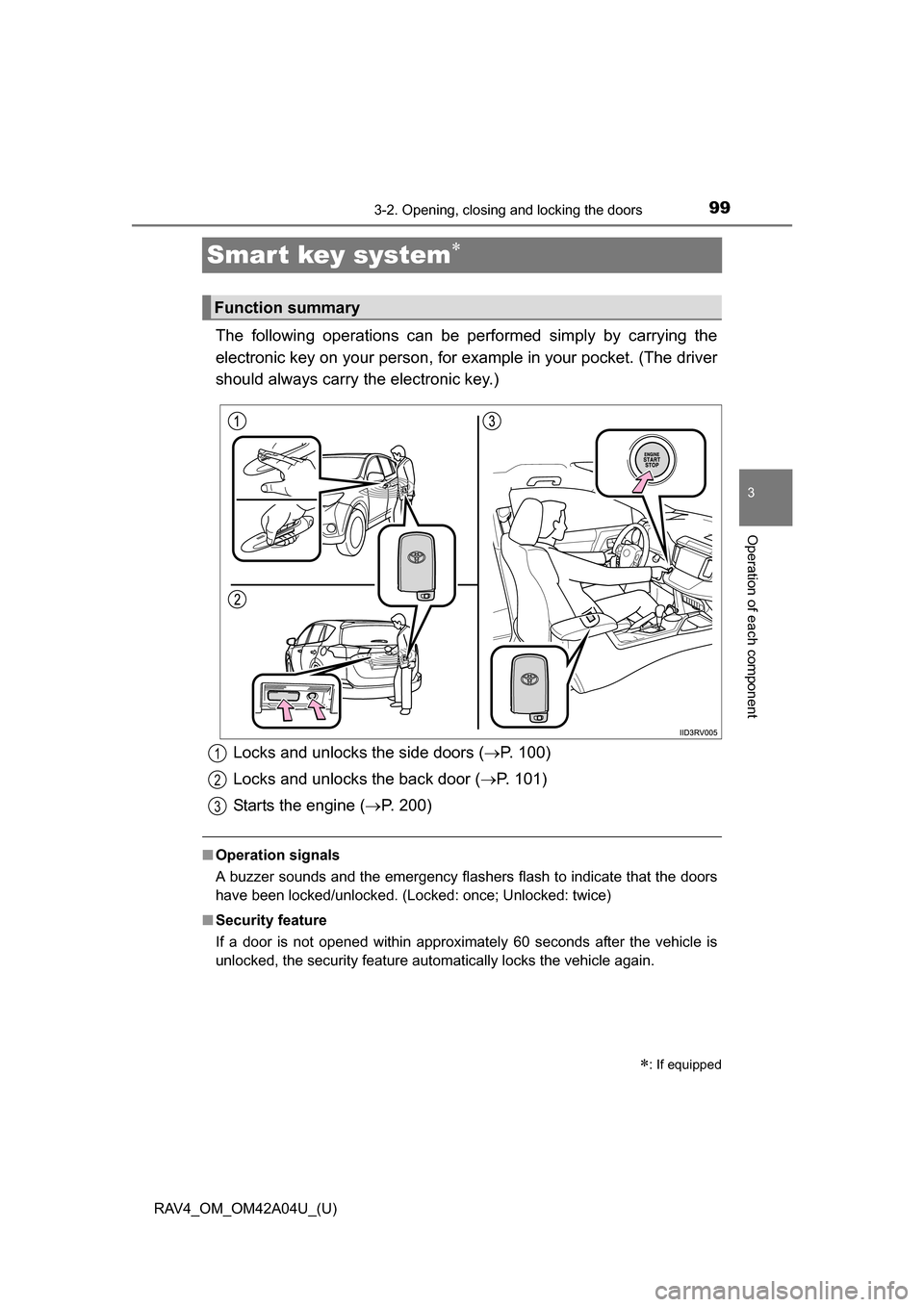
The following operations can be performed simply by carrying the
electronic key on your person, for example in your pocket. (The driver
should always carry the electronic key.)
■ Operation signals
A buzzer sounds and the emergency flashers flash to indicate that the doors
have been locked/unlocked. (Locked: once; Unlocked: twice)
■ Security feature
If a door is not opened within approximately 60 seconds after the vehicle is
unlocked, the security feature automatically locks the vehicle again.
: If equipped
Function summary
Locks and unlocks the side doors ( P. 100)
Locks and unlocks the back door ( P. 101)
Starts the engine ( P. 200)1
2
3
Page 114 of 732
114
RAV4_OM_OM42A04U_(U)
3-2. Opening, closing and locking the doors
■Operation signals
Doors:
A buzzer sounds and the emergency flashers flash to indicate that the doors
have been locked/unlocked. (Locked: once; Unlocked: twice)
Power back door (if equipped):
A buzzer sounds and the emergency flashers flash twice to indicate that the
back door is opening/closing.
■ Door lock buzzer
If an attempt to lock the doors is made when a door is not fully closed, a
buzzer sounds continuously for 5 seconds. Fully close the door to stop the
buzzer, and lock the vehicle once more.
■ Power back door oper ation (vehicles with a power back door)
The back door can be opened even if it is locked. The back door and side
doors will be unlocked when the power back door is opened. Lock all the
doors again when you leave the vehicle. All the doors will not lock automati-
cally after the back door has been opened and then closed.
■ Panic mode
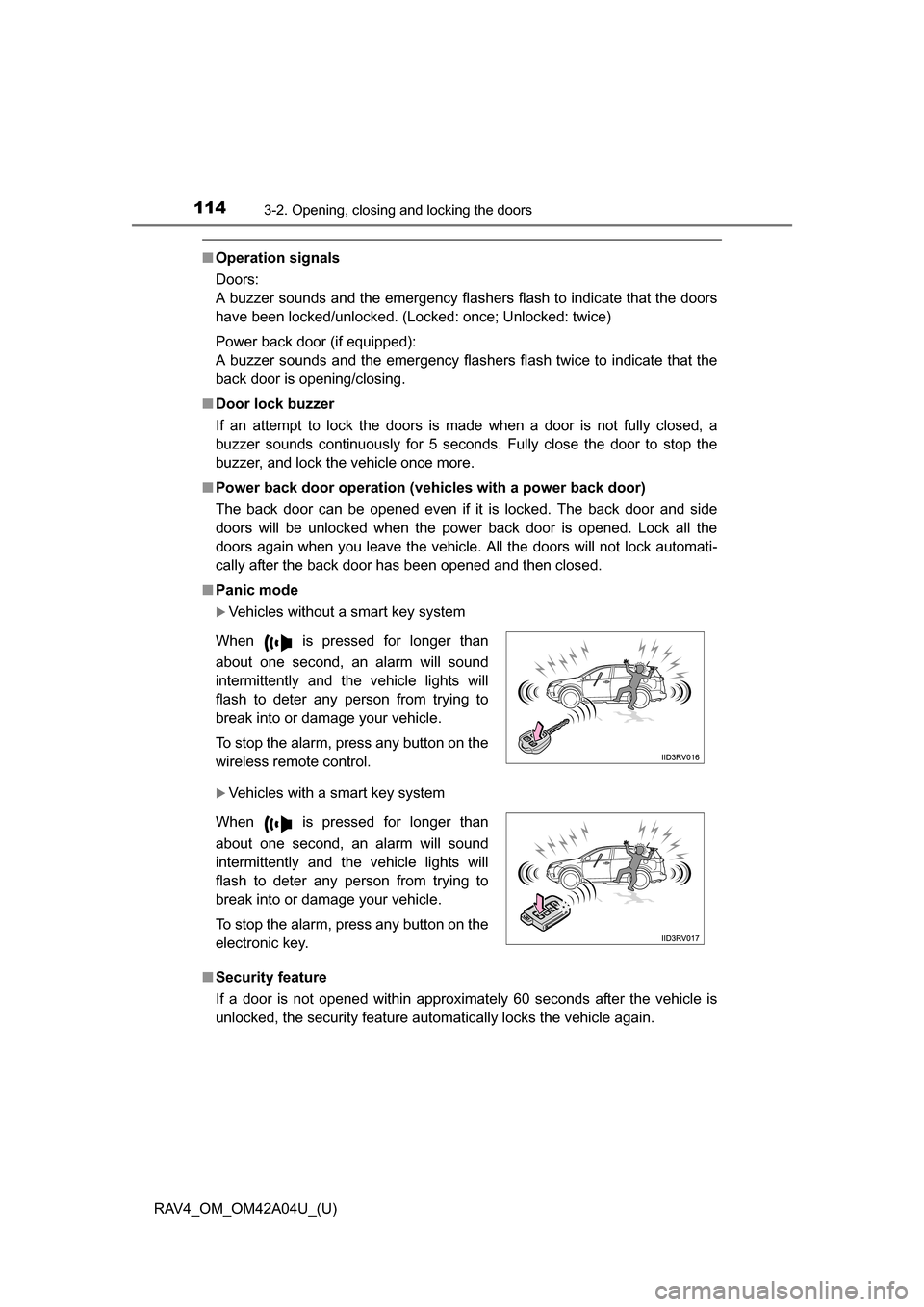
Vehicles without a smart key system
Vehicles with a smart key system
■ Security feature
If a door is not opened within approximately 60 seconds after the vehicle is
unlocked, the security feature automatically locks the vehicle again. When is pressed for longer than
about one second, an alarm will sound
intermittently and the vehicle lights will
flash to deter any person from trying to
break into or damage your vehicle.
To stop the alarm, press any button on the
wireless remote control.
When is pressed for longer than
about one second, an alarm will sound
intermittently and the vehicle lights will
flash to deter any person from trying to
break into or damage your vehicle.
To stop the alarm, press any button on the
electronic key.
Page 117 of 732
RAV4_OM_OM42A04U_(U)
1173-2. Opening, closing and locking the doors
3
Operation of each component
■Certification for wireless remote co ntrol (vehicles without a smart key
system - type B)
TRW Automotive
Automobile Entry/Security Transmitter
Model: 226624-101, 226624-102
FCC ID: GQ4-52T
IC: 1470A-33T
Auto Alarm/Security system Receiver
Model: 230433
FCC ID: GQ4-45R
MADE IN U.S.A.
This device complies with Part 15 of the FCC Rules and with Industry Canada
license-exempt RSS standard(s). Operation is subject to the following two
conditions:
(1) This device may not cause harmful interference, and
(2) This device must accept any interference received, including interference that may cause undesired operation of the vehicle.
Le présent appareil est conforme aux CNR d’Industrie Canada applicables
aux appareils radio exempts de licence. L’exploitation est autorisée aux deux
conditions suivantes :
(1) l’appareil ne doit pas produire de brouillage, et
(2) l’utilisateur de l’appareil doit accepter tout brouillage radioélectrique subi, même si le brouillage est susceptible d’en compromettre le
fonctionnement.
WARNING: Changes or modifications not expressly approved by TRW Auto-
motive U.S. LLC could void the user’s authority to operate the equipment.
Page 477 of 732
RAV4_OM_OM42A04U_(U)
4775-3. Using the audio system (Entune Audio)
5
Interior features
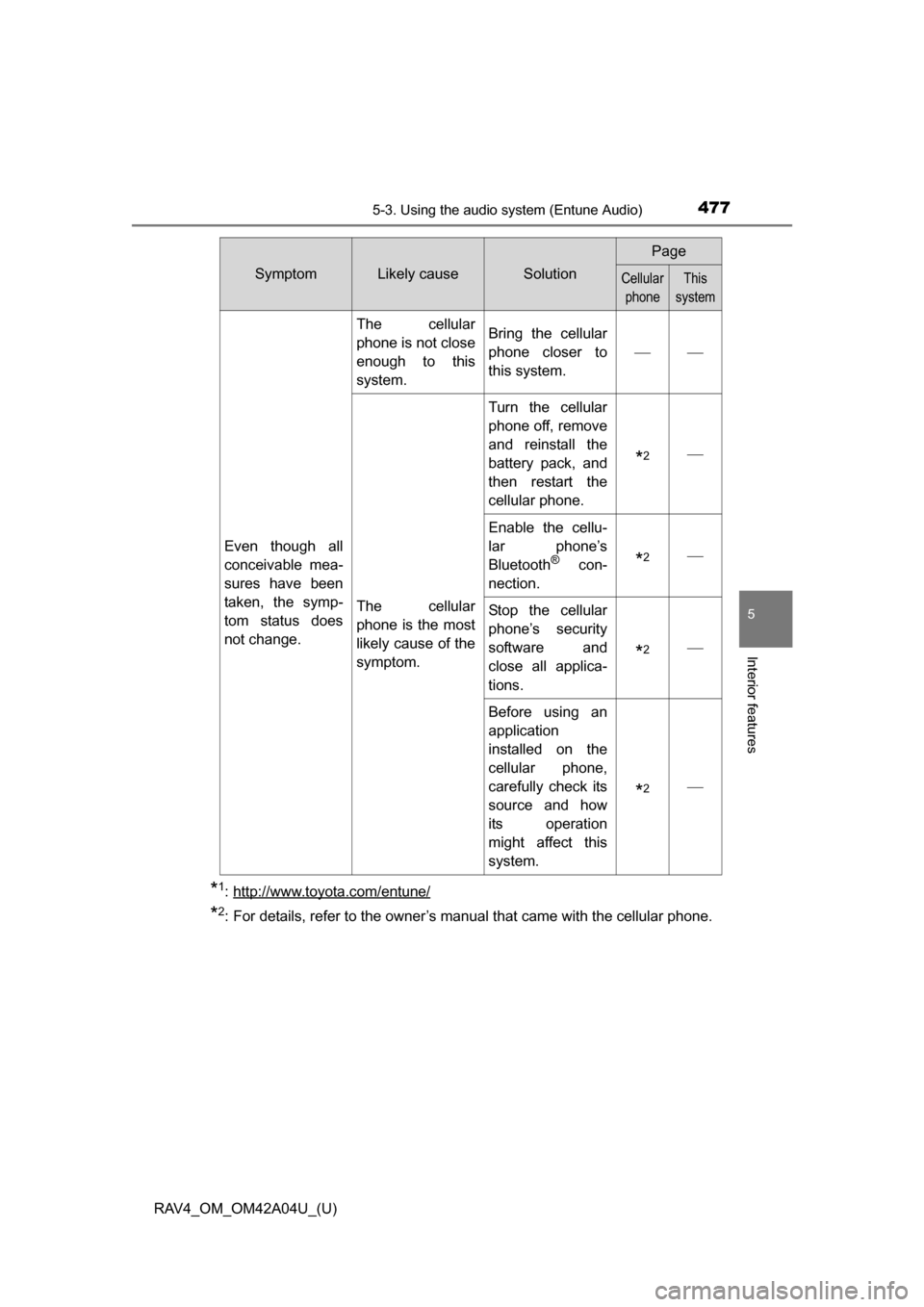
*1: http://www.toyota.com/entune/
*2: For details, refer to the owner’s manual that came with the cellular phone.
Even though all
conceivable mea-
sures have been
taken, the symp-
tom status does
not change.
The cellular
phone is not close
enough to this
system.Bring the cellular
phone closer to
this system.
The cellular
phone is the most
likely cause of the
symptom.
Turn the cellular
phone off, remove
and reinstall the
battery pack, and
then restart the
cellular phone.
*2
Enable the cellu-
lar phone’s
Bluetooth
® con-
nection.*2
Stop the cellular
phone’s security
software and
close all applica-
tions.
*2
Before using an
application
installed on the
cellular phone,
carefully check its
source and how
its operation
might affect this
system.
*2
SymptomLikely causeSolution
Page
Cellular phoneThis
system