bluetooth TOYOTA RAV4 2014 XA40 / 4.G Service Manual
[x] Cancel search | Manufacturer: TOYOTA, Model Year: 2014, Model line: RAV4, Model: TOYOTA RAV4 2014 XA40 / 4.GPages: 732, PDF Size: 14.44 MB
Page 442 of 732
442
RAV4_OM_OM42A04U_(U)
5-3. Using the audio system (Entune Audio)
Using a Bluetooth® Phone
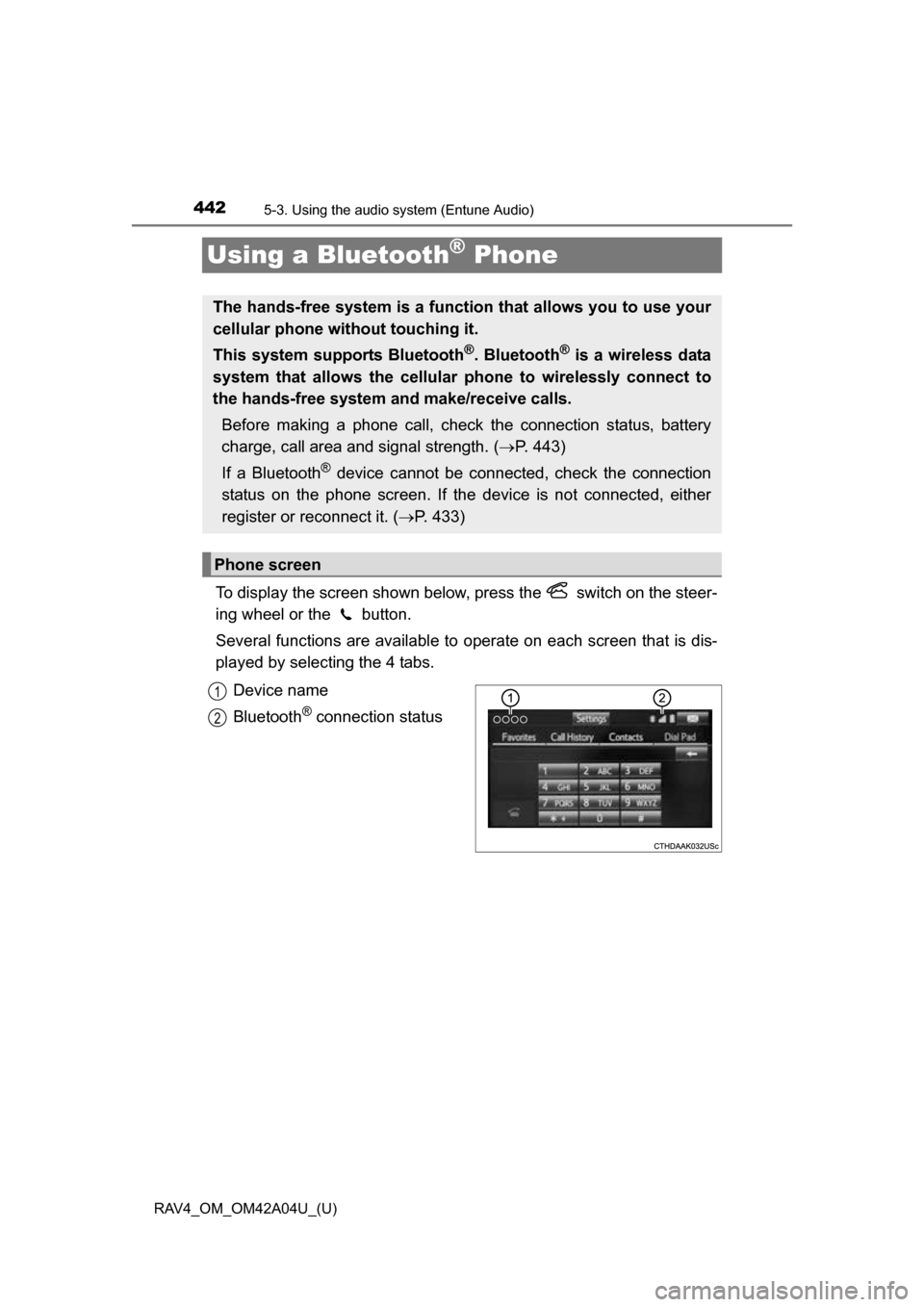
To display the screen shown below, press the switch on the steer-
ing wheel or the button.
Several functions are available to operate on each screen that is dis-
played by selecting the 4 tabs.
Device name
Bluetooth
® connection status
The hands-free system is a function that allows you to use your
cellular phone without touching it.
This system supports Bluetooth
®. Bluetooth® is a wireless data
system that allows the cellular phone to wirelessly connect to
the hands-free system and make/receive calls.
Before making a phone call, check the connection status, battery
charge, call area and signal strength. ( P. 443)
If a Bluetooth
® device cannot be connected, check the connection
status on the phone screen. If th e device is not connected, either
register or reconnect it. ( P. 433)
Phone screen
1
2
Page 443 of 732
RAV4_OM_OM42A04U_(U)
4435-3. Using the audio system (Entune Audio)
5
Interior features
■Telephone switch (P. 457)
■Microphone
The vehicle’s built in micro-
phone is used when talking on
the phone.
The person you are speaking to
can be heard from the front
speakers.
To use the hands-free system,
you must register your
Bluetooth
® phone in the sys-
tem. ( P. 431)
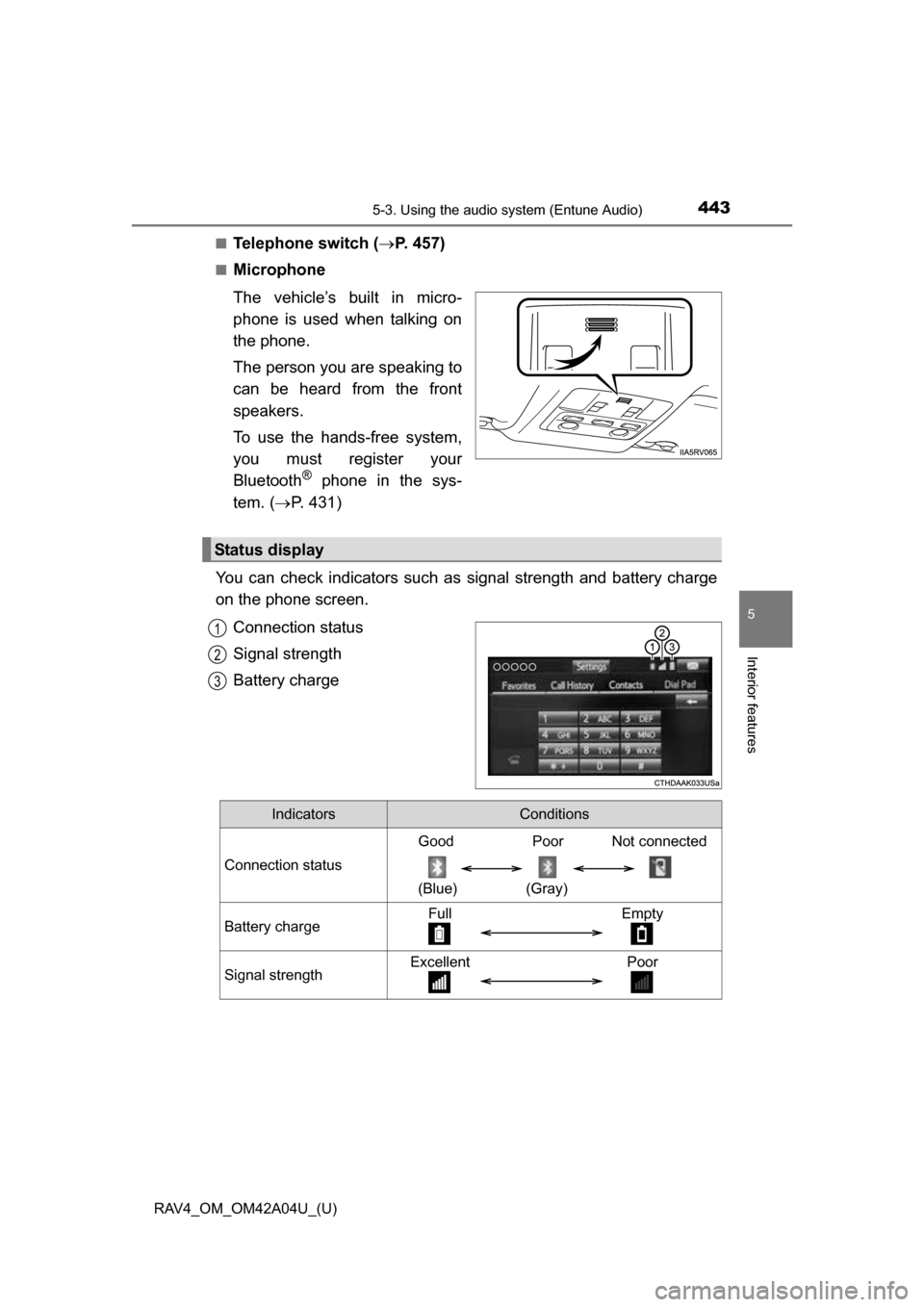
You can check indicators such as signal strength and battery charge
on the phone screen.
Connection status
Signal strength
Battery charge
Status display
1
2
3
IndicatorsConditions
Connection status
Good Poor Not connected
(Blue) (Gray)
Battery chargeFull Empty
Signal strengthExcellent Poor
Page 444 of 732
444
RAV4_OM_OM42A04U_(U)
5-3. Using the audio system (Entune Audio)
Making a call
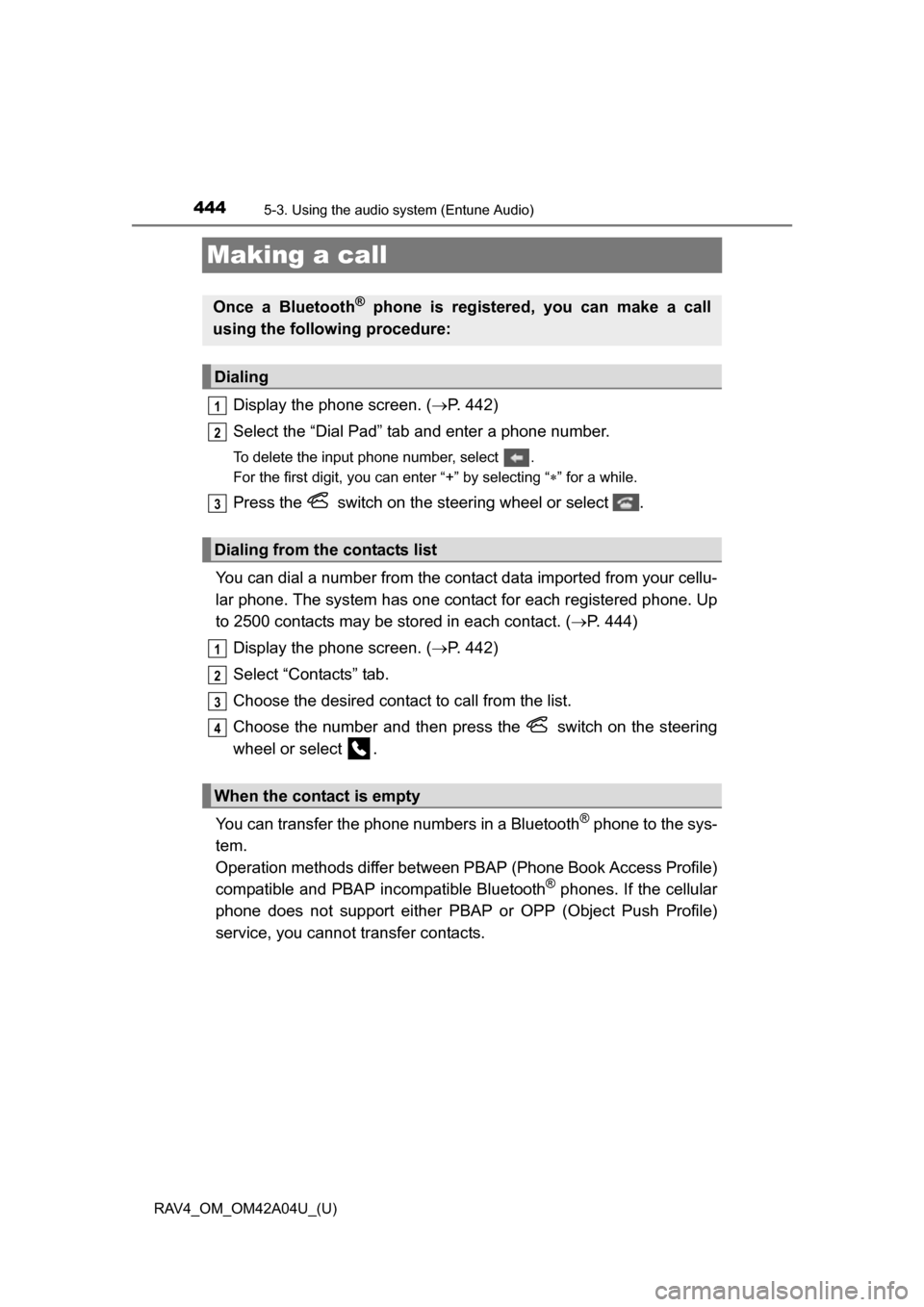
Display the phone screen. ( P. 442)
Select the “Dial Pad” tab and enter a phone number.
To delete the input phone number, select .
For the first digit, you can enter “+” by selecting “ ” for a while.
Press the switch on the steering wheel or select .
You can dial a number from the contact data imported from your cellu-
lar phone. The system has one co ntact for each registered phone. Up
to 2500 contacts may be stored in each contact. ( P. 444)
Display the phone screen. ( P. 442)
Select “Contacts” tab.
Choose the desired contact to call from the list.
Choose the number and then press the switch on the steering
wheel or select .
You can transfer the phone numbers in a Bluetooth
® phone to the sys-
tem.
Operation methods differ between PBAP (Phone Book Access Profile)
compatible and PBAP incompatible Bluetooth
® phones. If the cellular
phone does not support either PBAP or OPP (Object Push Profile)
service, you cannot transfer contacts.
Once a Bluetooth® phone is registered, you can make a call
using the following procedure:
Dialing
Dialing from the contacts list
When the contact is empty
1
2
3
1
2
3
4
Page 445 of 732
RAV4_OM_OM42A04U_(U)
4455-3. Using the audio system (Entune Audio)
5
Interior features
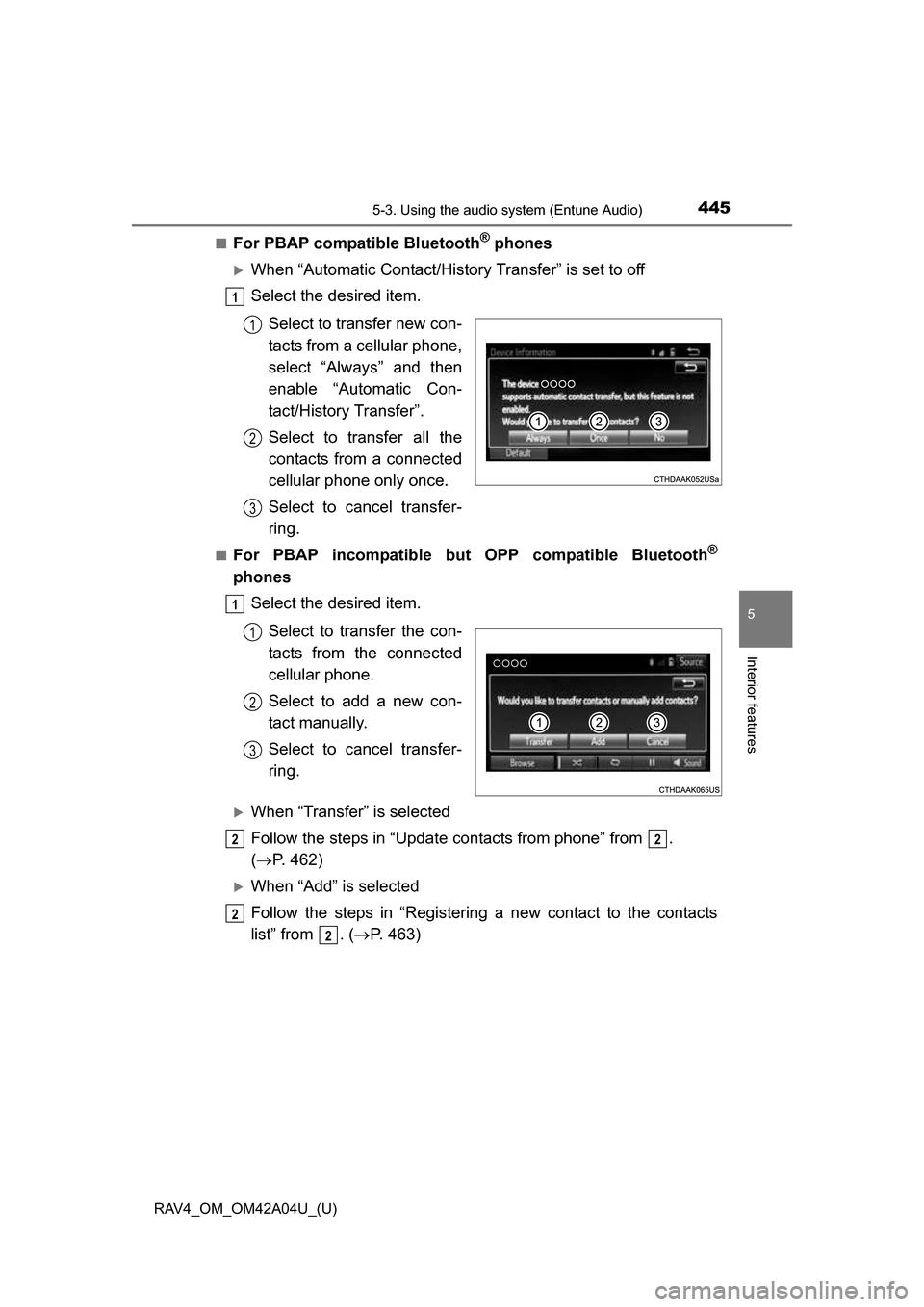
■For PBAP compatible Bluetooth® phones
When “Automatic Contact/History Transfer” is set to off
Select the desired item.
Select to transfer new con-
tacts from a cellular phone,
select “Always” and then
enable “Automatic Con-
tact/History Transfer”.
Select to transfer all the
contacts from a connected
cellular phone only once.
Select to cancel transfer-
ring.
■For PBAP incompatible but OPP compatible Bluetooth®
phonesSelect the desired item.
Select to transfer the con-
tacts from the connected
cellular phone.
Select to add a new con-
tact manually.
Select to cancel transfer-
ring.
When “Transfer” is selected
Follow the steps in “Update contacts from phone” from .
( P. 462)
When “Add” is selected
Follow the steps in “Registering a new contact to the contacts
list” from . ( P. 463)
1
1
2
3
1
1
2
3
22
2
2
Page 452 of 732
452
RAV4_OM_OM42A04U_(U)
5-3. Using the audio system (Entune Audio)
Bluetooth® phone message function
Press the button.
Select .
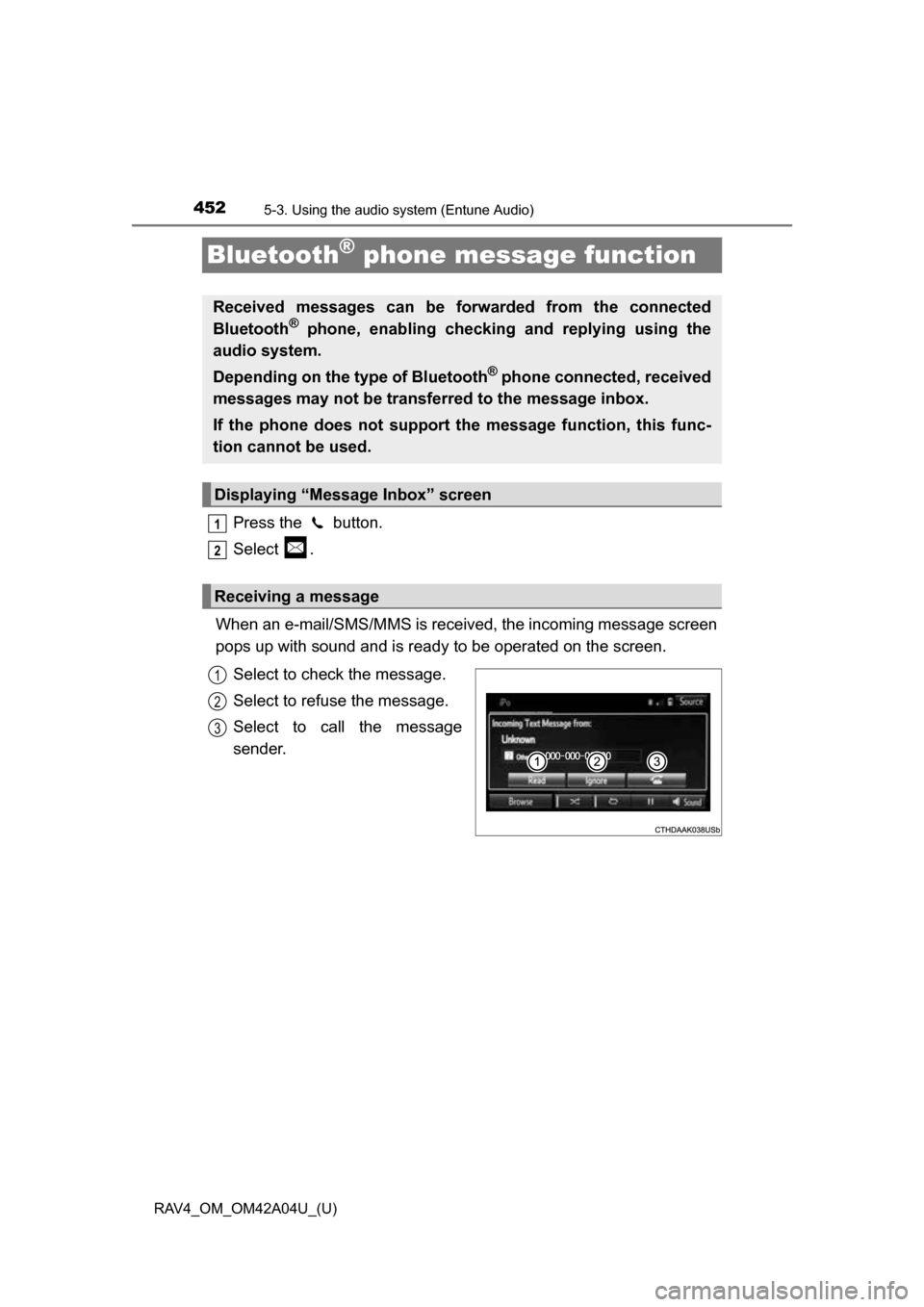
When an e-mail/SMS/MMS is received, the incoming message screen
pops up with sound and is ready to be operated on the screen. Select to check the message.
Select to refuse the message.
Select to call the message
sender.
Received messages can be forwarded from the connected
Bluetooth® phone, enabling checking and replying using the
audio system.
Depending on the type of Bluetooth
® phone connected, received
messages may not be transf erred to the message inbox.
If the phone does not support the message function, this func-
tion cannot be used.
Displaying “Message Inbox” screen
Receiving a message
1
2
1
2
3
Page 455 of 732
RAV4_OM_OM42A04U_(U)
4555-3. Using the audio system (Entune Audio)
5
Interior features
■Check the messages
●Depending on the type of Bluetooth
® phone being connected, it may be nec-
essary to perform additional steps on the phone.
● Messages are displayed in the appropriate connected Bluetooth
® phone’s
registered mail address folder.
Select the tab of the desired folder to be displayed.
● Only received messages on the connected Bluetooth
® phone can be dis-
played.
● The text of the message is not displayed while driving.
● When “Automatic Message Readout” is set to on, messages will be auto-
matically read out. ( P. 468)
● Turn the “PWR VOL” knob, or use the volume switch on the steering wheel
to adjust the message read out volume.
● The message read out function is available even while driving.
Display the “Message Inbox” screen. ( P. 452)
Select the desired message from the list.
Select “Quick Message”.
Select the desired message.
Select “Send”.
If an error message is displayed, follow the guidance on the screen to try
again.
■
Editing quick reply message Select “Quick Message”.
Select corresponding to the desired message to edit.
Select “OK” when editing is completed.
Replying to a message
1
2
3
4
5
1
2
3
Page 458 of 732
458
RAV4_OM_OM42A04U_(U)
5-3. Using the audio system (Entune Audio)
Bluetooth® phone settings
To display the screen shown below, press the “SETUP” button, and
select “Phone” on the “Setup” screen.
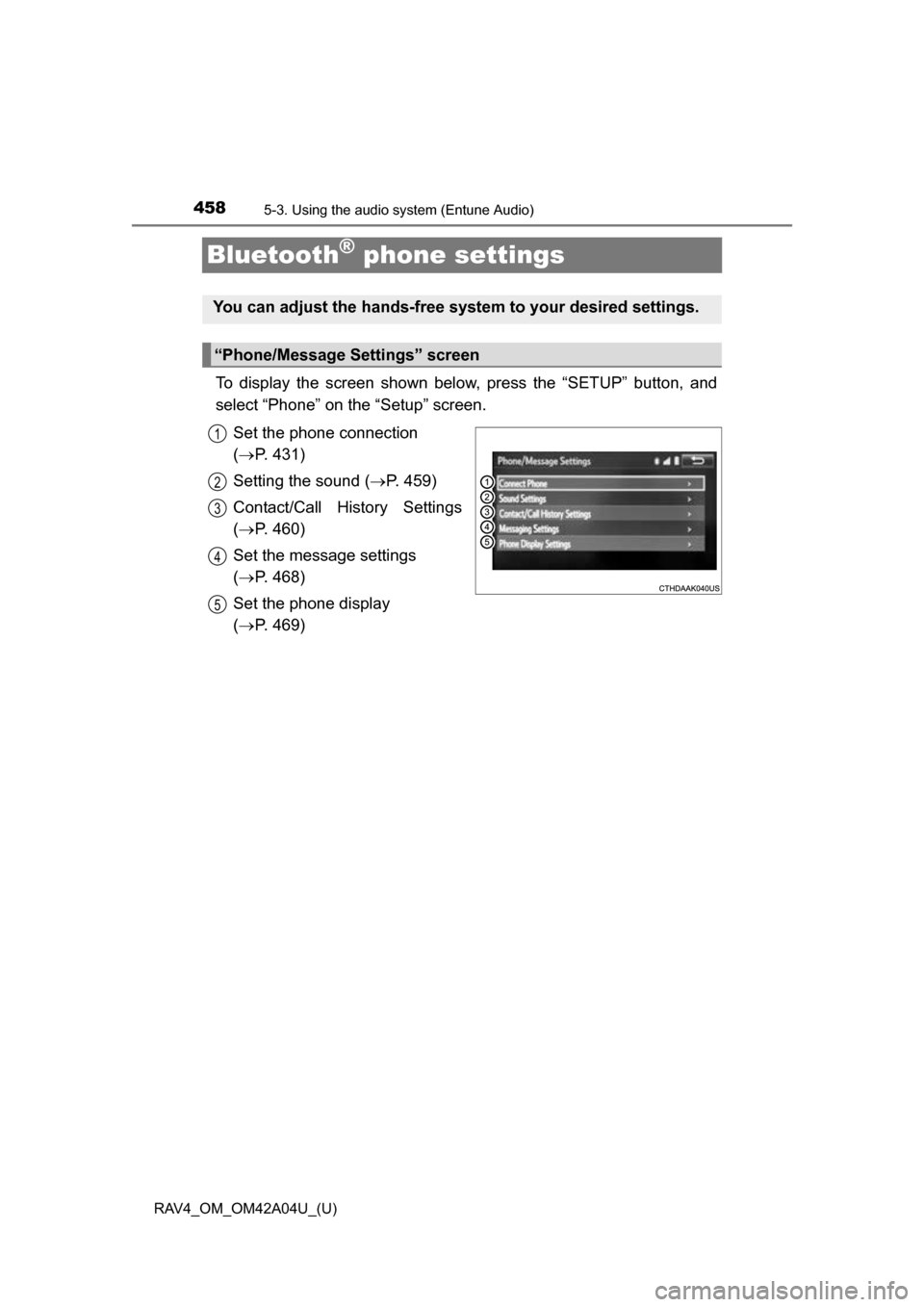
Set the phone connection
( P. 431)
Setting the sound ( P. 459)
Contact/Call History Settings
( P. 460)
Set the message settings
( P. 468)
Set the phone display
( P. 469)
You can adjust the hands-free system to your desired settings.
“Phone/Message Settings” screen
1
2
13
14
5
Page 460 of 732
460
RAV4_OM_OM42A04U_(U)
5-3. Using the audio system (Entune Audio)
Contact/Call Histor y Settings
The contact can be trans ferred from a Bluetooth® phone to the sys-
tem. The contact also c an be added, edited and deleted.
The call history can be deleted and contact and favorites can be
changed. Display the “Phone/Message Settings” screen. ( P. 458)
Select “Contact/Call History Settings”.
Select the desired item to be set.
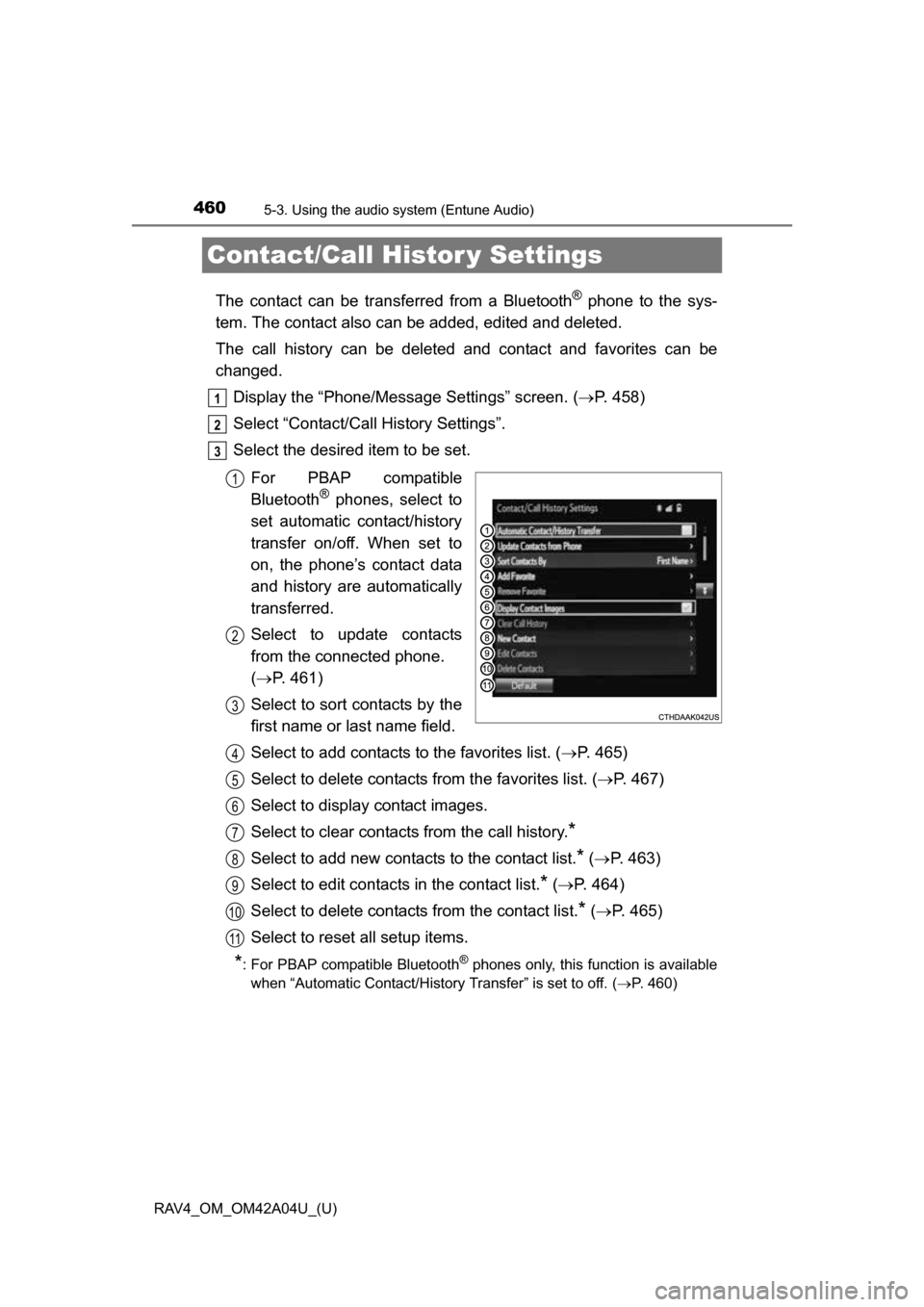
For PBAP compatible
Bluetooth
® phones, select to
set automatic contact/history
transfer on/off. When set to
on, the phone’s contact data
and history are automatically
transferred.
Select to update contacts
from the connected phone.
( P. 461)
Select to sort contacts by the
first name or last name field.
Select to add contacts to the favorites list. ( P. 465)
Select to delete contacts from the favorites list. ( P. 467)
Select to display contact images.
Select to clear contacts from the call history.
*
Select to add new contacts to the contact list.* ( P. 463)
Select to edit contacts in the contact list.
* ( P. 464)
Select to delete contacts from the contact list.
* ( P. 465)
Select to reset all setup items.
*: For PBAP compatible Bluetooth® phones only, this function is available
when “Automatic Contact/History Transfer” is set to off.
( P. 460)
1
2
3
1
2
3
4
5
6
7
8
9
10
11
Page 461 of 732
RAV4_OM_OM42A04U_(U)
4615-3. Using the audio system (Entune Audio)
5
Interior features
Operation methods differ between PBAP compatible and PBAP
incompatible but OPP compatible Bluetooth® phones.
If your cellular phone is neither PBAP nor OPP compatible, the con-
tacts cannot be transferred.
■For PBAP compatible Bluetooth® Phones
Select “Update Contacts from Phone”.
Check that a confirmation scr een is displayed when the opera-
tion is complete.
This operation may be unnecessary depending on the type of cellular
phone.
Depending on the type of cellular phone, OBEX authentication may be
required when transferring contact data. Enter “1234” into the
Bluetooth
® phone.
If another Bluetooth
® device is connected when transferring contact
data, depending on the phone, the connected Bluetooth® device may
need to be disconnected.
Depending on the type of Bluetooth
® phone being connected, it may be
necessary to perform additional steps on the phone.
Update contacts from phone
1
2
Page 462 of 732
462
RAV4_OM_OM42A04U_(U)
5-3. Using the audio system (Entune Audio)
■For PBAP incompatible but OPP compatible Bluetooth®
Phones
Select “Update Contacts from Phone”.
Transfer the contact data to the system using a Bluetooth
®
phone.
This operation may be unnecessary depending on the type of cellular
phone.
Depending on the type of cellular phone, OBEX authentication may be
required when transferring contact data. Enter “1234” into the
Bluetooth
® phone.
To cancel this function, select “Cancel”.
Select “Done” when it appears on the screen.
Check that a confirmation scr een is displayed when the opera-
tion is complete.
■Updating the contacts in a different way (From the “Call His-
tory” screen)
For PBAP compatible Bluetooth
® phones, this function is available
when “Automatic Contact/History Transfer” is set to off. ( P. 460)
Display the phone screen. ( P. 442)
Select the “Call History” tab and select a contact not yet regis-
tered in the contact list.
Select “Update Contact”.
Select the desired contact.
Select a phone type for the phone number.
1
2
3
4
1
2
3
4
5