key TOYOTA RAV4 2015 XA40 / 4.G User Guide
[x] Cancel search | Manufacturer: TOYOTA, Model Year: 2015, Model line: RAV4, Model: TOYOTA RAV4 2015 XA40 / 4.GPages: 732, PDF Size: 12.43 MB
Page 77 of 732
771-2. Theft deterrent system
RAV4_OM_OM42A78U_(U)
1
For safety and security
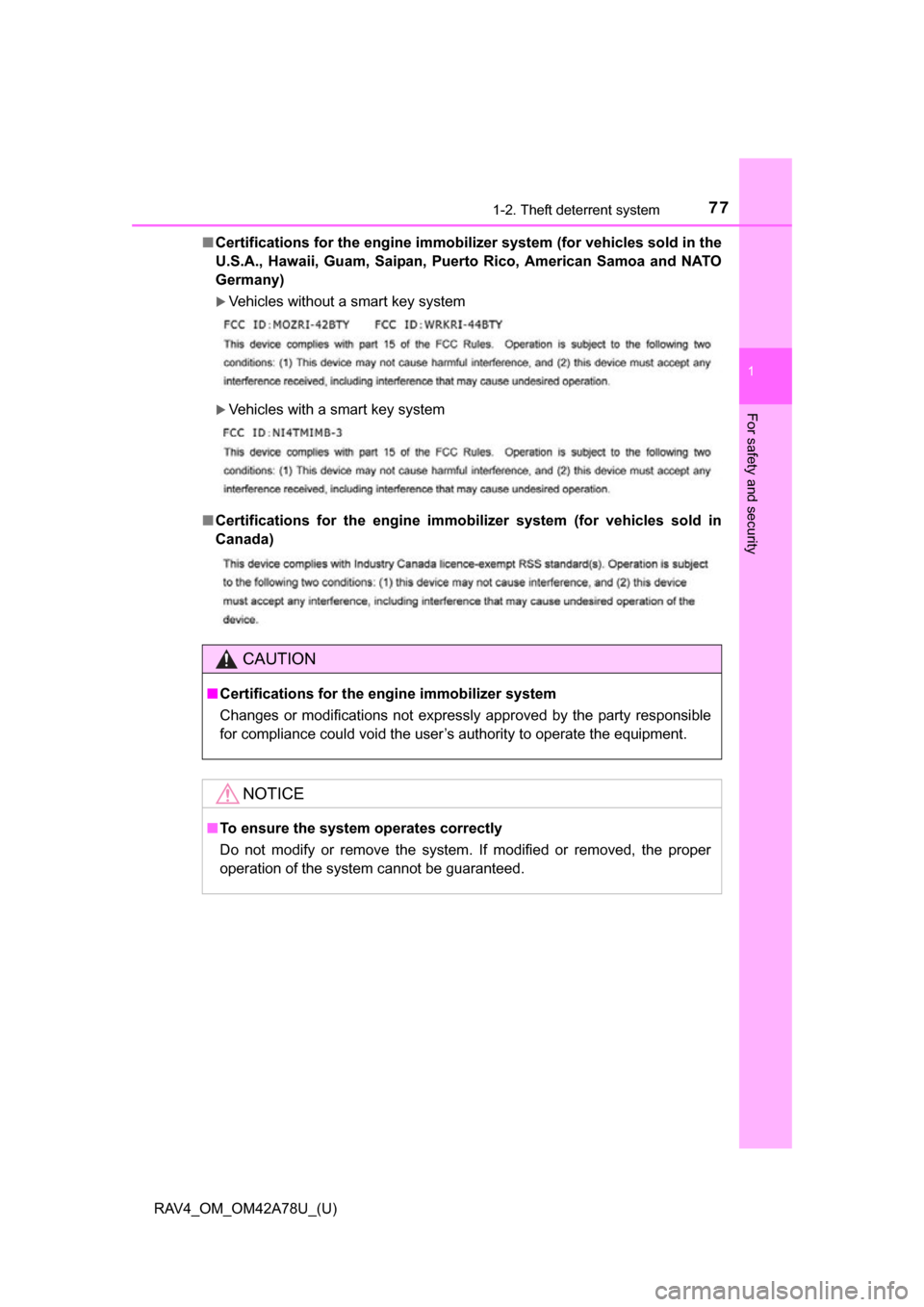
■Certifications for the engine immobili zer system (for vehicles sold in the
U.S.A., Hawaii, Guam, Saipan, Puer to Rico, American Samoa and NATO
Germany)
Vehicles without a smart key system
Vehicles with a smart key system
■ Certifications for the engine immobilizer system (for vehicles sold in
Canada)
CAUTION
■Certifications for the engine immobilizer system
Changes or modifications not expressly approved by the party responsible
for compliance could void the user’s authority to operate the equipment.
NOTICE
■To ensure the system operates correctly
Do not modify or remove the system. If modified or removed, the proper
operation of the system cannot be guaranteed.
Page 82 of 732
82
RAV4_OM_OM42A78U_(U)
2. Instrument cluster
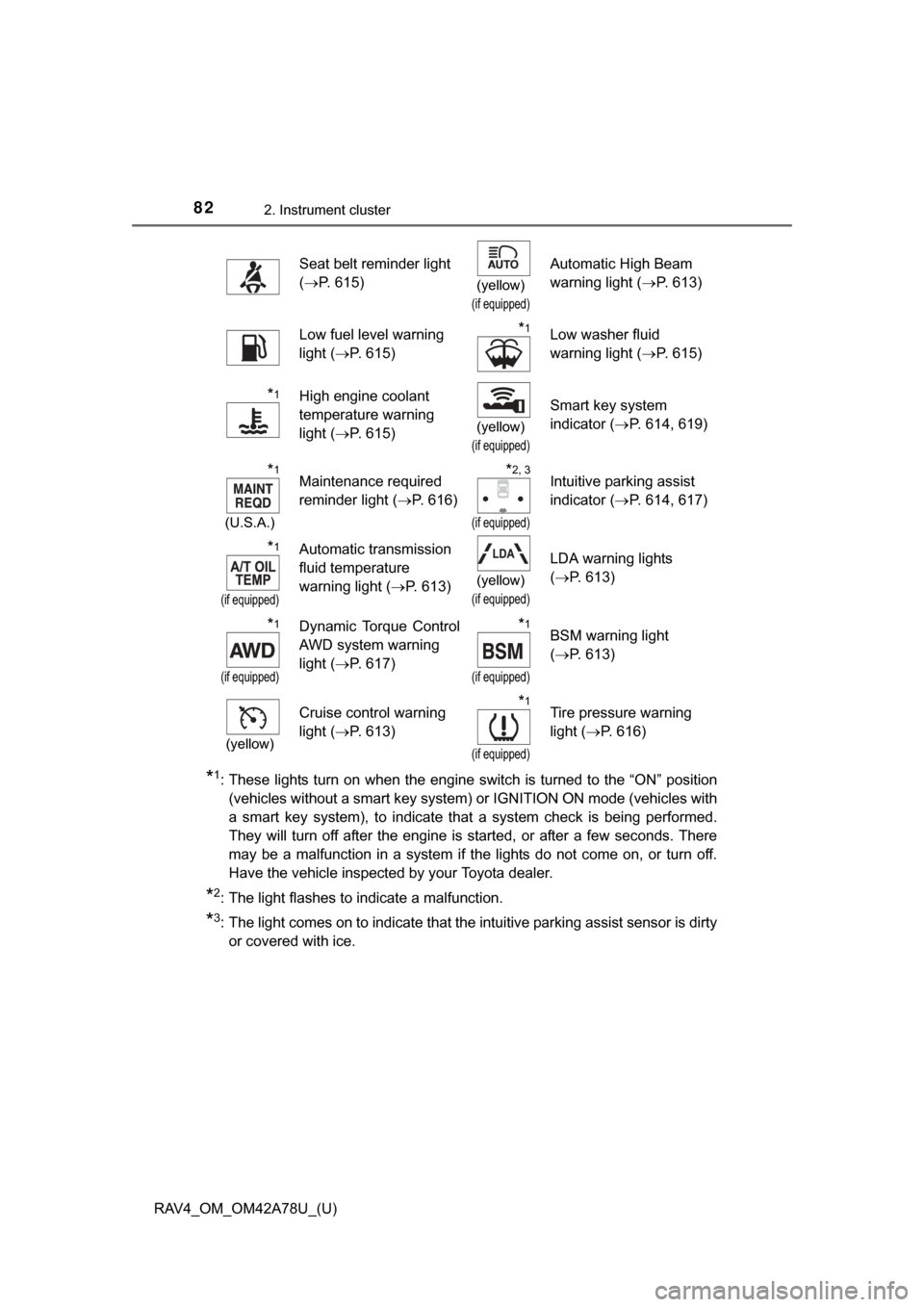
*1: These lights turn on when the engine switch is turned to the “ON” position(vehicles without a smart key system) or IGNITION ON mode (vehicles with
a smart key system), to indicate that a system check is being performed.
They will turn off after the engine is started, or after a few seconds. There
may be a malfunction in a system if the lights do not come on, or turn off.
Have the vehicle inspected by your Toyota dealer.
*2: The light flashes to indicate a malfunction.
*3: The light comes on to indicate that the intuitive parking assist sensor is dirtyor covered with ice.
Seat belt reminder light
(P. 615)
(yellow)
(if equipped)
Automatic High Beam
warning light ( P. 613)
Low fuel level warning
light ( P. 615)*1Low washer fluid
warning light ( P. 615)
*1High engine coolant
temperature warning
light ( P. 615)
(yellow)
(if equipped)
Smart key system
indicator ( P. 614, 619)
*1
(U.S.A.)
Maintenance required
reminder light ( P. 616)*2, 3
(if equipped)
Intuitive parking assist
indicator (P. 614, 617)
*1
(if equipped)
Automatic transmission
fluid temperature
warning light ( P. 613)
(yellow)
(if equipped)
LDA warning lights
(P. 613)
*1
(if equipped)
Dynamic Torque Control
AWD system warning
light ( P. 617)*1
(if equipped)
BSM warning light
(P. 613)
(yellow)
Cruise control warning
light ( P. 613)*1
(if equipped)
Tire pressure warning
light (P. 616)
Page 83 of 732
RAV4_OM_OM42A78U_(U)
832. Instrument cluster
2
Instrument cluster
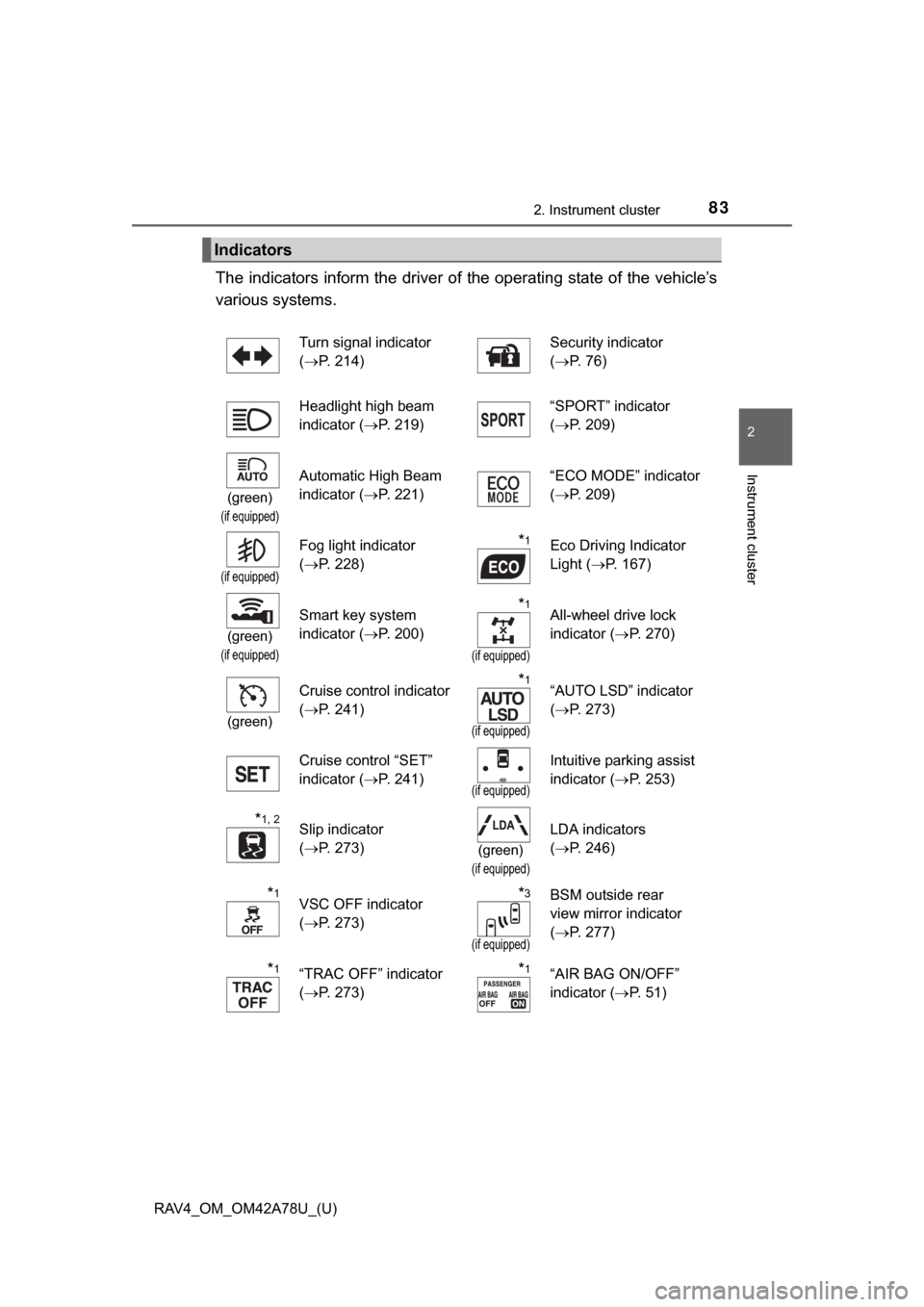
The indicators inform the driver of the operating state of the vehicle’s
various systems.
Indicators
Turn signal indicator
( P. 214) Security indicator
(
P. 76)
Headlight high beam
indicator ( P. 219) “SPORT” indicator
(
P. 209)
(green)
(if equipped)
Automatic High Beam
indicator ( P. 221) “ECO MODE” indicator
(
P. 209)
(if equipped)
Fog light indicator
(P. 228)*1Eco Driving Indicator
Light ( P. 167)
(green)
(if equipped)
Smart key system
indicator ( P. 200)*1
(if equipped)
All-wheel drive lock
indicator (P. 270)
(green)
Cruise control indicator
(P. 241)*1
(if equipped)
“AUTO LSD” indicator
(P. 273)
Cruise control “SET”
indicator ( P. 241)
(if equipped)
Intuitive parking assist
indicator (P. 253)
*1, 2Slip indicator
(P. 273)
(green)
(if equipped)
LDA indicators
(P. 246)
*1VSC OFF indicator
(P. 273)*3
(if equipped)
BSM outside rear
view mirror indicator
(P. 277)
*1“TRAC OFF” indicator
(P. 273)*1“AIR BAG ON/OFF”
indicator ( P. 5 1 )
Page 84 of 732
84
RAV4_OM_OM42A78U_(U)
2. Instrument cluster
*1: These lights turn on when the engine switch is turned to the “ON” position(vehicles without a smart key system) or IGNITION ON mode (vehicles with
a smart key system), to indicate that a system check is being performed.
They will turn off after the engine is started, or after a few seconds. There
may be a malfunction in a system if the lights do not come on, or turn off.
Have the vehicle inspected by your Toyota dealer.
*2: The light flashes to indicate that the system is operating.
*3: In order to confirm operation, the BS M outside rear view mirror indicators
illuminate in the following situations:
• When the engine switch is turned to the “ON” position (vehicles without a smart key system) or IGNITION ON mode (vehicles with a smart key sys-
tem) while the BSM main switch is set to ON.
• When the BSM main switch is set to ON while the engine switch is in the “ON” position (vehicles without a smart key system) or IGNITION ON
mode (vehicles with a smart key system).
If the system is functioning correctly, the BSM outside rear view mirror indi-
cators will turn off after a few seconds.
If the BSM outside rear view mirror indicators do not illuminate or do not
turn off, there may be a malfunction with the system. If this occurs, have the
vehicle inspected by your Toyota dealer.
CAUTION
■ If a safety system warning light does not come on
Should a safety system light such as the ABS and SRS warning light not
come on when you start the engine, this could mean that these systems are
not available to help protect you in an accident, which could result in death
or serious injury. Have the vehicle inspected by your Toyota dealer immedi-
ately if this occurs.
NOTICE
■ To prevent damage to the engine and its components
The engine may be overheating if the high engine coolant temperature
warning light flashes or turns on. In this case, immediately stop the vehicle
in a safe place, and check the engine after it has cooled completely.
(P. 653)
Page 92 of 732
92
RAV4_OM_OM42A78U_(U)
2. Instrument cluster
Fuel consumption information
Vehicles with Entune Audio
Press the “CAR” button.
Vehicles with Entune Premium Au dio with Navigation and Entune
Audio Plus
Press the “APPS” button, and t hen select “Eco” on the screen.
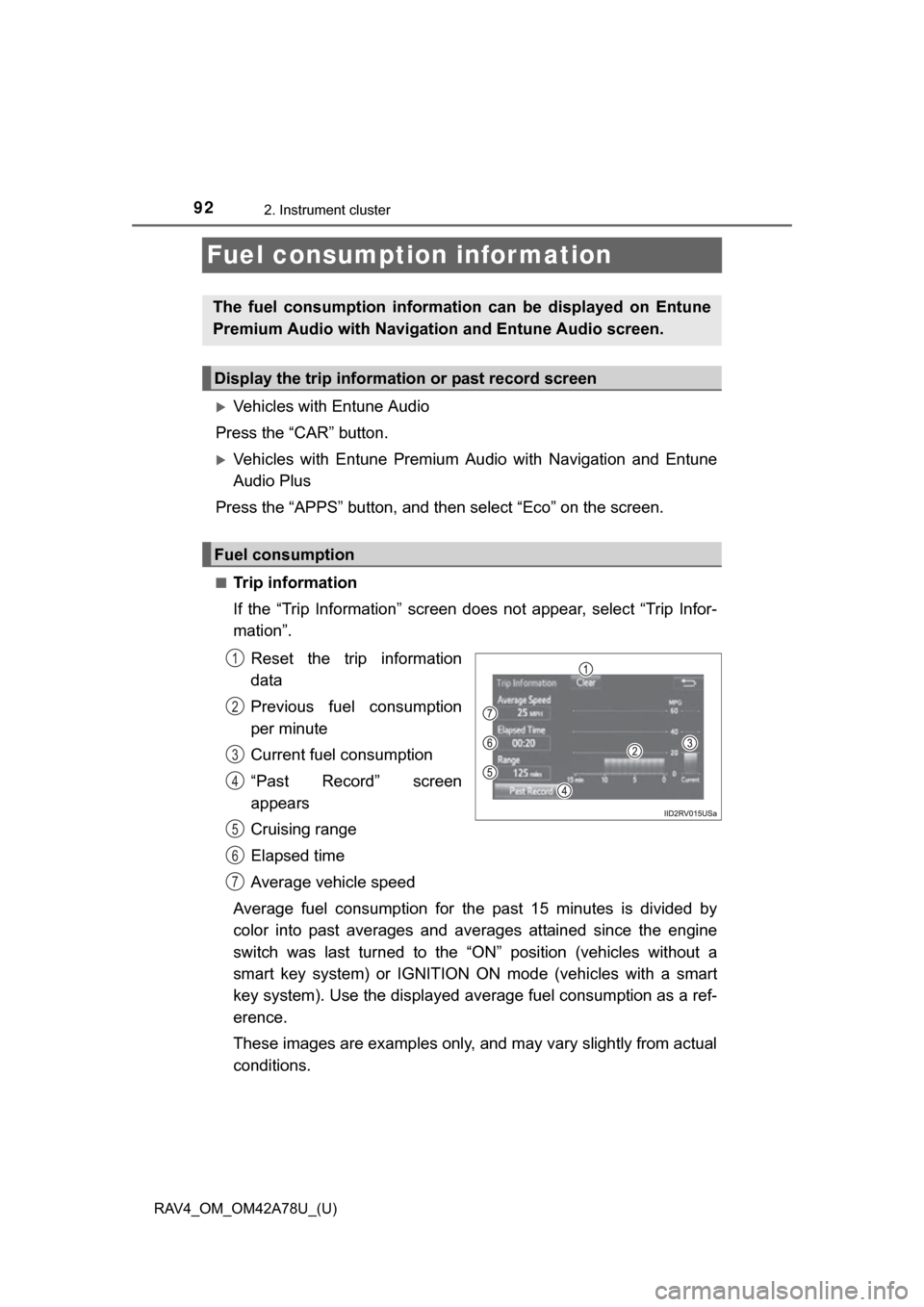
■Trip information
If the “Trip Information” screen does not appear, select “Trip Infor-
mation”.
Reset the trip information
data
Previous fuel consumption
per minute
Current fuel consumption
“Past Record” screen
appears
Cruising range
Elapsed time
Average vehicle speed
Average fuel consumption for the past 15 minutes is divided by
color into past averages and av erages attained since the engine
switch was last turned to the “O N” position (vehicles without a
smart key system) or IGNITION ON mode (vehicles with a smart
key system). Use the displayed average fuel consumption as a ref-
erence.
These images are examples only, and may vary slightly from actual
conditions.
The fuel consumption informat ion can be displayed on Entune
Premium Audio with Navigation and Entune Audio screen.
Display the trip information or past record screen
Fuel consumption
1
2
3
4
5
6
7
Page 95 of 732
95
RAV4_OM_OM42A78U_(U)
3
Operation of
each component
3-1. Key information
Keys .................................... 96
3-2. Opening, closing and locking the doors
Smart key system ............... 99
Wireless remote control .... 113
Side doors ......................... 119
Back door .......................... 124
3-3. Adjusting the seats Front seats ........................ 136
Rear seats......................... 138
Driving position memory ... 142
Head restraints.................. 146
3-4. Adjusting the steering wheel and mirrors
Steering wheel .................. 149
Inside rear view mirror ...... 150
Outside rear view mirrors............................. 153
3-5. Opening, closing the windows and moon roof
Power windows ................. 155
Moon roof .......................... 158
Page 96 of 732
96
RAV4_OM_OM42A78U_(U)
3-1. Key information
Keys
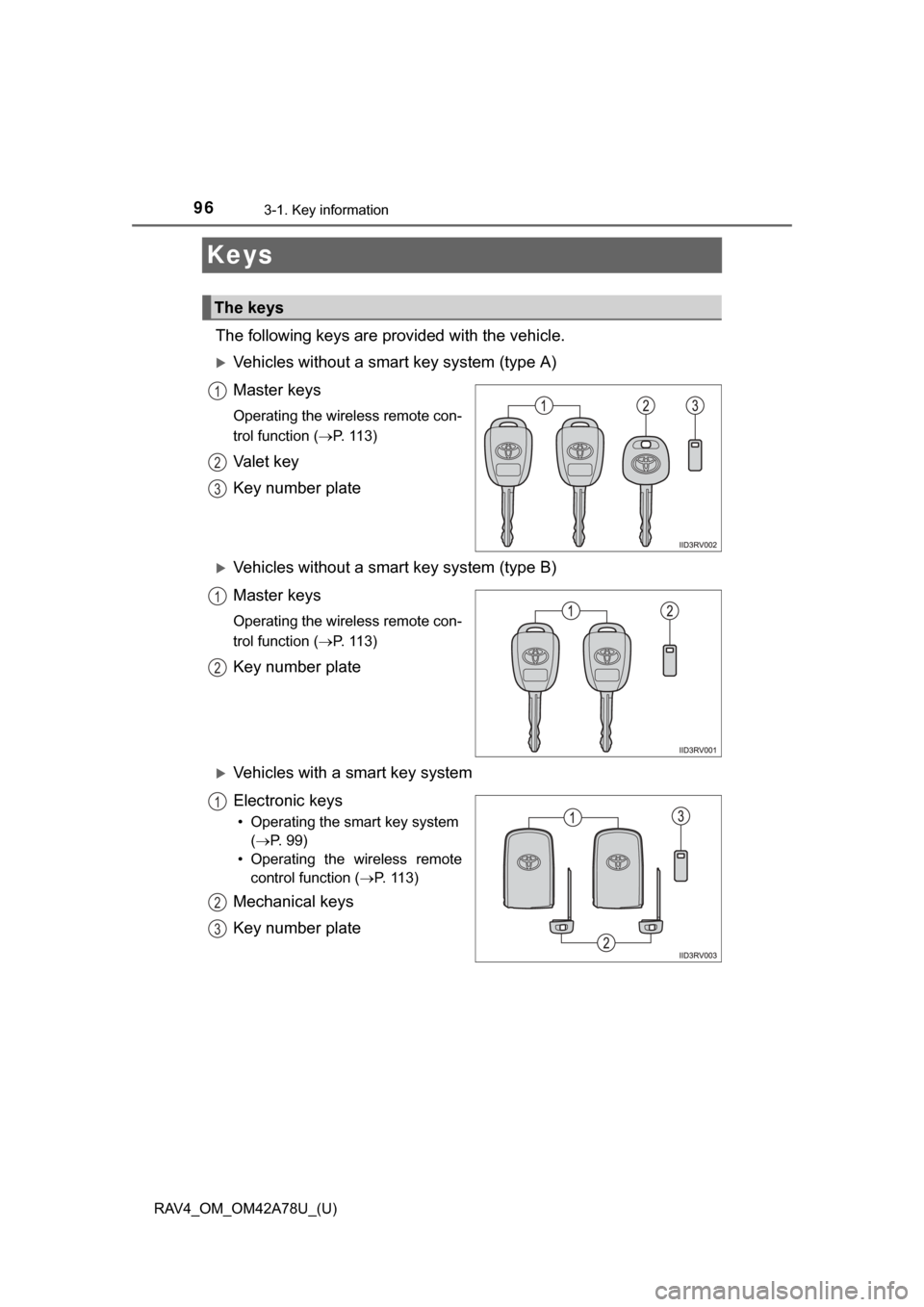
The following keys are provided with the vehicle.
Vehicles without a smart key system (type A)
Master keys
Operating the wireless remote con-
trol function (P. 113)
Va l e t k e y
Key number plate
Vehicles without a smart key system (type B)
Master keys
Operating the wireless remote con-
trol function (P. 113)
Key number plate
Vehicles with a smart key system
Electronic keys
• Operating the smart key system(P. 99)
• Operating the wireless remote control function ( P. 113)
Mechanical keys
Key number plate
The keys
1
2
3
1
2
1
2
3
Page 97 of 732
RAV4_OM_OM42A78U_(U)
973-1. Key information
3
Operation of each component
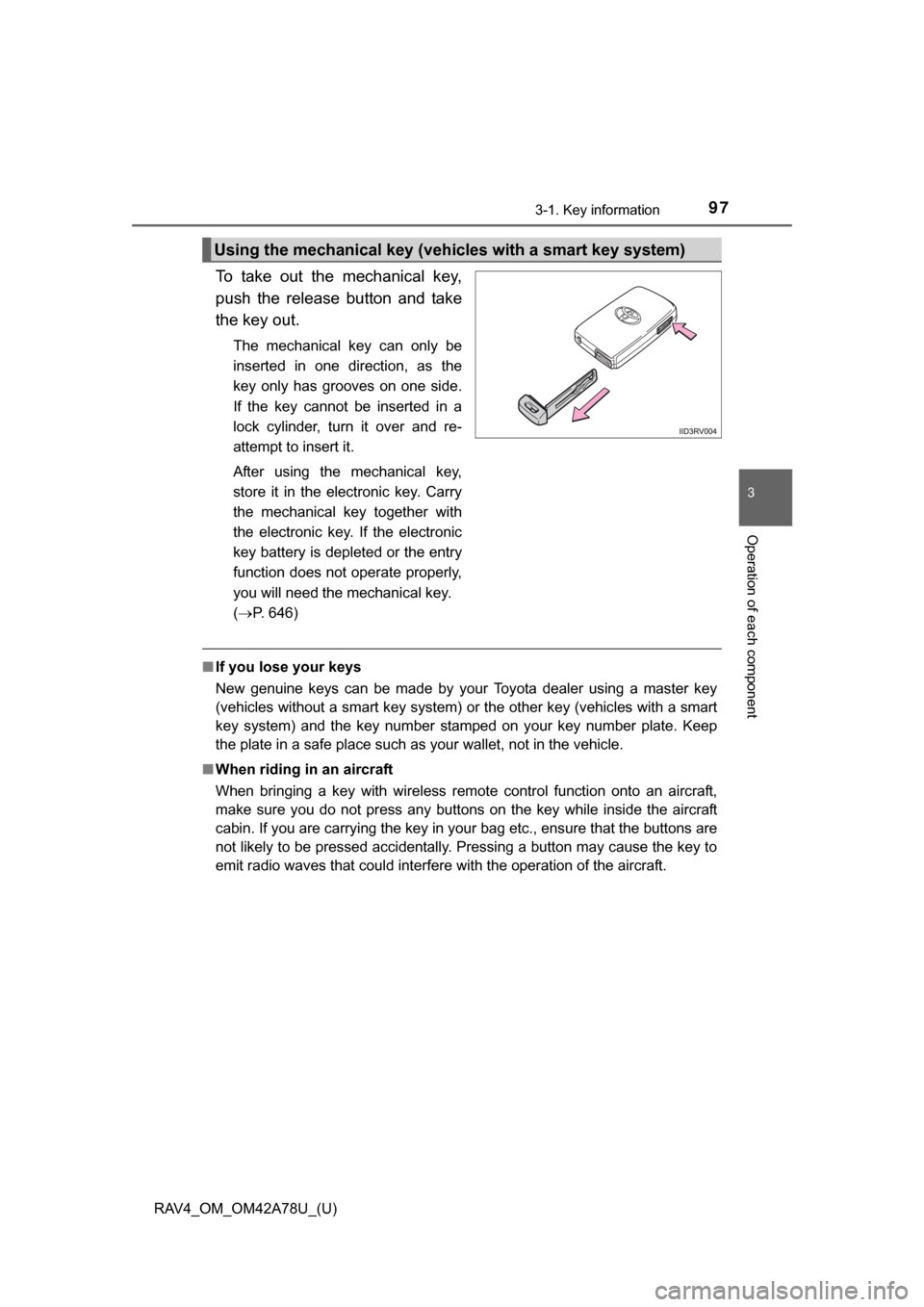
To take out the mechanical key,
push the release button and take
the key out.
The mechanical key can only be
inserted in one direction, as the
key only has grooves on one side.
If the key cannot be inserted in a
lock cylinder, turn it over and re-
attempt to insert it.
After using the mechanical key,
store it in the electronic key. Carry
the mechanical key together with
the electronic key. If the electronic
key battery is depleted or the entry
function does not operate properly,
you will need the mechanical key.
(P. 646)
■ If you lose your keys
New genuine keys can be made by your Toyota dealer using a master key
(vehicles without a smart key system) or the other key (vehicles with a smart
key system) and the key number stam ped on your key number plate. Keep
the plate in a safe place such as your wallet, not in the vehicle.
■ When riding in an aircraft
When bringing a key with wireless remote control function onto an aircraft,
make sure you do not press any buttons on the key while inside the aircraft
cabin. If you are carrying the key in your bag etc., ensure that the buttons are
not likely to be pressed accidentally. Pressing a button may cause the key to
emit radio waves that could interfere with the operation of the aircraft.
Using the mechanical key (vehic les with a smart key system)
Page 98 of 732
98
RAV4_OM_OM42A78U_(U)
3-1. Key information
NOTICE
■To prevent key damage
● Do not drop the keys, subject them to strong shocks or bend them.
● Do not expose the keys to high temperatures for long periods of time.
● Do not get the keys wet or wash them in an ultrasonic washer etc.
● Do not attach metallic or magnetic materials to the keys or place the keys
close to such materials.
● Do not disassemble the keys.
● Do not attach a sticker or anything else to the surface of the electronic key.
● Do not place the keys near objects that produce magnetic fields, such as
TVs, audio systems and induction cooker s, or medical electrical equip-
ment, such as low-frequency therapy equipment.
■ Carrying the electronic key on your person (vehicles with a smart key
system)
Carry the electronic key 3.9 in. (10 cm) or more away from electric appli-
ances that are turned on. Radio waves emitted from electric appliances
within 3.9 in. (10 cm) of the electronic key may interfere with the key, caus-
ing the key to not function properly.
■ In case of a smart key system malfunction or other key-related prob-
lems (vehicles with a smart key system)
Take your vehicle with all the electronic keys provided with your vehicle to
your Toyota dealer.
■ When an electronic key is lost (vehicles with a smart key system)
If the electronic key remains lost, the risk of vehicle theft increases signifi-
cantly. Visit your Toyota dealer imm ediately with all remaining electronic
keys that was provided with your vehicle.
Page 99 of 732
99
RAV4_OM_OM42A78U_(U)
3-2. Opening, closing and locking the doors
3
Operation of each component
Smar t key system
The following operations can be performed simply by carrying the
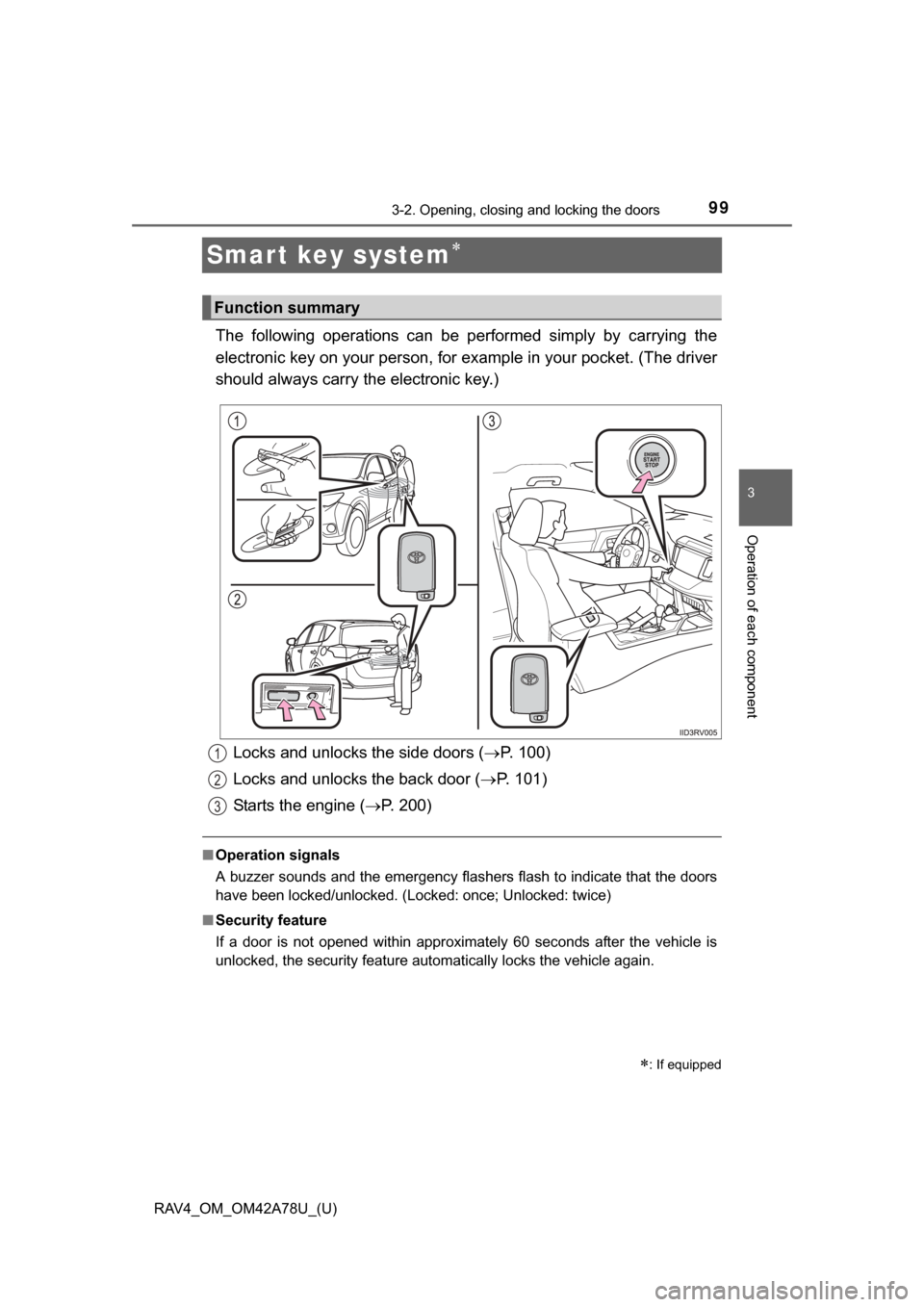
electronic key on your person, for example in your pocket. (The driver
should always carry the electronic key.)
■ Operation signals
A buzzer sounds and the emergency flashers flash to indicate that the doors
have been locked/unlocked. (Locked: once; Unlocked: twice)
■ Security feature
If a door is not opened within approximately 60 seconds after the vehicle is
unlocked, the security feature automatically locks the vehicle again.
: If equipped
Function summary
Locks and unlocks the side doors ( P. 100)
Locks and unlocks the back door ( P. 101)
Starts the engine ( P. 200)1
2
3