lock TOYOTA RAV4 2015 XA40 / 4.G Owner's Manual
[x] Cancel search | Manufacturer: TOYOTA, Model Year: 2015, Model line: RAV4, Model: TOYOTA RAV4 2015 XA40 / 4.GPages: 732, PDF Size: 12.43 MB
Page 70 of 732

701-1. For safe use
RAV4_OM_OM42A78U_(U)■
Booster seat
Adjust the seatback to the
8th lock position from the
fully reclined position.
( P. 138)
Fully reclined position
8th lock position
If your child restraint system interferes with a head restraint and
cannot be installed properly, install the child restraint system after
removing the head restraint. ( P. 146)
Place the child restraint system on the seat facing the front of the
vehicle.
Sit the child in the child
restraint system. Fit the seat
belt to the child restraint sys-
tem according to the manu-
facturer’s instructions and
insert the plate into the
buckle. Make sure that the
belt is not twisted.
Check that the shoulder belt is
correctly positioned over the
child’s shoulder and that the lap
belt is as low as possible.
( P. 30)
1
1
2
2
Booster typeHigh back type
3
Page 72 of 732
721-1. For safe use
RAV4_OM_OM42A78U_(U)
CAUTION
■When installing a booster seat
To prevent the belt from going into ALR lock mode, do not fully extend the
shoulder belt. ALR mode causes the belt to tighten only. This could cause
injury or discomfort to the child. ( P. 34)
■ When installing a child restraint system
Follow the directions given in the child restraint system installation manual
and fix the child restraint system securely in place.
If the child restraint system is not correctly fixed in place, the child or other
passengers may be seriously injured or even killed in the event of sudden
braking, sudden swerving or an accident.
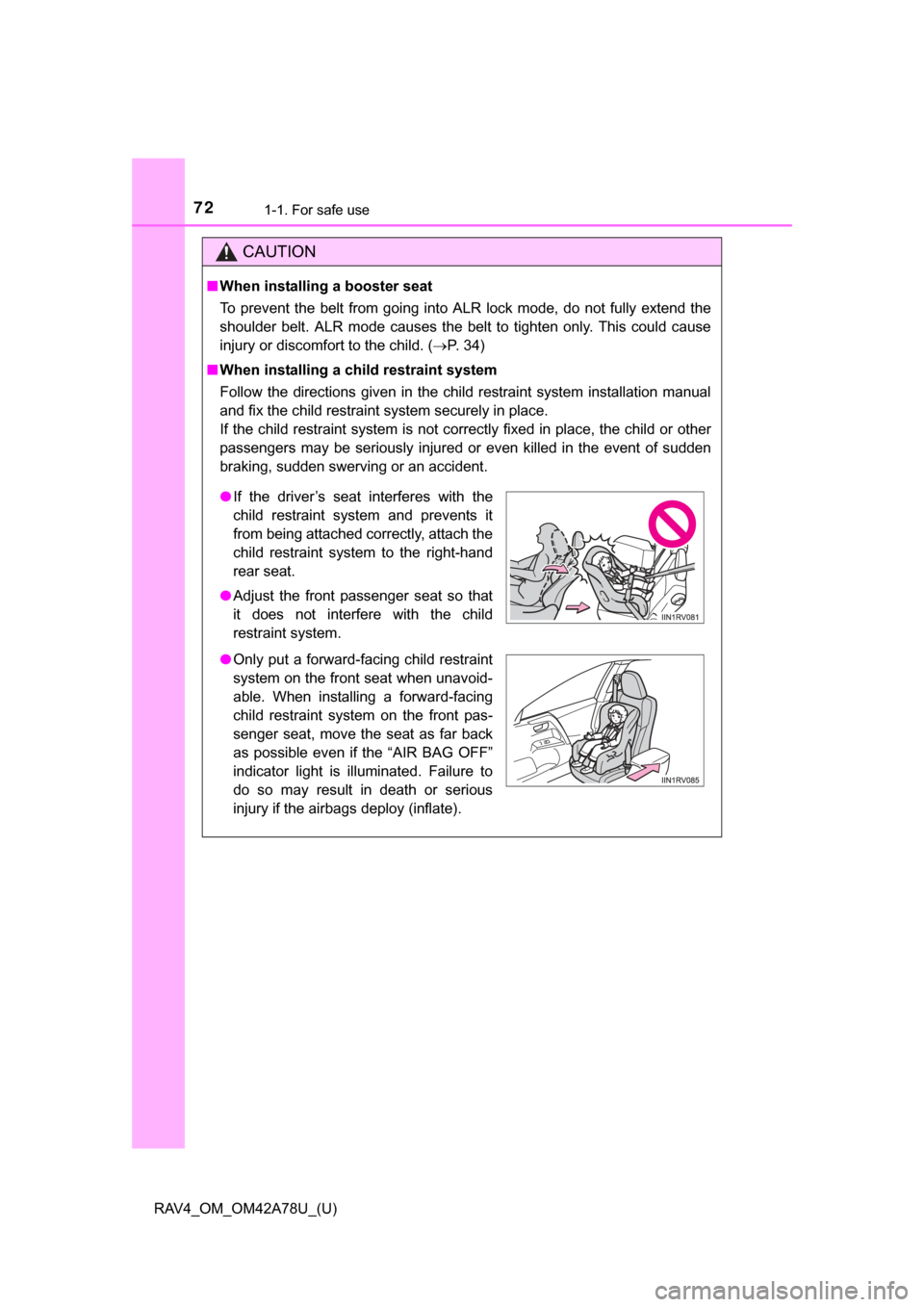
● If the driver’s seat interferes with the
child restraint system and prevents it
from being attached correctly, attach the
child restraint system to the right-hand
rear seat.
● Adjust the front passenger seat so that
it does not interfere with the child
restraint system.
● Only put a forward-facing child restraint
system on the front seat when unavoid-
able. When installing a forward-facing
child restraint system on the front pas-
senger seat, move the seat as far back
as possible even if the “AIR BAG OFF”
indicator light is illuminated. Failure to
do so may result in death or serious
injury if the airbags deploy (inflate).
Page 73 of 732
731-1. For safe use
RAV4_OM_OM42A78U_(U)
1
For safety and security
CAUTION
■When installing a child restraint system
● When installing a child restraint system in the rear center seat, adjust both
seatbacks at the same angle. Otherwise, the child restraint system cannot
be securely restrained and this may cause death or serious injuries in the
event of sudden braking, sudden swerving or an accident.
● When a booster seat is installed, always ensure that the shoulder belt is
positioned across the center of the child’s shoulder. The belt should be
kept away from the child’s neck, but not so that it could fall off the child’s
shoulder. Failing to do so may result in death or serious injury in the event
of sudden braking, sudden swerving or an accident.
● Ensure that the belt and plate are securely locked and the seat belt is not
twisted.
● Shake the child restraint system left and right, and forward and backward
to ensure that it has been securely installed.
● After securing a child restraint system, never adjust the seat.
● Follow all installation instructions provided by the child restraint system
manufacturer.
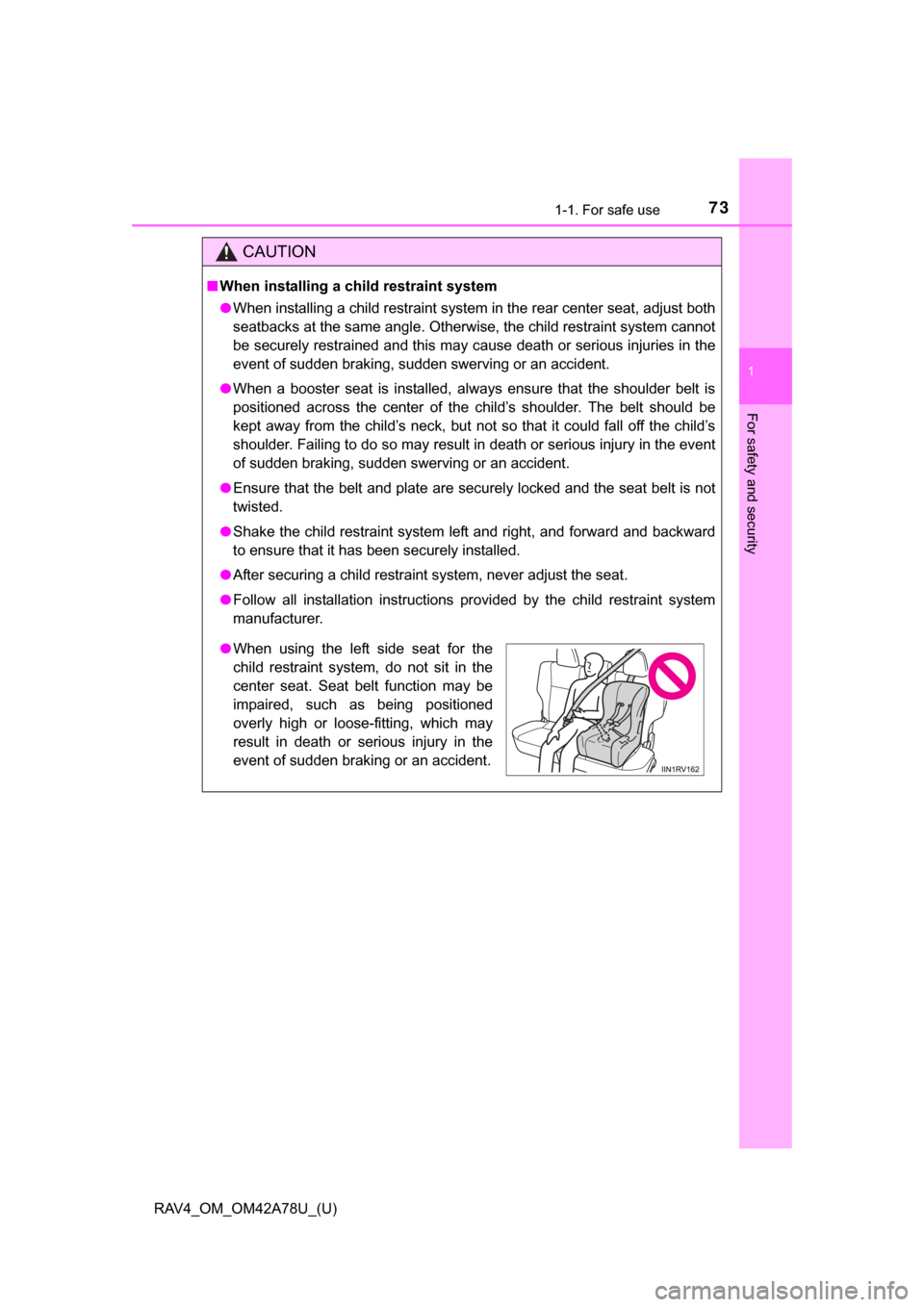
●When using the left side seat for the
child restraint system, do not sit in the
center seat. Seat belt function may be
impaired, such as being positioned
overly high or loose-fitting, which may
result in death or serious injury in the
event of sudden braking or an accident.
Page 83 of 732
RAV4_OM_OM42A78U_(U)
832. Instrument cluster
2
Instrument cluster
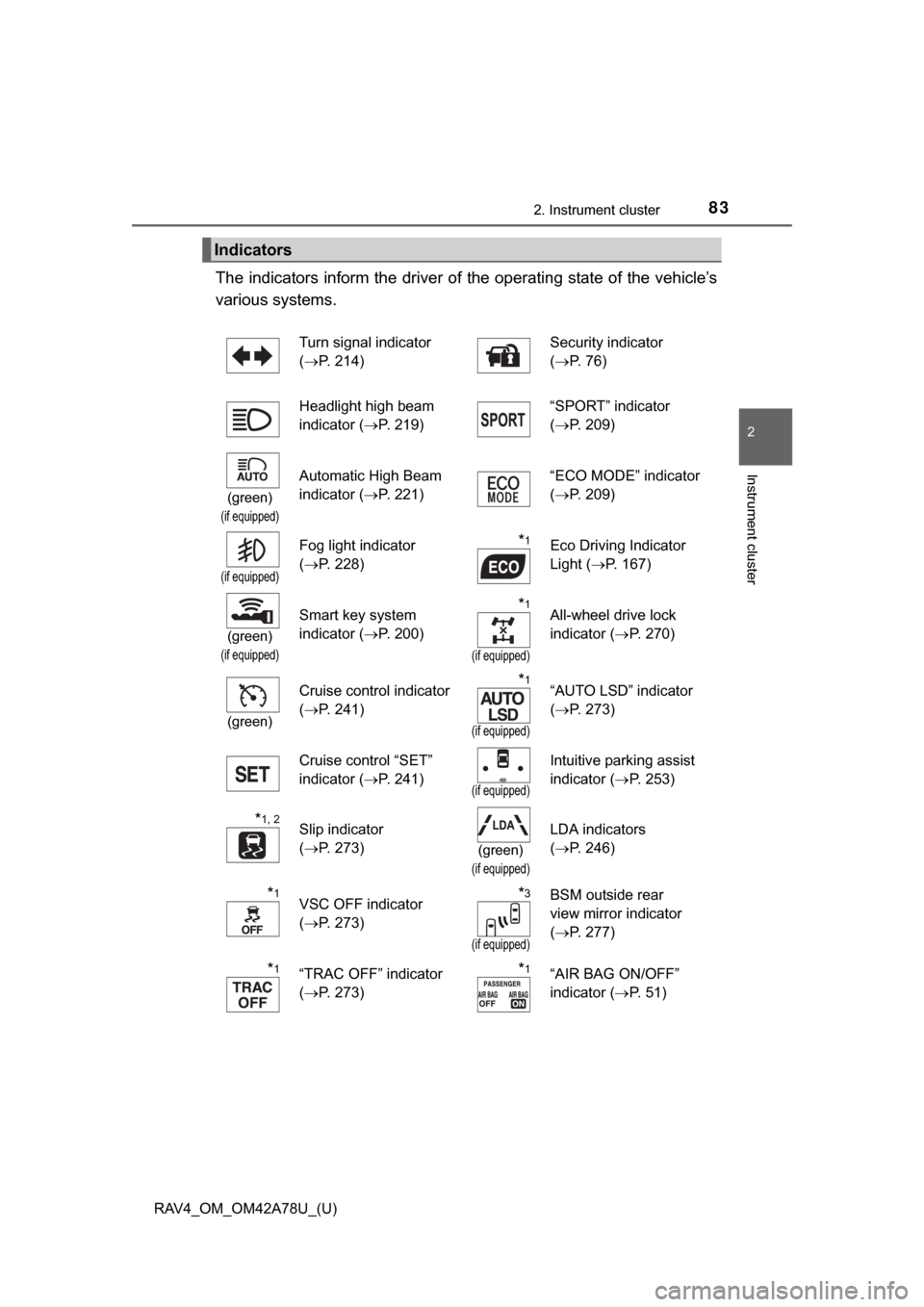
The indicators inform the driver of the operating state of the vehicle’s
various systems.
Indicators
Turn signal indicator
( P. 214) Security indicator
(
P. 76)
Headlight high beam
indicator ( P. 219) “SPORT” indicator
(
P. 209)
(green)
(if equipped)
Automatic High Beam
indicator ( P. 221) “ECO MODE” indicator
(
P. 209)
(if equipped)
Fog light indicator
(P. 228)*1Eco Driving Indicator
Light ( P. 167)
(green)
(if equipped)
Smart key system
indicator ( P. 200)*1
(if equipped)
All-wheel drive lock
indicator (P. 270)
(green)
Cruise control indicator
(P. 241)*1
(if equipped)
“AUTO LSD” indicator
(P. 273)
Cruise control “SET”
indicator ( P. 241)
(if equipped)
Intuitive parking assist
indicator (P. 253)
*1, 2Slip indicator
(P. 273)
(green)
(if equipped)
LDA indicators
(P. 246)
*1VSC OFF indicator
(P. 273)*3
(if equipped)
BSM outside rear
view mirror indicator
(P. 277)
*1“TRAC OFF” indicator
(P. 273)*1“AIR BAG ON/OFF”
indicator ( P. 5 1 )
Page 95 of 732
95
RAV4_OM_OM42A78U_(U)
3
Operation of
each component
3-1. Key information
Keys .................................... 96
3-2. Opening, closing and locking the doors
Smart key system ............... 99
Wireless remote control .... 113
Side doors ......................... 119
Back door .......................... 124
3-3. Adjusting the seats Front seats ........................ 136
Rear seats......................... 138
Driving position memory ... 142
Head restraints.................. 146
3-4. Adjusting the steering wheel and mirrors
Steering wheel .................. 149
Inside rear view mirror ...... 150
Outside rear view mirrors............................. 153
3-5. Opening, closing the windows and moon roof
Power windows ................. 155
Moon roof .......................... 158
Page 97 of 732
RAV4_OM_OM42A78U_(U)
973-1. Key information
3
Operation of each component
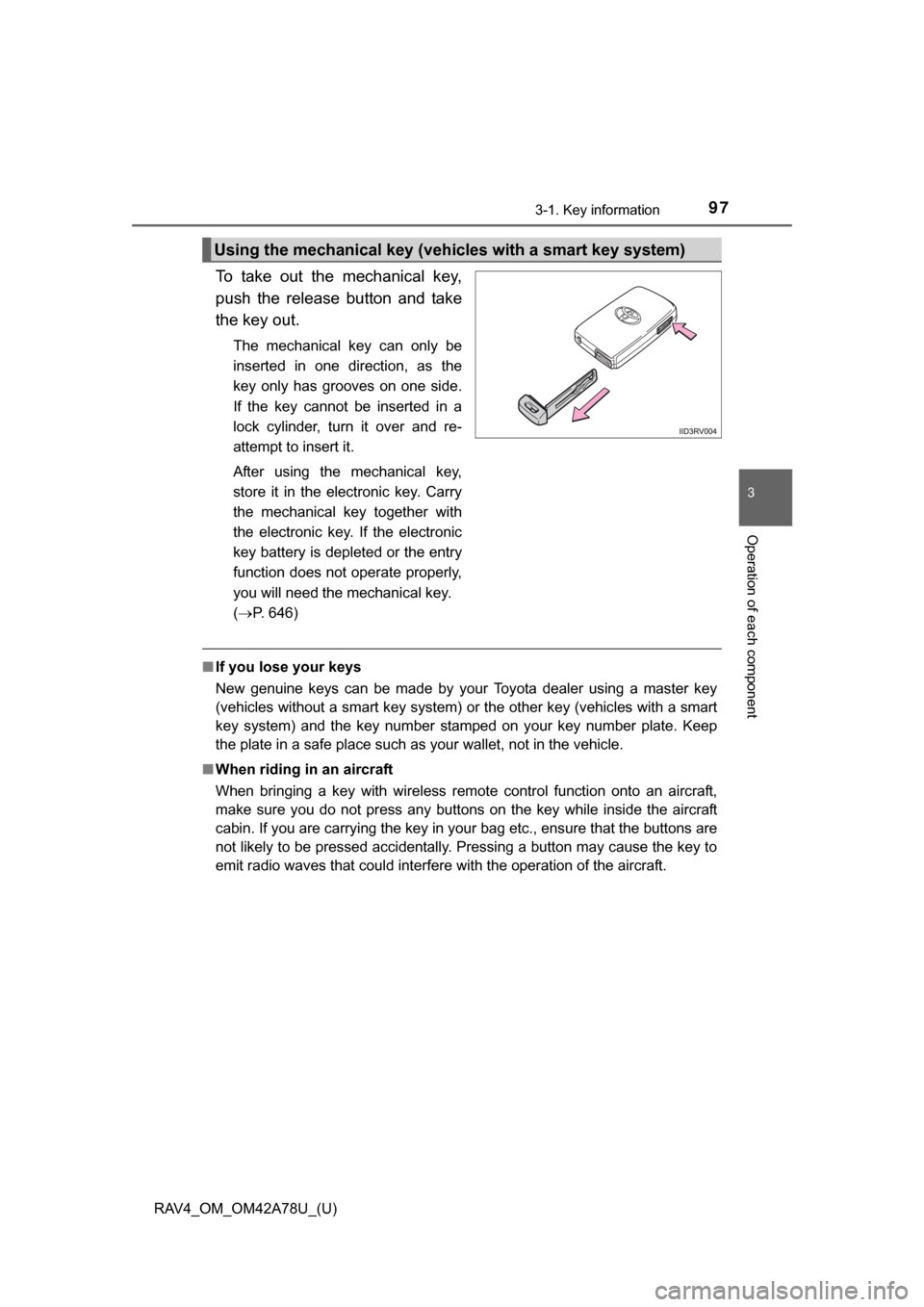
To take out the mechanical key,
push the release button and take
the key out.
The mechanical key can only be
inserted in one direction, as the
key only has grooves on one side.
If the key cannot be inserted in a
lock cylinder, turn it over and re-
attempt to insert it.
After using the mechanical key,
store it in the electronic key. Carry
the mechanical key together with
the electronic key. If the electronic
key battery is depleted or the entry
function does not operate properly,
you will need the mechanical key.
(P. 646)
■ If you lose your keys
New genuine keys can be made by your Toyota dealer using a master key
(vehicles without a smart key system) or the other key (vehicles with a smart
key system) and the key number stam ped on your key number plate. Keep
the plate in a safe place such as your wallet, not in the vehicle.
■ When riding in an aircraft
When bringing a key with wireless remote control function onto an aircraft,
make sure you do not press any buttons on the key while inside the aircraft
cabin. If you are carrying the key in your bag etc., ensure that the buttons are
not likely to be pressed accidentally. Pressing a button may cause the key to
emit radio waves that could interfere with the operation of the aircraft.
Using the mechanical key (vehic les with a smart key system)
Page 99 of 732
99
RAV4_OM_OM42A78U_(U)
3-2. Opening, closing and locking the doors
3
Operation of each component
Smar t key system
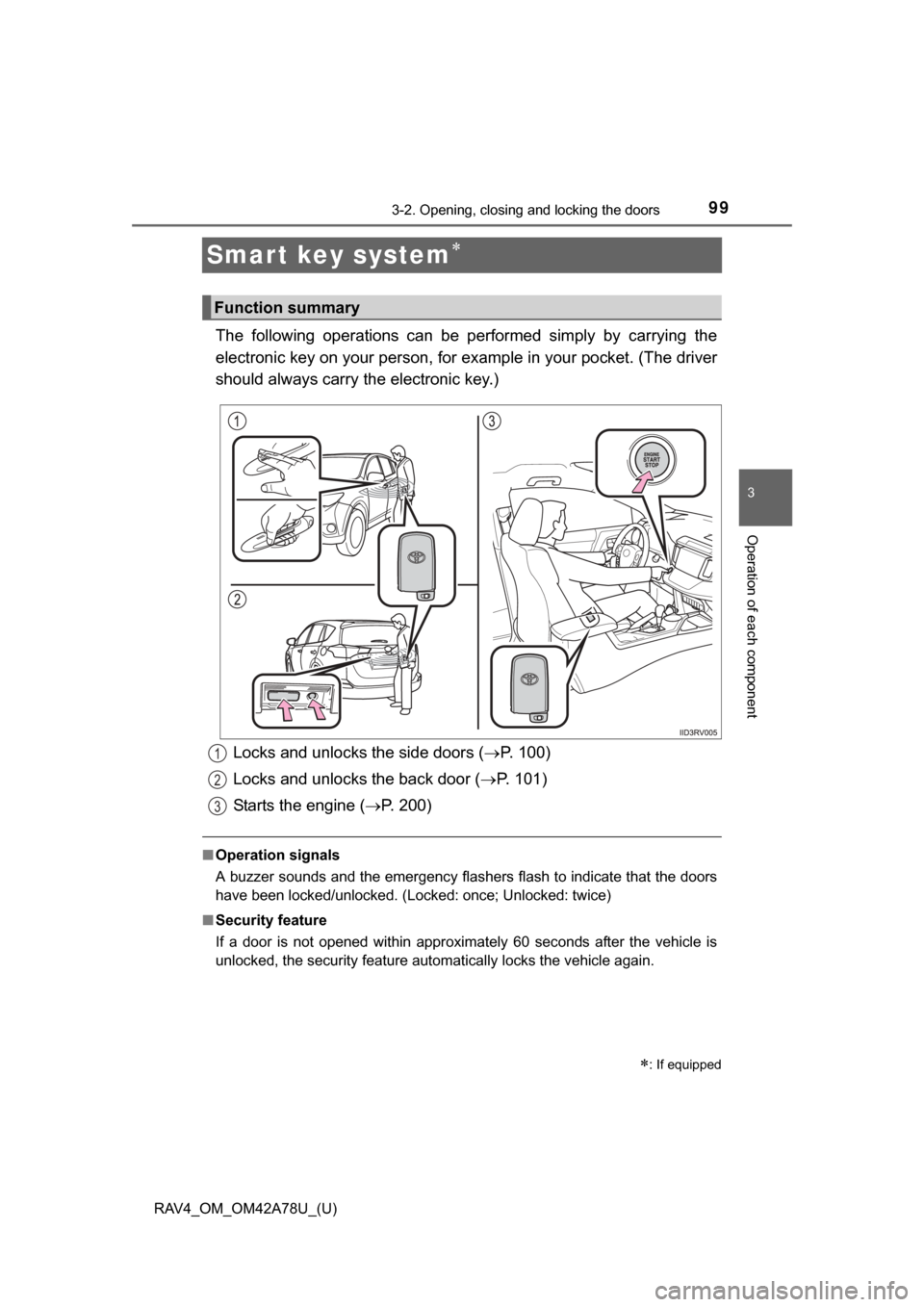
The following operations can be performed simply by carrying the
electronic key on your person, for example in your pocket. (The driver
should always carry the electronic key.)
■ Operation signals
A buzzer sounds and the emergency flashers flash to indicate that the doors
have been locked/unlocked. (Locked: once; Unlocked: twice)
■ Security feature
If a door is not opened within approximately 60 seconds after the vehicle is
unlocked, the security feature automatically locks the vehicle again.
: If equipped
Function summary
Locks and unlocks the side doors ( P. 100)
Locks and unlocks the back door ( P. 101)
Starts the engine ( P. 200)1
2
3
Page 100 of 732
100
RAV4_OM_OM42A78U_(U)
3-2. Opening, closing and locking the doors
Front doors
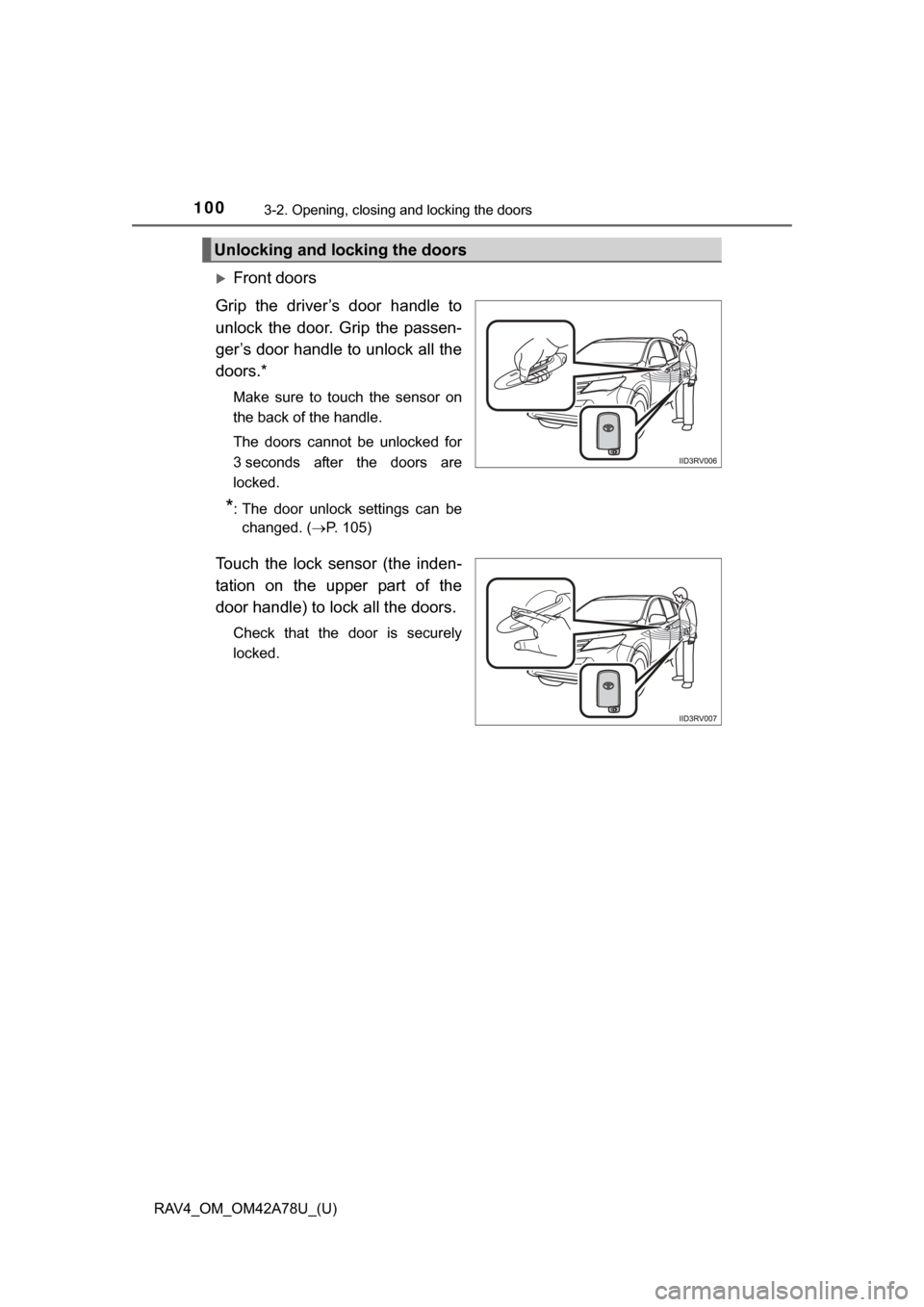
Grip the driver’s door handle to
unlock the door. Grip the passen-
ger’s door handle to unlock all the
doors.*
Make sure to touch the sensor on
the back of the handle.
The doors cannot be unlocked for
3 seconds after the doors are
locked.
*: The door unlock settings can be changed. ( P. 105)
Touch the lock sensor (the inden-
tation on the upper part of the
door handle) to lock all the doors.
Check that the door is securely
locked.
Unlocking and locking the doors
Page 101 of 732
RAV4_OM_OM42A78U_(U)
1013-2. Opening, closing and locking the doors
3
Operation of each component
Back door
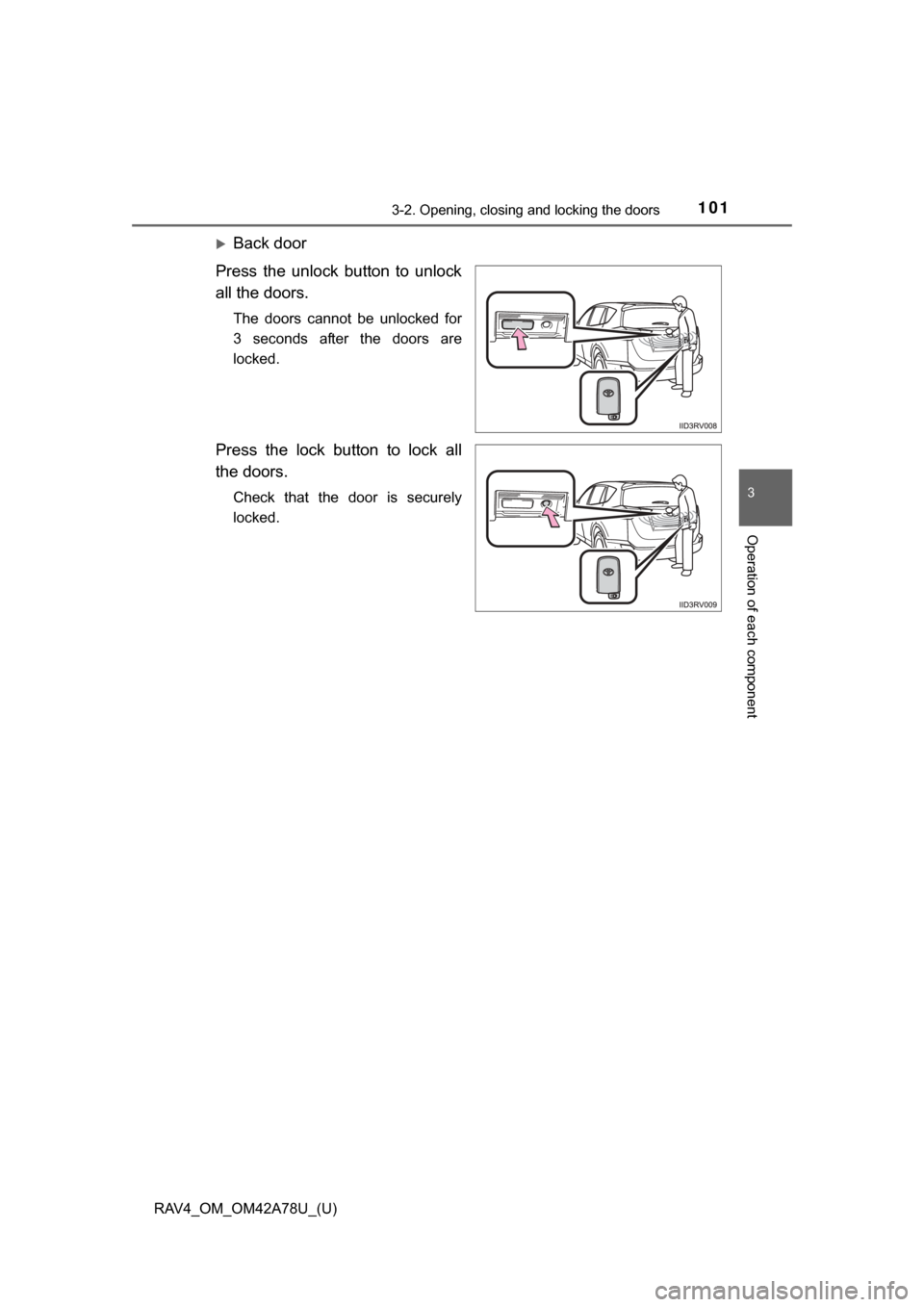
Press the unlock button to unlock
all the doors.
The doors cannot be unlocked for
3 seconds after the doors are
locked.
Press the lock button to lock all
the doors.
Check that the door is securely
locked.
Page 102 of 732
102
RAV4_OM_OM42A78U_(U)
3-2. Opening, closing and locking the doors
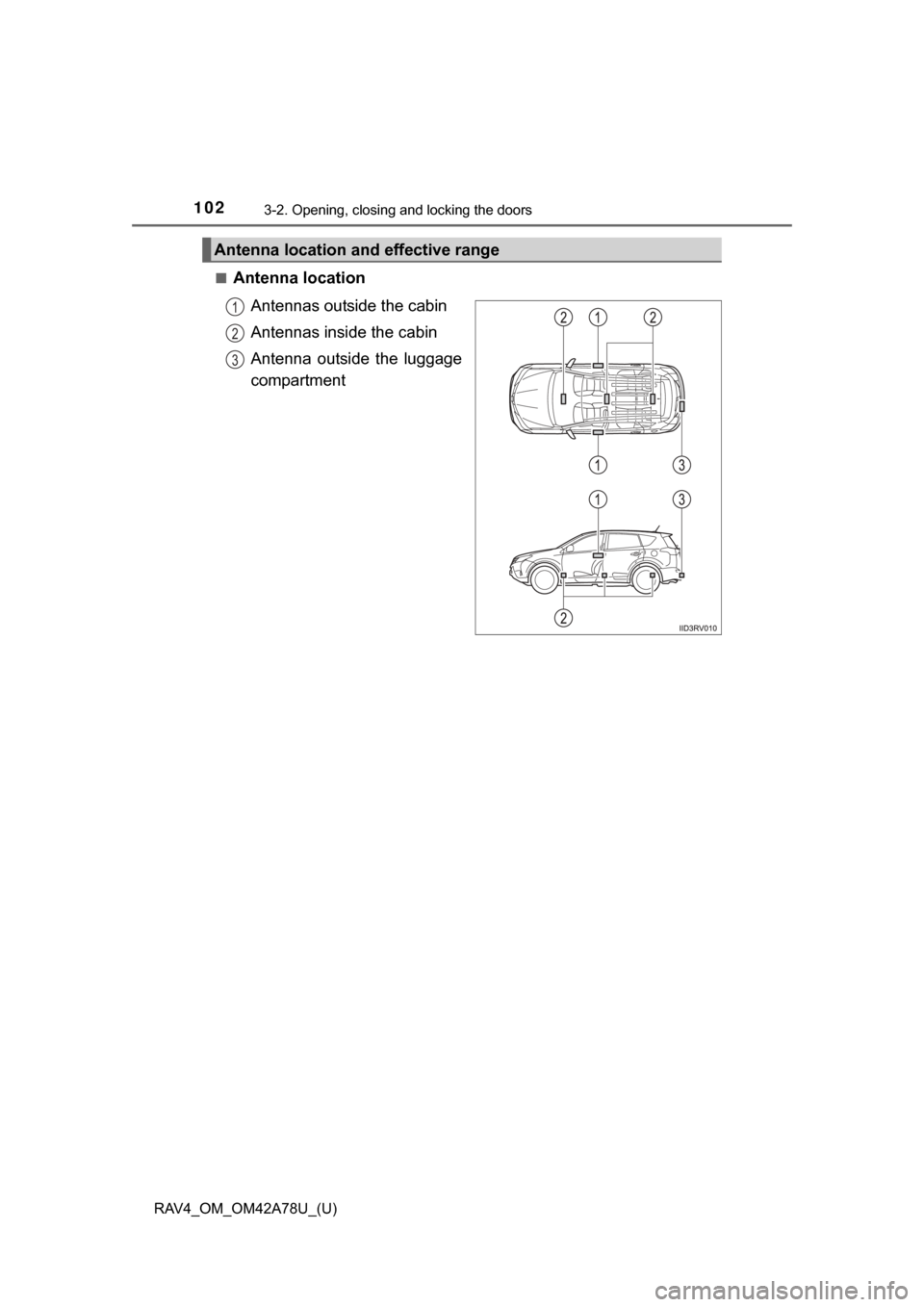
■Antenna locationAntennas outside the cabin
Antennas inside the cabin
Antenna outside the luggage
compartment
Antenna location and effective range
1
2
3