mirror TOYOTA RAV4 2015 XA40 / 4.G Owner's Manual
[x] Cancel search | Manufacturer: TOYOTA, Model Year: 2015, Model line: RAV4, Model: TOYOTA RAV4 2015 XA40 / 4.GPages: 732, PDF Size: 12.43 MB
Page 225 of 732

RAV4_OM_OM42A78U_(U)
2254-3. Operating the lights and wipers
4
Driving
●In the situations below, the system may not be able to correctly detect the
surrounding brightness levels, and may flash or expose nearby pedestrians
to the high beam. Therefore, you should consider turning the high beams on
or off manually rather than relying on the Automatic High Beam system.
• In bad weather (rain, snow, fog, sandstorms etc.)
• The windshield is obscured by fog, mist, ice, dirt etc.
• The windshield is cracked or damaged.
• The camera sensor is deformed or dirty.
• The camera sensor temperature is extremely high.
• Surrounding brightness levels are equal to those of headlights, tail lights
or fog lights.
• Vehicles ahead have headlights that are either switched off, dirty, are changing color, or are not aimed properly.
• When driving through an area of in termittently changing brightness and
darkness.
• When frequently and repeatedly driving ascending/descending roads, or roads with rough, bumpy or uneven surfaces (such as stone-paved
roads, gravel tracks etc.).
• When frequently and repeatedly taking curves or driving on a winding road.
• There is a highly reflective object ahead of the vehicle, such as a sign or a mirror.
• The back of a vehicle ahead is highly reflective, such as a container on a truck.
• The vehicle’s headlights are damaged or dirty.
• The vehicle is listing or tilting, due to a flat tire, a trailer being towed etc.
• The high beam and low beam are repeatedly being switched between in an abnormal manner.
• The driver believes that the high beam may be causing problems or dis- tress to other drivers or pedestrians nearby.
Page 268 of 732

268
RAV4_OM_OM42A78U_(U)
4-5. Using the driving support systems
CAUTION
■When using the rear view monitor system
The rear view monitor system is a supplemental device intended to assist
the driver when backing up. When backing up, be sure to check visually
behind and all around the vehicle before proceeding.
Observe the following precautions to avoid an accident that could result in
death or serious injuries.
● Never depend on the rear view monitor system entirely when backing up.
The image and the position of the guide lines displayed on the screen may
differ from the actual state.
Use caution, just as you would when backing up any vehicle.
● Be sure to back up slowly, depressing the brake pedal to control vehicle
speed.
● The instructions given are only guide lines.
When and how much to turn the steering wheel will vary according to traf-
fic conditions, road surface conditions, vehicle condition, etc. when park-
ing. It is necessary to be fully aware of this before using the rear view
monitor system.
● When parking, be sure to check that the parking space will accommodate
your vehicle before maneuvering into it.
● Do not use the rear view monitor system in the following cases:
• On icy or slick road surfaces, or in snow
• When using tire chains or the compact spare tire (if equipped)
• When the back door is not closed completely
• On roads that are not flat or straight, such as curves or slopes.
● In low temperatures, the screen may darken or the image may become
faint. The image could distort when the vehicle is moving, or you may
become unable to see the image on the screen. Be sure to check direct
visually and with the mirrors all around the vehicle before proceeding.
● If the tire sizes are changed, the position of the fixation guide lines dis-
played on the screen may change.
● The camera uses a special lens. The distances between objects and
pedestrians that appear in the image displayed on the screen will differ
from the actual distances. ( P. 262)
Page 278 of 732
278
RAV4_OM_OM42A78U_(U)
4-5. Using the driving support systems
■The outside rear view mirror indicators visibility
When under strong sunlight, the outside rear view mirror indicator may be dif-
ficult to see.
■ Rear Cross Traffic Alert buzzer hearing
Rear Cross Traffic Alert function may be difficult to hear over loud noises
such as high audio volume.
■ When there is a malfunction in the Blind Spot Monitor system
If a system malfunction is detected due to any of the following reasons, the
BSM warning light will come on: ( P. 613)
● There is a malfunction with the sensors
● The sensors have become dirty
● The outside temperature is extremely high or low
● The sensor voltage has become abnormal
Outside rear view mirror indicators
Blind Spot Monitor function:
When a vehicle is detected in the blind spot, the outside rear view mirror
indicator comes on while the turn signal lever is not operated and the out-
side rear view mirror indicator flashes while the turn signal lever is oper-
ated.
Rear Cross Traffic Alert function:
When a vehicle approaching from the right or left rear of the vehicle is
detected, the outside rear view mirror indicators flash.
Rear Cross Traffic Alert buzzer (Rear Cross Traffic Alert function
only)
When a vehicle approaching from the right or left rear of the vehicle is
detected, a buzzer sounds from behind the left-hand rear seat.
2
3
Page 281 of 732
RAV4_OM_OM42A78U_(U)
2814-5. Using the driving support systems
4
Driving
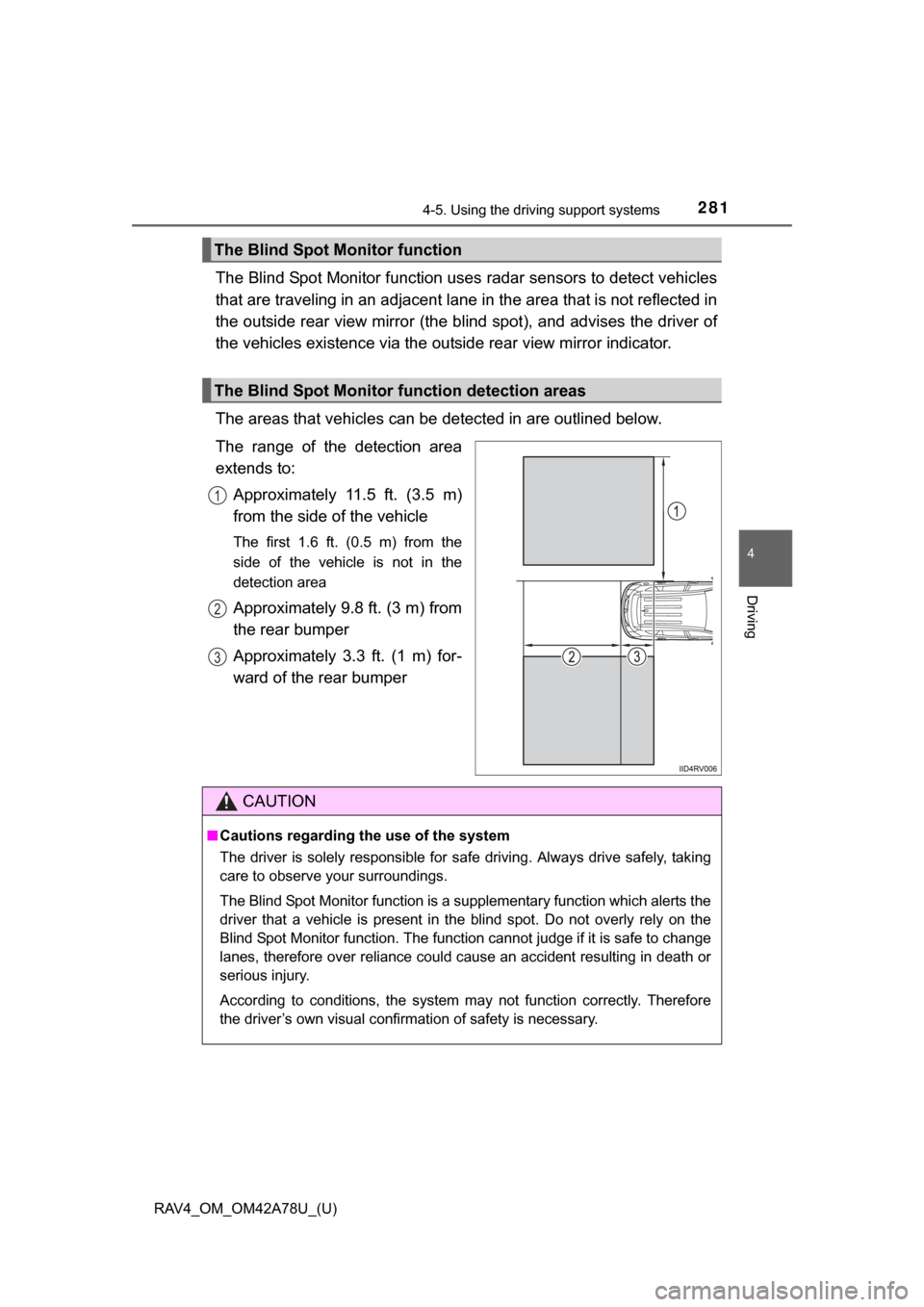
The Blind Spot Monitor function uses radar sensors to detect vehicles
that are traveling in an adjacent lane in the area that is not reflected in
the outside rear view mirror (the b lind spot), and advises the driver of
the vehicles existence via the out side rear view mirror indicator.
The areas that vehicles can be detected in are outlined below.
The range of the detection area
extends to: Approximately 11.5 ft. (3.5 m)
from the side of the vehicle
The first 1.6 ft. (0.5 m) from the
side of the vehicle is not in the
detection area
Approximately 9.8 ft. (3 m) from
the rear bumper
Approximately 3.3 ft. (1 m) for-
ward of the rear bumper
The Blind Spot Monitor function
The Blind Spot Monitor function detection areas
1
2
3
CAUTION
■Cautions regarding the use of the system
The driver is solely responsible for safe driving. Always drive safely, taking
care to observe your surroundings.
The Blind Spot Monitor function is a supplementary function which alerts the
driver that a vehicle is present in the blind spot. Do not overly rely on the
Blind Spot Monitor function. The function cannot judge if it is safe to change
lanes, therefore over reliance could cause an accident resulting in death or
serious injury.
According to conditions, the system may not function correctly. Therefore
the driver’s own visual confirmation of safety is necessary.
Page 284 of 732
284
RAV4_OM_OM42A78U_(U)
4-5. Using the driving support systems
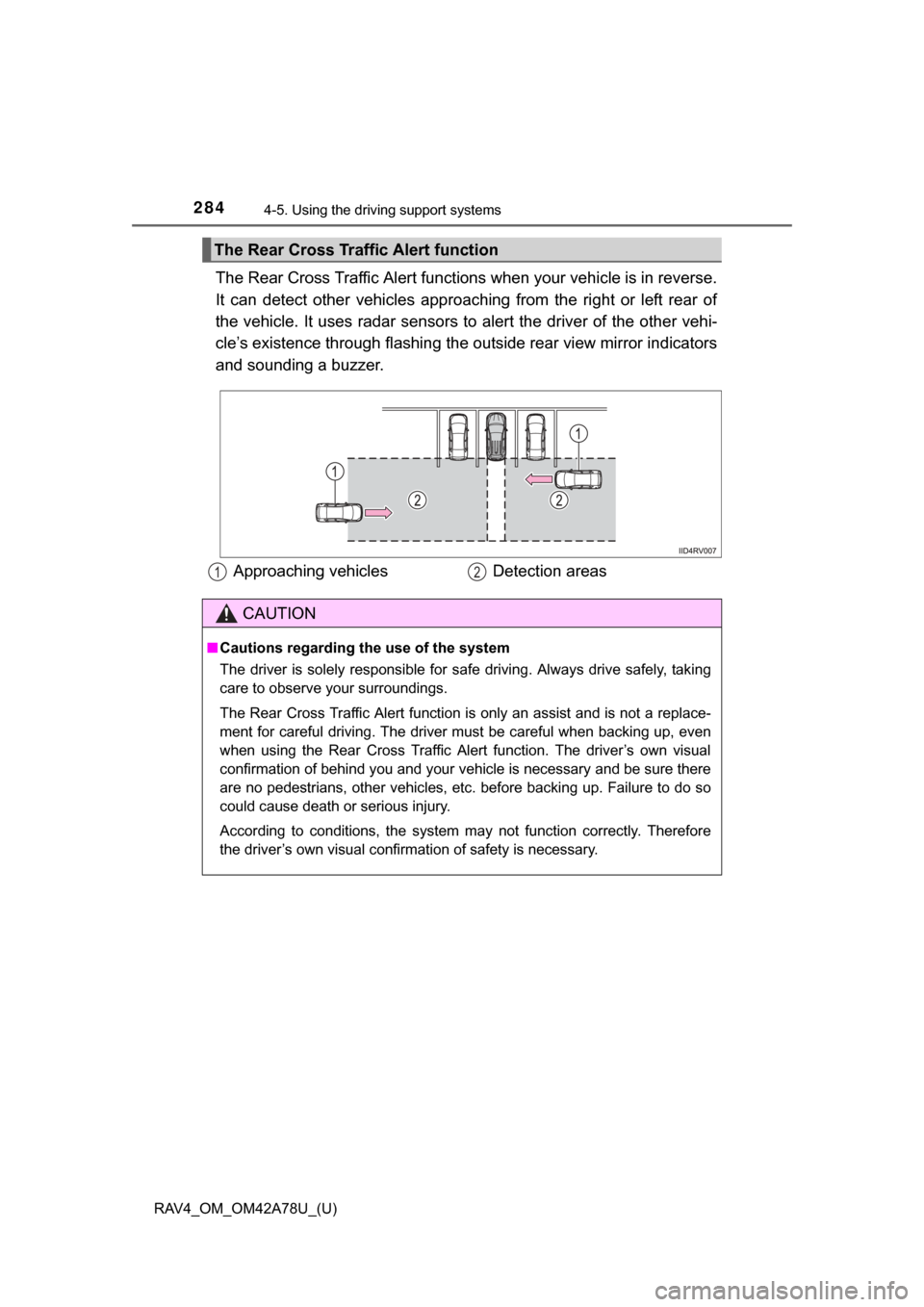
The Rear Cross Traffic Alert functions when your vehicle is in reverse.
It can detect other vehicles approaching from the right or left rear of
the vehicle. It uses radar sensors to alert the driver of the other vehi-
cle’s existence through fl ashing the outside rear view mirror indicators
and sounding a buzzer.
The Rear Cross Traffic Alert function
Approaching vehicles Detection areas12
CAUTION
■Cautions regarding the use of the system
The driver is solely responsible for safe driving. Always drive safely, taking
care to observe your surroundings.
The Rear Cross Traffic Alert function is only an assist and is not a replace-
ment for careful driving. The driver must be careful when backing up, even
when using the Rear Cross Traffic Alert function. The driver’s own visual
confirmation of behind you and your vehicle is necessary and be sure there
are no pedestrians, other vehicles, etc. before backing up. Failure to do so
could cause death or serious injury.
According to conditions, the system may not function correctly. Therefore
the driver’s own visual confirmation of safety is necessary.
Page 298 of 732
298
RAV4_OM_OM42A78U_(U)
5-1. Using the air conditioning system and defogger
Manual air conditioning system............................. 300
Automatic air conditioning system ... 306
Rear window and outside rear view mirror
defoggers ........................ 316
Windshield wiper de-icer ... 318
5-2. Using the audio system Audio system types ........... 319
Using the radio .................. 322
Using the CD player .......... 325
Playing back MP3 and WMA discs ...................... 330
Operating an iPod ............. 337
Operating a USB memory................... 345
Optimal use of the audio system ................... 353
Using the AUX port ........... 355
Using the steering wheel audio switches ................ 356
Bluetooth
® audio/phone .... 359
Using the Bluetooth®
audio/phone .................... 364
Operating a Bluetooth
®
enabled portable
player .............................. 369
Making a phone call .......... 372
Using the “SETUP” menu (“Bluetooth
*” menu) ........ 377
Using the “SETUP” menu (“PHONE” menu) ............ 382 5-3. Using the audio system
(Entune Audio)
Audio system .................... 387
Steering wheel audio switches .......................... 389
USB Port/AUX Port ........... 391
Basic Audio Operations .... 392
Setup menu....................... 394
General settings ................ 395
Audio settings ................... 399
Display settings ................. 400
Voice settings.................... 402
Selecting the audio source ............................. 403
List screen operation......... 404
Optimal use of the audio system................... 406
Radio operation................. 407
CD player operation .......... 409
Listening to an iPod .......... 415
Listening to a USB memory device ............... 420
Using the AUX port ........... 425
Preparations to use wireless
communication ................ 426
5
Page 299 of 732

299
RAV4_OM_OM42A78U_(U)
5
Registering a Bluetooth®
audio player for the
first time .......................... 429
Registering a Bluetooth
®
phone for the first time .... 430
Registering a Bluetooth
®
device.............................. 431
Connecting a Bluetooth
®
device.............................. 433
Displaying a Bluetooth
®
device details .................. 436
Detailed Bluetooth
®
system settings ............... 438
Listening to Bluetooth
®
Audio ............................... 440
Using a Bluetooth
®
Phone.............................. 442
Making a call ..................... 444
Receiving a call ................. 447
Speaking on the phone ..... 448
Bluetooth
® phone
message function ............ 452
Using the steering wheel switches ................ 457
Bluetooth
® phone
settings............................ 458
Contact/Call History Settings ........................... 460
What to do if... (Troubleshooting) ............ 470
Bluetooth
®......................... 478
Voice command system .... 483 5-4. Using the interior lights
Interior lights list ................ 486
• Interior lights ................. 487
• Personal lights .............. 487
5-5. Using the storage features List of storage features ..... 489
• Glove box...................... 490
• Console box .................. 491
• Cup holders .................. 492
• Bottle holders ................ 493
Luggage compartment features ........................... 494
5-6. Other interior features Sun visors and vanity mirrors............................. 503
Clock ................................. 504
Power outlets .................... 505
Seat heaters...................... 506
Armrest ............................. 508
Coat hooks ........................ 509
Assist grips........................ 510
*: Bluetooth is a registered trademark of Bluetooth SIG, Inc.
Page 316 of 732
316
RAV4_OM_OM42A78U_(U)
5-1. Using the air conditioning system and defogger
Rear window and outsid e rear view mirror
defoggers
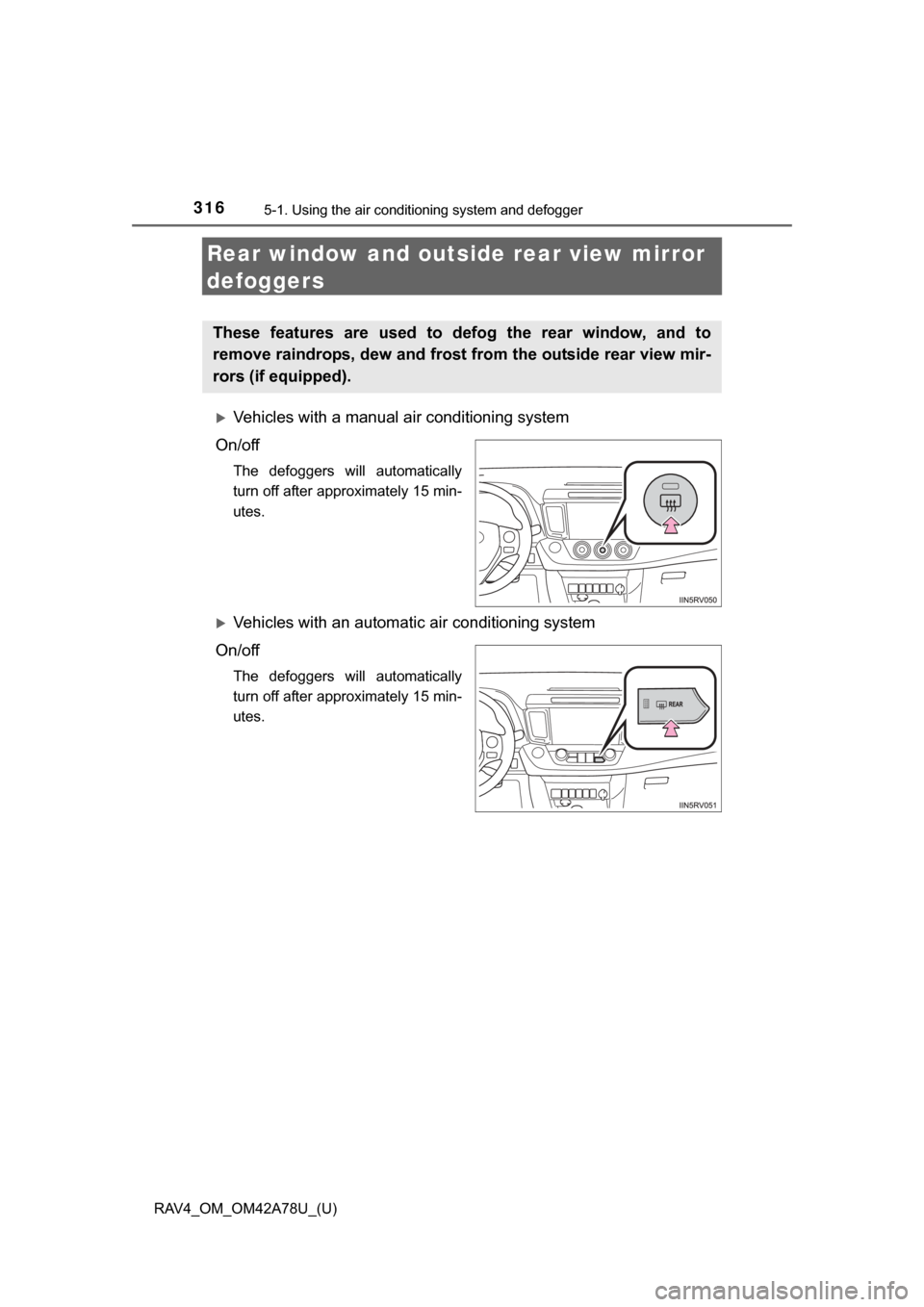
Vehicles with a manual air conditioning system
On/off
The defoggers will automatically
turn off after approximately 15 min-
utes.
Vehicles with an automatic air conditioning system
On/off
The defoggers will automatically
turn off after approximately 15 min-
utes.
These features are used to defog the rear window, and to
remove raindrops, dew and frost from the outside rear view mir-
rors (if equipped).
Page 317 of 732
RAV4_OM_OM42A78U_(U)
3175-1. Using the air conditioning system and defogger
5
Interior features
■Operating conditions
Vehicles without a smart key system
The engine switch is in the “ON” position.
Vehicles with a smart key system
The engine switch is in IGNITION ON mode.
■ The outside rear view mirror defogge rs (vehicles with outside rear view
mirror defoggers)
Turning the rear window defogger on will turn the outside rear view mirror
defoggers on.
CAUTION
■ When the outside rear view mirror defoggers are on (vehicles with out-
side rear view mirror defoggers)
Do not touch the rear view mirror surfaces, as they can become very hot
and burn you.
NOTICE
■ To prevent battery discharge
Turn the defoggers off when the engine is off.
Page 503 of 732
503
RAV4_OM_OM42A78U_(U)
5-6. Other interior features
5
Interior features
Sun visors and vanity mirrors
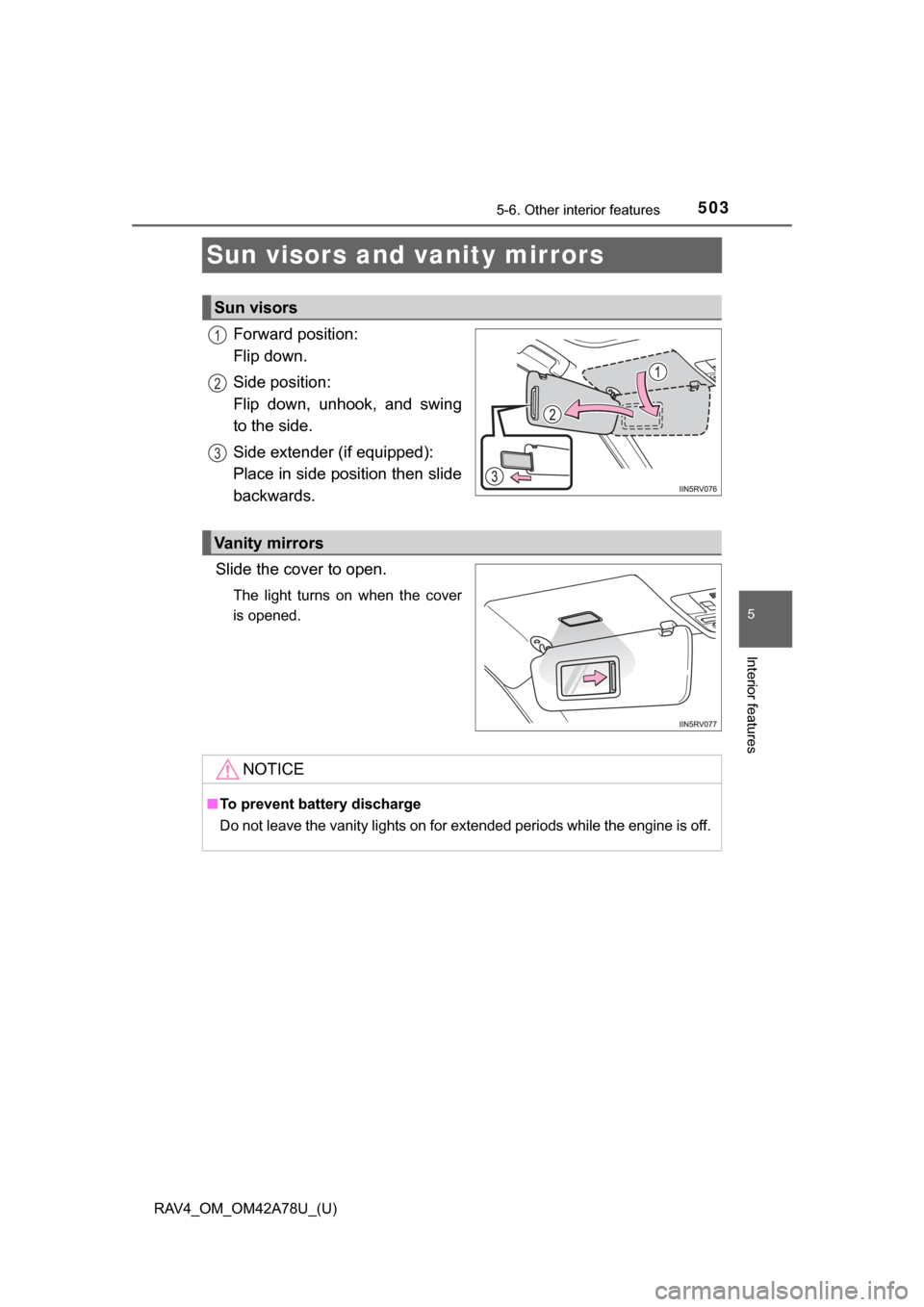
Forward position:
Flip down.
Side position:
Flip down, unhook, and swing
to the side.
Side extender (if equipped):
Place in side position then slide
backwards.
Slide the cover to open.
The light turns on when the cover
is opened.
Sun visors
1
2
3
Vanity mirrors
NOTICE
■ To prevent battery discharge
Do not leave the vanity lights on for extended periods while the engine is off.