engine TOYOTA RAV4 2016 XA40 / 4.G Owners Manual
[x] Cancel search | Manufacturer: TOYOTA, Model Year: 2016, Model line: RAV4, Model: TOYOTA RAV4 2016 XA40 / 4.GPages: 741, PDF Size: 14.31 MB
Page 298 of 741
298
RAV4_OM_OM42A41U_(U)
4-5. Using the driving support systems
◆Dynamic Torque Control AWD system (AWD models)
Automatically switches from front-w heel drive to all-wheel drive (AWD)
according to the driving conditions, helping to ensure reliable handling and
stability. Examples of conditions where the system will switch to AWD are
when cornering, going uphill, starting off or accelerating, and when the
road surface is slippery due to snow, rain, etc.
◆EPS (Electric Power Steering)
Employs an electric motor to reduce the amount of effort needed to turn
the steering wheel
◆Trailer Sway Control (if equipped)
Helps the driver to control trailer sway by selectively applying brake pres-
sure for individual wheels and reducing engine torque when trailer sway is
detected.
Trailer Sway Control is part of the VSC system and will not operate if VSC
turned off or experiences a malfunction.
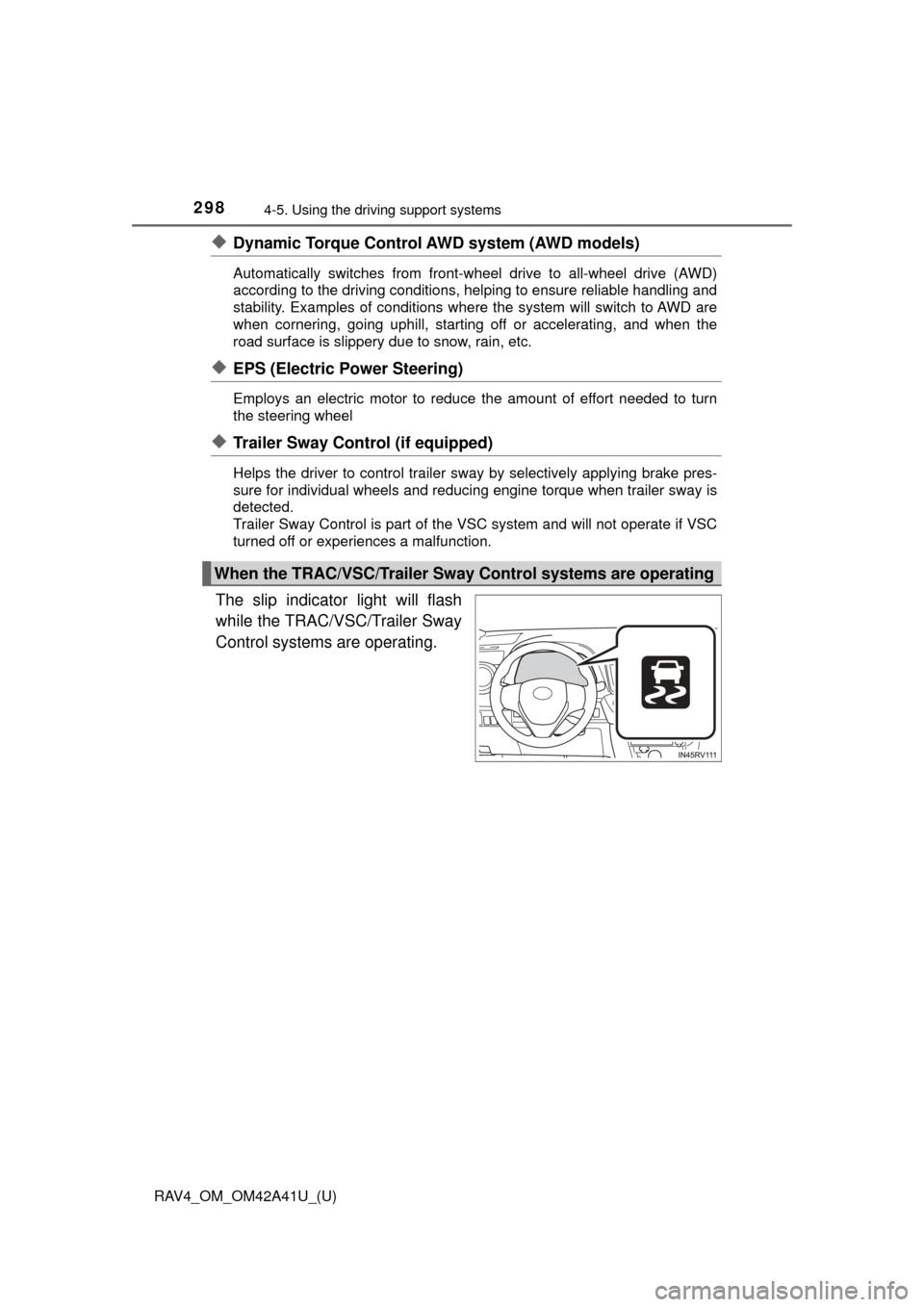
The slip indicator light will flash
while the TRAC/VSC/Trailer Sway
Control systems are operating.
When the TRAC/VSC/Trailer Sway Control systems are operating
Page 299 of 741
RAV4_OM_OM42A41U_(U)
2994-5. Using the driving support systems
4
Driving
If the vehicle gets stuck in mud, di rt or snow, the TRAC system may
reduce power from the engine to the wheels. Pressing to turn the
system off may make it easier for you to rock the vehicle in order to
free it.
To turn the TRAC system off, quickly press and release .
Press again to turn the system back on.
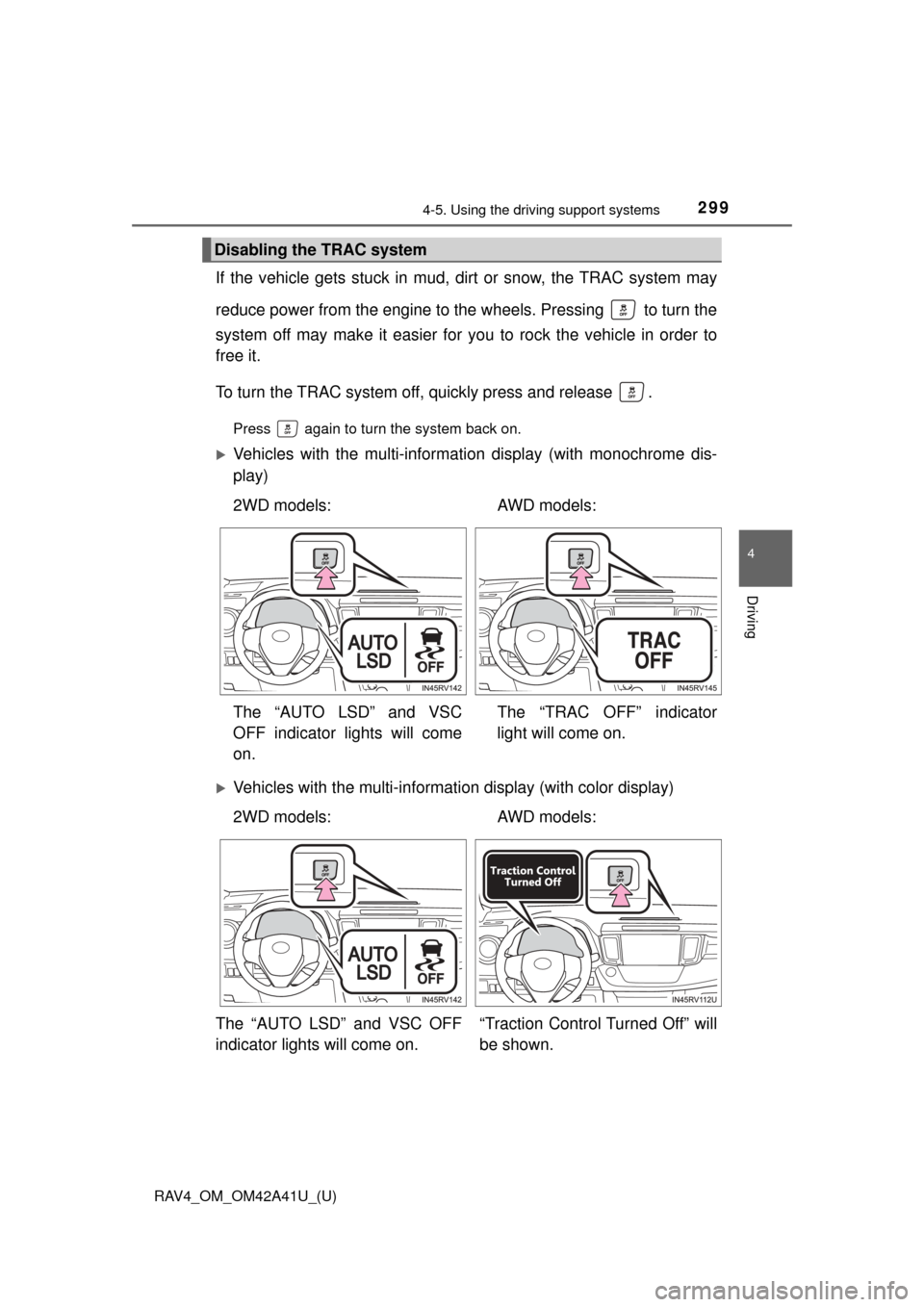
Vehicles with the multi-informat ion display (with monochrome dis-
play)
Vehicles with the multi-informat ion display (with color display)
Disabling the TRAC system
2WD models: AWD models:
The “AUTO LSD” and VSC
OFF indicator lights will come
on. The “TRAC OFF” indicator
light will come on.
2WD models:
AWD models:
The “AUTO LSD” and VSC OFF
indicator lights will come on. “Traction Control Turned Off” will
be shown.
Page 301 of 741

RAV4_OM_OM42A41U_(U)
3014-5. Using the driving support systems
4
Driving
■Sounds and vibrations caused by the ABS, brake assist, VSC/Trailer
Sway Control, TRAC and hill-start assist control systems
● A sound may be heard from the engine compartment when the brake pedal
is depressed repeatedly, when the engine is started or just after the vehicle
begins to move. This sound does not indicate that a malfunction has
occurred in any of these systems.
● Any of the following conditions may occur when the above systems are
operating. None of these indicates that a malfunction has occurred.
• Vibrations may be felt through the vehicle body and steering.
• A motor sound may be heard after the vehicle comes to a stop.
• The brake pedal may pulsate slightly after the ABS is activated.
• The brake pedal may move down slightly after the ABS is activated.
■ EPS operation sound
When the steering wheel is operated, a motor sound (whirring sound) may be
heard. This does not indicate a malfunction.
■ Automatic reactivation of TRAC an d VSC/Trailer Sway Control systems
After turning the TRAC and VSC/Trailer Sway Control systems off, the sys-
tems will be automatically re-enabled in the following situations:
● When the engine switch is turned to the “LOCK” position (vehicles without
smart key system) or off (vehicles with smart key system).
● If only the TRAC system is turned off, the TRAC will turn on when vehicle
speed increases.
If both the TRAC and VSC/Trailer Sway Control systems are turned off,
automatic re-enabling will not occur when vehicle speed increases.
Page 302 of 741

302
RAV4_OM_OM42A41U_(U)
4-5. Using the driving support systems
■Reduced effectiveness of the EPS system
The effectiveness of the EPS system is reduced to prevent the system from
overheating when there is frequent steering input over an extended period of
time. The steering wheel may feel heavy as a result. Should this occur, refrain
from excessive steering input or stop the vehicle and turn the engine of\
f. The
EPS system should return to normal within 10 minutes.
■ Operating conditions of hill-start assist control
When the following four conditions are met, the hill-start assist control will
operate:
● The shift lever is in a position other than P or N (when starting off forward/
backward on an upward incline).
● The vehicle is stopped.
● The accelerator pedal is not depressed.
● The parking brake is not applied.
■ Automatic system cancelation of hill-start assist control
The hill-start assist control will turn off in any of the following situations:
● The shift lever is shifted to P or N.
● The accelerator pedal is depressed.
● The parking brake is applied.
● Approximately 2 seconds elapse after the brake pedal is released.
Page 314 of 741
314
RAV4_OM_OM42A41U_(U)
4-5. Using the driving support systems
■Conditions under which the Rear Cr oss Traffic Alert function will not
detect a vehicle
The Rear Cross Traffic Alert function is not designed to detect the following
types of vehicles and/or objects.
● Small motorcycles, bicycles, pedestrians, etc.
*
●Vehicles approaching from directly behind
● Guardrails, walls, signs, parked vehi cles and similar stationary objects
*
●Vehicles moving away from your vehicle
● Vehicles approaching from the parking spaces next to your vehicle
*
●Vehicles backing up in the parking space next to your vehicle*
*
: Depending on conditions, detection of a vehicle and/or object may occur.
■ Conditions under which the Rear Cr oss Traffic Alert function may not
function correctly
The Rear Cross Traffic Alert function may not detect vehicles correctly in the
following conditions:
● When ice, mud, etc. is attached to the rear bumper
● During bad weather such as heavy rain, fog, snow, etc.
● When multiple vehicles approach continuously
● Shallow angle parking
● When a vehicle is approaching at high speed
● When parking on a steep incline, such as hills, a dip in the road, etc.
● Directly after the Blind Spot Monitor system is set to on
● Directly after the engine is started with the Blind Spot Monitor system is set
to on
● When towing a trailer
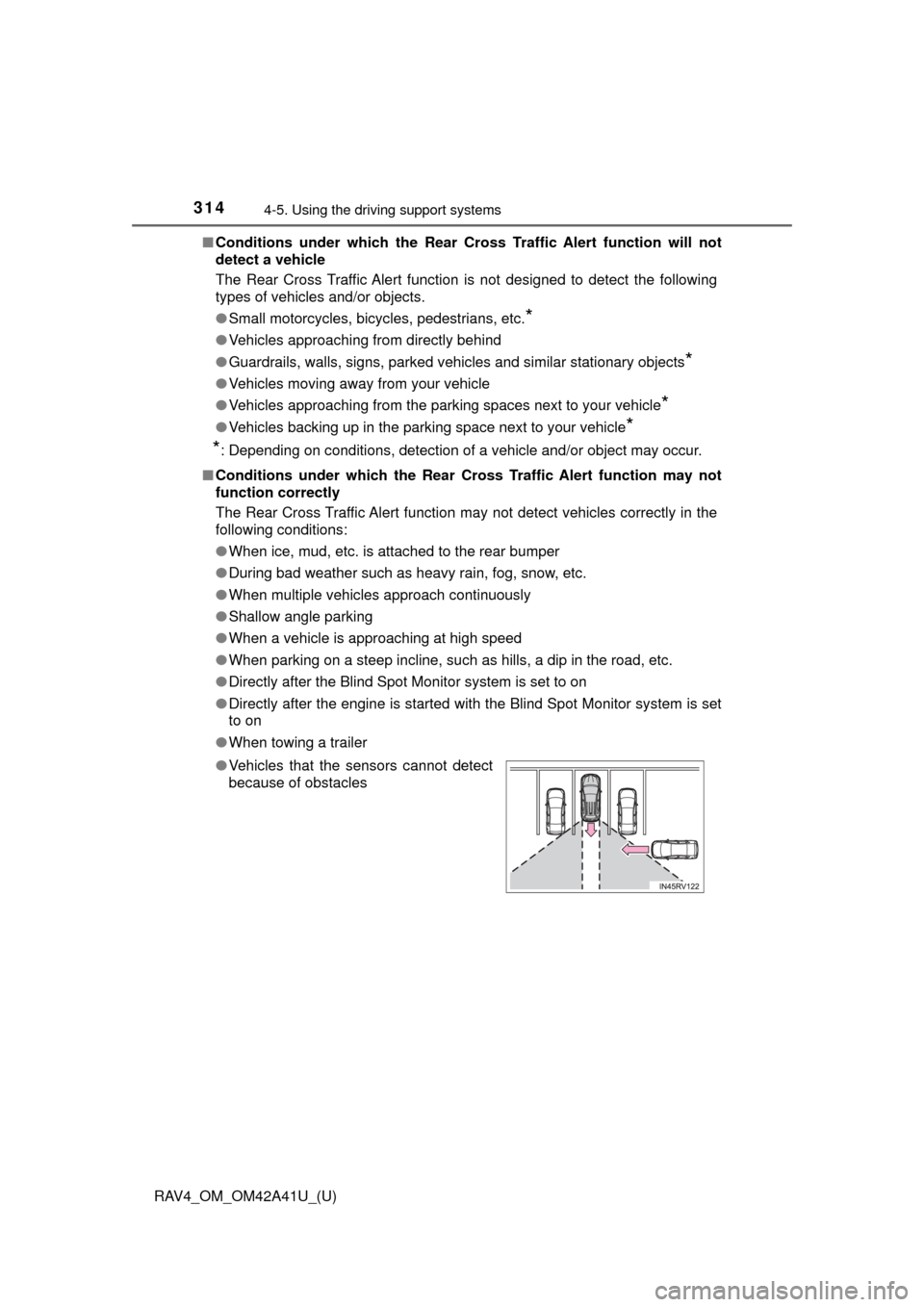
● Vehicles that the sensors cannot detect
because of obstacles
Page 316 of 741
315
RAV4_OM_OM42A41U_(U)
4-6. Driving tips
4
Driving
Winter driving tips
●Use fluids that are appropriate to the prevailing outside tempera-
tures. • Engine oil
• Engine coolant
• Washer fluid
● Have a service technician ins pect the condition of the battery.
● Have the vehicle fitted with four snow tires or purchase a set of tire
chains for the front tires.
Ensure that all tires are the same size and brand, and that chains match
the size of the tires.
Perform the following accordin g to the driving conditions:
● Do not try to forcibly open a window or move a wiper that is frozen.
Pour warm water over the frozen area to melt the ice. Wipe away
the water immediately to prevent it from freezing.
● To ensure proper operation of the climate control system fan,
remove any snow that has accumulated on the air inlet vents in
front of the windshield.
● Check for and remove any excess ice or snow that may have accu-
mulated on the exterior lights, vehicle’s roof, chassis, around the
tires or on the brakes.
● Remove any snow or mud from the bottom of your shoes before
getting in the vehicle.
Carry out the necessary preparations and inspections before
driving the vehicle in winter. Al ways drive the vehicle in a man-
ner appropriate to the prevailing weather conditions.
Preparation for winter
Before driving the vehicle
Page 318 of 741
RAV4_OM_OM42A41U_(U)
3174-6. Driving tips
4
Driving
■Tire chain installation
Observe the following precautions when installing and removing chains:
●Install and remove tire chains in a safe location.
● Install tire chains on the front tires only. Do not install tire chains on the rear
tires.
● Install tire chains on front tires as tightly as possible. Retighten chains after
driving 1/4 - 1/2 mile (0.5 - 1.0 km).
● Install tire chains following the instructions provided with the tire ch\
ains.
WARNING
■Driving with snow tires
Observe the following precautions to reduce the risk of accidents.
Failure to do so may result in a loss of vehicle control and cause death or
serious injury.
● Use tires of the specified size.
● Maintain the recommended level of air pressure.
● Do not drive in excess of 75 mph (120 km/h), regardless of the type of
snow tires being used.
● Use snow tires on all, not just some wheels.
■ Driving with tire chains
Observe the following precautions to reduce the risk of accidents.
Failure to do so may result in the vehicle being unable to be driven safely,
and may cause death or serious injury.
● Do not drive in excess of the speed limit specified for the tire chains being
used, or 30 mph (50 km/h), whichever is lower.
● Avoid driving on bumpy road surfaces or over potholes.
● Avoid sudden acceleration, abrupt steering, sudden braking and shifting
operations that cause sudden engine braking.
● Slow down sufficiently before entering a curve to ensure that vehicle con-
trol is maintained.
● Do not use LDA (Lane Departure Alert with steering control) system.
Page 323 of 741

322
RAV4_OM_OM42A41U_(U)
4-6. Driving tips
NOTICE
■To prevent the water damage
Take all necessary safety measures to ensure that water damage to the
engine or other components does not occur.
● Water entering the engine air intake will cause severe engine damage.
● Water entering the automatic transmission will cause deterioration in shift
quality, locking up of your transmission accompanied by vibration, and ulti-
mately damage.
● Water can wash the grease from wheel bearings, causing rusting and pre-
mature failure, and may also enter the differentials, transmission and
transfer case (AWD models), reducing the gear oil’s lubricating qualities.
■ When you drive through water
If driving through water, such as when crossing shallow streams, first check
the depth of the water and the bottom of the riverbed for firmness. Drive
slowly and avoid deep water.
■ Inspection after off-road driving
● Sand and mud that has accumulated around brake drums and around
brake discs may affect braking efficiency and may damage brake system
components.
● Always perform a maintenance inspection after each day of off-road driv-
ing that has taken you through rough terrain, sand, mud, or water. For
scheduled maintenance information, refer to the “Scheduled Maintenance
Guide” or “Owner’s Manual Supplement”.
Page 329 of 741

328
RAV4_OM_OM42A41U_(U)
5-1. Basic Operations
WARNING
■Certification for the disc player
● Part 15 of the FCC Rules
FCC Warning:
Changes or modifications not expressly approved by the party responsi-
ble for compliance could void the user’s authority to operate the equip-
ment.
● Laser products
• Do not take this unit apart or attempt to make any changes yourself.
This is an intricate unit that uses a laser pickup to retrieve information
from the surface of compact discs. The laser is carefully shielded so
that its rays remain inside the cabinet. Therefore, never try to disassem-
ble the player or alter any of its parts since you may be exposed to laser
rays and dangerous voltages.
• This product utilizes a laser. Use of controls or adjustments or performance of procedures other than
those specified herein may result in hazardous radiation exposure.
NOTICE
■To prevent battery discharge
Do not leave the audio system on longer than necessary with the engine is
stopped.
■ To avoid damaging the audio system
Take care not to spill drinks or other fluids over the audio system.
Page 372 of 741
RAV4_OM_OM42A41U_(U)
3715-7. “SETUP” menu
5
Audio system
Select “Passkey” using the “TUNE•SCROLL” knob.
Select a 4 to 8-digit passkey using the knob.
Input the number 1 digit at a time.
When the entire number to be registered as a passkey has been
input, press (ENTER).
If the passkey to be registered has 8 digits, pressing (ENTER) is not
necessary.
If “BT power” is set to on, the registered device will be connected
automatically when the engine switch is turned to the “ACC” position
(vehicles without smart key syst em) or ACCESSORY mode (vehicles
with smart key system).
Select “BT Power” using the “TUNE•SCROLL” knob.
Select “ON” or “OFF” using the knob.
Select “Bluetooth
* info” using the “TUNE•SCROLL” knob.
● Displaying the device name
Select “Device name” using the “TUNE•SCROLL” knob.
● Displaying the device address
Select “Device address” using the “TUNE•SCROLL” knob.
*: Bluetooth is a registered trademark of Bluetooth SIG, Inc.
Changing the passkey
Setting automatic connection of the device on or off
Displaying the device status
1
2
3
1
2