change time TOYOTA RAV4 2016 XA40 / 4.G Owner's Manual
[x] Cancel search | Manufacturer: TOYOTA, Model Year: 2016, Model line: RAV4, Model: TOYOTA RAV4 2016 XA40 / 4.GPages: 741, PDF Size: 14.31 MB
Page 473 of 741
472
RAV4_OM_OM42A41U_(U)
5-22. Bluetooth®
In other situations
The Bluetooth® connection status is displayed at the top of the screen each
time the engine switch is turned to the “ACC” or “ON” position (vehicles
without smart key system) or ACCESSORY or IGNITION ON mode (vehi-
cles with smart key system).
Connection confirmation display on this system is set to on.
→ To turn off the display, set conn ection confirmation display on this
system to off. ( →P. 438)
Even though all conceivable measures have been taken, the symptom sta-
tus does not change.
The cellular phone is not close enough to this system.
→Bring the cellular phone closer to this system.
The cellular phone is the most likely cause of the symptom.
→Turn the cellular phone off, remo ve and reinstall the battery pack,
and then restart the cellular phone.
→ Enable the cellular phone’s Bluetooth
® connection.
→ Stop the cellular phone’s security software and close all applica-
tions.
→ Before using an appli cation installed on the cellular phone, care-
fully check its source and how its operation might affect this sys-
tem.
Page 486 of 741
RAV4_OM_OM42A41U_(U)
4856-1. Using the air conditioning system and defogger
6
Interior features
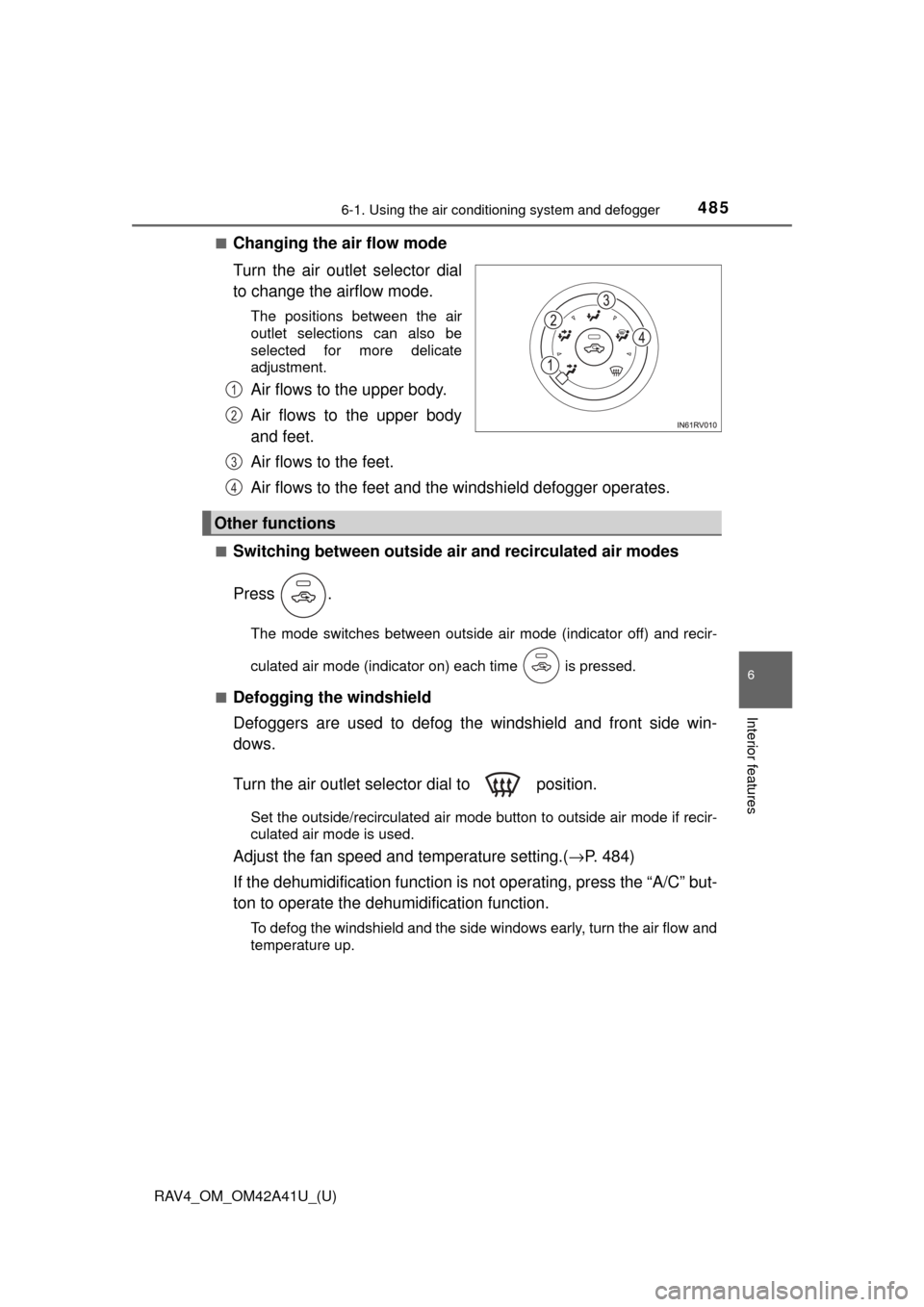
■Changing the air flow mode
Turn the air outlet selector dial
to change the airflow mode.
The positions between the air
outlet selections can also be
selected for more delicate
adjustment.
Air flows to the upper body.
Air flows to the upper body
and feet.
Air flows to the feet.
Air flows to the feet and the windshield defogger operates.
■Switching between outside air and recirculated air modes
Press .
The mode switches between outside air mode (indicator off) and recir-
culated air mode (indicator on) each time is pressed.
■
Defogging the windshield
Defoggers are used to defog the windshield and front side win-
dows.
Turn the air outlet selector dial to position.
Set the outside/recirculated air mode button to outside air mode if recir-
culated air mode is used.
Adjust the fan speed and temperature setting.( →P. 484)
If the dehumidification function is not operating, press the “A/C” but-
ton to operate the dehumi dification function.
To defog the windshield and the side windows early, turn the air flow and
temperature up.
1
2
Other functions
3
4
Page 487 of 741
486
RAV4_OM_OM42A41U_(U)
6-1. Using the air conditioning system and defogger
■Defogging the rear window and out side rear view mirrors (if
equipped)
Defoggers are used to defog the rear window, and to remove rain-
drops, dew and frost from the outside rear view mirrors.
Press .
The defoggers will automatically turn off after a period of time.
■
Windshield wiper de-icer (if equipped)
This feature is used to prevent ice from building up on the wind-
shield and wiper blades.
Turns on/off
The windshield wiper de-icer will
automatically turn off after a
period of time.
■
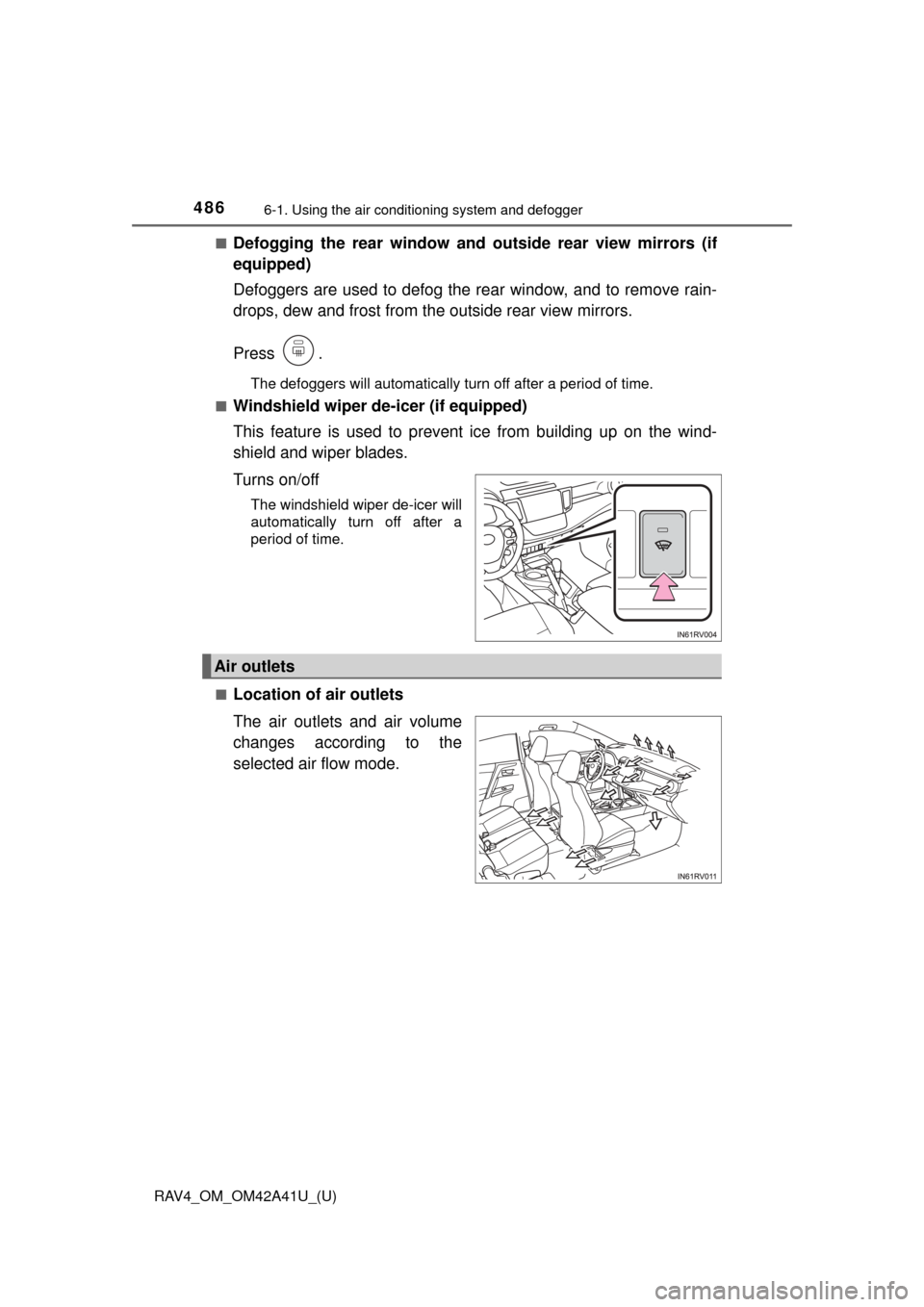
Location of air outlets
The air outlets and air volume
changes according to the
selected air flow mode.
Air outlets
Page 492 of 741
RAV4_OM_OM42A41U_(U)
4916-1. Using the air conditioning system and defogger
6
Interior features
■Adjusting the fan speed setting
Press “∧”on to increase the fan speed and “ ∨” to decrease
the fan speed.
Press to turn the fan off.
■
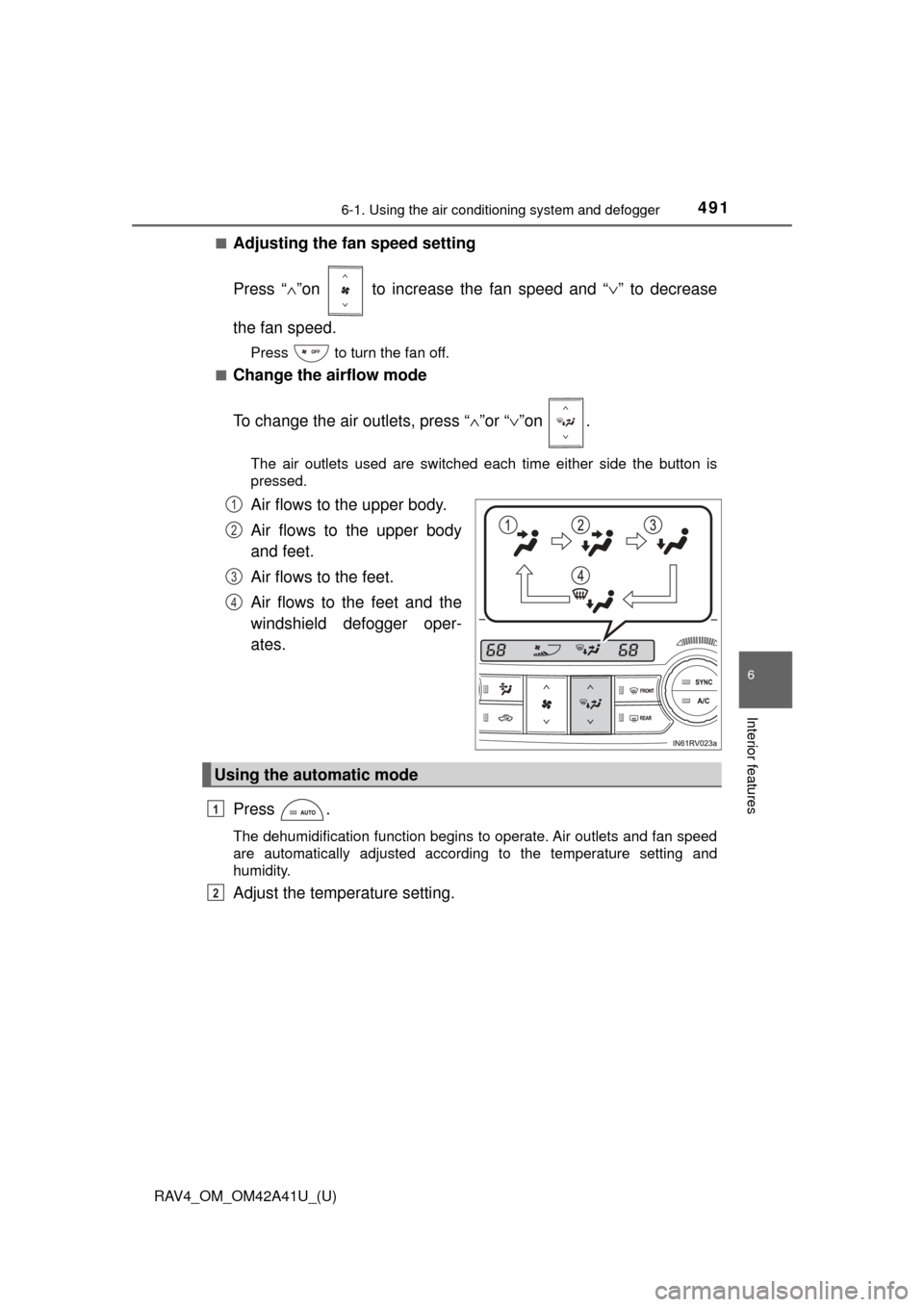
Change the airflow mode
To change the air outlets, press “ ∧”or “∨ ”on .
The air outlets used are switched each time either side the button is
pressed.
Air flows to the upper body.
Air flows to the upper body
and feet.
Air flows to the feet.
Air flows to the feet and the
windshield defogger oper-
ates.
Press .
The dehumidification function begins to operate. Air outlets and fan speed
are automatically adjusted according to the temperature setting and
humidity.
Adjust the temperature setting.
1
2
3
4
Using the automatic mode
1
2
Page 498 of 741
RAV4_OM_OM42A41U_(U)
4976-1. Using the air conditioning system and defogger
6
Interior features
■Ventilation and air conditioning odors
●To let fresh air in, set the air conditioning system to the outside air m\
ode.
● During use, various odors from inside and outside the vehicle may enter into
and accumulate in the air conditioning system. This may then cause odor to
be emitted from the vents.
● To reduce potential odors from occurring:
• It is recommended that the air conditioning system be set to outside air
mode prior to turning the vehicle off.
• The start timing of the blower may be delayed for a short period of time
immediately after the air conditioning system is started in automatic
mode.
■ Air conditioning filter
→P. 583
■ Customization
Settings (e.g. outside/recirculated air mode) can be changed.
(Customizable features →P. 702)
WARNING
■To prevent the windshield from fogging up
● Do not use
during cool air operation in extremely humid weather.
The difference between the temperature of the outside air and that of the
windshield can cause the outer surface of the windshield to fog up, block-
ing your vision.
■ To prevent burns
● Vehicles with outside rear view mirror defoggers: Do not touch the rear
view mirror surfaces when the outsi de rear view mirror defoggers are on.
● Vehicles with windshield wiper de-icer: Do not touch the glass at lower part
of the windshield or to the side of the front pillars when the windshield
wiper de-icer is on.
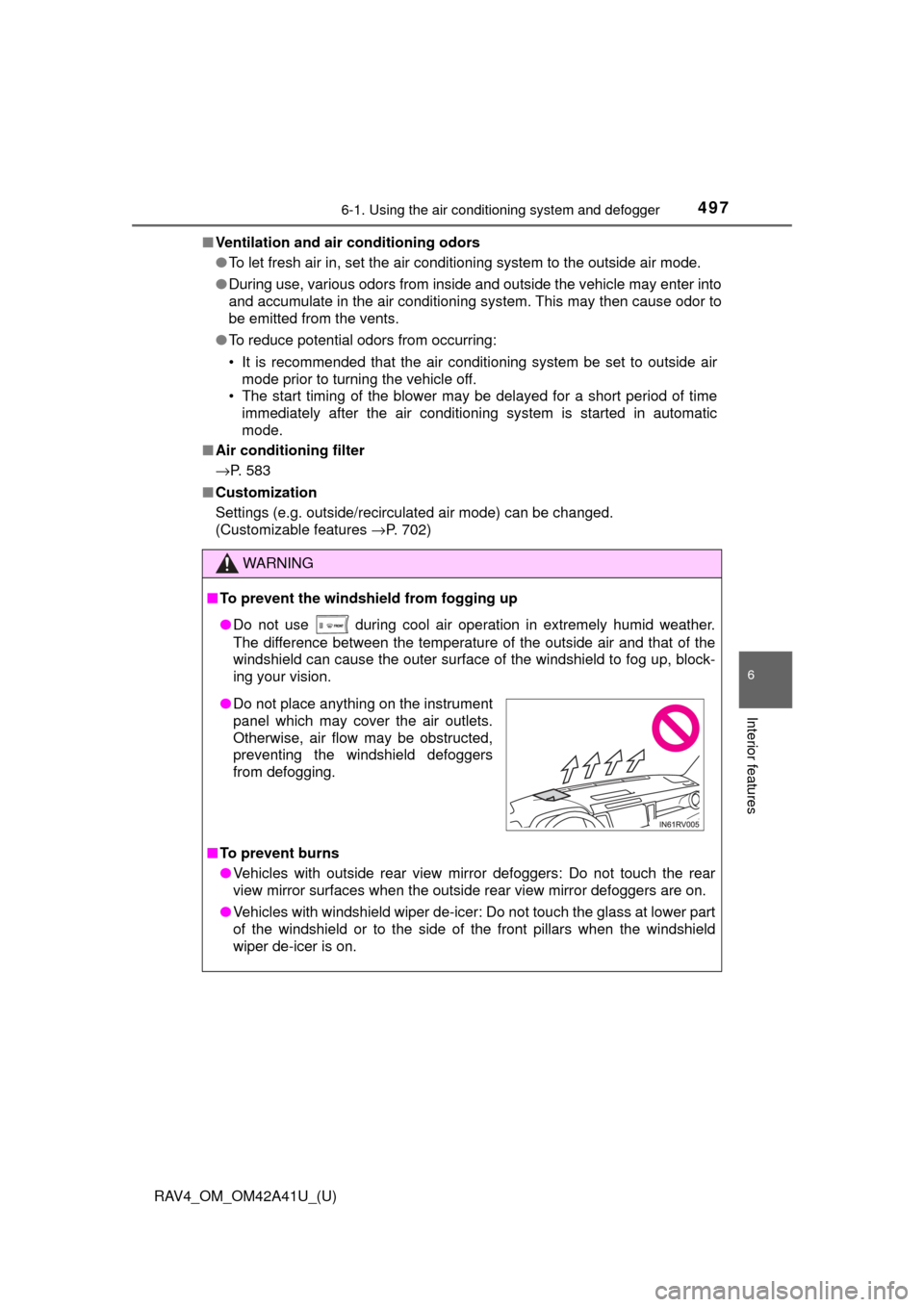
●Do not place anything on the instrument
panel which may cover the air outlets.
Otherwise, air flow may be obstructed,
preventing the windshield defoggers
from defogging.
Page 504 of 741

RAV4_OM_OM42A41U_(U)
5036-2. Using the interior lights
6
Interior features
●Illuminated entry system: The lights automatically turn on/off according to
the engine switch position (vehicles without smart key system), engine
switch mode or presence of the electronic key (vehicles with smart key sys-
tem), whether the doors are locked/unlocked, and whether the doors are
opened/closed.
● If the following lights remain on when the door is not fully closed and the
interior light main switch is in the door position, the lights will go off automat-
ically after 20 minutes:
• Interior light
• Engine switch light (if equipped)
● Setting (e.g. the time elapsed before lights turn off) can be changed.
(Customizable features: →P. 701)
Page 660 of 741
6598-2. Steps to take in an emergency
RAV4_OM_OM42A41U_(U)
8
When trouble arises
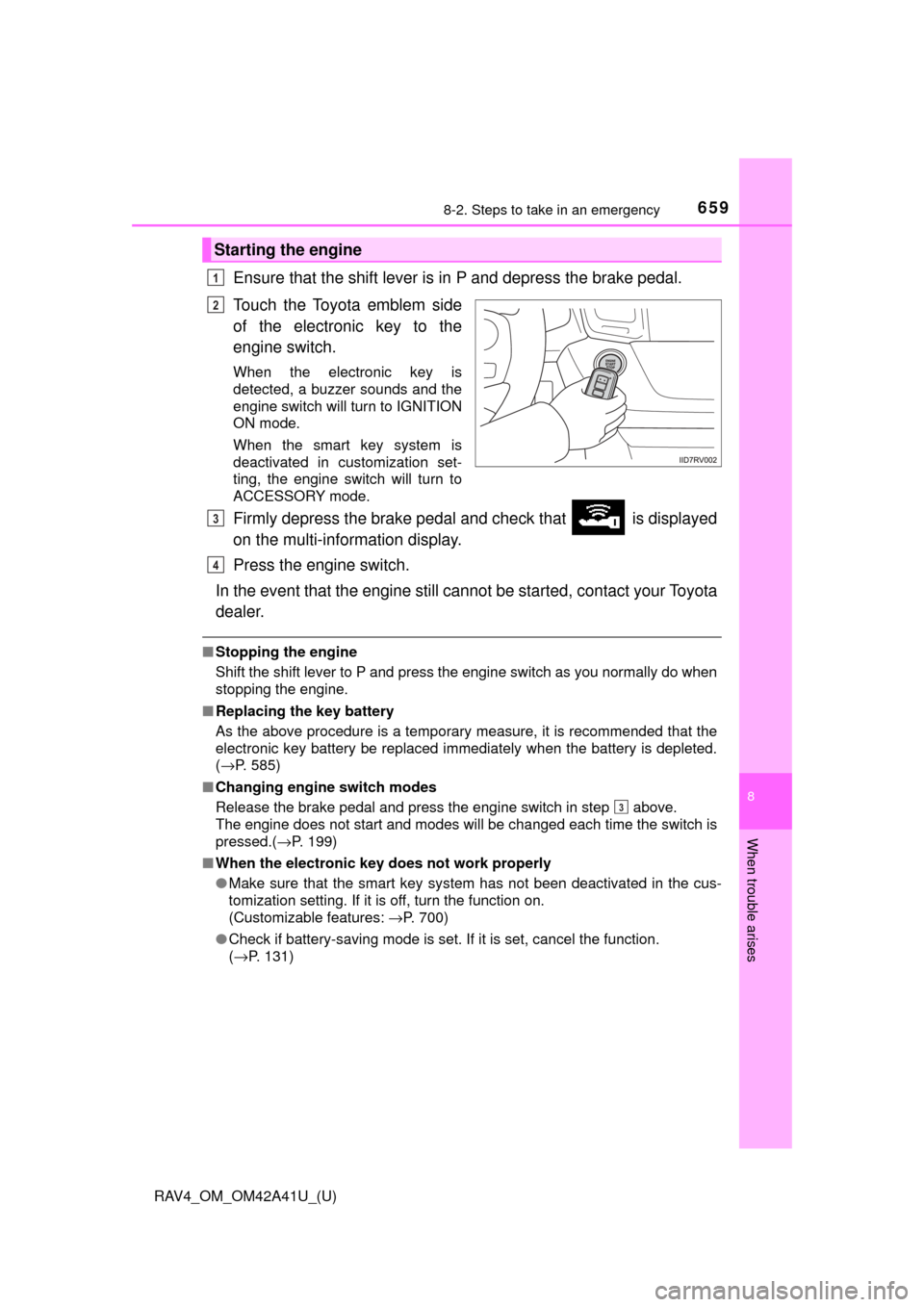
Ensure that the shift lever is in P and depress the brake pedal.
Touch the Toyota emblem side
of the electronic key to the
engine switch.
When the electronic key is
detected, a buzzer sounds and the
engine switch will turn to IGNITION
ON mode.
When the smart key system is
deactivated in customization set-
ting, the engine switch will turn to
ACCESSORY mode.
Firmly depress the brake pedal and check that is displayed
on the multi-information display.
Press the engine switch.
In the event that the engine still ca nnot be started, contact your Toyota
dealer.
■ Stopping the engine
Shift the shift lever to P and press the engine switch as you normally do when
stopping the engine.
■ Replacing the key battery
As the above procedure is a temporary measure, it is recommended that the
electronic key battery be replaced immediately when the battery is depleted.
(→P. 585)
■ Changing engine switch modes
Release the brake pedal and press the engine switch in step above.
The engine does not start and modes will be changed each time the switch is
pressed.( →P. 199)
■ When the electronic key does not work properly
●Make sure that the smart key system has not been deactivated in the cus-
tomization setting. If it is off, turn the function on.
(Customizable features: →P. 700)
● Check if battery-saving mode is set. If it is set, cancel the function.
(→P. 131)
Starting the engine
1
2
3
4
3
Page 701 of 741
700
RAV4_OM_OM42A41U_(U)
9-2. Customization
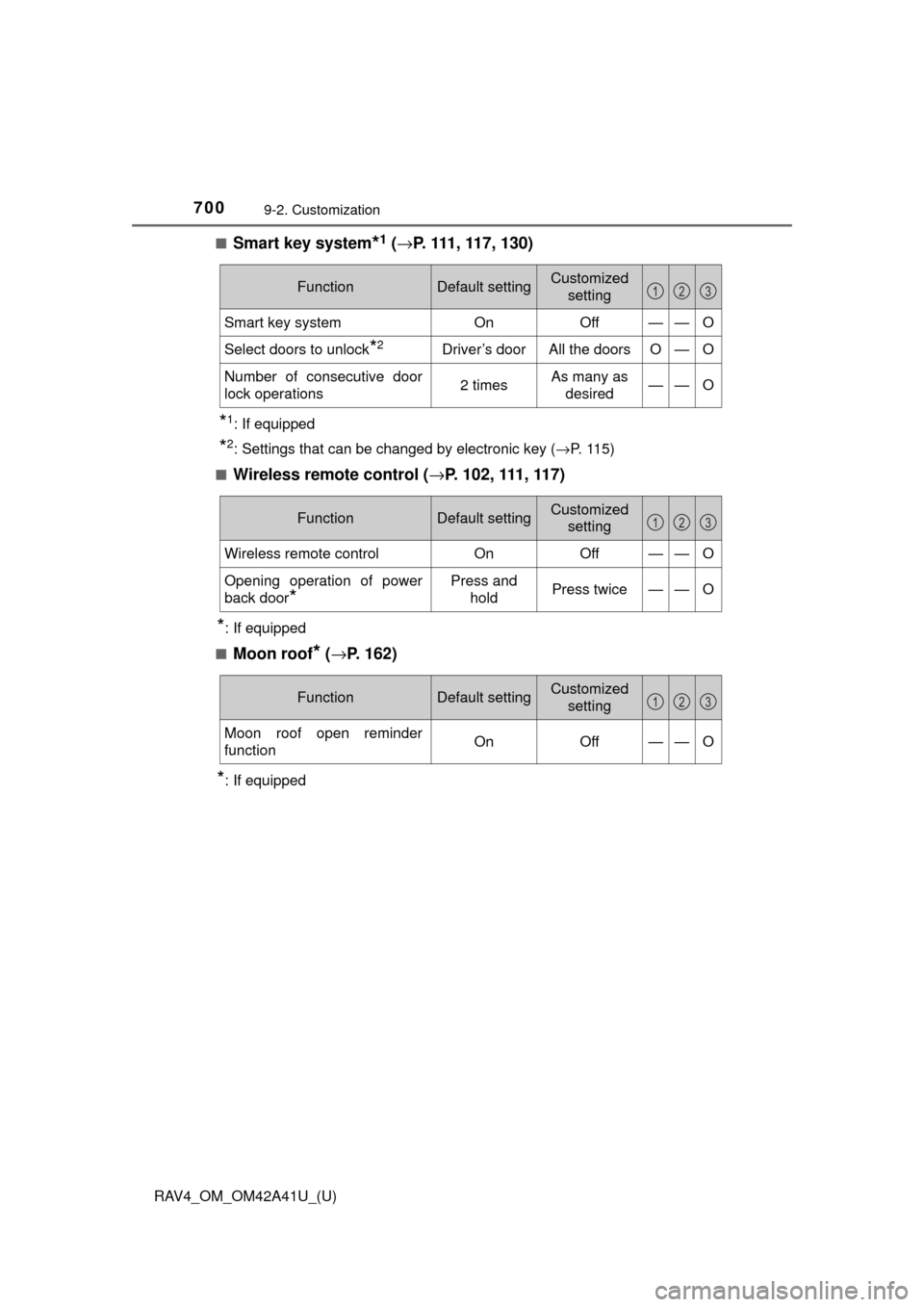
■Smart key system*1 (→ P. 111, 117, 130)
*1: If equipped
*2: Settings that can be changed by electronic key ( →P. 11 5 )
■
Wireless remote control ( →P. 102, 111, 117)
*: If equipped
■
Moon roof* ( → P. 162)
*: If equipped
FunctionDefault settingCustomized
setting
Smart key systemOnOff——O
Select doors to unlock*2Driver’s doorAll the doorsO—O
Number of consecutive door
lock operations2 timesAs many as desired——O
123
FunctionDefault settingCustomized setting
Wireless remote controlOnOff——O
Opening operation of power
back door
*
Press and holdPress twice——O
123
FunctionDefault settingCustomized
setting
Moon roof open reminder
functionOnOff——O
123
Page 703 of 741
702
RAV4_OM_OM42A41U_(U)
9-2. Customization
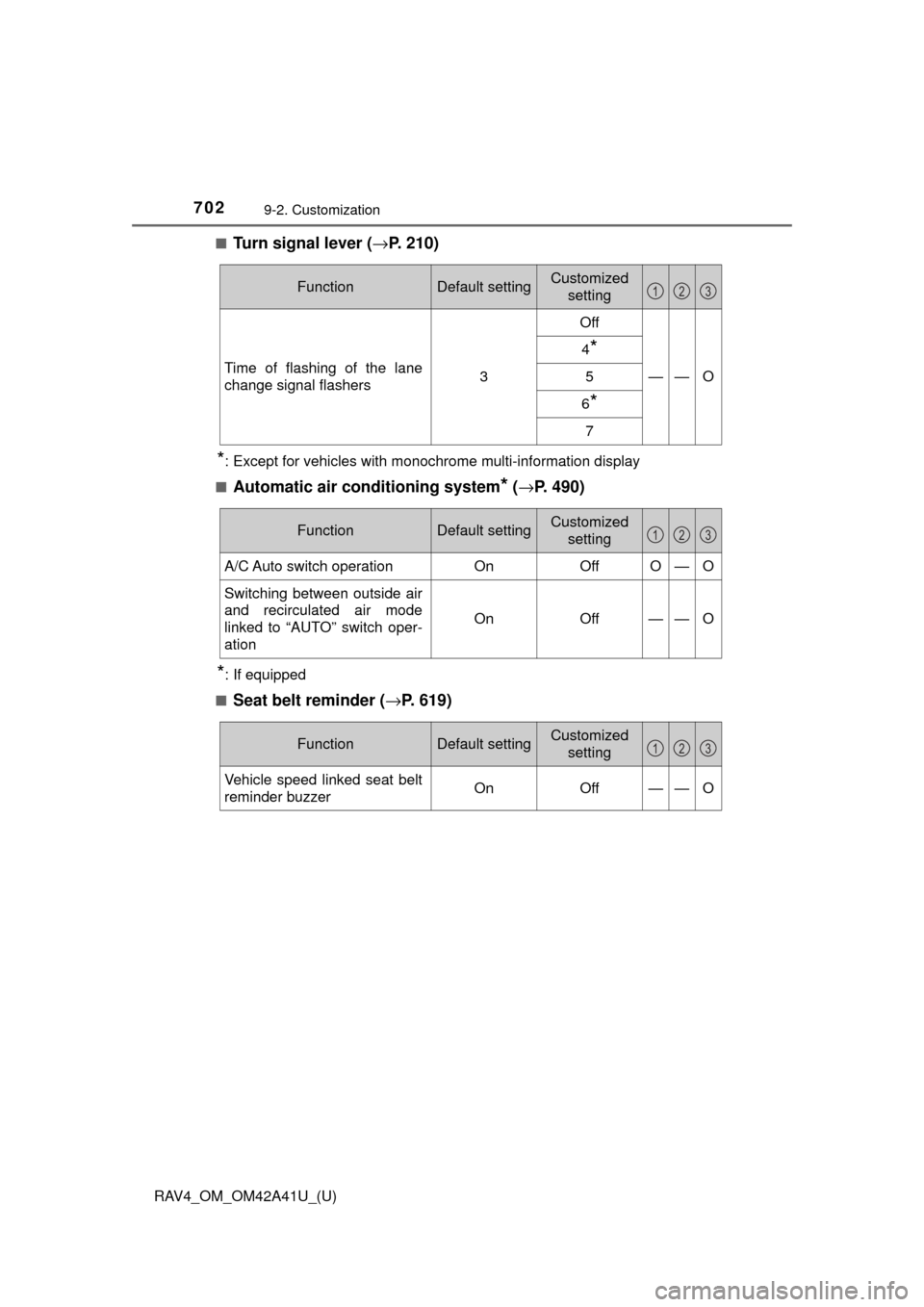
■Turn signal lever (→P. 210)
*: Except for vehicles with monochrome multi-information display
■
Automatic air conditioning system* ( → P. 490)
*: If equipped
■
Seat belt reminder ( →P. 619)
FunctionDefault settingCustomized
setting
Time of flashing of the lane
change signal flashers3
Off
——O
4*
5
6*
7
123
FunctionDefault settingCustomized
setting
A/C Auto switch operationOnOffO—O
Switching between outside air
and recirculated air mode
linked to “AUTO” switch oper-
ation
OnOff——O
123
FunctionDefault settingCustomized setting
Vehicle speed linked seat belt
reminder buzzerOnOff——O
123