ESP TOYOTA RAV4 2016 XA40 / 4.G Workshop Manual
[x] Cancel search | Manufacturer: TOYOTA, Model Year: 2016, Model line: RAV4, Model: TOYOTA RAV4 2016 XA40 / 4.GPages: 741, PDF Size: 14.31 MB
Page 455 of 741
454
RAV4_OM_OM42A41U_(U)
5-20. Bluetooth® Phone
■Check the messages
●Depending on the type of Bluetooth® phone being connected, it may be nec-
essary to perform additional steps on the phone.
● Messages are displayed in the appropriate connected Bluetooth
® phone’s
registered mail address folder.
Select the tab of the desired folder to be displayed.
● Only received messages on the connected Bluetooth
® phone can be dis-
played.
● The text of the message is not displayed while driving.
● When “Automatic Message Readout” is set to on, messages will be auto-
matically read out. ( →P. 467)
● Turn the “PWR VOL” knob, or use the volume switch on the steering wheel
to adjust the message read out volume.
● The message read out function is available even while driving.
Display the “Message Inbox” screen. ( →P. 451)
Select the desired message from the list.
Select “Quick Message”.
Select the desired message.
Select “Send”.
If an error message is displayed, follow the guidance on the screen to try
again.
■
Editing quick reply message
Select “Quick Message”.
Select corresponding to the desired message to edit.
Select “OK” when editing is completed.
Replying to a message
1
2
3
4
5
1
2
3
Page 456 of 741
RAV4_OM_OM42A41U_(U)
4555-20. Bluetooth® Phone
5
Audio system
Calls can be made to an e-mail/SMS/MMS message sender’s phone
number.Display the “Message Inbox” screen. ( →P. 451)
Select the desired message.
Select .
Check that the “Call” screen is displayed.
■Calling from a number within a message
Calls can be made to a number identified in a message’s text area.
This operation cannot be performed while driving.
Display the “Message Inbox” screen. ( →P. 451)
Select the desired message.
Select the text area.
Select corresponding to the desired number.
Check that the “Call” screen is displayed.
■Calling from the incoming message screen → P. 450
Calling the message sender
1
2
3
4
1
2
3
4
5
Page 464 of 741
RAV4_OM_OM42A41U_(U)
4635-21. Phonebook
5
Audio system
For PBAP compatible Bluetooth® phones, this function is available
when “Automatic Contact/History Transfer” is set to off. ( →P. 459)
Select “Edit Contact”.
Select the desired contact.
Select corresponding to the desired name or number.
For editing the name
Follow the steps in “Registering a new contact to the contacts list”
from . ( →P. 462)
For editing the number
Follow the steps in “Registering a new contact to the contacts list”
from . ( →P. 462)
■Editing the contacts in a different way (From the “Contact
Details” screen)
Display the phone screen. (→ P. 442)
Select the “Contacts”, “Call Histor y” tab or the “Favorites” tab and
select the desired contact.
Select “Edit Contact”.
“E-mail Addresses”: Select to display all registered e-mail addresses for
the contact.
Follow the steps in “Editing the contact data” from .
Editing the contact data
1
2
3
4
2
4
3
1
2
3
44
Page 475 of 741
474
RAV4_OM_OM42A41U_(U)
5-22. Bluetooth®
■Bluetooth® antenna
The antenna is built into the display.
If the portable audio player is behind the seat or in the glove box or console
box, or is touching or covered by metal objects, the connection status may
deteriorate.
If the cellular phone is behind the seat or in the console box, or touching or
covered by metal objects, the connection status may deteriorate.
■ Battery charge/signal status
●This display may not correspond exactly with the portable audio player or
cellular phone itself.
● This system does not have a charging function.
● The portable audio player or cellular phone battery will be depleted quickly
when the device is connected to Bluetooth
®.
■ When using the Bluetooth
® audio and hands-free system at the same
time
The following problems may occur.
● The Bluetooth
® audio connection may be interrupted.
● Noise may be heard during Bluetooth
® audio playback.
■ About the contact in this system
The following data is stored for every registered cellular phone. When
another phone is connecting, you cannot read the registered data.
●Contact data
● Call history
● Favorite
● Message
When removing a Bluetooth
® phone from the system, the above-mentioned
data is also deleted.
■ About Bluetooth
®
The Bluetooth® word mark and logos are
registered trademarks owned by Blue-
tooth SIG, Inc. and any use of such
marks by Fujitsu Ten Limited is under
license. Other trademarks and trade
names are those of their respective own-
ers.
Page 482 of 741
RAV4_OM_OM42A41U_(U)
4815-23. Other function
5
Audio system
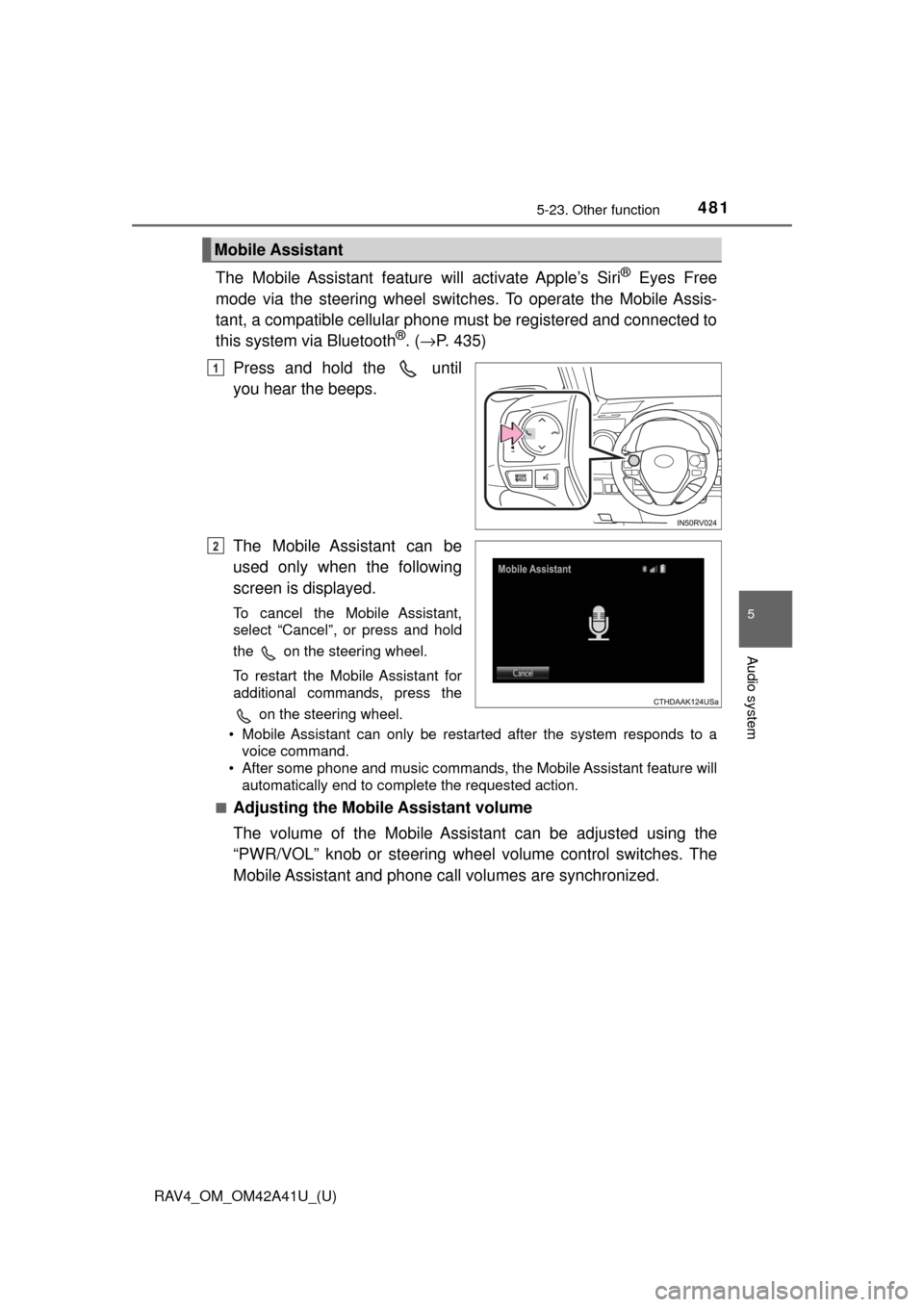
The Mobile Assistant feature will activate Apple’s Siri® Eyes Free
mode via the steering wheel switc hes. To operate the Mobile Assis-
tant, a compatible cellular phone must be registered and connected to
this system via Bluetooth
®. ( → P. 435)
Press and hold the until
you hear the beeps.
The Mobile Assistant can be
used only when the following
screen is displayed.
To cancel the Mobile Assistant,
select “Cancel”, or press and hold
the on the steering wheel.
To restart the Mobile Assistant for
additional commands, press the on the steering wheel.
• Mobile Assistant can only be restarted after the system responds to a voice command.
• After some phone and music commands, the Mobile Assistant feature will automatically end to complete the requested action.
■
Adjusting the Mobile Assistant volume
The volume of the Mobile Assistant can be adjusted using the
“PWR/VOL” knob or steering wheel volume control switches. The
Mobile Assistant and phone call volumes are synchronized.
Mobile Assistant
1
2
Page 500 of 741
499
RAV4_OM_OM42A41U_(U)
6-1. Using the air conditioning system and defogger
6
Interior features
Heated steering wheel∗/seat heaters∗
∗: If equipped
Heated steering wheel and seat heaters heat the side grips of the
steering wheel and seats, respectively.
WARNING
●Care should be taken to prevent injury if anyone in the following categories
comes in contact with the steering wheel and seats when the heater is on\
:
• Babies, small children, the elderly, the sick and the physically chal-
lenged
• Persons with sensitive skin
• Persons who are fatigued
• Persons who have taken alcohol or drugs that induce sleep (sleeping drugs, cold remedies, etc.)
● Observe the following precautions to prevent minor burns or overheating:
• Do not cover the seat with a blanket or cushion when using the seat heater.
• Do not use seat heater more than necessary.
NOTICE
● Do not put heavy objects that have an uneven surface on the seat and do
not stick sharp objects (needles, nails, etc.) into the seat.
● To prevent battery discharge, do not use the functions when the engine is
not running.
Page 517 of 741
516
RAV4_OM_OM42A41U_(U)
6-3. Using the storage features
■Installing to the lower level and changing the fixed position
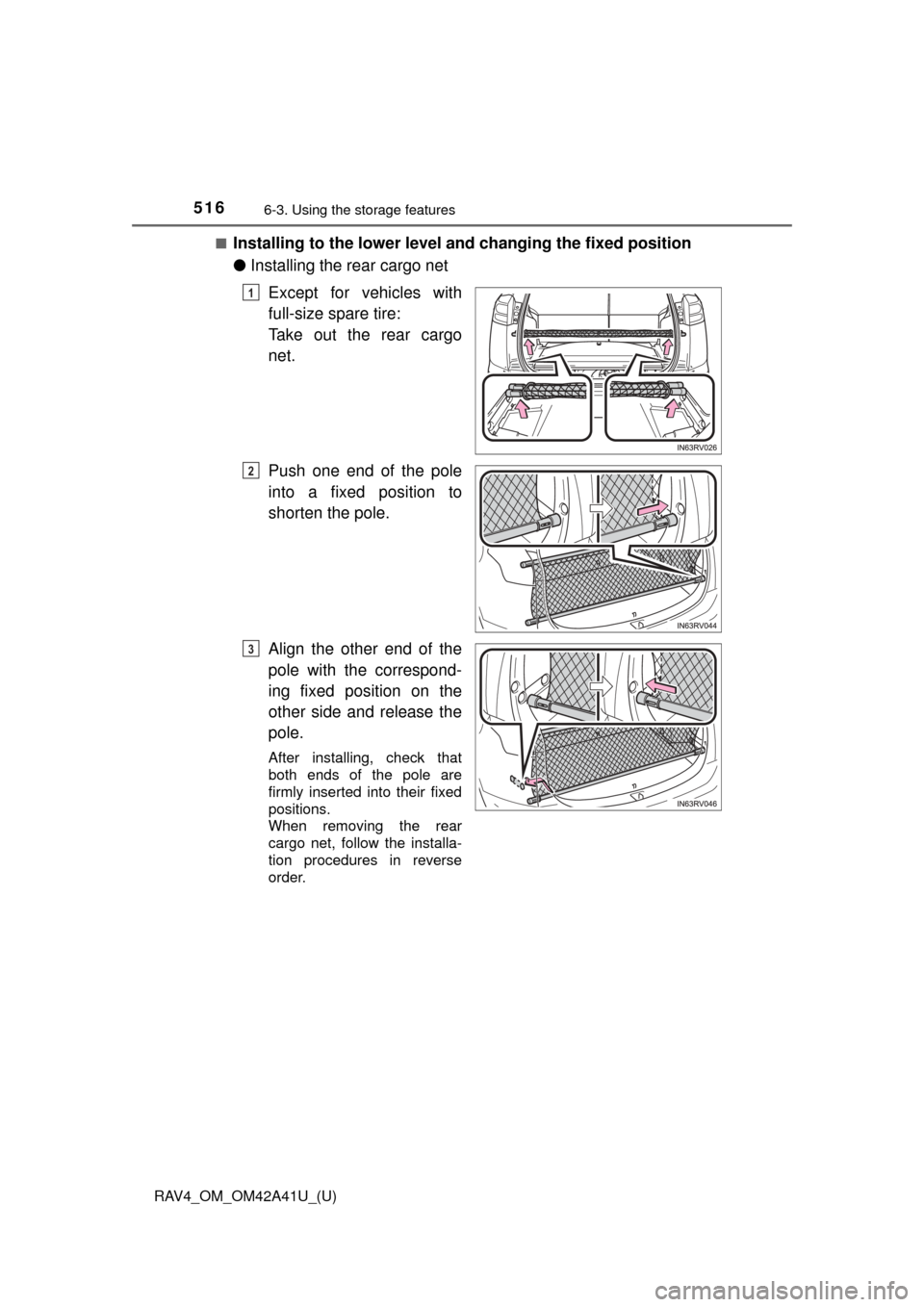
● Installing the rear cargo net
Except for vehicles with
full-size spare tire:
Take out the rear cargo
net.
Push one end of the pole
into a fixed position to
shorten the pole.
Align the other end of the
pole with the correspond-
ing fixed position on the
other side and release the
pole.
After installing, check that
both ends of the pole are
firmly inserted into their fixed
positions.
When removing the rear
cargo net, follow the installa-
tion procedures in reverse
order.
1
2
3
Page 529 of 741
528
RAV4_OM_OM42A41U_(U)
6-4. Using the other interior features
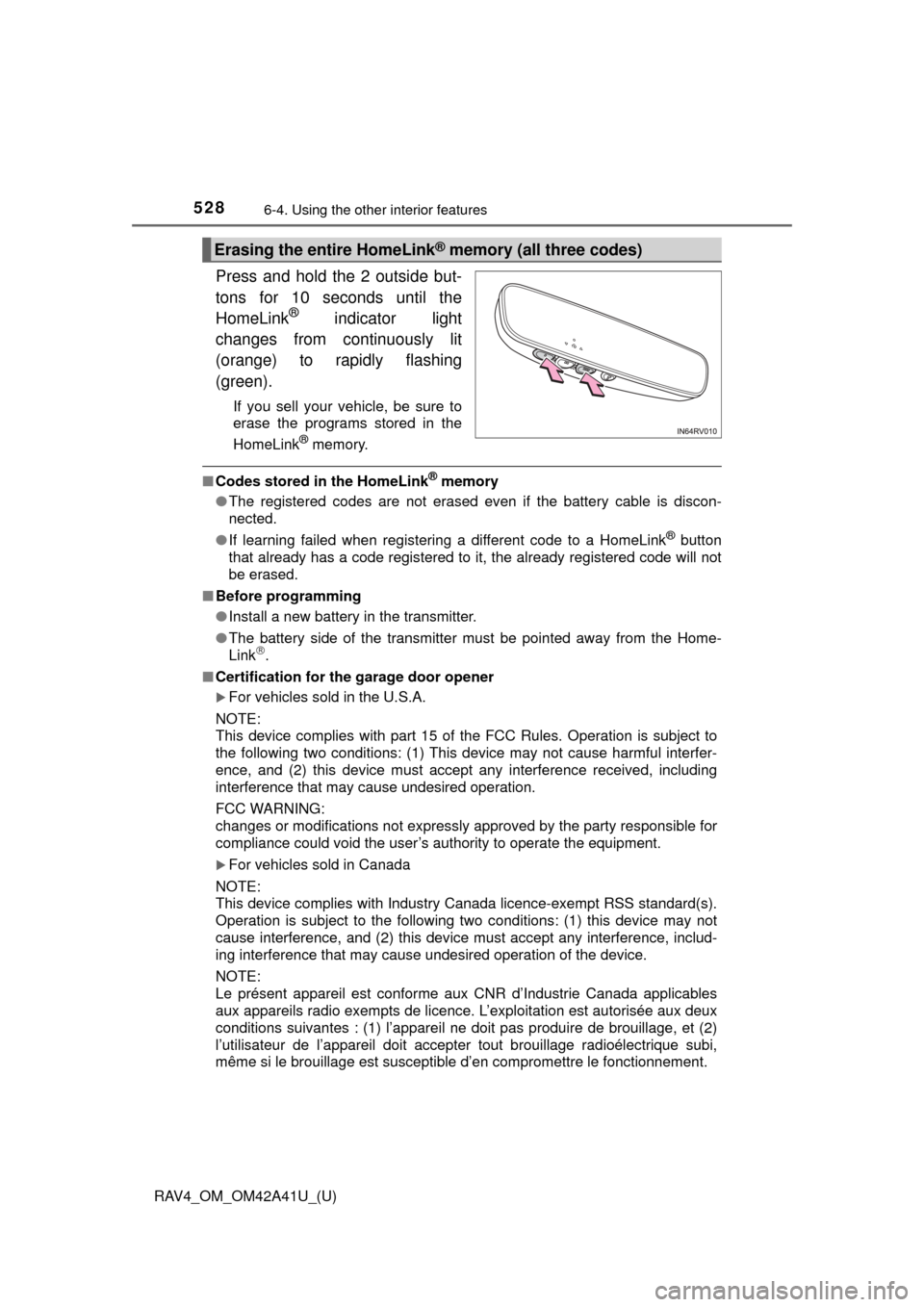
Press and hold the 2 outside but-
tons for 10 seconds until the
HomeLink
® indicator light
changes from continuously lit
(orange) to rapidly flashing
(green).
If you sell your vehicle, be sure to
erase the programs stored in the
HomeLink
® memory.
■ Codes stored in the HomeLink® memory
● The registered codes are not erased even if the battery cable is discon-
nected.
● If learning failed when registering a different code to a HomeLink
® button
that already has a code registered to it, the already registered code will not
be erased.
■ Before programming
●Install a new battery in the transmitter.
● The battery side of the transmitter must be pointed away from the Home-
Link
.
■ Certification for the garage door opener
For vehicles sold in the U.S.A.
NOTE:
This device complies with part 15 of the FCC Rules. Operation is subject to
the following two conditions: (1) This device may not cause harmful interfer-
ence, and (2) this device must accept any interference received, including
interference that may cause undesired operation.
FCC WARNING:
changes or modifications not expressly approved by the party responsible for
compliance could void the user’s authority to operate the equipment.
For vehicles sold in Canada
NOTE:
This device complies with Industry Canada licence-exempt RSS standard(s).
Operation is subject to the following two conditions: (1) this device may not
cause interference, and (2) this device must accept any interference, includ-
ing interference that may cause undesired operation of the device.
NOTE:
Le présent appareil est conforme aux CNR d’Industrie Canada applic\
ables
aux appareils radio exempts de licenc e. L’exploitation est autorisée aux deux
conditions suivantes : (1) l’appareil ne doit pas produire de brouillage, et (2)
l’utilisateur de l’appareil doit accepter tout brouillage radioélectrique subi,
même si le brouillage est susceptible d’en compromettre le fonctionnement.
Erasing the entire HomeLink® memory (all three codes)
Page 541 of 741
540
RAV4_OM_OM42A41U_(U)
7-1. Maintenance and care
■Caring for leather areas
Toyota recommends cleaning the interior of the vehicle at least twice a year to
maintain the quality of the vehicle’s interior.
■ Shampooing the carpets
There are several commercial foaming-type cleaners available. Use a sponge
or brush to apply the foam. Rub in overlapping circles. Do not use water.
Wipe dirty surfaces and let them dry. Excellent results are obtained by keep-
ing the carpet as dry as possible.
■ Seat belts
Clean with mild soap and lukewarm water using a cloth or sponge. Also
check the belts periodically for excessive wear, fraying or cuts.
WARNING
■Water in the vehicle
● Do not splash or spill liquid in the vehicle.
Doing so may cause electrical components etc. to malfunction or catch
fire.
● Do not get any of the SRS components or wiring in the vehicle interior wet.
(→P. 38)
An electrical malfunction may cause the airbags to deploy or not function
properly, resulting in death or serious injury.
■ Cleaning the interior (especially instrument panel)
Do not use polish wax or polish cleaner. The instrument panel may reflect
off the windshield, obstructing the driver’s view and leading to an accident,
resulting in death or serious injury.
Page 542 of 741
RAV4_OM_OM42A41U_(U)
5417-1. Maintenance and care
7
Maintenance and care
NOTICE
■Cleaning detergents
● Do not use the following types of detergent, as they may discolor the vehi-
cle interior or cause streaks or damage to painted surfaces:
• Non-seat portions: Organic substances such as benzene or gasoline,
alkaline or acidic solutions, dye, and bleach
• Seats: Alkaline or acidic solutions, such as thinner, benzene, and alcohol
● Do not use polish wax or polish cleaner. The instrument panel’s or other
interior part’s painted surface may be damaged.
■ Preventing damage to leather surfaces
Observe the following precautions to avoid damage to and deterioration of
leather surfaces:
● Remove any dust or dirt from leather surfaces immediately.
● Do not expose the vehicle to direct sunlight for extended periods of time.
Park the vehicle in the shade, especially during summer.
● Do not place items made of vinyl, plastic, or containing wax on the uphol-
stery, as they may stick to the leather surface if the vehicle interior heats
up significantly.
■ Water on the floor
Do not wash the vehicle floor with water.
Vehicle systems such as the audio system may be damaged if water comes
into contact with electrical components such as the audio system above or
under the floor of the vehicle. Water may also cause the body to rust.
■ When cleaning the inside of th e windshield (vehicles with Toyota
Safety Sense P)
Do not allow glass cleaner to contact the lens. Also, do not touch the lens.
( →P. 233)
■ Cleaning the inside of the rear window
● Do not use glass cleaner to clean the rear window, as this may cause
damage to the rear window defogger heater wires. Use a cloth dampened
with lukewarm water to gently wipe the window clean. Wipe the window in
strokes running parallel to the heater wires.
● Be careful not to scratch or damage the heater wires.