USB port TOYOTA RAV4 2016 XA40 / 4.G Owners Manual
[x] Cancel search | Manufacturer: TOYOTA, Model Year: 2016, Model line: RAV4, Model: TOYOTA RAV4 2016 XA40 / 4.GPages: 741, PDF Size: 14.31 MB
Page 4 of 741

TABLE OF CONTENTS4
RAV4_OM_OM42A41U_(U)5-1. Basic Operations
Audio system types ........... 326
Using the steering wheel audio switches ................ 329
AUX port/USB port ............ 332
5-2. Using the audio system Optimal use of the audio system ................... 334
5-3. Using the radio Radio operation ................. 336
5-4. Playing an audio CD and MP3/WMA discs
CD player operation .......... 338
5-5. Using an external device Listening to an iPod........... 348
Listening to USB memory device................ 354
Using the AUX port ........... 360
5-6. Using Bluetooth
® devices
Bluetooth® audio/
phone .............................. 361
Using the steering wheel switches ................ 366
Register a Bluetooth
®
device.............................. 367
5-7. “SETUP” menu Using the “SETUP” menu (“Bluetooth
*” menu) ........ 368
Using the “SETUP” menu (“PHONE” menu) ............ 373
5-8. Bluetooth
® Audio
Operating a Bluetooth®
enabled portable
player .............................. 378 5-9. Bluetooth
® Phone
Making a phone call........... 381
When receiving a phone call ........................ 383
Speaking on the phone...... 384
5-10. Bluetooth
®
Bluetooth®......................... 386
5-11. Using the audio system (Entune Audio)
Audio system (Entune Audio) ................ 389
5-12. Basic Operations Audio system operations (Entune Audio) ................ 391
Steering wheel audio switches........................... 393
AUX port/USB port ............ 394
Basic audio operations ...... 395
5-13. Setup Setup menu ....................... 397
General settings ................ 398
Audio settings .................... 400
Display settings ................. 401
Voice settings .................... 403
5-14. Using the audio system Selecting the audio source.............................. 404
List screen operation ......... 405
Optimal use of the audio system ............................. 407
5-15. Using the radio Radio operation ................. 408
5-16. Playing an audio CD and MP3/WMA/AAC discs
CD player operation........... 410
CD player and disc information....................... 411
5Audio system
*: Bluetooth is a registered trademark of Bluetooth SIG, Inc.
Page 5 of 741
5
RAV4_OM_OM42A41U_(U)
1
9 8
7
6 4 3
2
10
5
5-17. Using an external deviceiPod player operation ........ 417
USB memory device player operation .............. 422
Using the AUX port ........... 427
5-18. Connecting Bluetooth
®
Preparations to use wireless
communication ................ 428
Registering a Bluetooth
®
audio player for the
first time .......................... 431
Registering a Bluetooth
®
phone for the
first time .......................... 432
Registering a Bluetooth
®
device.............................. 433
Connecting a Bluetooth
®
device.............................. 435
Displaying a Bluetooth
®
device details .................. 437
Detailed Bluetooth
®
settings............................ 438
5-19. Bluetooth
® Audio
Listening to Bluetooth®
Audio ............................... 440
5-20. Bluetooth
® Phone
Using a Bluetooth®
Phone.............................. 442
Making a call ..................... 444
Receiving a call ................. 447
Speaking on the phone ..... 448
Bluetooth
® phone
message function ............ 451
Using the steering wheel switches ................ 456
Bluetooth
® phone
settings............................ 457 5-21. Phonebook
Contact/Call History Settings ........................... 459
5-22. Bluetooth
®
What to do if... (Troubleshooting) ............ 469
Bluetooth
®......................... 473
5-23. Other function Voice command system ............................. 478
6-1. Using the air conditioning system and defogger
Manual air conditioning system ............................. 484
Automatic air conditioning system .... 490
Heated steering wheel/ seat heaters..................... 499
6-2. Using the interior lights Interior lights list................. 501• Interior lights.................. 502
• Personal lights............... 502
6-3. Using the storage features List of storage features ...... 504• Glove box ...................... 505
• Console box .................. 505
• Cup holders ................... 506
• Bottle holders ................ 507
• Auxiliary box .................. 507
Luggage compartment features ........................... 508
6Interior features
Page 20 of 741
20Pictorial index
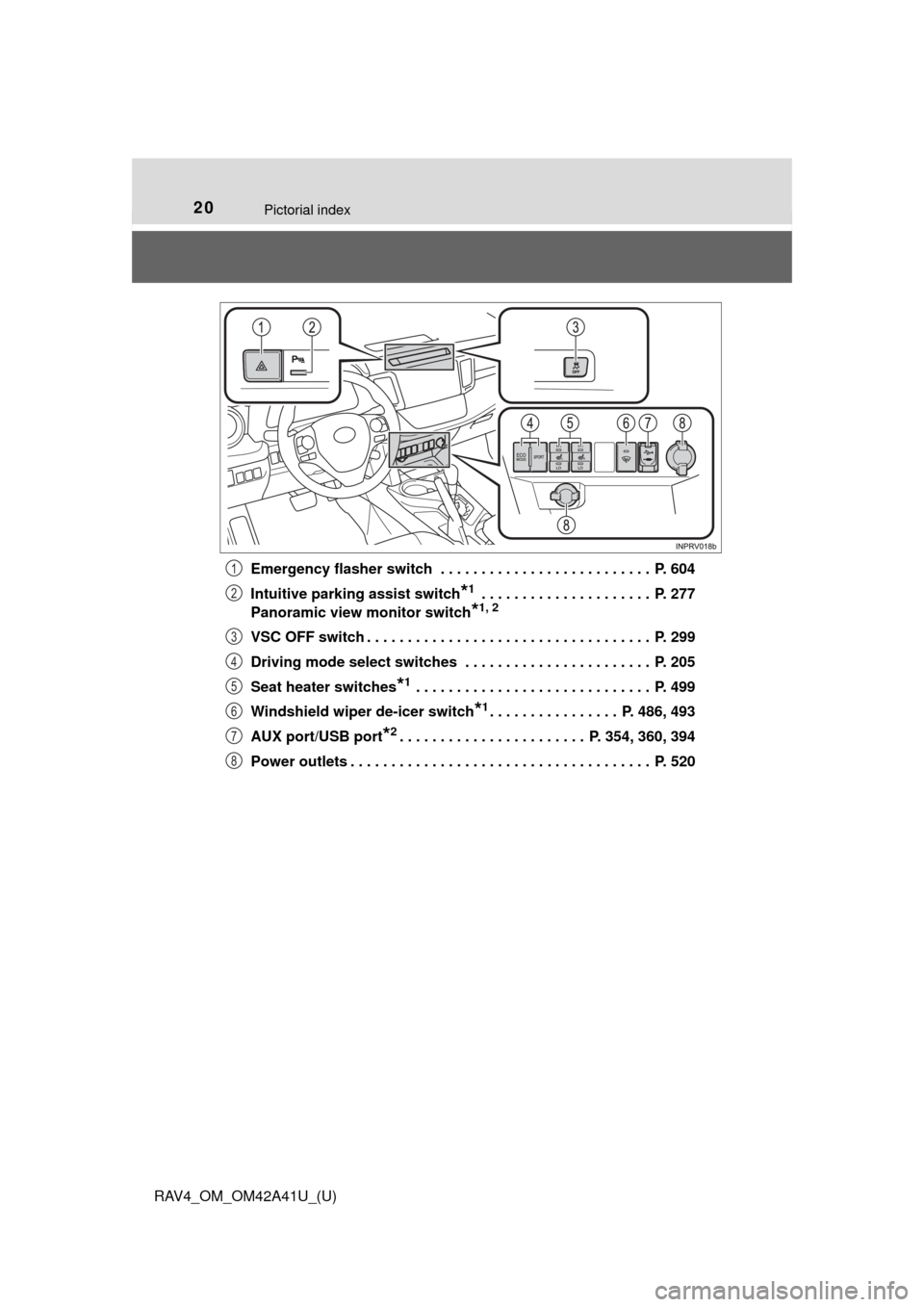
RAV4_OM_OM42A41U_(U)Emergency flasher switch . . . . . . . . . . . . . . . . . . . . . . . . . . P. 604
Intuitive parking assist switch
*1 . . . . . . . . . . . . . . . . . . . . . P. 277
Panoramic view monitor switch
*1, 2
VSC OFF switch . . . . . . . . . . . . . . . . . . . . . . . . . . . . . . . . . . . P. 299
Driving mode select switches . . . . . . . . . . . . . . . . . . . . . . . P. 205
Seat heater switches
*1 . . . . . . . . . . . . . . . . . . . . . . . . . . . . . P. 499
Windshield wiper de-icer switch
*1. . . . . . . . . . . . . . . . P. 486, 493
AUX port/USB port
*2. . . . . . . . . . . . . . . . . . . . . . . P. 354, 360, 394
Power outlets . . . . . . . . . . . . . . . . . . . . . . . . . . . . . . . . . . . . . P. 520
1
2
3
4
5
6
7
8
Page 325 of 741

324
RAV4_OM_OM42A41U_(U)
5-1. Basic OperationsAudio system types ........... 326
Using the steering wheel audio switches ................ 329
AUX port/USB port ............ 332
5-2. Using the audio system Optimal use of the audio system ................... 334
5-3. Using the radio Radio operation ................. 336
5-4. Playing an audio CD and MP3/WMA discs
CD player operation .......... 338
5-5. Using an external device Listening to an iPod .......... 348
Listening to USB memory device................ 354
Using the AUX port ........... 360
5-6. Using Bluetooth
® devices
Bluetooth® audio/
phone .............................. 361
Using the steering wheel switches ................ 366
Register a Bluetooth
®
device.............................. 367
5-7. “SETUP” menu Using the “SETUP” menu (“Bluetooth
*” menu) ........ 368
Using the “SETUP” menu (“PHONE” menu) ............ 373 5-8. Bluetooth
® Audio
Operating a Bluetooth®
enabled portable
player .............................. 378
5-9. Bluetooth
® Phone
Making a phone call .......... 381
When receiving a phone call ....................... 383
Speaking on the phone ..... 384
5-10. Bluetooth
®
Bluetooth®......................... 386
5-11. Using the audio system (Entune Audio)
Audio system (Entune Audio) ................ 389
5-12. Basic Operations Audio system operations (Entune Audio) ................ 391
Steering wheel audio switches .......................... 393
AUX port/USB port ............ 394
Basic audio operations...... 395
5-13. Setup Setup menu....................... 397
General settings ................ 398
Audio settings ................... 400
Display settings ................. 401
Voice settings.................... 403
5-14. Using the audio system Selecting the audio source ............................. 404
List screen operation......... 405
Optimal use of the audio system ............................ 407
*: Bluetooth is a registered trademark of Bluetooth SIG, Inc.
5Audio system
Page 326 of 741

325
RAV4_OM_OM42A41U_(U)
5Audio system
5-15. Using the radioRadio operation ................. 408
5-16. Playing an audio CD and MP3/WMA/AAC discs
CD player operation .......... 410
CD player and disc information ...................... 411
5-17. Using an external device iPod player operation ........ 417
USB memory device player operation .............. 422
Using the AUX port ........... 427
5-18. Connecting Bluetooth
®
Preparations to use wireless
communication ................ 428
Registering a Bluetooth
®
audio player for the
first time .......................... 431
Registering a Bluetooth
®
phone for the
first time .......................... 432
Registering a Bluetooth
®
device.............................. 433
Connecting a Bluetooth
®
device.............................. 435
Displaying a Bluetooth
®
device details .................. 437
Detailed Bluetooth
®
settings............................ 438 5-19. Bluetooth
® Audio
Listening to Bluetooth®
Audio............................... 440
5-20. Bluetooth
® Phone
Using a Bluetooth®
Phone ............................. 442
Making a call ..................... 444
Receiving a call ................. 447
Speaking on the phone ..... 448
Bluetooth
® phone
message function ............ 451
Using the steering wheel switches ................ 456
Bluetooth
® phone
settings ........................... 457
5-21. Phonebook Contact/Call History Settings ........................... 459
5-22. Bluetooth
®
What to do if... (Troubleshooting) ............ 469
Bluetooth
®......................... 473
5-23. Other function Voice command system ............................ 478
Page 333 of 741
332
RAV4_OM_OM42A41U_(U)
5-1. Basic Operations
AUX port/USB port
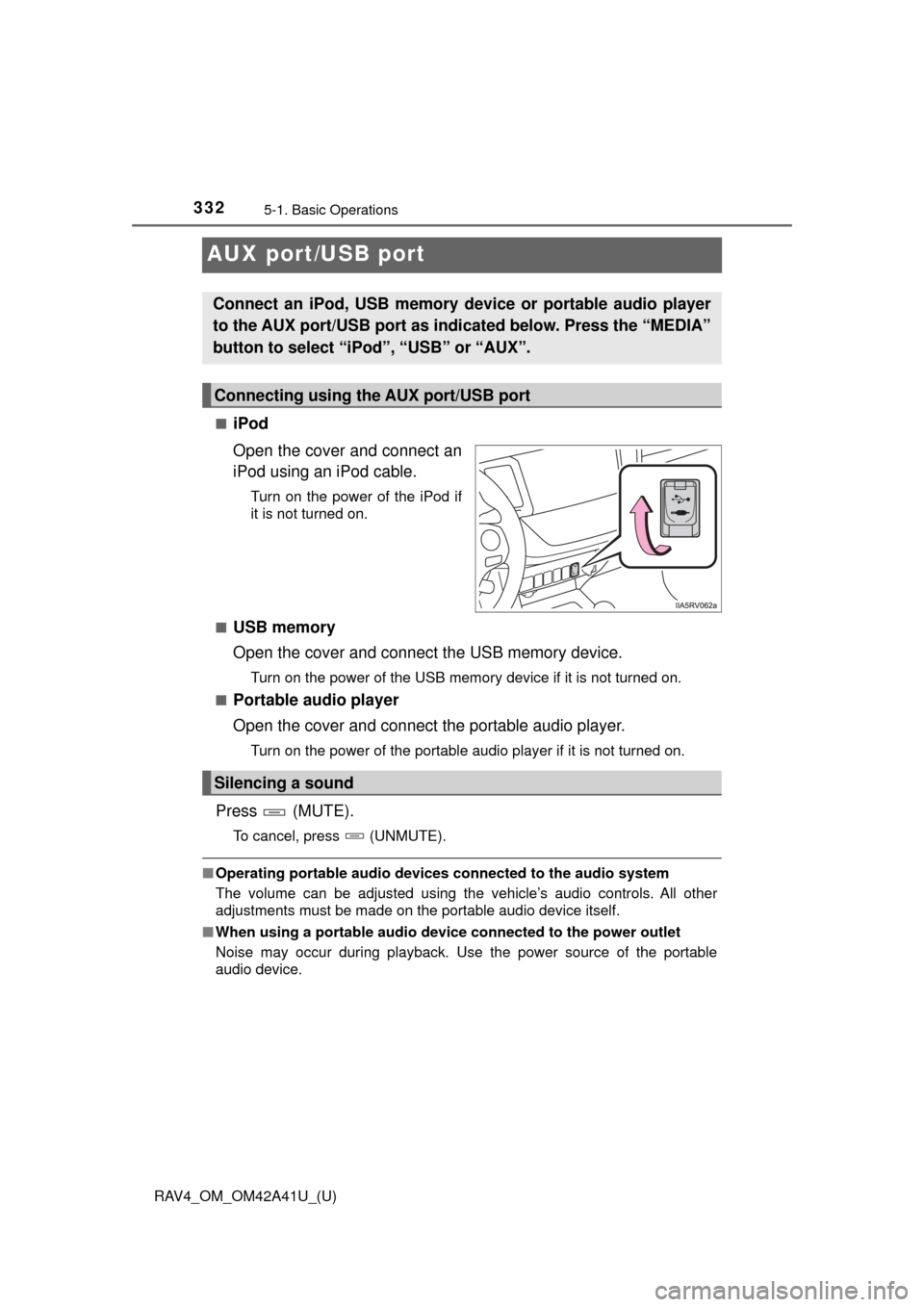
■iPod
Open the cover and connect an
iPod using an iPod cable.
Turn on the power of the iPod if
it is not turned on.
■
USB memory
Open the cover and connect the USB memory device.
Turn on the power of the USB memory device if it is not turned on.
■
Portable audio player
Open the cover and connect the portable audio player.
Turn on the power of the portable audio player if it is not turned on.
Press (MUTE).
To cancel, press (UNMUTE).
■ Operating portable audio devices connected to the audio system
The volume can be adjusted using the vehicle’s audio controls. All other
adjustments must be made on the portable audio device itself.
■ When using a portable audio devi ce connected to the power outlet
Noise may occur during playback. Use the power source of the portable
audio device.
Connect an iPod, USB memory device or portable audio player
to the AUX port/USB port as indi cated below. Press the “MEDIA”
button to select “iPo d”, “USB” or “AUX”.
Connecting using the AUX port/USB port
Silencing a sound
Page 360 of 741
RAV4_OM_OM42A41U_(U)
3595-5. Using an external device
5
Audio system
WARNING
■While driving
Do not connect USB memory or operate the controls. Doing so may cause
an accident, resulting in death or serious injury.
NOTICE
■To prevent damage to USB memory
● Do not leave USB memory in the vehicle. The temperature inside the vehi-
cle may become high, resulting in damage to the USB memory.
● Do not push down on or apply unnecessary pressure to the USB memory
while it is connected as this may damage the USB memory or its terminal.
● Do not insert foreign objects into the port as this may damage the USB
memory or its terminal.
Page 395 of 741
394
RAV4_OM_OM42A41U_(U)
5-12. Basic Operations
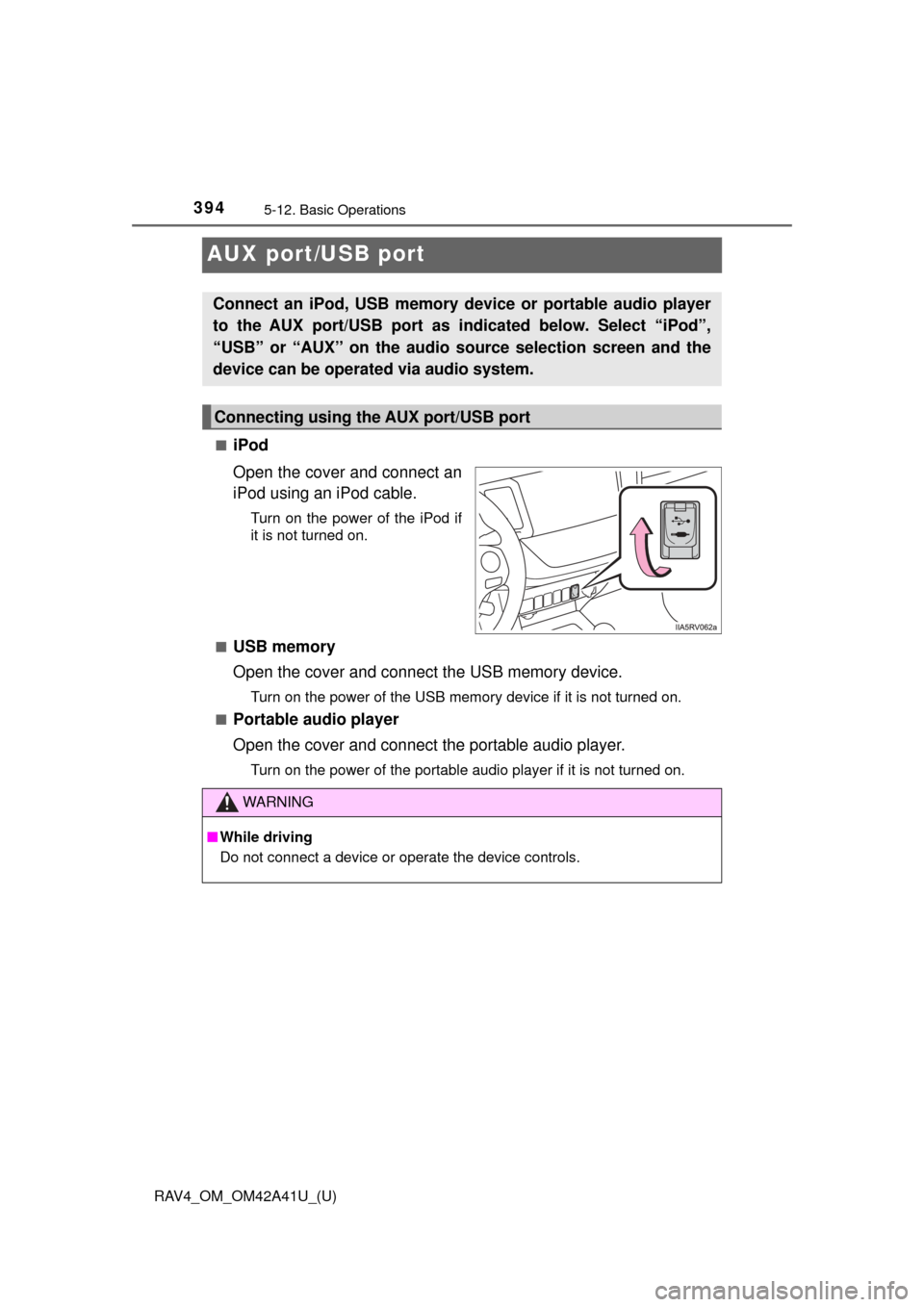
AUX port/USB port
■iPod
Open the cover and connect an
iPod using an iPod cable.
Turn on the power of the iPod if
it is not turned on.
■
USB memory
Open the cover and connect the USB memory device.
Turn on the power of the USB memory device if it is not turned on.
■
Portable audio player
Open the cover and connect the portable audio player.
Turn on the power of the portable audio player if it is not turned on.
Connect an iPod, USB memory device or portable audio player
to the AUX port/USB port as indicated below. Select “iPod”,
“USB” or “AUX” on the audio source selection screen and the
device can be operated via audio system.
Connecting using the AUX port/USB port
WARNING
■ While driving
Do not connect a device or operate the device controls.
Page 427 of 741
426
RAV4_OM_OM42A41U_(U)
5-17. Using an external device
●MP3, WMA and AAC playback
• When a device containing MP3, WMA and AAC files is connected, all
files in the USB memory device are checked. Once the file check is fin-
ished, the first MP3, WMA and AAC file is played. To make the file check
finish more quickly, we recommend that you do not include any files other
than MP3, WMA and AAC files or create any unnecessary folders.
• When a USB memory device is connected and the audio source is
changed to USB memory mode, the USB memory device will start play-
ing the first file in the first folder. If the same device is removed and
reconnected (and the con- tents have not been changed), the USB mem-
ory device will resume play from the same point in which it was last used.
● Extensions
If the file extensions .mp3, .wma and .m4a are used for files other than
MP3, WMA and AAC files, they will be skipped (not played).
● Playback
• To play MP3 files with steady sound quality, we recommend a fixed bit
rate of at least 128 kbps and a sampling frequency of 44.1 kHz.
• There is a wide variety of freeware and other encoding software for MP3, WMA and AAC files on the market, and depending on the status of the
encoding and the file format, poor sound quality or noise at the start of
playback may result. In some cases, playback may not be possible at all.\
• Microsoft, Windows, and Windows Media are the registered trademarks of Microsoft Corporation in the U.S.A. and other countries.
WARNING
■While driving
Do not connect a USB memory device or operate the device controls.
NOTICE
■To prevent damage to the USB memory device or its terminals
● Do not leave the USB memory device in the vehicle. The temperature
inside the vehicle may become high.
● Do not push down on or apply unnecessary pressure to the USB memory
device while it is connected.
● Do not insert foreign objects into the port.
Page 727 of 741

726Alphabetical index
RAV4_OM_OM42A41U_(U)
Alphabetical index
A/C .................................... 484, 490Air conditioning filter ............. 583
Automatic air conditioning
system ......... ....................... 490
Manual air conditioning
system ......... ....................... 484
Micro dust and pollen filter .... 492
ABS (Anti-lock Brake
System) .................................. 297 Function ................................ 297
Warning light ......................... 616
Air conditioning filter .............. 583
Air conditioning system ............................ 484, 490
Air conditioning filter ............. 583
Automatic air conditioning system ......... ....................... 490
Manual air conditioning system ......... ....................... 484
Micro dust and pollen filter .... 492
Airbags ....................................... 36 Airbag operating conditions .... 44
Airbag precautions for your child .............................. 39
Airbag warning light .............. 616
Correct driving posture ........... 26
Curtain shield airbag operating conditions ............. 44
Curtain shield airbag precautions ........................... 41
Front passenger occupant classification syst em............. 49
General airbag precautions .... 39
Locations of airbags................ 36
Modification and disposal of airbags.............................. 43
Side airbag operating conditions ............................. 44 Side airbag precautions .......... 41
Side and curtain shield
airbags operating
conditions ............................. 44
Side and curtain shield
airbags precautions .............. 41
SRS airbag instructions for Canadian owners ............... 711
SRS airbags ........................... 36
All-wheel drive lock switch..... 296
Anchor brackets ........................ 62
Antenna Radio ............................ 337, 409
Smart key system ................. 130
Anti-lock brake system (ABS) ...................................... 297 Function ................................ 297
Warning light......................... 616
Approach warning Dynamic radar cruise
control ................................ 267
Armrest..................................... 521
Assist grips .............................. 522
Audio input ...................... 332, 394
Audio system ........................... 326 Audio input............................ 332
AUX port/USB port............. 332, 348, 354
Bluetooth
® audio .................. 361
CD player.............................. 338
iPod ...................................... 348
MP3/WMA disc ..................... 338
Optimal use .......................... 334
Portable music player ........... 332
Radio .................................... 336
Steering wheel audio
switch ................................. 329
USB memory ........................ 354
AUTO LSD ................................ 297
A