warning TOYOTA RAV4 2017 XA40 / 4.G Navigation Manual
[x] Cancel search | Manufacturer: TOYOTA, Model Year: 2017, Model line: RAV4, Model: TOYOTA RAV4 2017 XA40 / 4.GPages: 366, PDF Size: 12.77 MB
Page 185 of 366
185
3. PANORAMIC VIEW MONITOR
RAV4_RAV4 HV_Navi+MM_OM0R007U_(U)
16.06.10 19:05
PERIPHERAL MONITORING SYSTEM
6
WARNING
●Depending on the circumstances of the
vehicle (number of passengers, amount
of luggage, etc.), the position of the
guide lines displayed on the screen may
change. Be sure to check visually
around the vehicle before proceeding.
● Do not use the panoramic view monitor
system in the following cases:
• On icy or slick road surfaces, or in
snow
• When using tire chains or emergency
tires
• When the back door is not closed com- pletely
• On roads that are not flat or straight, such as curves or slopes
● In low temperatures, the screen may
darken or the image may become faint.
The image could distort when the vehi-
cle is moving, or you may become
unable to see the image on the screen.
Be sure to visually check all around the
vehicle both directly and using the mir-
rors before proceeding.
● If the tire sizes are changed, the position
of the guide lines displayed on the
screen may change.
● The camera uses a special lens. The
distances between objects and pedestri-
ans that appear in the image displayed
on the screen will differ from the actual
distances. ( →P.210)
NOTICE
● In panoramic view/moving view/see-
through view, the system combines
images taken from the front, back, left
and right side cameras into a single
image. There are limits to the range and
content that can be displayed. Familiar-
ize yourself with the characteristics of
the panoramic view monitor system
before using it.
● Image clarity may decline at the four cor-
ners of the panoramic view/moving view/
see-through view. However, this is not a
malfunction, as these are the regions
along the border of each camera image
where the images are combined.
● Depending on lighting conditions near
each of the cameras, bright and dark
patches may appear on the panoramic
view/moving view/see-through view.
● The panoramic view/moving view/see-
through view display does not extend
higher than the installation position and
image capture range of each camera.
Page 206 of 366
206
3. PANORAMIC VIEW MONITOR
RAV4_RAV4 HV_Navi+MM_OM0R007U_(U)
16.06.10 19:05
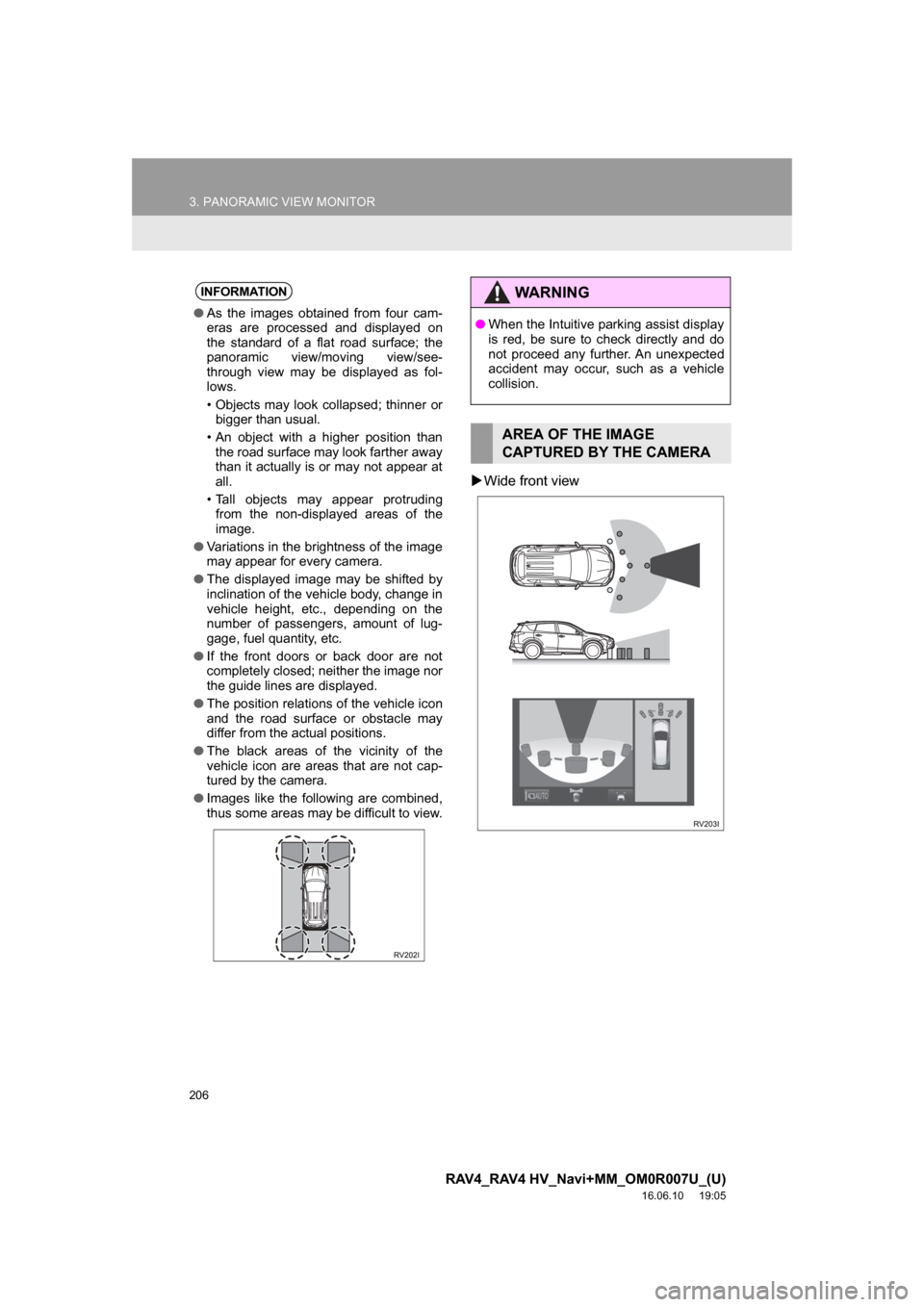
Wide front view
INFORMATION
● As the images obtained from four cam-
eras are processed and displayed on
the standard of a flat road surface; the
panoramic view/moving view/see-
through view may be displayed as fol-
lows.
• Objects may look collapsed; thinner or
bigger than usual.
• An object with a higher position than the road surface may look farther away
than it actually is or may not appear at
all.
• Tall objects may appear protruding from the non-displayed areas of the
image.
● Variations in the brightness of the image
may appear for every camera.
● The displayed image may be shifted by
inclination of the vehicle body, change in
vehicle height, etc., depending on the
number of passengers, amount of lug-
gage, fuel quantity, etc.
● If the front doors or back door are not
completely closed; neither the image nor
the guide lines are displayed.
● The position relations of the vehicle icon
and the road surface or obstacle may
differ from the actual positions.
● The black areas of the vicinity of the
vehicle icon are areas that are not cap-
tured by the camera.
● Images like the following are combined,
thus some areas may be difficult to view.
WARNING
●When the Intuitive parking assist display
is red, be sure to check directly and do
not proceed any further. An unexpected
accident may occur, such as a vehicle
collision.
AREA OF THE IMAGE
CAPTURED BY THE CAMERA
Page 212 of 366
212
3. PANORAMIC VIEW MONITOR
RAV4_RAV4 HV_Navi+MM_OM0R007U_(U)
16.06.10 19:05
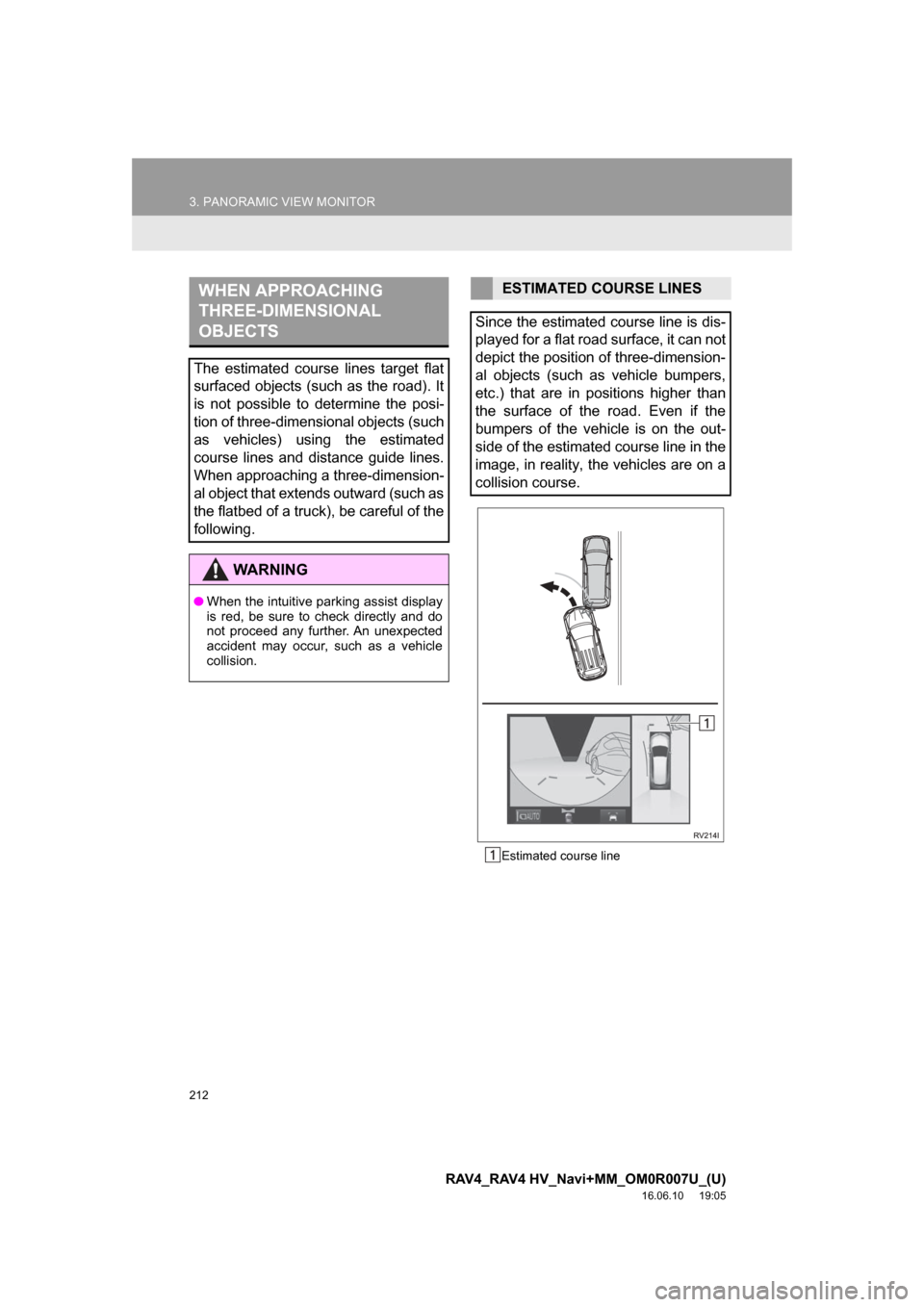
Estimated course line
WHEN APPROACHING
THREE-DIMENSIONAL
OBJECTS
The estimated course lines target flat
surfaced objects (such as the road). It
is not possible to determine the posi-
tion of three-dimensional objects (such
as vehicles) using the estimated
course lines and distance guide lines.
When approaching a three-dimension-
al object that extends outward (such as
the flatbed of a truck), be careful of the
following.
WARNING
●When the intuitive parking assist display
is red, be sure to check directly and do
not proceed any further. An unexpected
accident may occur, such as a vehicle
collision.
ESTIMATED COURSE LINES
Since the estimated course line is dis-
played for a flat road surface, it can not
depict the position of three-dimension-
al objects (such as vehicle bumpers,
etc.) that are in positions higher than
the surface of the road. Even if the
bumpers of the vehicle is on the out-
side of the estimated course line in the
image, in reality, the vehicles are on a
collision course.
Page 221 of 366
221
1. PHONE OPERATION (HANDS-FREE SYSTEM FOR CELLULAR PHONES)
RAV4_RAV4 HV_Navi+MM_OM0R007U_(U)
16.06.10 19:05
PHONE
7
2. SOME BASICS
The hands-free system enables calls
to be made and received without hav-
ing to take your hands off the steering
wheel.
This system supports Bluetooth
®.
Bluetooth® is a wireless data system
that enables cellular phones to be used
without being connected by a cable or
placed in a cradle.
The operating procedure of the phone
is explained here.
WARNING
● While driving, do not use a cellular
phone or connect the Bluetooth® phone.
● Your audio unit is fitted with Bluetooth
®
antennas. People with implantable car-
diac pacemakers, cardiac resynchroni-
zation therapy-pacemakers or
implantable cardioverter defibrillators
should maintain a reasonable distance
between themselves and the Bluetooth
®
antennas. The radio waves may affect
the operation of such devices.
● Before using Bluetooth
® devices, users
of any electrical medical device other
than implantable cardiac pacemakers,
cardiac resynchronization therapy-pace-
makers or implantable cardioverter
defibrillators should consult the manu-
facturer of the device for information
about its operation under the influence
of radio waves. Radio waves could have
unexpected effects on the operation of
such medical devices.
NOTICE
● Do not leave your cellular phone in the
vehicle. The temperature inside may rise
to a level that could damage the phone.
INFORMATION
●If your cellular phone does not support
Bluetooth®, this system cannot function.
● In the following conditions, the system
may not function:
• The cellular phone is turned off.
• The current position is outside the
communication area.
• The cellular phone is not connected.
• The cellular phone has a low battery.
● When using Bluetooth
® audio and
hands-free at the same time, the follow-
ing problems may occur:
• The Bluetooth
® connection may be
cut.
• Noise may be heard on the Bluetooth
®
audio playback.
REGISTERING/CONNECTING
A Bluetooth® PHONE
To use the hands-free system for cellu-
lar phones, it is necessary to register a
cellular phone with the system.
( → P.43)
Bluetooth® PHONE CONDITION
DISPLAY
The condition of the Bluetooth
® phone
appears on the upper right side of the
screen. ( →P.18)
Page 293 of 366
293
2. DESTINATION SEARCH
RAV4_RAV4 HV_Navi+MM_OM0R007U_(U)
16.06.10 19:05
NAVIGATION SYSTEM
8
3. STARTING ROUTE GUIDANCE
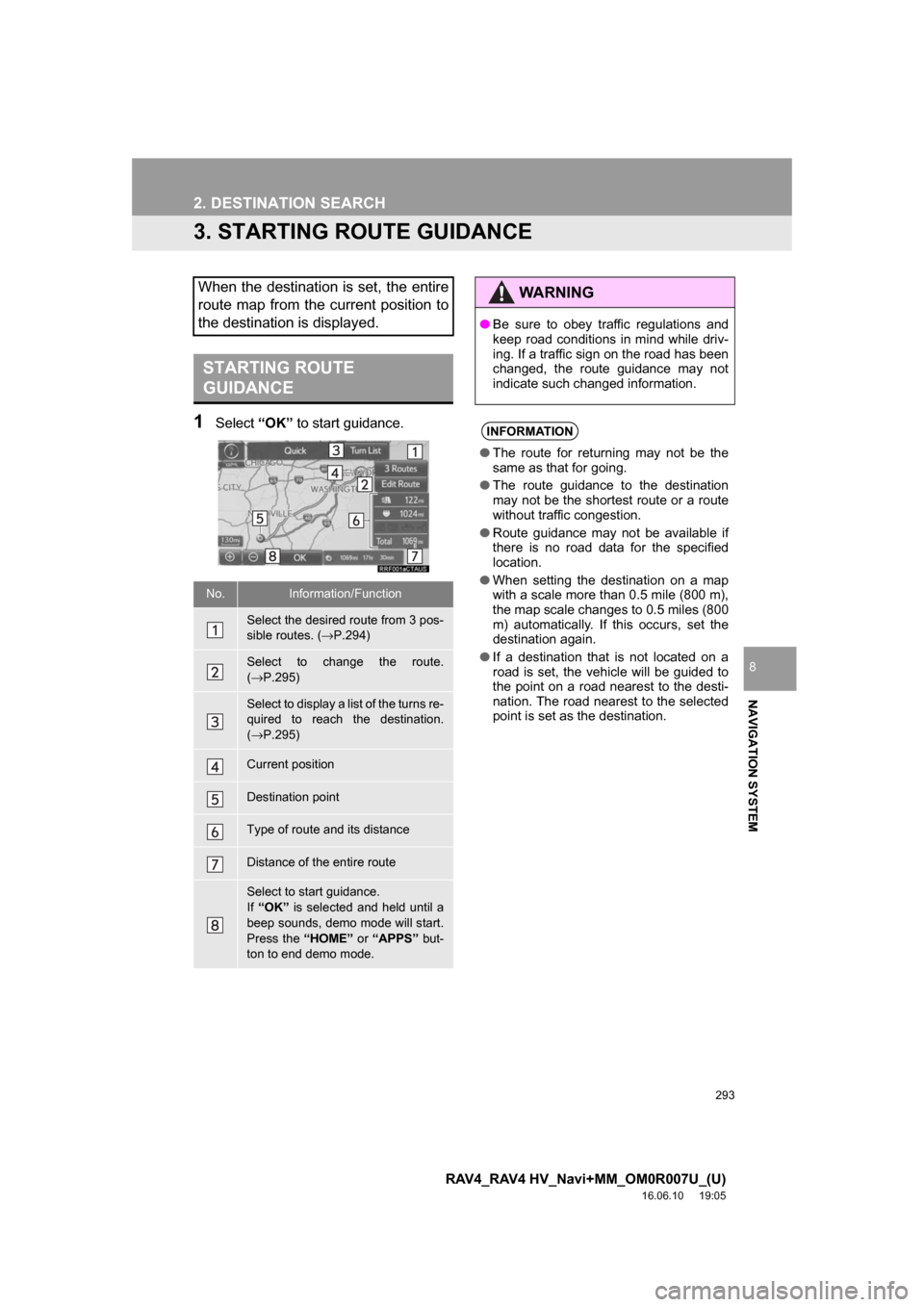
1Select“OK” to start guidance.
When the destination is set, the entire
route map from the current position to
the destination is displayed.
STARTING ROUTE
GUIDANCE
No.Information/Function
Select the desired route from 3 pos-
sible routes. ( →P.294)
Select to change the route.
(→ P.295)
Select to display a list of the turns re-
quired to reach the destination.
(→ P.295)
Current position
Destination point
Type of route and its distance
Distance of the entire route
Select to start guidance.
If “OK” is selected and held until a
beep sounds, demo mode will start.
Press the “HOME” or “APPS” but-
ton to end demo mode.
WARNING
● Be sure to obey traffic regulations and
keep road conditions in mind while driv-
ing. If a traffic sign on the road has been
changed, the route guidance may not
indicate such changed information.
INFORMATION
●The route for returning may not be the
same as that for going.
● The route guidance to the destination
may not be the shortest route or a route
without traffic congestion.
● Route guidance may not be available if
there is no road data for the specified
location.
● When setting the destination on a map
with a scale more than 0.5 mile (800 m),
the map scale changes to 0.5 miles (800
m) automatically. If this occurs, set the
destination again.
● If a destination that is not located on a
road is set, the vehicle will be guided to
the point on a road nearest to the desti-
nation. The road nearest to the selected
point is set as the destination.
Page 302 of 366
302
3. ROUTE GUIDANCE
RAV4_RAV4 HV_Navi+MM_OM0R007U_(U)
16.06.10 19:05
2. TYPICAL VOICE GUIDANCE PROMPTS
As the vehicle approaches an intersec-
tion, or point, where maneuvering the
vehicle is necessary, the system’s
voice guidance will provide various
messages.
WARNING
●Be sure to obey the traffic regulations
and keep the road condition in mind
especially when you are driving on IPD
roads (roads that are not completely dig-
itized in our database). The route guid-
ance may not have the updated
information such as the direction of a
one way street.
INFORMATION
●If a voice guidance command cannot be
heard, select on the map screen
to hear it again.
● To adjust the voice guidance volume:
→P. 6 3
● Voice guidance may be made early or
late.
● If the system cannot determine the cur-
rent position correctly, you may not hear
voice guidance or may not see the mag-
nified intersection on the screen.
Page 318 of 366
318
RAV4_RAV4 HV_Navi+MM_OM0R007U_(U)
16.06.10 19:05
5. SETUP
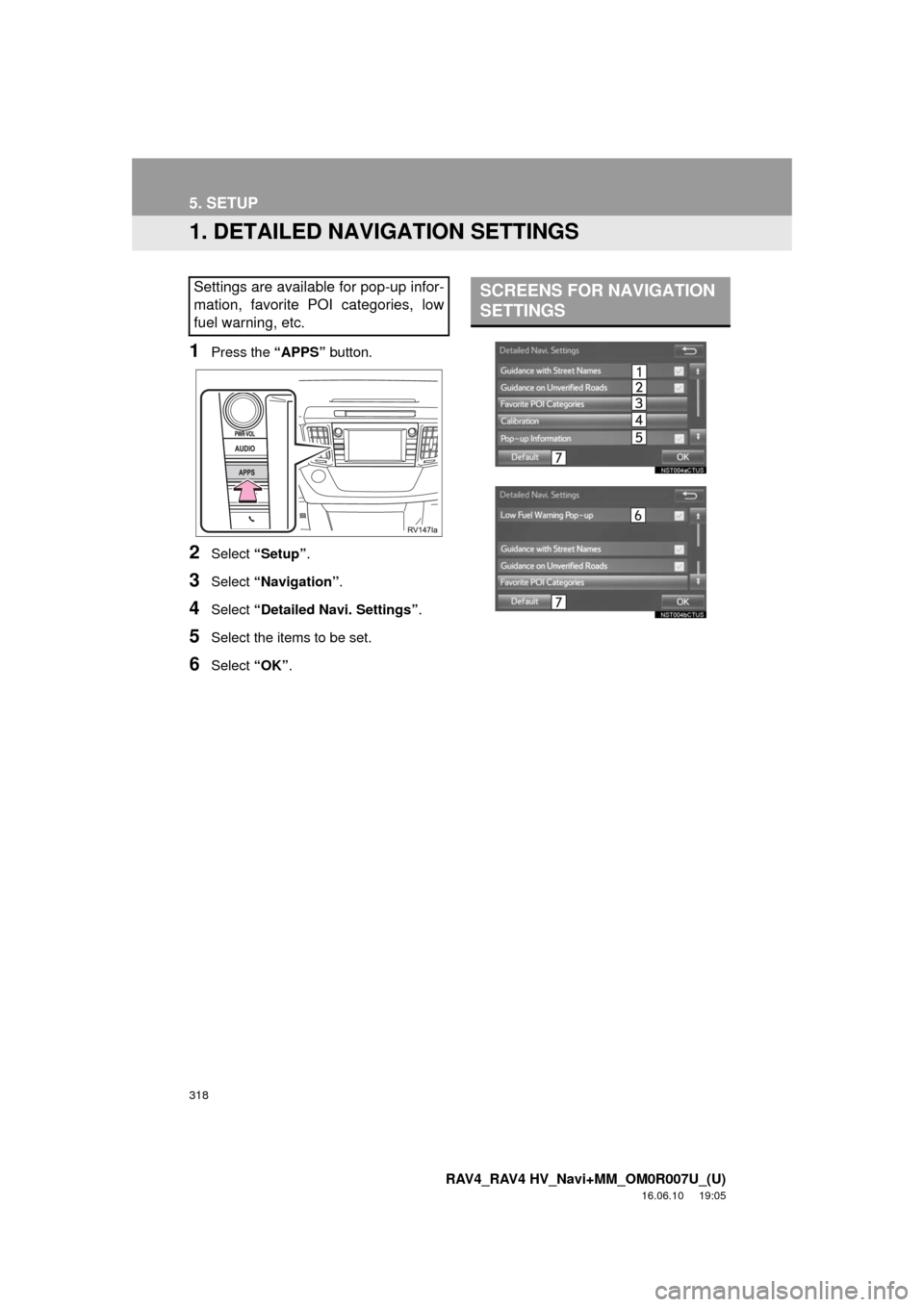
1. DETAILED NAVIGATION SETTINGS
1Press the “APPS” button.
2Select “Setup” .
3Select “Navigation” .
4Select “Detailed Navi. Settings” .
5Select the items to be set.
6Select “OK”.
Settings are available for pop-up infor-
mation, favorite POI categories, low
fuel warning, etc.SCREENS FOR NAVIGATION
SETTINGS
Page 319 of 366
319
5. SETUP
RAV4_RAV4 HV_Navi+MM_OM0R007U_(U)
16.06.10 19:05
NAVIGATION SYSTEM
8
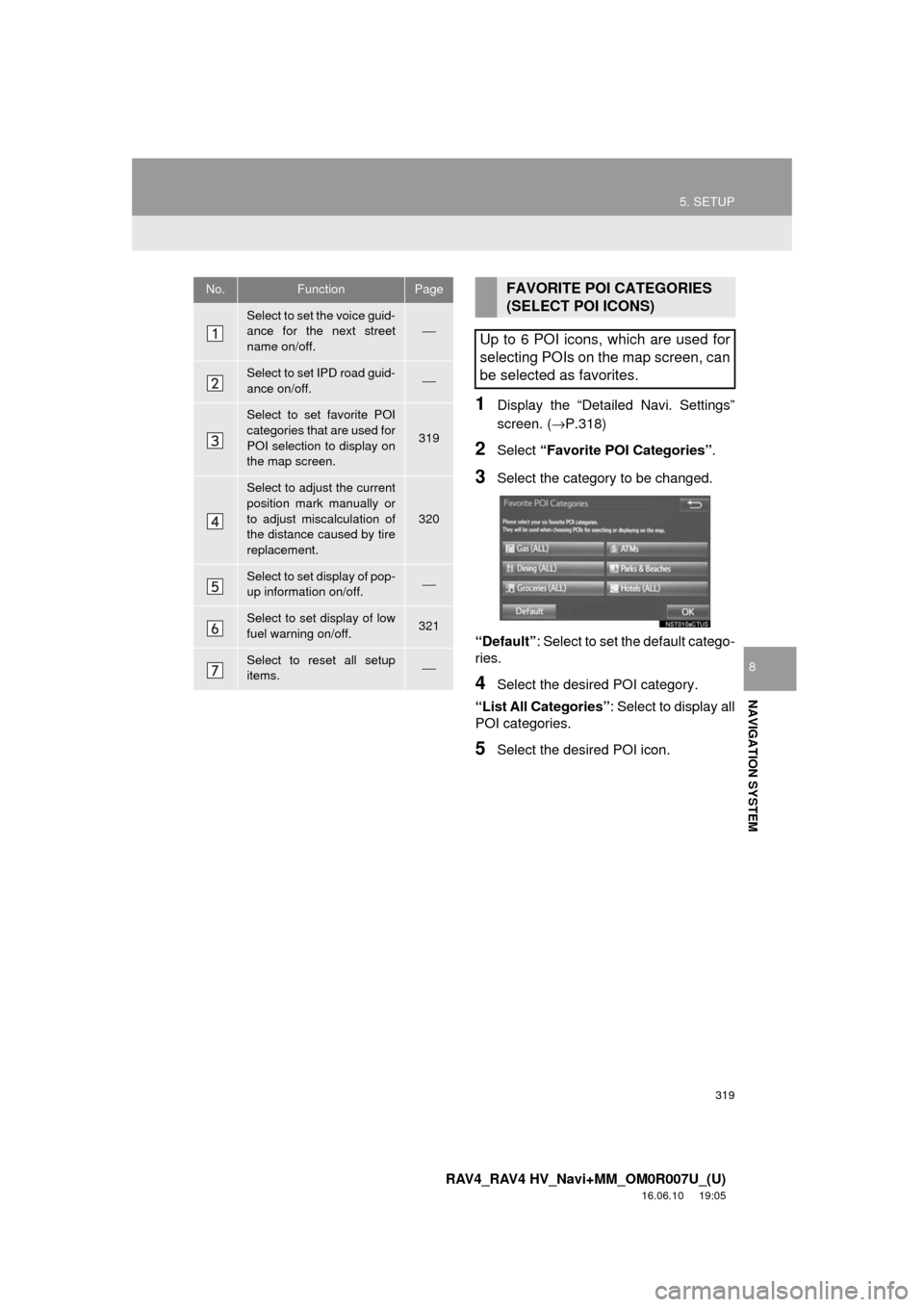
1Display the “Detailed Navi. Settings”
screen. (→P.318)
2Select “Favorite POI Categories” .
3Select the category to be changed.
“Default” : Select to set the default catego-
ries.
4Select the desired POI category.
“List All Categories”: Select to display all
POI categories.
5Select the desired POI icon.
No.FunctionPage
Select to set the voice guid-
ance for the next street
name on/off.⎯
Select to set IPD road guid-
ance on/off.⎯
Select to set favorite POI
categories that are used for
POI selection to display on
the map screen.
319
Select to adjust the current
position mark manually or
to adjust miscalculation of
the distance caused by tire
replacement.
320
Select to set display of pop-
up information on/off.⎯
Select to set display of low
fuel warning on/off.321
Select to reset all setup
items.⎯
FAVORITE POI CATEGORIES
(SELECT POI ICONS)
Up to 6 POI icons, which are used for
selecting POIs on the map screen, can
be selected as favorites.
Page 321 of 366
321
5. SETUP
RAV4_RAV4 HV_Navi+MM_OM0R007U_(U)
16.06.10 19:05
NAVIGATION SYSTEM
8
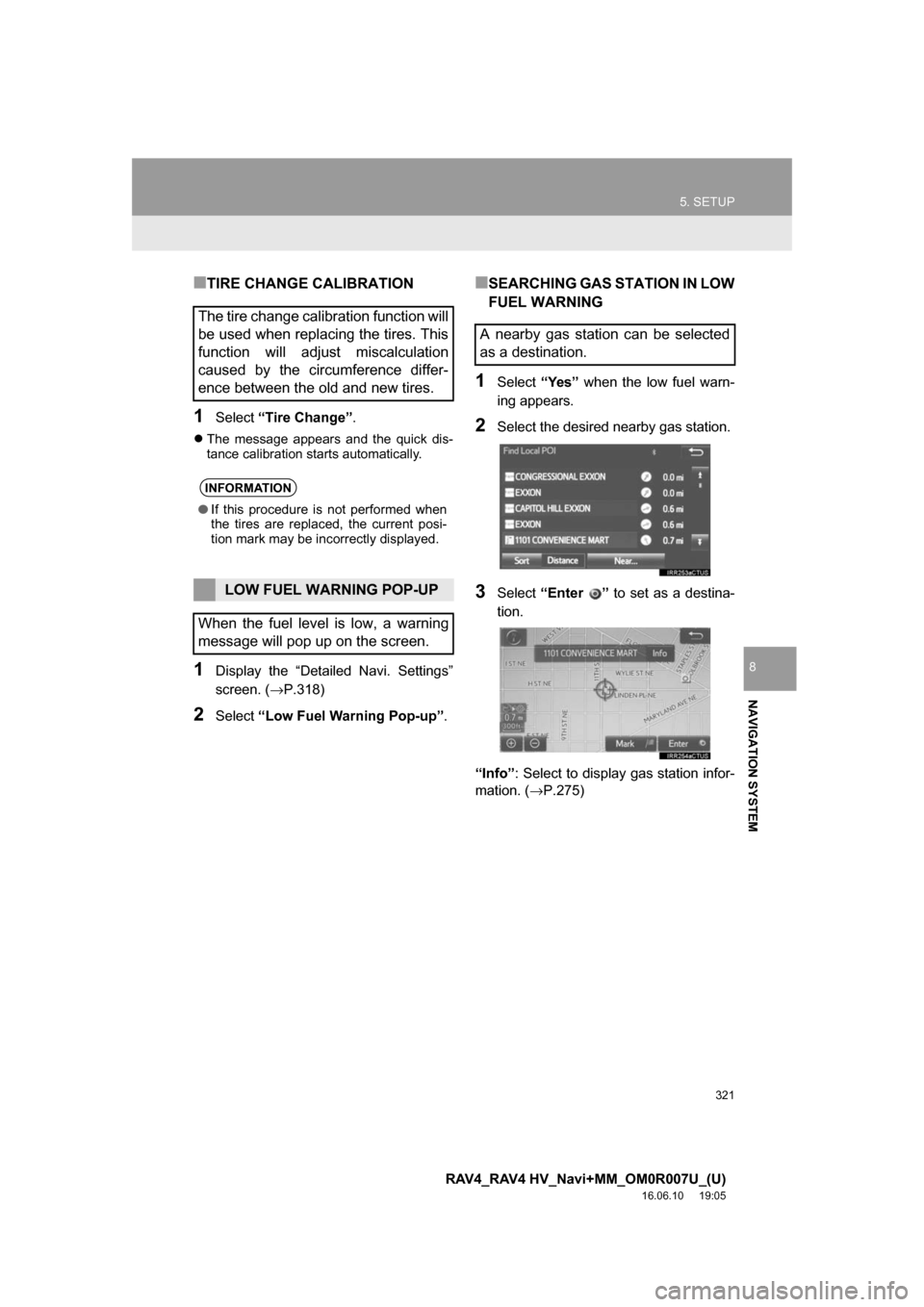
■TIRE CHANGE CALIBRATION
1Select“Tire Change”.
The message appears and the quick dis-
tance calibration starts automatically.
1Display the “Detailed Navi. Settings”
screen. ( →P.318)
2Select“Low Fuel Warning Pop-up” .
■SEARCHING GAS STATION IN LOW
FUEL WARNING
1Select“Yes” when the low fuel warn-
ing appears.
2Select the desired nearby gas station.
3Select “Enter ” to set as a destina-
tion.
“Info” : Select to display gas station infor-
mation. ( →P.275)
The tire change calibration function will
be used when replacing the tires. This
function will adjust miscalculation
caused by the circumference differ-
ence between the old and new tires.
INFORMATION
●If this procedure is not performed when
the tires are replaced, the current posi-
tion mark may be incorrectly displayed.
LOW FUEL WARNING POP-UP
When the fuel level is low, a warning
message will pop up on the screen.
A nearby gas station can be selected
as a destination.
Page 322 of 366
322
5. SETUP
RAV4_RAV4 HV_Navi+MM_OM0R007U_(U)
16.06.10 19:05
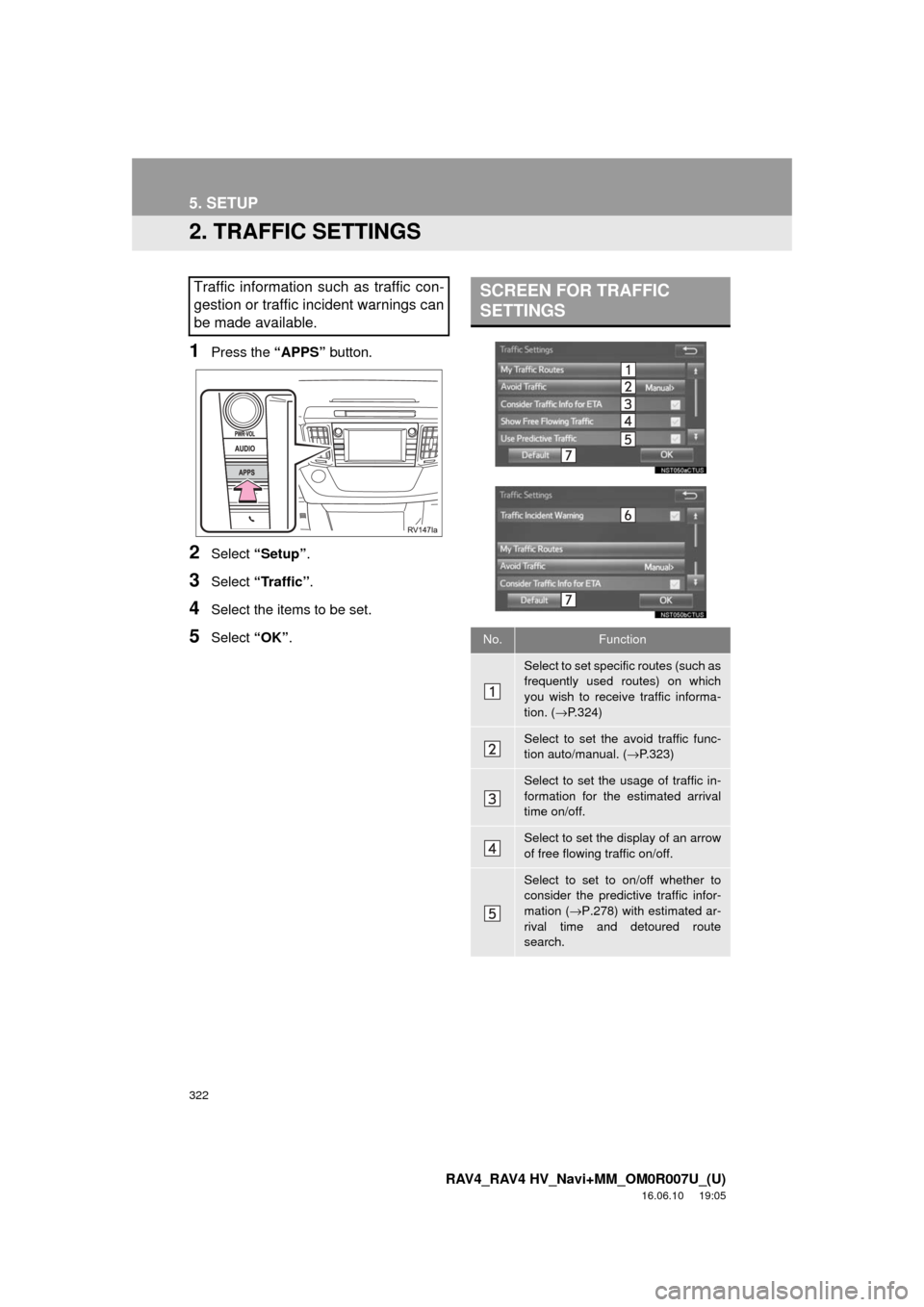
2. TRAFFIC SETTINGS
1Press the “APPS” button.
2Select “Setup” .
3Select “Traffic”.
4Select the items to be set.
5Select “OK”.
Traffic information such as traffic con-
gestion or traffic incident warnings can
be made available. SCREEN FOR TRAFFIC
SETTINGS
No.Function
Select to set specific routes (such as
frequently used routes) on which
you wish to receive traffic informa-
tion. ( →P.324)
Select to set the avoid traffic func-
tion auto/manual. ( →P.323)
Select to set the usage of traffic in-
formation for the estimated arrival
time on/off.
Select to set the display of an arrow
of free flowing traffic on/off.
Select to set to on/off whether to
consider the predictive traffic infor-
mation ( →P.278) with estimated ar-
rival time and detoured route
search.