audio TOYOTA RAV4 2017 XA40 / 4.G User Guide
[x] Cancel search | Manufacturer: TOYOTA, Model Year: 2017, Model line: RAV4, Model: TOYOTA RAV4 2017 XA40 / 4.GPages: 741, PDF Size: 19.55 MB
Page 196 of 741
196
RAV4_OM_OM0R005U_(U)
4-2. Driving procedures
Engine (ignition) switch (vehicles without
smart key system)
Check that the parking brake is set.
Check that the shift lever is set in P.
Firmly depress the brake pedal.
Turn the engine switch to the “START” position to start the engine.
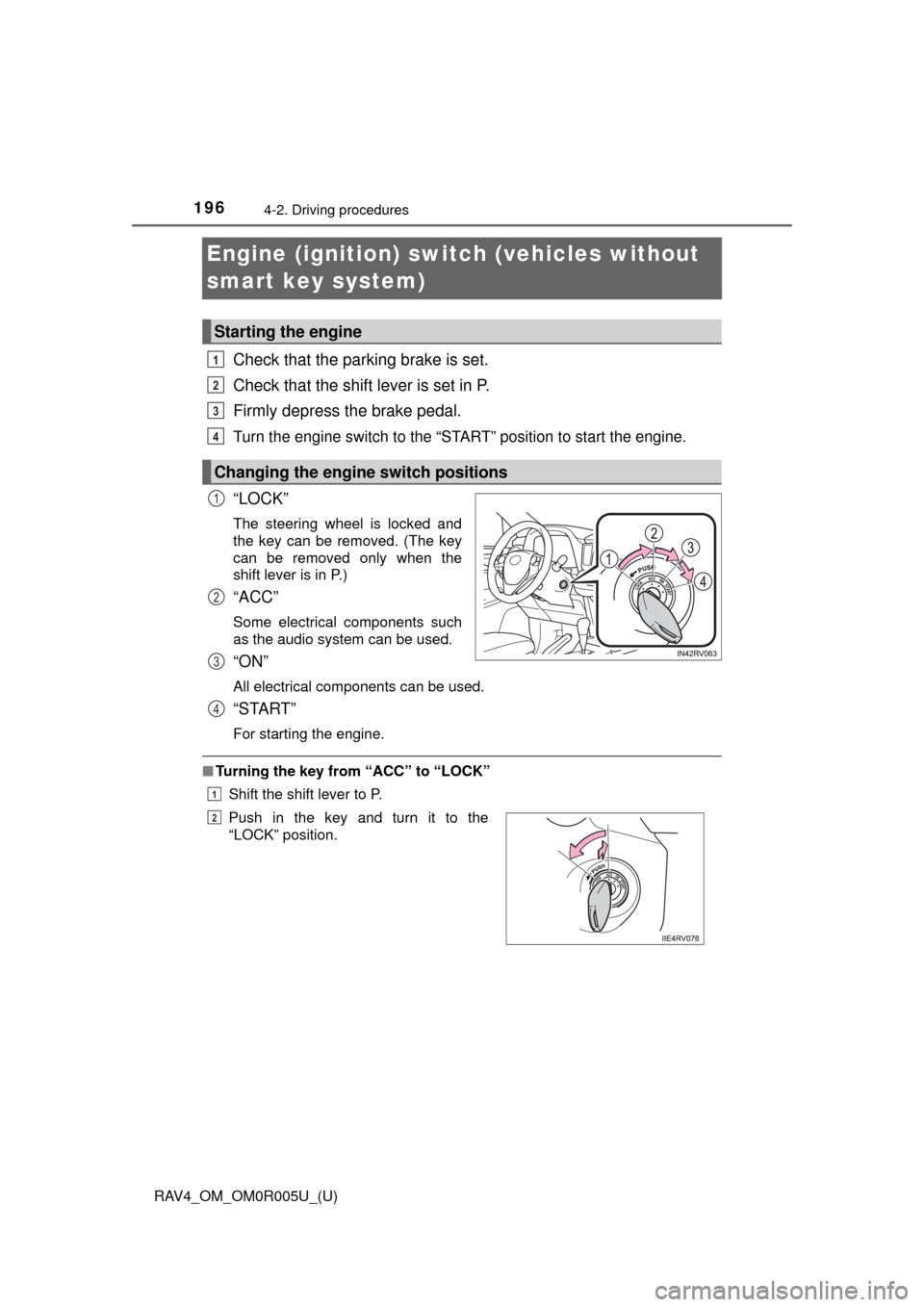
“LOCK”
The steering wheel is locked and
the key can be removed. (The key
can be removed only when the
shift lever is in P.)
“ACC”
Some electrical components such
as the audio system can be used.
“ON”
All electrical components can be used.
“START”
For starting the engine.
■ Turning the key from “ACC” to “LOCK”
Shift the shift lever to P.
Starting the engine
Changing the engine switch positions
1
2
3
4
1
2
3
Push in the key and turn it to the
“LOCK” position.
4
1
2
Page 199 of 741
RAV4_OM_OM0R005U_(U)
1994-2. Driving procedures
4
Driving
Stop the vehicle completely.
Set the parking brake (→P. 212), and shift the shift lever to P.
Press the engine switch.
Release the brake pedal and check that the display on the instru-
ment cluster is off.
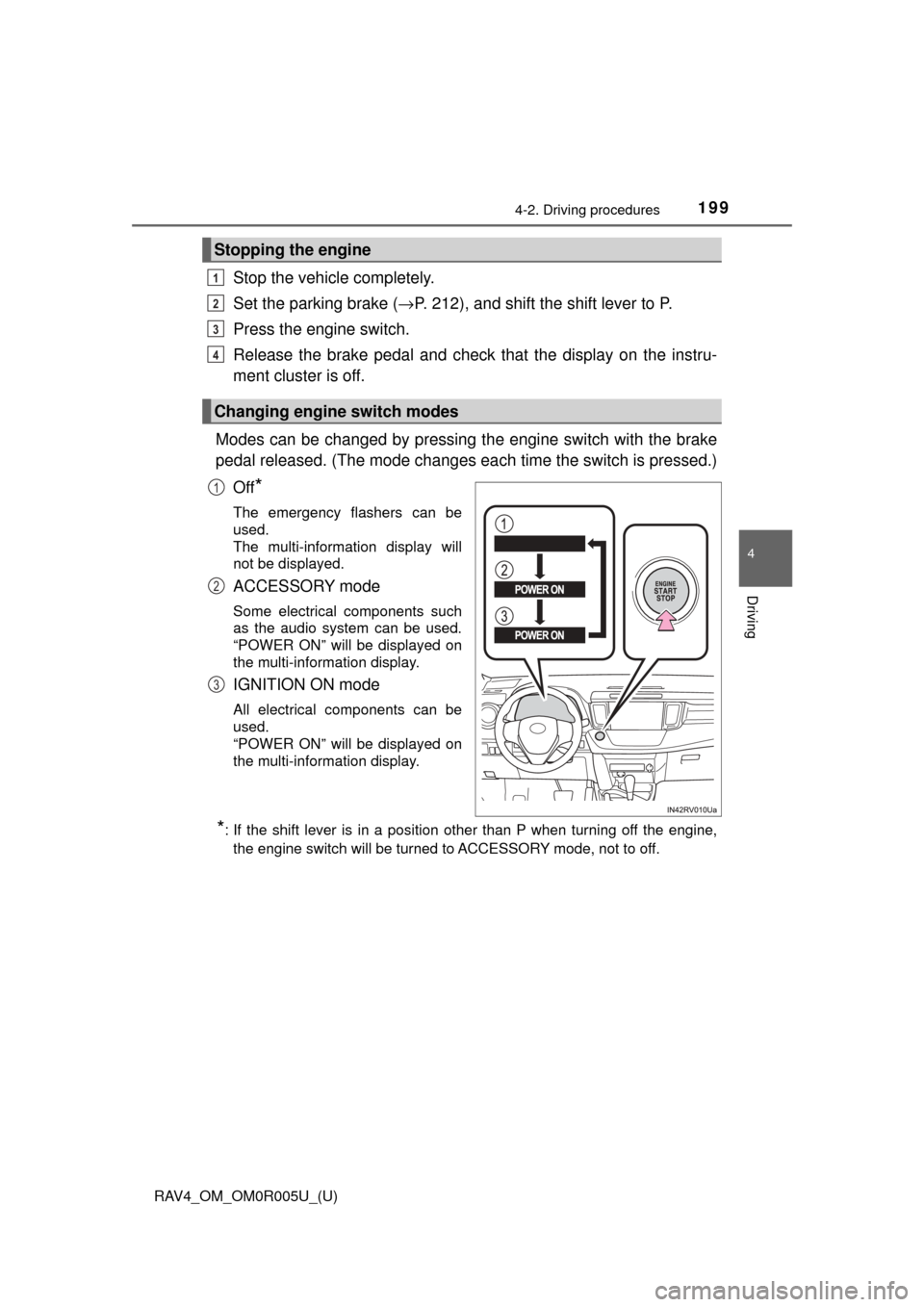
Modes can be changed by pressing th e engine switch with the brake
pedal released. (The mode changes ea ch time the switch is pressed.)
Off
*
The emergency flashers can be
used.
The multi-information display will
not be displayed.
ACCESSORY mode
Some electrical components such
as the audio system can be used.
“POWER ON” will be displayed on
the multi-information display.
IGNITION ON mode
All electrical components can be
used.
“POWER ON” will be displayed on
the multi-information display.
*: If the shift lever is in a position other than P when turning off the engine, the engine switch will be turned to ACCESSORY mode, not to off.
Stopping the engine
Changing engine switch modes
1
2
3
4
1
2
3
Page 258 of 741

258
RAV4_OM_OM0R005U_(U)
4-5. Using the driving support systems
■Operation conditions of each function
●Lane departure alert function
This function operates when all of the following conditions are met.
• LDA is turned on.
• Vehicle speed is approximately 32 mph (50 km/h) or more.
• System recognizes white (yellow) lines.
• Width of traffic lane is approximately 9.8 ft. (3 m) or more.
• Turn signal lever is not operated.
• Vehicle is driven on a straight road or around a gentle curve with a radius
of more than approximately 492 ft. (150 m).
• No system malfunctions are detected. (→P. 626)
● Steering control function
This function operates when all of the following conditions are met in addi-
tion to the operation conditions for the lane departure alert function.
• Setting for “Steering Assist” in on the multi-information display is
set to “On”. ( →P. 695)
• Vehicle is not accelerated or decelerated by a fixed amount or more.
• Steering wheel is not operated with a steering force level suitable for changing lanes.
• ABS, VSC, TRAC and PCS are not operating.
• TRAC or VSC is not turned off.
● Vehicle sway warning
This function operates when all of the following conditions are met.
• Setting for “Sway Warning” in on the multi-information display is set
to “On”. (→P. 695)
• Vehicle speed is approximately 32 mph (50 km/h) or more.
• Width of traffic lane is approximately 9.8 ft. (3 m) or more.
• No system malfunctions are detected. (→P. 626)
■ Temporary cancellation of functions
When operation conditions are no longer met, a function may be temporarily\
canceled. However, when the operation conditions are met again, operation
of the function is automatically restored. (→P. 258)
■ Steering control function
Depending on the vehicle speed, lane departure situation, road conditions,
etc., the driver may not feel the function is operating or the function may not
operate at all.
■ Lane departure alert function
The warning buzzer may be difficult to hear due to external noise, audio play-
back, etc.
■ Hands off steering wheel alert
When the system determines that the driver has removed his hands from the
steering wheel while the steering control function is operating, a warning
message is displayed on the multi-information display and the buzzer
sounds.
Page 282 of 741
282
RAV4_OM_OM0R005U_(U)
4-5. Using the driving support systems
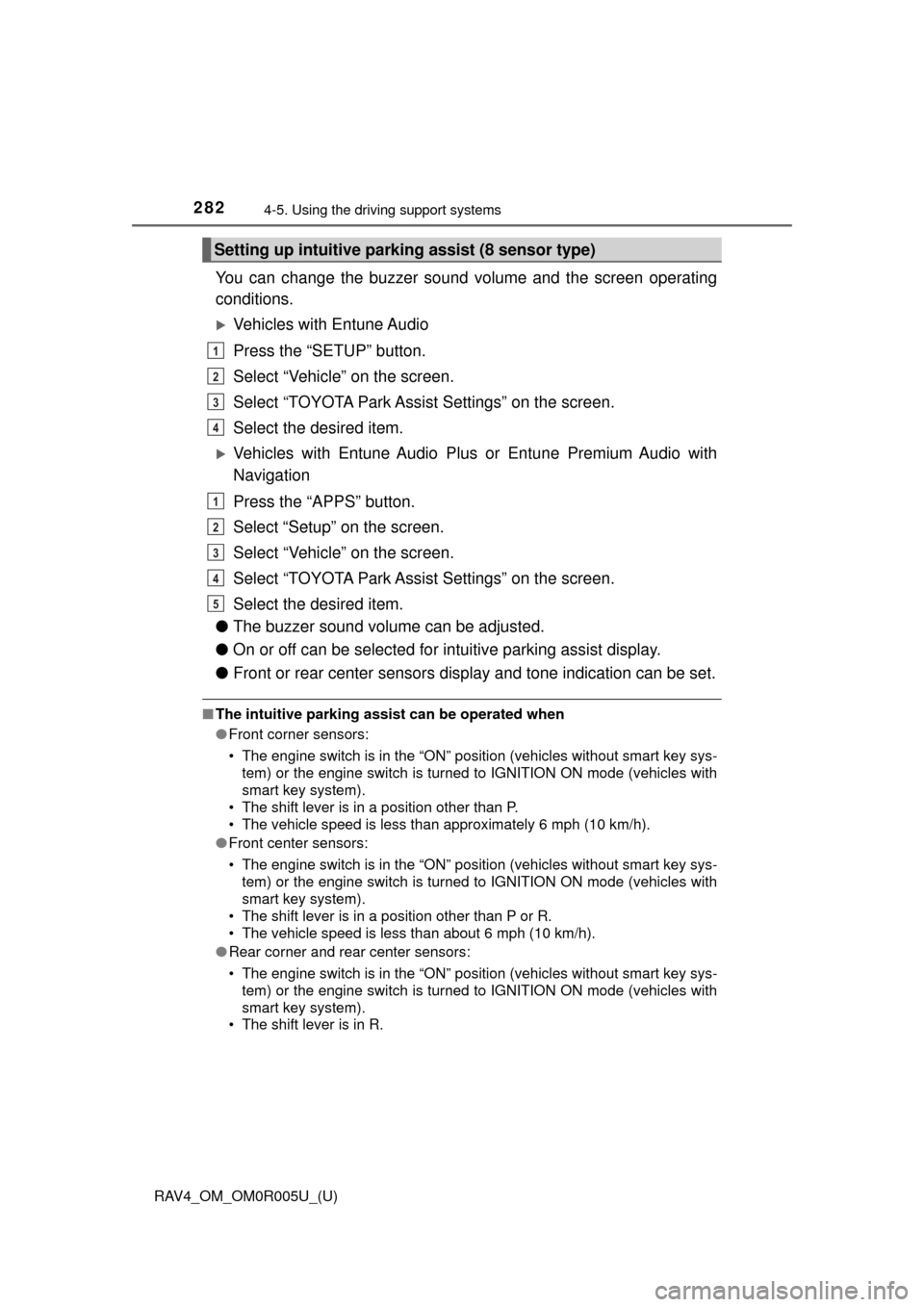
You can change the buzzer sound volume and the screen operating
conditions.
Vehicles with Entune Audio
Press the “SETUP” button.
Select “Vehicle” on the screen.
Select “TOYOTA Park Assi st Settings” on the screen.
Select the desired item.
Vehicles with Entune Audio Pl us or Entune Premium Audio with
Navigation
Press the “APPS” button.
Select “Setup” on the screen.
Select “Vehicle” on the screen.
Select “TOYOTA Park Assi st Settings” on the screen.
Select the desired item.
● The buzzer sound volume can be adjusted.
● On or off can be selected for intuitive parking assist display.
● Front or rear center sensors display and tone indication can be set.
■The intuitive parking assist can be operated when
●Front corner sensors:
• The engine switch is in the “ON” position (vehicles without smart \
key sys-
tem) or the engine switch is turned to IGNITION ON mode (vehicles with
smart key system).
• The shift lever is in a position other than P.
• The vehicle speed is less than approximately 6 mph (10 km/h).
● Front center sensors:
• The engine switch is in the “ON” position (vehicles without smart \
key sys-
tem) or the engine switch is turned to IGNITION ON mode (vehicles with
smart key system).
• The shift lever is in a position other than P or R.
• The vehicle speed is less than about 6 mph (10 km/h).
● Rear corner and rear center sensors:
• The engine switch is in the “ON” position (vehicles without smart \
key sys-
tem) or the engine switch is turned to IGNITION ON mode (vehicles with
smart key system).
• The shift lever is in R.
Setting up intuitive parking assist (8 sensor type)
1
2
3
4
1
2
3
4
5
Page 284 of 741

284
RAV4_OM_OM0R005U_(U)
4-5. Using the driving support systems
●The following situations may occur during use:
• Depending on the shape of the obstacle and other factors, the detection
distance may shorten, or detection may be impossible.
• Obstacles may not be detected if they are too close to the sensor.
• There will be a short delay between obstacle detection and indicator. Even at slow speeds, there is a possibility that the obstacle will come
within the sensor’s detection areas before the indicator comes on and the
warning beep sounds.
• Thin posts or objects lower than the sensor may not be detected when approached, even if they have been detected once.
• It might be difficult to hear beeps due to the volume of audio system or air flow noise of the air conditioning system.
■ When the system malfunctions
4 sensor type
● If the vehicle indicator remains on while the rear corner and rear center indi-
cators flash and the malfunction beep sounds for approximately 7 seconds,
have the vehicle inspected by your Toyota dealer.
● If the vehicle indicator and the rear corner and rear center indicators flash
and the malfunction beep sounds for approximately 7 seconds, clean the
sensors with soft cloth.
8 sensor type
A message is displayed on the multi-information display: →P. 627
■ Customization
Setting of buzzer volume can be changed.
(Customizable features
→P. 700)
■ Certification (Canada only)
This ISM device complies with Canadian ICES-001.
Page 298 of 741
298
RAV4_OM_OM0R005U_(U)
4-5. Using the driving support systems
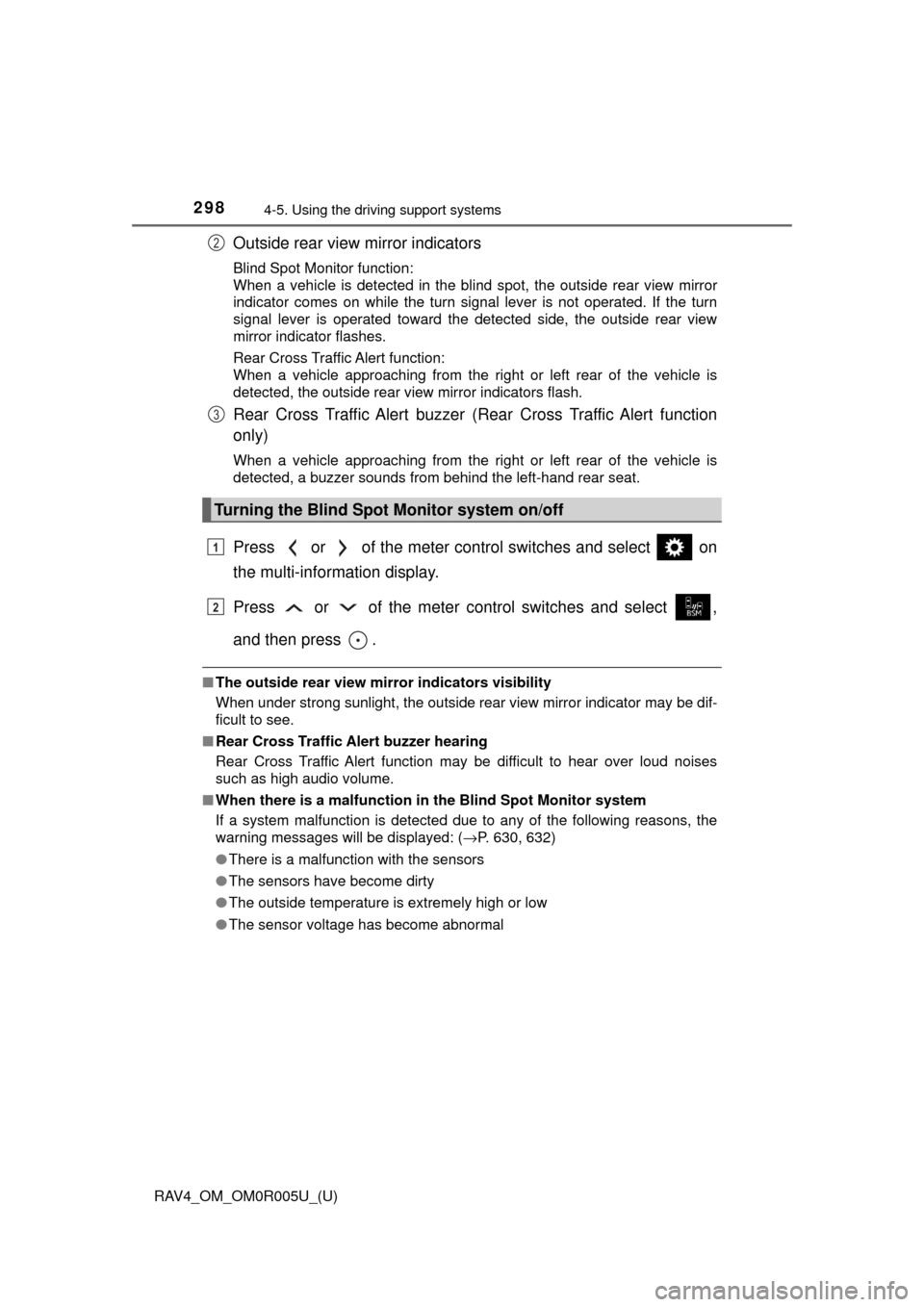
Outside rear view mirror indicators
Blind Spot Monitor function:
When a vehicle is detected in the blind spot, the outside rear view mirror
indicator comes on while the turn signal lever is not operated. If the turn
signal lever is operated toward the detected side, the outside rear view
mirror indicator flashes.
Rear Cross Traffic Alert function:
When a vehicle approaching from the right or left rear of the vehicle is
detected, the outside rear view mirror indicators flash.
Rear Cross Traffic Alert buzzer (Rear Cross Traffic Alert function
only)
When a vehicle approaching from the right or left rear of the vehicle is
detected, a buzzer sounds from behind the left-hand rear seat.
Press or of the meter control switches and select on
the multi-information display.
Press or of the meter control switches and select ,
and then press .
■The outside rear view mirror indicators visibility
When under strong sunlight, the outside rear view mirror indicator may be dif-
ficult to see.
■ Rear Cross Traffic Alert buzzer hearing
Rear Cross Traffic Alert function may be difficult to hear over loud noises
such as high audio volume.
■ When there is a malfunction in the Blind Spot Monitor system
If a system malfunction is detected due to any of the following reasons, the
warning messages will be displayed: ( →P. 630, 632)
● There is a malfunction with the sensors
● The sensors have become dirty
● The outside temperature is extremely high or low
● The sensor voltage has become abnormal
Turning the Blind Spot Monitor system on/off
2
3
1
2
Page 323 of 741

322
RAV4_OM_OM0R005U_(U)
5-1. Basic OperationsAudio system types ........... 324
Using the steering wheel audio switches ................ 327
AUX port/USB port ............ 330
5-2. Using the audio system Optimal use of the audio system ................... 332
5-3. Using the radio Radio operation ................. 334
5-4. Playing an audio CD and MP3/WMA discs
CD player operation .......... 336
5-5. Using an external device Listening to an iPod .......... 346
Listening to USB memory device................ 352
Using the AUX port ........... 358
5-6. Using Bluetooth
® devices
Bluetooth® audio/
phone .............................. 359
Using the steering wheel switches ................ 364
Register a Bluetooth
®
device.............................. 365
5-7. “SETUP” menu Using the “SETUP” menu (“Bluetooth
*” menu) ........ 366
Using the “SETUP” menu (“PHONE” menu) ............ 371 5-8. Bluetooth
® Audio
Operating a Bluetooth®
enabled portable
player .............................. 376
5-9. Bluetooth
® Phone
Making a phone call .......... 379
When receiving a phone call ....................... 381
Speaking on the phone ..... 382
5-10. Bluetooth
®
Bluetooth®......................... 384
5-11. Using the audio system (Entune Audio)
Audio system (Entune Audio) ................ 388
5-12. Basic Operations Audio system operations (Entune Audio) ................ 390
Steering wheel audio switches .......................... 392
AUX port/USB port ............ 393
Basic audio operations...... 394
5-13. Setup Setup menu....................... 396
General settings ................ 397
Audio settings ................... 399
Display settings ................. 400
Voice settings.................... 402
5-14. Using the audio system Selecting the audio source ............................. 403
List screen operation......... 404
Optimal use of the audio system ............................ 406
*: Bluetooth is a registered trademark of Bluetooth SIG, Inc.
5Audio system
Page 324 of 741
323
RAV4_OM_OM0R005U_(U)
5Audio system
5-15. Using the radioRadio operation ................. 407
5-16. Playing an audio CD and MP3/WMA/AAC discs
CD player operation .......... 409
CD player and disc information ...................... 410
5-17. Using an external device iPod player operation ........ 416
USB memory device player operation .............. 421
Using the AUX port ........... 426
5-18. Connecting Bluetooth
®
Preparations to use wireless
communication ................ 427
Registering a Bluetooth
®
audio player for the
first time .......................... 430
Registering a Bluetooth
®
phone for the
first time .......................... 431
Registering a Bluetooth
®
device.............................. 432
Connecting a Bluetooth
®
device.............................. 434
Displaying a Bluetooth
®
device details .................. 436
Detailed Bluetooth
®
settings............................ 437 5-19. Bluetooth
® Audio
Listening to Bluetooth®
Audio............................... 439
5-20. Bluetooth
® Phone
Using a Bluetooth®
Phone ............................. 441
Making a call ..................... 443
Receiving a call ................. 446
Speaking on the phone ..... 447
Bluetooth
® phone
message function ............ 450
Using the steering wheel switches ................ 455
Bluetooth
® phone
settings ........................... 456
5-21. Phonebook Contact/Call History Settings ........................... 458
5-22. Bluetooth
®
What to do if... (Troubleshooting) ............ 468
Bluetooth
®......................... 472
5-23. Other function Voice command system ............................ 478
Page 325 of 741
324
RAV4_OM_OM0R005U_(U)
5-1. Basic Operations
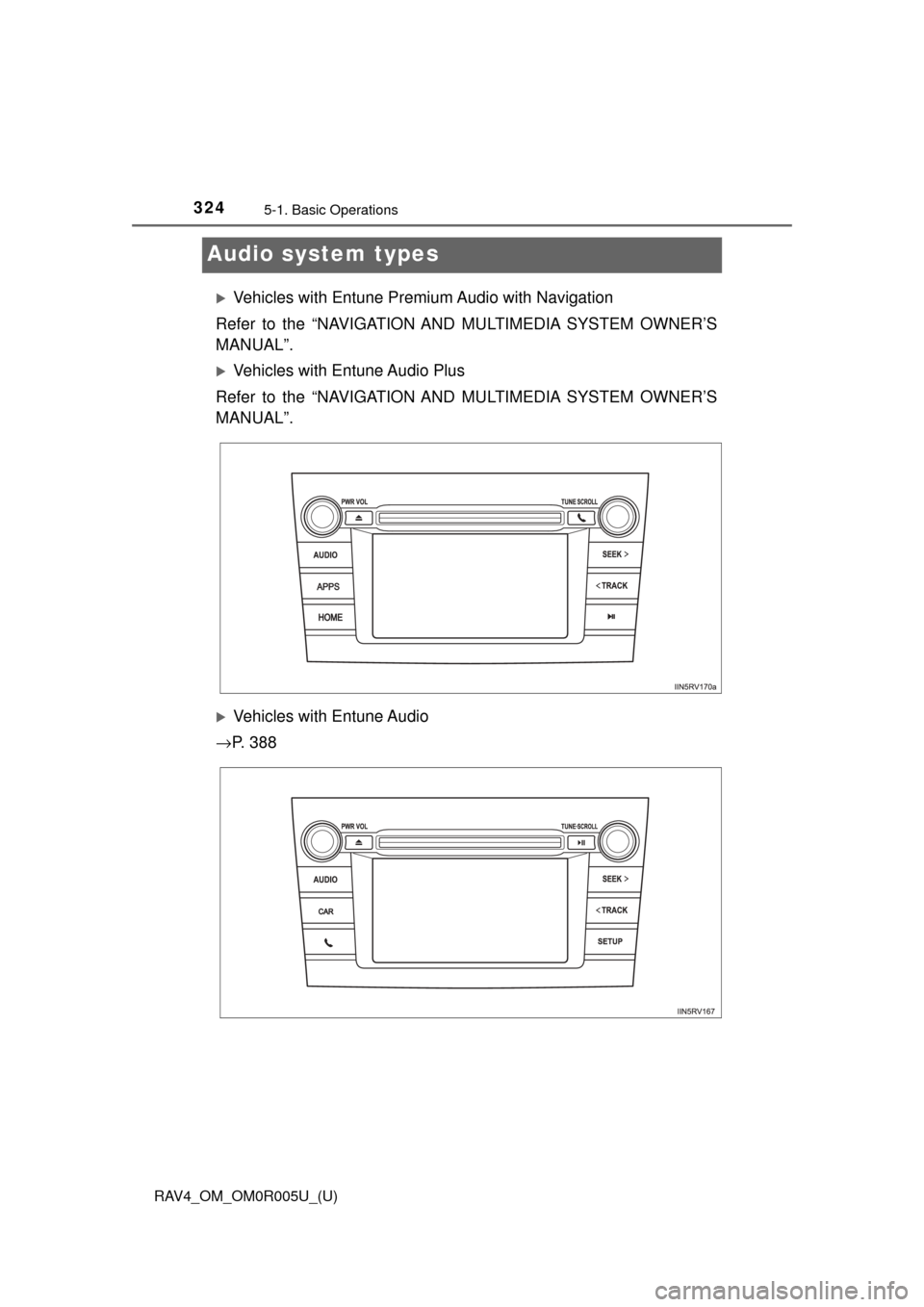
Audio system types
Vehicles with Entune Premium Audio with Navigation
Refer to the “NAVIGATION AND MULTIMEDIA SYSTEM OWNER’S
MANUAL”.
Vehicles with Entune Audio Plus
Refer to the “NAVIGATION AND MULTIMEDIA SYSTEM OWNER’S
MANUAL”.
Vehicles with Entune Audio
→ P. 3 8 8
Page 326 of 741
RAV4_OM_OM0R005U_(U)
3255-1. Basic Operations
5
Audio system
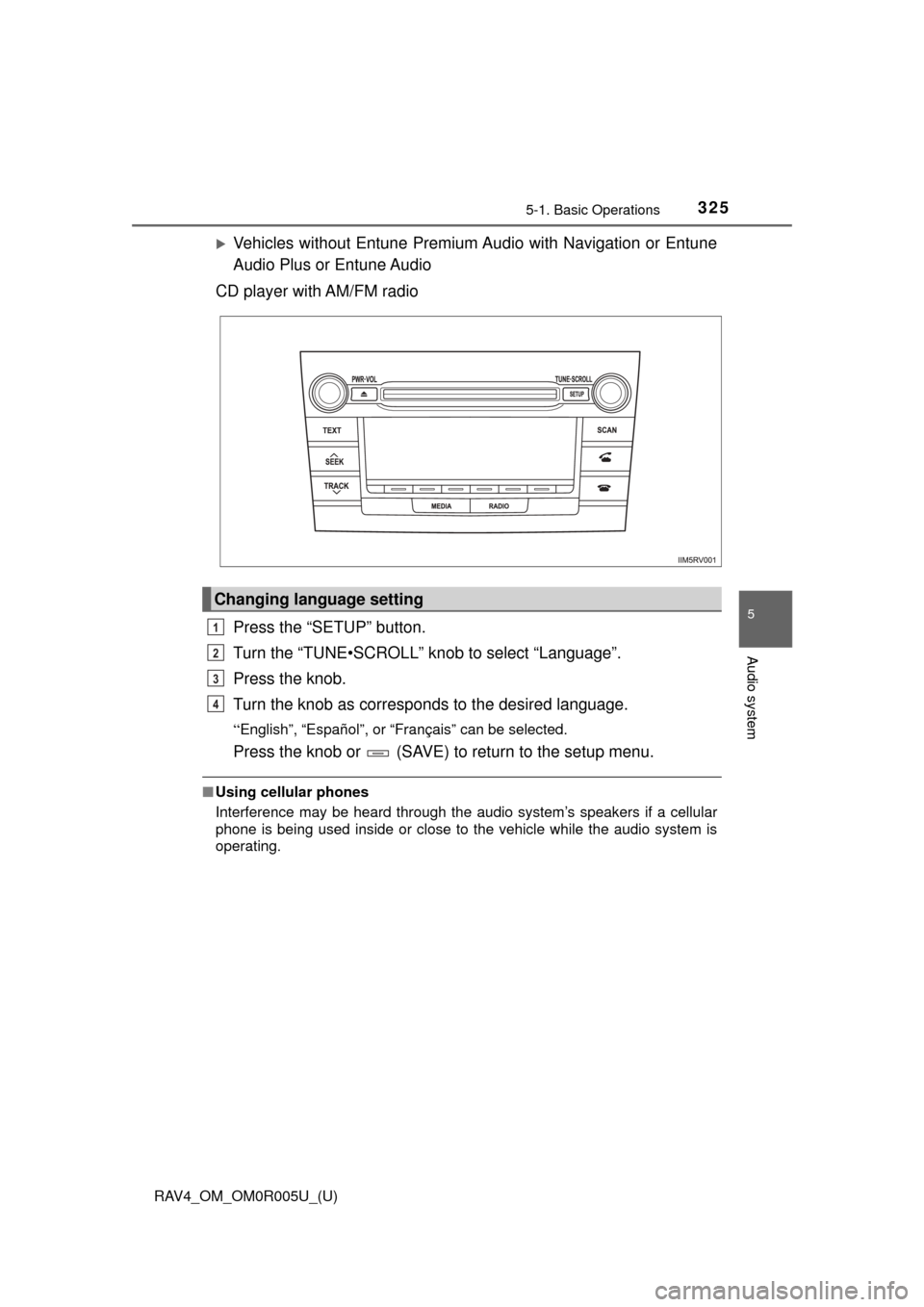
Vehicles without Entune Premium Audio with Navigation or Entune
Audio Plus or Entune Audio
CD player with AM/FM radio
Press the “SETUP” button.
Turn the “TUNE•SCROLL” knob to select “Language”.
Press the knob.
Turn the knob as corresponds to the desired language.
“English”, “Español”, or “Français” can be selected.
Press the knob or (SAVE) to return to the setup menu.
■Using cellular phones
Interference may be heard through the audio system’s speakers if a cellular
phone is being used inside or close to the vehicle while the audio system is
operating.
Changing language setting
1
2
3
4