turn signal TOYOTA RAV4 2018 Owners Manual (in English)
[x] Cancel search | Manufacturer: TOYOTA, Model Year: 2018, Model line: RAV4, Model: TOYOTA RAV4 2018Pages: 744, PDF Size: 13.78 MB
Page 3 of 744
3
RAV4_OM_OM0R012U_(U)
1
9 8
7
6 4 3
2
10
5
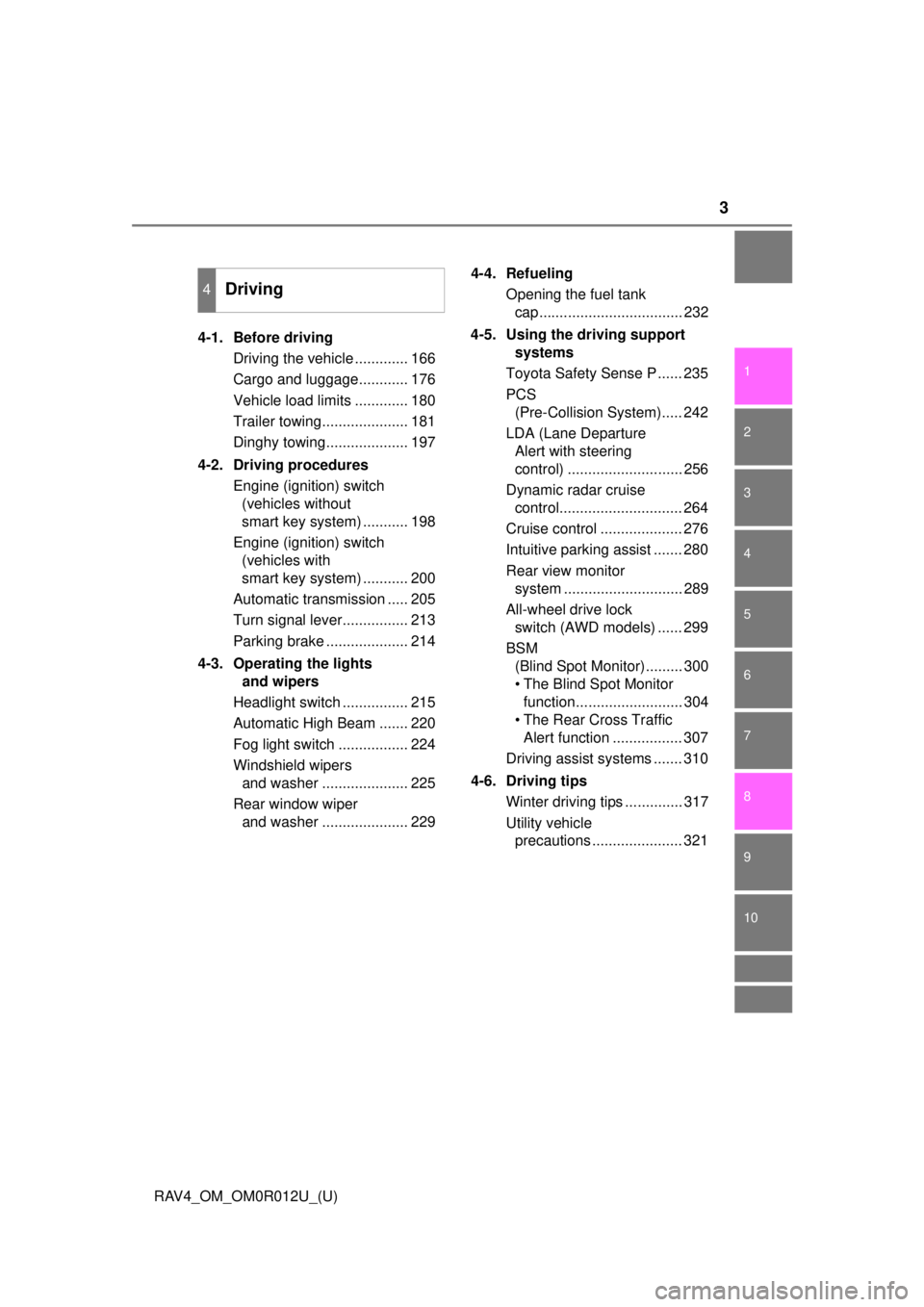
4-1. Before drivingDriving the vehicle ............. 166
Cargo and luggage............ 176
Vehicle load limits ............. 180
Trailer towing..................... 181
Dinghy towing.................... 197
4-2. Driving procedures Engine (ignition) switch (vehicles without
smart key system) ........... 198
Engine (ignition) switch (vehicles with
smart key system) ........... 200
Automatic transmission ..... 205
Turn signal lever................ 213
Parking brake .................... 214
4-3. Operating the lights and wipers
Headlight switch ................ 215
Automatic High Beam ....... 220
Fog light switch ................. 224
Windshield wipers and washer ..................... 225
Rear window wiper and washer ..................... 229 4-4. Refueling
Opening the fuel tank cap................................... 232
4-5. Using the driving support systems
Toyota Safety Sense P ...... 235
PCS (Pre-Collision System)..... 242
LDA (Lane Departure Alert with steering
control) ............................ 256
Dynamic radar cruise control.............................. 264
Cruise control .................... 276
Intuitive parking assist ....... 280
Rear view monitor system ............................. 289
All-wheel drive lock switch (AWD models) ...... 299
BSM (Blind Spot Monitor)......... 300
• The Blind Spot Monitor function.......................... 304
• The Rear Cross Traffic Alert function ................. 307
Driving assist systems ....... 310
4-6. Driving tips Winter driving tips .............. 317
Utility vehicle precautions ...................... 321
4Driving
Page 15 of 744
15Pictorial index
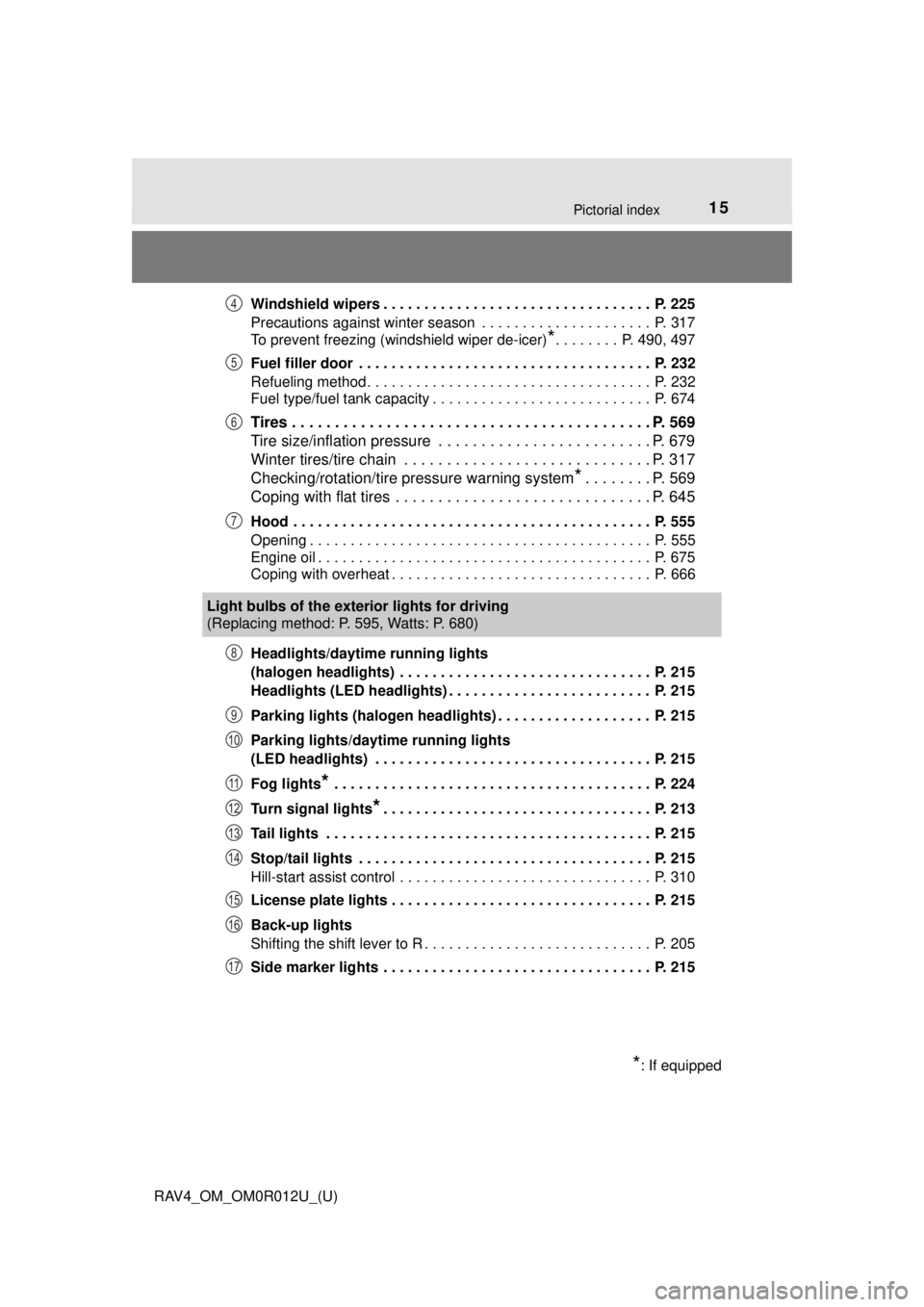
RAV4_OM_OM0R012U_(U)Windshield wipers . . . . . . . . . . . . . . . . . . . . . . . . . . . . . . . . . P. 225
Precautions against winter season . . . . . . . . . . . . . . . . . . . . . P. 317
To prevent freezing (windshield wiper de-icer)
*. . . . . . . . P. 490, 497
Fuel filler door . . . . . . . . . . . . . . . . . . . . . . . . . . . . . . . . . . . . P. 232
Refueling method . . . . . . . . . . . . . . . . . . . . . . . . . . . . . . . . . . . P. 232
Fuel type/fuel tank capacity . . . . . . . . . . . . . . . . . . . . . . . . . . . P. 674
Tires . . . . . . . . . . . . . . . . . . . . . . . . . . . . . . . . . . . . . . . . . . P. 569
Tire size/inflation pressure . . . . . . . . . . . . . . . . . . . . . . . . . P. 679
Winter tires/tire chain . . . . . . . . . . . . . . . . . . . . . . . . . . . . . P. 317
Checking/rotation/tire pressure warning system
*. . . . . . . . P. 569
Coping with flat tires . . . . . . . . . . . . . . . . . . . . . . . . . . . . . . P. 645
Hood . . . . . . . . . . . . . . . . . . . . . . . . . . . . . . . . . . . . . . . . . . . . P. 555
Opening . . . . . . . . . . . . . . . . . . . . . . . . . . . . . . . . . . . . . . . . . . P. 555
Engine oil . . . . . . . . . . . . . . . . . . . . . . . . . . . . . . . . . . . . . . . . . P. 675
Coping with overheat . . . . . . . . . . . . . . . . . . . . . . . . . . . . . . . . P. 666
Headlights/daytime running lights
(halogen headlights) . . . . . . . . . . . . . . . . . . . . . . . . . . . . . . . P. 215
Headlights (LED headlights) . . . . . . . . . . . . . . . . . . . . . . . . . P. 215
Parking lights (halogen headlights) . . . . . . . . . . . . . . . . . . . P. 215
Parking lights/daytime running lights
(LED headlights) . . . . . . . . . . . . . . . . . . . . . . . . . . . . . . . . . . P. 215
Fog lights
* . . . . . . . . . . . . . . . . . . . . . . . . . . . . . . . . . . . . . . . P. 224
Turn signal lights
*. . . . . . . . . . . . . . . . . . . . . . . . . . . . . . . . . P. 213
Tail lights . . . . . . . . . . . . . . . . . . . . . . . . . . . . . . . . . . . . . . . . P. 215
Stop/tail lights . . . . . . . . . . . . . . . . . . . . . . . . . . . . . . . . . . . . P. 215
Hill-start assist control . . . . . . . . . . . . . . . . . . . . . . . . . . . . . . . P. 310
License plate lights . . . . . . . . . . . . . . . . . . . . . . . . . . . . . . . . P. 215
Back-up lights
Shifting the shift lever to R . . . . . . . . . . . . . . . . . . . . . . . . . . . . P. 205
Side marker lights . . . . . . . . . . . . . . . . . . . . . . . . . . . . . . . . . P. 215
4
5
6
7
Light bulbs of the exter ior lights for driving
(Replacing method: P. 595, Watts: P. 680)
*: If equipped
8
9
10
11
12
13
14
15
16
17
Page 17 of 744
17Pictorial index
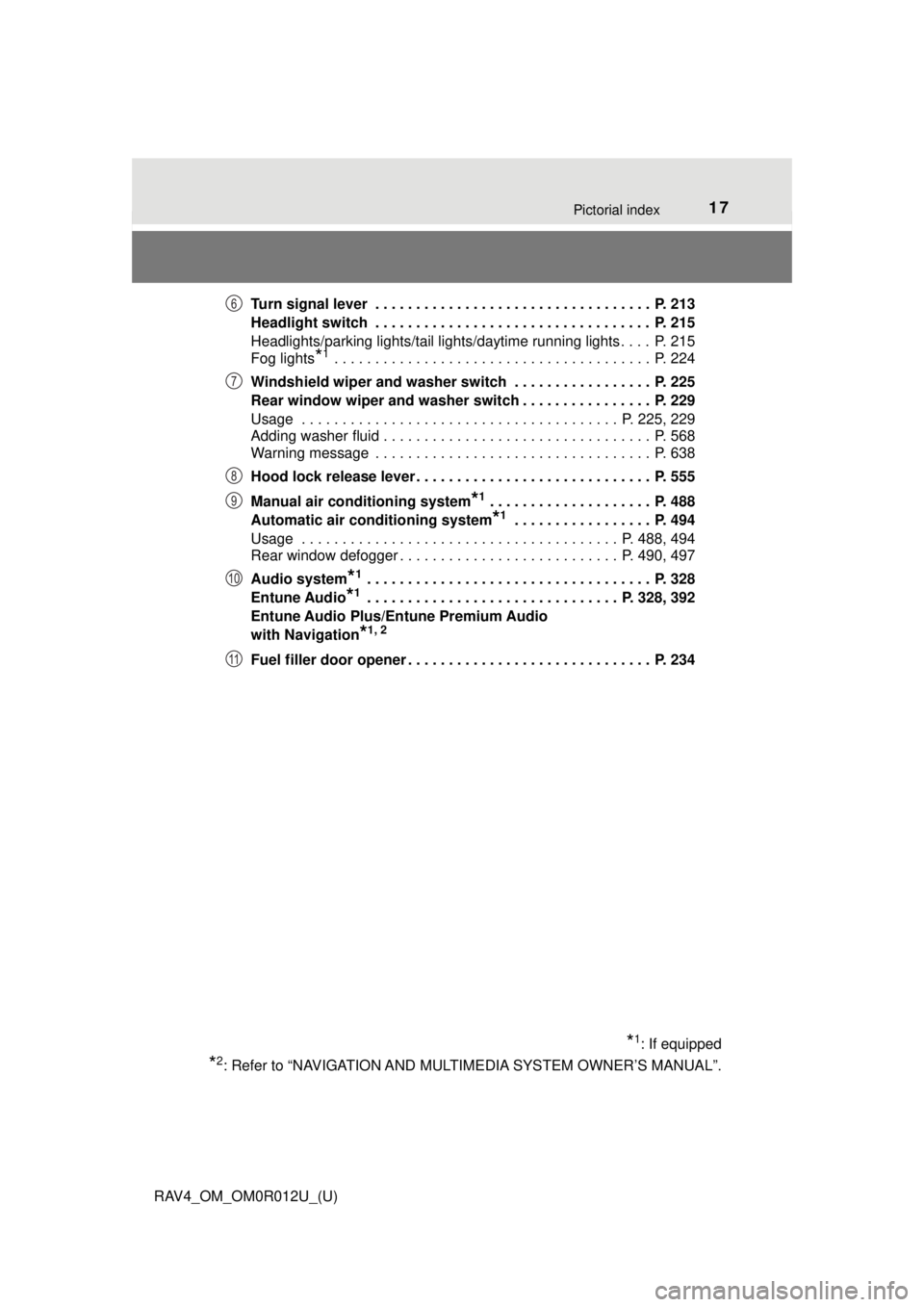
RAV4_OM_OM0R012U_(U)Turn signal lever . . . . . . . . . . . . . . . . . . . . . . . . . . . . . . . . . . P. 213
Headlight switch . . . . . . . . . . . . . . . . . . . . . . . . . . . . . . . . . . P. 215
Headlights/parking lights/tail lights/daytime running lights . . . . P. 215
Fog lights
*1 . . . . . . . . . . . . . . . . . . . . . . . . . . . . . . . . . . . . . . . P. 224
Windshield wiper and washer switch . . . . . . . . . . . . . . . . . P. 225
Rear window wiper and washer switch . . . . . . . . . . . . . . . . P. 229
Usage . . . . . . . . . . . . . . . . . . . . . . . . . . . . . . . . . . . . . . . P. 225, 229
Adding washer fluid . . . . . . . . . . . . . . . . . . . . . . . . . . . . . . . . . P. 568
Warning message . . . . . . . . . . . . . . . . . . . . . . . . . . . . . . . . . . P. 638
Hood lock release lever. . . . . . . . . . . . . . . . . . . . . . . . . . . . . P. 555
Manual air conditioning system
*1 . . . . . . . . . . . . . . . . . . . . P. 488
Automatic air conditioning system
*1 . . . . . . . . . . . . . . . . . P. 494
Usage . . . . . . . . . . . . . . . . . . . . . . . . . . . . . . . . . . . . . . . P. 488, 494
Rear window defogger . . . . . . . . . . . . . . . . . . . . . . . . . . . P. 490, 497
Audio system
*1 . . . . . . . . . . . . . . . . . . . . . . . . . . . . . . . . . . . P. 328
Entune Audio
*1 . . . . . . . . . . . . . . . . . . . . . . . . . . . . . . . P. 328, 392
Entune Audio Plus/Entune Premium Audio
with Navigation
*1, 2
Fuel filler door opener . . . . . . . . . . . . . . . . . . . . . . . . . . . . . . P. 234
*1: If equipped
*2: Refer to “NAVIGATION AND MULT IMEDIA SYSTEM OWNER’S MANUAL”.
6
7
8
9
10
11
Page 81 of 744
RAV4_OM_OM0R012U_(U)
812. Instrument cluster
2
Instrument cluster
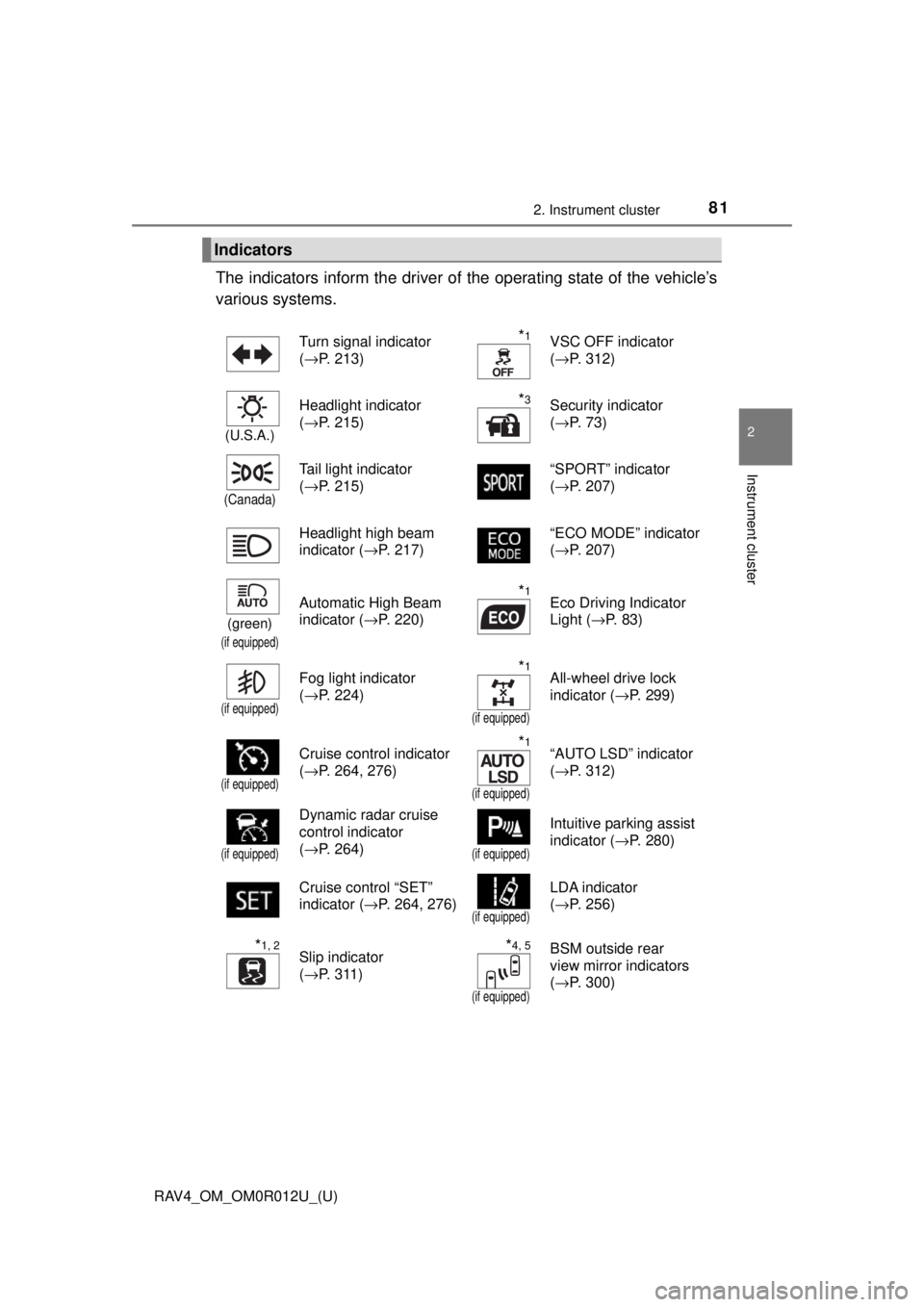
The indicators inform the driver of the operating state of the vehicle’s
various systems.
Indicators
Turn signal indicator
( →P. 213)*1VSC OFF indicator
(→P. 312)
(U.S.A.)
Headlight indicator
(→P. 215)*3Security indicator
(→P. 73)
(Canada)
Tail light indicator
(→P. 215) “SPORT” indicator
(
→P. 207)
Headlight high beam
indicator ( →P. 217) “ECO MODE” indicator
(
→P. 207)
(green)
(if equipped)
Automatic High Beam
indicator ( →P. 220)*1Eco Driving Indicator
Light (→P. 83)
(if equipped)
Fog light indicator
(→P. 224)*1
(if equipped)
All-wheel drive lock
indicator ( →P. 299)
(if equipped)
Cruise control indicator
(→P. 264, 276)*1
(if equipped)
“AUTO LSD” indicator
(→P. 312)
(if equipped)
Dynamic radar cruise
control indicator
(→P. 264)
(if equipped)
Intuitive parking assist
indicator ( →P. 280)
Cruise control “SET”
indicator ( →P. 264, 276)
(if equipped)
LDA indicator
(→P. 256)
*1, 2Slip indicator
(→P. 311)*4, 5
(if equipped)
BSM outside rear
view mirror indicators
(→P. 300)
Page 108 of 744
108
RAV4_OM_OM0R012U_(U)
3-2. Opening, closing and locking the doors
◆Key
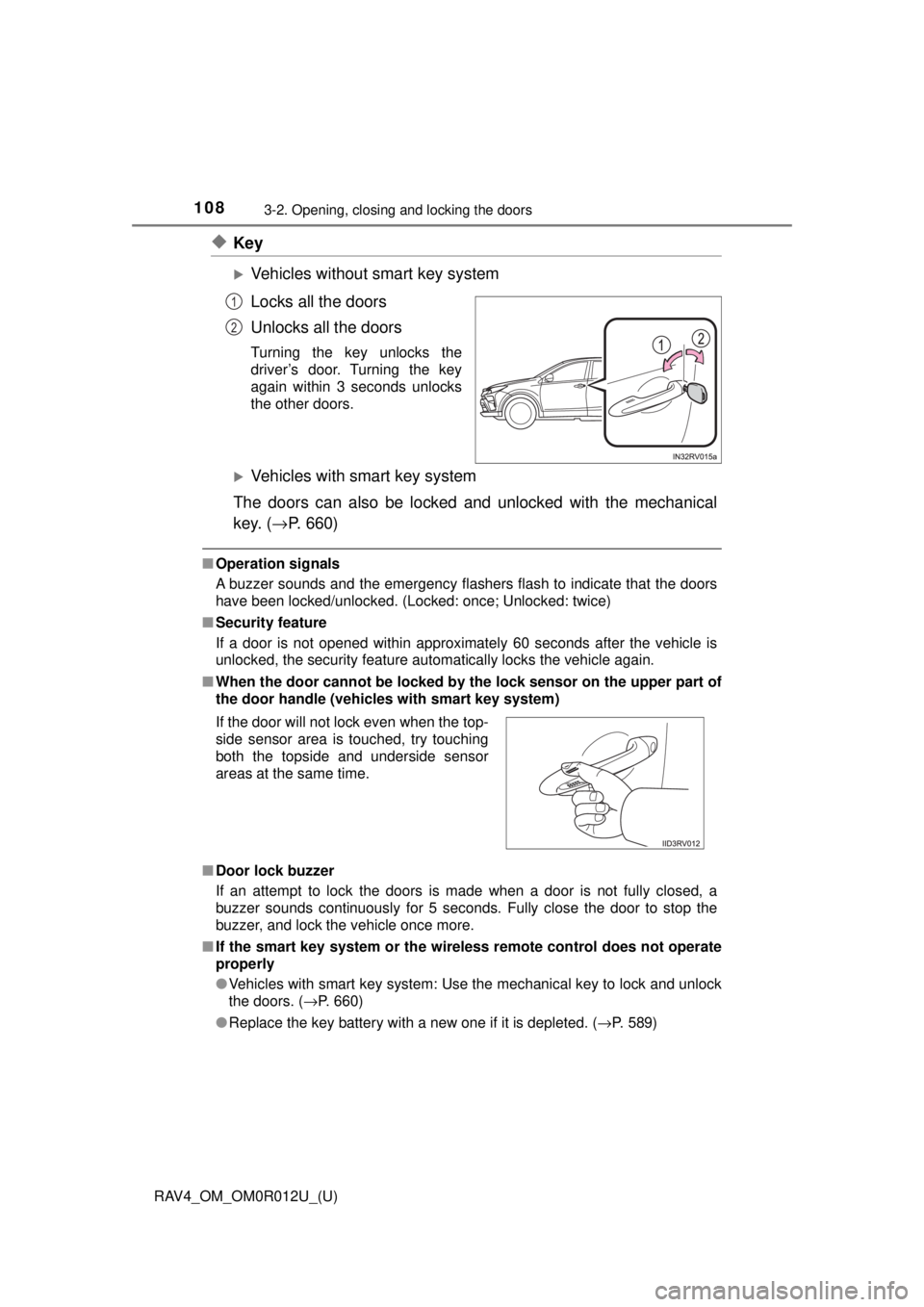
Vehicles without smart key system
Locks all the doors
Unlocks all the doors
Turning the key unlocks the
driver’s door. Turning the key
again within 3 seconds unlocks
the other doors.
Vehicles with smart key system
The doors can also be locked and unlocked with the mechanical
key. ( →P. 660)
■Operation signals
A buzzer sounds and the emergency flashers flash to indicate that the doors
have been locked/unlocked. (Locked: once; Unlocked: twice)
■ Security feature
If a door is not opened within approximately 60 seconds after the vehicle is
unlocked, the security feature automatically locks the vehicle again.
■ When the door ca nnot be locked by the lock sen sor on the upper part of
the door handle (vehicles with smart key system)
■ Door lock buzzer
If an attempt to lock the doors is made when a door is not fully closed, a
buzzer sounds continuously for 5 seconds. Fully close the door to stop the
buzzer, and lock the vehicle once more.
■ If the smart key system or the wireless remote control does not operate
properly
●Vehicles with smart key system: Use the mechanical key to lock and unlock
the doors. (→P. 660)
● Replace the key battery with a new one if it is depleted. ( →P. 589)
1
2
If the door will not lock even when the top-
side sensor area is touched, try touching
both the topside and underside sensor
areas at the same time.
Page 133 of 744
RAV4_OM_OM0R012U_(U)
1333-2. Opening, closing and locking the doors
3
Operation of each component
■Note for the entry function
●Even when the electronic key is within the effective range (detection areas),
the system may not operate properly in the following cases:
• The electronic key is too close to the window or outside door handle, near
the ground, or in a high place when the doors are locked or unlocked.
• The electronic key is near the ground or in a high place, or too close to
the rear bumper center when the back door is opened.
• The electronic key is on the instrument panel, luggage cover or floor, or in the door pockets or glove box when the engine is started or engine switch
modes are changed.
● Do not leave the electronic key on top of the instrument panel or near t\
he
door pockets when exiting the vehicle. Depending on the radio wave recep-
tion conditions, it may be detected by the antenna outside the cabin and the
door will become lockable from the out side, possibly trapping the electronic
key inside the vehicle.
● As long as the electronic key is within the effective range, the doors may be
locked or unlocked by anyone. However, only the doors detecting the elec-
tronic key can be used to unlock the vehicle.
● Even if the electronic key is not inside the vehicle, it may be possible to start
the engine if the electronic key is near the window.
● The doors may unlock or lock if a large amount of water splashes on the
door handle, such as in the rain or in a car wash when the electronic key is
within the effective range. (The doors will automatically be locked after
approximately 60 seconds if the doors are not opened and closed.)
● If the wireless remote control is used to lock the doors when the electronic
key is near the vehicle, there is a possibility that the door may not be
unlocked by the entry function. (Use the wireless remote control to unlock
the doors.)
● Touching the door lock sensor while wearing gloves may delay or prevent
lock operation. Remove the gloves and touch the lock sensor again.
● When the lock operation is performed using the lock sensor, recognition sig-
nals will be shown up to two consecutive times. After this, no recognition
signals will be given.
● If the door handle becomes wet while the electronic key is within the effec-
tive range, the door may lock and unlock repeatedly. In that case, follow the
following correction procedures to wash the vehicle:
• Place the electronic key in a location 6 ft. (2 m) or more away from the
vehicle. (Take care to ensure that the key is not stolen.)
• Set the electronic key to battery-saving mode to disable the smart key
system. ( →P. 131)
● If the electronic key is inside the vehicle and a door handle becomes wet
during a car wash, a message may be shown on the multi-information dis-
play and a buzzer will sound outside the vehicle. To turn off the alarm, lock
all the doors.
Page 165 of 744
165
RAV4_OM_OM0R012U_(U)
4Driving
4-1. Before drivingDriving the vehicle ............. 166
Cargo and luggage ........... 176
Vehicle load limits ............. 180
Trailer towing..................... 181
Dinghy towing ................... 197
4-2. Driving procedures Engine (ignition) switch (vehicles without
smart key system) ........... 198
Engine (ignition) switch (vehicles with
smart key system) ........... 200
Automatic transmission ..... 205
Turn signal lever................ 213
Parking brake .................... 214
4-3. Operating the lights and wipers
Headlight switch ................ 215
Automatic High Beam ....... 220
Fog light switch ................. 224
Windshield wipers and washer ..................... 225
Rear window wiper and washer ..................... 229 4-4. Refueling
Opening the fuel tank cap .................................. 232
4-5. Using the driving support systems
Toyota Safety Sense P ..... 235
PCS (Pre-Collision System) .... 242
LDA (Lane Departure Alert with steering
control) ............................ 256
Dynamic radar cruise control ............................. 264
Cruise control .................... 276
Intuitive parking assist....... 280
Rear view monitor system ............................ 289
All-wheel drive lock switch (AWD models) ..... 299
BSM (Blind Spot Monitor) ........ 300
• T he Blind Spot Monitor
function ......................... 304
• T he Rear Cross Traffic
Alert function ................. 307
Driving assist systems ...... 310
4-6. Driving tips Winter driving tips ............. 317
Utility vehicle precautions ..................... 321
Page 213 of 744
213
RAV4_OM_OM0R012U_(U)
4-2. Driving procedures
4
Driving
Turn signal lever
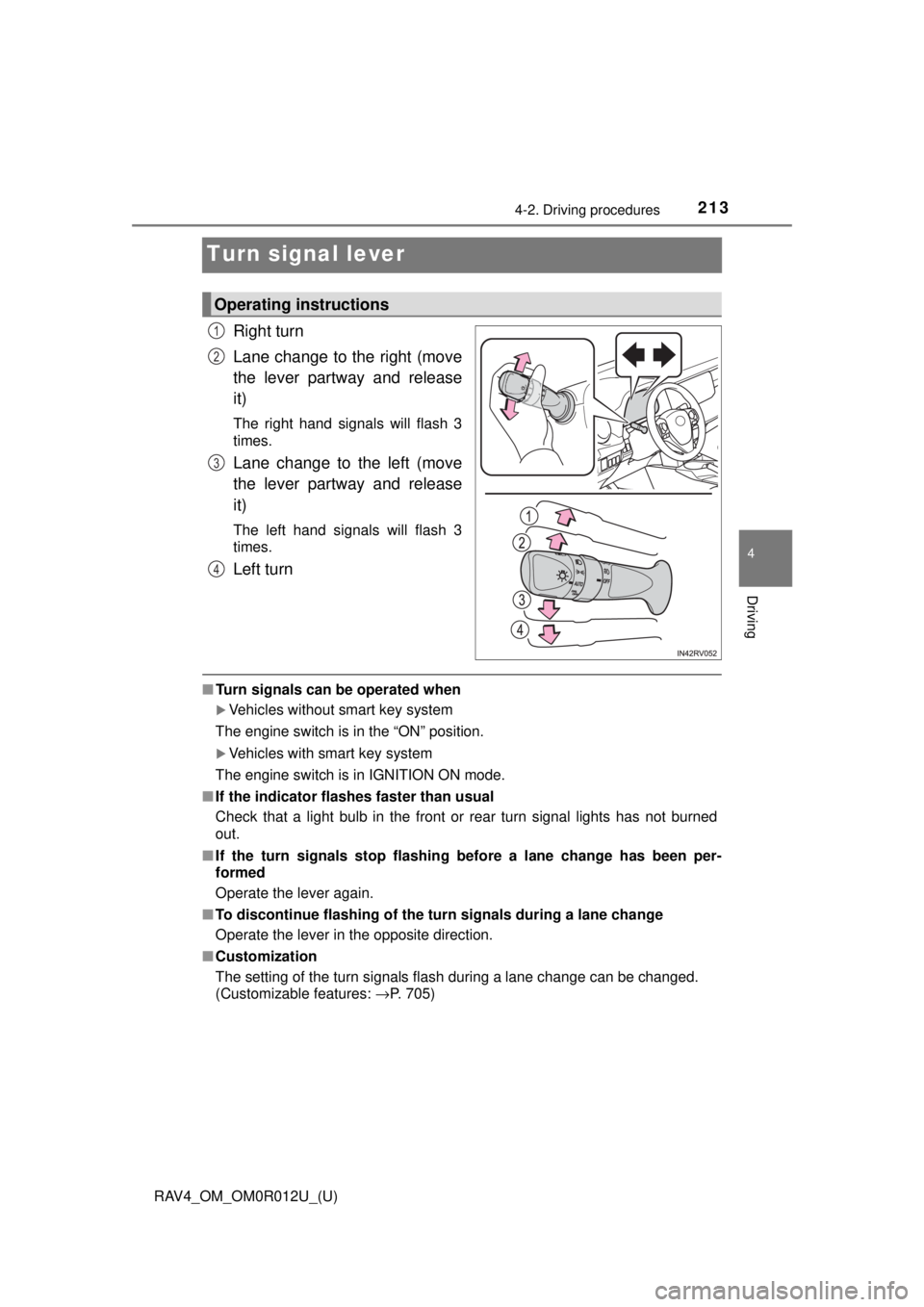
Right turn
Lane change to the right (move
the lever partway and release
it)
The right hand signals will flash 3
times.
Lane change to the left (move
the lever partway and release
it)
The left hand signals will flash 3
times.
Left turn
■Turn signals can be operated when
Vehicles without smart key system
The engine switch is in the “ON” position.
Vehicles with smart key system
The engine switch is in IGNITION ON mode.
■ If the indicator flashes faster than usual
Check that a light bulb in the front or rear turn signal lights has not burned
out.
■ If the turn signals stop flashing before a lane change has been per-
formed
Operate the lever again.
■ To discontinue flashing of the turn signals during a lane change
Operate the lever in the opposite direction.
■ Customization
The setting of the turn signals flash during a lane change can be changed.
(Customizable features: →P. 705)
Operating instructions
1
2
3
4
Page 222 of 744

222
RAV4_OM_OM0R012U_(U)
4-3. Operating the lights and wipers
■Camera sensor detection information
●The high beam may not be automatically turned off in the following situa-
tions:
• When oncoming vehicles suddenly appear from a curve
• When the vehicle is cut in front of by another vehicle
• When vehicles ahead are hidden from sight due to repeated curves, road
dividers or roadside trees
• When vehicles ahead appear from the faraway lane on wide road
• When vehicles ahead have no lights
● The high beam may be turned off if a vehicle ahead that is using fog lights
without using the headlights is detected.
● House lights, street lights, traffic signals, and illuminated billboards or signs
may cause the high beam to switch to the low beams, or the low beams to
remain on.
● The following factors may affect the amount of time taken to turn the high
beam on or off:
• The brightness of headlights, fog lights, and tail lights of vehicles ahe\
ad
• The movement and direction of vehicles ahead
• When a vehicle ahead only has operational lights on one side
• When a vehicle ahead is a two-wheeled vehicle
• The condition of the road (gradient, curve, condition of the road surface
etc.)
• The number of passengers and amount of luggage
● The high beam may be turned on or off when the driver does not expect it.
● Bicycles or similar objects may not be detected.
● In the situations shown below, the system may not be able to accurately
detect surrounding brightness levels. This may cause the low beams to
remain on or the high beams to cause problems for pedestrians, vehicles
ahead or other parties. In these cases, manually switch between the high
and low beams.
• In bad weather (rain, snow, fog, sandstorms etc.)
• The windshield is obscured by fog, mist, ice, dirt etc.
• The windshield is cracked or damaged.
• The camera sensor is deformed or dirty.
• The camera sensor temperature is extremely high.
• Surrounding brightness levels are equal to those of headlights, tail lights
or fog lights.
• Vehicles ahead have headlights that are either switched off, dirty, are changing color, or are not aimed properly.
• When driving through an area of in termittently changing brightness and
darkness.
• When frequently and repeatedly driving ascending/descending roads, or roads with rough, bumpy or uneven surfaces (such as stone-paved
roads, gravel tracks etc.).
• When frequently and repeatedly taking curves or driving on a winding road.
Page 261 of 744
RAV4_OM_OM0R012U_(U)
2614-5. Using the driving support systems
4
Driving
■Operation conditions of each function
●Lane departure alert function
This function operates when all of the following conditions are met.
• LDA is turned on.
• Vehicle speed is approximately 32 mph (50 km/h) or more.
• System recognizes white (yellow) lines.
• Width of traffic lane is approximately 9.8 ft. (3 m) or more.
• Turn signal lever is not operated.
• Vehicle is driven on a straight road or around a gentle curve with a radius
of more than approximately 492 ft. (150 m).
• No system malfunctions are detected. ( →P. 630)
● Steering control function
This function operates when all of the following conditions are met in addi-
tion to the operation conditions for the lane departure alert function.
• Setting for “Steering Assist” in on the multi-information display is
set to “On”. ( →P. 699)
• Vehicle is not accelerated or decelerated by a fixed amount or more.
• Steering wheel is not operated with a steering force level suitable for changing lanes.
• ABS, VSC, TRAC and PCS are not operating.
• TRAC or VSC is not turned off.
● Vehicle sway warning
This function operates when all of the following conditions are met.
• Setting for “Sway Warning” in on the multi-information display is set
to “On”. ( →P. 699)
• Vehicle speed is approximately 32 mph (50 km/h) or more.
• Width of traffic lane is approximately 9.8 ft. (3 m) or more.
• No system malfunctions are detected. ( →P. 630)
■ Temporary cancellation of functions
When operation conditions are no longer met, a function may be temporarily\
canceled. However, when the operation conditions are met again, operation
of the function is automatically restored. (→P. 261)
■ Steering control function
Depending on the vehicle speed, lane departure situation, road conditions,
etc., the driver may not feel the function is operating or the function may not
operate at all.
■ Lane departure alert function
The warning buzzer may be difficult to hear due to external noise, audio play-
back, etc.