brake TOYOTA RAV4 2021 Accessories, Audio & Navigation (in English)
[x] Cancel search | Manufacturer: TOYOTA, Model Year: 2021, Model line: RAV4, Model: TOYOTA RAV4 2021Pages: 240, PDF Size: 9.35 MB
Page 26 of 240
262-1. Basic information before operation
2-1.Basic information before operation
After a few seconds, the caution
screen will be displayed.
After about 5 seconds or select-
ing “Continue”, the caution
screen automatically switches to
the next screen.
*: Premium Audio only
This system reminds users
when to replace certain parts or
components and shows dealer
information (if registered) on the
screen.
When the vehicle reaches a pre-
viously set driving distance or
date specified for a scheduled
maintenance check, the mainte-
nance remainder screen will be
displayed when the system is
turned on.
To prevent this screen from
being displayed again, select
“Do Not Tell Me Again”.
To register maintenance infor-
mation: P.66
If is selected, the regis-
tered phone number can be
called.
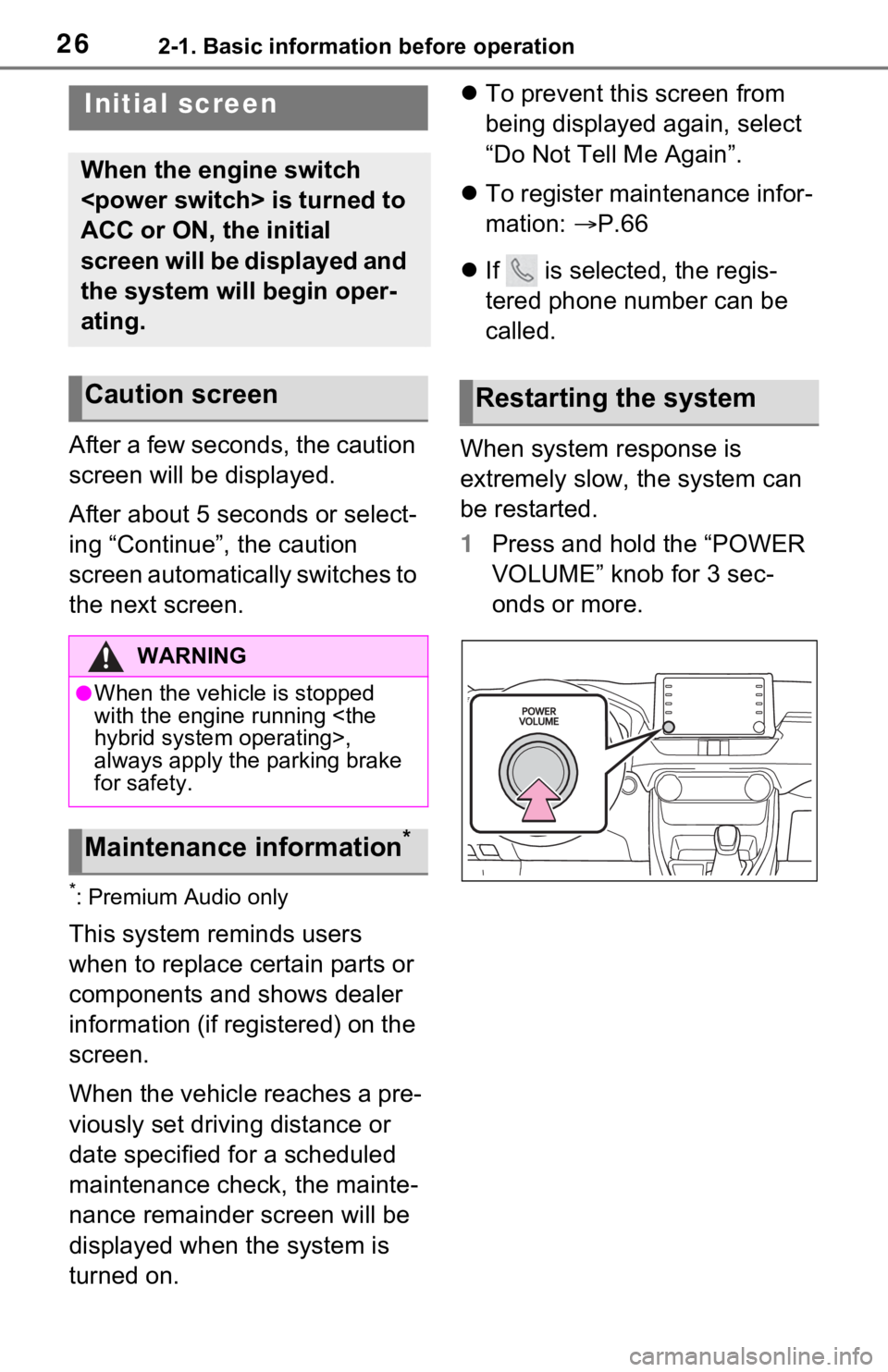
When system response is
extremely slow, the system can
be restarted.
1 Press and hold the “POWER
VOLUME” knob for 3 sec-
onds or more.
Initial screen
When the engine switch
ACC or ON, the initial
screen will be displayed and
the system will begin oper-
ating.
Caution screen
WARNING
●When the vehicle is stopped
with the engine running
always apply the parking brake
for safety.
Maintenance information*
Restarting the system
Page 108 of 240

1083-4. Setup
For additional information on
the accuracy of a current
position: P.114
When driving, the current posi-
tion mark will be automatically
corrected by GPS signals. If
GPS reception is poor due to
location, the current position
mark can be adjusted manually.
1 Select “Position/Direction”.
2 Scroll the map to the desired
point ( P.75) and select
“OK”.
3 Select an arrow to adjust the
direction of the current posi-
tion mark and select “OK”.
The tire change calibration func-
tion will be used when replacing
the tires. This function will adjust
miscalculation caused by the
circumference difference
between the old and new tires.
1 Select “Select after a Tire
Change”.
The message appears and
the quick distance calibration
starts automatically.
●If this procedure is not performed
when the tires are replaced, the
current position mark may be
incorrectly displayed.
*1: Vehicles with hybrid system
*2: This function does not operate
outside the cont iguous United
States (Exampl e: Alaska and
Hawaii).
*3: Refer to the “OWNER’S MAN- UAL”
This system operates based on
the driving situation and traffic
information to enhance fuel
economy.
The predictive efficient drive
function can be turned on/off.
( P.106)
The system automatically stores
and registers support points
where the driver always deceler-
ates or stops based on pedal
operation and the vehicle speed
of the driver.
The registered points are shown
on the map as icons for use
as predictive deceleration sup-
port points.
When the position of the vehicle
approaches the registered point,
the icon changes to an empha-
sized icon.
Depending on the system or
driving situation, the engine
brake amount increases after
Position/Direction calibra-
tion
Tire change calibration
Predictive efficient drive*1,
2, 3
Predictive deceleration sup-
port