brake sensor TOYOTA RAV4 2022 User Guide
[x] Cancel search | Manufacturer: TOYOTA, Model Year: 2022, Model line: RAV4, Model: TOYOTA RAV4 2022Pages: 748, PDF Size: 22.93 MB
Page 282 of 748

2824-5. Using the driving support systems
ing for approximately 2 seconds for
it to automatically be canceled.
Then, the vehicle can be operated
by depressing the accelerator pedal.
■Re-enabling the Parking Sup-
port Brake
To re-enable the Parking Support
Brake when it is disabled due to
operation of the Parking Support
Brake, either enable the system
again ( P.279), or turn the engine
switch to OFF and then back to ON.
Additionally, if the object becomes
no longer in the traveling direction of
the vehicle or if the traveling direc-
tion of the vehicle changes (such as
changing from moving forward to
backing up, or from backing up to
moving forward) , the system will be
re-enabled automatically.
■If “PKSB Unavailable” is dis-
played on the multi-information
display and the PKSB OFF indi-
cator is flashing
If this message is displayed, a sen-
sor on the front or rear bumper may
be dirty. Clean the sensors and their
surrounding area on the bumpers.
■If “PKSB Unavailable” and
“Parking Assist Unavailable
Clean Parking Assist Sensor”
are displayed on the multi-infor-
mation display and the PKSB
OFF indicator is flashing
●A sensor may be covered with ice,
snow, dirt, etc. In this case,
remove the ice, s now, dirt, etc.,
from the sensor to return the sys-
tem to normal. If this message is
shown even after removing dirt
from the sensor, or shown when
the sensor was not dirty to begin
with, have the vehicle inspected at
your Toyota dealer.
●A sensor may be frozen. Once the
ice melts, the sys tem will return to
normal.
●Water may be continuously flow-
ing over the sensor surface, such
as in a heavy rain. When the sys- tem determines that it is normal,
the system will retu
rn to normal.
■If a battery terminal has been
disconnected and reconnected
The system needs to be initialized.
To initialize the system, drive the
vehicle straight ahead for 5 seconds
or more at a speed of approximately
22 mph (35 km/h) or more.
Page 283 of 748
2834-5. Using the driving support systems
4
Driving
*: If equipped
This function will operate in situations such as the following if an
object is detected in the traveling direction of the vehicle.
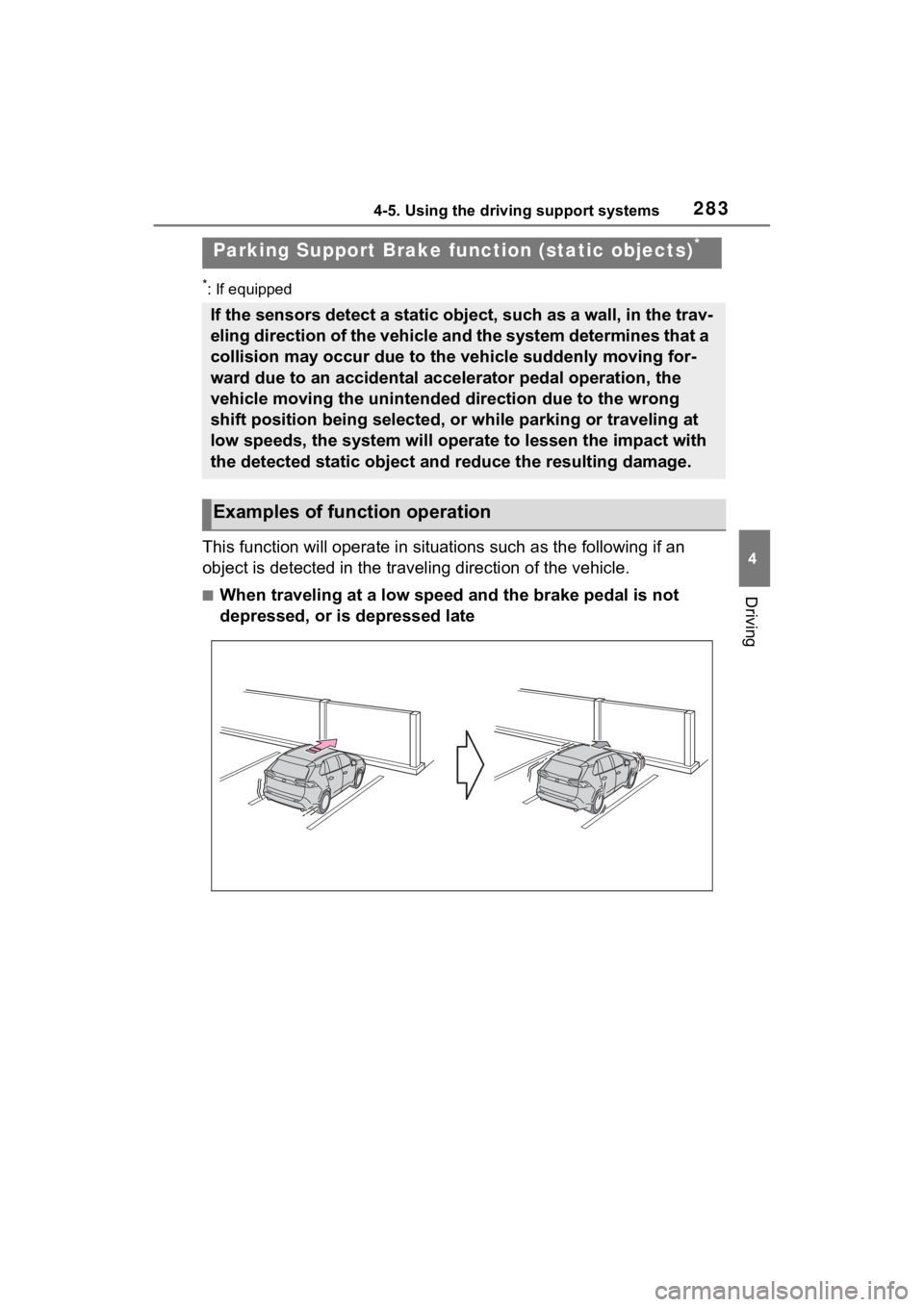
■When traveling at a low speed and the brake pedal is not
depressed, or is depressed late
Parking Support Brake fu nction (static objects)*
If the sensors detect a static object, such as a wall, in the t rav-
eling direction of the vehicle and the system determines that a
collision may occur due to the vehicle suddenly moving for-
ward due to an accidental accelerator pedal operation, the
vehicle moving the unintended direction due to the wrong
shift position being selected, or while parking or traveling at
low speeds, the system will operate to lessen the impact with
the detected static object and reduce the resulting damage.
Examples of function operation
Page 284 of 748
2844-5. Using the driving support systems
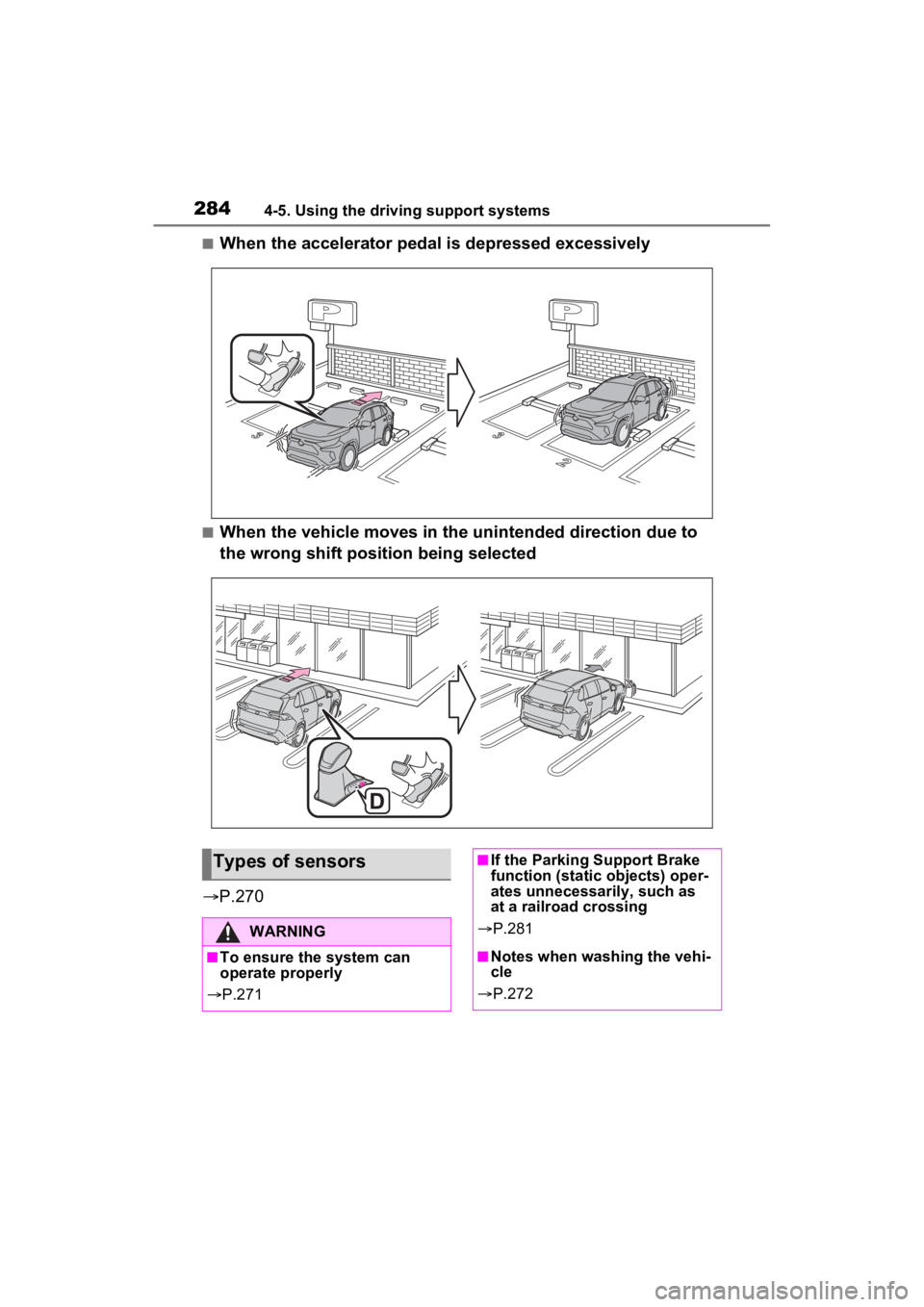
■When the accelerator pedal is depressed excessively
■When the vehicle moves in the unintended direction due to
the wrong shift position being selected
P.270
Types of sensors
WARNING
■To ensure the system can
operate properly
P.271
■If the Parking Support Brake
function (static objects) oper-
ates unnecessarily, such as
at a railroad crossing
P.281
■Notes when washing the vehi-
cle
P.272
Page 286 of 748
2864-5. Using the driving support systems
*: If equipped
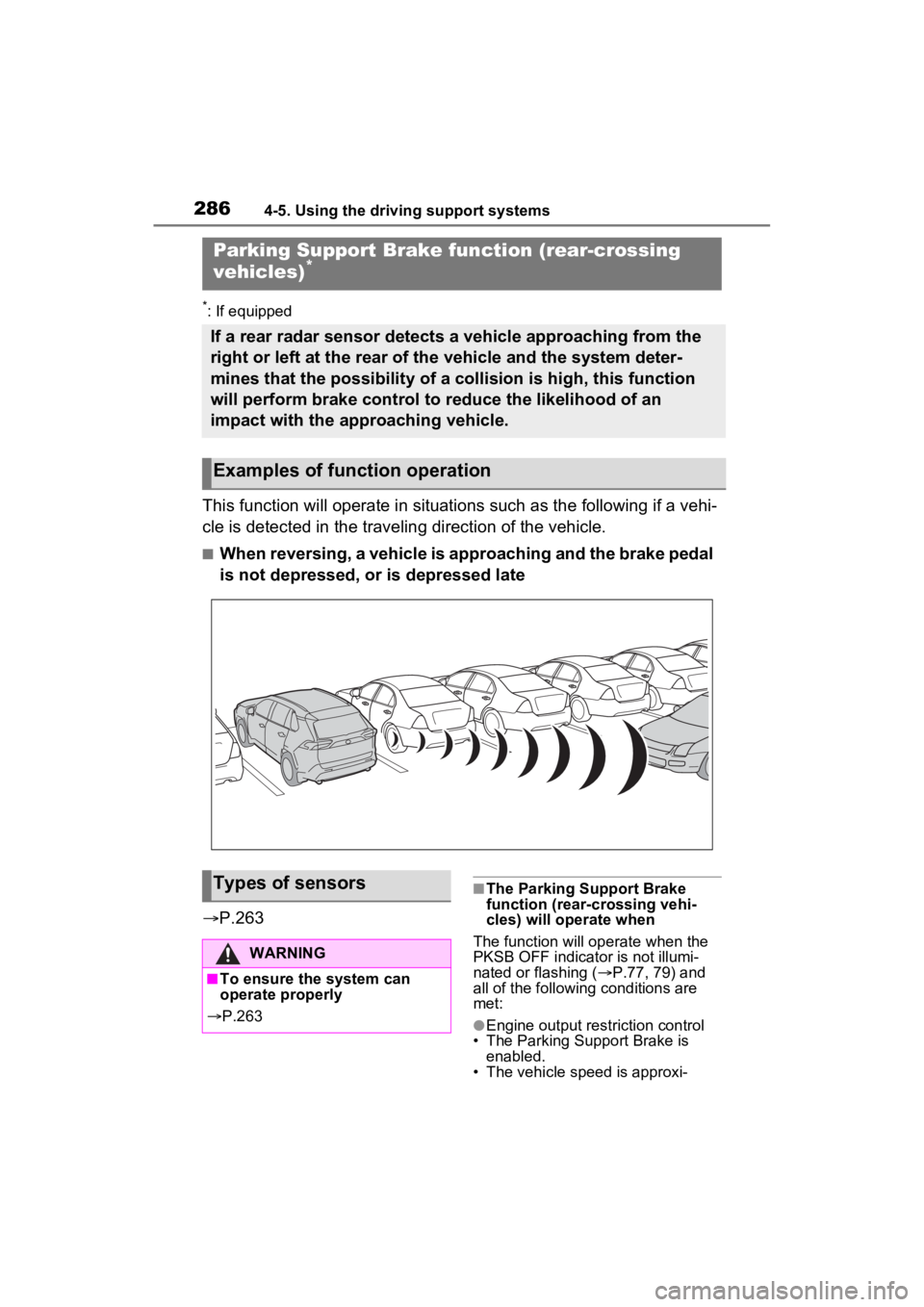
This function will operate in situations such as the following if a vehi-
cle is detected in the traveling direction of the vehicle.
■When reversing, a vehicle is approaching and the brake pedal
is not depressed, or is depressed late
P.263
■The Parking Support Brake
function (rear-crossing vehi-
cles) will operate when
The function will op erate when the
PKSB OFF indicator is not illumi-
nated or flashing ( P.77, 79) and
all of the followin g conditions are
met:
●Engine output restriction control
• The Parking Support Brake is
enabled.
• The vehicle speed is approxi-
Parking Support Brake function (rear-crossing
vehicles)*
If a rear radar sensor detects a vehicle approaching from the
right or left at the rear of the vehicle and the system deter-
mines that the possibility of a collision is high, this function
will perform brake control to reduce the likelihood of an
impact with the approaching vehicle.
Examples of function operation
Types of sensors
WARNING
■To ensure the system can
operate properly
P.263
Page 316 of 748
3164-5. Using the driving support systems
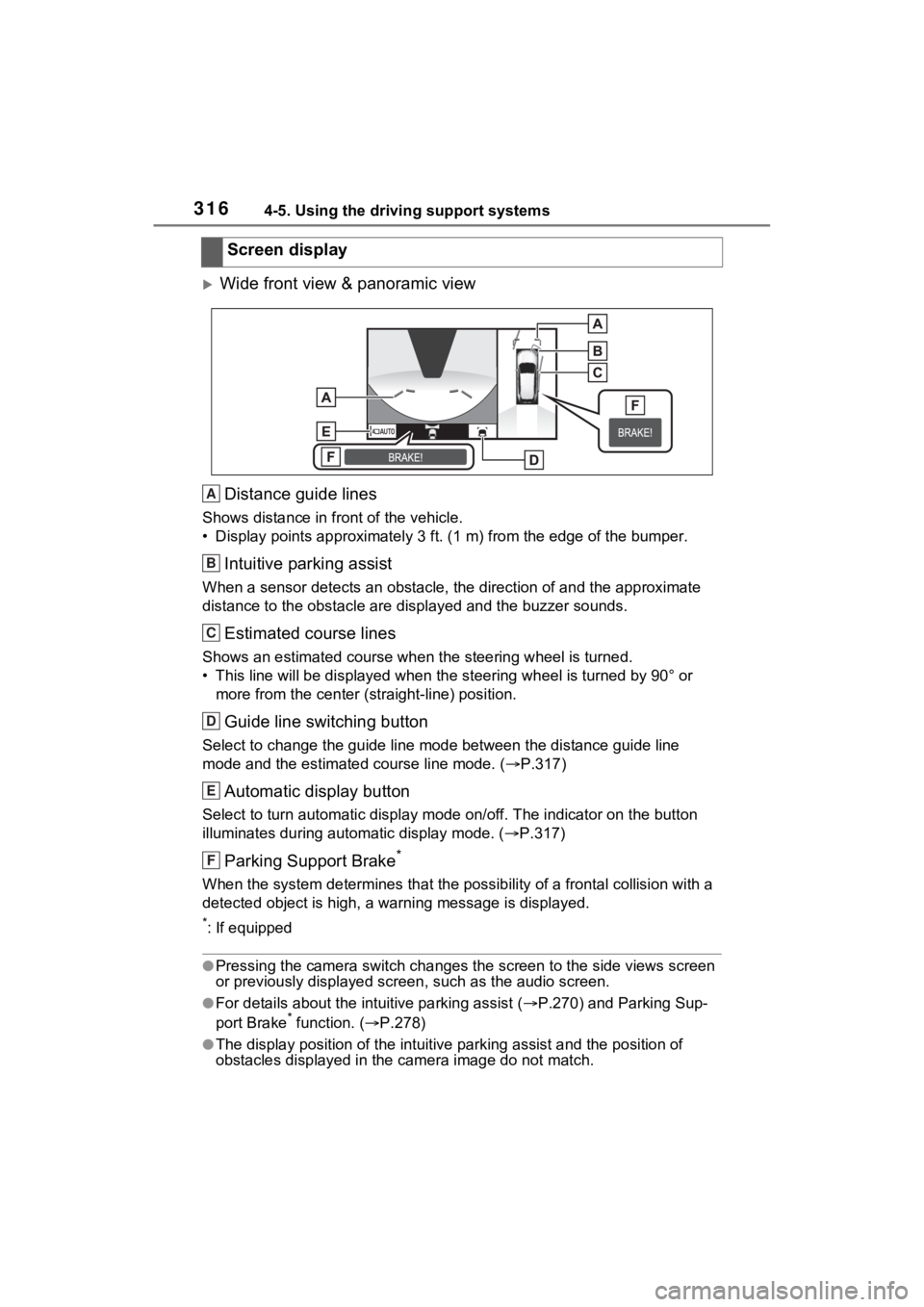
Wide front view & panoramic viewDistance guide lines
Shows distance in front of the vehicle.
• Display points approximately 3 ft. (1 m) from the edge of the bumper.
Intuitive parking assist
When a sensor detects an obstacle, the direction of and the app roximate
distance to the obsta cle are displayed and the buzzer sounds.
Estimated course lines
Shows an estimated course when the steering wheel is turned.
• This line will be displayed when the steering wh eel is turned by 90° or
more from the cen ter (straight-line) position.
Guide line switching button
Select to change the guide line mode between the distance guide line
mode and the estimated course line mode. ( P.317)
Automatic display button
Select to turn automatic display mode on/off. The indicator on the button
illuminates during autom atic display mode. (P.317)
Parking Support Brake*
When the system determines that the possib ility of a frontal collision with a
detected object is high, a warning message is displayed.
*: If equipped
●Pressing the camera switch chan ges the screen to the side views screen
or previously displayed scre en, such as the audio screen.
●For details about the intuitive parking assist (P.270) and Parking Sup-
port Brake* function. ( P.278)
●The display position of the intuitive parking assist and the po sition of
obstacles displayed in the camera image do not match.
Screen display
A
B
C
D
E
F
Page 321 of 748
3214-5. Using the driving support systems
4
Driving
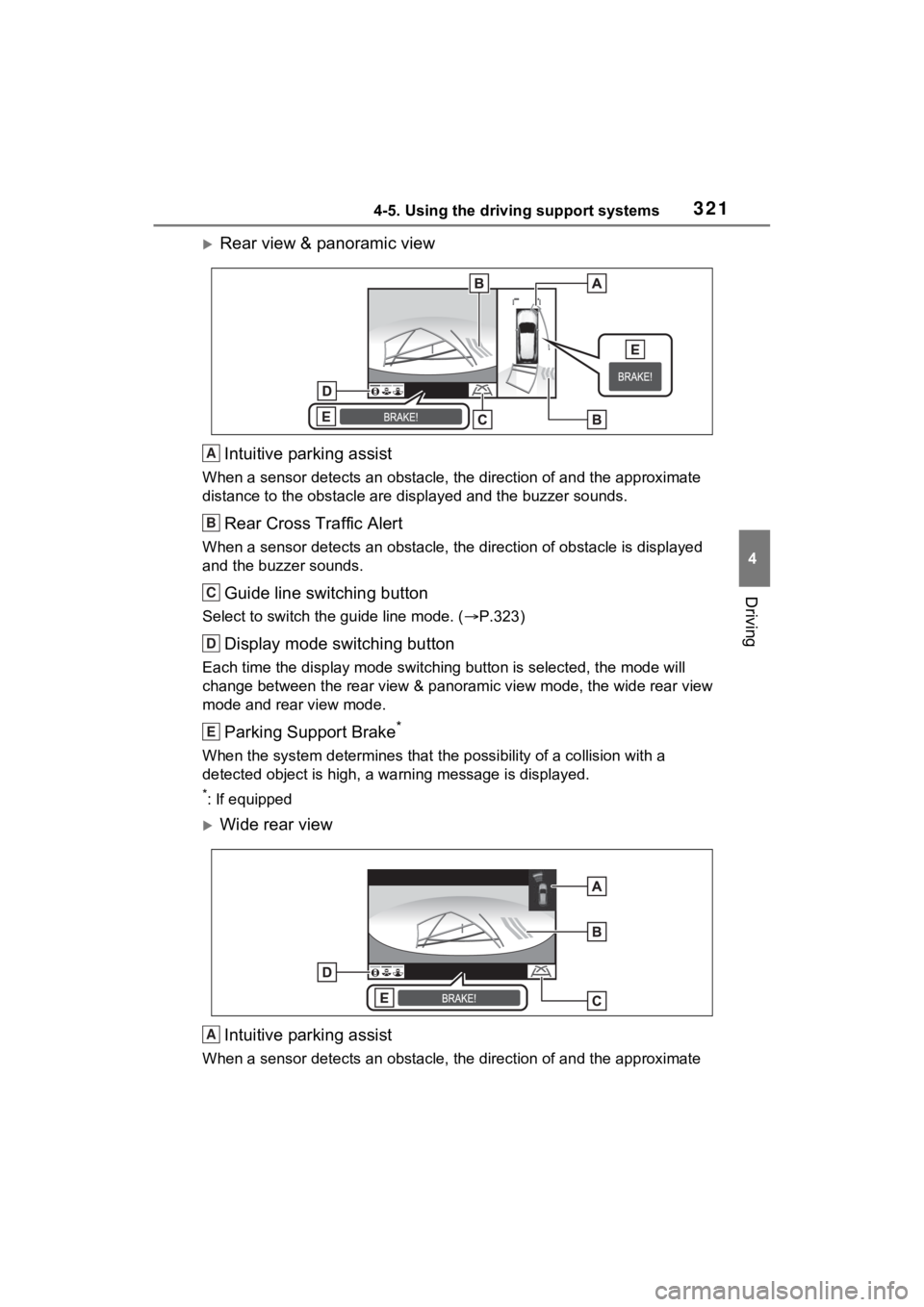
Rear view & panoramic viewIntuitive parking assist
When a sensor detects an obstacle, the direction of and the app roximate
distance to the obsta cle are displayed and the buzzer sounds.
Rear Cross Traffic Alert
When a sensor detects an obstacle, the direction of obstacle is displayed
and the buzzer sounds.
Guide line switching button
Select to switch the guide line mode. ( P.323)
Display mode switching button
Each time the display mode swit ching button is selected, the mode will
change between the rear view & panoramic view mode, the wide rear view
mode and rear view mode.
Parking Support Brake*
When the system determines that the possibility of a collision with a
detected object is high, a warning message is displayed.
*: If equipped
Wide rear view
Intuitive parking assist
When a sensor detects an obstacle, the direction of and the app roximate
A
B
C
D
E
A
Page 322 of 748
3224-5. Using the driving support systems
distance to the obstacle are displayed and the buzzer sounds.
Rear Cross Traffic Alert
When a sensor detects an obstacle, the direction of obstacle is displayed
and the buzzer sounds.
Guide line switching button
Select to switch the guide line mode. ( P.323)
Display mode switching button
Each time the display mode swit ching button is selected, the mode will
change between the rear view & panoramic view mode, the wide rear view
mode and rear view mode.
Parking Support Brake*
When the system determines that the possibility of a collision with a
detected object is high, a warning message is displayed.
*: If equipped
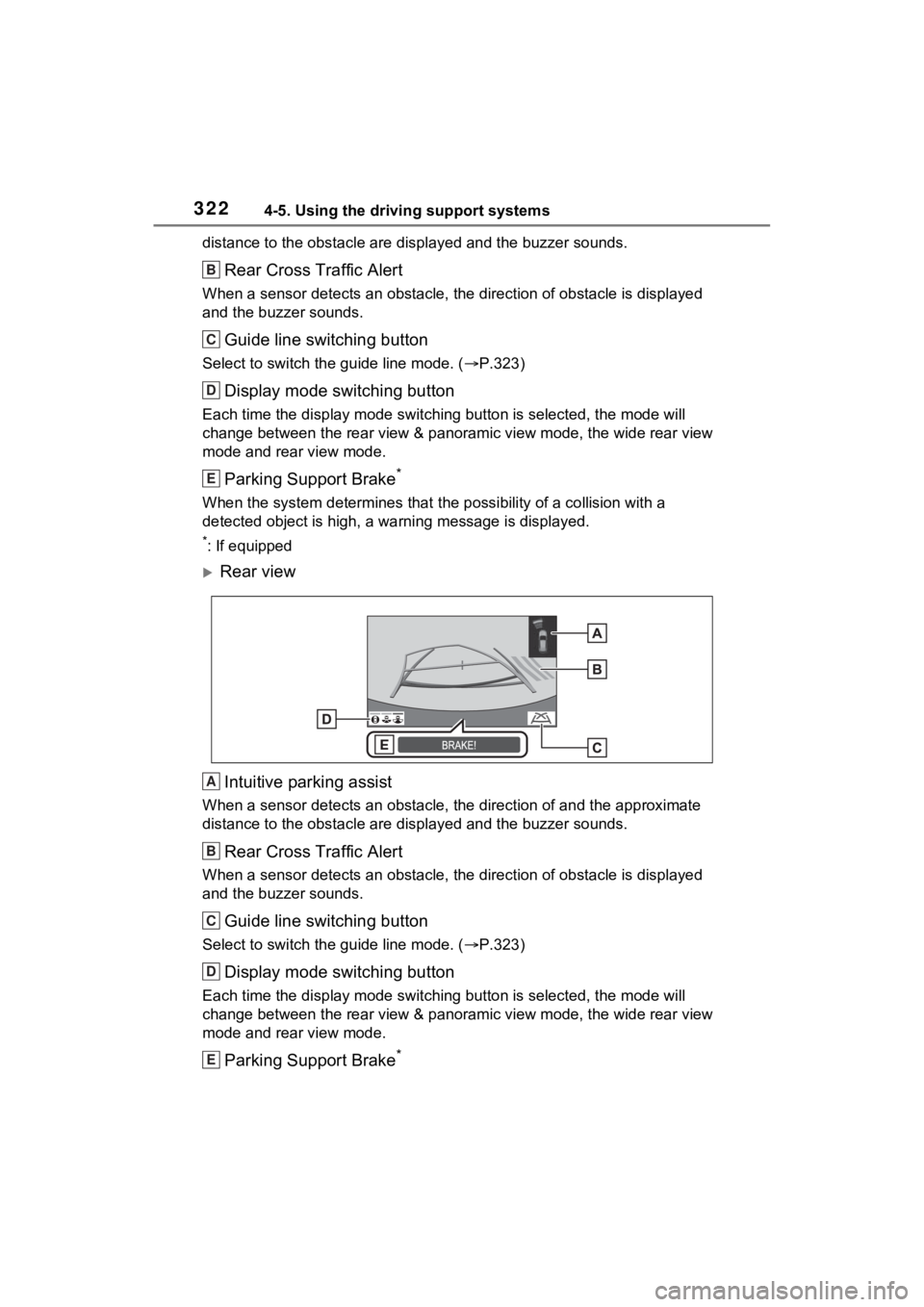
Rear view
Intuitive parking assist
When a sensor detects an obstacle, the direction of and the app roximate
distance to the obsta cle are displayed and the buzzer sounds.
Rear Cross Traffic Alert
When a sensor detects an obstacle, the direction of obstacle is displayed
and the buzzer sounds.
Guide line switching button
Select to switch the guide line mode. ( P.323)
Display mode switching button
Each time the display mode swit ching button is selected, the mode will
change between the rear view & panoramic view mode, the wide rear view
mode and rear view mode.
Parking Support Brake*
B
C
D
E
A
B
C
D
E
Page 323 of 748
3234-5. Using the driving support systems
4
Driving
When the system determines that the possibility of a collision with a
detected object is high, a warning message is displayed.
*: If equipped
●The monitor is canceled when the shift lever is shifted into any position
other than the “R” position.
●For details about the intuitive parking assist ( P.270), Rear Cross Traffic
Alert function ( P.266) and Parking Support Brake* function. ( P.278)
●The display position of the intuitive parking assist and the po sition of
obstacles displayed in the camera image do not match.
*: If equipped
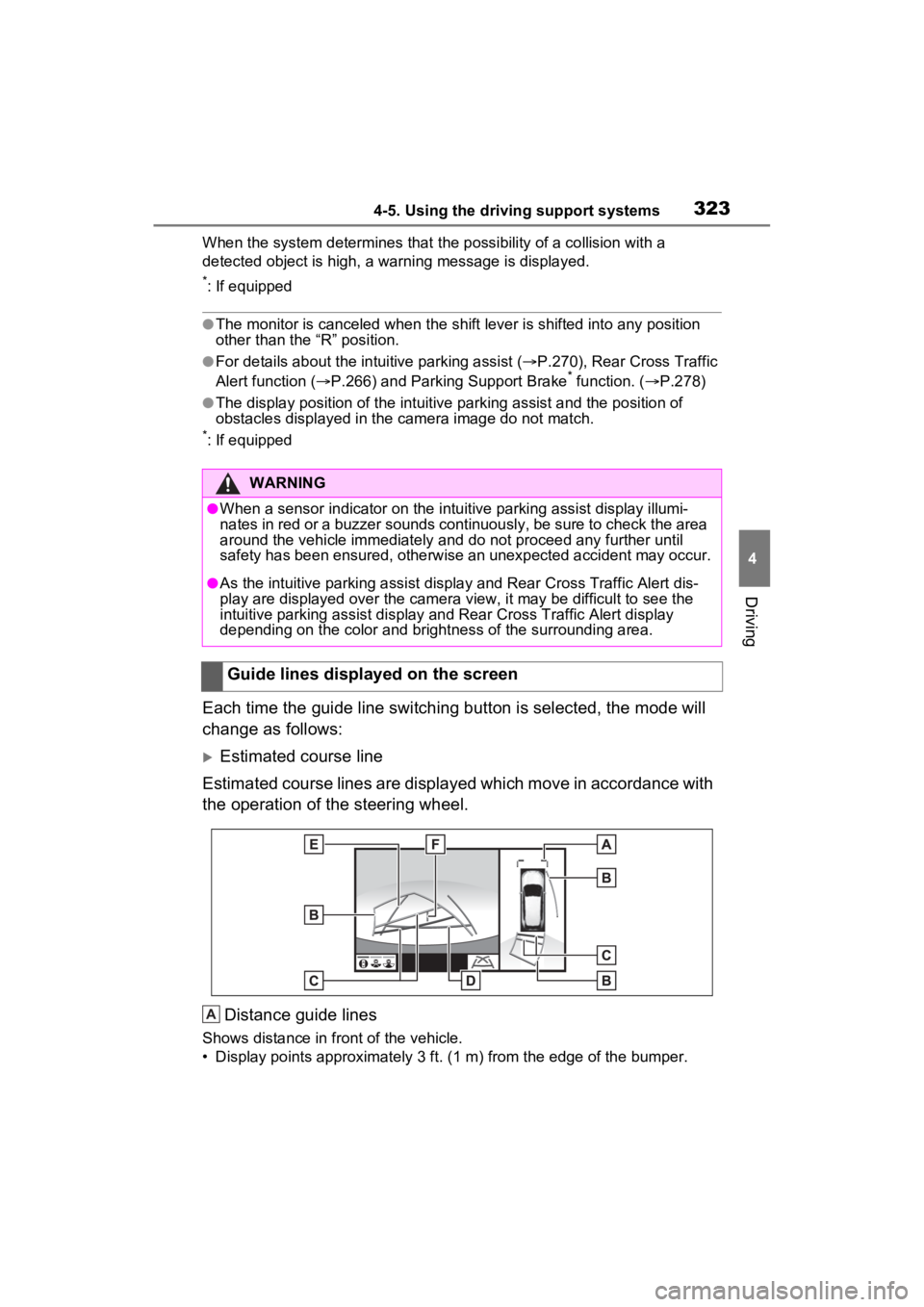
Each time the guide line switching button is selected, the mode will
change as follows:
Estimated course line
Estimated course lines are displ ayed which move in accordance w ith
the operation of the steering wheel.
Distance guide lines
Shows distance in fr ont of the vehicle.
• Display points approximately 3 ft. (1 m) from the edge of the bumper.
WARNING
●When a sensor indicator on the intuitive parking assist display illumi-
nates in red or a buzzer sounds continuously, be sure to check the area
around the vehicle immediately a nd do not proceed any further until
safety has been ensured, otherwise an unexpected accident may o ccur.
●As the intuitive parking assist display and Rear Cross Traffic Alert dis-
play are displayed over the camera view, it may be difficult to see the
intuitive parking assist display and Rear Cross Traffic Alert d isplay
depending on the color and brigh tness of the surrounding area.
Guide lines displayed on the screen
A
Page 356 of 748

3564-5. Using the driving support systems
■Enhanced VSC (Enhanced
Vehicle Stability Control)
Provides cooperative control of
the ABS, TRAC, VSC and EPS.
Helps to maintai n directional
stability when swerving on slip-
pery road surfaces by con-
trolling steering performance.
■Trailer Sway Control
Helps the driver to control trailer
sway by selectively applying
brake pressure for individual
wheels and reducing driving
torque when trailer sway is
detected.
■TRAC (Traction Control)
Helps to maintain drive power
and prevent the drive wheels
from spinning when starting the
vehicle or accelerating on slip-
pery roads
■Active Cornering Assist
(ACA)
Helps to prevent the vehicle
from drifting to the outer side by
performing inner wheel brake
control when attempting to
accelerate while turning
■Hill-start assist control
Helps to reduce the backward
movement of the vehicle when
starting on an uphill
■EPS (Electric Power Steer-
ing)
Employs an electric motor to
reduce the amount of effort needed to turn the steering
wheel.
■Dynamic Torque Control
AWD system (AWD models)
(if equipped)
Automatically controls the drive
system such as to front-wheel
drive or AWD (all wheel drive)
according to various running
conditions including normal driv-
ing, during cornering, on a
uphill, when starting off, during
acceleration, on a slippery roads
due to snow or rain, thus con-
tributing to stable operability and
driving stability.
■Dynamic Torque Vectoring
AWD system (AWD models)
(if equipped)
Automatically controls the drive
system such as to front-wheel
drive or AWD (all wheel drive)
according to various running
conditions including normal driv-
ing, during cornering, on a
uphill, when starting off, during
acceleration, on a slippery roads
due to snow or rain, thus con-
tributing to stable operability and
driving stability.
Also, drive torque distribution is
precisely controlled during cor-
nering, contributing to improve-
ments in operability and
stability.
■The Secondary Collision
Brake
When the SRS airbag sensor
Page 359 of 748
3594-5. Using the driving support systems
4
Driving
result. Should this occur, refrain
from excessive steering input or
stop the vehicle and turn the engine
off. The EPS system should return
to normal within 10 minutes.
■Secondary Collision Brake
operating conditions
The system operates when the SRS
airbag sensor detects a collision
while the vehicle is in motion. How-
ever, the system does not operate
when the components are dam-
aged.
■Secondary Collision Brake
automatic cancellation
The system is automatically can-
celed in any of th e following situa-
tions.
●The vehicle speed is below 6 mph
(10 km/h)
●A certain amount of time elapses
during operation
●The accelerator pedal is
depressed a large amount
■If a message about AWD is
shown on the multi-information
display (AWD models)
Perform the following actions.
●“AWD System Overheated
Switching to 2WD Mode”
AWD system is overheated. Stop
the vehicle in a safe place with the
engine running.
*
If the message disappears after a
while, there is n o problem. If the
message remains, have the vehicle
inspected by your Toyota dealer
immediately.
●“AWD System Overheated 2WD
Mode Engaged”
AWD system has been temporarily
released and switched to front-
wheel drive due to overheating.
Stop the vehicle in a safe place with the engine running.
*
If the message disappears after a
while, AWD system will automati-
cally recover. If the message
remains, have the vehicle inspected
by your Toyota dea
ler immediately.
●“AWD System Malfunction 2WD
Mode Engaged Visit Your Dealer”
A malfunction oc curs in the AWD
system. Have the vehicle inspected
by your Toyota dea ler immediately.
*: When stopping the vehicle, do not
stop the engine until the display
message has turned off.
WARNING
■The ABS does not operate
effectively when
●The limits of tire gripping perfor-
mance have been exceeded
(such as excessively worn tires
on a snow-covered road).
●The vehicle hydroplanes while
driving at high speed on wet or
slick roads.
■Stopping distance when the
ABS is operating may exceed
that of normal conditions
The ABS is not designed to
shorten the vehicle’s stopping dis-
tance. Always maintain a safe dis-
tance from the veh icle in front of
you, especially in the following sit-
uations:
●When driving on dirt, gravel or
snow-covered roads
●When driving with tire chains
●When driving over bumps in the
road
●When driving over roads with
potholes or uneven surfaces